
Picture this: you build an order-status widget for Slackbot, and everyone loves it. A few weeks later, the sales team wants the same thing inside ChatGPT. Then operations asks for it in Claude. Before long, you are maintaining three versions of the same widget, each with its own code, its own bugs, and features that slowly drift apart. This is the problem the Salesforce Headless Experience Layer is created to solve.
As AI agents become a normal way to work with business data, users no longer open Salesforce first. They ask an agent in Slack, in Claude, in ChatGPT, or in Agentforce. But when the agent answers with plain text, people lose the rich, clickable experience they are used to inside Salesforce.
The Salesforce Headless Experience approach fixes that. You describe an interface once, and it renders natively wherever your user happens to be. In this guide, you will learn what Headless Experience Layer (HXL) is, how the Salesforce HXL architecture works, how to build your first widget, and when it is (and is not) the right tool.
What Is the Salesforce Headless Experience Layer?
If you have been wondering what is Salesforce HXL, here is the short answer: it is a unified experience engine that separates your business logic, data, and permissions from the way information looks on screen.
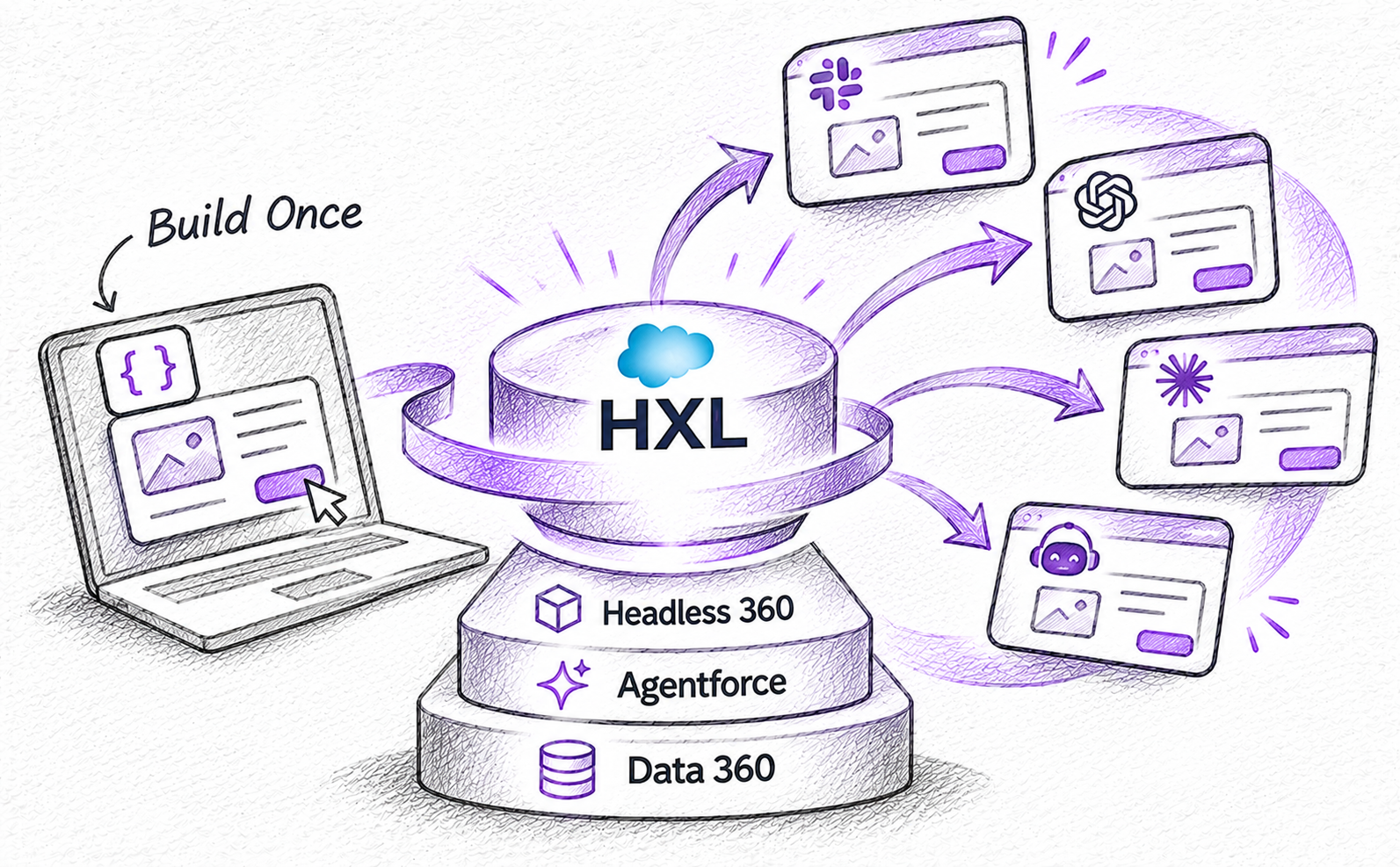
Think of it as a translator. You define your UI structure once, in declarative JSON. Salesforce HXL then translates it into the native format of each supported channel. The principle behind it is simple: write once, render anywhere.
A few important points to keep in mind:
An HXL widget is not a Lightning Web Component (LWC), and it is not a React app. It is a declarative tree of components that each surface draws in its own native style.
Today, most agent actions return a plain sentence. With HXL, the same action can return a branded, interactive card.
The layer is technology-agnostic, so the same widget behaves consistently in Agentforce, Slack, Claude, and ChatGPT.
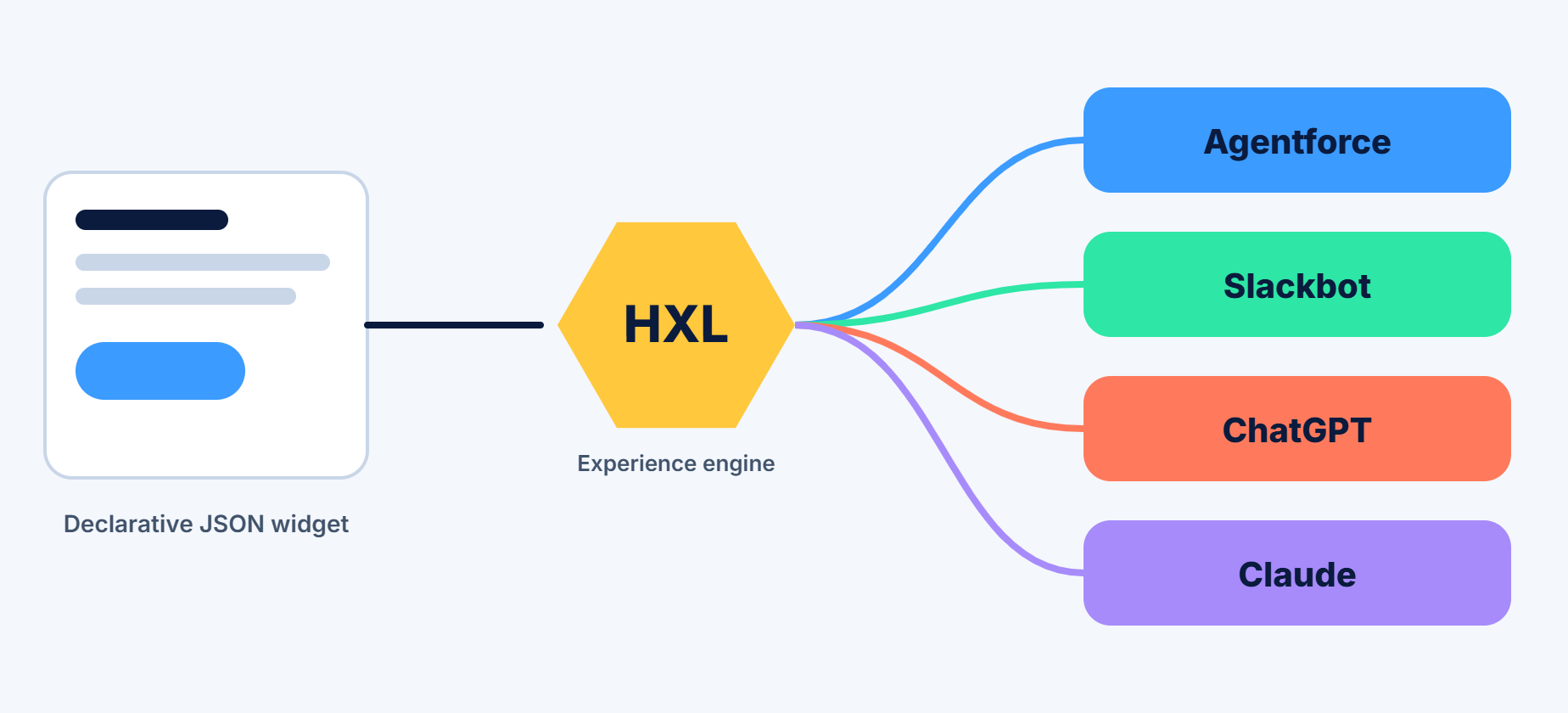
Where HXL fits in Headless 360
Salesforce announced Headless 360 at TrailblazerDX in April 2026. The idea is that everything on the platform becomes available as an API, an MCP tool, or a CLI command, so that people and AI agents no longer need to click through the traditional Salesforce UI.
Headless 360 answers the question, "How can agents reach Salesforce data and actions?" HXL answers the next one: "How do we show this result in a rich way on every surface?" In Salesforce's own words, the Salesforce Headless Experience Layer is the part of the toolkit that brings interactive experiences to any agent. It was first introduced under the name Agentforce Experience Layer, and the community now commonly calls it HXL.
A simple way to picture the stack, from bottom to top:
Your data and clouds (Customer 360, Data 360)
Agentforce, where agents reason and act
The Headless 360 platform, which exposes everything through APIs, MCP, and CLI
The Headless Experience Layer, which decides how results look
The channels where users actually work, such as Slack, Claude, and ChatGPT
Why the Salesforce Headless Experience Layer Matters
Before the Headless Experience Layer, delivering one experience to several channels meant building it several times. You might create Block Kit for Slack, an LWC for Lightning, and a Markdown card for a chat tool, all for the same next action. HXL removes that repetition. Here are the main benefits:
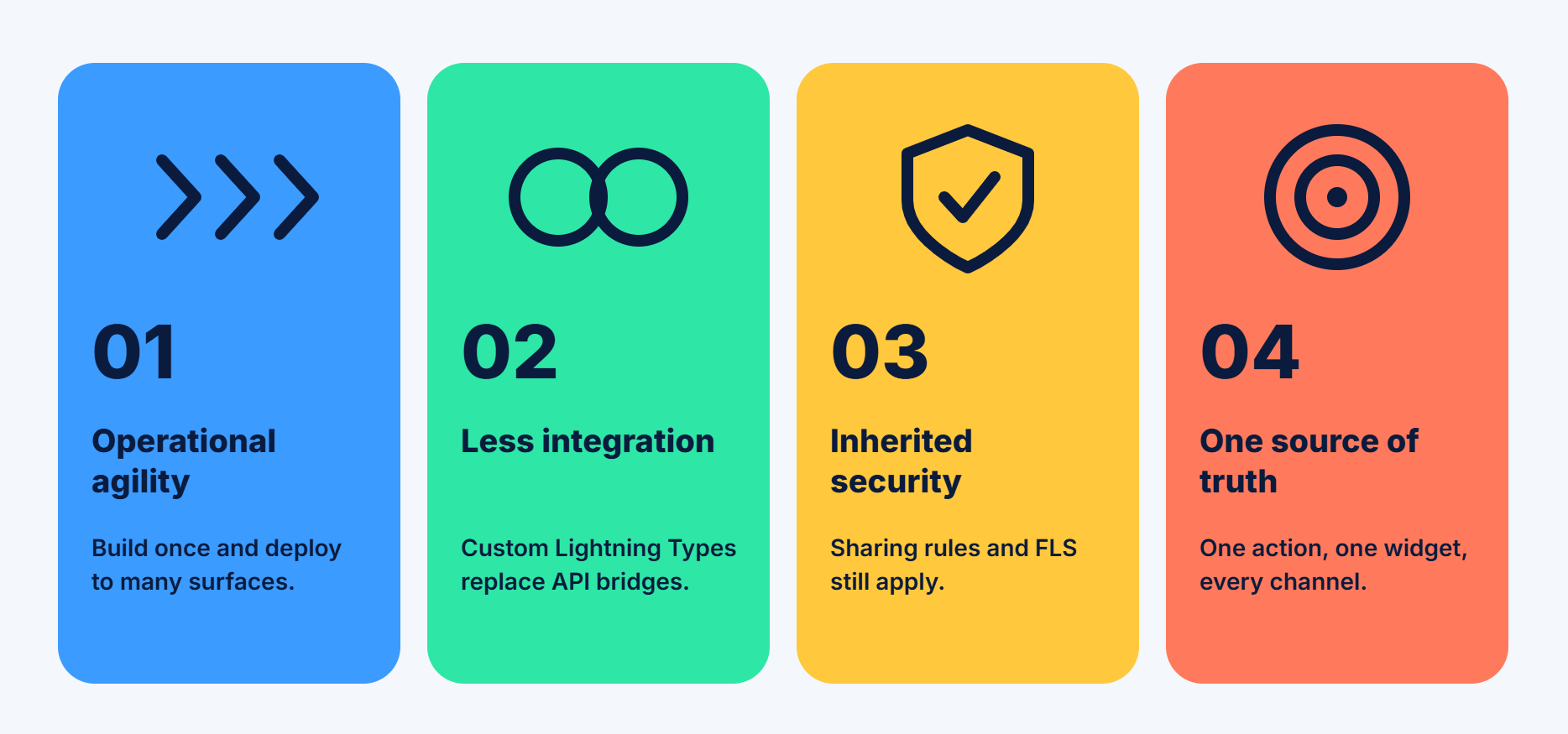
Operational agility. Build the logic once and deploy it to any supported surface using the same widgets.
Less integration work. Custom Lightning Types describe your data shape, so you do not need custom API bridges between your org and each UI surface.
Security you already trust. A widget only shows what your action returns. If your Apex action respects sharing rules and field-level security, every surface shows each user only what they are allowed to see.
One source of truth. The same Apex action and the same widget definition serve every channel, so there is no second copy to keep in sync.
Consistent experience. Users get the same look and behaviour whether they are in Agentforce or in an external AI app.
For Salesforce developers, this means less front-end duplication. For admins, it means deciding once which fields, warnings, and buttons matter, instead of building a new layout for every channel.
Where Can Salesforce HXL Widgets Run?
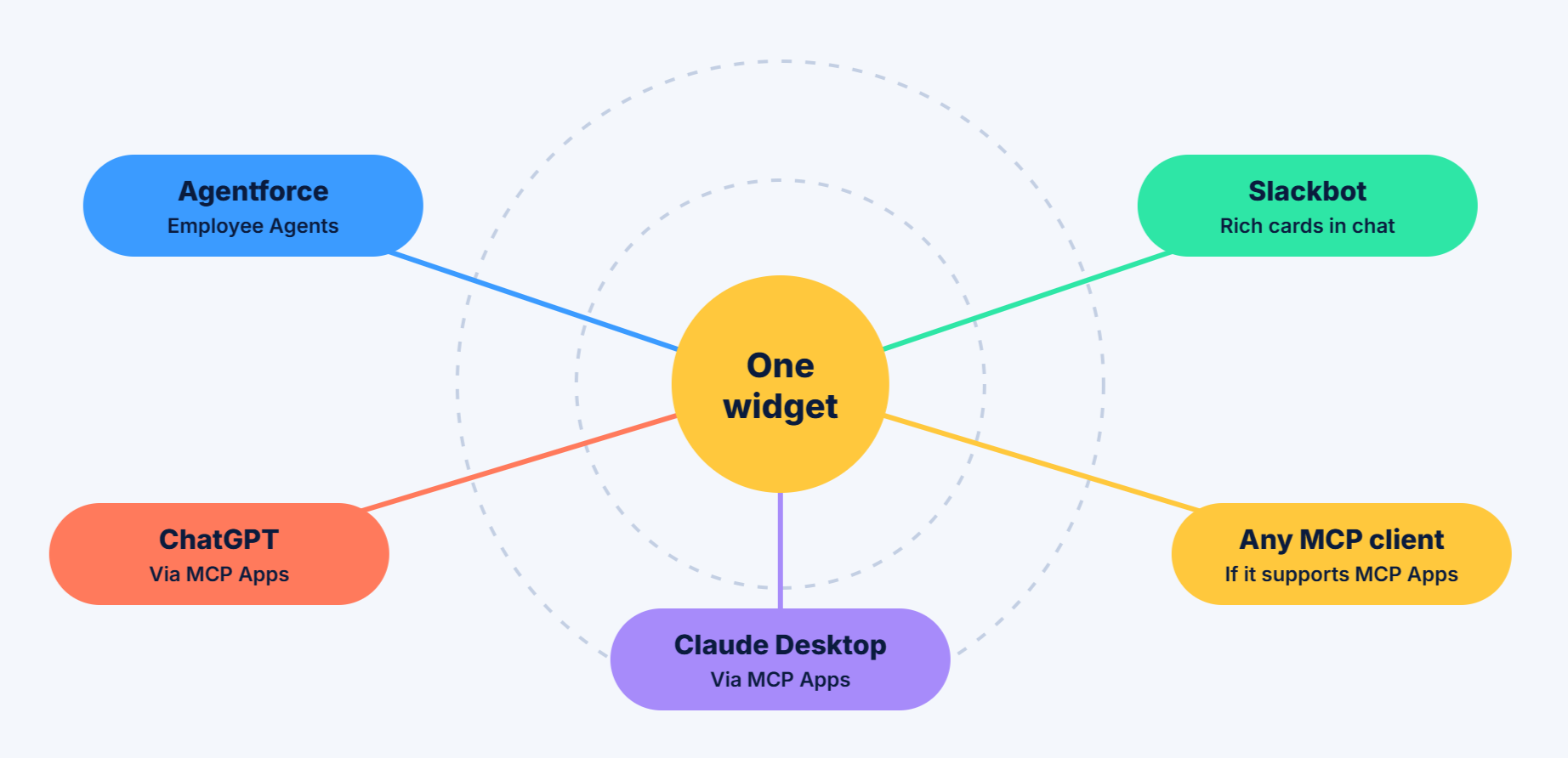
According to Salesforce Trailhead, HXL currently supports these surfaces:
Agentforce Employee Agents in Lightning Experience
Slackbot
ChatGPT
Claude Desktop
Beyond that, Salesforce HXL widgets follow the MCP Apps standard. That means any Model Context Protocol (MCP) client that supports MCP Apps can render them. Salesforce has also hinted at more channels, including Microsoft Teams and Gemini, so this list is likely to grow. Always check the official documentation for the latest supported surfaces.
Salesforce HXL Architecture: The Core Concepts
The Salesforce HXL architecture is easier to understand than it first looks. It rests on three building blocks.
1. Components
Components are the basic UI pieces, such as text, columns, cards, badges, callouts, and buttons. Each component is surface-aware, which means it knows how to draw itself correctly on every supported channel.
2. Widgets
A widget is a finished experience made by combining components for one purpose, for example, a customer reviews card or a case "next action" card. The widget defines the final structure and behavior users see.
3. Custom Lightning Types (CLTs)
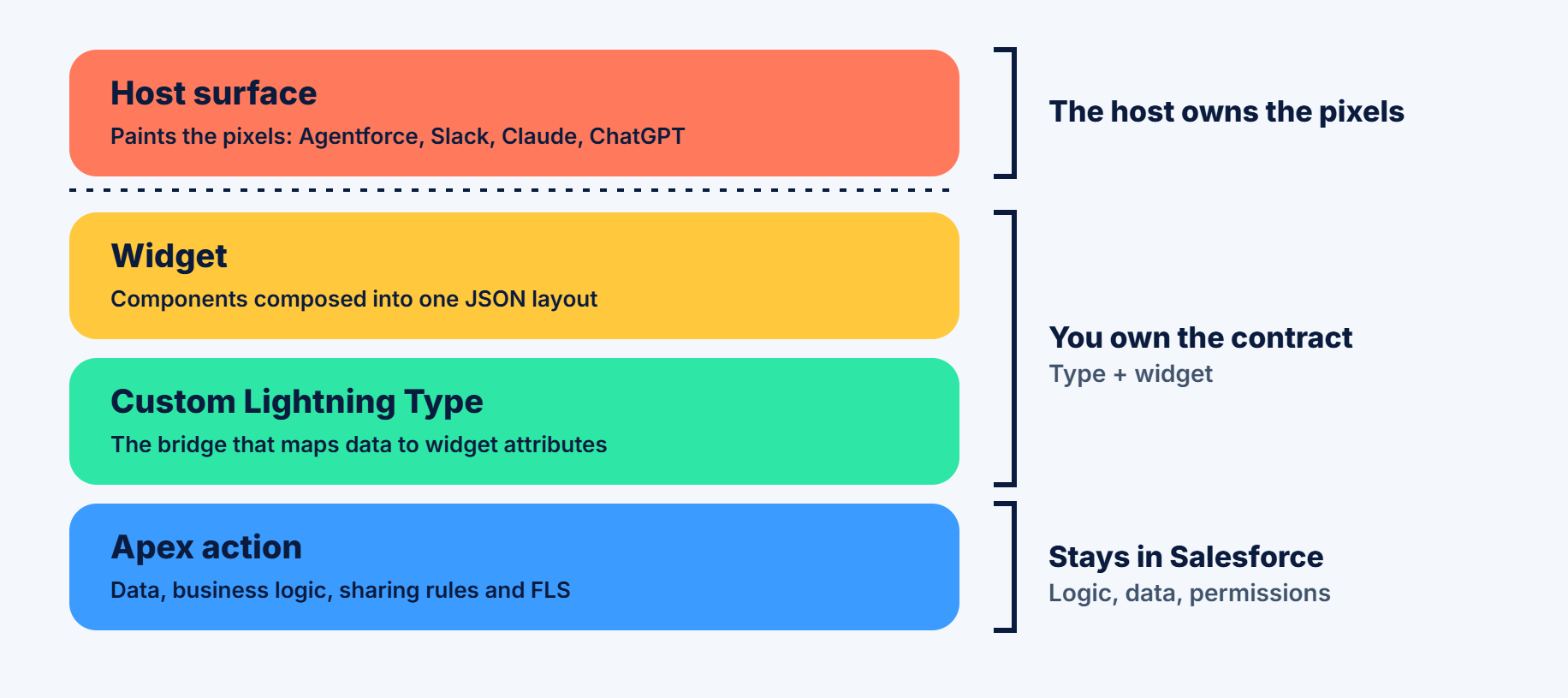
A Custom Lightning Type is the bridge between data and UI. It describes the shape of your data, and its renderer tells the platform which widget should draw that data and how each field maps to a widget attribute.
Keeping logic and presentation apart
The key idea in this Salesforce Headless Architecture is separation of concerns. Your business logic, sharing rules, and audit stay in Salesforce. The widget only describes the layout. Each host (Slack, Claude, ChatGPT, or Agentforce) owns the final pixels. In practice, you own the contract, and the host owns the look.
A widget does not fetch data by itself. Data arrives through the CLT, and the output of your data source, for example, an Apex invocable action, must match the CLT structure so that its fields can bind to the widget attributes. This is what the flow usually looks like:
A user asks an agent a question.
The agent calls an action (for example, an Apex invocable method).
The action returns structured data.
HXL uses the CLT to find the right widget and bind the data to it.
The surface renders the widget natively.
How Headless Experience Layer Works Across Agentforce and MCP
You write the Apex action once and the widget once. Only the configuration changes per channel.
| Agentforce | MCP clients (Claude, ChatGPT) | |
|---|---|---|
| CLTs you add | One, typed to your Apex class | Two nested types: an inner one that mirrors your Apex output and an outer one that mirrors the MCP envelope |
| Which CLT has the renderer | The single CLT | Only the outer CLT |
| Binding path example | {!$attrs.averageRating} | {!$attrs.outputValues.reviews.averageRating} |
| How the surface finds the widget | Agent Script output with a complex data type name and the displayable flag turned on | An MCP server definition with a UI resource that the tool points to |
The good news is that the widget itself and its attribute names stay the same. Only the paths in the renderer change.
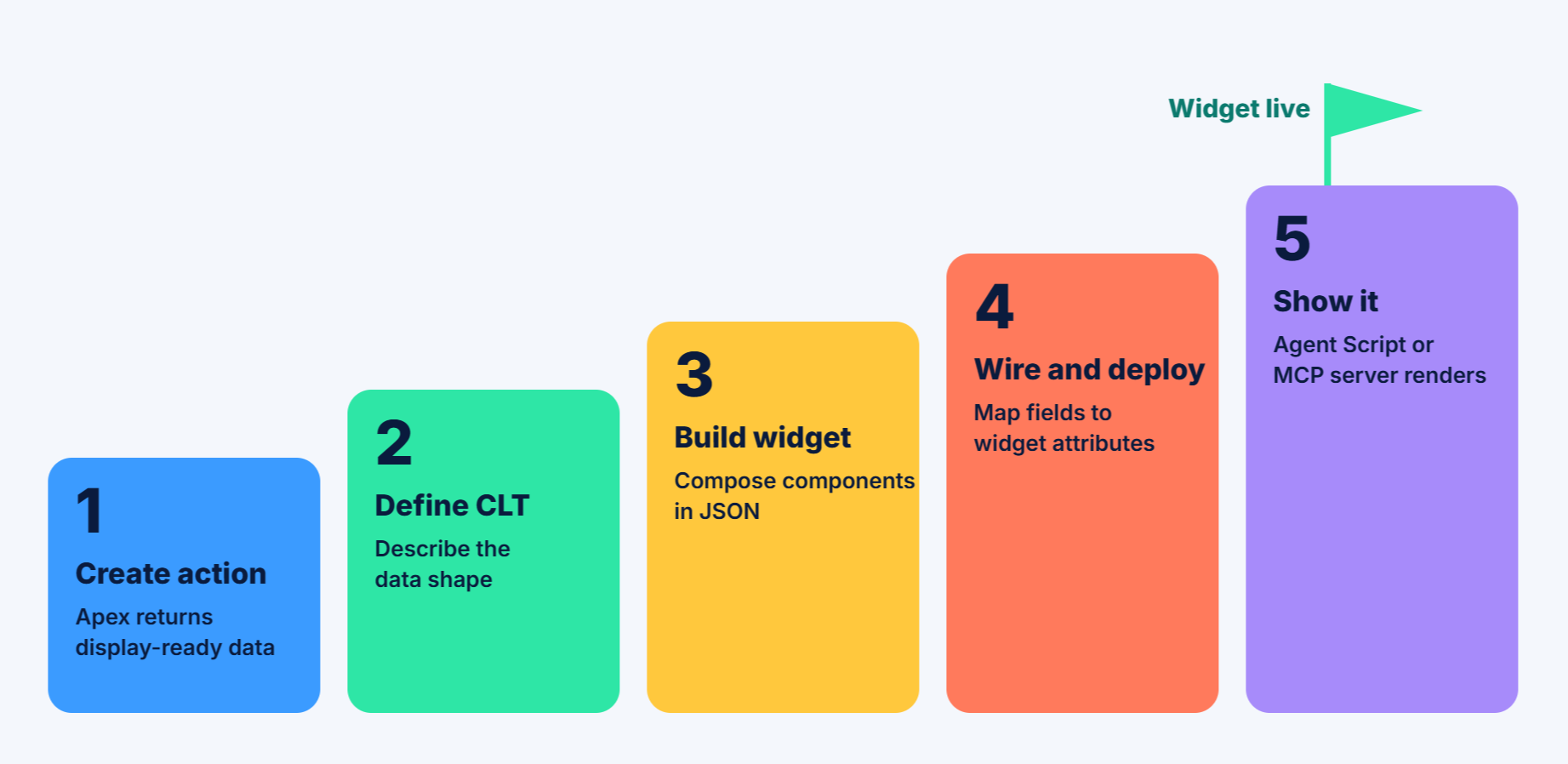
The HXL Implementation Workflow, Step by Step

Here is the high-level path to your first widget.
Step 1: Create the data source. Build an Apex invocable action that retrieves data from your org. This is where your business logic lives. Because the widget cannot do math, let the action return display-ready values, such as an average rating that is already calculated.
Step 2: Define the data model. Create a Custom Lightning Type that describes what your widget will show. For Agentforce, this CLT points straight to your Apex class.
Step 3: Build the widget. Compose the layout from components. A widget lives in a UI widget bundle in your Salesforce DX project and usually contains:
a metadata file that registers the widget (with the widget type set to JSON),
a composition file that holds the layout,
an optional schema file that declares the type of each attribute, so tools can check your bindings before deployment.
Values that change per record are written as placeholders such as {!$attrs.averageRating}. To repeat a component for each item in a list, you add a loop setting to the component. There is no JavaScript inside a widget, so the layout only places and styles values.
Step 4: Connect the bindings and deploy. The CLT's renderer file points at the widget and maps each output field to a widget attribute. Read each binding from right to left: the output field on the right feeds the widget attribute on the left.
Step 5: Tell the surface to show it. In Agentforce, you mark the action output as displayable and name the CLT in your Agent Script. For MCP, you publish the widget as a UI resource on your MCP server and point the tool at it.
After deployment, the same widget is usable as an MCP App in Slackbot, ChatGPT, and Claude, and inside Agentforce on Lightning Experience.
Getting Started With HXL in Salesforce: Setup and Tools
Ready to try it yourself? Here is what you need.
1. Enable the beta
In Setup, search for Headless Experience Layer Settings under Feature Settings. Turn on Headless Experience Layer (Beta) and accept the beta terms. Your project should use API version 67.0 or later.
2. Use the HXL Playground
The HXL Playground is a browser-based learning tool. It is not part of the build or deploy flow, so you do not need it to ship a widget, but it is the fastest way to learn. It has three areas:
Components: documents each component and its attributes.
Widgets: lets you compose components and preview the result on several surfaces.
Tutorials: walk you from a single text block to a full widget.
You can paste a widget's JSON into the Structure tab and add sample values in the Data tab. The preview updates as you type. Just remember that previews can differ from the live experience, so always test on each target surface.
3. Build faster with AI
Developers can write widgets as JSON in a Salesforce DX project, or "vibe code" them using the open-source Salesforce Skills library, which is designed to work with Agentforce Vibes and other AI coding tools. Its HXL skills can help plan the Apex display fields, the widget, and the Lightning Type from a single prompt.
See It in Action: The Salesforce HXL Demo
A short Salesforce HXL demo by the team of Concretio shows one customer request handled twice: first as plain text, then with the Salesforce Headless Experience Layer.
Before: A service agent on a live call asks for an order's status and gets one long paragraph. Cancelling means typing another message and waiting for another text reply.
After: The same request returns a rich card showing order status, expected delivery, the cause of the delay, and product details, with a Cancel button. One click cancels the order and displays a refund summary.
Same widget, other hosts: In ChatGPT, the same card appears with no extra setup. The AI app connects to Salesforce through an MCP server, and the card is delivered through MCP Apps, so any client that supports MCP Apps can render it.
Behind the scenes: A backend action fetches the order data, a Lightning type maps it, and the widget only displays it. HXL does no calculation, and the setup is JSON configuration rather than heavy code. The HXL Playground helps you design the UI first.
When to Use HXL (and When to Skip It)
Good fits:
A rich UI explains the information better than text, such as dashboards, tables with action buttons, SLA alerts, or approval requests.
You are building agent experiences that must work on several surfaces, for example, Agentforce, Slackbot, Claude, and ChatGPT.
You want the same experience to inherit your existing Salesforce permissions and sharing model.
Maybe skip it:
A single sentence answers the question well enough.
You only target one surface and already have a solid native UI for it.
A useful rule of thumb from the community: if the same next action has to look native in Lightning, Slack, and a chat host, HXL stops you from writing it three times.
What HXL Means for Each Role
Admins: You already decide what a user should see. HXL applies that same judgment to agents, so you choose which fields, warnings, and buttons appear without building a new page layout per channel.
Salesforce developers: One widget replaces several front ends. Bindings and conditions live in metadata, the host owns the pixels, and you own the contract.
Architects: Presentation can travel, but sharing, field-level security, and audit stay in Salesforce. Claude or Slack becomes another surface, not a separate copy of your org.
Agentforce builders: A case escalation or renewal alert can be a consistent card the agent shows, not a paragraph the model invents each turn.
Limitations and Best Practices
HXL is still young, so plan for a few limitations and follow the best practices.
HXL is in beta. The service is a pilot or beta feature under Salesforce's beta terms. Salesforce said earlier this year that general availability was planned around Dreamforce, but Salesforce's developer content from October 2026 still describes the beta, so check the official docs for the current status before building something critical.
The model decides when to show the card. In Salesforce's testing, the widget usually renders on the first question in a fresh conversation, while follow-up questions sometimes come back as plain text. To make it more consistent, name the action explicitly in your agent's instructions.
Previews are not the final result. The Playground is great for learning, but always test on every real target surface.
Hosts render differently. Each channel draws components in its own native style, so do not expect pixel-identical results.
Keep widgets focused. Pick one job per widget, such as a summary, an alert, or an approval, and use semantic variants (like primary or warning) rather than custom styling.
Do calculations in Apex. Widgets cannot run math or JavaScript, so hand them clean, display-ready values.
Expect early debugging. Community writers report blank frames or spinners during their first tests, so start small with one component and one host.
Security and Governance
Going "headless" does not mean your data leaves the platform. The widget only shows what the action returns, and a well-built action enforces sharing and field-level security. That is why every user sees only what they are allowed to see, no matter which surface they use.
In short, presentation can be portable, while permissions, sharing, and audit remain in Salesforce.
Troubleshooting & Debugging Common HXL Errors
While implementing Salesforce Headless Experience Layer (HXL), developers may encounter issues related to widget configuration, metadata deployment, data binding, and MCP integration. Understanding these common errors helps identify problems quickly and ensures a smooth implementation.
Here are some common Salesforce HXL issues and their troubleshooting approaches.
Common HXL Errors and Their Solutions
| Common error | Possible cause | Troubleshooting |
|---|---|---|
| Widget not rendering | Incorrect JSON composition or missing attributes | Validate JSON structure and widget schema. |
| Deployment failure | Missing metadata or API version incompatibility | Verify metadata files and API version. |
| Schema validation error | Incorrect attribute names or data types | Check schema definitions and property mappings. |
| Custom Lightning Type errors | Incorrect renderer or data mapping | Validate CLT schema and renderer.json. |
| MCP authentication error (401) | Invalid or expired OAuth token | Reauthorize the MCP client and verify OAuth settings. |
| Permission error (403) | Insufficient Salesforce user permissions | Review object, Apex, and resource access permissions. |
| Missing widget data | Incorrect attribute mapping or Apex response | Check Apex output and data binding configuration. |
HXL vs. the Traditional Approach
| LWC / Aura | Separate UI per channel | Salesforce HXL | |
|---|---|---|---|
| Where it runs | Mainly the Salesforce UI | One build per channel | Agentforce plus MCP App clients |
| Code reuse across channels | Low | Low | High |
| Security model | Native | Must be rebuilt for each channel | Inherits Salesforce permissions through the action |
| How it is defined | Code | Code per channel | Declarative JSON |
Final Thoughts
Users now ask questions in Slack, Claude, ChatGPT, and Agentforce, not just inside Salesforce. The Salesforce Headless Experience Layer lets you meet them there with rich, interactive cards instead of walls of text, and you only build each one once. Your logic, data, and permissions stay in Salesforce, so every surface stays secure and consistent.
Because Salesforce HXL is still in beta, teams that start testing now will be ready to go live faster once it reaches general availability.
Ready to bring a Salesforce Headless Experience to your customers and teams? The Salesforce development experts at Concretio can help you plan your first HXL widget, build the Apex actions and Custom Lightning Types behind it, and launch it across Agentforce and MCP clients. Book a consultation to turn your next agent use case into a rich, interactive experience.
Resources and Further Reading
Salesforce Developers Blog: Building Interactive UI with Headless Experience Layer
Salesforce Developer Guide: Get Started with Headless Experience Layer
Trailhead: Headless Experience Layer Basics
What's New in Salesforce 2026: Summer, Spring, and Winter Releases
Salesforce AIforce: A Complete Guide
Related Readings
Let's Talk

Drop us a note, we’re happy to take the conversation forward 👇🏻