A Complete Guide to Salesforce AIforce
Key Takeaways:
Salesforce AIforce lets users access Salesforce data and workflows through AI tools like Claude and Slack.
Its Headless Toolkit enables custom integrations, while security depends on permissions, configuration, and access controls.
Businesses can start with prebuilt experiences or build custom integrations after reviewing licensing, use cases, and data privacy.
Remember when you had to visit a bank branch for almost everything? Now, you can check your balance, transfer money, and pay bills right from your phone. The service comes to you instead of you going to the service.
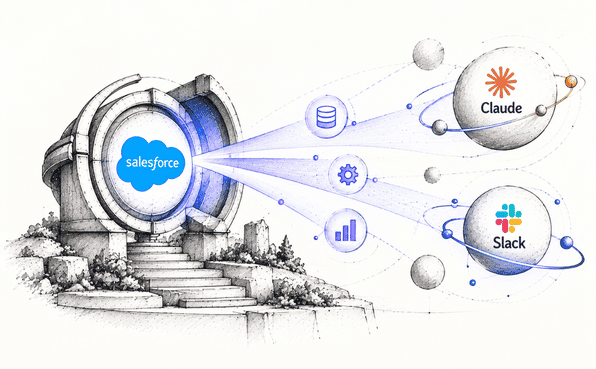
Salesforce is heading in the same direction. At Dreamforce 2026, it announced AIforce (also known as SIforce), which lets you use Salesforce data, workflows, and capabilities from the AI tools you already work in, like Claude and Slack. The idea is simple: you shouldn't always have to open Salesforce to get something done in Salesforce.
So, what exactly is AIforce, how does it work, and how can you start using it with Salesforce?
What Is Salesforce AIforce?
AIforce or Siforce isn't a single product. It's Salesforce's way of making its data, workflows, business logic, and AI capabilities available outside the Salesforce interface.
Salesforce still does the same job it always has. You just don't have to log in and click through the usual screens to get it done.
With AIforce, you can work with Salesforce from tools like Claude and Slack, or from AI experiences built around Salesforce, and Salesforce says your existing security permissions and data access controls still apply.
Salesforce introduced the approach as Headless 360 before rebranding it as AIforce in September 2026, now renamed as SIforce (for superintelligence). The name reflects the broader goal of making Salesforce data, workflows, and business logic available wherever people and AI agents work.
Note: Headless 360, AIforce, and SIforce are successive names for the same approach.
How Does AIforce Work?
AIforce connects Salesforce to the AI tools you already use. The piece that makes this possible is the Salesforce Headless Toolkit, which lets those tools reach Salesforce data, business logic, and features without going through the normal interface. It works in three steps.
1. You ask in an AI tool
It starts with a question or request in a supported tool, such as Claude or Slack. A sales rep might ask for a summary of an account, the status of an opportunity, or help preparing for a customer meeting. Instead of opening Salesforce and digging through records, the user can make the request directly through the connected AI tool.
2. The request reaches Salesforce
This is where the Headless Toolkit does its job. It's made up of a few building blocks:
MCP servers give connected AI apps access to Salesforce data and the actions they're allowed to take.
Skills are reusable instructions that help an AI tool handle a specific task.
Agentic Setup helps you set up and manage the connections behind these experiences.
Data and metadata layer makes Salesforce data, metadata, and business capabilities available to connected tools.
APIs and Salesforce CLI give developers a way to reach Salesforce features and build custom integrations.
These building blocks work together to make Salesforce capabilities accessible beyond its standard interface. The specific components used depend on the AI experience and the task being performed.
3. You get an answer or an action
With the connection in place, the AI tool uses whatever Salesforce capabilities it has access to. It might pull up account details, summarize customer activity, create a task, or trigger a supported workflow.
Security applies here too. Salesforce-hosted integrations are built to respect the platform's access controls, but what a connected tool can actually do depends on its authentication, its configuration, and the access it's been given.
Key Components of Salesforce AIforce
Salesforce AIforce includes three ready-to-use experiences and a toolkit for building custom AI integrations.
1. Claudeforce
Claudeforce puts Salesforce inside Claude. Its initial offering includes a prebuilt MCP server and 37 ready-to-use sales skills, so sales teams can research prospects, review opportunities, and prepare for meetings without jumping back and forth between Claude and Salesforce.
2. Slackforce
Slackforce takes Salesforce data and actions into Slack. Its interactive Slackforce Surfaces let teams explore CRM information, collaborate, and take action within conversations. For example, a sales team can review account activity, discuss next steps, and create follow-up tasks without leaving Slack.
3. Agentforce Coworker
Agentforce Coworker brings AI assistance directly into Salesforce itself. It looks through account information and customer activity to surface useful insights and help employees get tasks done. It can also work alongside any Agentforce agents your business has already set up.
4. Headless Toolkit
This is the option for building your own. The Headless Toolkit gives developers what they need to connect Salesforce to AI assistants, agents, and custom apps: MCP servers, skills, and Agentic Setup, backed by Salesforce's data and metadata layer, APIs, and CLI. Whatever they build still runs within Salesforce's security controls.
How AIforce fits into Salesforce's agentic enterprise
AIforce doesn't work in isolation. It is built on Salesforce's existing applications, data platform, and AI capabilities to make them accessible through more interfaces.
Customer 360 is the business applications such as Sales Cloud, Service Cloud, and Marketing Cloud. Customer records and business processes live here.
Data 360 pulls together data from Salesforce and outside sources, so AI agents have fuller context about the customer and the business.
Agentforce provides AI agents that can reason, use the available data, and take action through Salesforce workflows and connected systems.
AIforce is the top layer. It opens up Salesforce through tools like Claude and Slack, and gives developers the means to build their own AI experiences.
Take an example of a sales rep getting ready for a customer meeting. Data 360 supplies the context from connected data. Agentforce can handle tasks using the business logic and workflows already in place. And AIforce lets the rep reach all of it from a supported AI tool, without clicking through Salesforce at every step.
How Does AIforce Handle Security and Data Privacy?
If Salesforce is open to outside AI tools, does your data stay as protected as it was? Salesforce says it does: AIforce carries over the existing security, permissions, and data governance into connected experiences, and the Headless Toolkit is what applies those controls when an AI tool touches Salesforce data. That claim comes from Salesforce, so it's worth knowing what it means in practice.
1. Existing user permissions
Connecting an AI tool doesn't hand it free run of your Salesforce org. What it can see depends on how it signs in and which permissions the user or connection has. Salesforce-hosted MCP servers apply the usual security model, including object permissions, field-level security, and record-sharing rules.
2. Controlled Access to Actions
A connected tool can only do what its integration exposes and what the access controls allow. Validation rules, workflows, and other business logic still apply when an action runs through a supported headless interface. It's worth having an admin go through which capabilities are exposed and who can use them.
3. Third-Party AI Tools and Data Privacy
The outside tool brings its own privacy questions, and Salesforce's permissions don't answer them. Check how the provider handles and keeps data, what information you're sharing with it, and which terms cover your integration.
AIforce widens access to Salesforce, but it doesn't do the security setup for you. Before you deploy, confirm the authentication, the permissions, the exposed actions, and how the third party treats your data.
AIforce Availability and Requirements
Business users can start with prebuilt experiences such as Salesforce in Claude, Slackbot, or Agentforce Coworker, subject to the relevant access and licensing requirements. Salesforce in Claude is currently in beta and requires a supported Salesforce edition and an eligible Claude subscription.
Businesses looking to build custom AI experiences can use the Headless Toolkit. This route may require administrator configuration, appropriate permissions, and developer tools depending on the integration.
Before getting started, we suggest you review Salesforce's AIforce connection guide to identify the setup path and requirements for your use case.
How to Get Started With Salesforce AIforce
How you start with AIforce depends on how you want to use Salesforce through AI tools. You can use a ready-made experience like Salesforce in Claude, or build your own integration with the Headless Toolkit. We'll walk through the Claude route, since it's the quickest to try.
1. Set up Salesforce in Claude
Salesforce in Claude comes with a prebuilt MCP server and 37 sales skills, so there's no need to build the connection yourself.
To get started, follow Salesforce's official setup instructions for Salesforce in Claude. You'll need Claude Enterprise and a supported Salesforce edition. It's still in beta, so check the current eligibility requirements before you begin.
2. Ask Claude to do a Salesforce Task
Once the connection is set up, just describe what you need in plain language. Claude picks the right skill for your request, so you don't have to know its name. A few examples:
"Review my pipeline" checks pipeline health, coverage, and at-risk deals.
"Are there any upsell opportunities for XYZ company?" looks for ways to expand the account.
"Prep me for my call with Acme" gives you a meeting brief with the account history and suggested questions.
"Check my Salesforce records for consistency" flags missing fields, stale dates, and stage mismatches.
3. Review the Results and Approve Changes
During the beta, most skills are read-only or produce drafts for you to review. Some can create or update records, but that may need extra setup in the Salesforce MCP server settings.
Read the results before acting on them, and give the integration only the permissions it needs. For the full list of skills and sample prompts, see Salesforce's Salesforce in Claude Skills Reference.
Want to build your own integration instead? The setup is different. Developers can use the Salesforce Headless Toolkit to connect Salesforce to other AI tools and custom apps.
Conclusion
AIforce opens up new ways for businesses to work with Salesforce, but its value for your business depends on how your teams work today. If people lose time jumping between tools to find customer information or finish routine tasks, it could give them a shorter path to the same Salesforce data.
Before you commit, work out which workflows would benefit from AI access, which integrations your teams actually need, and how you'll handle permissions and data privacy.
If that sounds like a lot to sort out alone, a Salesforce consulting partner can help. Talk to Concretio about how AI could fit into your Salesforce workflows.
Frequently Asked Questions
-
Yes. The ready-made experiences focus on Claude and Slack, but the Headless Toolkit isn't limited to them. Any compatible AI client, including Claude, ChatGPT, Cursor, or a custom agent, can connect to a Salesforce org and act for authorized users. Connecting other tools usually takes some developer setup, and they're limited to the access that user has.
-
Not necessarily. MCP access is reportedly included with Enterprise Edition and above, but Salesforce is introducing usage-based billing through Flex Credits and requiring agents to be registered. You'll also need a plan for the AI tool itself, such as Claude. Check the current terms with your Salesforce account team.
-
It can do both, but reading is where most people start. In the Salesforce in Claude beta, most skills are read-only or produce drafts for you to review. Changing records is possible too, but it may need extra setup in the Salesforce MCP server settings.
Salesforce offers separate MCP servers for reading, creating or updating, and deleting records, and the rule is that if you can't do something in Salesforce, your agent can't do it through the MCP server.
-
AIforce serves the entire enterprise ecosystem, well beyond just sales. While early rollouts such as Salesforce in Claude launched with sales skills first, and Salesforce's Claudeforce page lists Service, Marketing, Commerce, and Field Service as coming soon. Other teams don't have to wait for ready-made skills, though. The Headless Toolkit exposes Salesforce capabilities as APIs, MCP tools, or CLI commands, so developers can build AI experiences for service, marketing, and other teams themselves.
-
Yes, they're three names for the same offering. Headless 360 was announced at TrailblazerDX in April 2026 and renamed AIforce in September 2026, and Salesforce's CEO announced the SIforce name on October 9.
Related Readings
Let's Talk

Drop us a note, we’re happy to take the conversation forward 👇🏻