Agentforce Agent Threat Modeling: AI Agent Risks & Security
Key takeaways:
Identify AI agent risks across data, tools, permissions, and workflows.
Use threat modeling to find weak points before they become business risks.
Strengthen Agentforce security with least privilege, guardrails, human oversight, and monitoring.
What if a single malicious instruction could make an AI agent expose sensitive data, misuse a connected tool, or change a customer record?
That’s the challenge with autonomous agents. An AI agent can reason, retrieve data, use tools, and take action. This increases the attack surface. Salesforce’s February 2026 Agentforce security guidance highlights controls such as prompt injection detection, access control, guardrails, and least-privilege permissions.
That’s where Agentforce’s agent threat modeling comes in: knowing what an agent can touch, what it can affect, and what can go wrong before it reaches production.
In this guide, we’ll look at the main AI agent threats, attack vectors, and security controls to manage Salesforce Agentforce agent risk.
Why Threat Modeling Matters When AI Agents Can Take Action
How Does Agentforce Threat Modeling Fit Into Your Organization?
The threat model fits into your Agentforce implementation in a clear way: STRIDE (spoofing, tampering, repudiation, information disclosure, denial of service, elevation of privilege) is a familiar framework that helps to identify application-level technical threats, but it misses risks that emerge from how agents are actually used.
As organizations connect agents with Salesforce integration services and other business systems, threat modeling helps identify risks across those connected workflows.
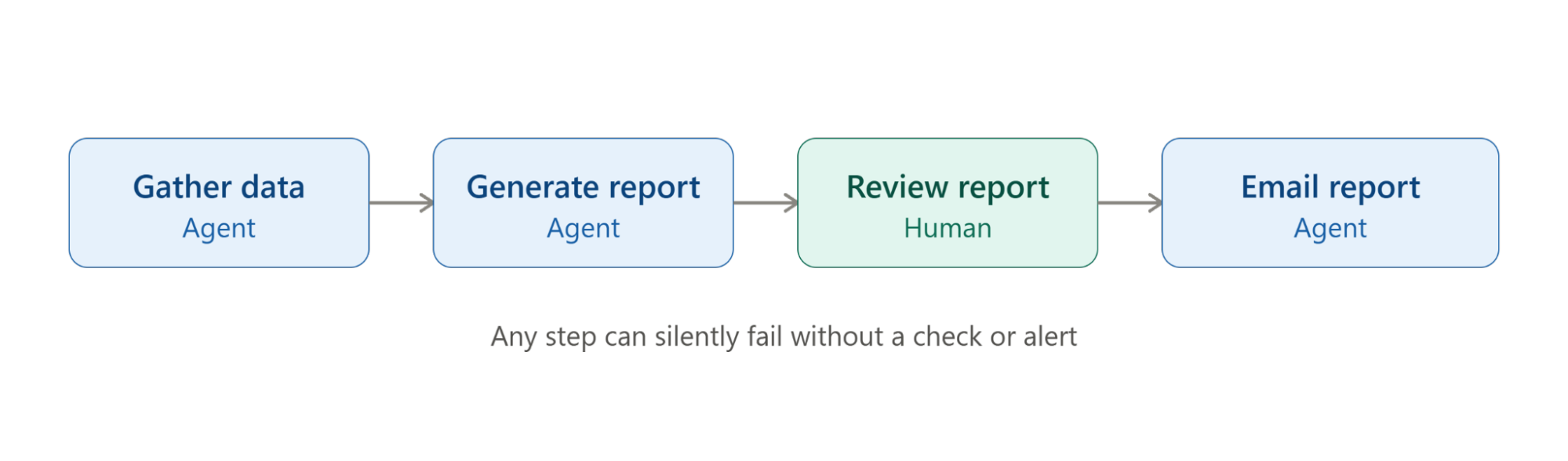
Here's an example of how one missed step can derail a process even when everything looks like it's working.
Scenario: The Vanishing Report
Your quarterly compliance report is missing. It was created but never sent to the regulator. The agent in charge says everything worked fine.
| Step | Who/What Acts | Description |
|---|---|---|
| 1. Gather data | AI agent | Pulls data from finance systems |
| 2. Generate report | AI agent | Puts the data together and formats the report |
| 3. Review report | Human | Checks the numbers and approves them. |
| 4. Email report | AI agent | Sends the final report to the regulator |
Think about:
Where could the report have gotten stuck (not saved, not passed along, not sent)
What check could have caught the problem sooner?
Who should have gotten an alert when it didn't go out?
Answer Key
| Workflow Step | What May Have Gone Wrong | What Could Have Stopped It |
|---|---|---|
| 1. Gather data | The data-gathering step may never have actually started | A check confirming the process started and finished properly |
| 2. Generate report | The report wasn't saved correctly or wasn't marked ready to send | An automatic check confirming the file was saved, named, and ready |
| 3. Review report | The reviewer approved it, but didn't confirm it was actually sent | A dashboard showing whether the report is pending, sending, or done |
| 4. Email report | The email failed to send (maybe permissions expired), and no one was told | A confirmation and alert system so people know if sending fails |
You can probably see why threat modeling matters here. When an agent can access data and take action, knowing its risks upfront isn’t optional.
What Types of Risks Can Threat Modeling Uncover in AI Agents?
Risks are not just in what a Salesforce Agentforce agent says. They can be generated from its memory, permissions, tools, identity, decisions, and its interaction with other agents. Some risks can also pile up as the agent moves through a workflow.
| Risk Type | What It Looks Like |
|---|---|
| Memory Poisoning | False or malicious information is introduced into an agent’s memory, influencing later decisions |
| Tool Misuse | An agent is manipulated into using an authorized tool in an unintended or harmful way. |
| Privilege Compromise | Excessive permissions allow an agent to perform actions beyond its intended role. |
| Resource Overload | Excessive requests consume available resources or API capacity and disrupt the workflow. |
| Cascading Hallucinations | Incorrect output from one agent is passed to another, allowing bad information to spread |
| Misaligned Behavior | An agent pursues its assigned objective in a way that conflicts with business rules or constraints |
| Repudiation and Untraceability | Incomplete or disrupted logs make agent actions difficult to trace or investigate. |
| Identity Spoofing | An attacker impersonates a trusted user or agent to access systems or trigger actions |
| Human Approval Fatigue | Too many agent-generated approval requests can overwhelm reviewers and reduce effective oversight. |
| Multi-Agent Trust Abuse | Weak trust or delegation between agents can create opportunities to bypass controls or gain additional privileges. |
How to Identify and Manage Agentforce Agent Risks
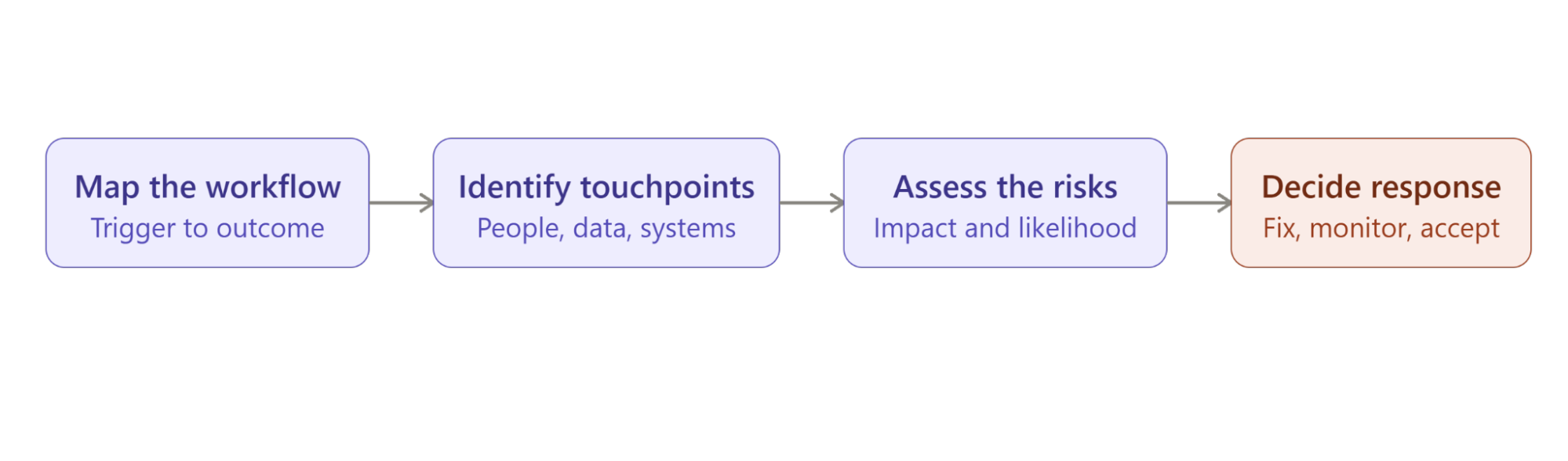
A practical way to approach Agentforce agent risk management is to work through four steps: map the workflow, identify touchpoints, assess risks, and decide how to respond.
Step 1: Map the Workflow
Start with a business process where the Salesforce Agentforce agent is involved. Map the journey from the initial trigger to the final outcome, including where the agent makes decisions or takes action.
Example:
Customer Request → Agent Reviews Data → Agent Responds → Human Approval → System Update
Step 2: Identify Agent Touchpoints
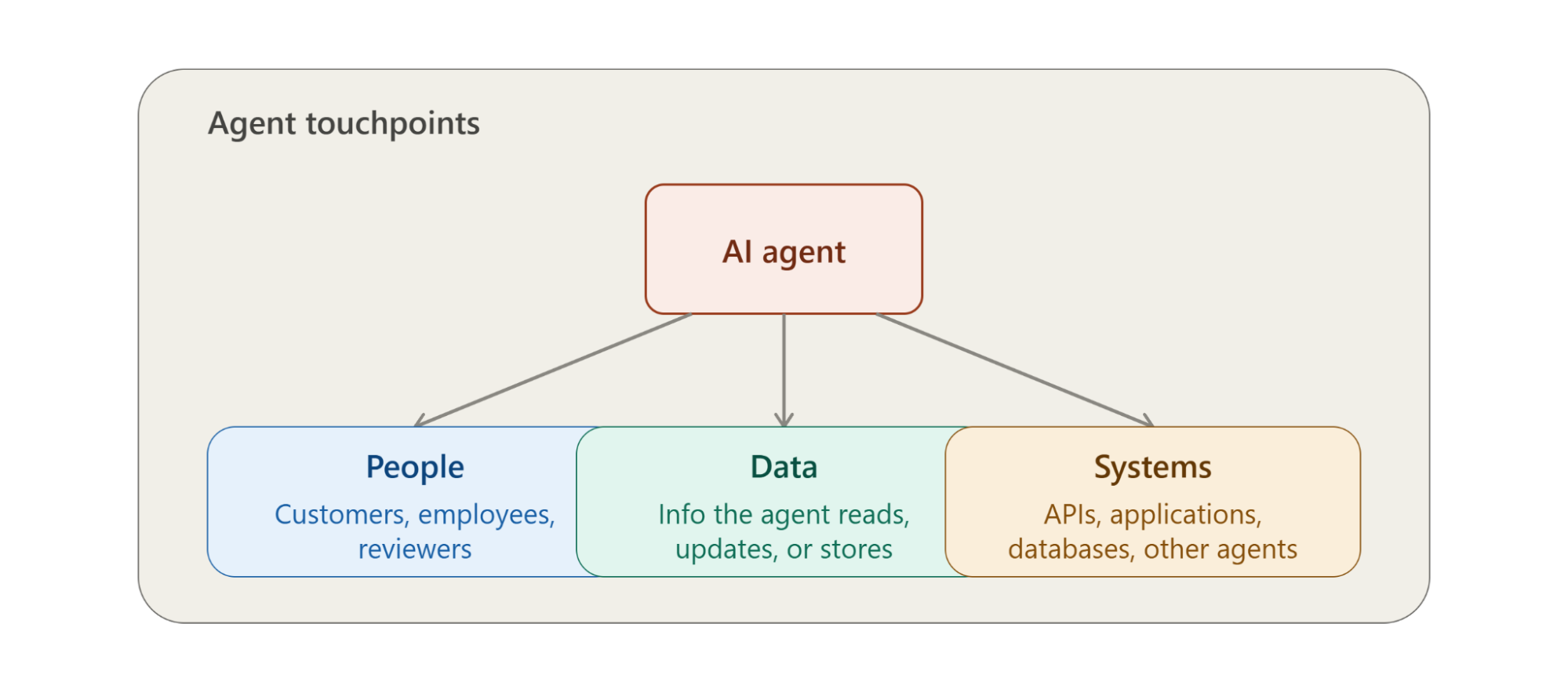
Next, identify every point where the agent connects with the workflow. These interactions show where the agent can influence people, access information, or interact with other systems.
People: customers, employees, or reviewers
Data: information the agent reads, updates, or stores
Systems: APIs, applications, databases, or other agents
These touchpoints help reveal where AI agent risks may enter the workflow.
Step 3: Assess the Risks
Once the touchpoints are mapped, examine what could go wrong at each one. Consider how an incorrect or manipulated agent action could affect the workflow and where the greatest impact could occur.
What could go wrong?
What happens if the agent acts incorrectly or at the wrong time?
Could someone exploit this interaction?
What would be the impact on the workflow?
Step 4: Decide How to Respond
After assessing the risks, the next step is to decide what action each risk requires. Depending on its severity and potential impact, you can:
Fix: Tighten permissions, add validation, or restrict agent access.
Monitor: Use alerts, logs, and regular reviews to spot unusual activity.
Accept: Document low-impact risks and revisit them periodically.
This helps teams prioritize AI agent risks and apply the right Agentforce security controls where they can make the most difference.
How to Secure Agentforce Against Identified Risks
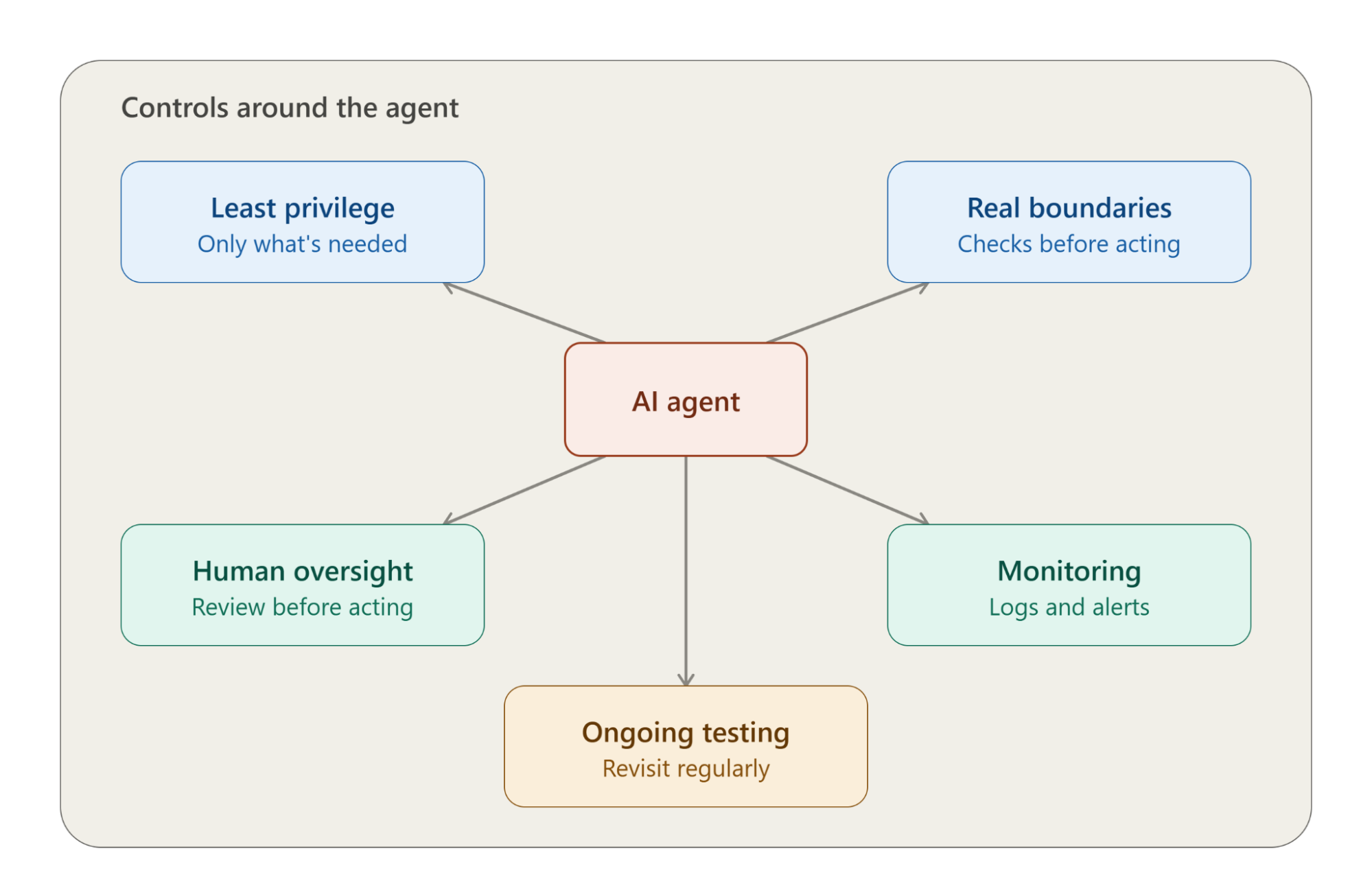
Finding the risk is just the beginning. The real work is putting the right controls around the agent, so a mistake, a bit of misuse, or a deliberate attack doesn't snowball into something that actually hurts the business.
1. Give It Only What It Needs
Don't hand the agent broad access "just in case." Give it the data, permissions, and actions its role actually calls for, nothing more. If something goes wrong or someone tries to manipulate it, tighter access means a smaller mess to clean up.
2. Set Real Boundaries Around What It Can Do
Be explicit about what's in bounds and what isn't. For anything sensitive or high-stakes, don't let the agent just run with it; build in validation, approval steps, or some kind of check before the action actually goes through.
3. Don't Take Humans Out of the Picture
Not everything needs to run on autopilot. When money, sensitive data, compliance, or other high-impact outcomes are on the line, having a person review things before they happen adds a layer of protection that's hard to replace.
4. Keep an Eye on What the Agent's Doing
Logs, alerts, regular check-ins; these aren't just paperwork. They're what let you catch odd behavior early and actually figure out what happened when something does go sideways.
5. Keep Testing, Don't Just Set It and Forget It
Throw unexpected inputs at it. Try malicious prompts. Push against its permission limits. See what breaks. And every time you add a new tool, data source, permission, or change the workflow, go back and revisit the threat model; don't assume it still holds.
Agentforce Threat Modeling Checklist
Before deploying an Agentforce agent, walk through these five questions for Agentforce threat modeling:
1. What Can the Agent Access?
Validate agent data, records, systems, APIs, and tools. Make sure it can only get to what it actually needs to do its thing.
2. What Can the Agent Do?
List out every action the agent can take, then flag which ones carry real business risk if they go wrong.
3. Where Can Things Go Wrong?
Walk through the workflow and look for weak points: prompt injection, bad decisions, overly broad permissions, misused tools, or handoffs that fail silently.
4. Where You Need To Control
Work out what role guardrails play: are they validation checks, tighter permissions, human approval steps, or monitoring and alerts to catch issues early?
5. What Changes Over Time?
Anytime you add new tools, data sources, integrations, permissions, or change the workflow, refer back to this threat model.
Conclusion
The real question isn’t whether an Agentforce agent can make a mistake. It’s what happens when that mistake becomes an action. Threat modeling helps answer that before the agent reaches production: What can it access? What can it change? Where can a decision go wrong? And what happens when it does?
With Salesforce Agentforce agent threat modeling, teams can spot those weak points early, tighten permissions, add the right guardrails, and keep humans involved where the stakes are high.
The goal isn’t to make agents less capable. It’s to make their autonomy safer to trust.
For organizations looking to implement secure and scalable Agentforce solutions, Agentforce Consulting Service can help identify risks, strengthen controls, and build safer agent-driven workflows.
FAQs
-
Traditional threat modeling often focuses on technical vulnerabilities in an application. Agentforce threat modeling also examines how an agent makes decisions, uses tools, accesses data, and affects a wider business workflow.
-
Yes. An agent can still be influenced by malicious instructions, unreliable information, or unexpected workflow conditions. That’s why permissions alone aren't enough; guardrails, monitoring, and workflow-level controls also matter.
-
Include the agent’s data sources, instructions, permissions, tools, integrations, users, actions, and workflow touchpoints. Also identify where human approval or additional controls are required.
-
Start with risks that could cause the greatest business impact, such as sensitive data exposure, excessive privileges, unauthorized actions, tool misuse, and failures in critical workflows.
-
Yes. Changes to an agent’s permissions, tools, data sources, integrations, or workflow can introduce new risks, so the threat model should evolve with the implementation changes.
Related Readings
Let’s Talk

Drop us a note, we’re happy to take the conversation forward 👇🏻