

Key takeaways:
Claudeforce is a two-way partnership, not one product. Claude powers Agentforce, and "Salesforce in Claude" plugin brings CRM data directly into Claude's chat interface.
Nothing gets written to Salesforce without your approval. The integration inherits your existing Salesforce permissions rather than granting broader access.
Connection setup and tools. You can simply use a plugin or connect Claude via Salesforce hosted MCP servers.
If you work in sales or run a CRM team, you've probably heard the name "Claudeforce" floating around lately. It's the name of the partnership between Salesforce and Anthropic, and it's changing how people interact with their CRM data.
The partnership went from announcement to fully live. At the Dreamforce 2026 keynote in San Francisco on September 15, Salesforce and Anthropic laid out the whole picture: the "Salesforce in Claude" plugin opened up for public beta, Claude became the default reasoning model behind Agentforce and Slack, and Salesforce introduced a new long-horizon runtime that lets agents work on a goal for days instead of minutes. Marc Benioff and Dario Amodei shared the keynote stage to walk through what that means for sales and service teams going forward.
In this guide, we are going to cover what Claudeforce actually is, how to use Salesforce in Claude, how to set it up, what you can do with it once it's running, and where the whole thing is headed.
What Is Claudeforce, Exactly?
Claudeforce is the name for the expanded partnership between Salesforce and Anthropic. Salesforce first announced it on August 26, 2026, but Dreamforce 2026 Day 1 is when the full product stack actually shipped. The Salesforce in Claude plugin opened to public beta signups, Claude became the default model for Agentforce, and Salesforce unveiled AIforce.
Claudeforce is not a single product. It's a strategic relationship that connects Claude's reasoning ability with Salesforce's data, workflows, and governance, so the two systems can work together instead of sitting side by side.
The partnership runs in two directions, and this is the part most people miss:
Claude in Salesforce means Claude acts as a reasoning engine inside the Salesforce ecosystem itself, powering things like the Atlas Reasoning Engine and Agentforce, Salesforce's own agent platform. In this direction, Claude is working behind the scenes, inside tools you may already use, running on Amazon Bedrock within Salesforce's Trust Boundary.
Salesforce in Claude flips that around. It's a plugin that brings your Salesforce data, records, and workflows directly into the Claude interface, so you can read and act on CRM information without leaving the conversation. This is the piece most sales teams will actually touch day-to-day, and it's the one we'll spend the most time on here.
Salesforce has also said Claude Code and Claude Enterprise will become available to its developers and knowledge workers as preferred productivity tools. Claude is the first large language model provider whose models sit fully inside the Salesforce Trust Boundary, meaning the data stays within Salesforce-managed environments rather than being sent somewhere else entirely.
Salesforce in Claude: The Plugin With 37 Sales Skills
The first product to come out of Claudeforce is called Salesforce in Claude. It's a plugin built around 37 prebuilt skills designed specifically for the work account executives do every day, i.e., account research, call prep, pipeline review, deal health checks, and CRM updates.
Here's the problem it's solving: sellers spend hours each week hunting down information that's scattered across Salesforce, email, Slack, and call recordings, just to prepare for a single meeting or write up a follow-up. Using Salesforce in Claude through this plugin means Claude assembles all of that context for you, and once you approve the changes, it writes them back into Salesforce automatically.
A few things worth knowing about how it works:
It's built on two connectors. One connects to Salesforce, letting Claude read records and take action such as summarizing account history, updating opportunities, logging calls, or creating follow-up tasks. The other connects to Slack, pulling in deal-channel discussions and account-team threads.
Nothing gets written without your okay. Claude drafts the update; you approve it before it hits Salesforce. This "propose, then confirm" pattern is central to how the whole integration is designed.
Setup is guided. The first time you use it, a setup skill scans your connected tools and builds you a starter Claude Artifact.
It's sales-first, for now. At launch, all 37 skills are built for sales teams. Salesforce has said skills for Service, Marketing, Commerce, Revenue Cloud, Field Service, MuleSoft, and Industries are coming later, with more prebuilt skills expected in late 2026.
As of writing, the Salesforce in Claude plugin is available in open beta, expanding out from a pilot with companies like GitLab, Siemens, and Legora. Head over to the complete plugin setup process here.
How the Claude Salesforce Integration Works
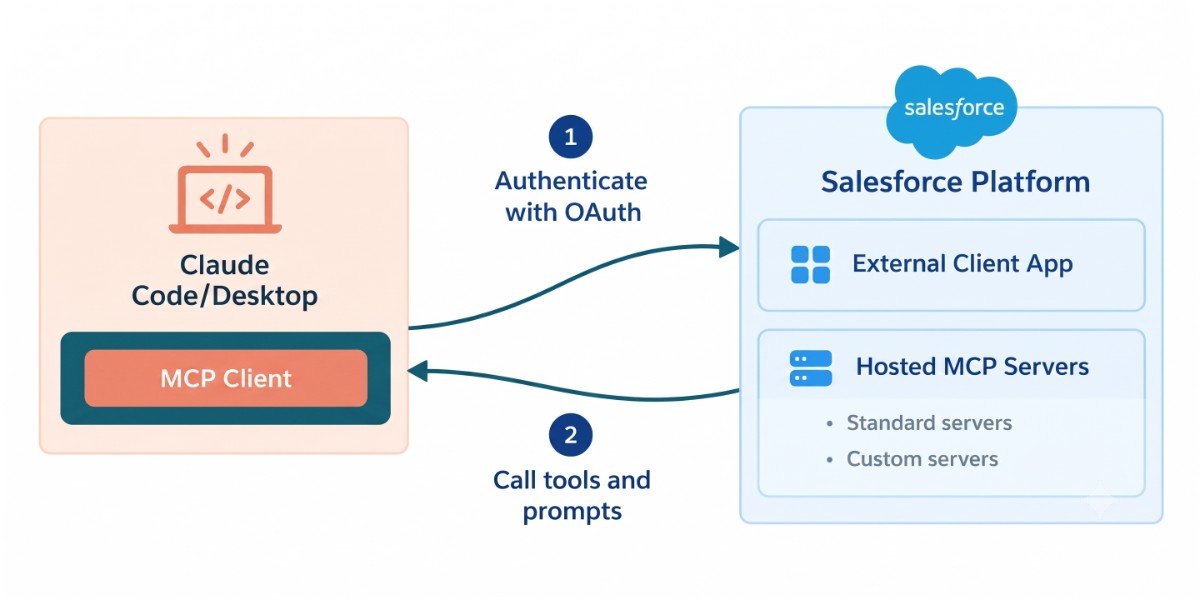
Under the hood, Claude connects to Salesforce through the Model Context Protocol (MCP). Salesforce runs its own hosted MCP servers, and Claude talks to those servers rather than reaching into your database directly.
That distinction matters for security. Claude never has its own separate copy of your Salesforce data sitting somewhere else. Every request goes through Salesforce's own permission system, so field-level security, sharing rules, and object permissions all still apply. If a rep can't see a record inside Salesforce, Claude can't surface it for them either. Data also flows through Salesforce's Einstein Trust Layer, which adds toxicity detection, dynamic grounding, and other security controls on top.
Setting Up the Connection (For Developers and Admins)
If you're setting up a custom connection outside of the ready-made Salesforce in Claude plugin, the general process looks like this:
1. Activate a Salesforce Hosted MCP server. In Salesforce Setup, search for "MCP Servers," open the Salesforce Servers tab, and activate the server you need (for example, an sobject-reads server for read-only queries). Copy the server's API name and URL.
2. Create an External Client App. In Setup, go to External Client App Manager, create a new app, enable OAuth, and configure the callback URL for Claude. Save the app, then grab the Consumer Key from the OAuth settings.
3. Connect Claude to the server. The steps here differ depending on whether your team works in Claude Desktop or Claude Code, since each uses a different callback URL and connection flow. Go to Salesforce developer documentation to know the exact configuration steps for each.
4. Test it. Ask Claude something simple, like pulling your top open opportunities or summarizing a specific account, and confirm the answer is grounded in real Salesforce records rather than a general answer.
“For most sales teams, though, you won't need to go through this manual setup at all. The Salesforce in Claude plugin handles the connector configuration for you once an admin turns it on and you sign in. ”
If your org is already running complex automation, custom objects, or a tangled permission model, connecting Claude is worth treating like any other integration project. This is exactly the kind of work Salesforce experts are built for: auditing your existing permission sets before you expose them to an AI agent, deciding which of the 37 skills actually map to how your sales team works, and making sure field-level security is airtight before Claude starts reading and writing records.
What You Can Actually Do With Claude and Salesforce Together
Once you're connected, using Salesforce with Claude starts to feel less like operating software and more like talking to a very well-informed colleague. Some concrete examples are:
Meeting prep. Ask Claude to prep you for a call, and it pulls the account's history, recent emails, open cases, and Slack discussion into one clear briefing instead of you clicking through five tabs.
Pipeline review. Ask for a summary of your pipeline health, and Claude can flag stalled deals, missing next steps, or opportunities that haven't been touched in weeks.
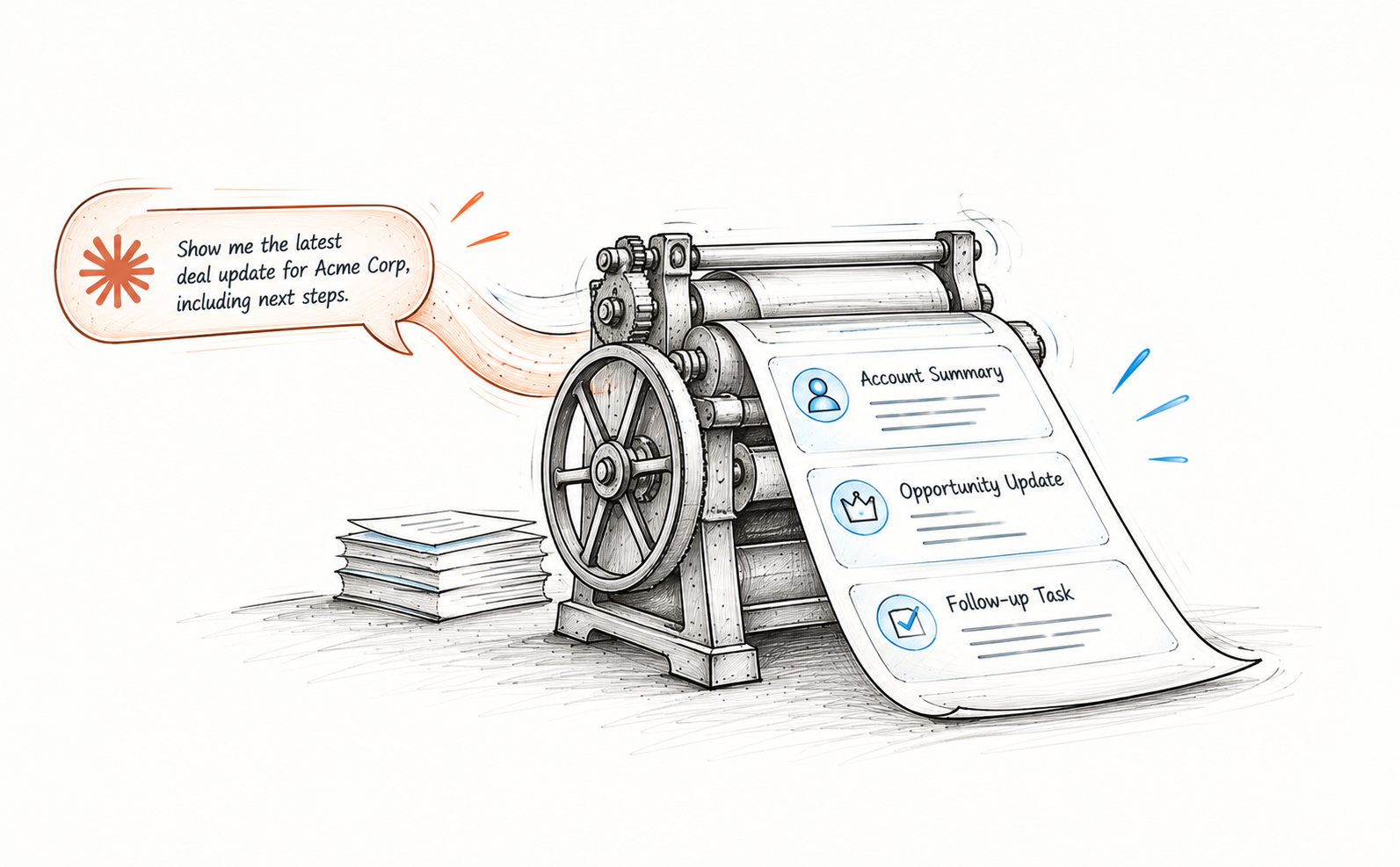
CRM hygiene. After a call, tell Claude what happened, and it drafts the opportunity update, logs the call, and creates follow-up tasks. You just approve the write.
Forecasting support. Claude can pull together a forecast summary across your book of business, highlighting risk and upside deals.
Customer service. On the Agentforce side, Claude (as the reasoning model) is already helping resolve a meaningful share of customer service cases without a human ever getting involved, escalating to a person with full context only when it truly needs to.
The bigger shift here is really about the interface. Traditional Salesforce use meant navigating to the right screen, clicking into the right record, and manually piecing together history before deciding what to do next. Salesforce in Claude collapses that: you ask a question or describe an outcome, and the reasoning and the navigation happen for you.
Security and Governance: What to Know Before You Roll This Out
Enterprise teams will rightly ask about governance before turning this on broadly. A few things are worth flagging:
Permissions are inherited, not duplicated. Claude acts under the logged-in user's existing Salesforce permission set. It doesn't get its own broader access.
Writes require human approval. The plugin is built around a "Claude proposes, human confirms" pattern for anything that changes data.
Data stays inside the Trust Boundary. Claude's models run within Salesforce-managed infrastructure for this integration, rather than sending your CRM data to an entirely separate, unrelated environment.
It's still early. Salesforce in Claude is in open beta as of this writing, with broader "Enterprise Frontier Safeguards" planned to roll out later in the year. Standalone pricing and packaging details haven't been fully published yet either, so if you're budgeting for a rollout, expect some of that to firm up over the coming months.
Working with a Salesforce consultant can save you from the two most common mistakes teams make when adopting this kind of tool too fast. 1. giving Claude access that's broader than it needs, and 2. turning on automation before anyone has actually mapped out which workflows should stay human-approved.
The Bottom Line
The full Claude-Salesforce partnership is only announced at Dreamforce 2026. Salesforce in Claude plugin is in open beta, but the direction is clear. Claude Salesforce integration isn't a bolt-on chatbot sitting next to your CRM; it's becoming a genuine second interface into it, one where you describe what you need instead of hunting for it yourself. Whether you access it through the ready-made plugin or a custom MCP connector, the fundamentals are the same. Your Salesforce permissions stay in control, your data stays inside Salesforce's trust boundary, and Claude does the busywork so you can focus on the parts of the job that actually need a human.
If you're evaluating this for your own team, start small: pilot it with a handful of reps, watch how the approval step works in practice, and bring in Salesforce experts if your permission model is complex enough to warrant a second set of eyes before you flip the switch org-wide.
Related Readings


Let’s Talk

Drop us a note, we’re happy to take the conversation forward 👇🏻
