Key Takeaways:
Agentforce data readiness starts with accurate, clean, and connected Salesforce data.
Salesforce Data 360 implementation helps unify customer data for more reliable AI responses.
Follow a 12-week data readiness checklist to strengthen data quality, governance, and Agentforce implementation.
Agentforce data readiness determines whether your AI agent gives accurate answers or repeats your data problems at scale.
Capgemini found that fewer than one in five companies have a high level of data readiness, and only 9% are fully prepared for the data integration AI requires.
An agent can only work with the information it can access. Duplicate contacts, outdated fields, and disconnected systems lead directly to incorrect answers and unreliable actions. The good news is that readiness doesn’t require perfect data or a company-wide cleanup. It requires good enough data: clean, connected, and trusted for the specific tasks your first agent will handle.
This guide gives you an Agentforce data readiness checklist, a 12-week timeline for what to fix and when, and the most common Salesforce data quality issues that affect AI agents.
What Is Agentforce Data Readiness?
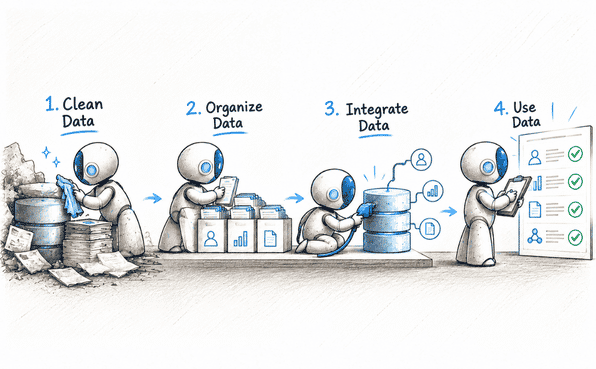
Agentforce data readiness is the process of auditing, cleaning, connecting, and structuring your business data so Agentforce agents can respond accurately and complete workflows reliably.
In practice, it covers four things:
Quality: records are accurate, complete, and free of duplicates.
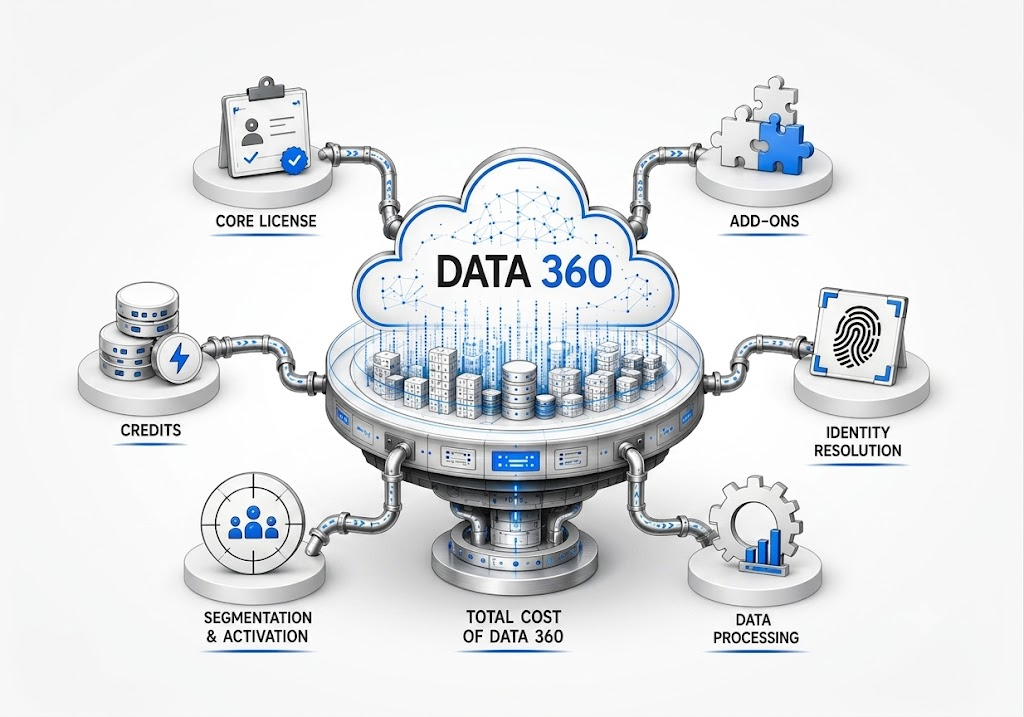
Connection: Bring data from your CRM, ERP, billing, and support systems together with solutions like Salesforce Data 360 to create a unified view of your business data.
Structure: Knowledge articles, case notes, and product names follow consistent formats, so the agent can find and use them.
Governance: ownership, access rules, and compliance requirements are defined.
It is one part of the wider question of whether your organization is ready for AI. Strategy, skills, and change management matter too, but if the data is wrong, the rest doesn’t help.
Take a customer service agent that handles refund requests. It needs the correct order details, the current return policy, and the right customer record. If the return policy in your knowledge base is a year out of date, the agent will confidently tell the customer the wrong refund window, and every similar request after that gets the same wrong answer.
Why Agentforce Data Readiness Matters Before Deployment
Agentforce data readiness is the foundation of a reliable AI deployment. Salesforce Agentforce uses business data, customer records, case histories, and knowledge sources to generate responses and perform tasks. If that information is incomplete, outdated, or inconsistent, AI agents can produce inaccurate answers and repeat existing process errors at scale.
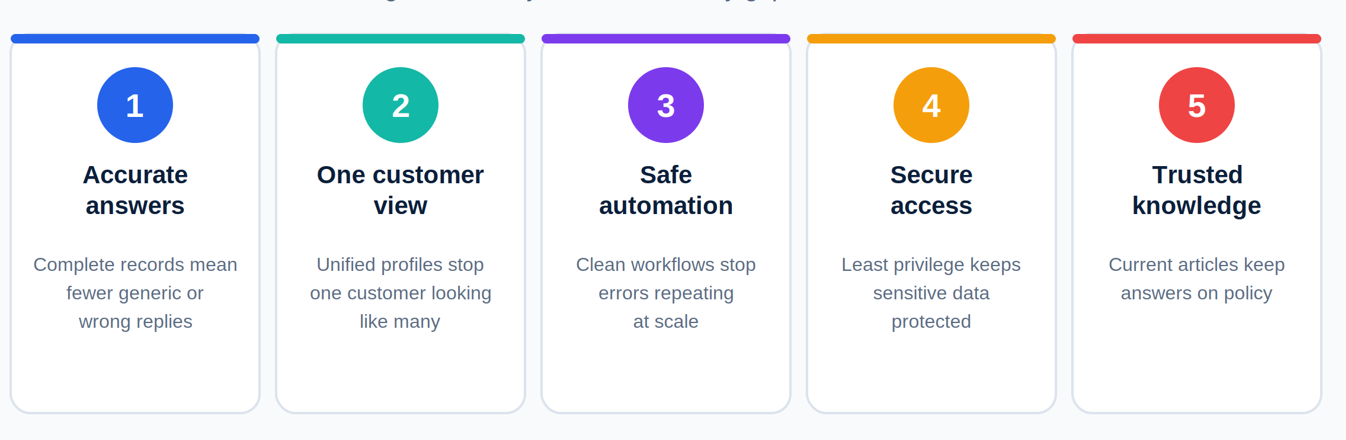
Salesforce Data 360 helps unify customer information and provide relevant context for AI agents. However, successful implementation also depends on data quality, system integrations, security controls, and reliable knowledge sources.
5 Key Reasons to Prioritize Data Readiness for AI Agents
1. Improve AI Response Accuracy
Poor data quality can lead to incomplete context and misleading AI-generated answers. Clean CRM records, accurate case histories, and consistent information help Agentforce deliver relevant responses grounded in reliable business data.
2. Unify Customer Data Across Systems
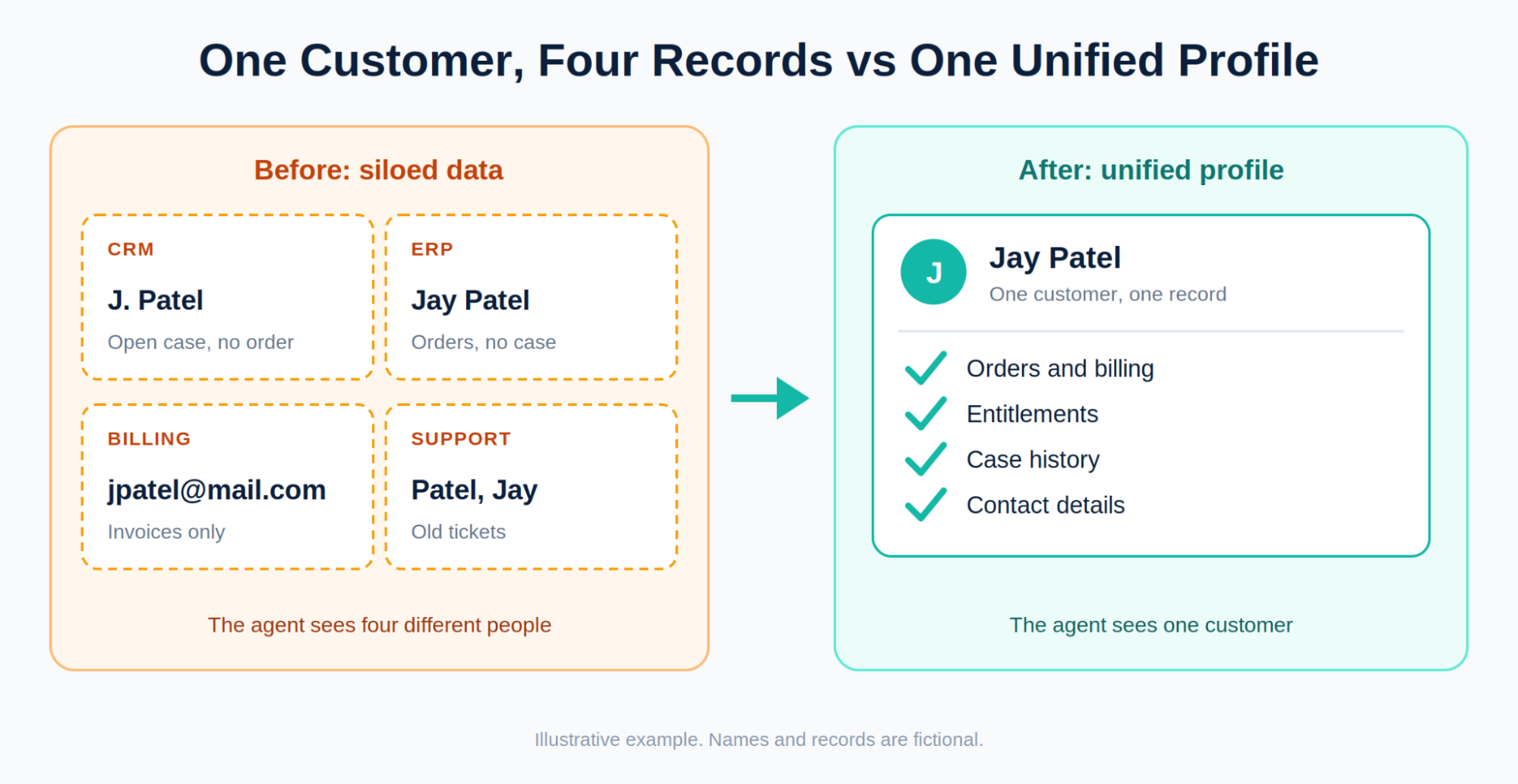
Duplicate records and disconnected customer profiles make it difficult for AI agents to understand the complete customer journey. Salesforce Data 360 implementation helps unify customer data and resolve identities, giving Agentforce a more consistent view of customer information.
3. Prevent Errors in Automated Workflows
Agentforce can trigger Salesforce Flows, invoke Apex logic, and interact with external systems through supported integrations. If these workflows contain broken dependencies or outdated business rules, AI-driven automation can reproduce those problems. Validate existing processes before enabling automated actions.
4. Strengthen Data Security and Governance
Data security is essential for responsible AI agent deployment. Incorrect permissions, excessive access privileges, or weak field-level security can expose sensitive information. Review access controls, apply least-privilege principles, and verify that agents can access only the data and actions they need.
5. Ground AI Agents in Trusted Knowledge
Reliable AI responses depend on accurate and accessible knowledge sources. Outdated documents, conflicting knowledge articles, and incomplete indexing can affect retrieval accuracy. Maintain current knowledge content and configure the appropriate retrieval and grounding mechanisms so Agentforce can use relevant information.
Before deploying Agentforce, assess your data quality, integrations, identity resolution, security, and knowledge sources. The following checklist will help you identify readiness gaps and determine what needs to be addressed before implementation.
The Agentforce Data Readiness Checklist: 7 Things CTOs Must Verify
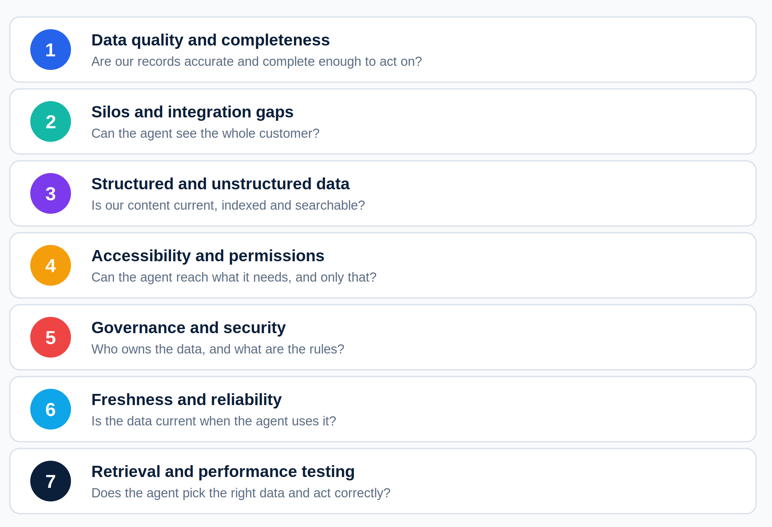
Before deploying Agentforce, you need to know whether your Salesforce data is ready for real business use. Incomplete records, disconnected systems, and outdated information can reduce data quality for AI agents, limit data integration, and create governance gaps.
Use this Agentforce data readiness checklist to assess Salesforce data readiness, identify issues with data unification and accessibility, and prepare your environment for a reliable Agentforce implementation.
The checklist at a glance
| Check | The question it answers |
|---|---|
| Data quality and completeness | Are our records accurate and complete enough to act on? |
| Silos and integration gaps | Can the agent see the whole customer? |
| Structured and unstructured data | Is our content current, indexed, and searchable? |
| Accessibility and permissions | Can the agent reach what it needs, and only that? |
| Governance and security | Who owns the data, and what are the rules? |
| Freshness and reliability | Is the data current when the agent uses it? |
| Retrieval and performance testing | Does the agent pick the right data and act correctly? |
1. Audit data quality and completeness
The question: Are our records accurate and complete enough to act on?
Start by checking whether your Salesforce records contain accurate, complete, and consistent information. Missing fields, duplicate contacts, and conflicting values can leave AI agents without the context they need.
Review key objects such as Accounts, Contacts, Leads, and Cases. Identify which fields are essential to your agent's tasks, then establish validation rules and data-quality standards to keep that information reliable.
What to verify:
✅ Required fields are populated with valid values.
✅ Duplicate records and inconsistent formats are identified.
✅ Critical records contain enough context for the intended use case.
2. Identify data silos and integration gaps
The question: can the agent see the whole customer?
Customer information rarely lives in one system. Salesforce CRM, ERP platforms, billing software, and support tools may each contain part of the customer journey. If these systems don't share information effectively, Agentforce may work with an incomplete view.
Review your existing integrations, identify synchronization failures, and determine which system is the authoritative source for each data type. Depending on the use case, you may need real-time access, scheduled synchronization, or unified customer profiles.
What to verify:
✅ Required data sources are connected and accessible.
✅ Integration failures and sync delays are monitored.
✅ Conflicting sources of truth are resolved.
3. Validate structured and unstructured data
The question: Is our content current, indexed, and searchable?
Salesforce records are only part of the picture. Agentforce may also need information from knowledge articles, PDFs, product documentation, emails, and support transcripts.
Structured data must have consistent fields and values, while unstructured data must be searchable and relevant to the agent's tasks. Outdated policies or poorly indexed documents can cause an agent to retrieve information that no longer reflects current business rules.
What to verify:
✅ Knowledge articles and documents are current and accurate.
✅ Metadata, document versions, and access permissions are maintained.
✅ Search returns relevant results for representative queries.
4. Check data accessibility and agent permissions
The question: can the agent reach what it needs, and only that?
Having the right data in Salesforce isn't enough if an agent cannot access it when needed. At the same time, unrestricted access can expose information that the agent should never retrieve.
Review object-level, field-level, and record-level permissions, along with the access configuration of the agent and its execution context. Test realistic scenarios to confirm that authorized information is available and restricted information remains protected.
What to verify:
✅ The agent can access the records and fields its tasks require.
✅ Sensitive and restricted data stays inaccessible where appropriate.
✅ Permissions are tested under realistic user and agent scenarios.
5. Establish data governance and security controls
The question: who owns the data, and what are the rules?
Data governance for Agentforce defines who owns the data, which sources should be trusted, and how information can be used. Without clear rules, teams may struggle to resolve conflicting records, enforce policies, or maintain consistent data standards as agent usage grows.
Establish ownership for critical datasets, document authoritative sources, and define retention, privacy, and compliance requirements. Also determine when an agent should stop, request clarification, or escalate a task to a human.
What to verify:
✅ Data owners and authoritative sources are clearly defined.
✅ Privacy, retention, and compliance policies are enforced.
✅ Escalation rules exist for sensitive or uncertain scenarios.
6. Verify data freshness and reliability
The question: Is the data current when the agent uses it?
An accurate record can still be unhelpful if it is outdated. For example, an agent that retrieves an old order status or superseded return policy may provide an incorrect answer despite accessing a valid record.
Check when critical data was last updated and how quickly changes become available to Agentforce. Set freshness requirements according to the task: order status may require frequent updates, while general product documentation may follow a different schedule.
What to verify:
✅ Critical records meet defined freshness requirements.
✅ Sync delays and failed updates are monitored.
✅ Outdated information is caught and corrected before it affects important actions.
7. Test Data Retrieval and Agent Performance
The question: does the agent pick the right data and act correctly?
Before production deployment, test whether Agentforce can retrieve the correct information and use it appropriately. Clean records and working integrations do not automatically guarantee that an agent will select the right context or complete a workflow correctly.
Run representative scenarios using realistic customer questions and business tasks. Compare retrieved information with authoritative records, verify the resulting actions, and track failures so they can be corrected before launch.
What to verify:
✅ Agents retrieve relevant, accurate records for representative queries.
✅ Responses and actions match expected business outcomes.
✅ Retrieval errors, task completion, and human escalations are measured.
✅ Tests are repeated after significant data or integration changes.

Salesforce Data Readiness Timeline: What to Do and When
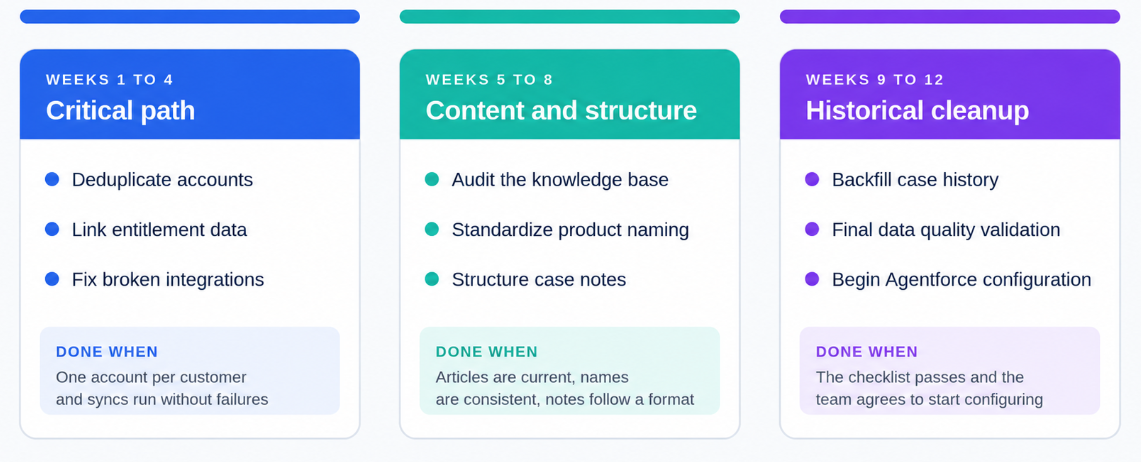
Don’t try to fix everything at once. A phased approach keeps your data governance for Agentforce manageable and prioritizes the issues that carry the greatest risk. The plan below runs for 12 weeks and ends with Agentforce configuration.
The 12-week timeline
| Phase | Weeks | Focus | What gets fixed |
|---|---|---|---|
| 1. Critical path | 1 to 4 | Problems that break the agent’s core logic | Duplicate accounts, unlinked entitlement data, broken integrations |
| 2. Content and structure | 5 to 8 | What the agent reads and how it is organized | Knowledge base, product naming, case note structure |
| 3. Historical cleanup | 9 to 12 | Past data and final validation | Incomplete case history, final quality check |
Weeks 1 to 4: Fix the critical path
Start with the issues that can make an agent give wrong answers no matter how good the rest of your data is.
Deduplicate accounts. Merge duplicate records so the agent sees one version of each customer.
Link entitlement data. Connect entitlements to the right accounts and products, so the agent knows what each customer is covered for.
Fix broken integrations. Repair failing syncs between Salesforce and your connected systems, so the agent isn’t working from stale or partial data.
Weeks 5 to 8: Clean up content and structure
Once the foundation is stable, improve what the agent actually reads.
Audit and update the knowledge base. Remove outdated articles, resolve conflicts between them, and make sure current policies are the ones the agent can find.
Standardize product naming. Use one naming convention across records, so the agent can match a question to the right product.
Implement structured case notes. Replace free-form notes with a consistent format, so past resolutions can be used as reliable context.
Weeks 9 to 12: Clean up historical data and validate
Finish with the work that improves quality over time but doesn’t block the first launch.
Backfill incomplete case history. Add missing descriptions, resolution notes, and context to older cases, so the agent has real detail to draw from.
Run a final data quality validation. Re-run your checklist and confirm the earlier fixes held.
Begin Agentforce configuration and training. Start building only after the data passes validation.
A mistake to avoid: Rushing data preparation to meet a deadline
Launching Agentforce too quickly can leave data gaps that lead to inaccurate responses and failed workflows.
A 12-week data preparation plan gives your team time to fix critical issues, validate integrations, and reduce costly rework after deployment.
Who needs to be involved?
Salesforce admin: deduplication, records, and configuration
Data or integration team: syncs, entitlement links, and system of record decisions
Content or support owners: knowledge base and case note standards
Business owner: use case, priorities, and sign-off
Conclusion: Make Your Data Ready for Agentforce
Successful Agentforce implementation starts with reliable data. Use this Agentforce data readiness checklist to identify data quality issues, close integration gaps, and establish the right governance before deployment.
You don’t need perfect data, just accurate, accessible, and connected data for your first use case. Strengthen your Salesforce data readiness step by step.
Need help preparing your data for Agentforce? Contact our Salesforce consultant to assess your data readiness and build a deployment-ready foundation for reliable AI agents.
Frequently Asked Questions
-
AI-ready data in Salesforce is data that is accurate, complete, connected, and trusted for the specific job an agent will do. It doesn’t have to be perfect or cover your whole org. It has to give the agent current, consistent information and only the access it needs.
-
Not necessarily for every use case. Data 360 helps unify customer data from multiple systems and supports identity resolution, which is useful when your data is spread across tools. If your agent only uses clean data inside Salesforce, you may not need it first. Check Salesforce’s documentation for your specific use case.
-
Run your data through the seven checks in this guide: quality and completeness, silos and integration gaps, structured and unstructured data, permissions, governance, freshness, and retrieval testing. If you find duplicate records, outdated knowledge articles, failing syncs or loose access rules, fix those before deployment.
-
Measure data quality for AI agents using key indicators such as data accuracy, completeness, duplicate records, consistency, and freshness. Also, test whether Agentforce retrieves the correct information and produces reliable responses for real use cases. Track these results regularly to identify gaps and improve data readiness over time.
-
AI readiness is the wider question of whether your organization can deploy and run AI successfully. It covers strategy, use cases, skills, security, and change management. Data readiness is one part of it: whether your data is accurate, connected, and governed well enough for an agent to use. If the data isn’t ready, the other parts of AI readiness can’t make up for it.
-
Salesforce uses the Einstein Trust Layer, which automatically masks sensitive data and prevents external LLMs from storing information. It doesn’t replace your own controls. You still need object-level and field-level permissions that limit what the agent can reach.
-
Treat it as ongoing work. Re-run your checks after any major change to your data, integrations, or knowledge base, such as a new system, a policy update, or a product launch. Many teams also schedule a regular review, for example, every quarter, and monitor retrieval errors and escalations continuously.
-
The biggest problems are duplicate accounts, unlinked entitlement data, broken integrations, outdated knowledge articles, inconsistent product naming, unstructured case notes, and incomplete case history. These lead directly to wrong answers and failed workflows, so fix them in order of risk.
Related Readings

Let's Talk

Drop us a note, we’re happy to take the conversation forward 👇🏻