What Should You Consider When Implementing Salesforce Data 360?
Key takeaways:
Salesforce Data 360 implementation requires more than connecting data; it starts with careful planning and preparation.
Data quality, identity resolution, and governance are the key considerations that determine implementation success.
A structured implementation approach helps organizations unify customer data and maximize the value of Data 360.
Salesforce Data 360 implementation is a major step for any organization looking to unify customer data, break down silos, and power smarter decision-making across sales, service, and marketing.
But a successful Data Cloud implementation requires more than just enabling the platform; it demands careful planning around data architecture, Salesforce data integration with existing systems, and long-term scalability. From assessing your current data quality and governance practices to defining clear use cases for Salesforce Customer 360 insights, every decision you make early on shapes how effectively your team can leverage Salesforce Data Cloud capabilities down the line.
Whether you're consolidating data from multiple sources, setting up real-time customer data unification, or preparing for AI-driven personalization, understanding the key considerations upfront can save significant time, cost, and rework. In this guide, we'll break down what you need to evaluate before and during your implementation journey.
8 Questions to Answer Before Implementing Salesforce Data 360
Before anyone touches a data stream or connector, get honest answers to these. Skipping them is the single biggest reason Data 360 (and Data Cloud, before the rename) projects run over budget.
| Question | Why It Matters |
|---|---|
| What business outcome are you trying to achieve? | Different goals need different data models. Pick one before you start. |
| Is your customer data clean and reliable? | Messy data in means a messy profile out. No exceptions. |
| Which systems will feed Data 360? | Every source becomes a data stream, each with its own fields and formats. |
| How will you resolve duplicate identities? | This decides if "one customer" is really one customer, or three profiles in disguise. |
| Who owns Salesforce data governance? | Someone must own access rules and PII tagging before go-live. |
| Are your security and compliance policies ready? | GDPR, HIPAA, and residency rules shape your setup from day one. |
| How will you measure success? | Match rate and segment accuracy, not just "data is in one place." |
| Is your team prepared for long-term adoption? | Data 360 keeps growing. Someone needs to own it after go-live. |
If you cannot answer question 1 in a single sentence, resolve that first before moving on to the remaining questions. A clear goal keeps every later decision data sources, identity rules, governance aligned to a single purpose.
Without it, teams tend to build a technically sound platform that does not serve any one business need well.
Key Considerations Before Implementing Salesforce Data 360
Before implementing Salesforce Data 360, it's important to lay the right foundation. A little planning upfront can help you avoid integration issues, improve data quality, and ensure your implementation delivers the expected business outcomes.
1. Define a Clear Business Use Case
Start by identifying the primary business problem you want Data 360 to solve. Instead of trying to support every department at once, focus on one high-impact use case that delivers measurable value.
Create a unified customer profile.
Personalize marketing campaigns.
Improve customer service experiences.
Prepare trusted customer data for Agentforce.
2. Verify Your Salesforce Environment
Before you begin implementation, make sure your Salesforce environment is ready to support Data 360. Confirm that the necessary licenses, permissions, and platform requirements are in place.
Salesforce Data 360 is provisioned.
Required licenses are active.
Users have the appropriate permission sets and roles.
Connected Salesforce products meet the implementation requirements.
3. Identify Your Data Sources
Data 360 brings customer data together from multiple systems. Identify every source you'll integrate to ensure no critical customer information is left behind.
Sales Cloud
Service Cloud
Marketing Cloud
Commerce Cloud
Snowflake, ERP systems, or other third-party applications
4. Assess Data Quality
The accuracy of your customer profiles depends on the quality of the data you import. Review and clean your data before ingestion to improve matching accuracy and reduce processing issues.
Remove duplicate records.
Fix missing or incomplete values.
Standardize formats such as email addresses and phone numbers.
Validate critical customer information.
5. Plan Data Governance
A clear governance strategy helps protect sensitive customer information while maintaining data consistency across teams. Define ownership and access policies before implementation begins.
Assign data owners.
Configure access permissions.
Protect sensitive data and meet compliance requirements.
Establish data management guidelines.
6. Plan Your Customer Data Model
Before importing data, determine how customer information from different systems will be organized within Data 360. A well-planned data model makes mapping and future expansion much easier.
Identify core entities such as Individuals, Accounts, Orders, and Interactions.
Map fields consistently across data sources.
Plan for future integrations and business needs.
7. Define Success Metrics
Establish measurable goals before deployment so you can evaluate the success of your implementation and identify areas for improvement after launch.
Identity resolution match rate.
Customer profile completeness.
Data freshness.
Segmentation and campaign performance.
Customer service improvements.
How to Implement Salesforce Data 360
This is where planning turns into data architecture. Salesforce's own guidance (and the experience of teams who've done this) points to a fairly consistent order:
Plan → Prepare data → Connect sources → Resolve identity → Model → Govern → Test → Scale.
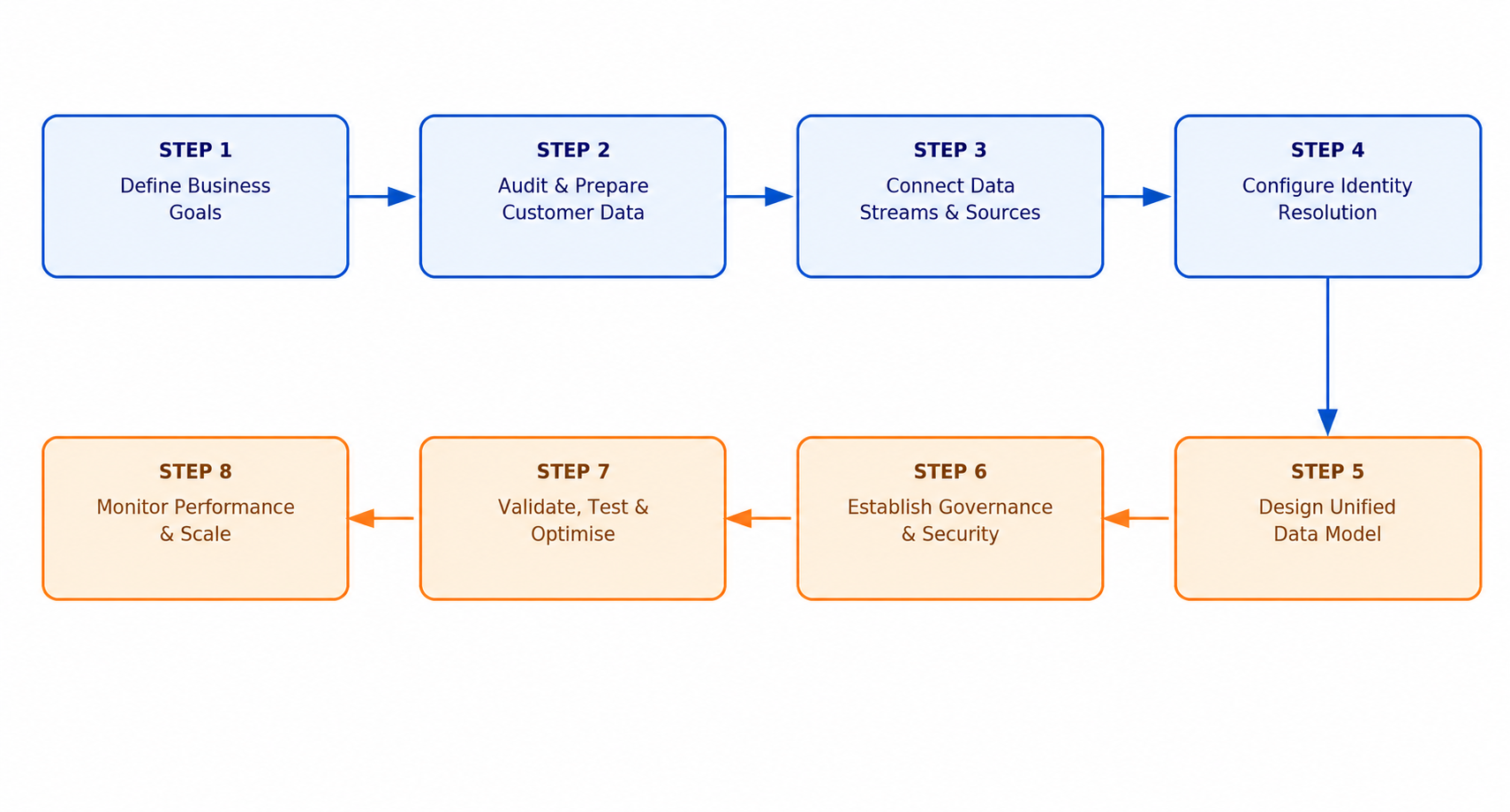
Skipping ahead, especially jumping straight to activation before identity resolution is solid, is the most common reason projects need to be rebuilt.
If you're looking for a step-by-step Salesforce Data 360 implementation guide, we've created a dedicated resource for you. Check it out.
Salesforce Data 360 Implementation Best Practices
Every successful Salesforce Data 360 implementation follows the same principle: start small, validate early, and scale with confidence. Rather than trying to connect every data source and activate every use case at once, focus on building a reliable foundation that can grow over time.
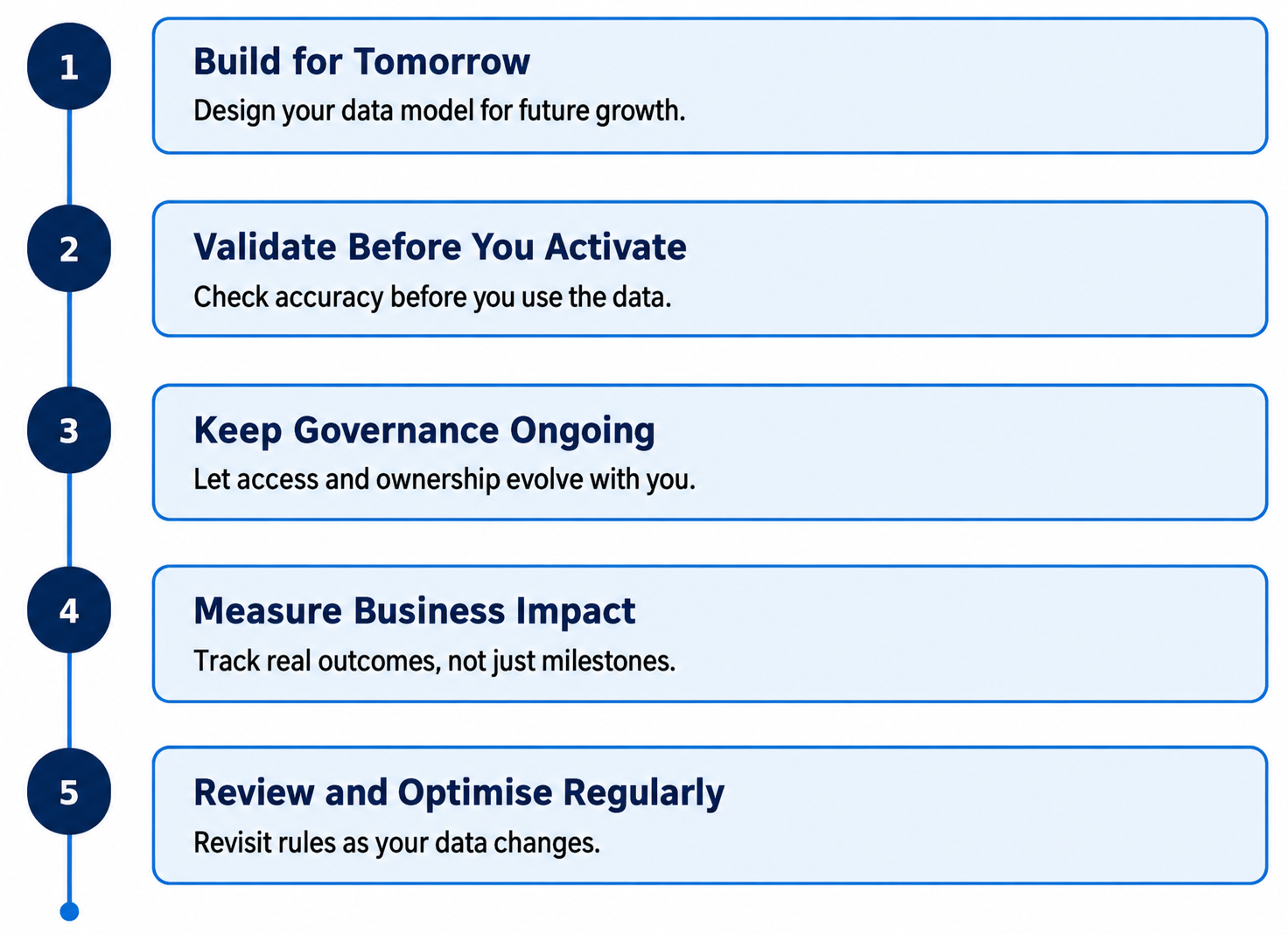
Here are a few practices that consistently lead to successful implementations:
Build for tomorrow, not just today. Design your data model with future business units, products, and integrations in mind.
Validate before you activate. Ensure identity resolution, data mappings, and customer profiles are accurate before using the data for segmentation or AI.
Keep governance ongoing. Data ownership, permissions, and compliance should evolve as your organization grows.
Measure business impact. Track improvements in customer experience, campaign performance, and operational efficiency instead of focusing only on technical milestones.
Review and optimize regularly. Customer data changes constantly, so revisit identity rules, data quality, and integrations to keep Data 360 performing at its best.
Common Salesforce Data 360 Implementation Mistakes to Avoid
Now that we've covered the overall Salesforce Data Cloud setup, let's explore the common pitfalls organizations face during the implementation process.
| Mistake | What Happens | How to Avoid It |
|---|---|---|
| Activating segments too early | Duplicate or wrong customer data goes out. | Fix identity resolution and the data model first. |
| Pulling in all data "just in case" | Higher cost and a messy data model. | Only bring in the data you actually need. |
| Setting up identity resolution once and forgetting it | Match rules stop working as new data comes in. | Review and test the rules regularly. |
| No one owns governance | Wrong people get access, and PII gets exposed. | Assign one clear owner from day one. |
| Skipping the data quality check | Unified profiles turn out messy or incorrect. | Clean and check data before connecting it. |
| Judging success by "data is unified" only | No one can prove real business impact. | Set clear KPIs like match rate and segment accuracy upfront. |
| No plan for long-term adoption | Project works at launch, then stalls afterward. | Plan for support and upkeep before you launch. |
Final Thoughts
A Salesforce Data 360 implementation succeeds or fails long before anyone builds a segment. Get your data quality, identity resolution, and governance right, and you get one accurate, secure view of the customer. Skip them, and you'll spend more time fixing duplicate profiles than using them.
Treat this Salesforce Data 360 implementation checklist as a living document; revisit it whenever a new source or team joins the project.
Need Salesforce Data 360 services? Our Salesforce data cloud consulting experts can help you plan your data strategy, configure identity resolution, and build a scalable implementation that aligns with your business goals.
Further Reading
What Tools and Resources Are Available for Salesforce Data Cloud?
How to Migrate from Marketing Cloud Connect to the Data Cloud-Native Connector
How Salesforce Data Cloud Powers AI Forecasting with Unstructured Data
How to Integrate Google BigQuery with Salesforce Marketing Cloud for Real-Time Segments
Frequently Asked Questions
-
Identity resolution matches and merges duplicate customer records from different systems into a single profile, improving data accuracy and enabling trusted customer insights across the business.
-
Salesforce data governance helps maintain data quality, control user access, protect sensitive information, and ensure compliance with regulations throughout the implementation lifecycle.
-
A Data Space is a dedicated workspace within Salesforce Data 360 that helps organizations organize customer data by business unit, brand, region, or department while maintaining data separation.
-
Clean and consistent data improves identity resolution, reduces duplicate records, and ensures unified customer profiles are accurate and reliable.
-
Data Model Objects (DMOs) provide a standardized structure for organizing customer data, making it easier to map information from multiple sources and create unified customer profiles.
Related Readings


Let’s Talk

Drop us a note, we’re happy to take the conversation forward 👇🏻