Key Takeaways:
B2B marketing involves longer buying cycles and multiple decision-makers, making automation essential for consistent lead nurturing and follow-ups.
Automating the right tasks helps marketers manage campaigns efficiently while delivering relevant content at each stage of the buyer's journey.
Choosing the right platform and maintaining clean data helps connect marketing efforts with sales outcomes and measure ROI.
Your next B2B campaign is ready to go. Before it launches, though, someone still has to segment the audience, schedule the emails, set up the follow-ups, and check that every lead gets the right message. Do that for several campaigns at once, and your team ends up managing tasks instead of generating demand.
Marketing automation takes much of that work off your plate. You build workflows once, and they respond to what prospects do, send relevant content, and move leads toward sales without anyone doing each step by hand.
This guide shows how to set that up, from picking the right processes to automate to building workflows that hold up.
What Is B2B Marketing Automation?
B2B marketing automation is the use of software and workflows to automate repetitive marketing activities, such as capturing leads, segmenting audiences, sending emails, nurturing leads, and following up. You set the rules and triggers, and the software decides what happens next.
Say a prospect downloads a whitepaper. A workflow can send a follow-up email, update their CRM record, and alert the sales team once the prospect meets your qualification criteria.
It won't replace marketers, and you don't need to automate everything. The point is to cut the repetitive work so your team can spend its time on things that need a person.
Which B2B Marketing Activities Can You Automate?
Not every marketing task needs automation, but some activities consume hours of your team's time despite following predictable, repeatable processes. These are often the best places to start.
Here are some of the key B2B marketing activities you can automate.
1. Lead capture and qualification
Getting a lead is the easy part. Someone still has to organize the prospect's details, judge how promising they are, and decide who sales should call. You can automate much of this by connecting website forms to your CRM, assigning leads by set criteria, and using lead scoring to flag the prospects most likely to convert.
2. Email marketing and lead nurturing
Once your contact list grows, sending follow-ups by hand stops being realistic. With email automation, you build sequences once, and each prospect gets content based on what they've done, what they care about, or where they are in the buying journey. For example, someone who downloads a product guide could get a few educational emails first, then an invitation to a demo.
3. Audience Segmentation and Personalization
B2B buyers differ by role, industry, and priorities, so one message for everyone tends to fall flat. Automation platforms can split your audience using CRM data, company details, past interactions, and engagement, so each segment gets emails and follow-ups that fit.
4. Lead routing and sales follow-ups
A hot lead cools off fast if nobody responds. Automated routing sends each prospect to the right sales rep based on territory, industry, company size, or product interest. You can also set alerts for when a lead asks for a demo, visits a high-intent page, or hits a certain score.
5. Campaign Execution
Running a campaign means juggling emails, landing pages, audience lists, and follow-up steps. Automation links them so one action sets off the next. Someone who registers for a webinar, for instance, can automatically get a confirmation, a reminder before the event, and the recording afterwards.
6. Marketing Reporting and Performance Tracking
Collecting campaign data from different channels and compiling reports manually can slow down decision-making. Automated reporting brings key metrics into dashboards, helping teams track campaign engagement, lead conversions, and pipeline contribution. This gives marketers a clearer view of what's working and where campaigns need improvement.
How to Automate B2B Marketing, Step by Step
Marketing automation isn't just about setting up a few automated emails and letting the software do the rest. To get real results, you need to know what to automate, how the pieces connect, and when to reach prospects along their buying journey. The steps below take you from picking the right opportunities to building workflows that support your goals.
1. Define Your Marketing Goals
Start by deciding what you want automation to do for you. More qualified leads? Better email engagement? Faster response times? Higher conversions?
Your answer decides what to automate first. If leads often go cold because follow-ups come too late, automating lead assignment and follow-up emails will help more than building an elaborate nurture campaign. Then set measurable targets, so you can tell whether the workflows are working.
2. Map Your B2B Buyer's Journey
B2B buyers rarely decide after one interaction. They visit your site, download a few resources, compare options, run it by their team, and talk to sales, usually in that order or something like it.
Map those stages so you know what prospects need at each point and where automation can step in. Someone in the awareness stage might get educational content, someone comparing solutions might get a product comparison, and someone showing strong intent might get a demo invitation. Without the map, you end up sending every contact the same message.
3. Audit Your Data and Existing Processes
A successful automation depends on accurate data. If your CRM has duplicate contacts, outdated details, or half-filled lead records, workflows will send the wrong messages or route leads to the wrong people.
Before you build anything, go through your data sources, lead capture forms, segmentation rules, and follow-up process. Fix the gaps, and standardize the fields your workflows will depend on. While you're at it, note the repetitive tasks that eat time or cause delays, since those are good candidates for automation.
4. Choose the Right Marketing Automation Platform Get Expert Guidance
This is one of the most important steps, as your implementation success depends on choosing the right platform and having the expertise to set it up correctly.
To get the most out of your marketing automation efforts, choose a platform that supports your requirements. The right tool should fit your existing technology stack rather than force you to rebuild your entire marketing operation around it. (We'll cover some of the top marketing automation platforms later in this blog.)
If you're unsure where to start or need help implementing your workflows, Concretio's marketing automation services can help you choose the right approach.
5. Build Your First Automation Workflows
You don't have to automate everything at once. Pick one or two processes that fix a clear problem and have results you can measure.
A new-lead workflow, for example, might run like this:
A prospect fills out a form on your website.
Their details are added to your CRM.
They get a confirmation email.
The lead is assigned to a rep based on your criteria.
The rep is notified once the lead meets your qualification requirements.
For every workflow, spell out the trigger, the conditions, the actions, and when a contact should exit. That keeps you from sending duplicate messages, running conflicting automations, or following up more than you should.
6. Personalize Workflows Using Customer Data
Automation doesn't mean sending the same message to everyone. Use the data you've collected to make each interaction fit the prospect.
You can personalize by industry, job role, company size, content interests, past interactions, and buying stage. A marketing manager researching campaign automation might get content on lead nurturing, while a sales leader gets something on lead routing and CRM alignment. Set clear rules for how each attribute changes the message, and don't guess when you don't have enough data to personalize properly.
7. Connect Marketing Automation With Sales
Automation works best when marketing and sales agree on what makes a lead ready for outreach.
Define your qualification criteria, who owns which leads, and what follow-up sales is expected to do. Then set your workflows to hand qualified leads to the right rep with the context they need, such as the pages the lead visited, the forms they filled out, and the emails they engaged with.
Feedback should also flow the other way. When sales tells marketing which leads were good and which weren't, you can tune lead scoring, sharpen your targeting, and see which campaigns produce opportunities instead of just contacts.
8. Test, Launch, and Optimize Your Workflows
Before you launch, run sample records through the workflow to check that the triggers, conditions, email content, and CRM updates all behave as expected.
Make sure contacts enter and leave the workflow correctly, get messages at the right time, and aren't caught in conflicting campaigns. Check consent rules and communication preferences, too.
Once it's live, compare results with the goals you set in step 1. Look at conversion rates, engagement, lead response times, and pipeline contribution where relevant, then adjust your timing, targeting, and logic based on what you see. Start small, learn from the results, and add more automation as your processes mature.

Best Marketing Automation Platforms for Mid-Market B2B Businesses
The right platform depends on your goals, your CRM, your team size, and how complex your workflows are. For mid-market B2B, look for one that handles lead nurturing, connects marketing with sales, and scales without piling on complexity. Here are four worth a look.
1. Salesforce Marketing Cloud
Salesforce offers powerful marketing automation through its legacy suites: Marketing Cloud Engagement and Marketing Cloud Account Engagement, as well as its next-generation platform built natively on the Salesforce Core architecture. The entire ecosystem is unified by the Salesforce Data 360 engine (for a 360-degree view of the customer) and enhanced by Agentforce for autonomous AI capabilities.
Marketing Cloud Engagement suits B2C businesses that run high-volume journeys across email, mobile, SMS, and web. It handles detailed audience segmentation, personalized campaigns, and complex journeys.
Marketing Cloud Account Engagement, formerly known as Pardot, is built for B2B marketing. It covers lead nurturing, email automation, lead scoring, prospect tracking, and close alignment with Sales Cloud.
The newer Growth and Advanced editions of Marketing Cloud Next natively connect with other Salesforce products, such as Sales Cloud and Service Cloud.
A well-built Marketing Cloud setup means fewer manual steps and campaigns that run on accurate data. Our Salesforce Marketing Cloud services are designed to get you there.
2. HubSpot Marketing Hub
HubSpot Marketing Hub is one of the leading marketing automation platforms that puts contact management, email marketing, landing pages, lead nurturing, and campaign analytics on top of its own CRM. Its visual workflow builder lets you automate follow-ups, segment contacts, and personalize campaigns based on what prospects do.
It fits mid-market B2B teams that focus on inbound marketing and want marketing and sales working from a single platform.
HubSpot and Salesforce both offer excellent marketing solutions. To see how they differ, read our comparison of Marketing Cloud vs. Marketing Hub.
If you're using or considering HubSpot, Concretio has specialized expertise, and our HubSpot services can help you set it up around your sales process.
3. Adobe Marketo Engage
Marketo Engage covers lead management, audience segmentation, email campaigns, and account-based marketing. You can track how prospects engage, send targeted content, and nurture leads through long buying cycles, and coordinate campaigns across channels.
Consider it if you need advanced campaign orchestration and detailed lead management, or workflows for complex marketing processes. It also supports closer alignment with sales on lead qualification and follow-up.
Learn how Marketing Cloud and Marketo Engage compare and compete with each other in our detailed comparison of Salesforce Marketing Cloud vs. Marketo Engage.
4. ActiveCampaign
ActiveCampaign brings email marketing, automation, segmentation, and lead management together in one place. Its visual automation builder can send emails, trigger follow-ups, and take other actions based on contact behavior, engagement, and changes in customer data.
It's built for businesses that run email-led campaigns and want to nurture leads without the weight of a large enterprise suite.
How Salesforce Marketing Cloud Account Engagement helps B2B marketers
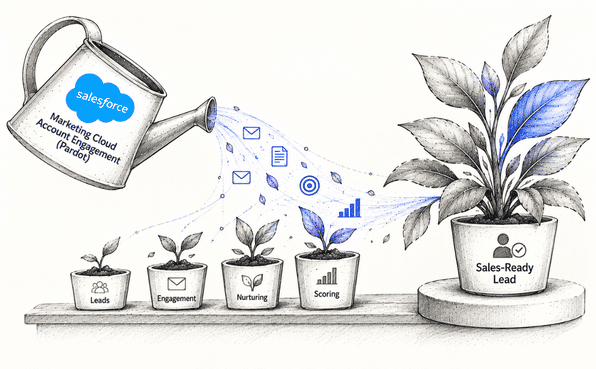
B2B buying takes time, involves several people, and rarely follows a straight line. Account Engagement is a B2B marketing automation tool that covers the stretch from a first website visit to a lead that’s ready for sales. Here is how it helps.
Capturing leads. Forms and form handlers capture and qualify leads, and progressive profiling lets you ask for more each time a prospect returns, so the first form can stay short. The platform also tracks which pages each prospect visits.
Scoring and grading. A score shows what a prospect does, and a grade shows how well they fit your ideal customer profile. AI Scoring flags hot leads based on engagement, sales knows who to call first.
Nurturing. Engagement Studio lets you build multi-touch campaigns, and dynamic content tailors emails, forms, and landing pages. A prospect who clicks a case study can get a demo invitation, while a quiet one gets a different message later.
Working with sales. Account Engagement connects natively to Salesforce CRM, so reps see prospect activity and get an alert when a lead is ready.
Measuring results. B2B Marketing Analytics surfaces pipeline insights to help prove ROI, so you can tie campaigns to revenue, not just opens and clicks
Common Challenges to Watch for When Automating B2B Marketing
Automating Marketing tasks can reduce manual work, but poorly planned workflows can create new problems. Before automating your B2B marketing processes, here are five challenges to watch for.
1. Messy data. Workflows trust whatever's in your CRM. If the same person appears twice, or a job title is three years out of date, the wrong people get the wrong emails, and nobody notices until a prospect replies to ask why. Clean up your records before you build anything on top of them.
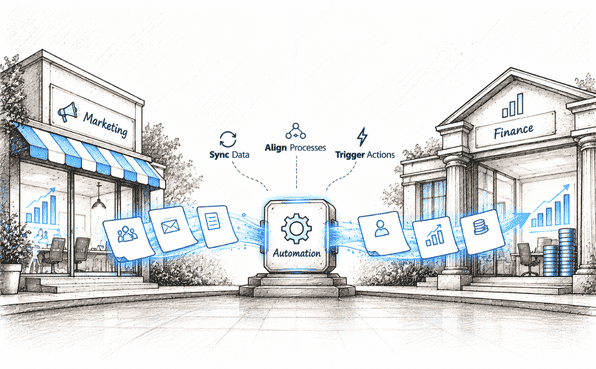
2. Marketing and sales see different things. Marketing sees email clicks. Sales sees call notes. When neither sees the other's side, a rep phones a lead who just asked to be left alone, or marketing keeps nurturing someone who's already in a deal. Connecting the two systems fixes most of this, and it's what platforms like Salesforce do by keeping marketing, sales, and service data together.
3. Overcomplicated workflows. Pile on too many rules, triggers, and conditions, and a workflow gets hard to test and even harder to maintain. We recommend keeping implementations simple. Automate the essentials first, then add to them as your needs grow.
4. Messages that still feel generic. Setting up automation doesn't make a message relevant. If every lead gets the same three-email sequence, you've automated the generic version. Use what you know about each prospect, like their role, what they've read, and how far along they are, and check results often enough to see what's falling flat.
5. Difficulty measuring ROI. Leads are easy to count, but revenue is harder. Unless your marketing data is tied to CRM outcomes, you can report on opens and form fills but not on whether any of it became a customer. Link the two, and you can track conversion rates, pipeline, and cost per customer.
The Bottom Line
Most B2B marketers are juggling demand generation, lead nurturing, sales handoffs, and the question of whether any of it is paying off. Doing all of that by hand means the planning and thinking get squeezed out by the busywork.
Automation won't fix a weak strategy, but it does take the repetitive tasks off your team. Start with one workflow, get it working, and build from there.
If you'd like help choosing a platform or setting it up around your current systems, Concretio can help.
Frequently Asked Questions
-
B2B sales cycles are longer, and several people often take part in a decision, so automation focuses on nurturing, lead scoring, and handing leads to sales. B2C usually deals with higher volumes and faster purchases, so the emphasis is on large-scale personalization across channels.
-
You need somewhere to store contacts and track what happens to them. Some platforms, such as HubSpot, include a CRM, while others connect to one you already use. A CRM link matters most for lead routing and for tracing campaigns back to revenue.
-
Lead scoring gives each prospect points based on who they are, such as role, industry, or company size, and what they do, such as visiting a pricing page, downloading a guide, or opening emails. When a score reaches a threshold you set, the lead is passed to sales. It helps reps focus on the prospects most likely to buy.
-
It doesn't need to be perfect, but your core fields should be reliable. Start with the basics: remove duplicate contacts, update outdated job titles and company names, and make sure the fields you segment on use consistent values, such as one spelling for each industry. Fix those first, since workflows build on them, then keep improving the rest as you go, rather than waiting for a perfect database.
-
It's possible, but it takes planning. You'll need to export contact data and rebuild workflows, and there can be a gap while you rebuild. That's one reason to choose a platform that fits your CRM and your plans for the next few years.
Related Readings
Let's Talk

Drop us a note, we’re happy to take the conversation forward 👇🏻