
Key Takeaways:
The Atlas Reasoning Engine helps Agentforce understand requests and decide what to do next based on available context.
Topics define tasks, while instructions set business rules, and actions let agents perform the required work.
Agentforce Builder helps teams inspect reasoning details and fix configuration issues to improve agent responses.
As the old saying goes, to win a battle, you must first understand the battleground. The same applies to Salesforce AI agents. To build successful agents, you need to understand not just what they do, but how they reason before acting.
Much like the brain, the Salesforce Atlas Reasoning Engine handles the thinking behind Agentforce. It helps AI agents interpret requests, weigh the available information, choose the right actions, and decide how to respond.
In this blog, we’ll look at what Atlas is, how it works, and what happens behind the scenes before an agent responds or takes action.
This blog is part of our series on understanding Agentforce inside out. So far we’ve covered:
What Is the Atlas Reasoning Engine?
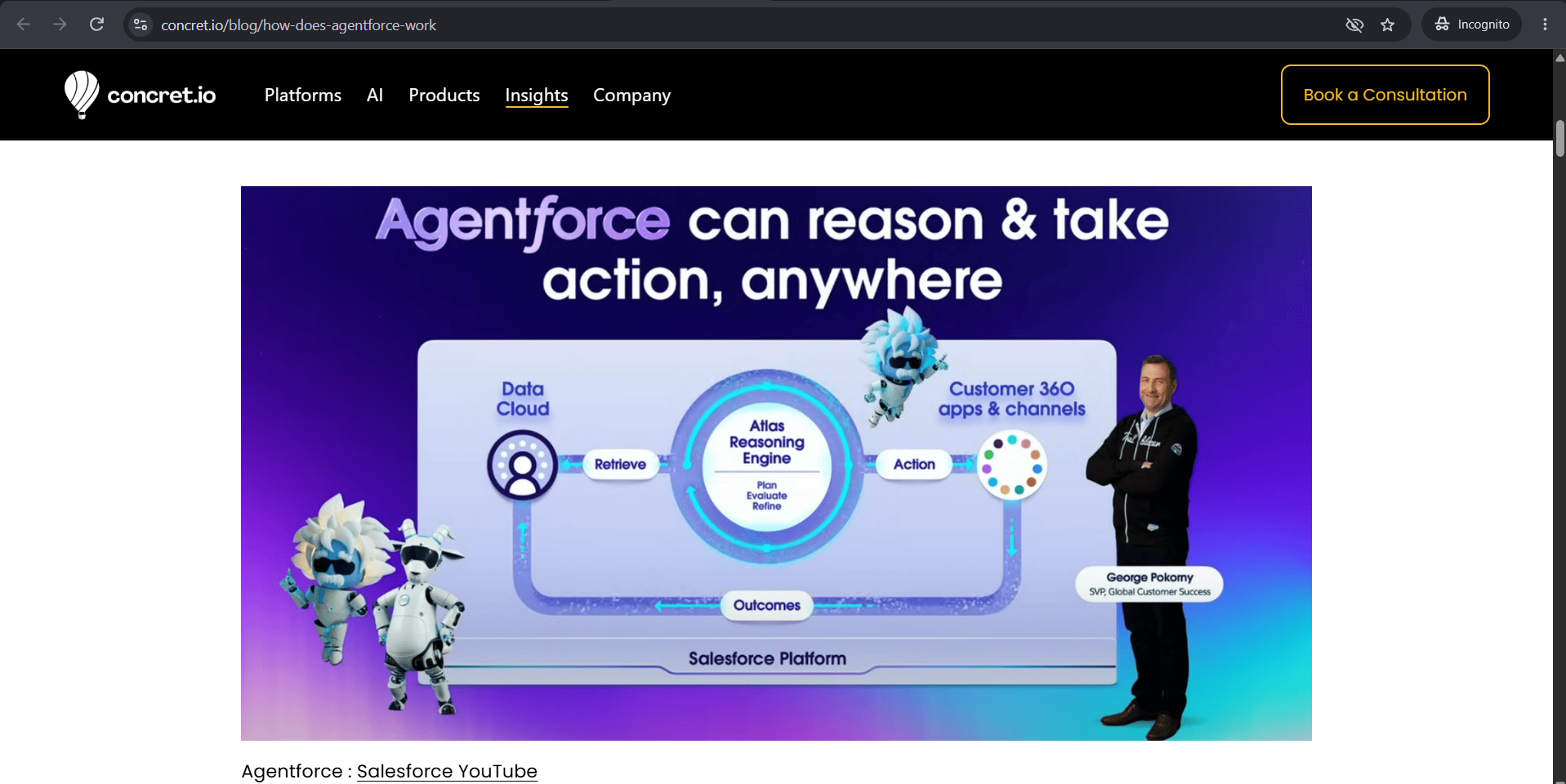
The Atlas Reasoning Engine is the reasoning system behind Salesforce Agentforce. It helps an AI agent go beyond simply generating a response by deciding how to handle a request, which actions to use, and whether it needs more information.
For example, if a customer asks to change a delivery address, the agent needs to understand the request, find the correct order, and determine how to update its shipping details. It may need to run multiple actions before it can give the customer a useful response.
The Atlas Reasoning Engine coordinates this process, allowing the agent to work through a request rather than rely on a fixed sequence of steps. It can use the information returned by an action to decide what to do next, or ask a follow-up question when the request needs clarification.
Why Did Salesforce Develop Atlas?
Salesforce had AI assistants before Atlas. Remember Einstein Copilot and the early Agentforce Assistant? They used Chain-of-Thought (CoT) reasoning, which splits a task into a sequence of steps and then carries them out to reach an answer or finish an action.
That worked for plenty of tasks, but it struggled whenever the plan needed to change. You couldn’t easily steer the assistant with new information halfway through a conversation, and follow-up questions and a growing list of actions became harder to manage. Salesforce pointed to three problems:
Limited adaptability. When a user added new information mid-conversation, the assistant struggled to change its plan.
Weak use of context. It couldn’t reliably answer follow-ups from things already said in the conversation.
Slowing down at scale. The more actions and use cases Salesforce added, the harder it was to keep responses fast and accurate.
Salesforce’s answer was to build Agentforce around Reasoning and Acting, known as ReAct. Rather than planning every step in advance and sticking to it, the system reasons about what to do, takes an action, looks at the result, and uses that to pick the next step. It can also stop and ask a clarifying question. All these improvements made Agentforce better at handling requests that change midway.
How Does the Atlas Reasoning Engine Work?
Now, you might be wondering how Atlas does its job. Well, it doesn’t just take a request and run a preset list of actions. Instead, it reasons through the request, determines what needs to be done, and decides which actions to take based on the results it receives.
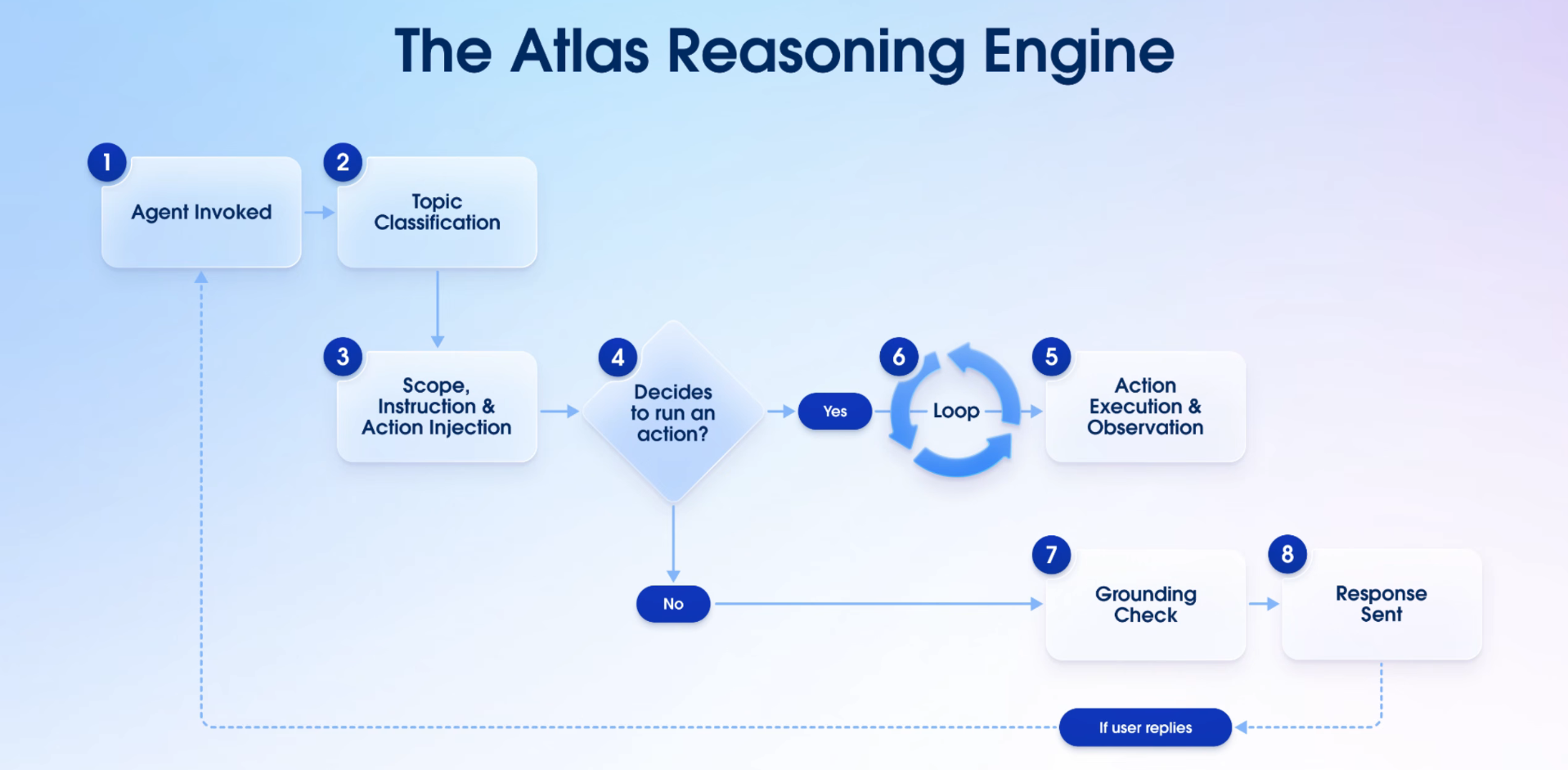
Let's understand how the Agentforce Atlas Reasoning Engine works from start to finish in simple steps
1. Invoke the Agent
The process begins when something calls the agent. That could either be a user sending a message or a system triggering it automatically. A new service request being created, for instance, can trigger an agent to start on it straight away, with nobody having to type anything.
From there, the Reasoning Engine takes over and looks for the right topic.
2. Classify the Request by Topic
The large language model (LLM) reads the request and works out which topic fits what the user wants. It compares the request with the available topics, going by their names and descriptions.
Say a sales rep asks, “What should I focus on today?” The agent has to find the topic that covers daily planning and sales priorities. If the request is outside its topics or guardrails, it won’t attempt the task. It’ll tell the user it can’t help with that.
With a topic chosen, the reasoning engine uses its instructions and available actions to determine how to handle the request.
3. Determine the Next Action
After identifying the relevant topic, Atlas hands the LLM everything the chosen topic defines: its scope, its instructions, and the actions. That tells the model what it’s responsible for, which rules apply, and what it’s allowed to do about the request.
Then the LLM decides what to do next. It can run an action, ask the user for more detail or a confirmation, or answer directly if no action is needed.
4. Execute Actions and Evaluate Results
When the LLM picks an action, Atlas runs it, whether that’s a Flow, a Prompt, or an API call, and captures what it returns. The LLM reads that output along with everything it already knows, then decides again: another action, a question for the user, or an answer. This loop keeps going until the agent is ready to reply.
5. Validate and Respond
Before responding, the agent performs a grounding check to verify that its response follows the instructions and stays within the defined guardrails. It then delivers the response to the user.
You can also track the agent's reasoning and action outputs in Agentforce Builder to understand how it arrived at its response.
How Topics, Instructions, and Actions Shape Agent Reasoning
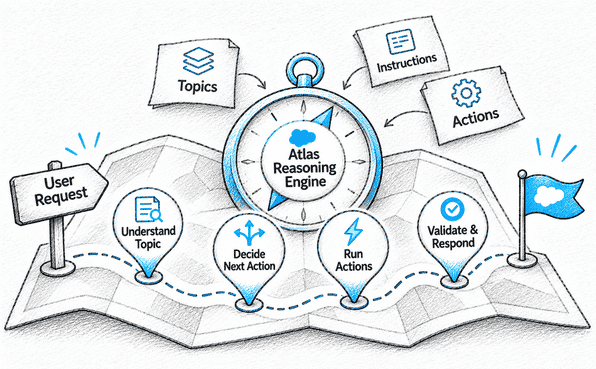
Salesforce Atlas Reasoning Engine relies on three building blocks when it makes decisions: topics, instructions, and actions. Each does a different job, and the agent needs all three to know what it’s being asked and what to do about it.
Topics are the “what.” A topic defines what the user is after and what task the agent is supposed to handle. When a request arrives, the agent compares it with the available topics and picks the best fit.
Instructions are the “how.” They tell the agent how to handle the task, and they can cover business policies, rules, guardrails, and the order in which certain actions should happen.
Actions are the “doing.” They let the agent look up information or carry out a task, such as finding an order, updating its shipping details, or running a Flow.
To see how they work together, take the customer who wants to change a delivery address. The Order Management topic covers the task. The instructions tell the agent to find the order before it changes the address. The actions then let it pull up the order and update the shipping details.
Together, these components help the Atlas Reasoning Engine narrow down the task, follow the relevant business rules, and select appropriate actions based on the information available.
How Atlas Uses Conversation History and Business Data

The Agentforce Atlas Reasoning Engine uses context to help the agent decide what to do next. When a request arrives, the LLM gets the user’s message along with the chosen topic’s scope, instructions, and available actions, plus the conversation so far. From that, it decides whether to answer, ask a follow-up question, or run an action.
In practice, it uses three sources:
The conversation so far. The agent can look back at earlier messages, so it understands follow-up questions and doesn’t ask for something twice. If a customer already gave their email address to find an order, the agent remembers it when deciding what to do next.
What actions return. After an action runs, its output goes back to the LLM with everything else it knows. The LLM reads the result and chooses what to do: run another action, ask for something that’s missing, or reply.
Your business data. Some tasks need information that isn’t in the conversation. For those, Agentforce can use retrieval-augmented generation (RAG) to pull relevant information from structured and unstructured sources through Data 360. The agent can then use it to answer a question or decide how to proceed.
How to Inspect and Troubleshoot Agent Reasoning
When an agent gives the wrong answer, the first job is to find out how it got there. You can’t change the reasoning process itself, but Agentforce Builder shows you the agent’s reasoning and action outputs, so your team can audit its behavior and see what to improve.
Here are a few pieces to examine:
The agent’s reasoning. Read the reasoning details to see why it picked a particular action, or how it approached the request in the first place. Our guide to the Agentforce Plan Tracer shows how to do this step by step.
The action outputs. Check what each executed action returned. If the result is wrong or incomplete, the agent probably didn’t have what it needed to carry on correctly.
Topics and instructions. If the agent took the wrong approach or skipped part of the process, go back to the topic, its instructions, and its actions. Clarifying the task scope or the business rules can improve the reasoning.
Once you’ve made a change, test the agent again with realistic requests to make sure it now behaves the way you want.
Keep in mind that looking at reasoning won’t stop every wrong answer. What it does is show you where the decision or the information went off track, so you can fix that part and try again.
Conclusion
The Atlas Reasoning Engine is what allows Agentforce to move beyond predefined sequences and make decisions based on a user's request and available context. By understanding how it works, you can better configure topics, instructions, and actions to guide agents through business tasks.
Since you cannot directly change the reasoning process itself, building a successful Agentforce solution depends on getting the configuration right. An experienced Agentforce consulting partner can help you define custom topics, refine instructions, and configure actions to align with your business requirements.
Planning to build an Agentforce solution? Explore Concretio's Agentforce consulting services to get expert guidance on building and configuring AI agents.
Frequently Asked Questions
-
ReAct (Reason + Act) is a loop where an AI reasons, acts, observes the result, and adapts its next step. Atlas, Agentforce’s reasoning engine, repeats this loop until the user’s goal is fulfilled. It also grounds answers in enterprise data and shares its reasoning so admins can review decisions.
-
Atlas reads the user’s message, identifies their intent, and compares it to each topic’s name and classification description, then uses the best match. If nothing fits, the request defaults to an “off-topic” classification. The chosen topic acts as the agent’s job description for that moment, defining valid actions and applicable policies. Clear, distinct classification descriptions therefore make routing more accurate.
-
When a request doesn’t match any topic, Atlas Reasoning Engine defaults to an “off-topic” classification, so the agent doesn’t improvise outside its scope. Admins can reinforce this with off-topic instructions, explicit statements about subjects the agent must avoid however a user phrases the request. If a question is difficult or hits a strict business rule, the conversation can be handed to a human.
-
Yes, you can test your Agentforce agent before going live through:
Conversation preview: In Agent Builder, test edge cases like ambiguous queries and out-of-scope requests.
Topic Classification log: It shows which topic the model selected and why.
Visible reasoning: Atlas shares its “thoughts” in Agent Builder, so you can review its decisions.
Testing Center: It runs batches of synthetic utterances to measure topic classification and action selection before customers see the agent.
Related Readings
Let's Talk

Drop us a note, we’re happy to take the conversation forward 👇🏻