
Key takeaways:
Apply least-privilege permissions so agent actions perform only authorized operations.
Validate inputs, enforce Salesforce data access controls, and add guardrails to prevent security risks.
Test agent actions thoroughly and prepare for AgentExchange security review before publishing.
AI agents are becoming an important part of the Salesforce ecosystem. With Agentforce, businesses can build agents that retrieve customer information, update records, trigger workflows, and connect with external systems. However, every action an agent can perform introduces potential security risks.
An agent might have permission to access a tool but still use it in an unintended way. For example, a customer support agent designed to update case details could modify an unauthorized record if the underlying action does not enforce proper access controls.
This is why developers must secure agent actions before publishing their solutions on AgentExchange. Securing an agent involves more than configuring its instructions. Agentforce developers must also protect the code, data, permissions, and integrations behind every action.
In this guide, we will explore the key security risks associated with agent actions and the practical steps developers can take to secure agent actions before publishing on AgentExchange.
What Are Agent Actions in Salesforce Agentforce?
Agent actions allow AI agents to perform specific tasks in response to user requests. Instead of simply generating answers, an agent can invoke an action to retrieve information, update a Salesforce record, execute a business process, or interact with an external service.
Depending on the implementation, Salesforce Agentforce actions can use capabilities such as Apex, Salesforce Flows, prompt templates, and external services.
For example, a sales agent might use actions to retrieve account details, summarize an opportunity, or update a record after a user confirms a change.
Each action introduces a security boundary. Developers must determine what the action can access, which operations it can perform, and whether the executing user or identity is authorized to perform them.
This is particularly important for AgentExchange developers building solutions for multiple customers, where differences in permissions, data sensitivity, and business processes can affect how an action behaves.
Identify Security Risks Before Building Agent Actions
Before implementing an action, developers should understand what could go wrong if it receives unexpected inputs, accesses sensitive data, or executes in the wrong context. Some common risks include:
Excessive permissions: An action receives broader access than it needs, allowing it to retrieve or modify unrelated records.
Unauthorized data access: An action returns sensitive information without checking whether the executing user can access it.
Unsafe inputs: Malicious or malformed inputs influence record queries, updates, or other operations.
Unintended actions: An agent triggers a destructive operation, sends information to the wrong recipient, or repeats a transaction.
External integration risks: An action exposes credentials or transfers unnecessary customer data to an external service.
Prompt injection: Malicious instructions embedded in user input or external content influence the agent's decisions.
Create a simple threat model for each action. Identify its inputs, outputs, permissions, data sources, and potential impact before deciding which security controls it needs.
Essential Security Practices for Agentforce Agent Actions
To secure agent actions before publishing on AgentExchange, developers need to implement security controls at every stage, from managing permissions and validating inputs to protecting sensitive data and testing against potential threats. Here are some of the best practices to secure agent actions and ensure that each action performs only the operations it is authorized to execute.
1. Apply Least Privilege to Agent Action Permissions
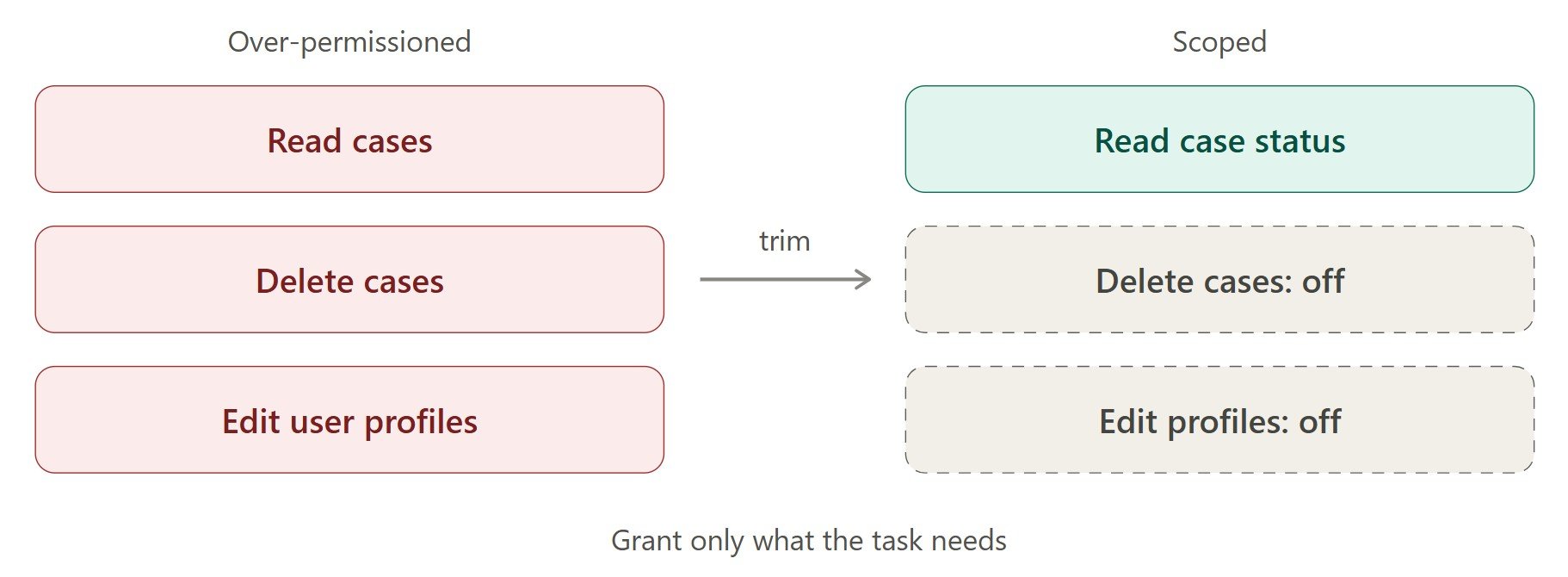
One of the most important principles of Agentforce agent security is least privilege. Every action should have only the access necessary to perform its intended task. For example, an agent that retrieves a customer's case status does not need permission to delete cases or modify user profiles.
To implement least privilege:
Assign only the required object and field permissions.
Separate read-only actions from record-creation, update, and deletion actions.
Restrict access to the specific records and resources needed.
Review the permissions of the user or identity under which the action executes.
Avoid granting broad administrative privileges to simplify development.
Pay particular attention to agent action permissions. Allowing an agent to invoke an action does not automatically mean every operation inside that action is appropriately authorized.
Developers must also review the underlying Apex, Flow, or integration logic. An action should enforce its own access requirements instead of relying exclusively on the agent's instructions or configuration.
2. Enforce Salesforce Data Access Controls
Salesforce provides several security mechanisms for controlling access to records, objects, and fields. AgentExchange developers must understand how these controls apply to each agent action.
Enforce record-level sharing
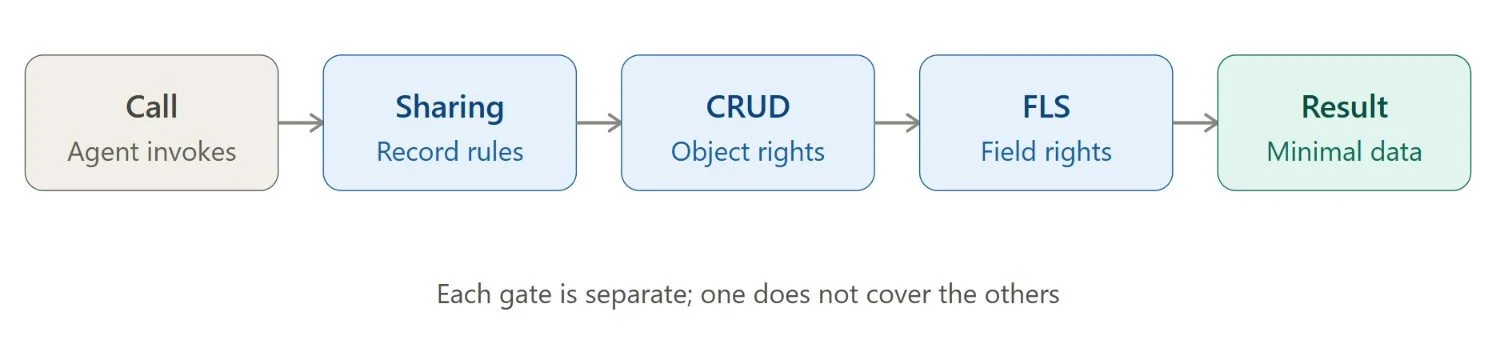
Use appropriate Apex sharing declarations, such as with sharing or inherited sharing, when record access should follow Salesforce sharing rules. However, sharing declarations alone do not enforce object-level and field-level permissions. Developers must address those separately.
Enforce CRUD and field-level security
CRUD controls whether a user can create, read, update, or delete records of an object. Field-level security (FLS) controls access to individual fields. Use appropriate permission checks and user-mode database operations where applicable. Avoid returning sensitive fields simply because the underlying query can retrieve them.
Review Flow execution context
For Flow-based actions, examine the execution context and any operations that run with elevated privileges. Verify that the Flow does not allow users to access or modify records beyond the intended scope.
Validate access within the action
Consider an action that accepts an Account ID. Before returning account details or modifying the record, the action should validate the input, confirm that it refers to the expected object, and enforce the appropriate access controls.
These checks help prevent an agent from using a valid action to perform an unauthorized operation.
3. Validate Inputs and Handle Errors Safely
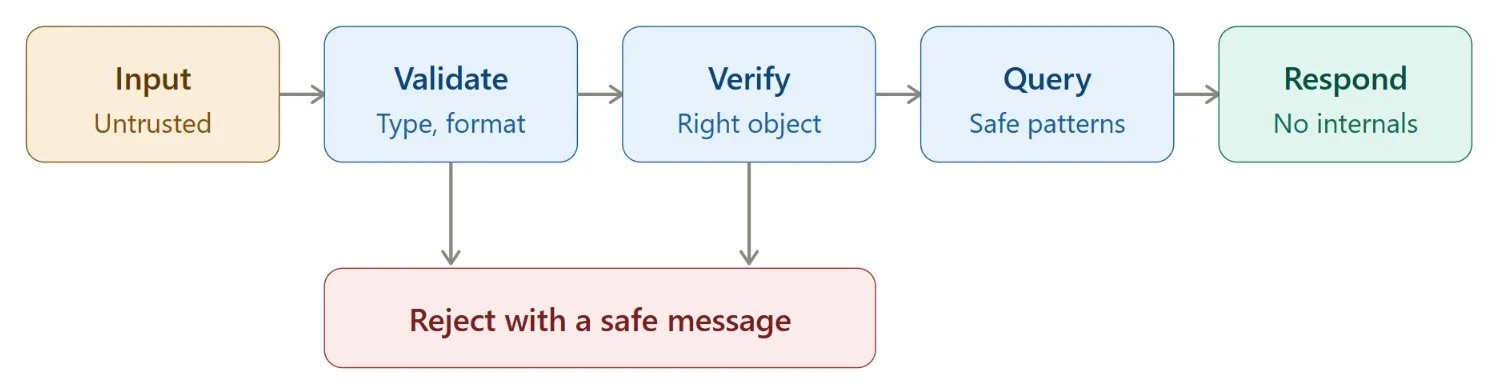
AI-generated inputs should not automatically be trusted. Even when an agent is configured correctly, user requests or external content can produce unexpected parameters. Developers should validate every input before processing it.
Key practices include:
Check required parameters, data types, formats, and acceptable values.
Verify that record IDs belong to the expected object.
Use safe query patterns and avoid concatenating untrusted input into dynamic SOQL.
Apply business rules before performing updates or deletions.
Set reasonable limits on bulk operations and resource-intensive requests.
Handle exceptions without exposing credentials, sensitive records, or internal implementation details.
For example, an action that updates an opportunity should verify that the requested stage is valid and that the executing identity is authorized to make the change.
Error handling also matters. If an external API fails, the action should return a safe, understandable message rather than exposing authentication tokens, internal URLs, or sensitive response data.
4. Add Guardrails to High-Impact Actions
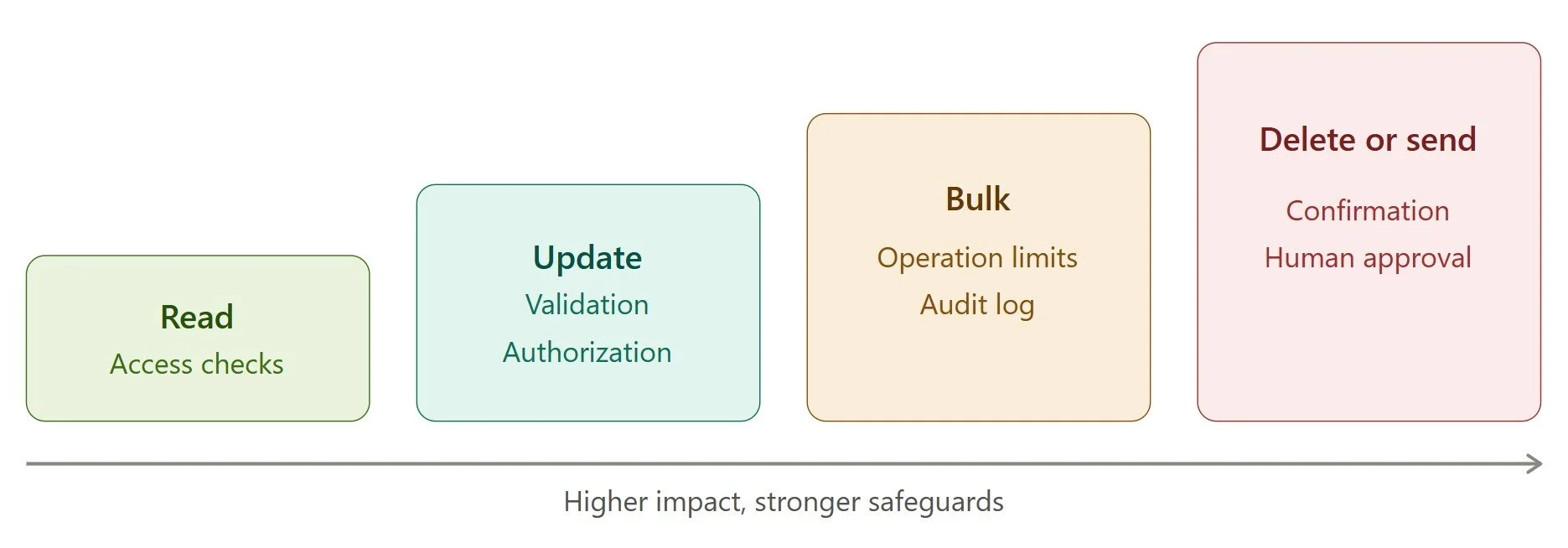
Not every agent action carries the same level of risk. Retrieving a product description is different from deleting customer records or initiating a sensitive business transaction.
Classify actions according to their potential impact and apply safeguards accordingly.
| Action type | Recommended safeguard |
|---|---|
| Read-only retrieval | Access checks and field filtering |
| Routine record updates | Input validation and authorization |
| Bulk updates | Operation limits and audit logging |
| Record deletion | Explicit authorization and confirmation where appropriate |
| Sensitive transactions | Strong verification and approval workflows |
| External communications | Recipient validation and safeguards against unintended sends |

For high-impact operations, consider requiring human approval before execution. This is particularly useful when an action is irreversible or could have significant financial or operational consequences.
Salesforce developers should also consider repeated execution. If an agent retries an operation, it should not accidentally create duplicate records or trigger the same transaction multiple times. Idempotency controls and transaction safeguards can help prevent these problems.
Remember that approval workflows complement security controls; they do not replace authorization or input validation.
5. Secure External APIs and Integrations
Many AgentExchange solutions connect Salesforce with external applications, data sources, or AI services. These connections can expand an agent's capabilities, but they also introduce additional security risks.
To protect these integrations:
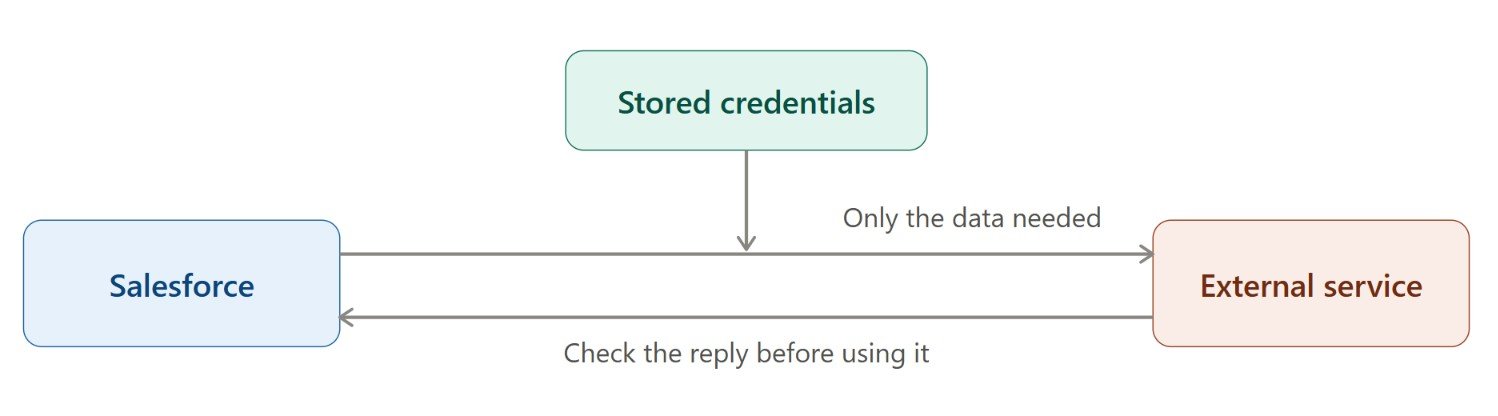
Use supported credential-management mechanisms, such as Named Credentials and External Credentials where appropriate.
Never hardcode passwords, API keys, or access tokens.
Send only the customer data required for the specific operation.
Validate external responses before using them in subsequent actions.
Configure appropriate timeouts and safe failure handling.
Review how external services process, store, and retain transmitted data.
Consider an agent that retrieves customer information from Salesforce and sends it to an external enrichment service. Developers should verify that the request contains only necessary fields and that the returned data cannot trigger unauthorized record updates.
External integrations should be included in the overall AgentExchange security assessment, rather than treated as separate components that fall outside the application's security boundaries.
6. Test Agent Actions Against Security Threats
Testing should verify not only that actions work as expected, but also that they reject unauthorized or dangerous requests. Before publishing, test the following scenarios.
Authorization testing: Attempt to access records or fields that the executing identity should not be able to access.
Input testing: Submit invalid record IDs, malformed parameters, unexpected values, and inputs designed to manipulate the action.
Destructive-operation testing: Verify that unauthorized deletions, excessive bulk updates, and unintended transactions are blocked.
Integration testing: Test expired credentials, failed API requests, unexpected responses, and service timeouts.
Prompt-injection testing: Evaluate whether malicious instructions or untrusted external content can influence an agent to invoke inappropriate actions.
Repeated-execution testing: Check whether retries cause duplicate records, repeated transactions, or unwanted workflow loops.
Use automated security scanning alongside manual testing. Salesforce Code Analyzer can help identify potential code issues, but automated tools do not detect every vulnerability. Agentforce developers should also review authorization logic, data flows, and business-specific attack scenarios.
Prepare Agent Actions for AgentExchange Security Review
Once the actions have been secured and tested, prepare the solution for the applicable AgentExchange security review requirements. Before submission:
Review every action included in the solution.
Document its purpose, inputs, outputs, permissions, and external dependencies.
Verify record-sharing, CRUD, and FLS enforcement.
Review authentication, credential handling, and API security.
Run appropriate automated security scans.
Perform manual testing and address identified vulnerabilities.
Test the final package or solution version intended for publication.
Keep evidence of security testing and document how identified issues were resolved. This makes the review process more structured and helps the team maintain consistent practices across releases.
Remember that passing a Salesforce security review does not guarantee that every possible vulnerability has been eliminated. Security responsibilities continue as the solution evolves, particularly when new actions, permissions, or integrations are introduced. Learn about the common reasons Agentforce packages fail security review here.
AI Agent Security Checklist Before Publishing
Use this checklist to verify that your solution is ready for its final security assessment.
Every action has a clearly defined purpose and scope.
Agent action permissions follow least-privilege principles.
Record-sharing, CRUD, and FLS controls are enforced appropriately.
Inputs are validated before processing.
Outputs expose only the data required for the task.
High-impact actions have appropriate safeguards.
External credentials and API connections are secured.
Errors and logs do not expose sensitive information.
Positive, negative, and adversarial tests are complete.
Automated scans and manual security testing are complete.
Required security-review documentation is prepared.
The final solution version has been tested.
Final Thoughts
Securing agent actions is an essential part of building trustworthy Salesforce AI solutions. An agent may follow its instructions correctly and still create security risks if its underlying actions have excessive permissions, weak input validation, or inadequate data-access controls.
Before publishing on AgentExchange, developers should apply least privilege, enforce Salesforce security controls, protect external integrations, and test actions against realistic attack scenarios. Each action should be designed to perform only the operations it is authorized to execute.
A strong Agentforce agent security strategy also requires reviewing the solution whenever its code, permissions, or capabilities change.
Ultimately, an AI agent is only as secure as the actions it can execute. By prioritizing security from development through testing and deployment, developers can minimize risks, safeguard customer data, and build reliable solutions for marketplace approval. Businesses looking to build secure, scalable, and compliant AI solutions can hire AgentExchange developers who understand Salesforce security best practices and can develop trusted Agentforce solutions ready for real-world use.
Frequently Asked Questions
-
Agentforce agent security helps prevent unauthorized data access, unintended record changes, sensitive information exposure, and misuse of connected tools. Strong security controls help businesses deploy AI agents more safely within their Salesforce environments.
-
Agent action permissions determine which actions an agent can invoke and under what access conditions. Developers should restrict these permissions to necessary operations and ensure that the underlying Apex, Flow, or integration independently enforces appropriate authorization.
-
Security testing helps identify vulnerabilities before an AI agent reaches production. It verifies that permissions work correctly, inputs are handled safely, sensitive data remains protected, and unauthorized operations are blocked.
-
AI agents should be assessed before deployment and whenever significant changes affect their code, permissions, integrations, or capabilities. Regular reviews and continuous testing also help teams identify emerging vulnerabilities as systems evolve.
-
Human approval provides an additional safeguard for sensitive, irreversible, or high-impact operations. It allows authorized users to review an action before execution, reducing the risk of unintended changes. However, it should complement rather than replace access controls and input validation.
Related Readings
Let's Talk

Drop us a note, we’re happy to take the conversation forward 👇🏻