Salesforce Agentforce: A complete guide
Key Takeaways
Agentforce is Salesforce's platform for building autonomous AI agents that reason over data and take real action, not just chat.
It integrates natively with Salesforce Flows, Data Cloud, and Slack, with usage-based pricing that scales as you grow.
Building an agent requires real setup and testing; it works best for Salesforce users with clean data, and now supports multi-agent orchestration.
It’s been two years since Agentforce's launch, yet many businesses are still unsure what it’s all about. And honestly, that’s understandable; the Agentforce ecosystem itself is complex, and figuring out how all the pieces fit together isn’t straightforward. In a situation like this, having doubts about whether to implement the technology or not is completely natural.
To save you the hassle and answer all your questions, we’ve created this 360° guide to Agentforce. We’ll help you understand the technology from the ground up, including what Agentforce is, how it works, the different types of agents, real-world use cases, benefits, comparisons, and how to build and implement Agentforce agents.
By the end of this guide, you’ll have a clear understanding of Agentforce and the confidence to evaluate where it can actually fit into your business.
If you'd rather skip the research and just talk through whether Agentforce fits your business, speak with our Agentforce consulting experts.
What Is Salesforce Agentforce?
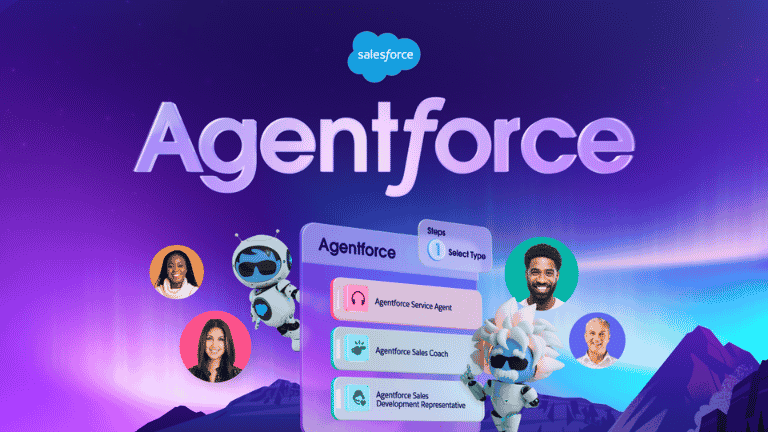
Agentforce is Salesforce's platform for building autonomous AI agents that doesn't just answer questions like a chatbot, but can actually take action inside your business systems. It sits on top of Salesforce's Customer 360 platform and is designed in a way where agents understand a request, reason about how to handle it, and then execute real tasks: updating a record, issuing a refund, scheduling an appointment, or answering a customer's question using your company's own data.
As of 2026, the platform has been rebranded and expanded under the name Agentforce 360, reflecting Salesforce's push toward what it calls the "agentic enterprise", a model where human employees direct and collaborate with teams of AI agents rather than doing every task themselves.
How Does Agentforce Work?
Salesforce describes agents as needing three core ingredients to get work done: data, reasoning, and actions. Together, these three components allow an Agentforce agent to understand a request, determine what needs to happen, and take action to get the job done.
For a deeper dive into this architecture, see our full breakdown: How Does Agentforce Work
1. Data- grounded in your business context
Just like data is required for any AI to work, Agentforce runs on the same fuel. It connects to Data Cloud (also referred to as Data 360), which acts as a unified data backbone. It ingests and harmonizes both structured data (CRM records, SQL databases) and unstructured data (PDFs, emails, chat transcripts) from across your business in real time. This is what allows an agent to answer a specific customer's question using their actual order history, rather than giving a generic response.
2. Reasoning- the "brain" of the agent
Once an agent has the relevant data, it needs to reason about what to do with it. Agentforce's reasoning engine interprets the user's intent, decides which Topic the conversation falls under, and determines the right Action to take. This is the layer that separates Agentforce from rule-based automation: instead of following a fixed script, the agent evaluates context and makes a judgment call, and you can inspect exactly how it got there during testing.
3. Actions- actually doing the work
This is where agents earn the "agentic" label. Actions are the things an agent can execute such as retrieving a record, triggering a Flow, calling an API, or generating a response grounded in your knowledge base. Because Agentforce is built natively into the Salesforce platform, it can reuse your existing Flows, Apex, and APIs as agent actions rather than requiring you to rebuild your automation from scratch.

The building blocks of Agentforce: Topics and Actions
Practically speaking, every agent you build is made up of:
Topics: The areas of expertise an agent has (e.g., "Order Status," "Returns," "Case Management"). Each topic includes a description, scope, instructions, and the group of actions relevant to it.
Actions: The specific capabilities within a topic that let the agent do something, such as retrieving related records or triggering a workflow.
Instructions: Natural-language guidance that tells the agent how to behave within a topic.
Variables: Structured data (like a Contact or Case ID) that give the agent context about who or what it's working with.
Agentforce trust and guardrails
Because agents can take action on real data, Salesforce has built a dedicated trust layer around Agentforce:
Einstein Trust Layer: Protects data privacy and security with features like dynamic grounding, zero data retention, and toxicity detection, so your data isn't used to train underlying LLMs and sensitive information stays protected.
Agent Guardrails: A combination of user-defined safeguards and Salesforce-managed protections that stop an agent from going off-topic, deviating from instructions, or producing hallucinated or biased responses.
Audit Trail: Logs agent actions and outputs so you can track what an agent did and confirm it complies with your organization's governance policies.
Types of Agents in Agentforce
Agentforce isn't limited to a single type; it's a family of agents built to do different functions across the business. Salesforce provides out-of-the-box agent templates you can customize, including:

Service Agents: These agents handle customer support: troubleshooting, order status, returns, billing issues, and escalation to a human rep when needed.
Sales Agents (SDR Agents): Qualify leads, send personalized outreach, answer pricing questions, and schedule meetings on a rep's calendar.
Marketing Agents: For marketing teams, these agents generate campaigns, audience segments, briefs, and end-to-end customer journeys based on business goals.
Commerce Agents: Work as a digital assistant that can manage storefronts, personalize promotions, and guide shoppers through purchases.
Employee-facing / Coworker Agents: Internal agents that help employees with tasks like IT support, onboarding questions, or research, often surfaced directly inside Slack.
Custom Agents: These are the agents you can build from scratch in Agentforce Builder for any use case specific to your business, industry, or workflow.
Practical Agentforce Use Cases for Businesses
Rather than deploying one agent to handle everything, most businesses build several narrowly scoped agents, each focused on a specific job. Here's where Agentforce agents are typically put to work:
Order and delivery management: Where's my order, I want to return this, Can I swap sizes this is what customer service teams deal with daily, and it's usually the first thing companies hand off to an agent.
Product and service information: Questions about stock, specs, or pricing that a rep would otherwise have to look up manually. An agent can also nudge a customer toward the right product based on what they're actually asking for.
Financial and transactional support: Customers can resolve billing disputes, ask about loan or credit terms, or get help filing a fraud claim without waiting for a callback.
Technical support and troubleshooting: Agents walk customers through login issues, API errors, and device problems, and guide them through setup.
Knowledge assistance: Rather than a customer digging through a help center themselves, the agent finds the right article or answer and hands it over directly.
Account and scheduling management: Routine requests like password resets, membership renewals, and appointment booking or rescheduling get handled instantly.
Escalation handling: Agents use sentiment analysis to detect a frustrated customer and hand the conversation off to a human rep before it escalates further.
The Integration Capabilities of Agentforce
The best thing about Agentforce is that it's built directly into the Salesforce platform, rather than a separate tool that requires extra work to connect. Here's how it connects seamlessly:
Native platform tools: Agentforce doesn't ask you to rebuild automation you've already invested in. Any existing Flow, Apex class, or API you've built in Salesforce can be plugged in directly as an agent action, so an agent can trigger the same processes your team already relies on.
Data Cloud / Data 360: Data Cloud pulls together structured data like CRM records and orders with unstructured data like PDFs, emails, and chat transcripts, and can also draw in data from outside Salesforce entirely, so agents aren't stuck answering only from what's in your CRM.
Slack: For employee-facing agents especially, Slack becomes the interface. Instead of switching into a separate app, employees can ask an agent a question or hand it a task right inside a Slack channel or DM, and get a response without breaking their workflow.
MuleSoft: Not every system a business runs on lives inside Salesforce. MuleSoft acts as the bridge, letting agents reach into external, non-Salesforce systems (legacy databases, third-party platforms, internal tools) to retrieve data or trigger actions there too.
Communication channels: Agentforce supports web and in-app messaging, SMS, WhatsApp, Facebook Messenger, and Apple Messages for Business, and can even handle voice conversations through partners like Amazon Connect, Genesys, Five9, and NICE.
What It Costs to Run Agentforce
Pricing is usually the first question anyone asks about Agentforce, and the honest answer is: it depends on how you buy in. There are a few different models to choose from:
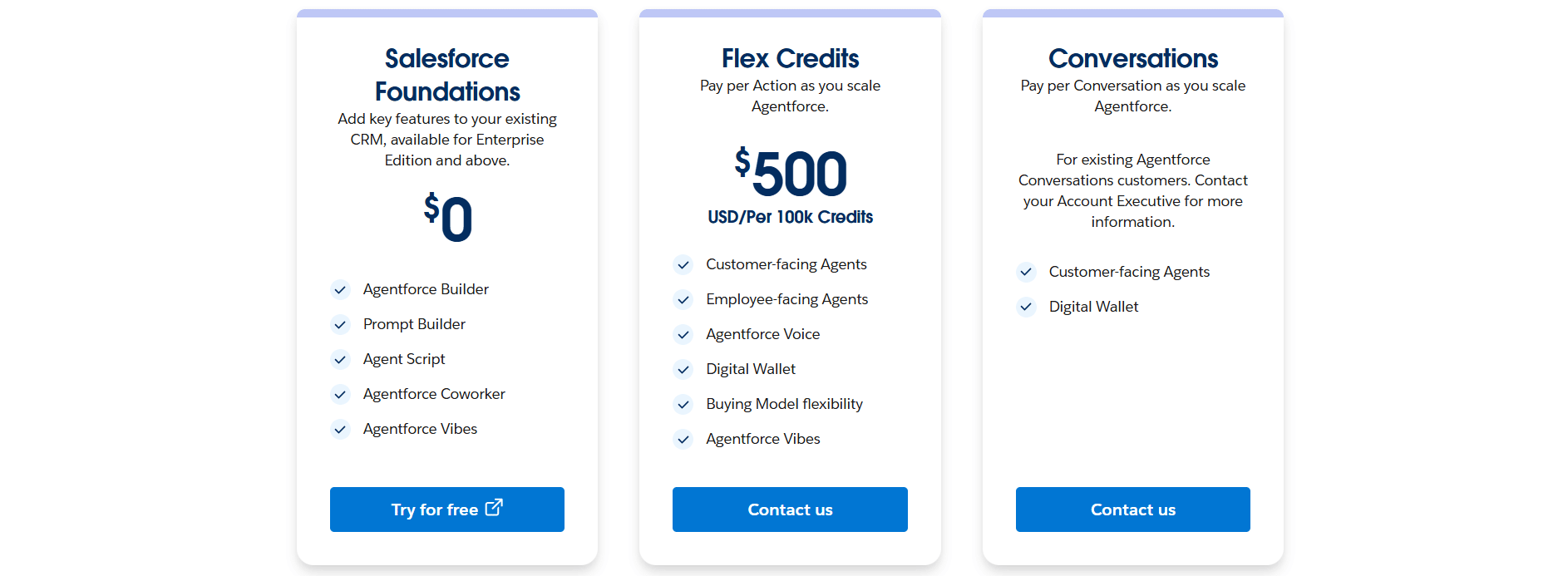
1. Salesforce Foundations: A free ($0) add-on for Enterprise Edition and above that gives you access to core tools like Agentforce Builder, Prompt Builder, and Agent Script, plus 200,000 free Flex Credits to try Agentforce before committing to spend.
2. Flex Credits: The most flexible consumption model, priced at $500 per 100,000 credits. Every action an agent takes (answering a question, updating a record, running a custom prompt) draws down credits, a standard Agentforce action costs 20 credits, while a voice action costs 30 credits. This model works across both customer-facing and employee-facing agents, and usage can be tracked in real time through Salesforce's Digital Wallet.
3. Conversations: Flat, per-conversation price of $2 per conversation, aimed specifically at customer-facing agents. It's simpler than Flex Credits but less flexible, and you can't run both pricing models in the same org simultaneously.
4. Help Agent Resolutions: A newer, pay-per-resolution option available on the Help Agent SKU, priced at $2 per resolution. Any agent actions or data lookups that happen during a successful resolution are included in that flat $2, rather than billed separately as Flex Credits.
Agentforce add-ons and licenses for organizations wanting unmetered employee usage:
Agentforce Sales/Service/Field Service add-ons: $125/user/month
Agentforce Industries add-ons: $150/user/month
Agentforce 1 Editions (bundles the add-on plus 2.5 million Flex Credits/year): from $550/user/month
Agentforce User License (metered, limited CRM object access): $5/user/month, requires Flex Credits
For a deeper breakdown of how Agentforce pricing has evolved and what to watch for at renewal, Concretio's guide to the new Agentforce pricing model is worth a read.
With the cost side covered, the natural next step is actually building one, here's what that process looks like in practice.
How to Build an Agent in Agentforce (Step-by-Step)
This is where the hands-on work starts: in Agent Builder, a tool that lives inside Agentforce Studio, designed to walk you through the process step by step rather than dropping you on a blank screen
Open Agentforce Studio. Navigate to the Agentforce Studio app in your org (or a Salesforce Developer Edition org if you're just testing), go to the Agents tab, and click New Agent.
Choose a starting point. You can either select a pre-built template (e.g., a Service Agent template) or describe what you want to build in natural language and let Agentforce assist you. Templates give you a working set of Topics, Actions, and Variables out of the box.
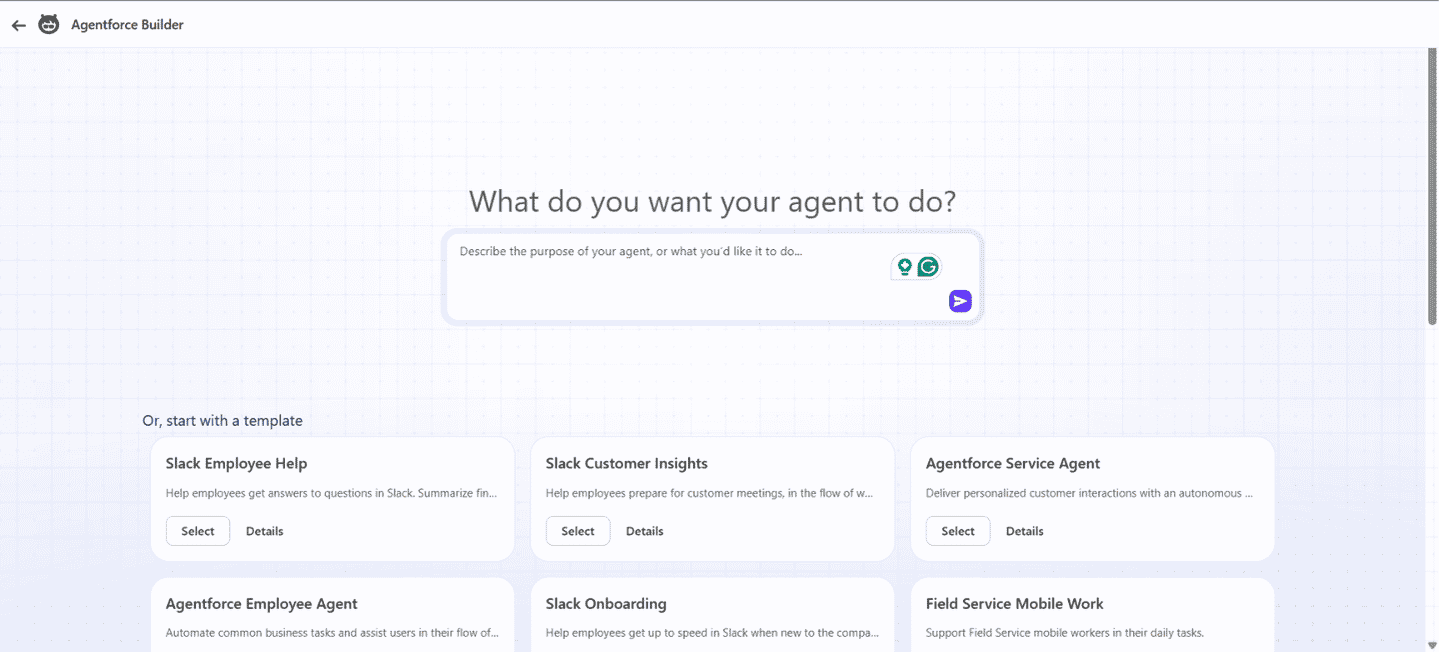
Scope the agent deliberately. Don't try to make one agent do everything. Decide what role this specific agent should play, then build around that.
Review and trim the template. Templates typically include several pre-built Topics. Delete the ones you don't need, and update references so nothing points to a removed Topic.
Create your own Topics and Actions. A Topic defines an area of expertise (with a name, description, scope, and instructions); Actions are the specific tools the agent uses within that topic. These are often built from a Flow, Apex, or a prompt template.
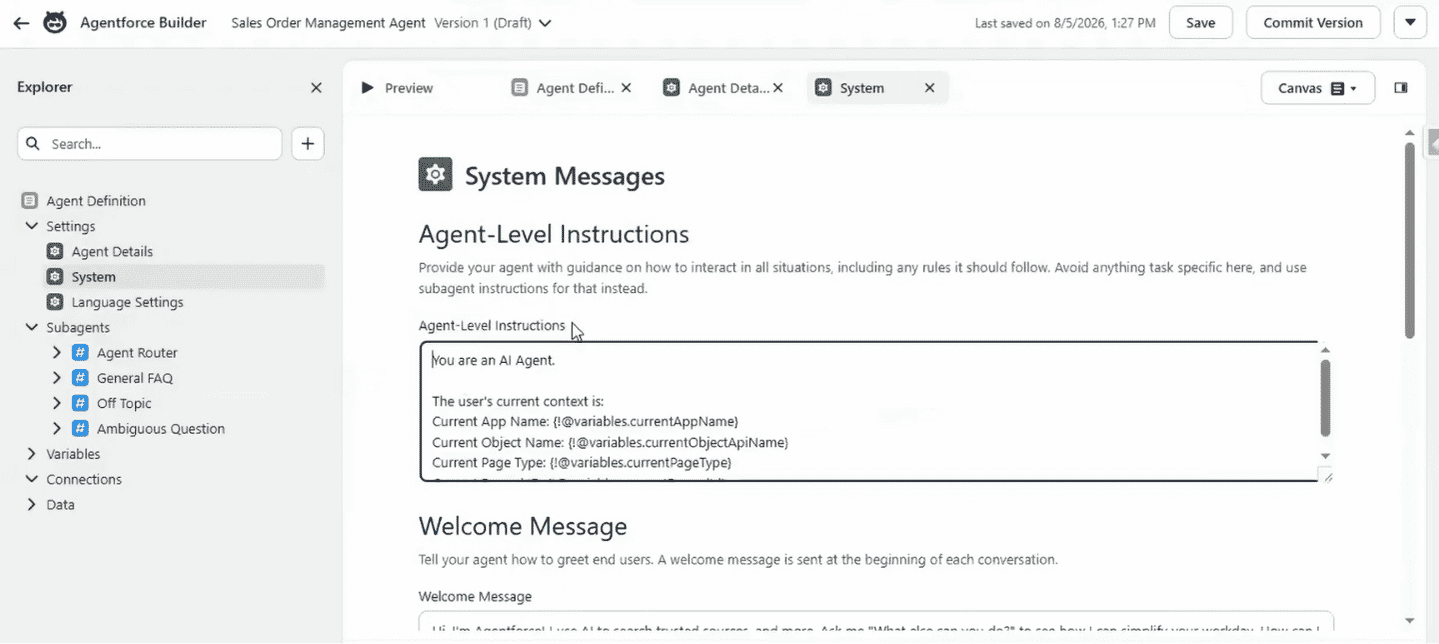
Add Agent-Level Instructions. These are system-level instructions that define the agent's overall persona and behavior, plus a welcome message and an error/fallback message for when something goes wrong.
Source: SalesforceFAQs youtube
Save and check for errors. Agent Builder flags broken references (e.g., an Action pointing to a deleted resource); you can debug these in Canvas view or switch to Agent Script view for more technical control.
Test in the Preview panel. This shows both the end-user chat experience and the "reasoning" behind it, including which Topic and Action the agent selected, and the inputs/outputs at each step. This transparency is key for debugging why an agent responded the way it did.
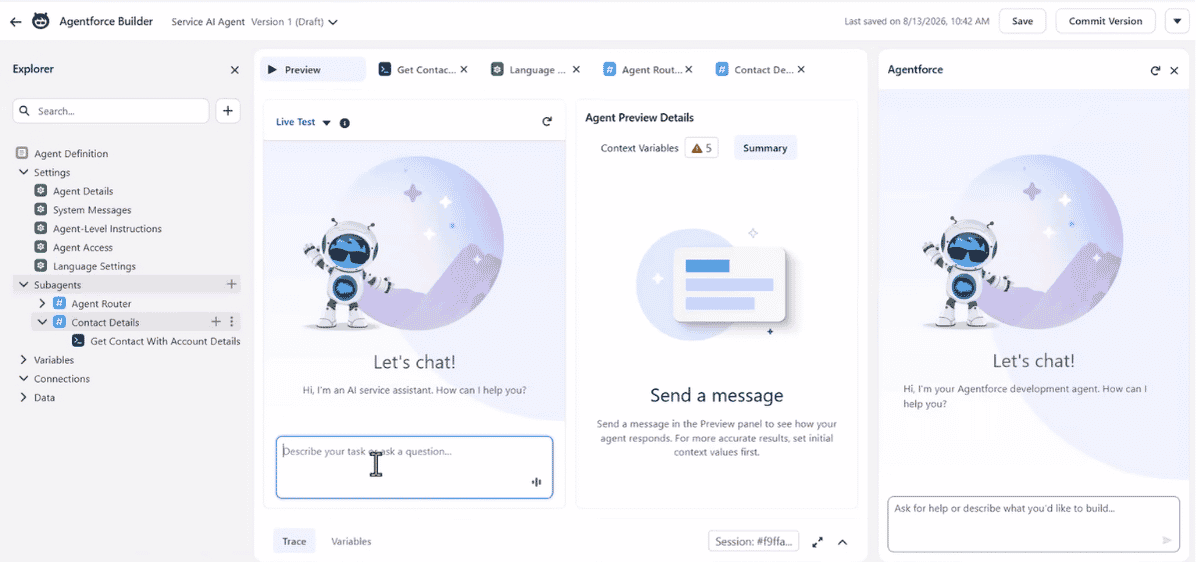
Iterate and expand testing. Once a basic scenario works, use the Agentforce Testing Center to generate broader test cases, check how guardrails are being respected, and simulate more real-world variation before going live.
Deploy to a channel. Activate the agent on the channel where it's needed: a website, WhatsApp, Slack, voice, or embedded in the Salesforce console for internal users.
Monitor and optimize. After launch, use Agentforce's analytics tools to track performance, debug individual session data, and refine Topics and Actions based on real usage.
These steps cover building a simple agent, but if you're planning a broader rollout across your business, our Agentforce Implementation Roadmap breaks down the phases, timeline, and cost factors involved in scaling beyond your first agent.
Is Agentforce Right for Your Business?
Salesforce positions Agentforce as a solution that businesses can use across different functions, but that doesn’t necessarily mean it’s the right fit for every organization. The better question is whether your business has the foundation, use case, and resources needed to get value from it.
You already use Salesforce: Agentforce is deeply integrated with the Salesforce platform and Data 360, so businesses already working within the Salesforce ecosystem are in a stronger position to adopt it.
Your data is ready: Agents rely on business data to reason and respond. Clean, reliable CRM and knowledge data are therefore essential for getting useful results.
For a deeper look at connecting the right data sources, see our guide: How to Ground Agentforce with RAG in Data 360.
You have a clear use case: Agentforce works best when you can identify a specific, repeatable task or process where an agent can take meaningful action. Starting with a narrowly defined use case is usually more practical than trying to automate everything at once.
You're prepared for implementation: Building an effective agent involves configuring data, topics, instructions, and actions, followed by testing and governance. Agentforce isn't something you simply switch on and leave to run.
The economics make sense: Because Agentforce costs can vary based on conversations, actions, or licenses, you should estimate expected usage and potential business value before choosing a pricing model.
So, is Agentforce right for you? If you're already using Salesforce, have reasonably clean and accessible business data, and can identify a well-defined use case with measurable value, Agentforce is worth considering for a pilot. If you're not on Salesforce, your data isn't ready, or you don't yet have a clear problem for an agent to solve, there's probably groundwork to do before implementation.
Common Challenges in Agentforce Implementation
Agentforce can deliver real value, but getting there isn't always a straight line; the technology is rarely the problem; the surrounding work usually is. A few issues tend to come up over and over due to:
No agreement on what success looks like: Teams launch a pilot without a target metric or baseline, so months in, nobody can say if the agent is actually helping.
Messy or fragmented data. An agent can only work with what it's given; duplicate records, stale fields, or disconnected systems all get inherited straight into its answers.
Doing too much too soon. Handing an agent five responsibilities on day one usually backfires. Better to get one use case solid, then expand.
Underestimating the real cost. Licenses or Flex Credits are just the sticker price; integrations, testing, and ongoing tuning after launch add up fast.
Skipping the human side. A well-built agent still fails if employees or customers don't know when to trust it. Adoption problems kill more rollouts than bugs do.
These are fixable situations, but they’re worth planning for upfront rather than discovering in the middle of a rollout. For practical insights from our experts, see Salesforce Agentforce Challenges & How to Avoid Them.
Final Thoughts
Agentforce represents a genuine shift from "AI that talks" to "AI that acts" within the Salesforce ecosystem: agents that can reason over your real business data and actually complete tasks, not just suggest them. And with Multi-Agent Orchestration now live, that foundation only gets more valuable as your agents start working together.
If you've made it this far and you're ready to move from reading about Agentforce to actually building on it, that's exactly where our Agentforce consulting team comes in, from scoping your first agent to planning a multi-agent rollout. Talk to our Agentforce experts to figure out where to start.
Frequently Asked Questions
-
The answer could be both yes and no. It depends on the type of agent you want to build and the level of control you want.
For simple use cases, Agent Builder is a low-code tool. You can start with a pre-built template or describe what you want in natural language, and it will generate a working Topic/Action structure for you.
For more precise, deterministic control over agent behavior, Salesforce offers Agent Script. Custom Actions can also be built on Apex or Flows if your team wants that level of control.
-
Yes, you can build custom agents directly, or apply changes to the templates, as they are just a starting point.
You can add or remove Topics, write custom Instructions, build Actions tied to your own Flows or Apex code, and set a distinct persona for the agent.
Nothing about the templates is meant to be used as-is for every business.
-
Yes. Through Data Cloud, agents can connect directly to external databases and storage platforms like Amazon S3, Snowflake, and Microsoft Azure, without copying that data into Salesforce first.
They can also call external APIs directly for live lookups during a conversation, and MuleSoft extends this reach further into other non-Salesforce systems. Agentforce also supports the Model Context Protocol (MCP), an open standard for connecting agents to external tools and enterprise systems.
So an agent isn't limited to what's inside your CRM; it can pull from wherever your business data actually lives.
-
Yes, agents aren't people, so they can handle conversations any time, day or night, without needing a break. What happens next depends on your setup: an unresolved case can wait for a human or get escalated right away, based on how you've set your escalation rules and your team's working hours.
-
It doesn't guess. If an agent hits the edge of what it's scoped or able to do, it falls back to a pre-configured fallback message and escalates the conversation to a human rep, rather than attempting an action it isn't confident about. That's part of what the Guardrails are designed to enforce.
-
Yes, switching is possible, but you can't run both models in the same org at the same time, they're mutually exclusive. Switching from one to the other isn't something you can just toggle in settings, either. It involves your Salesforce account team updating the licenses on your contract, so it's worth checking with them on the specifics before making the switch.
As for which one to pick: shorter, simpler tasks like a password reset tend to be cheaper on Flex Credits, while longer, multi-step conversations are usually better suited to the flat Conversations rate.
Let’s Talk!

Drop us a note, we’re happy to take the conversation forward 👇🏻