How to Ground Agentforce with RAG in Data 360 (2026 Decision Guide)
The demo answered every question perfectly. Three weeks into production, your Agentforce agent tells a customer their policy covers storm damage when it does not. Nobody on the team can say whether the failure lives in the data library, the search index, the chunks, or the prompt.
That diagnostic blindness is the real risk of learning how to ground Agentforce with RAG from tutorials
Salesforce's documentation for Data 360 (formerly Data Cloud), Prompt Builder, the Einstein Trust Layer, and Agentforce Testing Center shows every click. It never shows the five decisions behind those clicks, or what each wrong choice costs once the Atlas Reasoning Engine answers real customers.
This guide walks the five decisions in order of consequence. Each one ends with the exact configuration that makes it real.
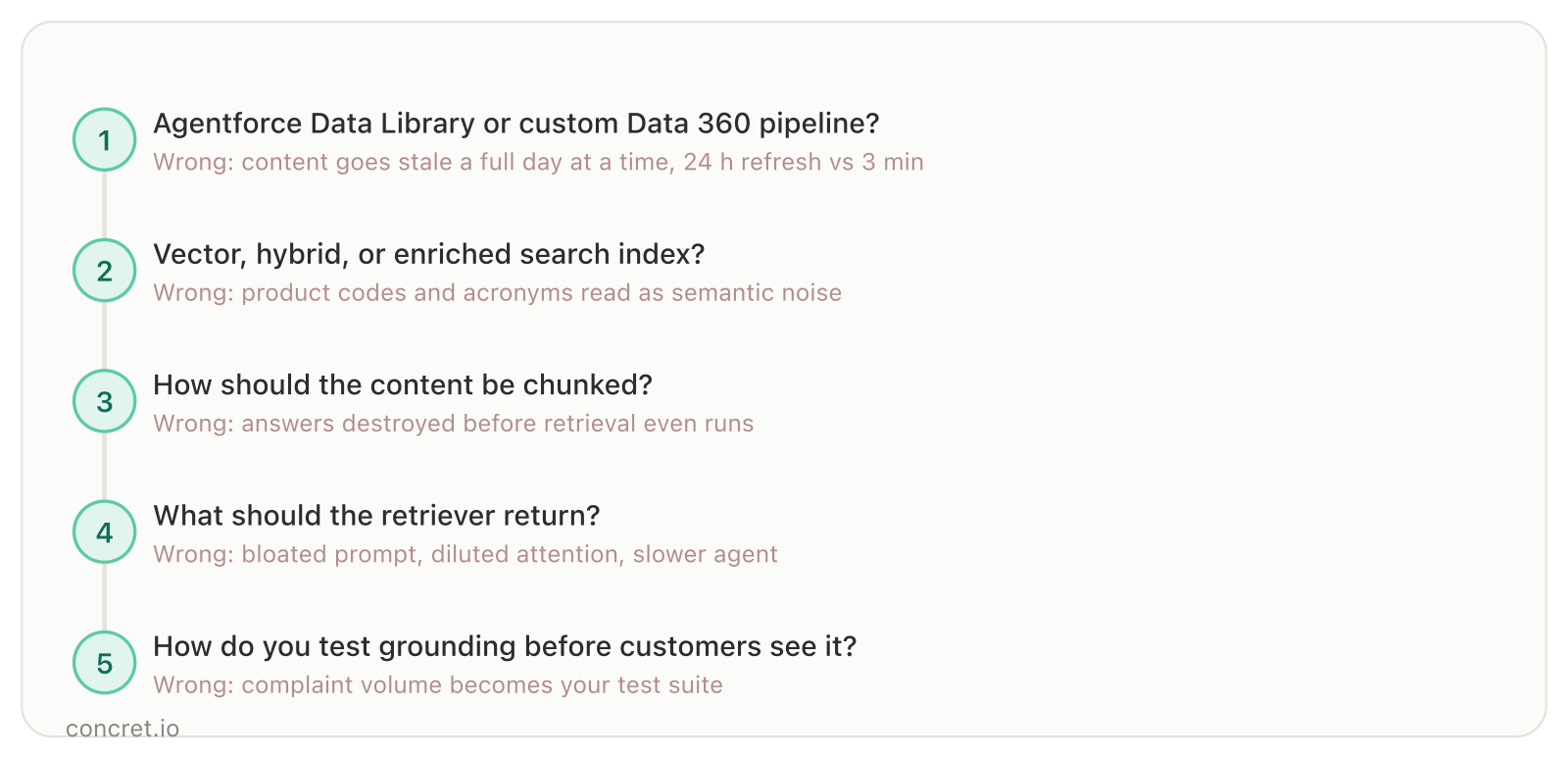
The decision chain this guide walks. Every wrong answer in production traces back to one of these five.
What Does Grounding Agentforce with RAG Actually Mean?
Grounding adds your company's verified data to the prompt an LLM sees. Retrieval augmented generation (RAG) is how Agentforce does it: a retriever searches an index of your content, relevant chunks augment the prompt, the model answers from that evidence. That flow, retriever to prompt to answer, is how you ground Agentforce with RAG.
Nearly 90% of enterprise data is unstructured, exactly the data RAG unlocks.
In Data 360 terms, three components do the work: a search index stores your chunked, vectorized content; a retriever links the prompt to that index; Prompt Builder assembles what the LLM sees.
One distinction sets up everything that follows: retrieval is not grounding. Retrieval asks whether the right evidence reached the context window, a search problem. Grounding asks whether the answer is actually entailed by that evidence, a generation property.
The failure modes are independent. An agent can fetch the perfect passage and still write a confident sentence the passage does not support, or faithfully ground its answer in the wrong passage.
Wrong answers surface at the end of the pipeline; the root cause hides upstream. Salesforce's codeLive session on RAG best practices names three ways it happens: content never retrieved, retrieved but not brought into the prompt, or present but ignored during generation.
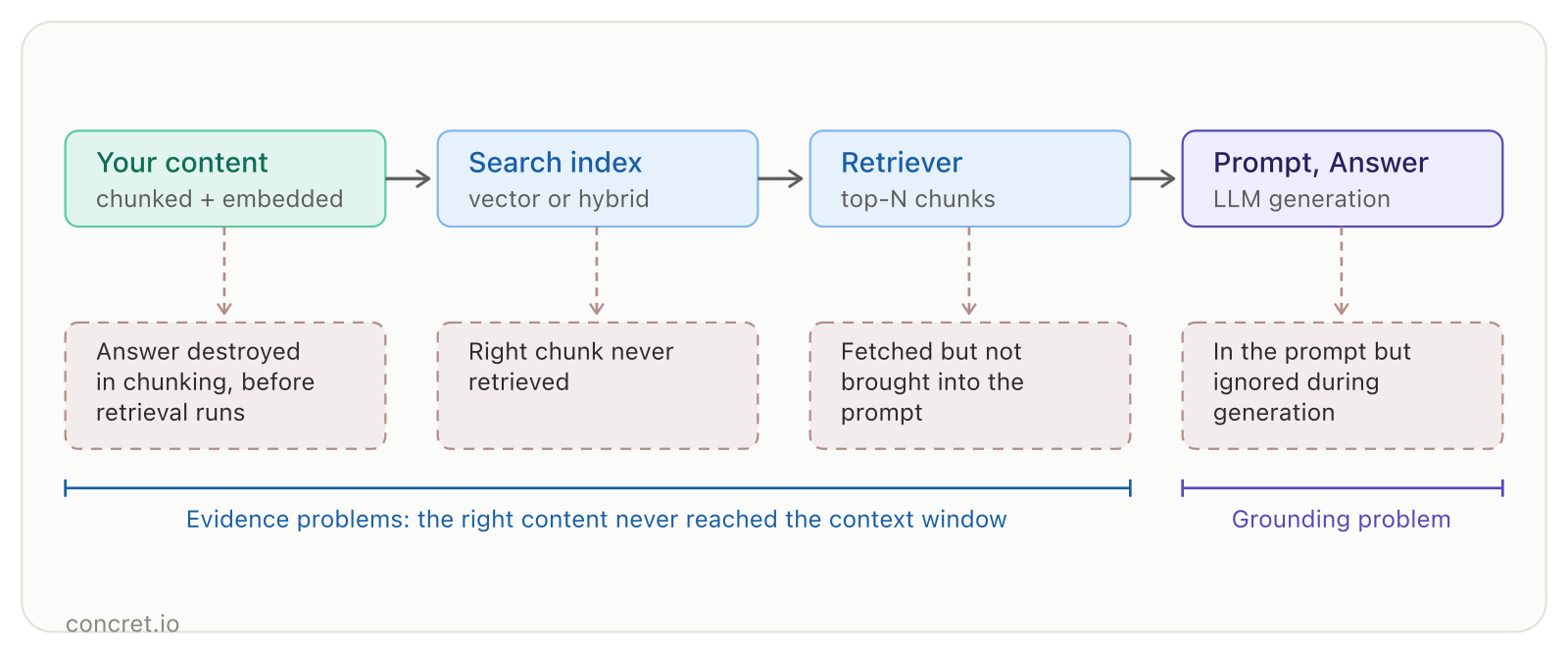
Four places a wrong answer can originate. In the first three, the right evidence never reaches the context window; only the last is a grounding problem.
Which upstream layer you control first is itself a decision, and it is the first fork every team hits.
Decision 1: Agentforce Data Library or a Custom Data 360 Pipeline?
The Agentforce Data Library (ADL) is the quick start: add a data library and Salesforce auto-builds the vector data store, search index, and retriever with defaults. A custom Data 360 pipeline costs more setup and returns control over ingestion, indexing, and retrieval.
The ADL ceiling is structural, not cosmetic. Each library holds one data source, limited to Knowledge articles, uploaded files, web search, or a custom retriever. No real-time data. No zero-copy: non-CRM data must be physically downloaded and re-uploaded as files.
Freshness is where the quick start quietly becomes the wrong answer. Salesforce's architect walkthrough puts the numbers side by side: 24-hour refresh through Data Library, 15 minutes through the CRM Connector, roughly 3 minutes through MuleSoft's Ingestion API, "the closest viable option to real-time".
If your content changes daily and a stale answer carries real cost, the 24-hour path fails you a full day at a time.
The same walkthrough ruled out migrating documents into Salesforce Knowledge for three named reasons: data residency, refresh latency, and citation integrity. Citations should point to the source of truth, not a migrated copy.
Make it real: start with ADL when one source and daily freshness suffice; it is the fastest path into RAG. Go custom when you need multiple sources through ensemble retrievers, real-time or zero-copy data, or custom Salesforce objects that data libraries cannot index; picking the right Agentforce integration pattern decides how that outside data arrives. For teams taking the custom path, our Data 360 implementation guide covers the ingestion groundwork it requires.
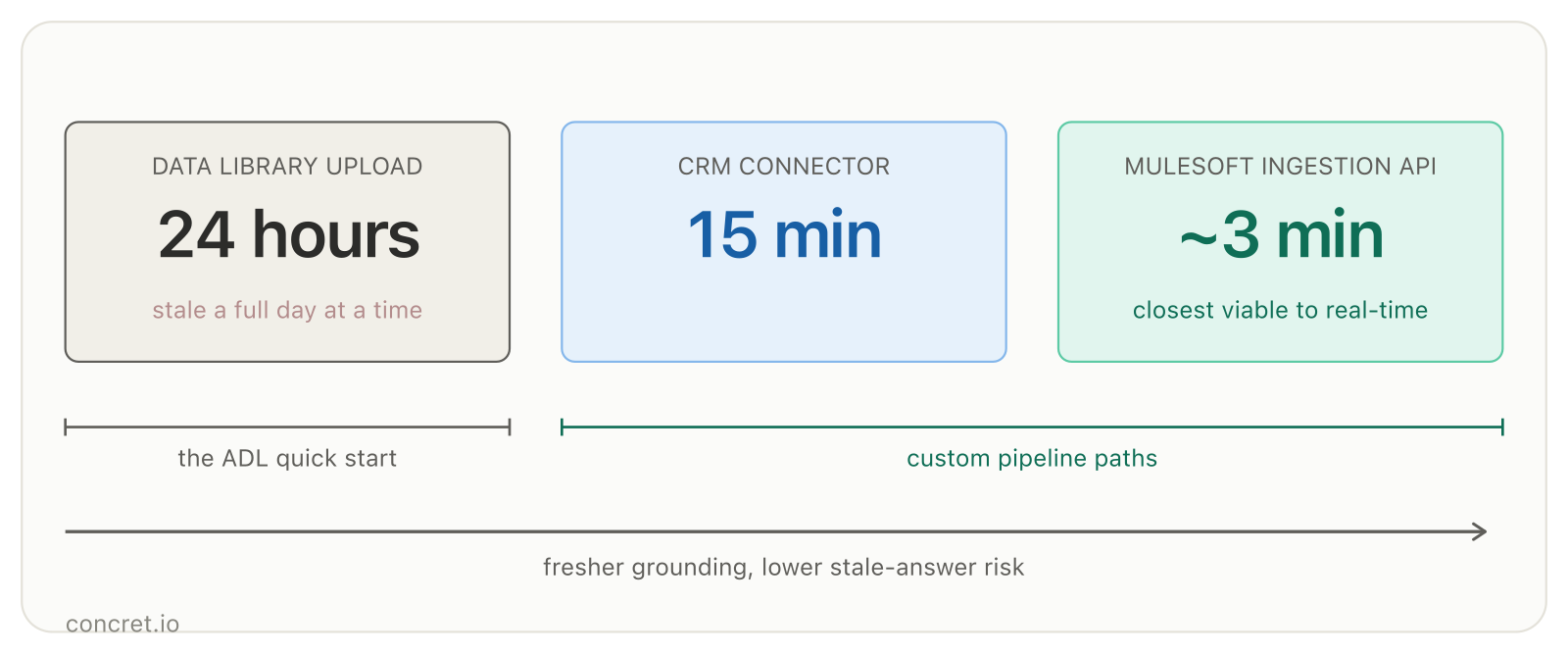
The number that decides Decision 1. Figures: Salesforce, How to Ground Agentforce in External Documentation.
This choice cascades into every remaining decision, starting with the index your retriever will search.
Decision 2: Vector, Hybrid, or Enriched Search Index?
Data 360 offers three index types. Vector search matches meaning and wins for long, general questions. Hybrid search adds keyword matching for domain vocabulary. Enriched indexing generates extra LLM-built chunks to improve retrieval accuracy at extra cost.
The vector-only default has a named failure mode: it misses exact terms. Product codes, acronyms, and policy names read as semantic noise to an embedding model but decide the answer for your customer.
Hybrid search runs vector and keyword retrieval in parallel and fuses the ranked results. Salesforce engineering reports the dual approach measurably beats either alone.
Hybrid is not a reflex, though. It adds latency and cost; choose it when keywords genuinely matter in your domain.
The same Trailhead module is blunt about the third type: enriched indexing earns its Flex Credit spend only "where higher retrieval accuracy provides measurable value" against the cost of LLM-generated metadata and question chunks.
Make it real: hybrid search exposes three tuning surfaces at index creation: up to 10 pre-filter fields, recency and popularity ranking factors, and a fusion ranking model. The industry-standard Reciprocal Rank Fusion runs with rank constant k=60 and a keyword-weight alpha defaulting to 0.5, adjustable per query in small increments.
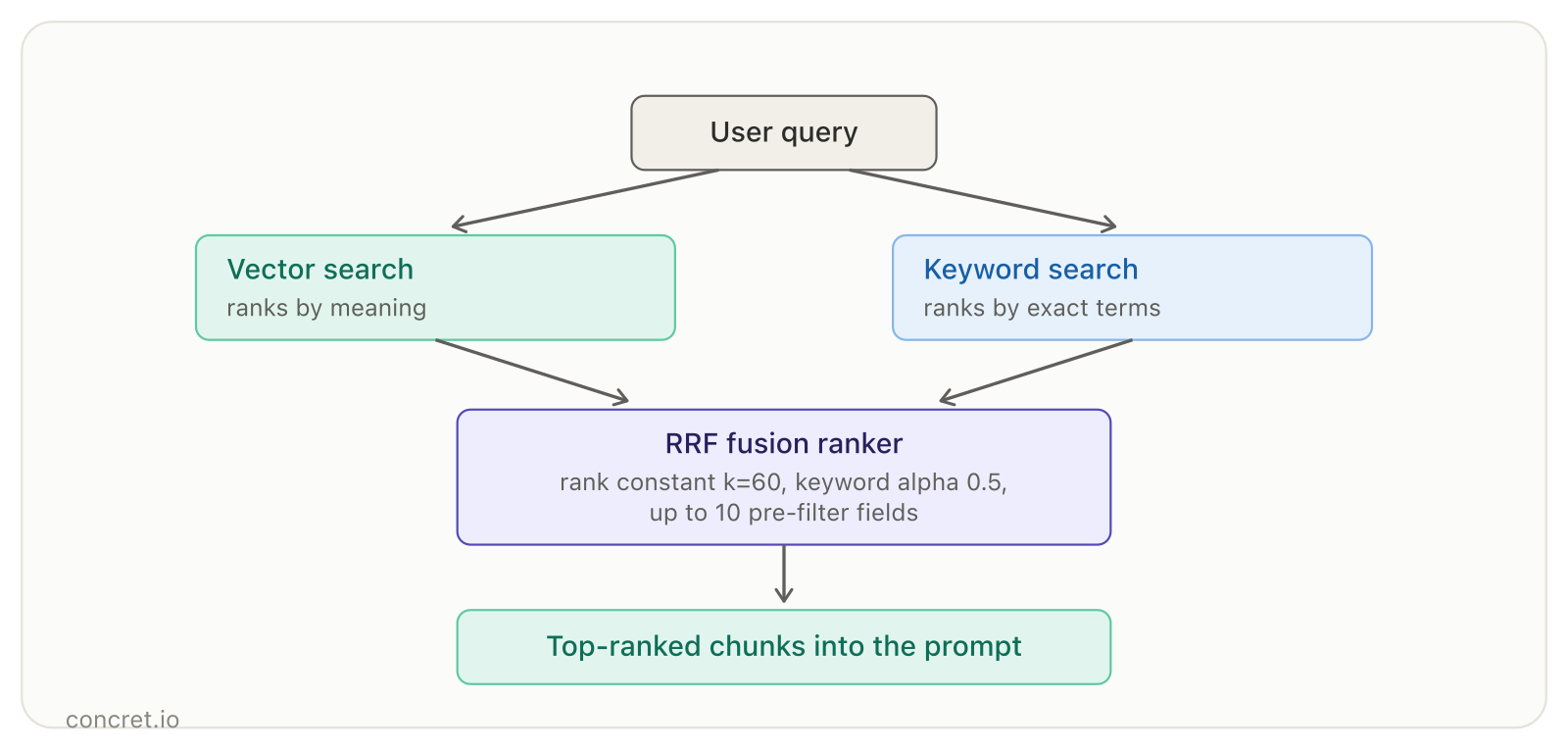
Two retrievals fused before ranking. Tuning values: Trailhead, Optimize Hybrid Search for RAG.
An index can only rank what chunking preserved, which makes the next decision the most underrated one in the chain.
Decision 3: How Should You Chunk Your Content?
Salesforce's recommended configuration for website grounding is specific: Section Aware Chunking, max 1,200 tokens, 0 overlap tokens, title prepending enabled, with an embedding model that supports that chunk size.
Each default carries reasoning. 1,200 tokens gives chunks enough context without bloat. Zero overlap keeps the chunk set clean when pages are well structured. Prepending the title makes each chunk self-describing, which improves retrieval.
Get chunk size wrong and questions become unanswerable before retrieval runs. In a controlled 500-question benchmark, chunk size 80 destroyed the answers to 23 of 500 questions during preprocessing; chunk size 140 lost only 3.
No retriever or re-ranker recovers information that chunking split or discarded.
Structure-aware beats fixed-size because it cuts on meaning boundaries: sections, headers, paragraphs. That is also why content curation matters here: chunking follows HTML tags and line breaks, so structured headings produce coherent chunks and wall-of-text pages produce fragments.
Make it real: configure parsing and chunking per file extension, remove file types you never want ingested, and verify chunk records exist and read coherently after the index builds. Index only the most detailed field; use prepending for context fields like policy names instead of indexing title, summary, and description separately.
Clean chunks still reach the LLM through one more gate: what the retriever hands back.
Decision 4: What Should the Retriever Return?
A Data 360 retriever returns 20 results by default, and the reflex when an answer goes missing is to raise that number. The evidence says the reflex backfires.
In the same benchmark's 56 runs, retrieval coverage climbed with depth while answer quality peaked at 3 retrieved chunks, then fell; extra context diluted attention and introduced distractors.
Salesforce's RAG product lead sees the same pattern in the field: customers raise results to 25, 50, even 300 to chase a missing fact. What they buy is a bloated prompt, higher latency, higher token cost, and a slower agent.
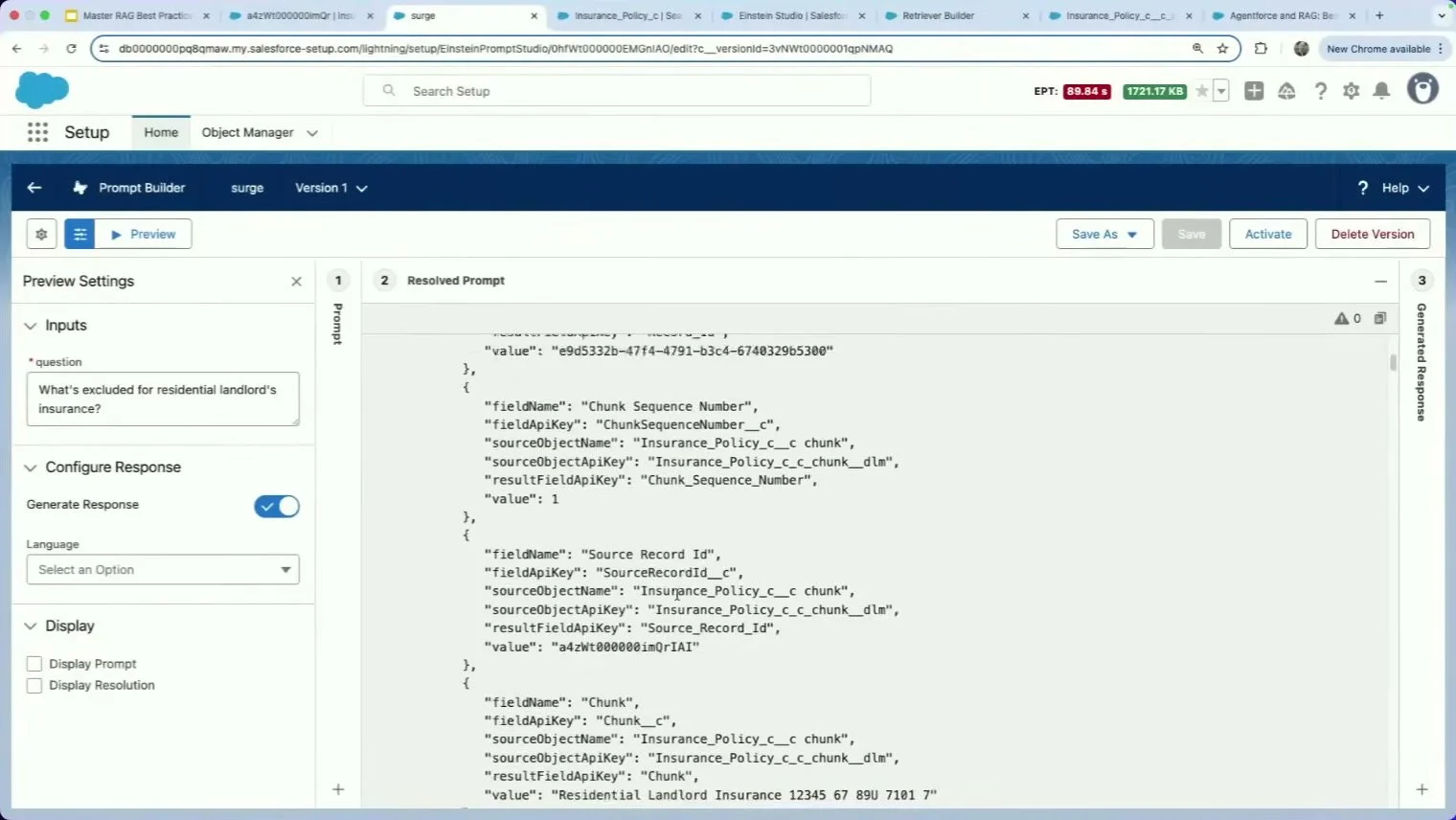
The Resolved Prompt view: every chunk the retriever fetched, exactly as the LLM sees it. Frame: Salesforce Developers codeLive, 32:25.
Return fields follow the same discipline. The Trailhead reference retriever returns three: Subject, Description, and the Chunk itself, enough for the answer plus citation metadata, not every field on the object.
Citations belong in this decision because they are structural trust, not decoration. Salesforce's Knowledge Answers template forces the model to extract the source article ID verbatim into a source_id field. When no relevant article exists, it sets the field to NONE and answers "Sorry, I can't find an answer based on the available articles."
Skip that constraint and you get citation theater: an on-topic source cited under a claim it never makes.
Make it real: keep the chunk plus source-identifier fields, enable citation settings, and treat result count as a recall knob you tune downward with evidence, not upward on instinct.
Every decision so far shapes what the agent could answer. The last one determines whether you find out before your customers do.
Decision 5: How Do You Test Grounding Before Customers See It?
Start with a golden dataset: 20 to 30 questions with known correct answers, each recording which document contains the answer. That third field is what separates a retrieval failure from a generation failure when a test goes red.
Category coverage matters more than question count. Four categories bite in production: multi-hop questions needing two chunks combined, questions whose correct answer is a refusal, conflicting or stale document pairs, and adversarial phrasing.
The stale-documents category is the most skipped and produces the most incidents.
Then test at the retriever level before the agent level. In Prompt Builder, open Preview, enter a golden question, and paste your retriever's API name into the Retriever ID field.
The Resolved Prompt view shows the exact chunks the retriever fetched; the Generated Response tab shows what a customer would see. Reading the two side by side is where retriever noise becomes visible.
One trap deserves its own warning. A fluent, cited answer built on a stale document is fully grounded and fully wrong at the same time; faithfulness metrics cannot catch a confidently wrong source. That is why the stale-document category belongs in your golden set.
Salesforce now surfaces RAG quality metrics, faithfulness and context relevance among them, so teams catch problematic responses proactively instead of learning about them from complaint volume. Grounding is one failure class among several; the wider catalog lives in our post on Agentforce implementation pitfalls.
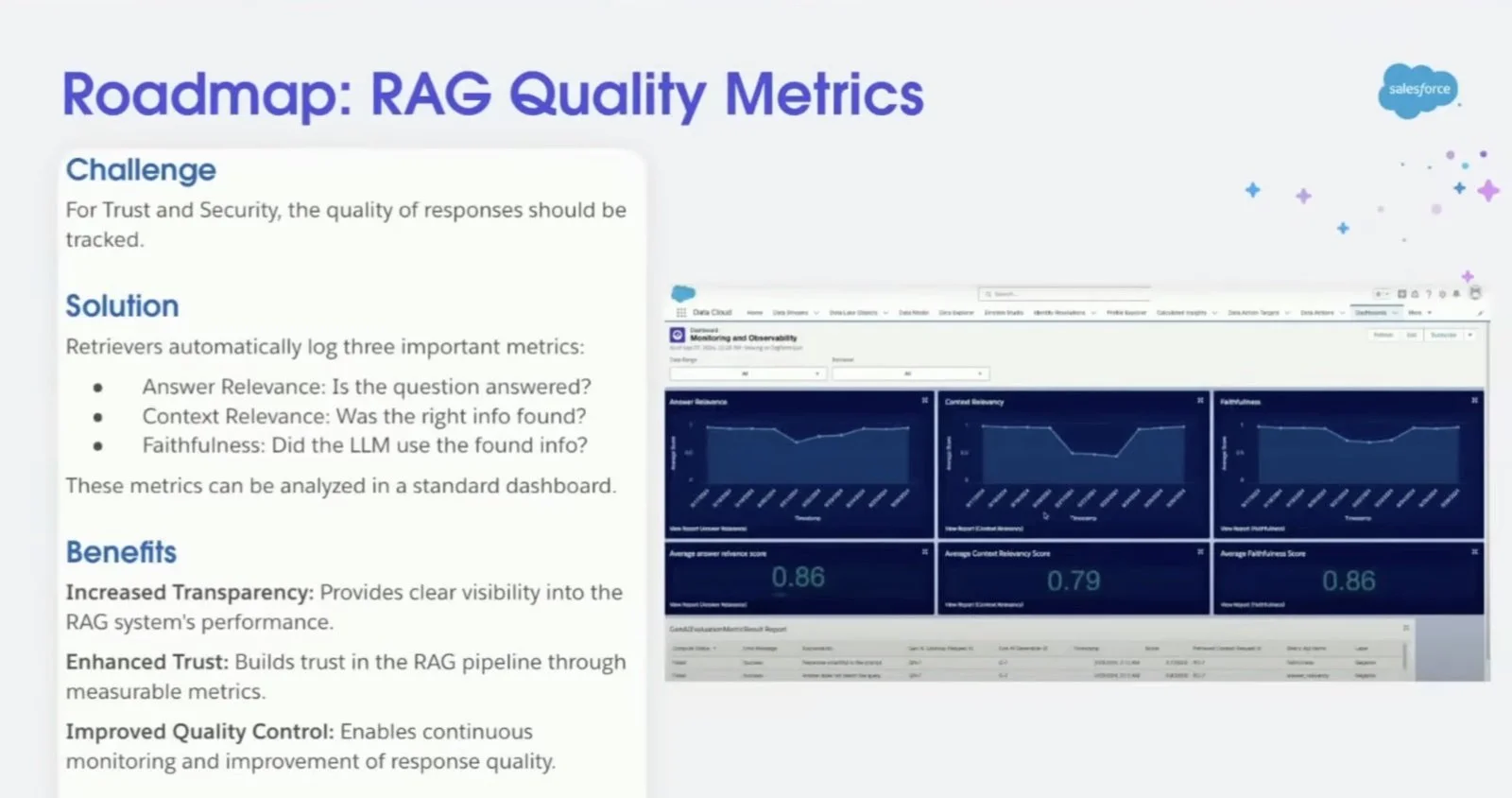
Salesforce's RAG quality metrics dashboard as shown in the codeLive session. Frame: Salesforce Developers codeLive, 1:05:35.
Watch the full session: the codeLive video behind several figures in this guide walks Decisions 1 through 5 live in a real org, including the Resolved Prompt debugging at 32:25 and the quality metrics dashboard at 1:05:35.
For regulated teams, one more lens sits above all five decisions.
The Compliance Lens: Trust Layer, Residency, and Audit
Compliance constraints are decision inputs, not afterthoughts. In Salesforce's architect walkthrough, data residency alone ruled out migrating documents into Knowledge: the files had to stay in their source CMS, and grounding had to come to them.
The Einstein Trust Layer covers the generation path: zero data retention, toxicity detection, secure data retrieval, and dynamic grounding.
The Generative AI Audit Trail records the prompt, its PII-masked version, and safety and toxicity scores in Data 360. That trail is your evidence base when an auditor asks what the agent saw and said.
In my assessment, the Trust Layer is where teams over-delegate. It protects the data path; it does not absolve a single grounding decision. A stale index, a noisy retriever, or an untested prompt produces a wrong answer that is perfectly masked, perfectly logged, and perfectly compliant. Answer correctness stays yours.
FAQs
What is RAG in Agentforce?
RAG (retrieval augmented generation) grounds Agentforce agents in your data: a retriever searches indexed content in Data 360, relevant chunks augment the prompt, and the LLM answers from that evidence. Salesforce auto-builds the full pipeline when you create an Agentforce Data Library.
Do I need Data 360 to use an Agentforce Data Library?
Yes. ADL requires Data 360 to be enabled; it auto-creates the vector data store, search index, and retriever there. Full custom pipelines require Data 360 to be implemented, which adds ingestion, modeling, and identity resolution.
Can Agentforce ground on data outside Salesforce?
Yes. A custom pipeline ingests external content while files stay in the source system; MuleSoft with the Ingestion API refreshes in roughly 3 minutes, versus 24 hours for Data Library uploads.
Should I use vector or hybrid search in Data 360?
Vector search suits long, general questions. Choose hybrid when exact terms matter: product codes, acronyms, policy names. It fuses keyword and vector results and measurably beats either alone, at some latency and cost.
How many results should a retriever return?
The default is 20. Raising it to chase missing answers bloats the prompt and can lower answer quality; in one controlled study answer quality peaked at 3 retrieved chunks while retrieval coverage kept climbing.
Who is responsible when a grounded agent answers wrong?
You are. The Trust Layer masks PII and logs every exchange, but answer correctness traces to your grounding decisions: source freshness, index type, chunking, retriever scope, and pre-launch testing against a golden question set.
The Decision Chain on One Page
| Decision | Default | When the default is wrong |
|---|---|---|
| Data Library vs custom pipeline | ADL quick start | Multiple sources, real-time or zero-copy data, custom objects, sub-24-hour freshness |
| Search index type | Vector | Domain keywords matter (codes, acronyms); hybrid with RRF fusion wins |
| Chunking | Section-aware, 1,200 tokens, 0 overlap, title prepend | Dense or unstructured pages; too-small chunks destroy answers before retrieval |
| Retriever returns | 20 results, all fields tempting | Return chunk + source IDs only; tune count down with evidence, never up on instinct |
| Testing | Ad-hoc demo questions | Golden set of 20-30 incl. stale-document and refusal cases, tested in Prompt Builder first |
These five decisions are how to ground Agentforce with RAG in practice, and they sit inside a larger Agentforce implementation roadmap: licensing, timeline, and cost come next. But the roadmap only delivers if the grounding holds.
Tutorials configure agents; decisions make them trustworthy.
Sources
Agentforce Data Library Basics, Salesforce Trailhead
Empower Agents with Data Cloud, Salesforce Trailhead
Retrieval Is Not Grounding, Mirlohi
codeLive: Master RAG Best Practices, Salesforce Developers, August 2025
How to Ground Agentforce in External Documentation, Salesforce
Search Index Types in Data Cloud, Salesforce Trailhead
How Data Cloud Hybrid Search Combines Keyword and Vector Retrieval, Salesforce Engineering
Optimize Hybrid Search for RAG, Salesforce Trailhead
Create Search Index and Retriever, Salesforce Developers
A Systems-Level Analysis of Retrieval-Augmented Generation, arXiv
Building Reliable RAG Pipelines: Prototype to Production, practitioner engineering notes
Create a Search Index, Retriever, and Prompt Template, Salesforce Trailhead
Building Trustworthy Production RAG Systems Through Continuous Evaluation, Towards Data Science
Standing up Agentforce and want these decisions pressure-tested against your data landscape before go-live? Book an architecture consult with a Salesforce Partner that has made these tradeoffs in production.
Thanks
Harting Harris for all the assistance with the content quality and proof reading.