HubSpot Portal Audit Pricing: Free vs Paid Tools What Do You Actually Need?
Key takeaways:
There are three ways to audit a HubSpot portal: manual reviews, consultants, or dedicated audit tools
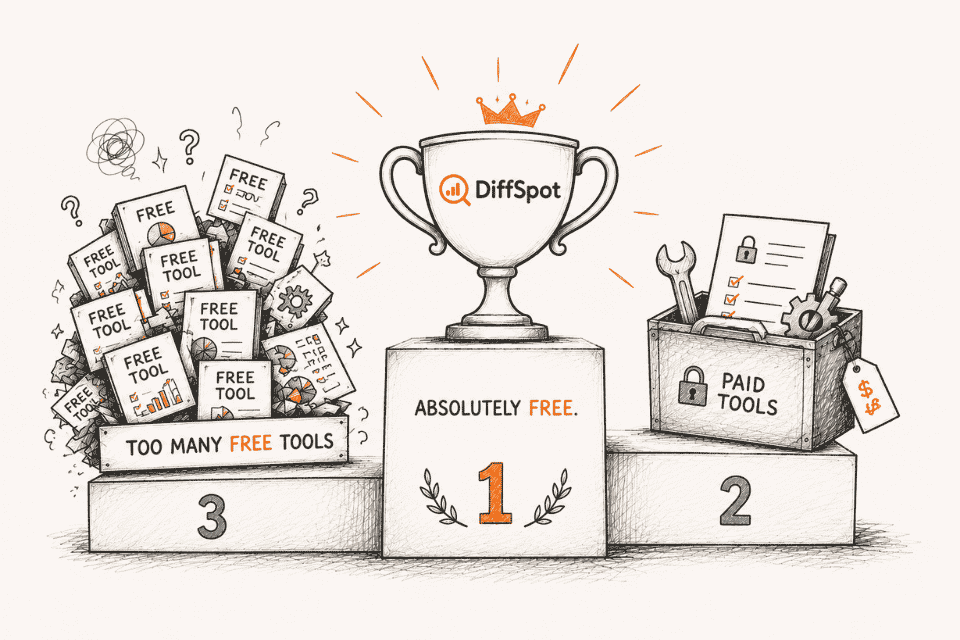
Free and paid audit tools differ more in capabilities and insights than in their pricing.
Choose an audit tool based on your portal's complexity and the features your business actually needs.
DiffSpot delivers advanced HubSpot portal auditing capabilities, including portal comparison and workflow analysis, completely free.
If you've started looking for a way to audit your HubSpot portal, chances are you've already noticed that there are plenty of HubSpot audit tools available today. Some of these tools are free of cost, and some require a monthly fee or a one-time payment.
In our experience, we have seen teams try different methods, from DIY, where they review everything manually, to hiring HubSpot consultants, to relying on dedicated audit tools, just to get it done quickly.
But the biggest question businesses should ask isn't whether a tool is free or paid; it's whether it provides the visibility they need to truly understand their HubSpot portal.
This guide answers that question. However, before we start, let us first understand the various approaches for auditing the HubSpot portal. Then, we'll compare free vs. paid tools to help you decide which option best fits your requirements.
Different Ways to Audit a HubSpot Portal
There are three common ways to audit a HubSpot portal. Each approach comes with its own level of effort and outcome. For a deeper breakdown of what each area of the review should cover, see our complete HubSpot Portal Audit Guide.
1. Manual (DIY) HubSpot Portal Audit
A manual HubSpot audit is exactly what it sounds like. Here, instead of relying on a tool or consultants, you do the parts of your HubSpot workflow audit yourself. This typically involves inspecting CRM properties, pipelines, forms, users, and other assets one by one.
Since no external support or tools are involved, it may look like the most affordable option. But honestly? For any portal that's been around for more than a year or so, we won’t recommend this approach because then the audit will become time-consuming.
2. Hiring a HubSpot Consultant
Hiring a HubSpot consultant is often the go-to for companies with complex setups or those that have let things get a bit out of hand. A good consultant will review your environment, flag the problems, and give you recommendations that actually make sense for your business.
The downside? It can get expensive fast. We're talking anywhere from a few hundred to several thousand dollars, depending on what you need done. For some companies, that's absolutely worth it. For others? Not so much.
3. Using a HubSpot Audit Tool
HubSpot CRM audit tools automate the audit process by scanning your portal and providing a structured view of what exists inside it, from HubSpot workflow audit to reviewing assets. These tools save time and money by eliminating the need for manual reviews and for hiring a consultant.
For many teams, this is the most effective way to audit a HubSpot portal and comparatively cheaper, or in some cases, completely free. However, the success of the audit here depends entirely on the HubSpot CRM audit tool you choose.
Free vs. Paid HubSpot Portal Audit Tools
One thing you'll quickly notice is that not all HubSpot audit tools are priced the same. The difference, however, isn't just about the price; it's about the features, level of insights, and the problems each tool is designed to solve.
Free HubSpot Audit Tools
Free audit tools are designed to give you a quick look inside your HubSpot without making you open your wallet first. Most of these tools can scan your portal and show you the key components.
If you're just trying to get your portal reviewed before a migration, clean up some CRM, or figure out how your portal is actually structured, a free tool often does the job just fine. You get the visibility you need without adding to your project costs.
Paid HubSpot Portal Audit Tools
Paid HubSpot audit tools typically build on the same core functionality but offer additional capabilities aimed at larger teams and more complex environments. Depending on the platform, these may include continuous monitoring, advanced reporting, team collaboration, governance features, scheduled audits, or dedicated customer support.
While these features can be valuable for enterprises or organizations that regularly manage large HubSpot environments, they also come with an ongoing cost. For many businesses, the decision ultimately comes down to whether those additional capabilities provide enough value to justify the investment.
Does Free Mean Limited?
There's this assumption that free HubSpot audit tools basically won’t work beyond basic scanning, and you need to pay for anything worthwhile. Sometimes that's true. Sometimes it's not.
When most free tools come with limitations, tools like DiffSpot go much further by offering many of the same capabilities as paid solutions without charging a subscription fee.
That's because DiffSpot was built with a different vision. Instead of limiting core audit capabilities behind a subscription, it provides features such as portal comparison, workflow visualization, detailed metadata analysis, and professional audit reports at no cost.
That's why, when you're comparing tools, look past the price and focus on what each one actually does.
| Feature | Typical Free Tools | DiffSpot | Paid Audit Tools | |
|---|---|---|---|---|
| Portal Scanning | ✅ | ✅ | ✅ | |
| CRM Properties Analysis | Basic | ✅ | ✅ | |
| Workflow Analysis | Basic | ✅ | ✅ | |
| Portal Comparison (Sandbox vs. Production) | ❌ | ✅ | ✅ | |
| Workflow Visualization | ❌ | ✅ | ✅ | |
| Audit Report Export | Limited | ✅ | ✅ | |
| Portal Complexity Analysis | ❌ | ✅ | ✅ | |
| Metadata Coverage | Limited | ✅ | ✅ | |
| Cost | Free | Free | Monthly / Annual Subscription |
Which HubSpot CRM Audit Tool Is Right for You?
By now, it's clear that there isn't a single HubSpot CRM audit tool that's right for every business. The best choice depends on what you want to achieve, whether it's a quick portal review, an in-depth audit, or enterprise-level governance.
Here's a simple way to decide:
Choose a Basic Free HubSpot Audit Tool If:
You only need a high-level overview of your HubSpot portal.
Your portal is relatively small with a simple CRM structure.
You're looking for a quick, one-time audit without advanced analysis.
Choose DiffSpot If:
You want a thorough audit, but don't want to pay for it
You need to really understand your portal or find unused elements like workflows, properties, and other metadata
You're preparing for a HubSpot migration, implementation, CRM cleanup, or sandbox-to-production comparison.
Features are required, like workflow visualization, portal comparison, and audit reports.
Choose a Paid HubSpot Audit Tool If:
You need enterprise-specific features that go beyond just auditing
Your organization requires continuous governance and compliance or specialized support
You've got the budget and the operational complexity that justifies the investment
Final Thoughts
HubSpot portals get complicated as your business grows. Whether you're getting ready to migrate, trying to clean up some CRM, or just trying to figure out what is actually in your portal, an audit is usually the best first step.
The good news? Getting those insights doesn't always require expensive solutions or hiring consultants. The right tool should help you see what's there, spot opportunities to improve, and make better decisions about what to do next.
That's exactly why we built DiffSpot. It gives you deep visibility into your portal, workflow analysis, comparison features, comprehensive metadata insights, and professional reports - all without costing you anything.
Frequently Asked Questions
-
Most teams review their HubSpot instance before a CRM migration, implementation, major cleanup, or deployment. But it's also good to do it once or twice a year, depending on the complexity and size of your portal. Many teams also do regular audits just to keep their portal organized.
-
Yes. In many cases, the use of a free tool gives sufficient visibility for the analysis of CRM properties, workflows, pipelines, and other items. The crucial point here is that you should find a tool that gives you the required valuable information. Tools like DiffSpot do exactly that, without affecting your budget.
-
While looking for a HubSpot CRM audit tool, your best choice should be one that lets you analyze your portal through CRM properties, workflows, pipelines, forms, users, and other metadata. Features such as portal comparison, workflow diagrams, and audit reports can help you better understand your HubSpot environment.
-
Yes, using some advanced auditing tools, you can compare your sandbox and production environments to identify differences. But not all HubSpot audit tools support portal comparison, whereas tools like DiffSpot provide this capability by comparing and highlighting those differences in one place.
-
For many businesses, DiffSpot is a strong alternative to paid tools like Portal IQ because, just like paid HubSpot audit tools, DiffSpot provides advanced audit capabilities such as portal comparison, workflow visualization, detailed metadata analysis, and professional audit reports at no cost. If your primary goal is to understand your HubSpot portal inside out, then DiffSpot meets your audit requirements.
Related Reading
Let’s Talk

Drop us a note, we’re happy to take the conversation forward 👇🏻