The HubSpot Revenue Hub Implementation Framework: A Quote-to-Cash Blueprint
Key Takeaways:
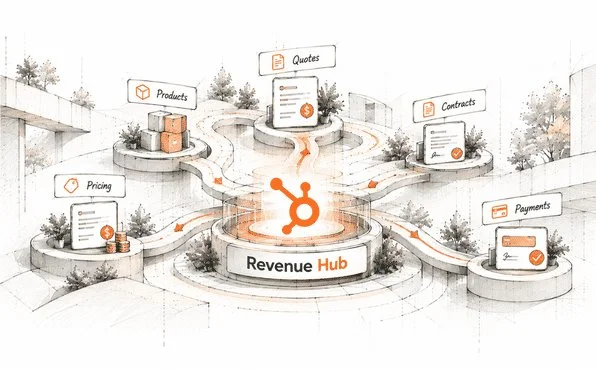
HubSpot Revenue Hub connects products, pricing, quotes, contracts, billing, payments, and renewals in one revenue process.
A structured HubSpot Revenue Hub implementation and HubSpot Revenue Hub implementation framework can help businesses build a more connected and efficient revenue workflow.
HubSpot quote-to-cash connects the journey from quote creation and acceptance through contracts, billing, invoicing, payment collection, and renewals.
On June 16, 2026, HubSpot retired the Commerce Hub name and replaced it with HubSpot Revenue Hub. The change goes beyond the name; it reflects a broader shift in what the platform does.
Where Commerce Hub focused on transactions, HubSpot Revenue Hub covers the full quote-to-cash journey: AI-assisted quoting, automated contracts, billing schedules, and AI-powered collections, all connected within the CRM.
For businesses already on Commerce Hub, this raises practical questions: which workflows still work, what needs to be rebuilt, and how quoting, billing, and payments should connect from start to finish.
This framework answers those questions step by step: how to assess your current setup, plan a successful HubSpot Revenue Hub implementation, and then build a quote-to-cash workflow that runs as one connected system.
A quote sets the revenue process in motion. The quick takeaway? A quote-to-cash blueprint connects each stage from quote to payment.
What Is a Quote-to-Cash Blueprint?
A quote-to-cash (QTC or Q2C) blueprint is a strategic roadmap that connects the entire revenue journey, from quote creation and contract management to billing, payment collection, and renewals.
In simple terms, “quote” refers to the pricing and proposal given to a customer, while “cash” represents the payment collected after the sale. Quote-to-cash connects everything in between, from quoting and contracting to billing, invoicing, payment, and renewals.
HubSpot Revenue Hub Framework Explained: How Its Components Work Together
HubSpot Revenue Hub is a native, AI-powered quote-to-cash platform. It connects quoting, contracts, subscriptions, invoicing, and payments within the CRM.
See how its core components work together to create a connected HubSpot Revenue Hub workflow, from quote generation to payment collection and renewals.
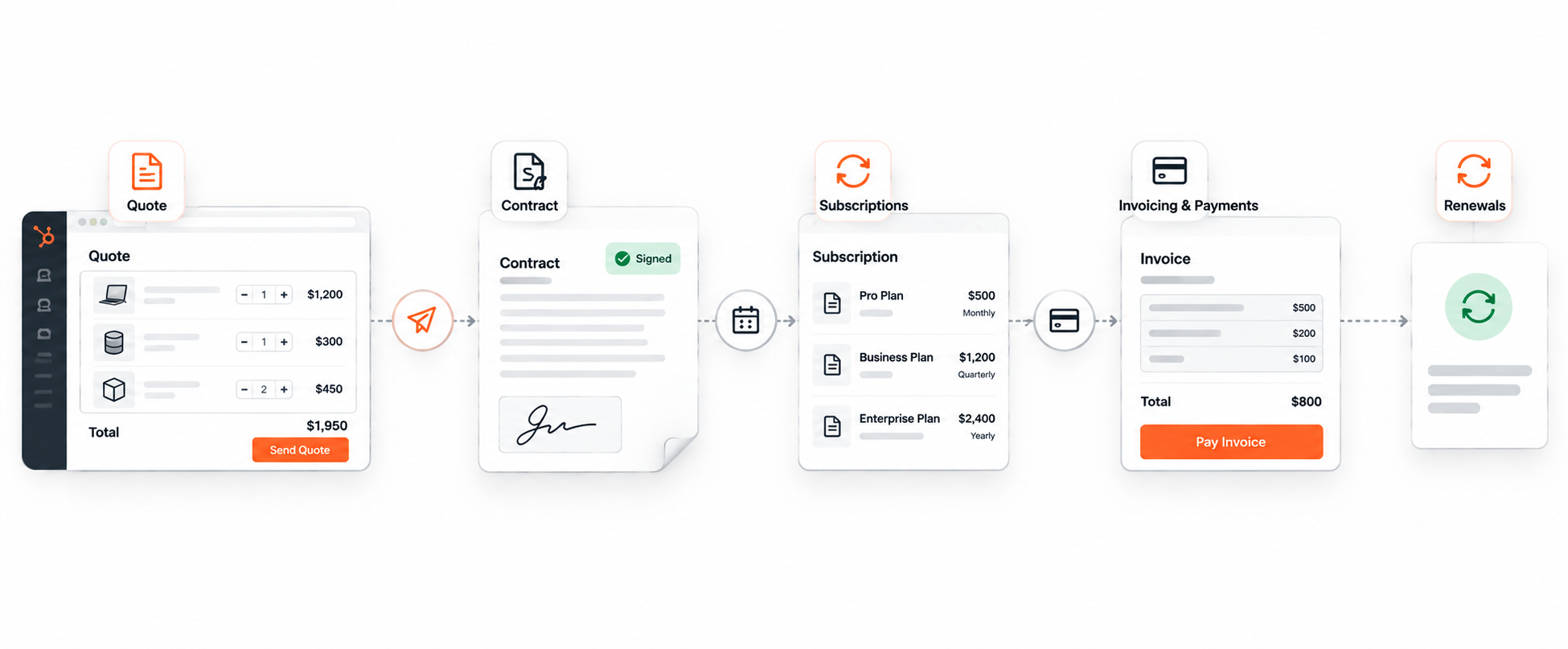
The HubSpot Quote-to-Cash Framework
The framework consists of four core components that connect sales execution with billing and payment operations.
1. CPQ (Configure, Price, Quote)
The CPQ component helps sales representatives create and share quotes within their sales workflow.
Sales execution: Reps can generate branded, signable quotes using chat prompts or native templates.
Pricing governance: Price books, tiered discounting, and approval processes help businesses manage pricing rules. Some governance capabilities depend on the subscription tier.
2. Contracts Object
The Contracts object connects the agreed commercial terms with the rest of the revenue process.
Source of truth: A contract record can be created automatically when a quote is accepted.
Lifecycle anchor: Contract records store details such as term dates, billing schedules, and renewal information, connecting the initial agreement with ongoing revenue activities.
3. Subscriptions and Invoicing
This component supports recurring billing and helps businesses track changes to subscription revenue.
Automated billing: Recurring invoices can be generated on defined schedules, such as weekly, monthly, or yearly.
Revenue tracking: Teams can monitor metrics such as monthly recurring revenue (MRR) and track change orders and contract amendments.
4. Payments and Collections
The payments component connects invoice settlement with customer and financial records.
Payment collection: Businesses can collect card or ACH payments through supported HubSpot Payments or Stripe configurations.
Accounting integration: Connections with accounting platforms such as QuickBooks and Xero can help synchronize financial information. The available sync behavior depends on the integration and configuration.
How the Components Work Together
These components connect the key stages of HubSpot quote-to-cash:
Configure and price a deal → Generate a quote → Create a contract → Schedule billing → Issue invoices → Collect payments → Manage renewals
This connected approach helps teams maintain continuity from the initial sale through subsequent revenue activities, rather than managing every stage independently.
What to Check Before Migrating from Commerce Hub to Revenue Hub
Before starting your HubSpot Commerce Hub migration, review your existing Commerce Hub setup to identify workflows, integrations, and data that may need adjustment.
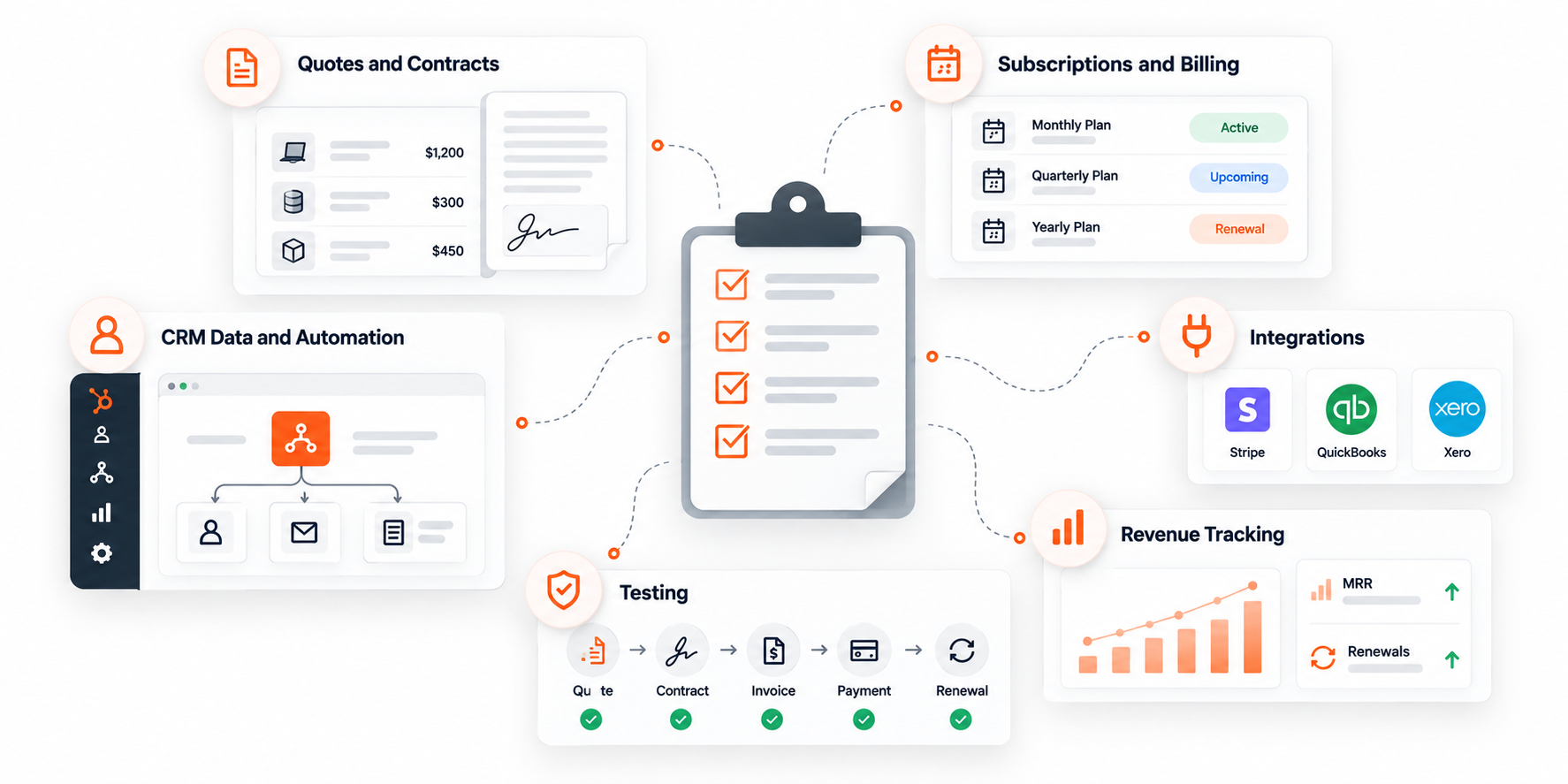
Quotes and contracts: Check templates, pricing rules, approval processes, and contract workflows.
Subscriptions and billing: Validate recurring payment schedules, invoices, amendments, and renewals.
Integrations: Review payment providers and accounting connections, including Stripe, QuickBooks, and Xero.
CRM data and automation: Audit custom properties, workflows, reports, and dependencies.
Revenue tracking: Confirm that contract details, MRR, and renewal information remain accessible.
Testing: Validate quote acceptance, invoicing, payment collection, and renewals before going live.
Review your existing processes and dependencies, then test the updated workflows to help ensure a smooth transition to Revenue Hub.
HubSpot Revenue Hub Implementation: Six Steps to Connect Quote-to-Cash
Quote-to-cash shouldn’t feel like a chain of disconnected tasks. A well-planned HubSpot Revenue Hub implementation brings products, pricing, quotes, billing, and payments into one streamlined process while making the HubSpot Commerce Hub migration easier to manage.
Here are six steps to guide your quote-to-cash implementation and build a faster, more connected revenue workflow.
Step 1: Add Products to Your Product Library
Start by adding the products or services your team sells.
In your HubSpot account, click More.
Navigate to CRM → Products.
Click Create product in the upper-right corner.
Enter the product name, description, price, and billing frequency.
Click Create to save the product.
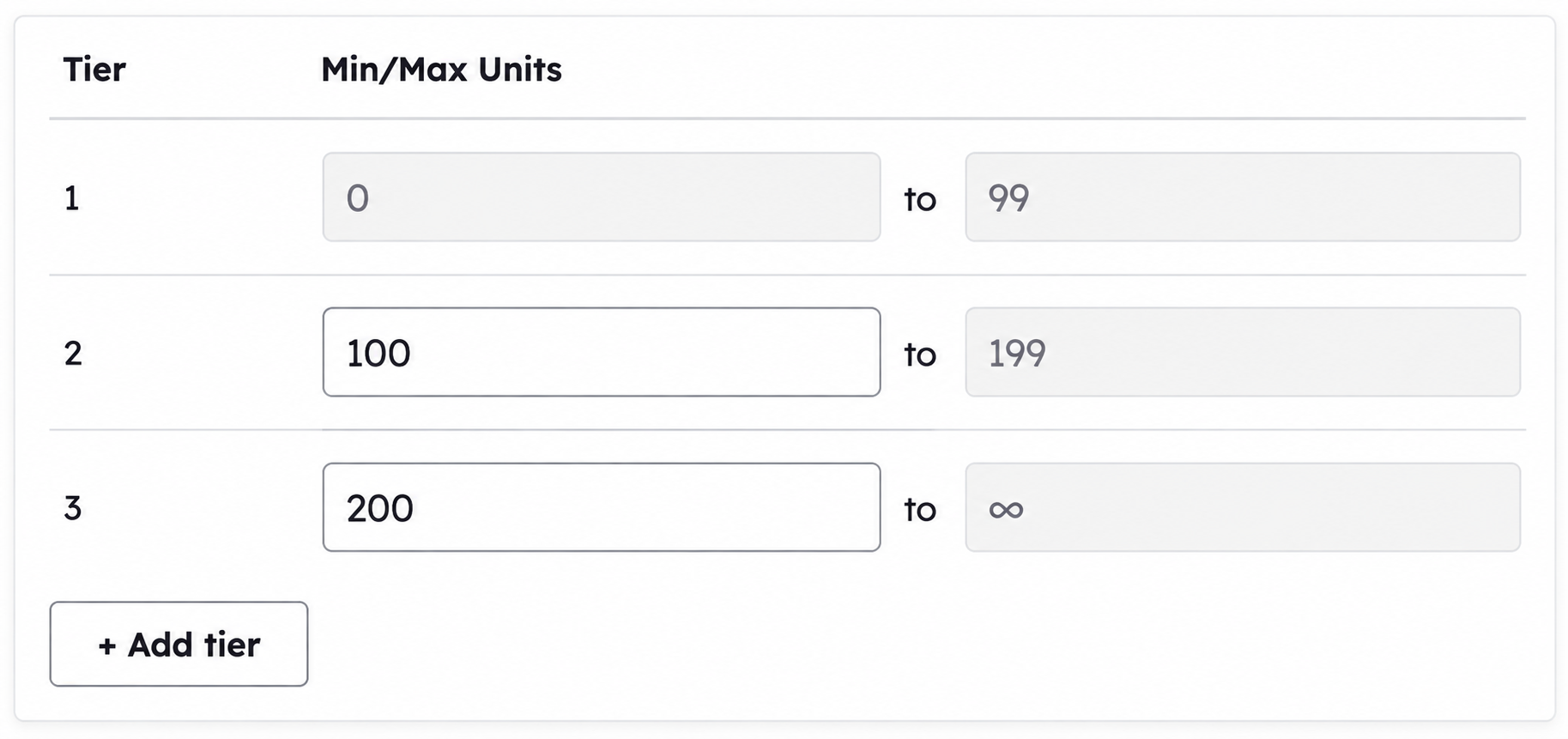
For tiered pricing, a Revenue Hub subscription is required.
Step 2: Configure Your Pricing Structure
If your business uses different pricing models, organize them through price books.
Navigate to CRM → Products.
Click Manage price books.
Click Create price book.
Enter the name, description, and currency.
Click Create, then select Add products.
Select the products to include and click Add.
Update the price, billing frequency, and term for each product as needed.
Step 3: Set Up Payment Processing
Connect a payment processor before configuring quotes or other revenue tools that need to collect payments.
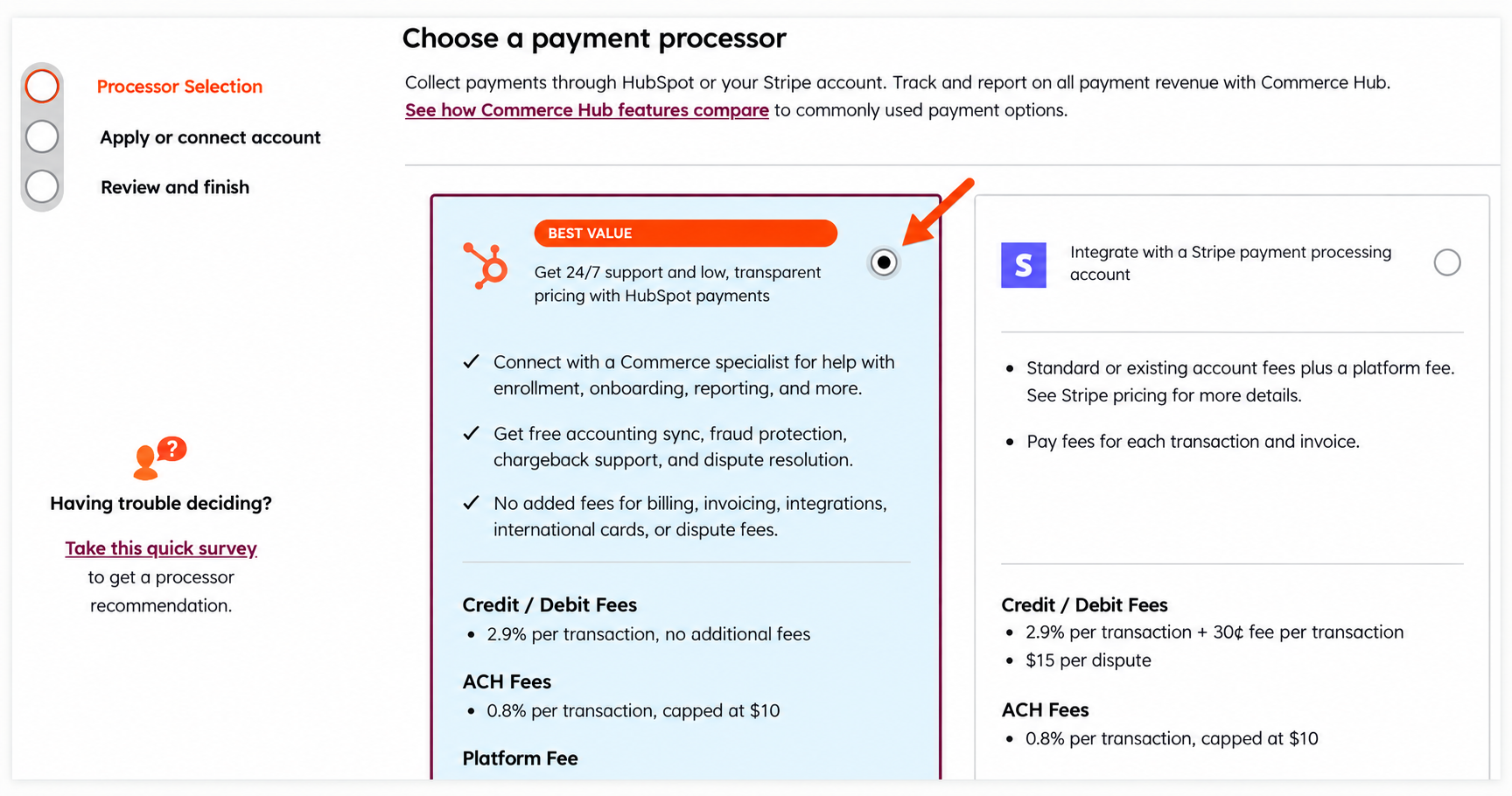
Option A: HubSpot payments
Open your HubSpot account's payment setup flow.
Follow the application steps to set up HubSpot payments.
Make sure your business meets HubSpot's eligibility requirements.
After approval, review your payment settings and supported payment methods.
HubSpot Payments is available to eligible businesses operating in the United States, United Kingdom, and Canada. A paid HubSpot subscription and a qualifying bank account are required.
Option B: Stripe
If your business isn't eligible for HubSpot Payments, you may be able to use Stripe.
Open HubSpot's payment-processing setup flow.
Select the option to connect Stripe for payment processing.
Follow the on-screen instructions to connect your Stripe account.
Review the payment setup before using it with your revenue tools.
Stripe availability and supported functionality depend on your account and location. Connecting Stripe for payment processing is different from simply syncing Stripe data to HubSpot.
Step 4: Configure Contract Settings
Use contract settings to control automatic contract creation and renewal management.
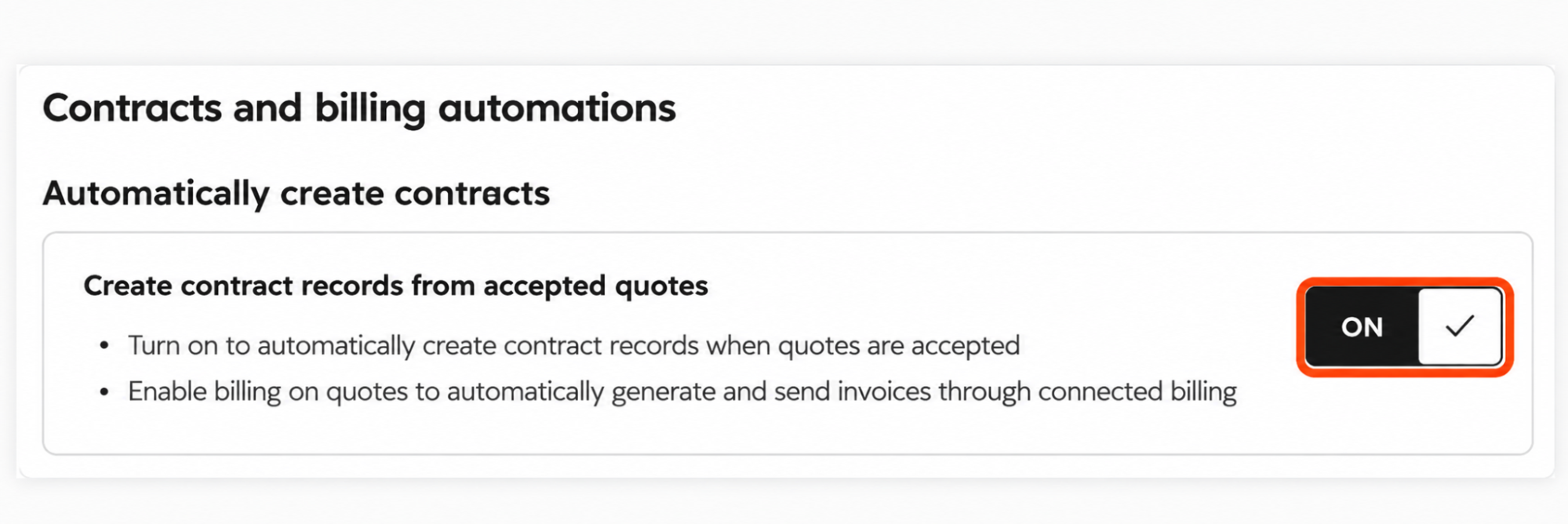
Enable automatic contract creation
Click the Settings icon in the top navigation.
In the left sidebar, under Data Management, click Objects.
Open the Select an object dropdown.
Select Contracts.
Turn on Create contracts from accepted quotes if you want HubSpot to create contracts automatically when buyers accept eligible quotes.
Configure renewal alerts
Stay in Settings → Data Management → Objects → Contracts.
Click the Renewals tab.
Under Renewal management setup, open the Renewal is approaching alert dropdown.
Select the number of days before renewal when the alert should appear, or choose Custom to enter a timeframe.
A Super Admin is required to configure contract settings. Creating and editing contracts generally requires a Revenue Hub seat, subject to the documented beta exception. Accepted legacy quotes do not automatically create contracts.
Step 5: Create and Share a Quote From a Deal
Once your products and pricing are ready, create a quote for a sales opportunity.
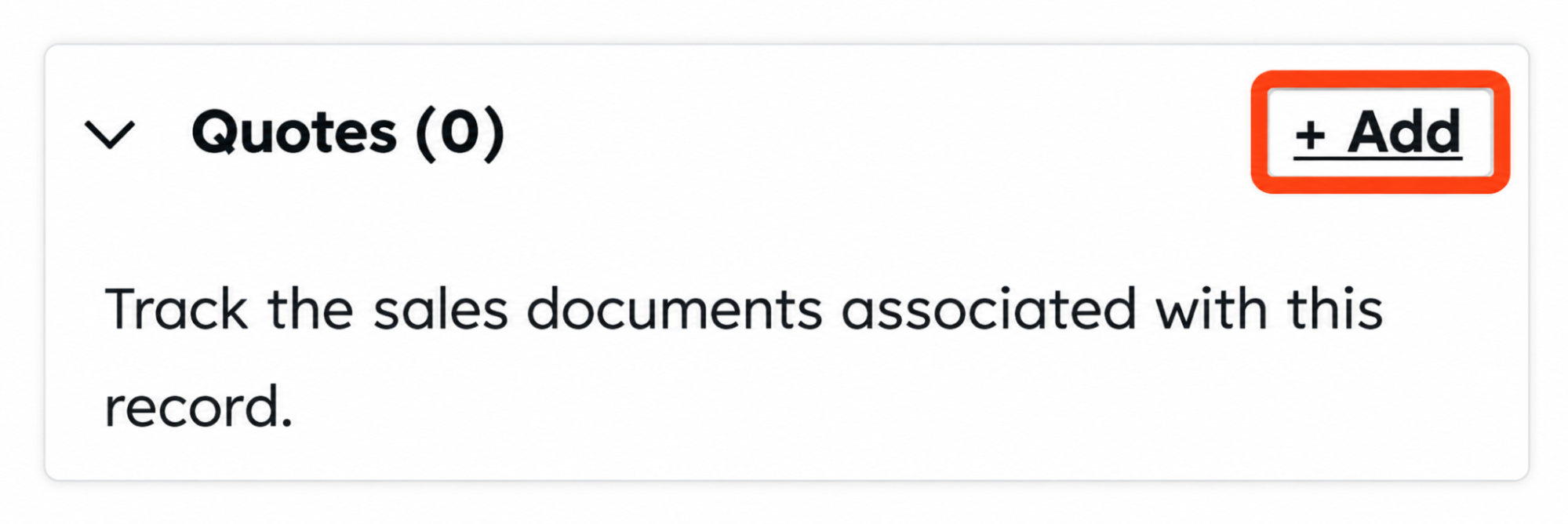
Navigate to More → CRM → Deals.
Click the name of the deal you want to quote.
In the right sidebar, find the Quotes card.
Click + Add.
If HubSpot offers a choice of quote types, select Create quote rather than Create quote (legacy).
If quote templates are available, open Select a quote template and choose the template you want.
In the quote editor, add the relevant products or line items and review their prices, billing details, and terms.
Click Preview in the upper-right corner to check how the quote will appear to the buyer.
If the quote requires approval, click Request approval and follow the prompts. Otherwise, click Share to finalize it.
Use the sharing options to copy the quote link, download a PDF, or send the quote by email.
Creating and editing Revenue Hub quotes requires Revenue Hub Professional or Enterprise, a Revenue Hub seat, and the appropriate deal permissions.
Step 6: Test the Quote-to-Cash Process
Before rolling out the process, use a test deal to check that each configured stage behaves as expected.
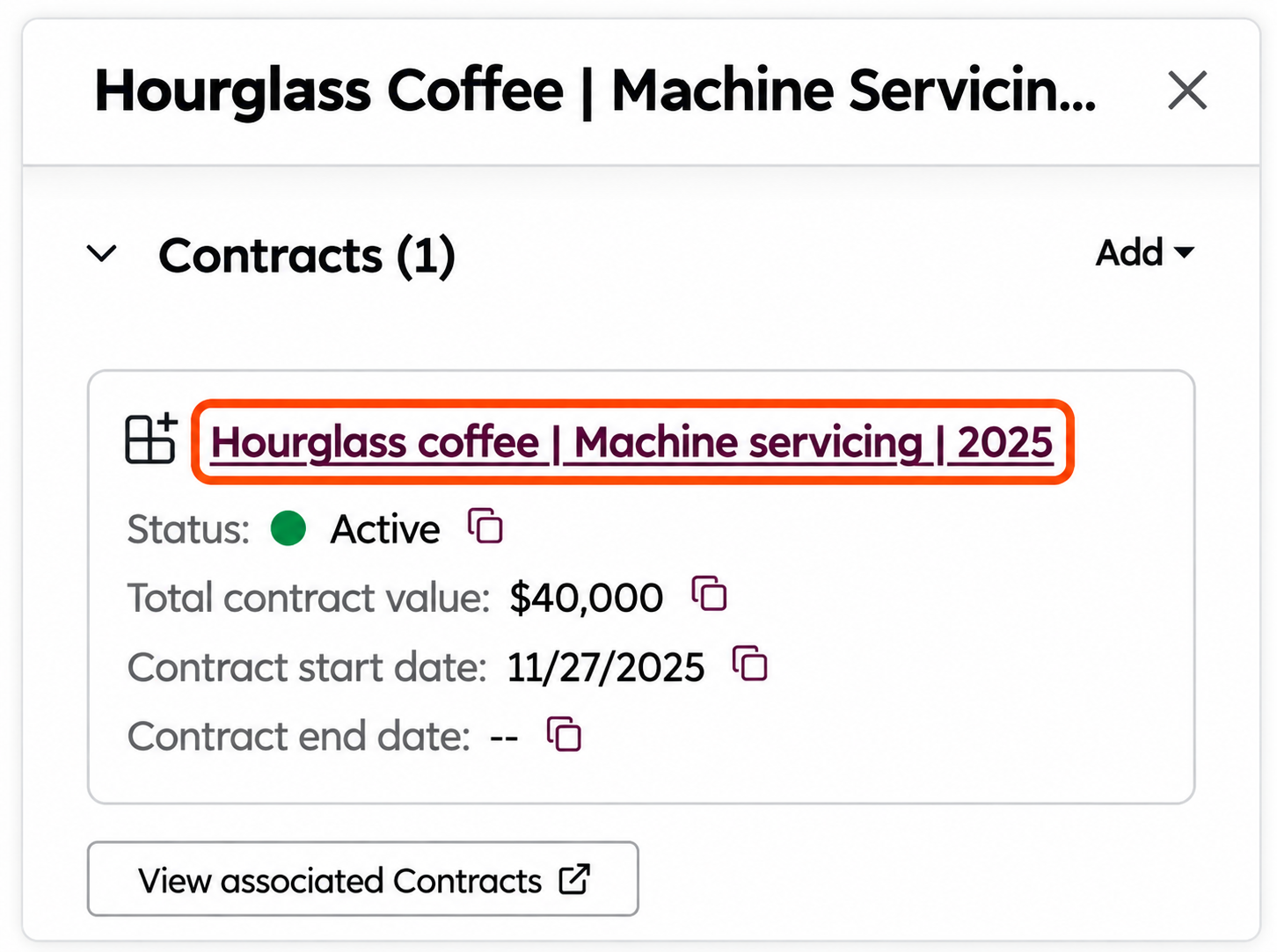
Check the quote: Create a test quote and verify the products, prices, terms, and acceptance options.
Test buyer acceptance: Preview the quote and complete the acceptance process using an appropriate test scenario.
Check contract creation: If Create contracts from accepted quotes is enabled, confirm that accepting the quote creates the expected contract.
Check billing: Verify the invoice or subscription behavior supported by your account's configuration.
Test payment collection: If payment processing is configured, confirm that the test payment is handled as expected.
Review the records: Check the quote, deal, contract, and relevant billing records for accurate information and proper associations.
How a Deal Moves from Quote Acceptance to Payment in HubSpot Revenue Hub
Once a buyer accepts a billing-enabled quote, HubSpot can move the deal into a connected quote-to-payment process, linking the agreement, billing, invoices, and payment collection.
Quote accepted → Contract record → Billing schedule → Invoice → Payment collection
Quote acceptance: The buyer accepts the quote using the configured acceptance method. If billing is enabled, the buyer can then move into the invoice and payment process.
Contract record: When Automatically creating contracts from accepted quotes is turned on, HubSpot automatically creates a contract record after the quote is accepted. The contract carries details such as the billing contact, payment method, and agreed line items.
Billing schedule: HubSpot creates a billing schedule based on each line item’s bill date, billing frequency, and start date. This determines when the buyer needs to be invoiced.
Invoice generation: Invoices are generated according to the billing schedule and sent to the billing contact. For recurring line items, invoices can continue to be generated at each billing interval.
Payment collection: The buyer moves to the invoice checkout experience to pay immediately or schedule a payment. If Automatic payments are enabled, the stored payment method can be used for future invoices.
Revenue Hub connects the deal with contracts, billing schedules, invoices, and payments in one quote-to-payment flow.
Note: The connected contract-to-invoice flow requires the Connected CPQ, Billing, and Payments beta.
How to Measure Quote-to-Cash Improvements After Go-Live
Once Revenue Hub is live, compare your pre-implementation baseline with post-implementation results to measure the impact of your HubSpot revenue management process.
Tracking the right Quote-to-Cash (Q2C) KPIs helps you identify whether the new process is improving speed, accuracy, cash flow, and user adoption.
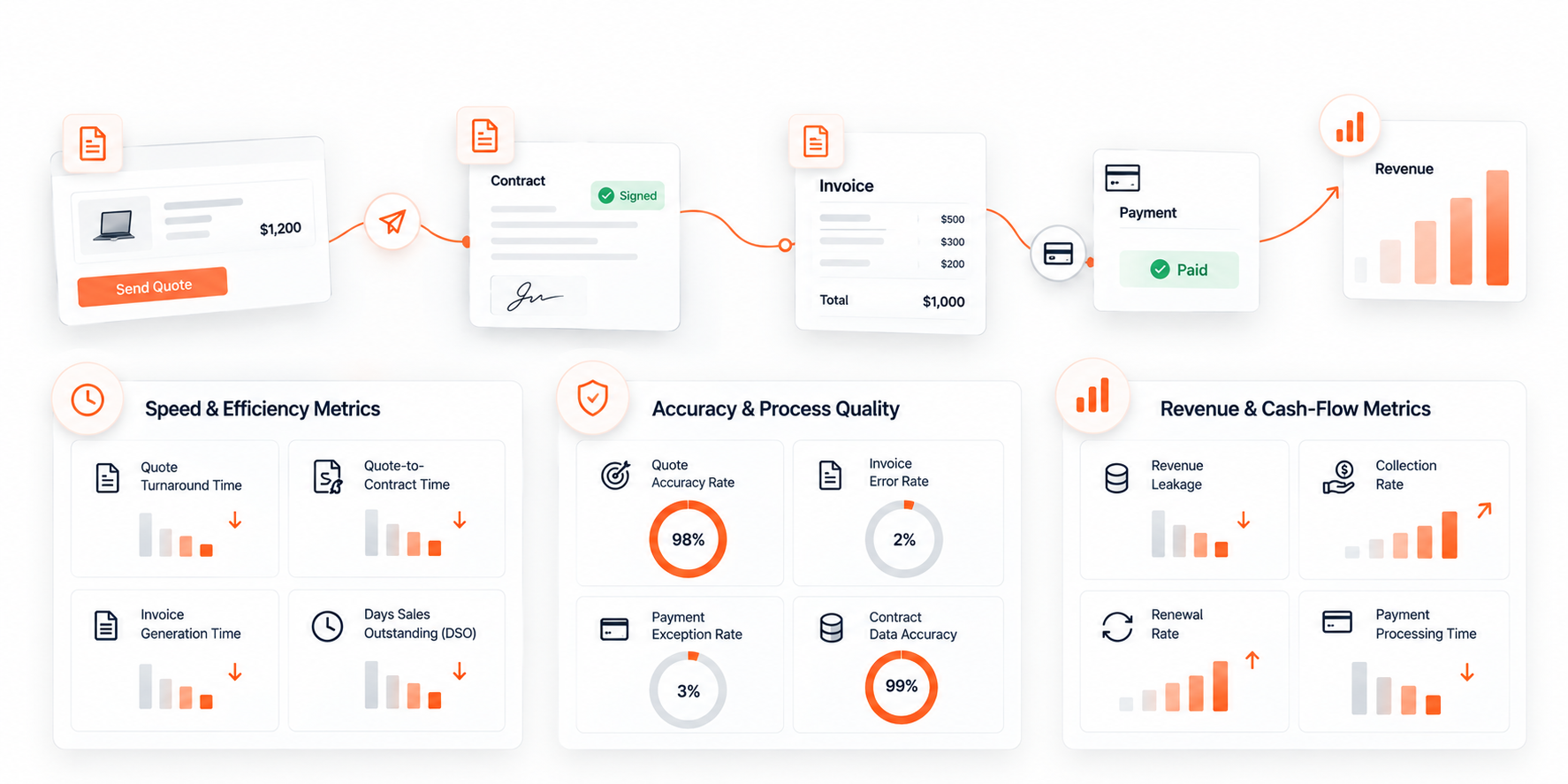
1. Speed & Efficiency Metrics
These metrics show whether transactions are moving faster through the revenue cycle.
Quote Turnaround Time: Average time from quote creation to delivery.
Quote-to-Contract Time: Time between quote acceptance and contract creation.
Invoice Generation Time: Time required to generate an invoice after the applicable billing event.
Days Sales Outstanding (DSO): Average number of days required to collect payment after invoicing.
2. Accuracy & Process Quality
Faster processes are only valuable when they also reduce errors and rework.
Quote Accuracy Rate: Percentage of quotes completed without pricing corrections or manual changes.
Invoice Error Rate: Percentage of invoices requiring correction because of billing or data discrepancies.
Payment Exception Rate: Percentage of transactions requiring manual intervention before payment can be completed.
Contract Data Accuracy: Percentage of contract records containing complete and correct billing information.
3. Revenue & Cash-Flow Metrics
These KPIs help measure the financial impact of the new Q2C process.
Revenue Leakage: Revenue lost through missed billing, incorrect discounts, or unbilled services.
Collection Rate: Percentage of invoiced revenue collected within the expected payment period.
Renewal Rate: Percentage of eligible contracts successfully renewed.
Payment Processing Time: Time between invoice delivery and successful payment.
4. Before vs. After Comparison
| Q2C Phase | Metric | Before Implementation |
After Implementation |
Change |
|---|---|---|---|---|
| Quoting | Quote Turnaround Time | 5 Days | 2 Hours | 96% Reduction |
| Contracting | Quote-to-Contract Time | 7 Days | 2 Days | 71% Reduction |
| Billing | Invoice Generation Time | 3 Days | Same Day | Faster Processing |
| Collections | DSO | 45 Days | 32 Days | 13-Day Reduction |
5. Adoption & User Experience
Track whether sales and finance teams are actually using the new Q2C process. Measure the percentage of quotes created in HubSpot, manual workarounds, billing-related support requests, and exception volumes.
A useful post-launch review combines process speed, data accuracy, revenue performance, and user adoption rather than relying on a single KPI.
Conclusion: Turning the Quote-to-Cash Blueprint into a Connected Revenue Process
A quote should not be the end of the sales process; it should trigger the next steps. With HubSpot Revenue Hub, an accepted quote can flow into the contract, billing schedule, invoice, checkout, and payment without breaking the revenue trail.
The goal of a HubSpot Revenue Hub implementation is to connect these handoffs, manage exceptions without stopping the main flow, and measure where revenue gets delayed. That is where HubSpot revenue management and quote-to-cash automation become practical, not just another layer of software.
Ready to connect your quote-to-cash process? Talk to a HubSpot expert and see what Revenue Hub can automate for your business.
Frequently Asked Questions
-
The HubSpot quote-to-cash process connects the stages from creating and accepting a quote through contracts, billing, invoicing, payment collection, and renewals.
-
Revenue Hub can connect accepted quotes with contracts, billing schedules, invoices, and payment collection, reducing manual handoffs between sales and finance.
-
Yes. Stripe can be used as a payment-processing option, with availability and functionality depending on the account and location.
-
Revenue Hub is the evolution of Commerce Hub. It expands beyond billing and payments to connect quoting, contracts, billing, and payments into a broader revenue process.
-
Revenue Hub is the evolution of Commerce Hub. It expands beyond billing and payments to connect quoting, contracts, billing, and payments into a broader revenue process.
-
Common areas that require careful planning include pricing structures, existing workflows, integrations, contract settings, billing schedules, payment processing, data dependencies, and testing.
Related Readings
Let’s Talk

Drop us a note, we’re happy to take the conversation forward 👇🏻