The Enterprise Architect’s Guide to Agentforce Headless Agents
Key takeaways:
Learn how Agentforce Headless Agents power autonomous enterprise workflows using APIs, runtime intelligence, and contextual decision-making.
Explore the core principles of Enterprise AI Architecture, including integration patterns, governance, and AI Trust for scalable deployments.
Discover best practices for implementing Agentforce AI Agents securely, efficiently, and at enterprise scale.
At TrailblazerDX 2026, Salesforce co-founder Parker Harris asked a question that would have sounded absurd a few years earlier: why should anyone log into Salesforce at all? The remark framed Salesforce Headless 360, a platform-wide restructuring that exposes data, workflows, and business logic through APIs, MCP tools, and CLI commands instead of screens built for human hands and it's why Agentforce Headless Agents deserve a serious architectural look, not a passing product mention.
For twenty-five years, "using Salesforce" meant navigating a UI. Headless 360 inverts that, giving agents direct, programmatic access through 60+ new MCP tools and 30-plus preconfigured coding skills to the same data and processes that once required a browser tab.
Agentforce Headless Agents are the execution layer on top of that infrastructure: agents that reason, decide, and act without ever rendering a chat window or a page. For enterprise architects, this is a runtime model change touching identity, integration, governance, and operations all at once.
Why Headless Agents Are the Next Evolution of Enterprise AI
Conversational AI got enterprises comfortable with agents, but it also capped how much work they could do. Headless agents remove that cap by letting the agent reason and act without needing a screen. Here's what changes underneath.
The chatbot ceiling: Most enterprise AI conversations still start with a chatbot someone types into a widget, an LLM responds, the interaction ends. That model requires a human to initiate every interaction, which caps how much work an AI system can absorb.
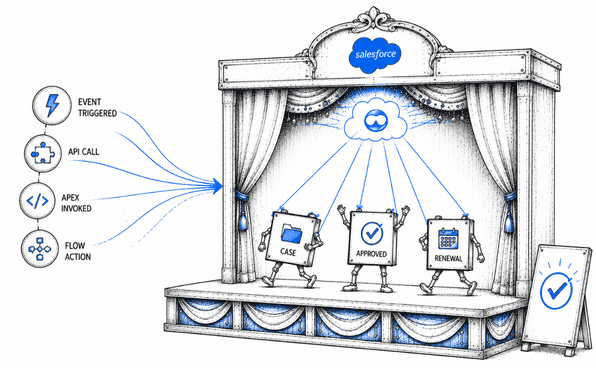
Decoupled triggers: An agent can be invoked by a Flow, called from Apex, triggered by a platform event, or reached directly through the Agent API reasoning the same way, but fully decoupled from human interaction.
Backend-first scale: A conversational agent might handle a few hundred chats a day; a headless agent inside an approval or renewal workflow can evaluate thousands of records without a human opening a session.
“Salesforce's TDX case study featured a travel company whose service agent runs entirely through Slack and API calls, resolving cases without touching the console.”
Business vs. architectural driver: The architectural driver matters more once agents don't need a UI to act, they can live anywhere a business process already runs, from CI/CD pipelines to a partner system's own automation layer.
Conversational Agents vs. Headless Agents
| Dimension | Conversational Agent | Headless Agent |
|---|---|---|
| Trigger | A human opens a chat session. | A Flow, Apex call, platform event, or external API request. |
| Surface | Chat widget, Slack, or mobile app. | Output is structured data or an action. |
| Volume ceiling | Bound by human-initiated sessions. | Bound by data volume and system throughput. |
| Use case | Customer self-service and employee Q&A. | Approval routing, claims processing, and renewal management. |
| Where it lives | Front-facing surfaces. | Embedded inside backend workflows and pipelines. |
Building Blocks Behind Headless Agents
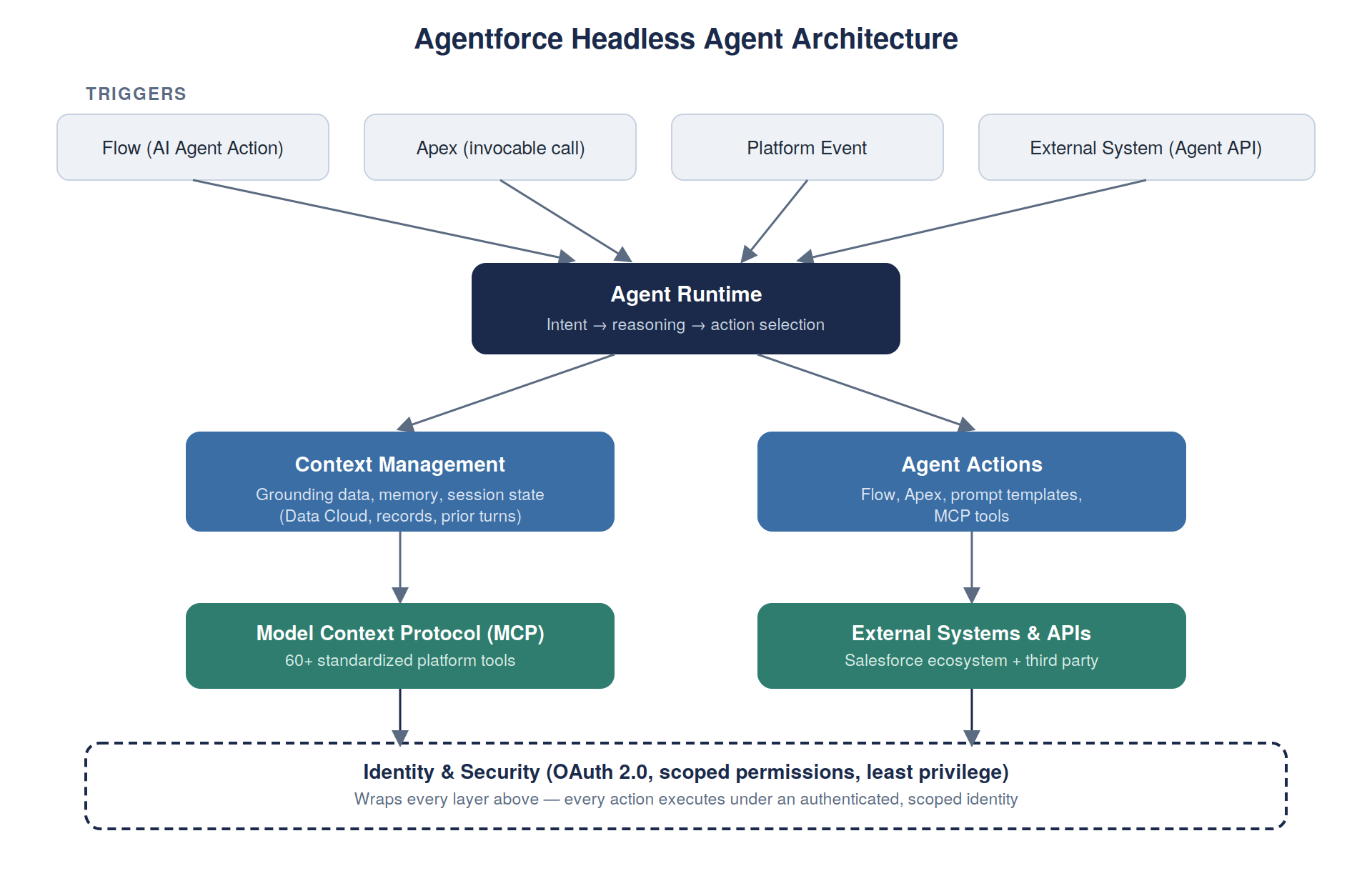
Before getting into each component, it helps to see how they fit together. A trigger invokes the agent runtime, which pulls in context, reasons over available actions, and calls out to MCP tools or external systems all under a single identity and permission boundary that wraps the entire flow.
Other frameworks sometimes collapse tool integration into a single layer; Here it's split into three Actions, MCP, and External Systems, because on Salesforce they behave differently enough to warrant separate architectural attention.
1. Agent Runtime
The agent runtime turns an utterance, event, or API call into a sequence of decisions: interpreting intent, selecting actions, and managing state across turns. The lifecycle:
session starts → context loads → reasoning → action execution → response returns.
This reasoning is probabilistic, not deterministic the same input can occasionally produce a different, still-valid path. Treat that as an operating characteristic to monitor, not a defect to eliminate.
Invocation method shapes latency, ownership, and where governance lives:
Invocation Method
Where It's Used
Best Fit
Flow (AI Agent Action)
Inside declarative automation on-platform
Admin-owned processes, low-code teams
Apex
Inside custom code on-platform
Complex conditional logic, existing Apex-heavy orgs
Agent API
Called by external systems over REST
Third-party integrations, partner systems, mobile/web apps
2. Context Management
Context management is how the agent pulls in relevant data before it responds, things like case history, opportunity stage, or entitlements, so it works with real, current information instead of general knowledge alone.
It also controls how much of the earlier conversation is kept as the session continues. Keeping too little makes responses feel disconnected; keeping too much adds cost and slows things down.
3. Agent Actions
Actions are how an agent does something rather than describes it. An action might be a Flow, an Apex invocable method, a prompt template, or an MCP tool, and the runtime picks among them based on reasoning.
Instead of hardcoded decision trees, agents evaluate the context and dynamically choose the best action. The result is more adaptable automation without increasing workflow complexity.
4. Model Context Protocol (MCP)
MCP is an open protocol for connecting AI systems to external tools and data through a standardized interface, instead of a bespoke integration for every system. Salesforce has adopted it as a first-class connectivity layer.
Headless 360 exposes dozens of platform capabilities as callable MCP tools that any authorized client can discover and invoke, inheriting the same scoped, token-based permissions as any other integration, deterministic and testable.
5. External Systems & APIs
Headless agents rarely operate in isolation they reach the broader Salesforce ecosystem (Data Cloud, Service Cloud, Sales Cloud) and third-party applications through the Agentforce REST API (Agent API), which authenticates and exchanges messages against a specific agent session. Treat every external connection as a scoped integration with its own credentials and blast radius, not a blanket trust relationship.
6. Identity & Security
Every headless invocation needs an identity behind it. The Agent API relies on OAuth 2.0 client credentials flow for service-to-service calls, or JWT-based flow when acting on behalf of a named user. Authorization works like any integration user:
Scoped OAuth permissions: grants only what the agent needs
Field- and object-level security: inherited, not bypassed
Sharing rules: govern what records the agent can touch
Identity propagation: "on behalf of" a user vs. a service identity produces different audit trails; conflating the two is a common early mistake
Enterprise Integration Patterns for AI-Powered Workflows
| Pattern | What It Does | Key Enterprise Consideration |
|---|---|---|
| API-first integration | The Agent API, Data Cloud APIs, and standard REST/SOAP endpoints give agents the same access points your other systems already use. | Reuse existing API governance rather than building agent-specific integration paths. |
| Event-driven workflows | Agents trigger off platform events, such as a case escalation or a Data Cloud threshold breach, instead of polling. | Keeps cost and latency proportional to real business activity. |
| Microservices | Each action is a small, independently testable unit rather than a monolithic script. | Easier to version and reuse actions across multiple agents. |
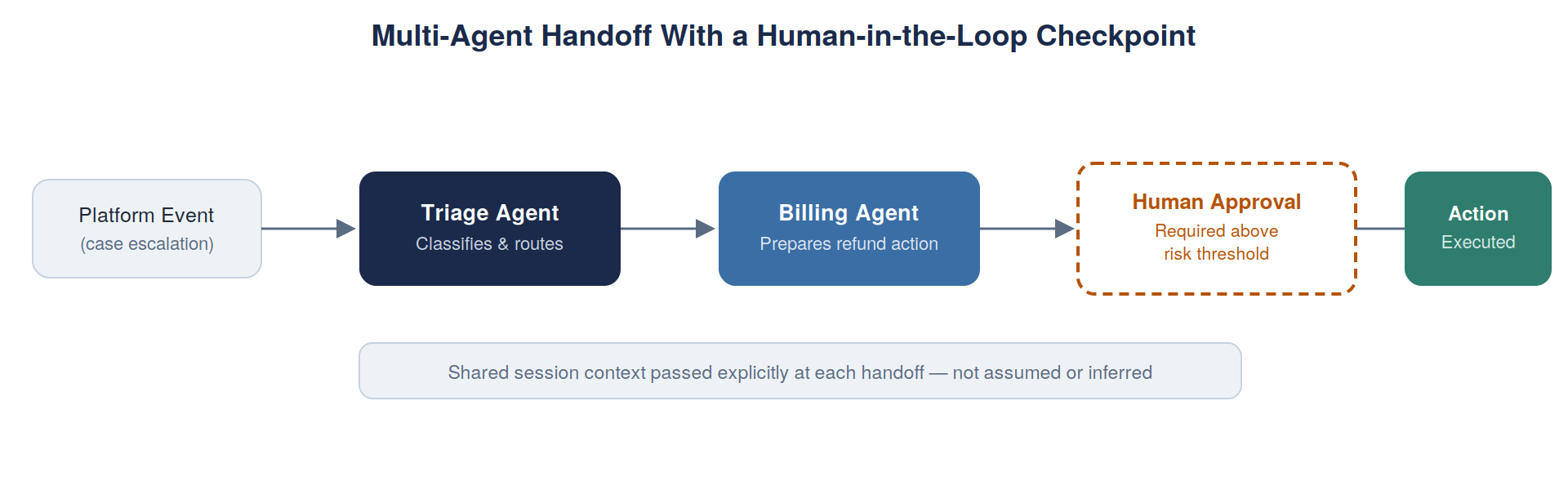
| Multi-agent collaboration | One agent invokes another, enabling specialization, such as a triage agent handing off to a billing agent. | Requires explicit handoff contracts so context passes deliberately and failures don't cascade silently. |
| Human-in-the-loop | High-stakes actions route through an approval step even inside a headless workflow. | A deliberate checkpoint tied to risk, not a fallback for immature automation. |
Governance, Security, and Trust for Autonomous AI Systems
When an agent can act on its own, mistakes can chain together just like actions do. For example, an agent with both a "send email" action and a "read case" action could combine them in a way no one planned for.
That's why governance for headless agents needs several overlapping controls, not just one policy.
| Governance Area | What It Does | Why It Matters |
|---|---|---|
| Permissions | Controls exactly what each action is allowed to do. | Stops two safe actions from combining into something unsafe. |
| Compliance | Keeps a record of what data the agent looked at and used. | Proves what happened, since no person clicked through it. |
| AI Trust Layer | Salesforce's built-in privacy and safety checks. | Covers the basics, but you still need your own rules on top. |
| Audit Logs | Records who ran the agent, what it did, and when. | Lets you look back and see exactly what happened. |
| Prompt Governance | Reviews and tests agent instructions before they go live. | Catches bad changes before they affect real users. |
Monitoring and Operational Excellence
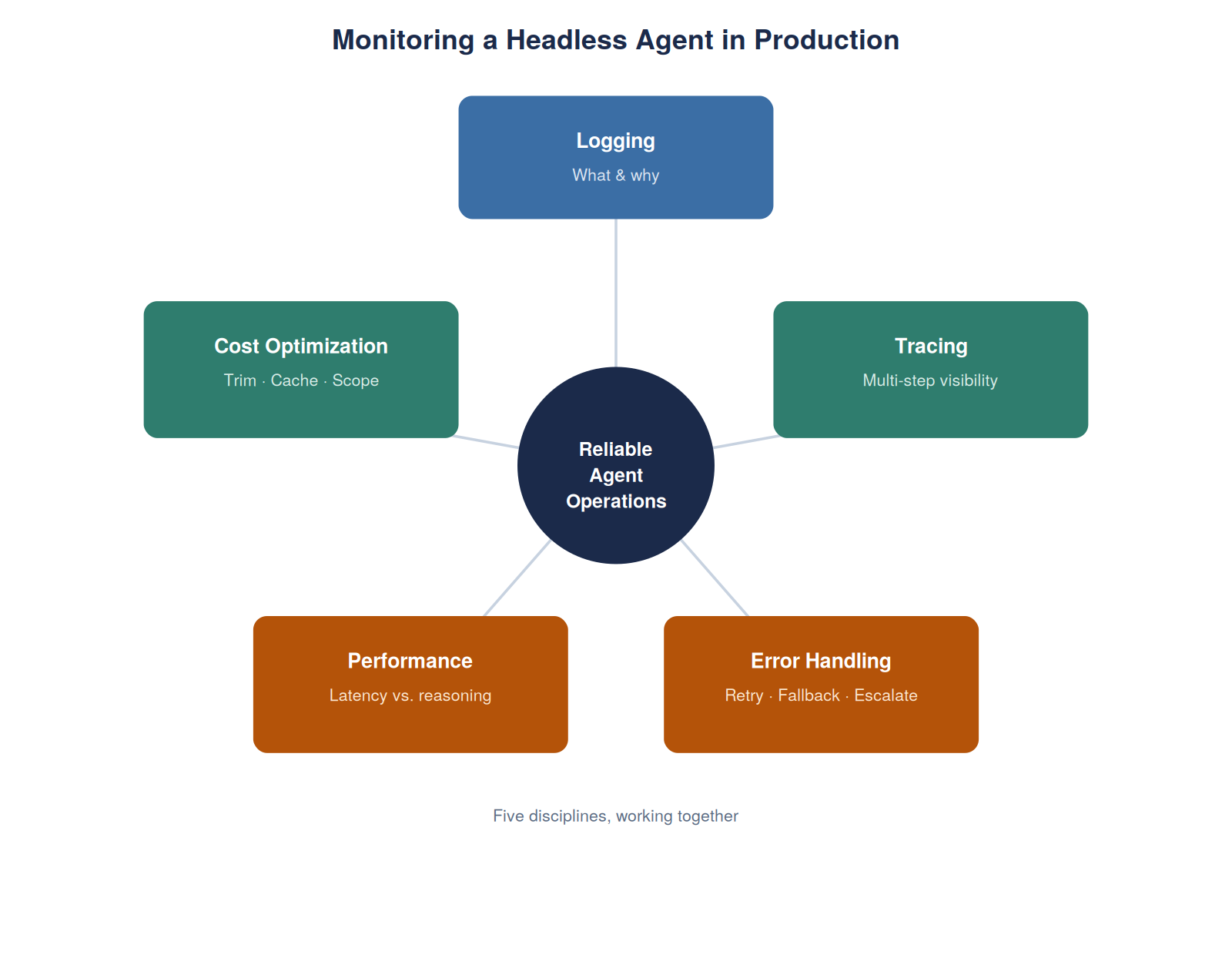
Agent behavior isn't always predictable, so basic uptime checks aren't enough. Production monitoring for headless agents needs to cover these areas:
Logging: record not just what the agent did, but why it chose that action.
Tracing: use Salesforce's session tracing and evaluation tools (Testing Center, custom scoring evals) to follow an agent's steps across multiple actions or handoffs, especially when something fails deep in the process.
Error handling: decide upfront what happens when something fails: retry, fall back, or escalate to a human. Don't leave this to default behavior.
Performance monitoring: more reasoning and more context both add latency, so track them together.
Cost optimization: trim unused context, cache repeated data, and scope actions tightly to keep both cost and speed in check.
Quick Deployment Tips for Agentforce Headless Agents
1. Stateless execution.
Treat individual actions as stateless by default, even though the overall session may carry conversational state. Actions that don't depend on hidden local state are easier to test, retry, and reuse.
2. Reusable actions.
Once you have more than one agent in production, build a shared action library instead of duplicating logic inside each agent. This keeps behavior consistent and shrinks the maintenance surface when a downstream API changes.
3. Version control.
Apply the same discipline to instructions, topics, and prompt templates as you would to Apex and Flow metadata branch it, review it, roll it back when something regresses.
4. Testing strategies.
Go beyond happy-path validation. Include adversarial and edge-case prompts, and run them against Testing Center-style evaluation frameworks before every meaningful configuration change ships.
5. Ownership model.
Assign clear ownership across three distinct skill sets that are too often treated as one undifferentiated "AI team": instructions and topics, the action library, and data grounding.
6. Continuous monitoring.
Deploying a headless agent is an ongoing commitment, not a one-time integration project. Feed session tracing and evaluation scores back into instruction and action refinements over time.
Conclusion
Agentforce Headless Agents mark a real shift: APIs, MCP tools, and CLI commands are replacing the browser as how work gets done. For architects, that means treating runtime design, context, identity, integration, governance, and monitoring as one connected system, not separate decisions.
Getting this right from the start is far easier than fixing it later. If you're planning a headless agent architecture, an experienced Salesforce Consultant can help you avoid costly identity, integration, and governance mistakes. Reach out to a qualified Salesforce Consultant to get started.
Frequently Asked Questions
-
An Agentforce Headless Agent is an AI agent that reasons and acts without a chat interface or rendered UI. It's triggered by a Flow, Apex, a platform event, or an external system through the Agent API, and returns structured data or executes an action instead of a conversational response.
-
A conversational agent waits for a human to open a chat session. A headless agent doesn't need a human to start anything it runs inside backend workflows like approval processes, claims handling, or renewal pipelines, and can process far higher volumes since it isn't limited by how many people can chat with it at once.
-
The Agent API is Salesforce's REST API for invoking an Agentforce agent from outside the platform. External systems authenticate, open a session against a specific agent, and exchange messages making it the primary way headless agents connect to mobile apps, Slack, or partner systems.
-
Through OAuth 2.0, using an External Client App. Salesforce supports a client credentials flow for service-to-service calls, or a JWT-based flow when the agent needs to act on behalf of a specific named user.
-
MCP (Model Context Protocol) is an open standard for connecting AI systems to external tools and data through one standardized interface instead of custom integrations for each system. Salesforce ships MCP tools as part of Headless 360, letting authorized agents and coding tools call platform capabilities directly.
Related Readings
Let’s Talk

Drop us a note, we’re happy to take the conversation forward 👇🏻