Connecting Your AI Voice Agent to the Real World: SIP, WebRTC, and CRM Integrations Explained
takeaways:
SIP connects AI voice agents to phone networks, while WebRTC enables browser-based voice. Production agents often need both.
Media servers/SBCs bridge SIP and WebRTC, allowing one voice agent to handle calls across phones, websites, and apps.
CRM integration adds business context through real-time lookups and automatically syncs post-call data.
The model is the easy part, and that’s the truth that surprises a lot of teams building voice AI. You can get an LLM sounding natural, handling interruptions gracefully, and responding in real time within a few weeks. What actually takes the work is everything around the model. The underlying infrastructure and connectivity that lets it receive a phone call, stream audio from a browser, and know who it's actually talking to.
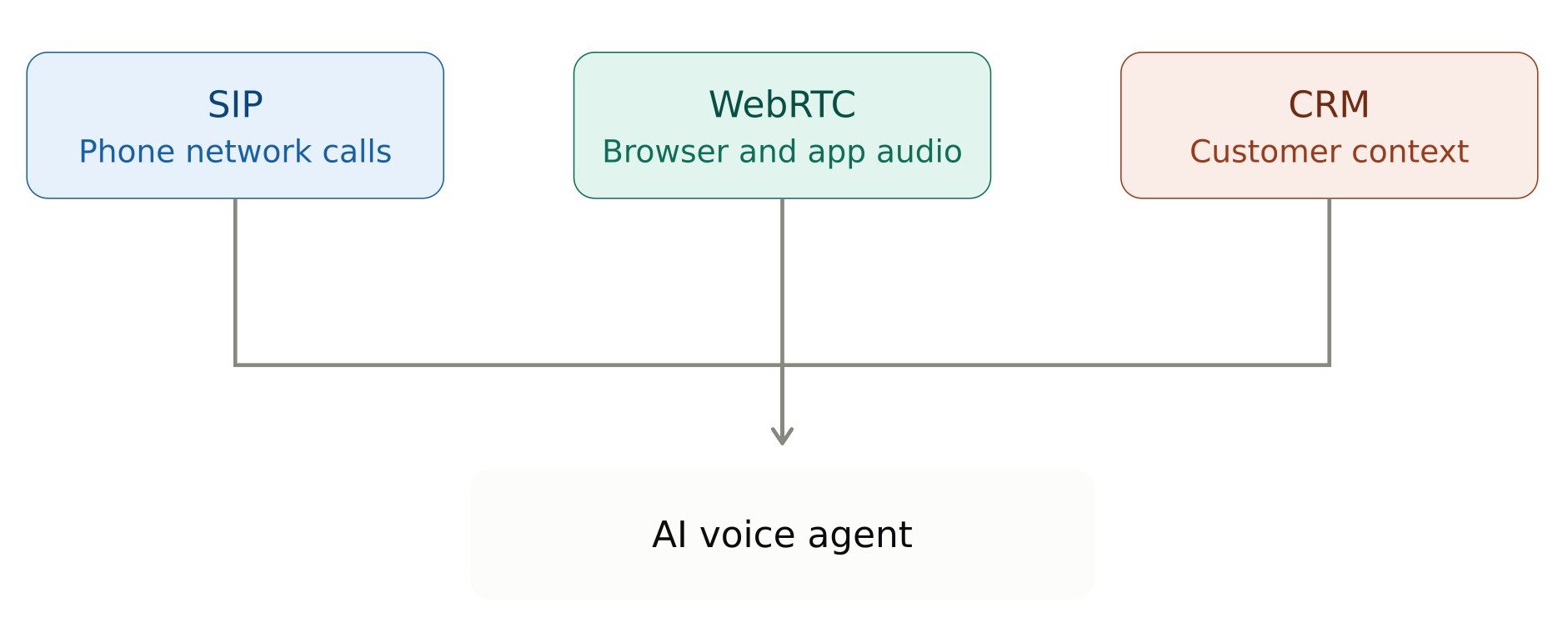
This connectivity comes down to three layers. First, SIP (Session Initiation Protocol), which connects your AI voice agent to real phone numbers and the traditional phone network. Second, WebRTC, which streams real-time audio directly from a browser or app. Third, CRM integration, which gives your agent business context like customer history, open tickets, or order status so it isn't just a chatty voice with no memory of who it's serving.
So, we will walk through each layer: how a SIP trunk AI voice agent setup actually works, what WebRTC voice AI unlocks for web and app experiences, and how voice agent CRM integration turns your agent from a novelty into something that moves business forward. Along the way, we'll touch on the AI voice agent API layer that ties it all together.
Session Initiation Protocol (SIP) Explained: Connecting to Phone Networks
What’s SIP, and why is it still the backbone of phone networks?
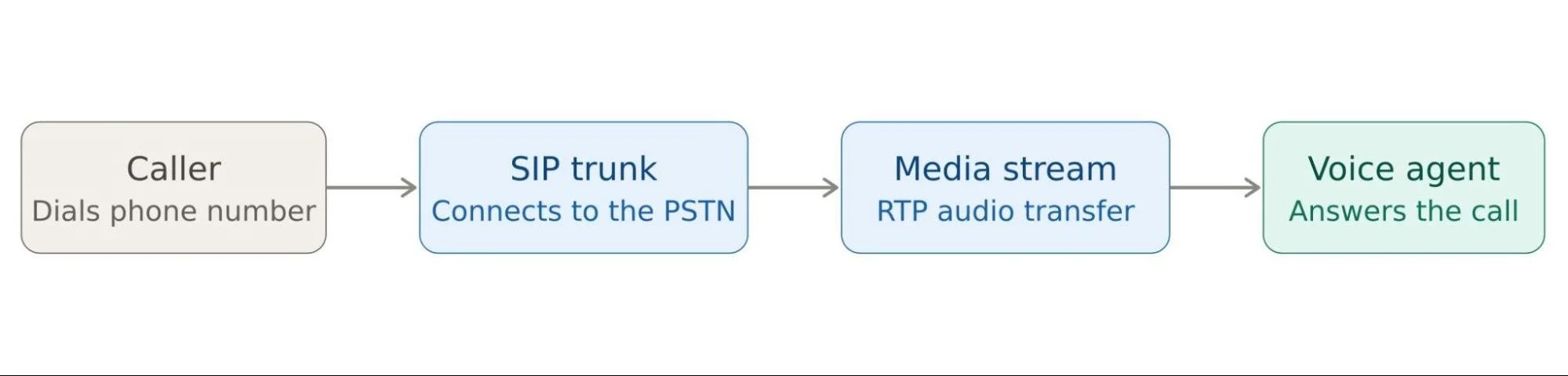
SIP stands for Session Initiation Protocol, and it has been quietly running voice calls over IP networks for over two decades. It's still the standard that most business phone systems rely on today. SIP handles call signaling, setting up, managing, and tearing down a call, while the actual audio travels separately over RTP (Real-time Transport Protocol).
For a SIP trunk AI voice agent, this is the layer that makes it possible for a customer to dial a real phone number and reach your AI instead of a human, or for your agent to place outbound calls on your behalf.
How a SIP Trunk Connects Your AI Voice Agent to the PSTN
A SIP trunk is essentially a virtual phone line delivered over the internet, replacing the old physical trunk lines that used to connect a business to the phone company. Your SIP trunking provider bridges your AI system to the PSTN (the public switched telephone network), so calls can flow in both directions.
This is where a lot of the telephony stack for AI actually lives: number provisioning, call routing rules, and the SIP trunk itself, usually purchased from a provider like Twilio, Telnyx, or SignalWire.
SIP Trunking Providers, Number Provisioning, and Call Flows Explained
A few things you'll deal with when wiring up SIP for a voice agent:
SIP trunking providers: the companies that actually connect you to the phone network (Twilio Voice AI tooling is a common starting point here, given how widely Twilio is already used for business communications)
Phone number provisioning: buying and configuring numbers that route into your AI voice agent API endpoint
Inbound vs. outbound call flows: inbound calls need to be answered and routed to your agent in real time; outbound calls (reminders, confirmations, follow-ups) need to be triggered programmatically, usually via API.
Audio Codecs and Latency in SIP-Based Voice AI Calls
Once a call connects, audio quality depends heavily on the codec in use, commonly G.711 for traditional telephony or Opus for better compression and quality. Every hop the audio takes (provider → your backend → speech-to-text → LLM → text-to-speech → back out) adds latency, and in a voice conversation, latency is the difference between a natural exchange and an awkward one.
Common SIP Pitfalls for AI Voice Agents: NAT, Jitter, and One-Way Audio
If you've never built telephony infrastructure before, a few issues tend to show up early:
NAT traversal problems: calls connect, but audio doesn't flow properly because devices behind routers can't find each other.
Jitter: inconsistent packet timing that makes speech choppy.
One-way audio: a classic and maddening bug where one side of the call can hear the other, but not vice versa.
These are solvable, but they're exactly the kind of infrastructure headache that makes a lot of teams reach for a managed platform instead of building SIP handling from scratch.
WebRTC Voice AI: Bringing Real-Time Voice Agents to the Browser
What Is WebRTC and How It Differs From SIP
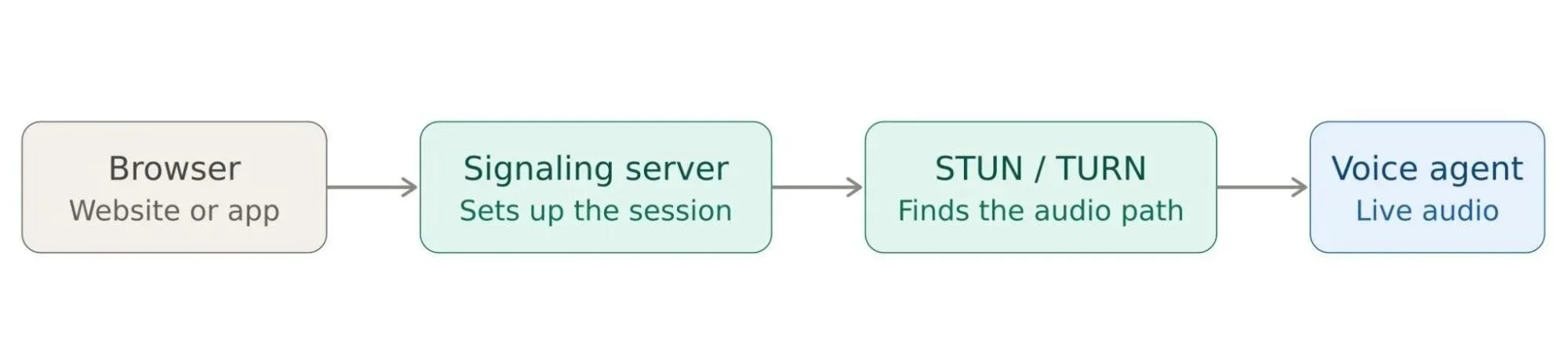
WebRTC (Web Real-Time Communication) is a browser-native standard for streaming real-time audio, video, and data. No phone number, no SIP trunk, no plugin. Where SIP connects your agent to the phone network, WebRTC voice AI connects your agent directly to a browser tab or mobile app.
WebRTC Voice AI Use Cases: Embedded Widgets and Click-to-Call
This is the layer behind voice widgets embedded on a website, in-app voice assistants, and "click to talk" experiences where a customer starts a voice conversation without ever dialing a number. If you want a voice agent living inside your product rather than answering a support line, WebRTC is what makes that possible.
Signaling Servers, STUN/TURN, and ICE Negotiation Explained
WebRTC itself doesn't define how two endpoints find each other; that's handled by:
Signaling servers: coordinate the initial connection setup between browser and backend.
STUN/TURN servers: help devices behind firewalls and routers establish a connection (NAT traversal, browser edition).
ICE negotiation: the process of finding the best available path for audio to travel.
Why WebRTC Voice AI Offers Lower Latency Than SIP
Because WebRTC connects directly between browser and server without routing through the traditional phone network, it generally offers lower latency than SIP-over-PSTN calls. A real advantage for AI conversations where fast, natural turn-taking matters.
SIP vs. WebRTC: Choosing the Right Protocol for Your AI Voice Agent
If your customers are calling a phone number, you need SIP. If your agent lives inside a website or app, you need WebRTC. Most serious deployments end up needing both, which brings us to how they connect.
Bridging SIP and WebRTC in Your AI Voice Agent's Stack
Why Most Voice AI Deployments Need Both SIP and WebRTC
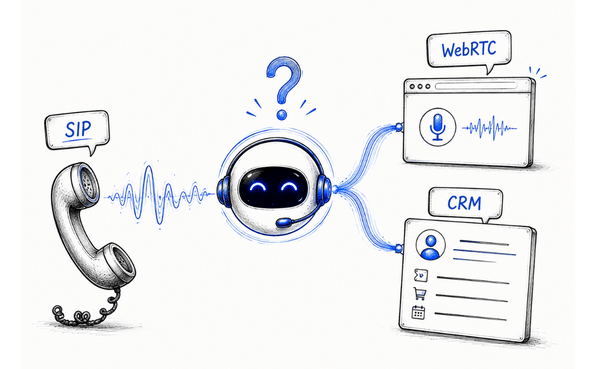
Picture a company where customers can call a support line and click a "talk to us" button on the website. Same AI agent, two completely different transport layers. The phone call comes in over SIP; the website conversation streams over WebRTC.
Media Servers and SBCs: Bridging Phone Calls and Browser Audio
Bridging the two typically happens through a media server or SBC (session border controller). An infrastructure that translates between SIP/RTP on one side and WebRTC on the other, so the same voice AI backend can serve both channels without duplicating logic.
How Managed Voice AI Platforms Simplify SIP and WebRTC Orchestration
Building this bridge from scratch is a serious infrastructure project. That's why a lot of teams lean on platforms that already handle it. Twilio Voice AI tools sit on top of Twilio's long-standing telephony infrastructure, while newer voice-AI-specific platforms like Vapi and Retell AI are built to abstract SIP and WebRTC orchestration entirely, exposing a simpler AI voice agent API so you can focus on the conversation logic instead of the transport layer. A Vapi integration or Retell AI setup, for instance, typically lets you plug in a phone number and a web widget through the same underlying agent without manually managing SBCs yourself.
Learn more about: How to Scale Multi-Agent Orchestration Without Communication Failures
Voice Agent CRM Integration: Giving Your AI Agent Business Context
Why AI Voice Agents Need CRM Integration
A voice agent that can hold a great conversation but has no idea who it's talking to is only doing half the job. Real value comes from voice agent CRM integration, connecting each call or chat to actual customer records, so the agent can say "I see your order shipped yesterday" instead of "Can you give me your order number again?"
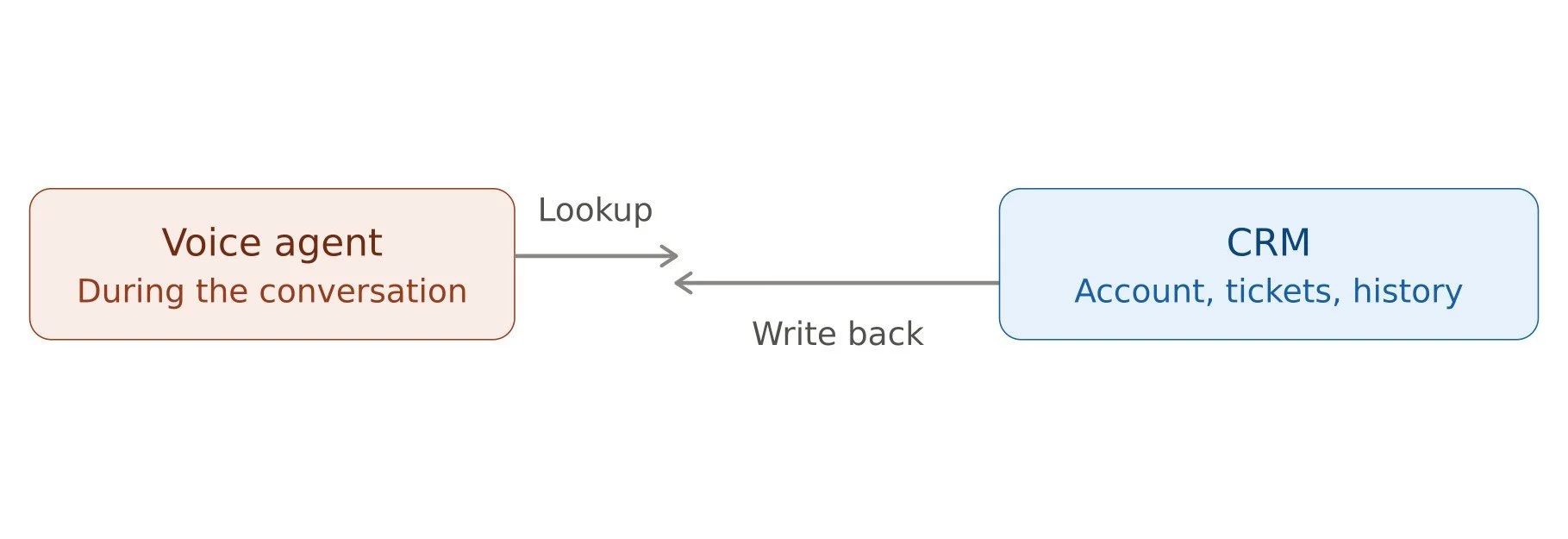
Real-Time CRM Lookups vs. Post-Call Sync for Voice Agents
There are two main patterns:
Real-time lookups: the agent queries the CRM mid-conversation, pulling account details, order status, or open tickets as needed.
Post-call sync: after the call wraps, a summary, transcript, and updated record get written back into the CRM automatically.
Most mature setups use both: quick reads during the call, full write-back afterward.
REST APIs, Webhooks, and Native CRM Connectors for Voice AI
Under the hood, this usually relies on:
REST APIs exposed by the CRM for reading and writing records
Webhooks that notify your system of events, or that your agent triggers once a call ends
Native connectors, where the voice AI platform already ships with a pre-built Salesforce, HubSpot, or Zendesk integration
Security and Compliance for SIP, WebRTC, and CRM-Connected Voice Agents
Before any of this goes live with real customers, a few things need to be locked down:
Call recording consent: many jurisdictions require disclosure when a call is recorded or handled by AI
Encryption: SRTP for SIP audio, DTLS-SRTP for WebRTC, so voice data isn't traveling unprotected
CRM data access controls: your agent should only read or write the specific fields it needs, not have broad account access
PII handling: clear policies on how long transcripts and recordings are retained, and who can access them
Common Mistakes to Avoid When Building an AI Voice Agent
A few mistakes that trip teams up when building and connecting a voice agent to real infrastructure:
Treating telephony as an afterthought. SIP setup, number provisioning, and call routing are not small details; they're a core part of the AI voice agent API you're building around.
Not planning for CRM write conflicts. Two calls updating the same record at once, or duplicate leads getting created, is a common and avoidable headache.
Ignoring failover. If your SIP trunking provider or voice AI platform has an outage, what happens to inbound calls? Building in fallback routing early saves a lot of pain later.
Underestimating end-to-end latency. Teams often optimize the LLM's response time and forget that speech-to-text, text-to-speech, and CRM lookups all add up. A fast model bottlenecked by a slow API call still feels slow to the caller.
Skipping real conversation testing. A script that reads well in a demo often breaks down with real interruptions, background noise, accents, or off-topic questions. Test with messy, real-world audio, not just clean scripted calls.
Over-scripting the agent. Rigid decision trees make the agent feel robotic and brittle the moment a caller goes off-script. Design for flexible intent handling, not just a fixed dialogue flow.
No clear escalation path. Not every call should be fully automated. Without a smooth handoff to a human agent, frustrated callers get stuck with no way out.
Launching without monitoring. Once live, you need visibility into call success rates, drop-offs, and failed CRM syncs. Otherwise, problems go unnoticed until customers complain.
Conclusion
A great AI voice agent isn't just a great model, but it's a systems integration problem. And SIP, WebRTC, and CRM integration are the three pieces that turn a demo into something customers can actually use.
Whether you build this telephony stack for AI yourself using Twilio's infrastructure, or move faster with a platform like Vapi or Retell AI that abstracts the SIP/WebRTC bridging for you, the fundamentals stay the same. Get the transport layer and the CRM layer right, and your voice agent stops being a clever demo and starts being a real part of how your business runs.
Ready to move from prototype to production? Our team specializes in end-to-end AI voice agent development so you can launch a voice agent that actually works in the real world. Get in touch to start your build.
Further Reading:
Overcoming the "Infinite Loop" and Stalling in Enterprise AI Agents
Why Every Big Tech Company Suddenly Wants to Own the Agent Gateway
The Modern Enterprise AI Stack: What Enterprise Architect Should Build in 2026
Related Readings