Integrating AI Automation Directly Into Your CRM Ecosystem
Key takeaways:
AI-powered CRM turns static data into intelligent automation.
Direct CRM integration enables accurate, context-aware insights.
Clean data and human oversight are essential for success.
If you've used a CRM for more than a few months, you already know the drill. Sales reps spend half their day updating fields, writing follow-up emails, and trying to remember which lead they were supposed to call back. The CRM was supposed to make all of this easier, but somewhere along the way, it became just another tool that needs constant babysitting.
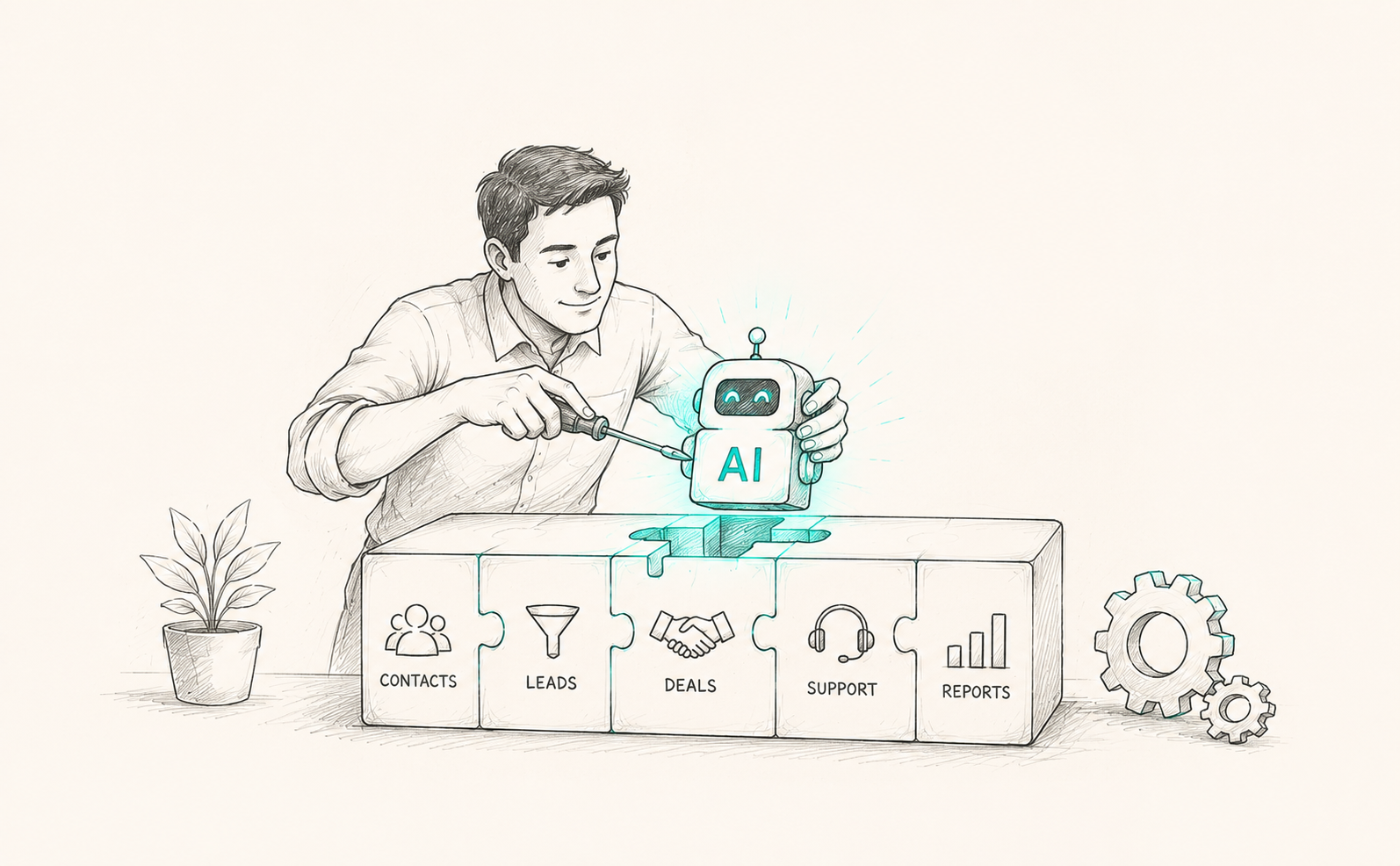
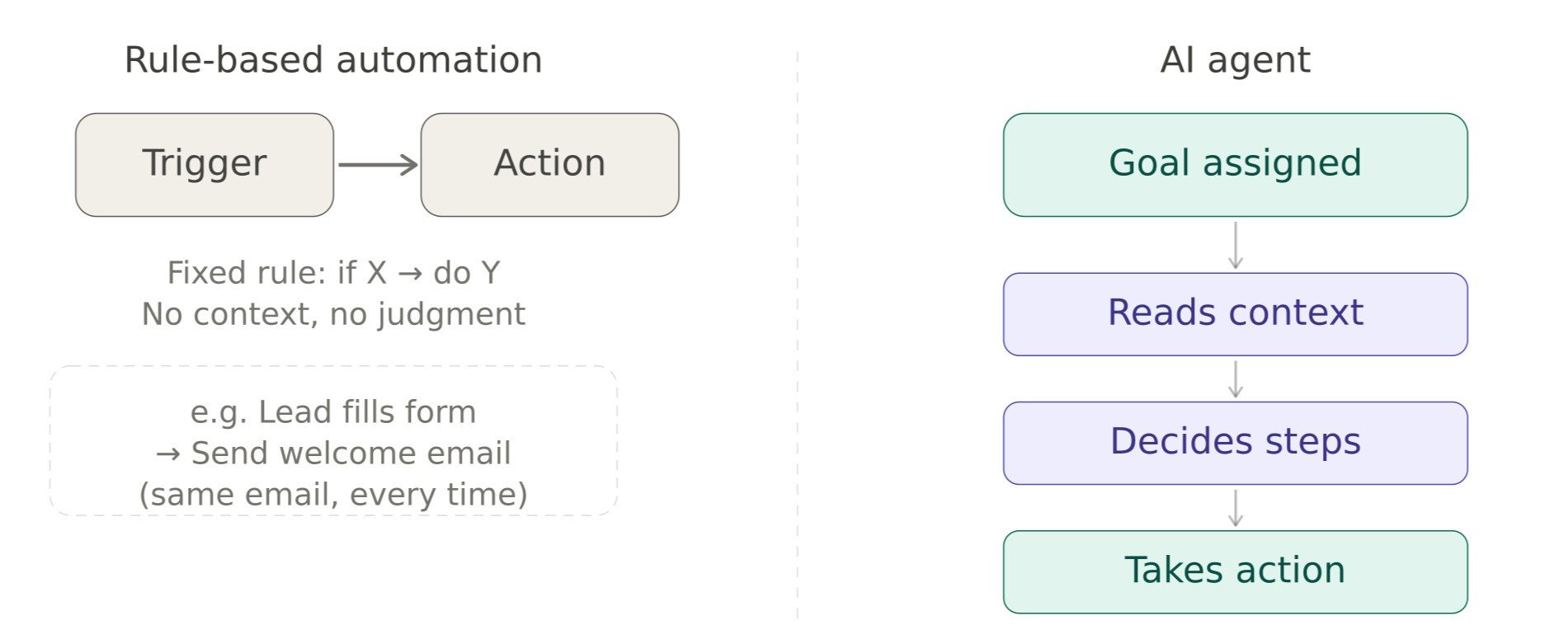
This is exactly the gap that AI automation is starting to fill. Instead of treating your CRM as an outdated system for contacts and deals, you can turn it into an active assistant that does a lot of the thinking and busywork for you. The real magic happens when that AI isn’t added as a separate app, but built directly into the CRM ecosystem you already use every day, whether that's straightforward rule-based automation or full-blown AI agents that can carry out an entire task on their own.
Let's understand what AI-automated CRM actually means, why it matters, and how you can integrate AI in CRM without turning your sales and support teams' world upside down.
What Does AI Automation in CRM Actually Mean?
At its core, AI automation in CRM means using artificial intelligence to handle tasks that would normally need a human to sit down and do them manually. Think of things like:
Sorting and scoring leads based on how likely they are to convert.
Drafting follow-up emails based on a prospect's previous conversations.
Summarizing long call transcripts into a few bullet points.
Predicting which deals are at risk of falling through.
Automatically updating records when new information comes in.
None of this is science fiction anymore. Most modern platforms already have built-in AI or allow you to connect AI tools through integrations. The question isn't really "should we use AI in our CRM," it's "how deeply AI should be integrated into our workflows."
Why Bother Integrating AI Directly Into the CRM Ecosystem?
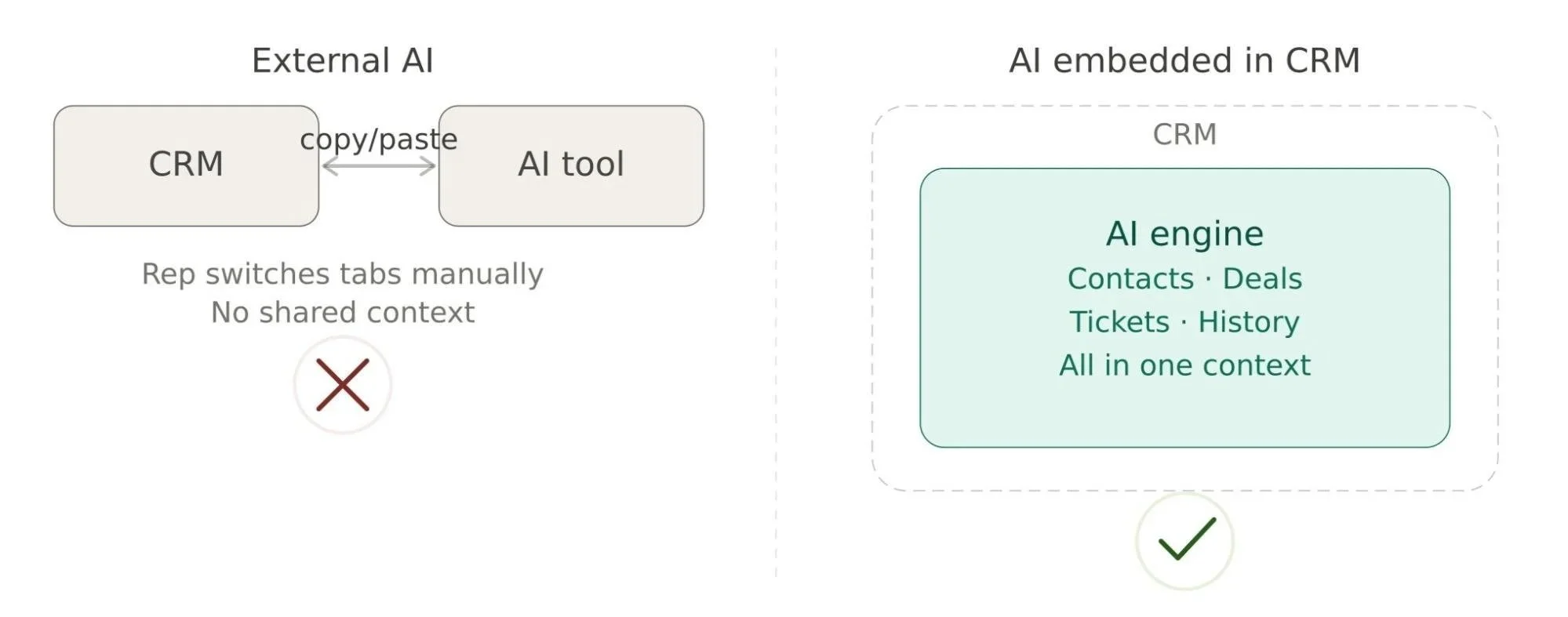
You might be wondering why you can't just use a separate AI tool alongside your CRM and call it a day. You can, technically. But there's a big difference between AI that sits next to your CRM and AI integration in CRM that lives inside it.
When AI is external, your team has to keep switching tabs, copying data back and forth, and hoping nothing gets lost in translation. When AI is built into the CRM itself, it has direct access to your contact history, deal stages, support tickets, and past conversations. That context is what makes the automation actually useful instead of just a flashy add-on. Salesforce's own data shows 87% of sales organizations already use some form of AI.
Here's a simple way to think about it: an AI-powered CRM doesn't just store your customer data; it understands it. It can connect the dots between a support ticket from last week and a renewal conversation happening today, because everything lives in one connected system rather than scattered across five different tools.
Where AI Automation Makes the Biggest Difference
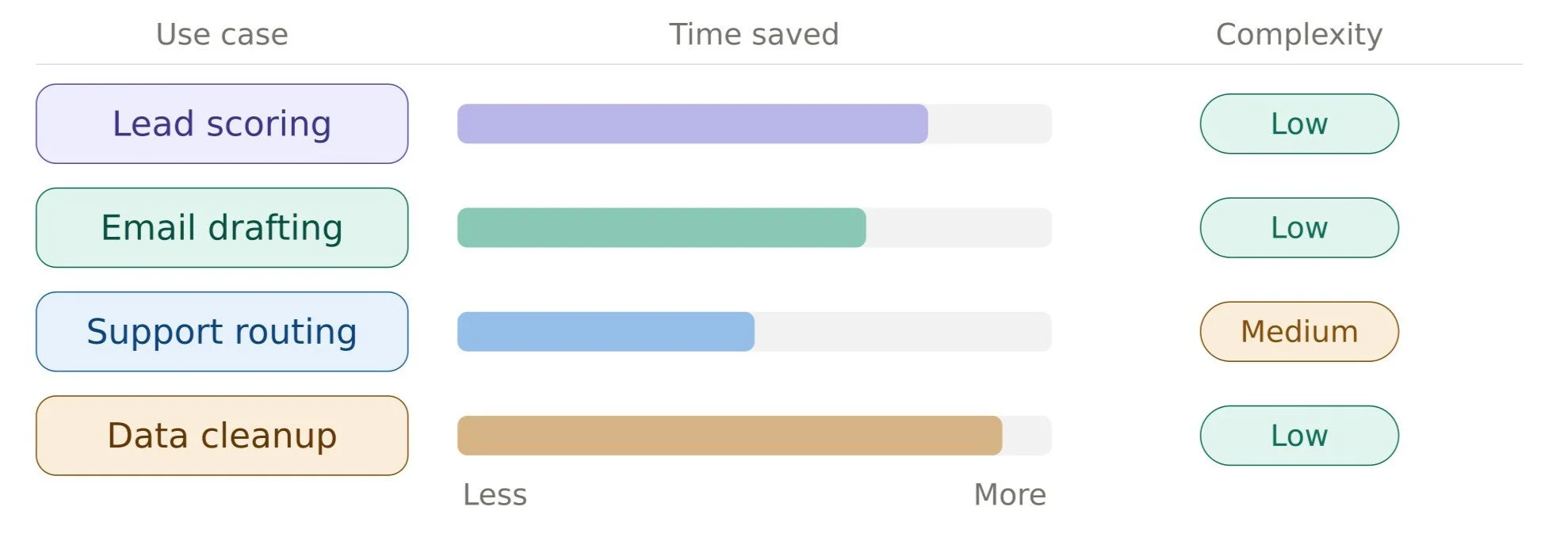
Not every part of your CRM needs an AI makeover on day one. Some areas just naturally benefit more than others, so it helps to know where to focus first.
Lead Scoring and Prioritization
Sales teams waste a shocking amount of time chasing leads that were never going to convert. AI automation can look at hundreds of data points, like website behavior, email engagement, company size, and past purchase patterns, and rank leads by how warm they actually are. Reps spend their energy where it counts instead of guessing. Salesforce's Einstein scoring is a good real-world example of this; it runs quietly in the background and flags which leads look sales-ready before a rep even opens the record.
Email and Follow-Up Automation
Nobody enjoys writing the same kind of follow-up email for the tenth time in a day. AI workflow automation can draft personalized messages based on what a prospect actually said, what stage they're in, and what worked with similar customers before. The representative still reviews and sends it, but the heavy lifting of writing is mostly done. HubSpot's Prospecting Agent works this way in practice. It watches accounts for buying signals and shows up with a drafted, personalized outreach email ready for a sales rep to review.
Customer Support and Ticket Routing
When AI is integrated into your CRM's support module, it can read incoming tickets, figure out urgency and category, and route them to the right person automatically. Some setups even draft a suggested response based on similar past tickets, so agents are editing instead of starting from scratch. HubSpot's Customer Agent is a real-world version of this. It handles support conversations across channels like chat, WhatsApp, and SMS, pulling answers straight from a company's existing knowledge base before a human ever has to step in. Companies running similar agent setups have reported cutting response times by 30 to 40 percent as a result.
Data Entry and Record Cleanup
This one may not sound glamorous, but it could save the most hours. AI automation in CRM can auto-fill fields from emails, meeting notes, or call transcripts and flag duplicate or incomplete records for cleanup. HubSpot's data enrichment tools can do exactly this, automatically filling in details like company revenue, industry, and employee count instead of leaving a sales rep to track that information down by hand.
Sales Forecasting
Instead of a sales manager eyeballing a pipeline report and making a guess, AI models can analyze historical deal patterns to predict revenue with a lot more confidence. It won't be perfect, but it's usually a lot closer to reality than a gut feeling. Salesforce leans on this through its Data Cloud, which pulls purchase history, support tickets, and website behavior into one unified profile. So forecasting models work from full data instead of partial data.
How AI Integration in CRM Actually Works
There are generally three ways teams go about this, and it's worth understanding the differences before picking one.
Native AI features: Many CRM platforms now ship with built-in AI tools for things like lead scoring, email drafting, or chat summarization, and most importantly, full AI agents. Salesforce's Agentforce and HubSpot's Breeze Agents are both good examples; they ship as part of the platform itself rather than something you bolt on afterward.
External AI integrations: This is where you connect specialized AI tools to your CRM through APIs or pre-built connectors. It gives you flexibility, since you can pick the best tool for each specific job rather than relying on one vendor for everything.
Custom-built automation: For companies with very specific workflows, it sometimes makes sense to build custom AI automation using the CRM's API directly. This takes more effort upfront, but it means the automation fits your exact process instead of forcing your process to fit the tool. This route is also where bringing in AI consulting tends to pay off the most, since getting the architecture right from the start saves a lot of rework later.
Most businesses end up using a mix of all three. You lean on native features where they're good enough, bring in external tools for specialized tasks, and build a few custom pieces where it really matters.
A Practical Roadmap to Get Started with AI Automation in CRM
A more sensible approach looks something like this, and if it feels like a lot to figure out solo, you can bring in AI consulting for help mapping priorities before you commit any engineering time:
1. Map out your current workflows: Before adding any AI, write down where your team is actually losing time. Is it a lead qualification? Follow-ups? Data entry? You can't automate what you haven't clearly identified.
2. Start with one or two high-impact areas: Pick the workflows with the most repetitive, low-judgment tasks. Lead scoring and follow-up drafting are usually good starting points because the impact is visible fast.
3. Test with a small group first: Roll out the automation to a handful of users before pushing it company-wide. This gives you a chance to catch weird edge cases without disrupting everyone.
4. Keep a human in the loop: Especially early on, have people review AI-generated emails, summaries, or scores before they go out. This builds trust in the system and catches mistakes before they reach customers.
5. Measure, adjust, expand: Once something is working, look at the actual numbers, time saved, response rates, deal velocity, and then expand to the next workflow.
Common Mistakes (and How to Avoid Them)
1. Messy or incomplete data: AI is only as good as the data it learns from. If your CRM is full of duplicate contacts and outdated fields, even the best automation will produce bad results. This goes double for AI agents. So, cleaning up your data before rolling out AI automation in CRM is not optional; it's the foundation.
2. Team resistance: Some people will worry that AI is coming for their jobs, or simply won't trust an algorithm's suggestions. The fix here is transparency: show people how the AI reached a recommendation, and let them keep override control, especially in the early days.
3. Over-automating too fast: It's tempting to automate everything at once, and you see early wins. Resist that urge. Automating a broken process just makes a broken process run faster, not better.
4. Integration headaches: Not every tool plays nicely with every CRM. Before committing to a third-party AI tool, check that it has solid, well-documented integration options for your specific CRM platform.
Wrapping Up
Integrating AI automation into your CRM ecosystem isn't about following a new trend; it's about giving your team back the hours they currently lose to repetitive, low-value tasks. Whether you start with native AI features, deploy AI agents to handle entire workflows end to end, or work with AI development consultants to build something custom, the goal stays the same: a CRM that doesn't just store your customer data but actually helps you act on it.
Start small, keep your data clean, keep humans checking the important decisions, and you'll find that an AI-powered CRM isn't some far-off concept. It's something you can build, piece by piece, starting this quarter.
Frequently Asked Question
-
Most major platforms now have native AI capabilities built in. Salesforce offers Agentforce and Einstein AI. HubSpot has Breeze Agents covering sales, marketing, and support use cases. Microsoft Dynamics 365 has Copilot, Zoho CRM has Zia, and many others are adding AI features rapidly. Beyond native tools, almost any CRM can be extended through third-party integrations or custom API-based automation.
-
Not at all. While enterprise teams were the early adopters, most major CRM platforms now offer AI features at mid-market and even small-business pricing tiers. The more relevant question is whether your CRM data is clean enough to get meaningful results from AI. That matters far more than company size.
-
Poor data quality is the single most common reason AI automation underperforms. AI models learn from your CRM data. So if your records are full of duplicates, outdated contacts, or incomplete fields, the automation will reflect that. The second most common risk is moving too fast, rolling out AI across every workflow before testing and refining it with a smaller group first.
-
Traditional CRM automation works on strict if-then logic: if a lead fills out a form, send an email. AI integration in CRM goes further. It can analyze what's in that form, compare it against thousands of past leads, decide how likely that person is to convert, and personalize the follow-up accordingly. It reacts to context, not just triggers.
Related Reading
Let’s Talk

Drop us a note, we’re happy to take the conversation forward 👇🏻