Updated on: Oct 13, 2026
In 2024, Salesforce launched Agentforce. At that time, it seemed just like Salesforce’s many products. Since then, Salesforce has worked on it a lot, and now it would not be wrong to say that almost every Salesforce product now comes with Agentforce 360 capabilities powering them.
It is truly a noteworthy innovation in the world of AI. Salesforce even brands it with the bold claim: “If you can explain it, Agentforce can do it.” But what makes it different from other AI offerings is the way it works.
Today, we are going to answer the most fundamental question every Agentforce user asks: “How is it doing it?” To answer that, we’ll dive deeper into its roots to understand its mechanics and evaluate what sets it apart from other generative AI chatbots. In this blog, we’ll unravel how Agentforce works, what powers it, and how all its components work together to make it happen.
The Three Core Components Behind Agentforce
Before we go deeper into technical mechanics, let's simplify the key components that make Agentforce work.
These components can be grouped into three key areas: data, reasoning, and actions. Let’s break them down step by step:
Data: Data is what gives AI the context to understand your business. Think of it as the fuel that powers everything. When consumed correctly, it can drive exceptional performance.
Reasoning: Feeding data to AI is one thing, but the outcome quality depends on how well it is understood. Reasoning enables Agentforce to analyze and process data intelligently, delivering accurate and context-aware responses.
Actions: Every agent needs specific jobs or roles to perform tasks. These roles define what they can and cannot do; this ensures they perform their tasks effectively while staying within boundaries.

Agentforce : Salesforce YouTube
The Data Behind Agentforce
AI agents need data to act upon. Because Agentforce 360 shares the core foundation other Customer 360 products are built on, it can natively access data from Marketing Cloud, Sales Cloud, Service Cloud, and other Salesforce products.
In cases where data resides outside Salesforce, let’s say in external systems such as SAP, Oracle, Microsoft Dynamics, Snowflake, or other third-party applications, Agentforce can access the relevant information through integrations and Data Cloud (now called Data 360).
Whether the data lives inside or outside Salesforce, Agentforce has the ability to pull it all together and put it to use. Thanks to the vector database capability of Data 360, organizations can bring structured and unstructured data together, such as CRM records alongside PDFs, policies, and knowledge articles. This makes the data both accessible and usable to AI agents.
Importantly, this data isn't used to train the LLM. Instead, Agentforce retrieves the relevant information at the moment it's needed and adds it to the prompt, a process called grounding. The richer, cleaner, and more up to date your data is, the better your agent's answers will be, because it has more accurate context to work with.
Smart Reasoning with the Atlas Reasoning Engine
For Agentforce to work well, it has to understand a request, reason through it, and decide what to do next.
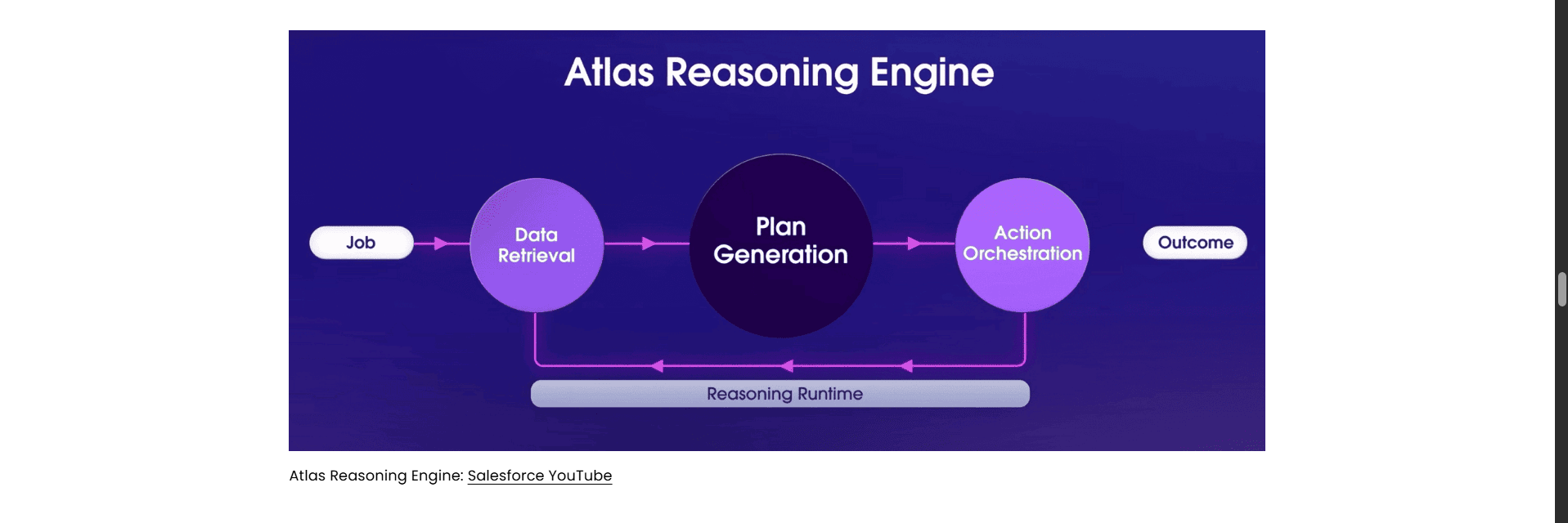
The Atlas Reasoning Engine handles this. It is the "brain" of Agentforce: it interprets the request, plans the steps, calls the right actions, and checks the results before responding.
Here's how the Reasoning Engine works:
ReAct-style reasoning loop: Atlas works in a cycle of reasoning, acting, and observing until the user's goal is met. After each action, it looks at the result and decides whether to answer, ask a clarifying question, or take another step. This lets agents handle multi-step requests instead of following a single fixed path.
Topic classification: Atlas first maps the user's input to the most relevant topic (now called subagent). A topic defines the job the agent is doing, along with the instructions and actions available for it. Only that topic’s instructions, business policies, and actions are brought into play, which keeps the agent focused and helps it stay accurate as you add more capabilities.
Note: In earlier versions of Agentforce, these were called Topics. Salesforce now refers to them as Subagents.
LLM-powered understanding and responses: Atlas uses a large language model to interpret intent and write responses. Your business data is retrieved at runtime and added to the prompt (grounding), so the model answers from your data rather than guessing. Your data is not used to train the model. Atlas also prompts the model to explain its reasoning, which gives builders visibility into why an agent chose a particular subagent or action.
Hybrid reasoning with Agent Script: With Agentforce 360, Atlas became configurable. Using Agent Script, a human-readable scripting language, you can define parts of the agent's behavior as fixed rules, such as "always verify identity before sharing account details," while leaving other parts to the LLM's judgment. Agent Script compiles into a structured specification called the Agent Graph, which Atlas follows at runtime.
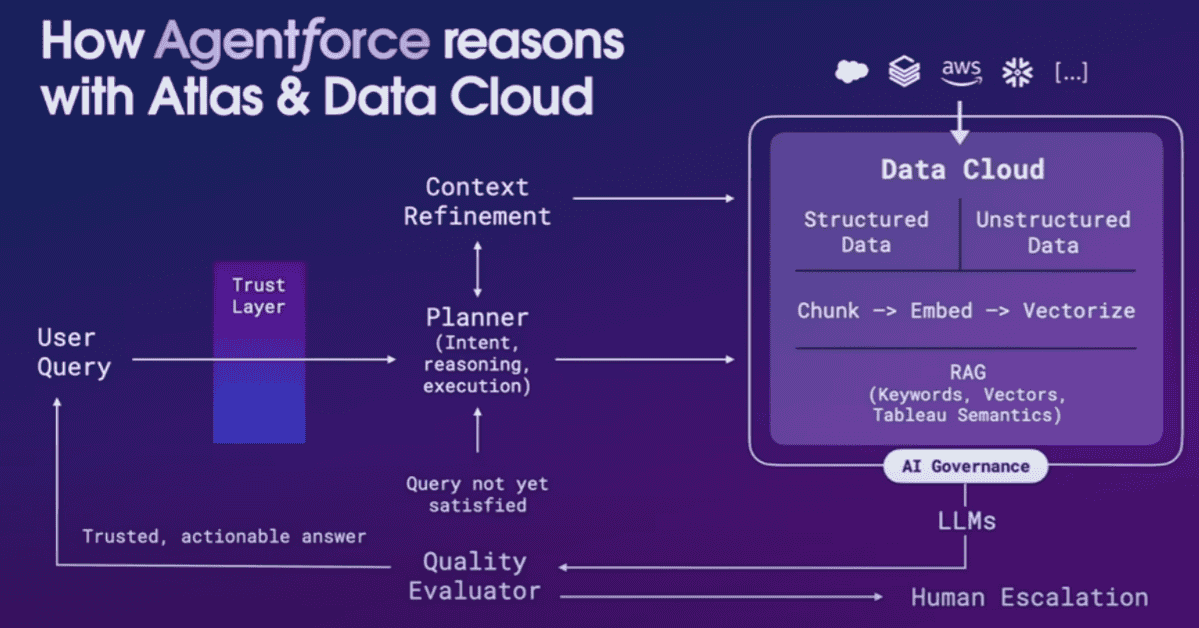
Agentforce, Altas Reasoning Engine, and Data Cloud: Salesforce YouTube
From Reasoning to Action
Agents need one final element to operate: Subagents and Actions
Subagents define the specific job or operational scope an agent can handle, while actions are the specific tools it uses to complete tasks within that scope. These actions can be built using Flow, Apex, Prompt Templates, and APIs.
Together, subagents and actions give Agentforce the ability to move beyond simply providing an answer and actually complete tasks.
Before We Dive In, Let’s Put Data, Reasoning, and Actions Together to Build an Agent
So far, we’ve looked at how data, reasoning, and actions work together to power an Agentforce agent. But how do these pieces come together when you actually build one?
Let’s create an agent and put what we’ve learned into practice. Why? Because once you have an agent in place, it becomes much easier to understand what happens behind the scenes and how Agentforce acts when a user sends a request.
Agentforce Builder in Agentforce Studio gives you a low-code way to build agents using natural language, with a pro-code option through Agent Script. Here's how it works:
Step 1: Open Agentforce Builder
Start by accessing the Agentforce Builder in Agentforce Studio.
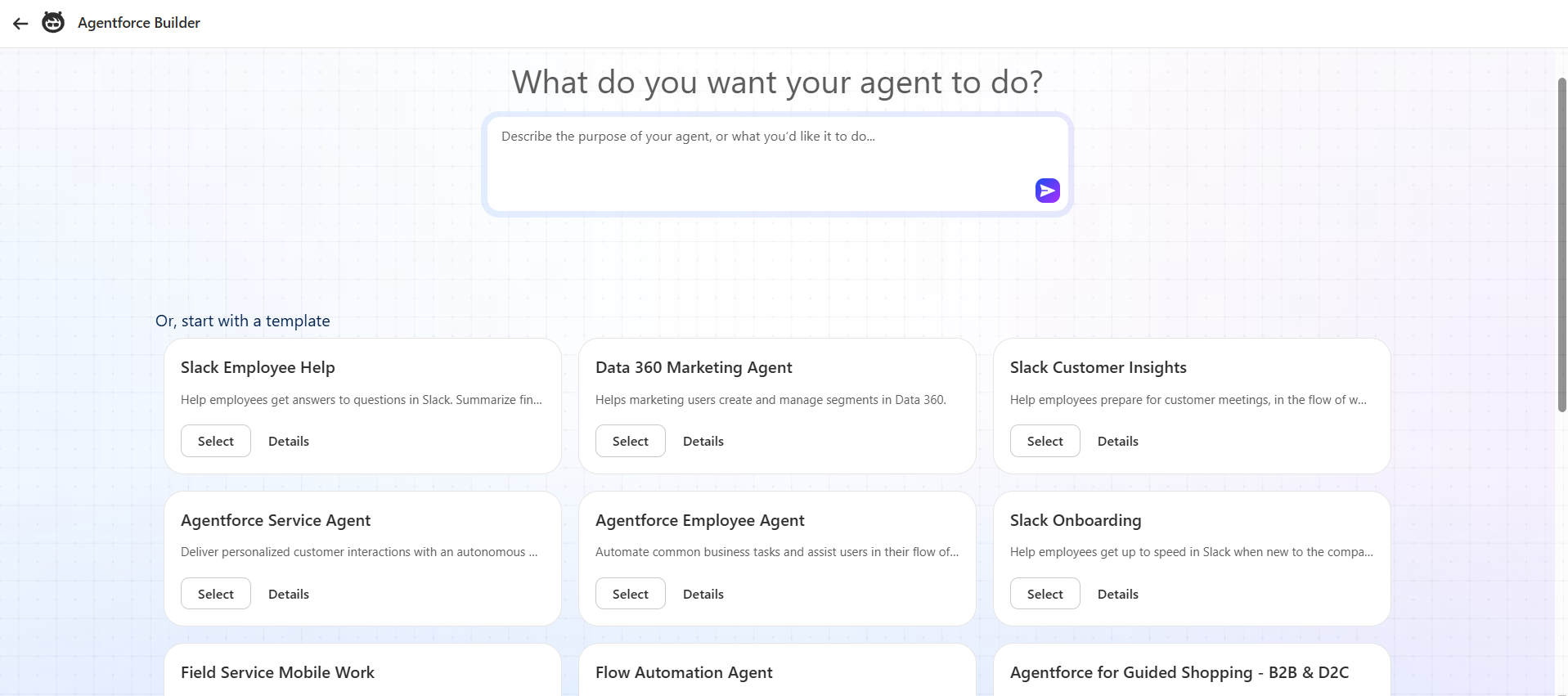
Step 2: Choose a Template, Give It a Description, or Build Using Agent Script
Prebuilt Templates: Agentforce offers a variety of templates for different use cases. Select one if it fits your requirements.
Create from Description: For specific use cases, choose this option. Simply define the agent's role by describing what you want it to do in natural language, then click Next.
Build Using Agent Script: For those comfortable with scripting, Agentforce offers a pro-code way to build customized agents.
Step 3: Add Subagents and Actions
After choosing a template or giving a description, you will see some prebuilt subagents and actions. If they match your requirements, you can use them as they are. If not, you can create your own subagent and actions.
Want to learn how to build agents in minutes? Read our detailed step-by-step guide on building AI agents using Agentforce Builder.
Note: Steps 2 and 3 are where you instruct Agentforce on what an agent should do and how it should do it. You can also create a Flow action at this stage to retrieve data from external systems such as Snowflake.
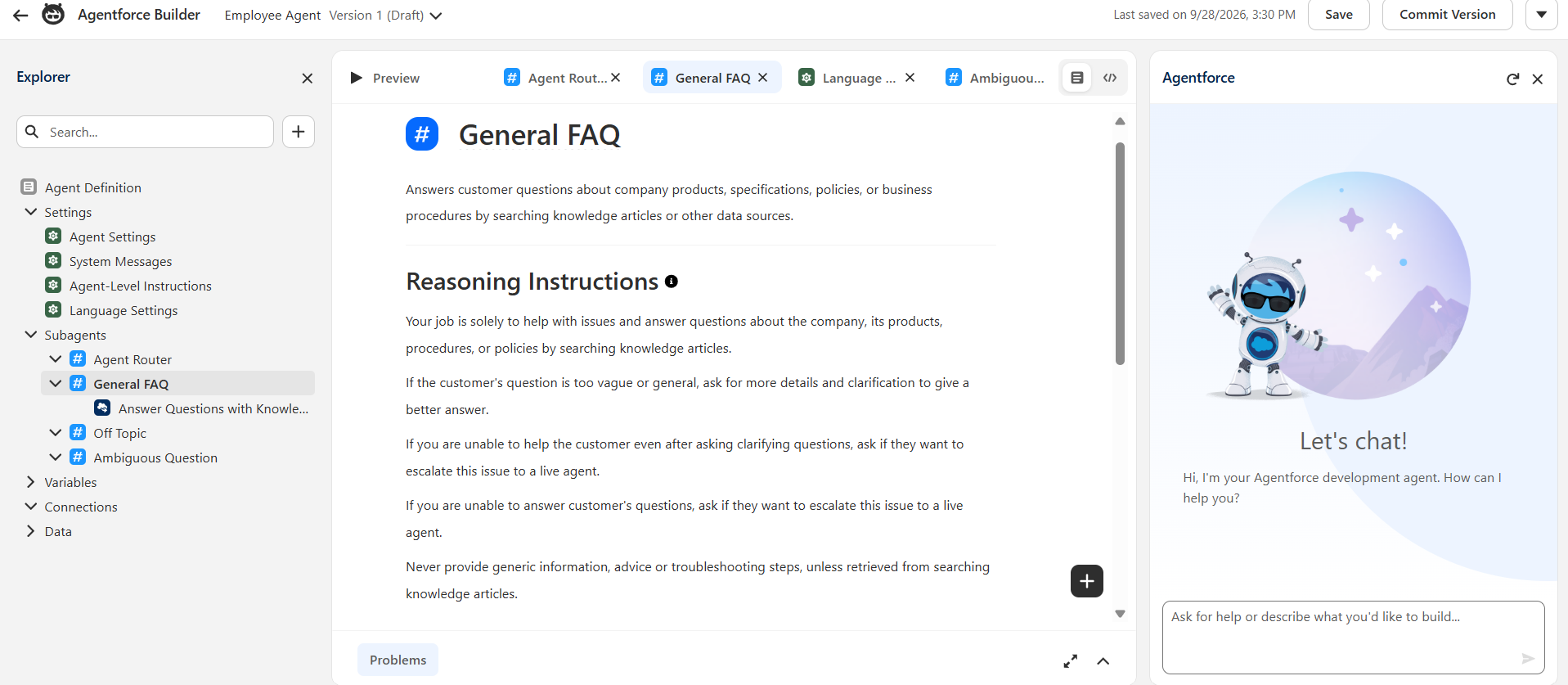
Assigning Topics and Actions to Agent: Salesforce YouTube
Step 4: Review and Save
Review all the configurations, Subagents, and data you’ve added.
Save the agent.
Step 5: Test and Activate
Your agent is created and ready to activate. However, we recommend testing it first.
After saving the agent, you’ll be directed to this page.
Test Responses: In the right corner, simply enter queries as a real user to view the agent's responses, or run batch tests in the Testing Center to generate multiple test cases.
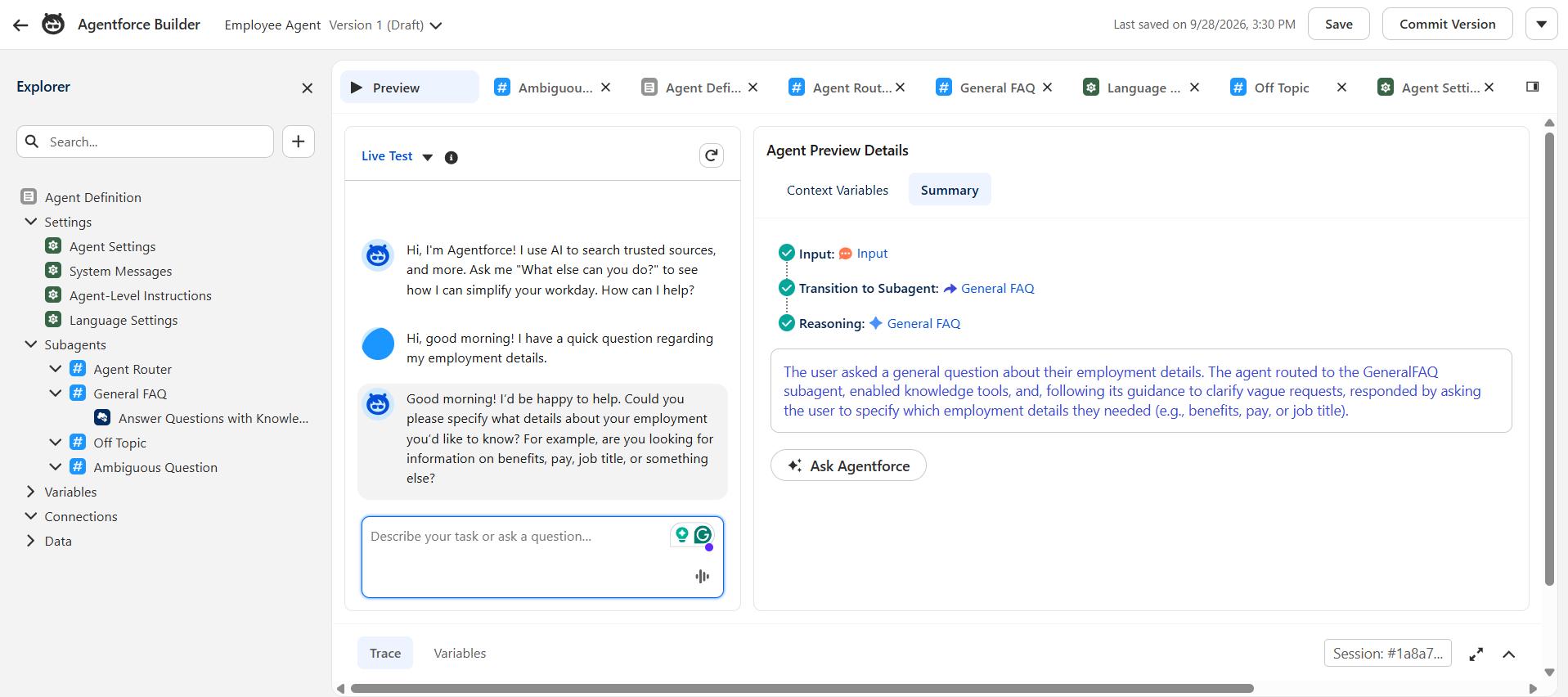
Performance Insights: The center screen displays the agent’s reasoning and actions, giving you a view of its performance under the hood.
Once you’re satisfied with the test results, click Activate to deploy your agent.
Wondering what it costs to run an agent like this? Check out our Agentforce pricing guide for a breakdown of the available pricing models.
From Customer Query to Response: How does Agentforce Work
Agentforce is designed to seamlessly handle customer queries, delivering contextually accurate and efficient responses. Here's the step-by-step process on how Agentforce works.
1. Receiving the Query
When a customer submits a query through any communication channel (Email, Web, Mobile, Chat, etc.), Agentforce analyzes the nature of the query. Using Natural Language Processing (NLP), it identifies the intent, context, and type of information needed to address the query.
2. Routing to the Right Subagent
Once the query is understood, Agentforce references the pre-assigned Subagents related to the agent’s role. These act as a guide, providing the agent with the appropriate scope and context to approach the query. If necessary, Agentforce retrieves additional data from the organization’s Data 360 (formerly Data Cloud), which aggregates structured and unstructured data, as well as external systems data through Zero-Copy Data Federation.
When the agent needs to fetch information or trigger a process in an external system in real time, it can also call an API as an action.
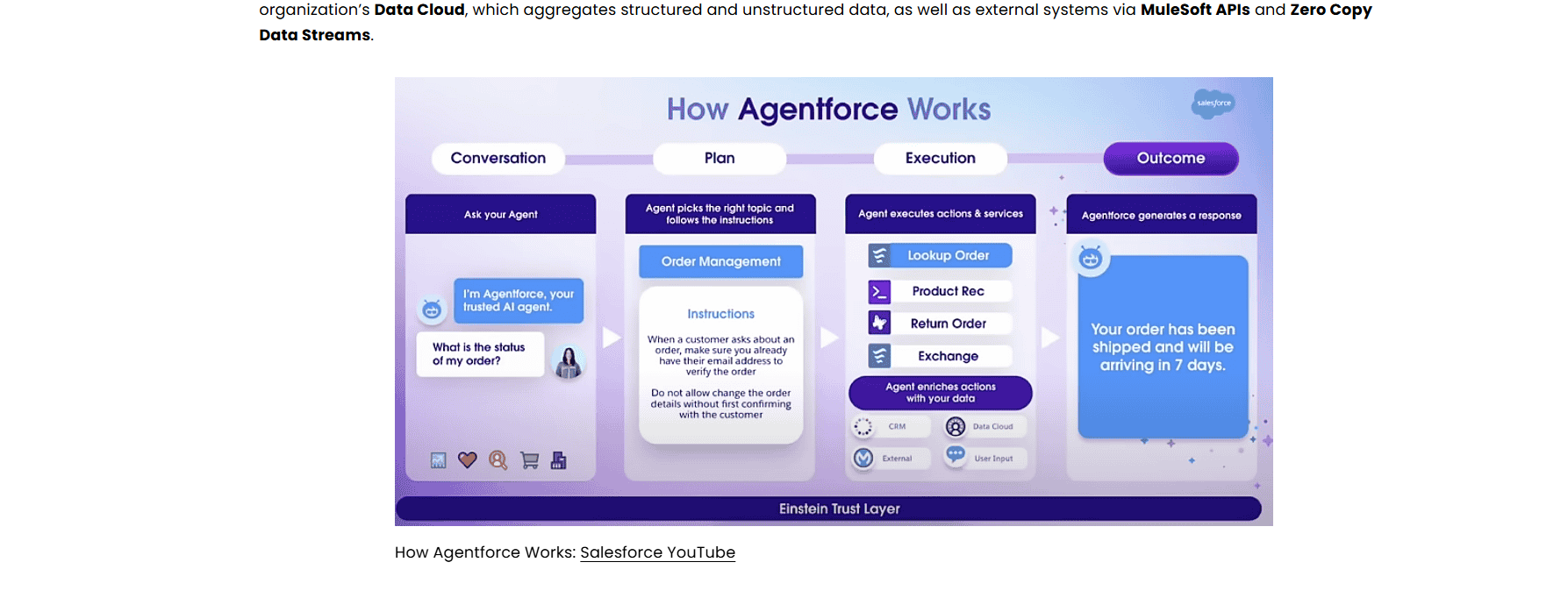
3. Retrieval-Augmented Generation (RAG)
Using Salesforce’s RAG, the system searches and retrieves relevant data needed for the query. This includes business-specific knowledge, past customer interactions, CRM records, and external data sources.
The retrieved data is then used to create a grounded prompt, a structured input sent to the Large Language Models (LLMs).
RAG augments the prompt with business data, making it more contextually detailed. These enriched prompts are then fed to LLMs, enabling them to generate accurate, context-aware responses grounded in business data.
Note: Before the prompt reaches the LLM, the Einstein Trust Layer masks sensitive data such as personally identifiable information.
4. Reasoning with the Atlas Reasoning Engine
The Atlas Reasoning Engine serves as the brain of Agentforce. It operates in a reasoning loop that consists of:
Planning: Based on the grounded prompt, it creates a dynamic plan of action to address the query.
Evaluating Data: It filters and validates the retrieved data to ensure relevance and accuracy.
Refining Actions: For complex queries, it breaks down the task into smaller steps and iterates until the desired outcome is achieved.
Observing: The engine checks whether the result answers the request, then responds, asks a clarifying question, takes another step, or escalates.
Test and Activate the Agent: Salesforce YouTube
5. Orchestrating Actions
If the query requires more than just information retrieval; such as executing a task, updating records, or triggering workflows, Agentforce leverages Actions (e.g., Flows, Apex Classes, APIs) to perform the required operations. These actions are orchestrated securely and transparently by the Atlas Reasoning Engine
6. Generating a Response
With the retrieved data and a clear plan in place, the LLM generates a response. Agentforce ensures that the response aligns with the assigned Subagents, guardrails, and business policies defined during the agent creation. The Einstein Trust Layer also screens the response for issues such as toxicity, restores any masked data, and logs the interaction for audit purposes.
For simple queries, the response is generated almost instantly. However, for complex tasks, the system may require additional time to evaluate, refine, and iterate through multiple reasoning loops.
7. Monitoring and Improvement
Agentforce doesn't retrain itself from conversations. Its performance improves because your team keeps refining it.
After an agent goes live, you can review how it handled real conversations, spot where it chose the wrong subagent or action, and make adjustments. Typical improvements include clearer subagent instructions, better-defined actions, tighter Agent Script rules, and cleaner knowledge content.
What Sets Agentforce Apart?
Agentforce differs from traditional chatbots in how it uses your data, how it reasons, and how much control you have over its behavior. Here's what sets it apart:
Comprehensive Data Access
Agentforce can use structured and unstructured data from Salesforce and external systems through Data 360. This equips agents with rich, relevant information, enabling them to provide highly informed and context-aware responses.Intelligent Reasoning
Powered by the Atlas Reasoning Engine, Agentforce breaks down requests, decides which steps to take, and adjusts based on the results. This lets it handle multi-step requests that rigid, scripted bots can't.Hybrid Reasoning with Agent Script
Unlike traditional chatbots, Agentforce uses hybrid reasoning with Agent Script. You can define the steps that must happen the same way every time, such as identity verification or approvals, and leave the rest to the LLM. This balance of flexibility and control makes agent behavior more predictable.Retrieval-Augmented Generation (RAG)
Agentforce uses RAG to ground its responses in your business data, retrieving relevant information at the moment it's needed. This reduces the risk of made-up answers and keeps responses tied to current information.Built-in Security with the Einstein Trust Layer
The Einstein Trust Layer masks sensitive data before prompts reach the LLM, applies zero data retention protections, screens responses for issues such as toxicity, and logs interactions for audit.
Reusable Prompts with Prompt Builder
Prompt Builder lets teams create and manage reusable prompt templates with low-code tooling. Templates can be grounded in your business data and used by agents as actions, so prompts stay consistent and are easier to maintain.Works Across Channels and Systems
With the introduction of newer generation Agentforce, agents can be deployed across channels such as chat, email, messaging, and voice, and can connect to external systems through APIs and integrations.
Conclusion
Building an impactful AI model requires more than just an LLM, and Salesforce has proved this with Agentforce. Whether it’s sales, service, marketing, or any other domain, Agentforce adapts seamlessly to your business operations. By deploying these AI agents, businesses can reduce costs, save time, and drive efficiency across domains.
Creating agents using tools like Agentforce Builder is easy, but optimizing them for maximum impact requires expertise. As a trusted Salesforce partner, we provide expert Agentforce consulting services that can help you unlock Agentforce's full potential and transform your business into an AI-powered enterprise.
Ready to Put Agentforce Into Practice?
Now that you understand how Agentforce works, take the next step with the right implementation approach. Our team can help you build agents around your business requirements.
Related Agentforce Resources
How to Ground Agentforce with RAG in Data 360 (2026 Decision Guide)
Migrate Einstein Bots to Agentforce: Your 2026 Rebuild Plan
Agentforce Builder: What's New, Features & Complete Guide
Boost Salesforce ROI With Agentforce | How to Win with AI
Hybrid Reasoning with Agent Script
Let’s Talk!

Drop a note below to move forward with the conversation 👇🏻