
Key takeaways:
AI voice agents excel at high-volume, routine tasks like scheduling, FAQs, and lead qualification, while complex issues still require human support.
Effective automation relies on connecting AI voice agents to your existing CRM, calendar, and phone systems for real-time actions.
Begin with a single call workflow, rigorously test for edge cases and latency, and continuously refine responses using real conversation data.
Phone calls still take up a lot of time. Staff answer the same questions all day, callers wait on hold, and calls that come in after hours go unanswered. You can automate phone calls with AI voice agents so that routine calls are handled for you, around the clock.
AI voice agents are software that can talk with callers, understand what they want, and take action, like booking an appointment or checking an order. This guide explains which calls to automate, how the technology works, how to set up the call automation, and what to watch out for.
Why Automate Phone Calls With AI Voice Agents?
Most businesses run into the same problems with phone calls:
Missed calls and long waits. Callers who can't get through often hang up and go to a competitor.
High support costs. Hiring and training enough people to cover every call is expensive, and the work is repetitive.
Slow follow-up. Leads and appointment requests can go cold when nobody calls back quickly.
Uneven service. Answers can change from one agent or shift to another.
AI phone call automation helps with each of these. An agent answers right away, handles many calls at once, and gives the same approved answers every time. It also records what happened on every call, which most phone systems never captured. That makes it a practical form of AI-powered customer support that grows with your call volume.
What Types of Phone Calls Can AI Voice Agents Automate?
Not every call is a good fit. The best ones are frequent, repetitive, and have clear answers.
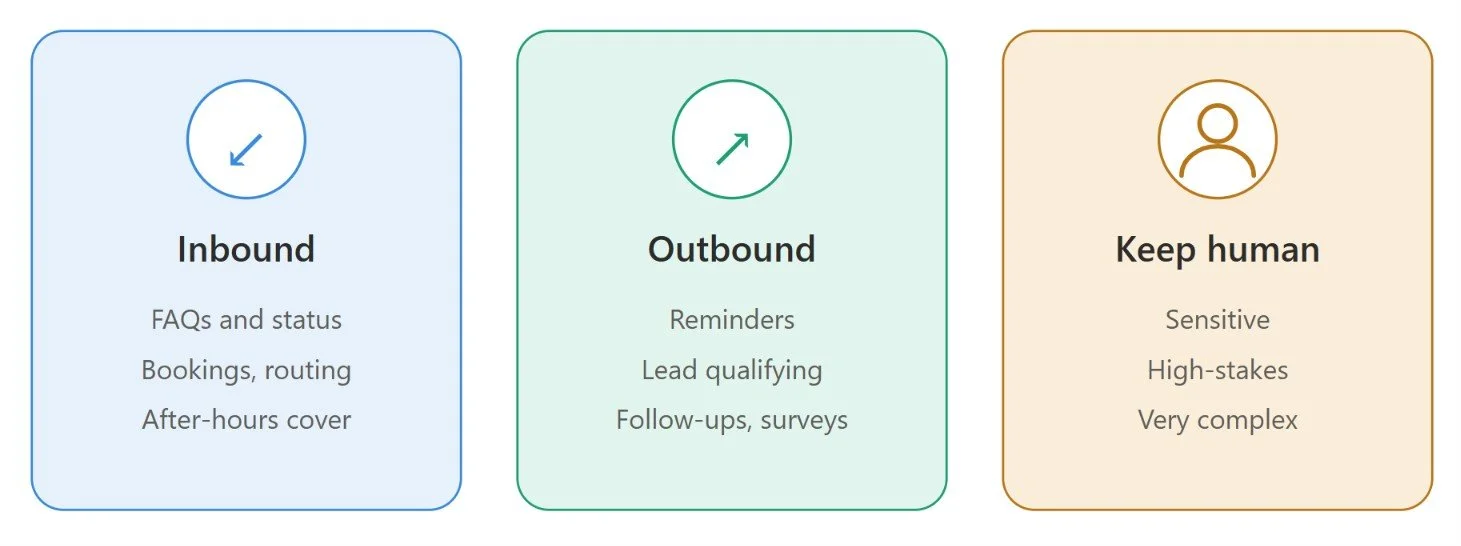
Inbound calls (calls you receive). Inbound call automation works well for:
Answering common questions, such as hours, pricing, and policies
Checking order or account status
Booking, changing, or canceling appointments
Routing callers to the right person or team
Covering calls after hours
Outbound calls (calls you make). Outbound call automation works well for:
Appointment reminders and confirmations
Qualifying new leads and booking meetings
Follow-up calls after a purchase or visit
Payment reminders and simple surveys
Calls to keep with people. Sensitive, emotional, high-stakes, or very complex conversations still need a human, such as complaints, bad news, or tricky negotiations.
How to Automate Phone Calls with AI Voice Agents: Step-by-Step
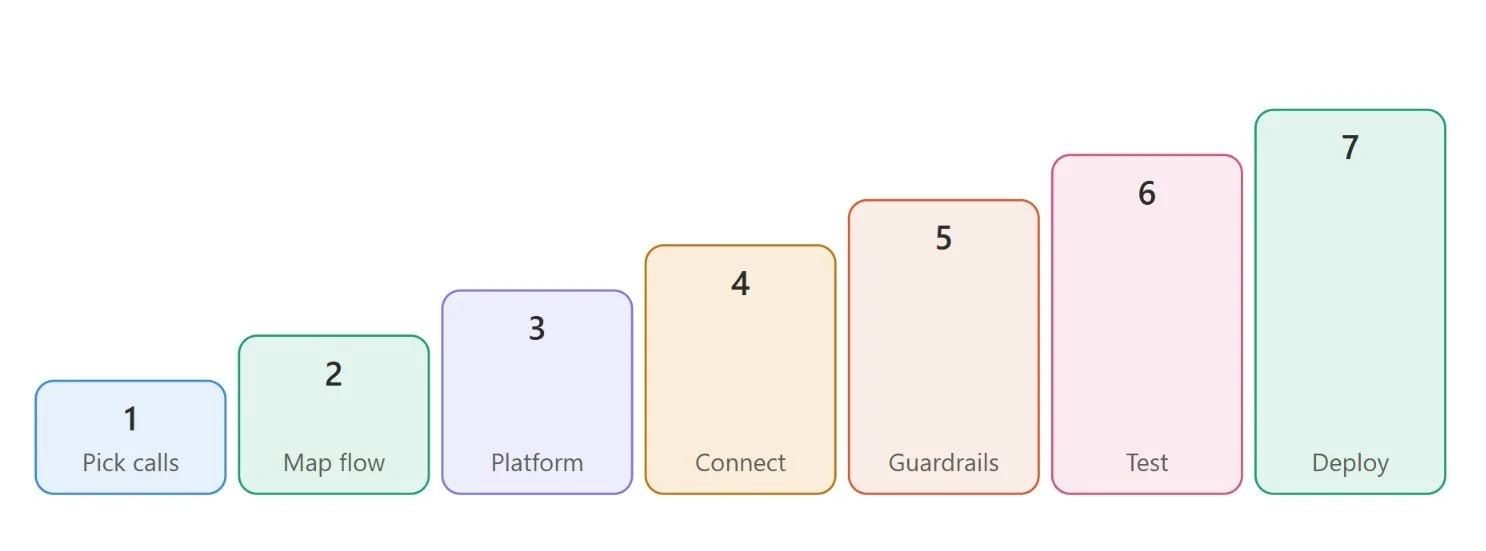
Automating phone calls requires more than connecting an AI model to a phone line. You need to define workflows, integrate business systems, and test the agent before deployment. Here are seven steps to get started.
Step 1: Identify Calls Worth Automating
Start by identifying repetitive, high-volume calls, such as answering FAQs, scheduling appointments, qualifying leads, and sharing order updates. Prioritize tasks that follow predictable patterns and require minimal human judgment.
Step 2: Define the Call Workflow
Map the conversation from greeting to task completion. Define what information the agent should collect, how it should respond, and when it should escalate a call. For example, an appointment-booking agent should check availability, offer time slots, and confirm bookings.
Step 3: Choose an AI Voice Agent Platform
Choose and evaluate the AI voice agent platform based on voice quality, response speed, language support, customization, and telephony compatibility. Also, check the integration options, security controls, monitoring capabilities, scalability, and pricing.
Step 4: Connect Your Business Systems
The agent needs to connect to the tools it will use during calls, such as your CRM, calendar and help desk. For instance, a Salesforce or HubSpot integration can help the agent retrieve customer details, update records, and schedule follow-ups. System integration is usually the hardest step. Many businesses use AI voice agent development services for this part, so the agent can read and update records reliably.
Step 5: Configure Prompts, Tools, and Guardrails
Set clear instructions for the agent's role, objectives, and limitations. Define which tools it can access and what actions it can perform. Use verification steps and human approval for sensitive or high-risk requests.
Step 6: Test Real-World Conversations
Test the agent with real call recordings, different accents, interruptions, unclear requests, background noise, and unexpected questions. Check how it handles integration failures and incomplete information, and ensure it can transfer calls to human agents when necessary.
Step 7: Deploy and Improve
Start with one calling workflow and monitor task completion, response times, customer feedback, and escalation rates. Review failed interactions, refine the conversation flow, and improve integrations before expanding automation.
The key is to start small, measure performance, and expand gradually. Reliable integrations, clear guardrails, and effective human handoffs help make phone call automation more useful and dependable.
How AI Voice Agents Automate Phone Calls
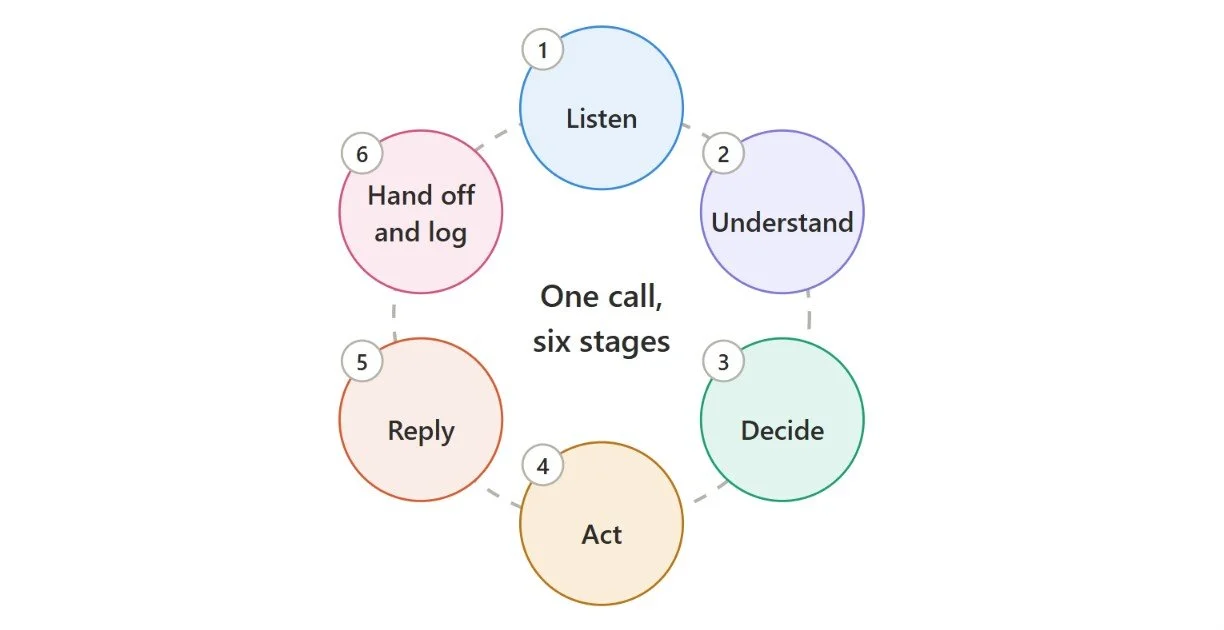
An automated call follows a clear workflow, from the moment the phone rings to the moment the task is done. Modern voice AI agents run through six stages, and on a real call they happen quickly and often loop back on each other as the conversation moves along.
1. Speech recognition. The agent listens to the caller and converts their speech into text as they talk. This step must handle accents, background noise, and interruptions because everything that follows depends on getting the words right.
2. Intent and context understanding. Next, the agent works out what the caller needs, such as booking an appointment, checking an order, or changing a booking. It also keeps track of what has already been said, so callers never have to repeat themselves.
3. AI reasoning. The agent then decides what to do next, based on its instructions and the information available to it. It might ask a follow-up question, look something up, or complete the request. Rules and guardrails keep it within approved topics and actions.
4. System integration. When the agent needs data or has to act, it retrieves information or performs actions through APIs and connected tools. For example, it can check calendar availability, find an order in your CRM, or create a support ticket while the caller is still on the line.
5. Voice response. The agent turns its answer into natural, spoken language and replies in a tone and pace that suit a real conversation. A well-set-up agent sounds like your brand, not like a generic recording.
6. Escalation and logging. If a call is complex, sensitive, or outside the agent's scope, it transfers the caller to a human and passes along a summary. Whether or not it escalates, it records the relevant details, such as the transcript, the outcome, and any changes it made, so your team has a clear record.
This is what separates AI voice automation from an old phone menu (IVR), where callers press numbers to move through fixed options, and from basic scripted voicebots that only recognize set phrases. With AI voice agents, people can just talk the way they normally would, including interrupting or changing their mind.
Key Features to Look for in an AI Voice Agent Platform
AI voice agent platforms may look similar in demos, but their real value depends on how well they handle actual calls. Focus on these key features when comparing solutions.
1. Natural conversation and low latency: The agent should understand natural speech, including accents and filler words, and respond quickly. It should also handle interruptions and changes in caller intent smoothly. Test it with real call recordings, not just scripted demos.
2. Telephony and CRM integrations: The platform should connect with your existing phone systems, CRM, calendars, and help desk tools. Verify that these integrations work in real time, allowing the agent to look up information, update records, and take action during calls.
3. Human handoff and call transfers: The agent should transfer calls to a human when needed, along with a summary of the conversation. Check whether you can customize transfer rules and ensure callers don't have to repeat information.
4. Analytics, recordings, and transcripts: Look for searchable transcripts, call recordings, outcome tracking, and reports on resolution rates and call volume. These insights help you identify issues, measure performance, and improve the agent over time.
5. Security, compliance, and customization: You should be able to customize the agent's voice, scripts, and approved responses to match your brand. Also, check how the platform protects call data and supports consent requirements, AI disclosure, and relevant compliance standards.

How Much Does It Cost to Automate Phone Calls with AI Voice Agents?
The cost of automating phone calls with AI voice agents depends on call volume, conversation complexity, platform pricing, and integration requirements. Some platforms charge per minute, while others offer monthly subscriptions or bundled pricing.
The main cost factors include:
Platform and AI usage: Fees for conversation management, speech recognition, language models, and voice generation.
Telephony: Charges for phone numbers and inbound or outbound calls.
Development and integration: Initial setup, custom workflows, and connections to CRM or other business systems.
Maintenance: Ongoing monitoring, testing, and workflow improvements.
For budgeting, estimate both the initial implementation cost and the ongoing cost per call minute. Compare providers carefully, as advertised rates may exclude telephony, AI model usage, or other fees.
Ultimately, the best way to evaluate costs is to compare the total cost per successfully completed call against the time and resources required to handle the same call manually.
Challenges to Consider Before Automating Calls
While AI voice agents can automate repetitive phone calls, businesses need to address a few challenges to ensure reliable customer interactions.
Speech recognition errors: Accents, background noise, and unclear speech can cause misunderstandings. Test the agent with different speaking styles and real-world call conditions.
Slow response times: Delays between a caller's question and the agent's response can make conversations feel unnatural. Choose a platform with low latency and optimize workflows.
Incorrect responses: AI agents may provide inaccurate information or misunderstand requests. Use reliable knowledge sources, clear instructions, and guardrails to reduce errors.
Integration failures: Problems with CRM systems, APIs, or scheduling tools can prevent agents from completing tasks. Monitor integrations and define fallback procedures.
Privacy and compliance: Call recordings and transcripts may contain sensitive information. Follow applicable consent, data retention, and privacy requirements.
Complex conversations: Some calls require empathy, judgment, or exceptions beyond the agent's capabilities. Provide a smooth handoff to human agents when needed.
Final Thoughts
You can automate phone calls with AI in a few clear steps: pick the right calls, set goals, connect your systems, design the conversation, test carefully, and improve over time. AI voice agents work best on high-volume, repetitive calls, with people handling the rest.
To get started, list your top call types and choose one to pilot. Measure the results against your baseline, learn from the calls, and expand when it's working.
If you need expert help building and integrating your voice solution, work with our team of experienced AI developers to accelerate your deployment.
Frequently Asked Questions
-
Yes, AI voice agents can transfer calls when a request is too complex, a customer asks for human assistance, or the agent cannot complete a task. Proper handoff workflows help preserve conversation context and reduce the need for customers to repeat information.
-
Yes, small businesses can use AI voice agents to automate repetitive calls, manage appointment bookings, qualify leads, and answer common questions. Starting with a specific, high-volume workflow can help control costs and demonstrate value before expanding automation.
-
Businesses can use transaction checks, confirmation steps, and safeguards that prevent the same request from being processed more than once. Integrations should also handle retries and timeouts carefully so that interrupted calls do not create duplicate appointments or CRM records.
-
If a call drops or an integration fails, the agent may be unable to complete the task. Businesses should design recovery workflows that allow callers to reconnect, retry safe operations, or reach a human agent. Important actions should be verified before the agent confirms completion.
Related Readings

Let's Talk

Drop us a note, we’re happy to take the conversation forward 👇🏻