

Key takeaways:
Two-way voice beats one-way messages. AI voice agents can confirm, reschedule, or cancel on the same call.
Rescheduling is where voice shines. The AI voice agent understands natural requests, checks the live calendar, books the new slot, and releases the old one.
Integrate with your scheduling system, test on one appointment type, follow consent and disclosure rules, and always offer a path to a human agent.
Every empty appointment slot costs money. A clinic loses revenue, a service business loses a job, and the staff who could have filled that slot are busy making reminder calls instead. Texts and emails help, but plenty of people ignore them. A phone call that talks back works differently.
The evidence is encouraging. A peer-reviewed study of more than 135,000 appointments at the Emirates Health Services primary care network found that AI-driven reminder calls cut no-show rates from roughly 21% to about 10%. The calls were two-way, so patients could confirm, change, or cancel on the spot.
This guide explains how AI voice agents automate appointment reminders and appointment rescheduling, what a real call looks like, which industries benefit most, and how to roll it out without creating new problems.
Why Manual Reminders and Rescheduling Fall Short
Most businesses still handle reminders by hand, or with one-way messages. Both approaches leak time and revenue.
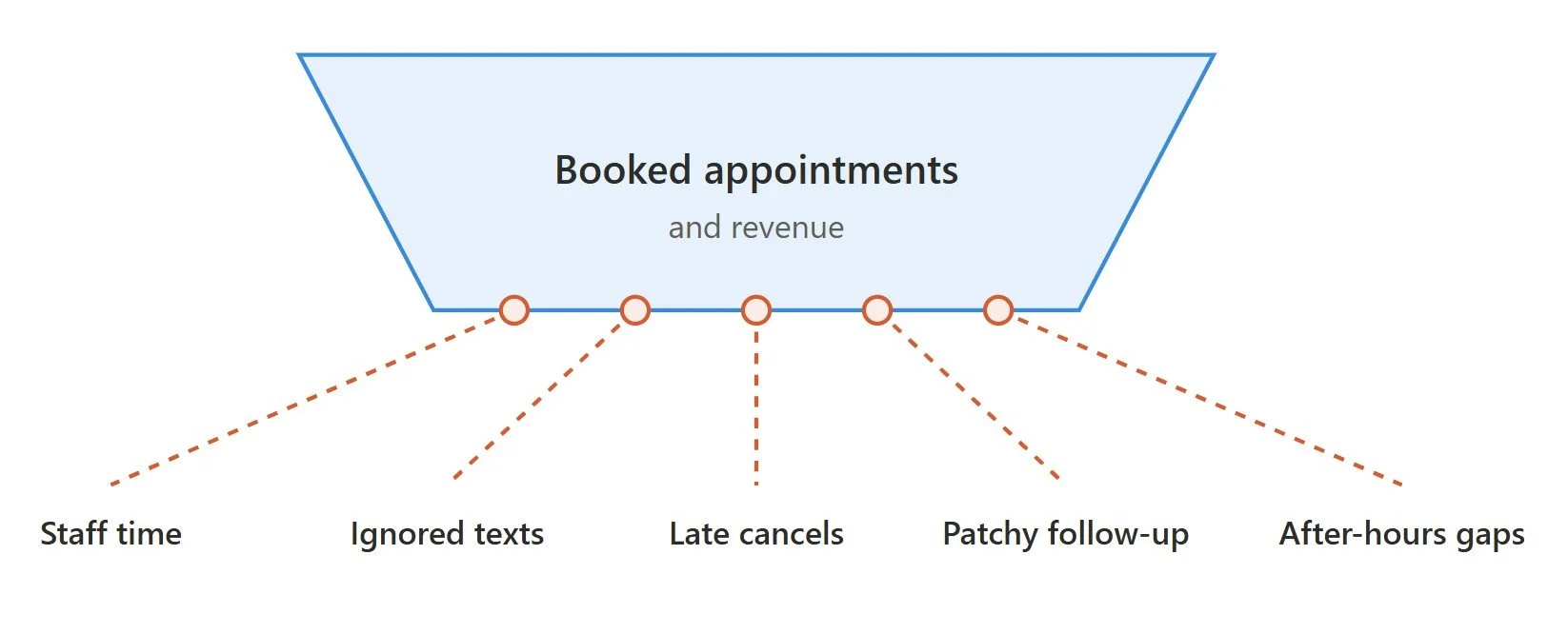
Staff time disappears. Reminder and reschedule calls are repetitive, and a busy front desk rarely has hours to spare for them.
Texts and emails get ignored. A one-way notification is easy to skim past, forget, or miss entirely.
Last-minute cancellations leave empty slots. If nobody learns about a cancellation until the appointment time, the slot cannot be refilled.
Follow-up is inconsistent. When the office is busy, reminders go out late or not at all, and no-shows follow.
Rescheduling happens only during office hours. Customers who want to change a booking in the evening have to wait until the next day or give up.
The result is lost revenue, wasted capacity, and frustrated staff and customers. That is the gap AI voice automation fills.
What Are AI Voice Agents for Appointment Management?
An AI voice agent is software that holds a natural, spoken conversation with a person, understands what they want, and takes action during the call. For appointment management, that means calling people to remind them of a booking, taking their reply, and updating the schedule on the spot.
This is different from the tools many businesses already use:
Bulk SMS and emails are one-way. They notify, but they cannot adapt to a reply like “I need to move it to Friday.”
IVR menus force callers through rigid options. A voice AI agent understands open-ended speech instead.
Most appointment-focused AI voice agents combine four pieces:
Speech recognition, which turns what the person says into text
A language model, which understands intent and decides what to do or say
Voice synthesis, which replies in a natural voice
Integrations with your calendar, scheduling software, and CRM, so the agent can check availability and book changes. Learn more about connecting your AI voice agent to the real world.
They work in both directions. Outbound agents call people with reminders and follow-ups. Inbound agents answer calls from people who want to book, change, or cancel an appointment at any hour.
How AI Voice Agents Automate Appointment Reminders
An AI appointment reminder is more than a recorded message. It is a short conversation designed to end in a confirmed, rescheduled, or canceled booking.
1. Right timing. The agent can call at set points, such as several days before, the day before, and the morning of the appointment. You choose the schedule that fits your business.
2. Two-way confirmation. Instead of just announcing the time, the agent asks the person to confirm. If they say yes, the system marks the appointment confirmed. If they cannot make it, the agent moves straight into rescheduling.
3. Voicemail, no answer, and retries. The agent follows rules you set: leave a short voicemail, try again later, switch to a text message, or flag the appointment for staff follow-up.
4. Personalization. The agent can use the person’s name, the appointment time, the location, and the provider, pulled from your scheduling system, so the call feels relevant rather than generic.
Done well, this form of communication automation turns a passive reminder into an active step that protects your calendar.

How AI Voice Agents Handle Rescheduling and Cancellations
Rescheduling is where AI voice agents show their biggest advantage over one-way messages.
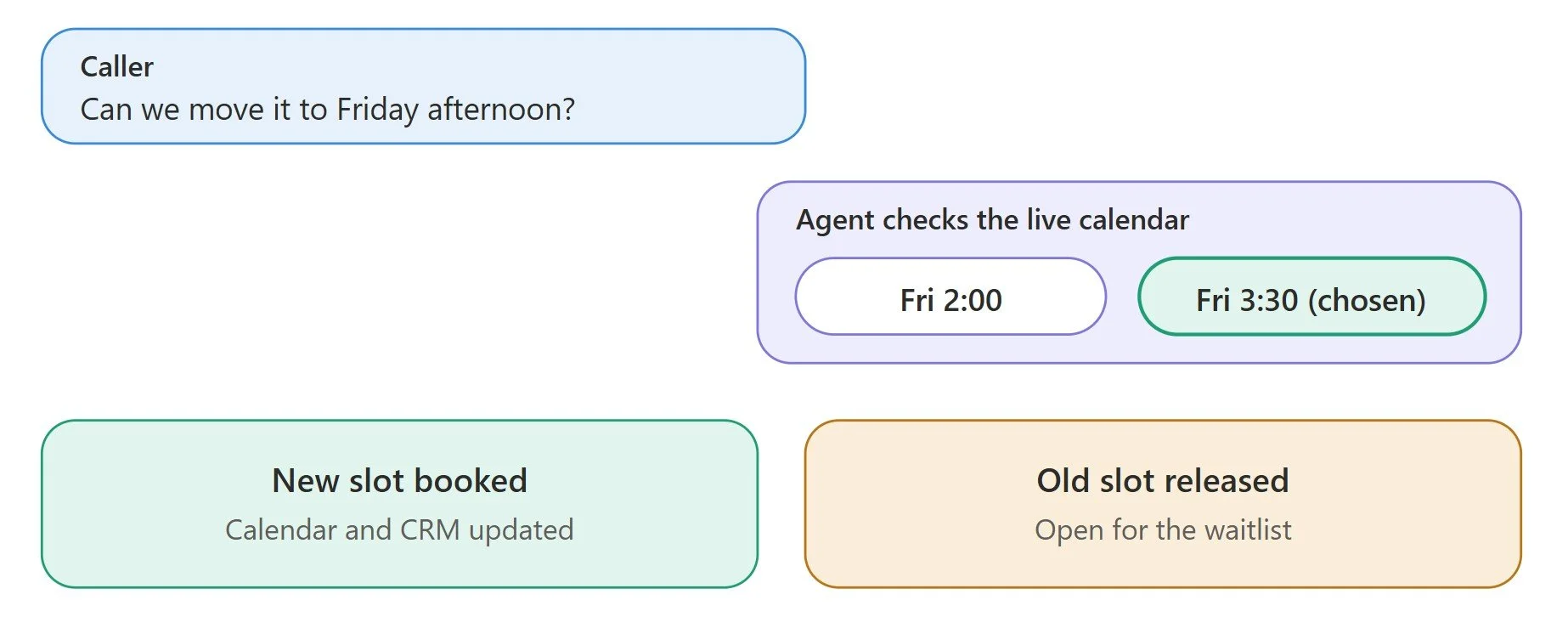
They understand natural requests. A caller can say, “Can we move it to Friday afternoon?” or “I’m stuck at work, anything later in the week?” without choosing from a menu.
They check live availability. The agent looks at the real calendar and offers open slots that match what the person asked for.
They book and update on the same call. Once the person picks a time, the agent books it and updates the calendar and CRM immediately, so there is no follow-up task for staff.
They release canceled slots. If someone cancels, the slot becomes available again right away, and the agent can offer it to people on a waitlist.
Because the agent works at any hour, callers can reschedule in the evening or on a weekend rather than waiting for the office to open. That alone prevents many cancellations from turning into silent no-shows.
Key Benefits of AI Scheduling and Reminders for Your Business
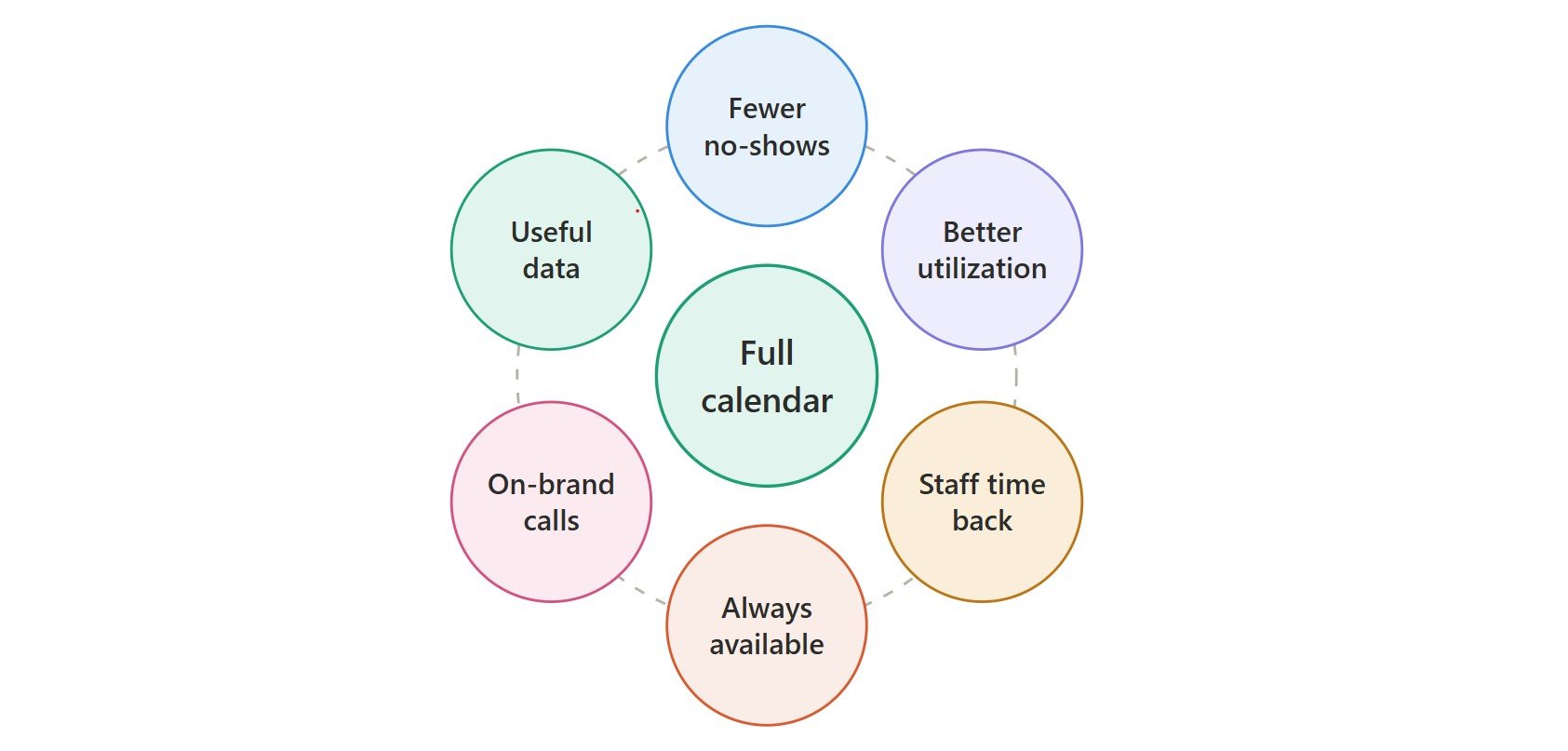
Fewer no-shows. Two-way reminder calls give people an easy way to confirm or change plans, which helps reduce no-shows.
Better calendar utilization. Canceled slots are released early, so they have a chance to be refilled.
Staff time freed up. The front desk stops making routine calls and focuses on in-person service and complex requests.
Round-the-clock availability. Customers can reschedule at any hour, without waiting for the office to open.
Consistent, on-brand communication. Every call follows the same approved wording and tone.
Useful data. You see confirmation rates, cancellation patterns, and reasons, which helps with planning and staffing.
How to Implement AI Voice Appointment Reminder Automation
Follow these steps to implement AI voice appointment reminder automation:
Step 1: Define your goals and baseline. Decide what you want to improve, such as no-show rate, staff time, or calendar utilization, and record today’s numbers so you can measure the change.
Step 2: Map reminder timing and rescheduling rules. Choose when calls go out, how many retries to allow, what happens when no one answers, and what the agent can offer when someone wants to move a booking.
Step 3: Integrate with your scheduling system and CRM. The AI voice agent needs real-time access to availability and permission to book, change, and cancel. This is usually the hardest step, especially with older or custom systems. If your stack is complex, an experienced AI voice agent development company can build and test the integrations so the voice agent works reliably from day one.
Step 4: Design the conversation and brand voice. Write the greeting, confirmation, reschedule, and fallback lines in your brand’s tone, keep the script short, and decide exactly when a call goes to a human.
Step 5: Configure consent, privacy, and compliance. Tell people they are speaking with an AI, follow the consent and call-recording rules that apply to your callers, and protect personal or health information, with extra care in regulated industries.
Step 6: Test and launch in phases. Test with real recordings, accents, and background noise, then test on one appointment type or location. Expand once the results hold up.
Best Practices To Follow When Automating Reminders and Rescheduling
Here are some of the best practices to keep in mind when automating reminders and scheduling with AI voice agents.
Start with one appointment type or location. Prove the results before you expand.
Keep reminders short, clear, and well timed. State who is calling, the appointment details, and the one action you want.
Always offer a human option. Make it easy for callers to reach a person.
Review real calls regularly. Listen to conversations, not just dashboards, to catch problems with tone, accuracy, or handoffs.
Combine voice with text messages where it helps. Use a text for written confirmations or as a fallback when calls go unanswered.
Track your numbers. Compare no-show rate, confirmation rate, and staff time against your baseline.
Final Thoughts
Manual reminders and one-way messages leave money on the table. AI voice agents turn appointment reminders into real conversations that end in a confirmed, rescheduled, or refilled slot, around the clock and in your brand’s voice.
Start small: record your current no-show rate, choose one appointment type, integrate with your calendar, and run a focused test. Review the calls, measure the change, and expand with proof.
Ready to automate your appointment reminders and rescheduling? Partner with Concretio’s experienced AI voice agent development team to build, test, and deploy custom voice solutions tailored to your business workflow.
Related Readings
Let's Talk

Drop us a note, we’re happy to take the conversation forward 👇🏻

