

Key takeaways:
Salesforce data masking has shifted from optional to essential as data volume, regulation, and complexity all grow at once.
Unmasked sensitive fields create compliance penalties, breach risk, and slower development, not just security gaps.
Automated masking tools turn best practices like discovery and audit trails into standard practice.
Salesforce has become the place where enterprises keep almost everything that matters: customer records, financial details, health information, employee data, deal history. As that footprint grows, so does the responsibility to protect it. Salesforce data security is tied directly to compliance, customer trust, and the everyday operations of the business.
Data security is where Salesforce data masking comes in. For a long time, it’s been sitting in the "nice-to-have" pile. Something teams meant to get around to eventually. That's no longer the case. Between more regulations, more sophisticated threats, and Salesforce orgs that have grown far more complex, sensitive data masking has become a business necessity rather than an optional improvement.
Therefore, we need to understand why the risks around Salesforce data have grown, how Salesforce data masking addresses these challenges, the business benefits of getting it right, and the best practices enterprises should follow.
The Rising Risks of Exposing Salesforce Data
The risk profile around Salesforce has changed quietly but significantly over the past few years, and it comes down to a few compounding factors.
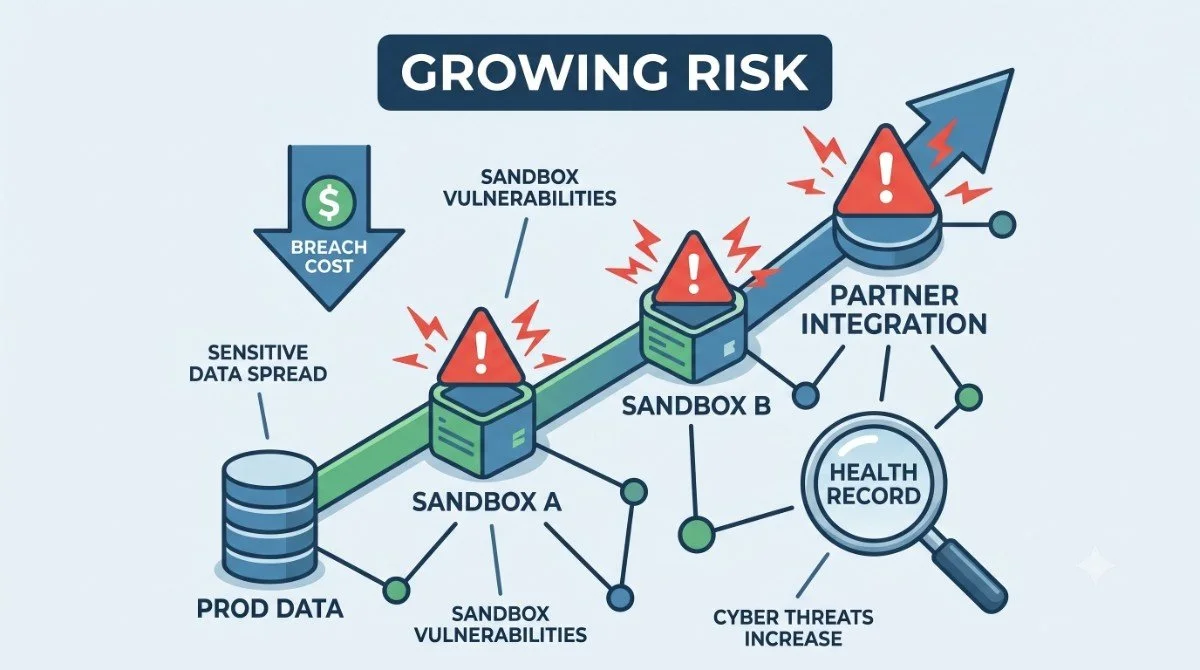
More sensitive data than ever. What used to be basic contact information has expanded into financial records, health details, government identifiers, and behavioral data. It all sits inside the same platform your sales, service, and marketing teams touch every day.
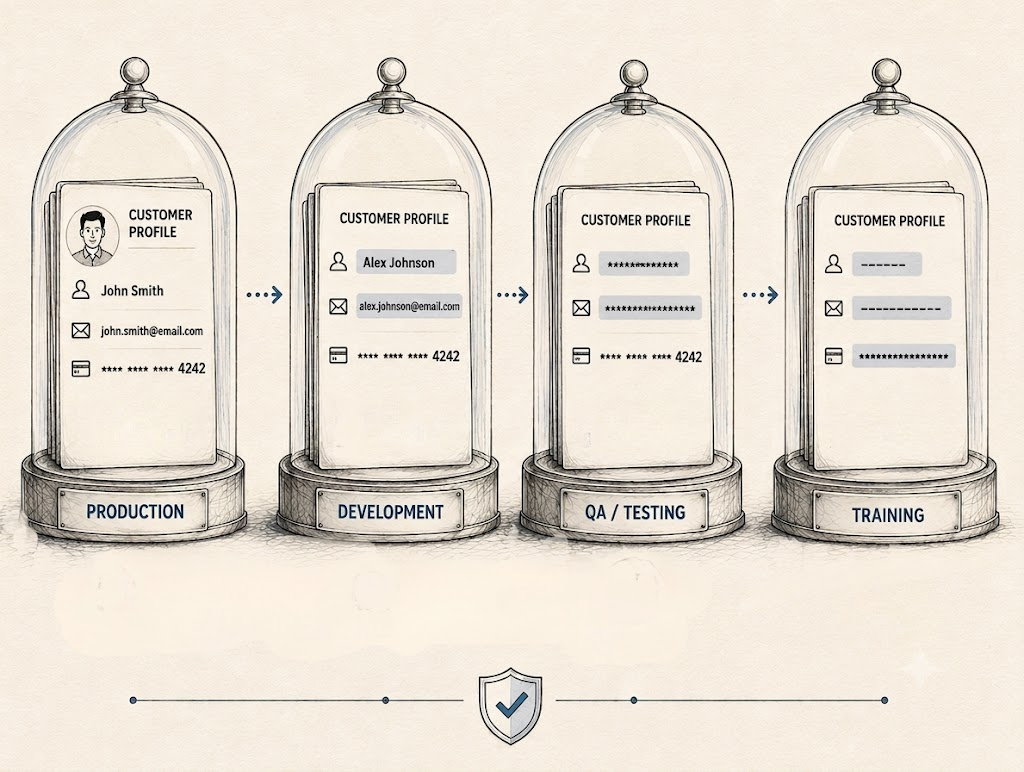
More sandboxes and non-production environments. Enterprise teams routinely run several sandboxes at once for development, QA, staging, and training, and each one typically contains a full copy of production data, often with broader access controls than production itself.
Rising cybersecurity threats and insider risk. Attackers have gotten better at breaching Salesforce orgs through compromised connections rather than brute-force login attempts. Also, insider risk (a contractor, a departing employee, an overly broad permission set) remains one of the most common causes of exposure.
The real cost of a data breach. It isn’t just the fine. It’s the customer trust, the sales cycles that stall while prospects demand security assurances, and the months spent rebuilding compliance certifications.
Put together, these factors mean that Salesforce sensitive data protection now has to account for far more surface area than it used to. More data, more environments, and more ways for that data to end up somewhere it shouldn't.
Why 2026 Is a Turning Point for Enterprise Data Security
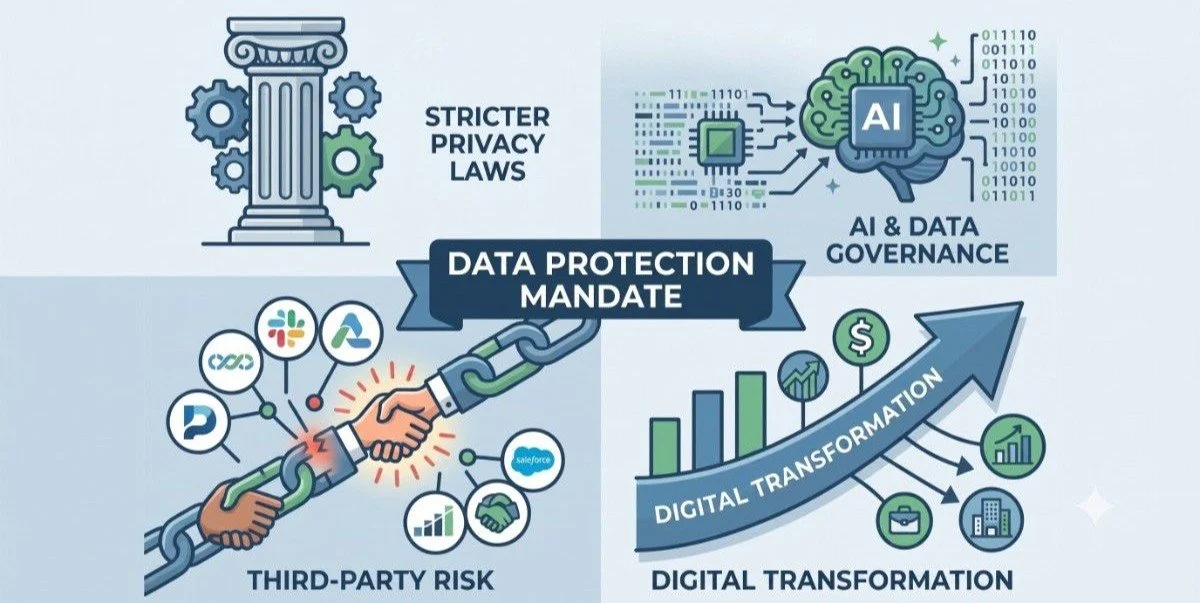
A few specific shifts are converging this year, making Salesforce data protection harder to postpone.
1. Stricter privacy regulations. Enterprises now navigate the growing body of state, national, and international privacy regulations, each with its own definitions of protected data and penalties for getting it wrong.
2. AI and data governance requirements. As enterprises plug AI tools into Salesforce for prediction, automation, and analysis, sensitive fields that were merely visible to a few internal users can now be indirectly exposed to AI models processing them at scale.
3. Growing reliance on third-party developers and partners. Every contractor, consultant, or partner integration is another set of eyes on your org, and another potential point of exposure if sensitive fields aren't properly protected.
4. Enterprise digital transformation. New business units, new integrations, and new automation all expand the number of objects, fields, and personas an organization has to account for. Each expansion is a chance for sensitive data to end up somewhere nobody's tracking.
Together, these shifts explain why enterprise data security feels different in 2026. The point has come where Salesforce data security can no longer be handled as an afterthought.
How Salesforce Data Masking Solves Enterprise Security Challenges
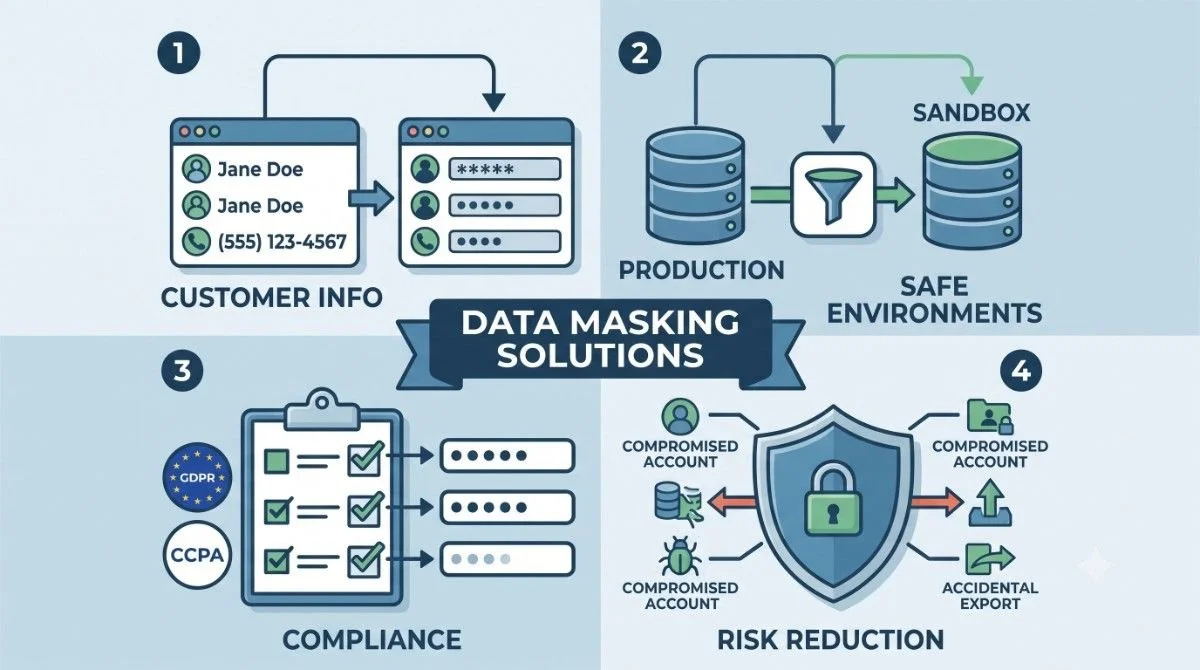
This is where Salesforce data masking earns its place as a core part of enterprise security strategy rather than an optional add-on.
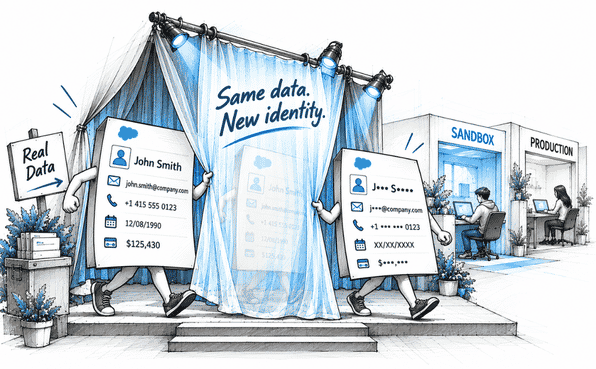
1. Protects sensitive customer information: Masking replaces or obscures real values, names, financial details, and health records so only authorized users see genuine data, while everyone else sees realistic but non-sensitive placeholders.
2. Creates safe testing and production environments: Sandboxes get masked copies of production data for development and QA, while production masking controls who sees the real value of a sensitive field based on their role. It's worth noting that sandbox and production masking aren’t the same. Our comparison of static vs dynamic data masking explains when each approach applies and why most enterprises end up needing both.
3. Supports compliance efforts: Because most privacy regulations share a common principle (i.e., limit exposure of sensitive data), a solid masking strategy tends to support GDPR, CCPA, HIPAA, and similar frameworks simultaneously.
4. Reduces security and operational risk: Fewer people with unnecessary access to sensitive fields means fewer opportunities for something to go wrong, whether that's a compromised account, an accidental export, or a well-meaning contractor mishandling data.
This is exactly the gap a dedicated Salesforce data masker like Contour is built to close. Rather than relying on manual permission set adjustments, Contour automates the process: it scans your org to find sensitive fields, lets you configure masking rules across different pages in bulk, and deploys those rules with a full audit trail. That’s what turns Salesforce data masking from a manual, error-prone project into a repeatable, governed process.
Key Business Benefits of Salesforce Data Masking
The case for masking goes beyond risk avoidance. Done well, it delivers real business value across several dimensions.
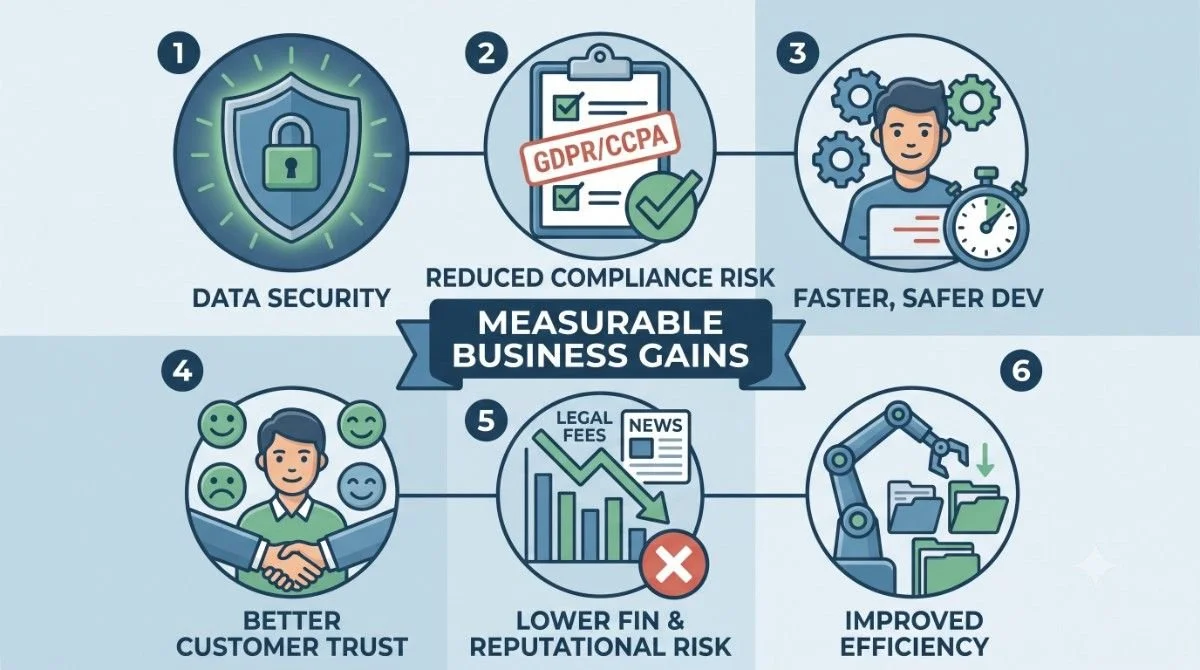
1. Stronger data security: sensitive fields are protected consistently, not dependent on someone remembering to configure a permission set correctly.
2. Reduced compliance risk: masking supports multiple regulatory frameworks at once, cutting down the work of proving protection to auditors and regulators.
3. Faster and safer application development: developers and QA teams get realistic test data without waiting on manual cleaning or risking exposure.
4. Better customer trust: customers are more willing to do business with organizations that can demonstrate serious data protection practices.
5. Lower financial and reputational risk: fewer opportunities for breaches means fewer regulatory fines, legal costs, and headlines to recover from.
6. Improved operational efficiency: automated masking removes hours of repetitive manual configuration work from admin and security teams.
These benefits compound over time. A masking program that starts by protecting a handful of fields tends to expand naturally as teams see how much friction it removes.
Best Practices for Enterprise Salesforce Data Masking
For enterprises ready to take this seriously, a few practices consistently separate effective masking process from struggling ones.
1. Identify sensitive data across the org. Most enterprises underestimate how scattered sensitive fields actually are. A reliable Salesforce data masking app like Contour includes automated scanning that finds sensitive fields across every object, not just the ones an admin already knows about.
2. Automate masking wherever possible. Manual field-by-field configuration doesn't scale, and it introduces the kind of human error that defeats the purpose of masking in the first place. Automation also keeps masking rules consistent as the org grows and changes.
3. Maintain realistic test data. Masked data still needs to behave like real data for testing purposes. So development and QA work doesn't break because the test data looks obviously fake.
4. Apply consistent masking policies across every layer. A field masked on a page layout but still exposed through a Lightning component or an overlooked permission set isn't actually protected. Consistency across Page Layouts, Lightning Pages, Profiles, and Permission Sets is non-negotiable.
5. Maintain configuration and audit trail records. Every scan, masking rule, deployment, and rollback should be logged automatically. Thanks to Contour for providing an audit trail of every change made. This turns Salesforce PII protection from a claim your team makes into something you can prove with a few clicks when an auditor asks.
6. Regularly review and update masking processes. Salesforce orgs don't stay still. New fields, integrations, and personas appear constantly. A masking program that isn't revisited periodically will develop blind spots exactly where the org has changed the most.
This is where a Salesforce data masking app becomes genuinely useful.
In a Nutshell
Enterprises running Salesforce in 2026 are dealing with more sensitive data, more environments, more regulatory scrutiny, and more complexity than at any point before. The Salesforce organizations that get data masking right won't be the ones with the least sensitive data, but they'll be the ones with the clearest visibility into where that data lives and the most reliable way to control who sees it. A dedicated Salesforce data masking solution is how enterprises get there without adding a permanent manual burden to their security and admin teams.
If your organization is still relying on ad hoc permission set adjustments and hoping nothing slips through, now is a time to look at what an automated approach can add. Need automation as your standard practice? Book a demo with us to learn how a Salesforce data masking solution like Contour can help.
Frequently Asked Questions
-
Three pressures are converging at once: more sophisticated attacks that get past traditional login defenses, expanding privacy regulations across states and countries, and enterprise orgs that have grown too complex to track sensitive fields manually.
-
Native tools like Shield Encryption and field-level security are strong, but they weren't designed to show different masked views of the same field to different users. If someone has field access, they see the full value. There's no built-in partial masking.
-
Yes. Because most privacy regulations share the same core principle, masking sensitive fields tends to support compliance with GDPR, state privacy laws, HIPAA, and similar frameworks simultaneously, rather than requiring a separate approach for each one.
-
It can work for very small orgs, but it doesn't hold up at enterprise scale. Too many fields, profiles, and personas make manual configuration slow to set up, hard to maintain, and prone to gaps opening up as the org keeps changing.
Related Reading

Let’s Talk

Drop us a note, we’re happy to take the conversation forward 👇🏻
