A contracted account renews at list price. A rep edits the Discount field on the quote line and Net Unit Price does not move. A newly published price book tier goes live, and the line ignores it.
Each of these is the same failure: the quote disagrees with what its pricing procedure, working through decision tables and price books, was configured to produce.
The name makes this harder before you start debugging. Price waterfall names two different machines depending on which Salesforce product taught it to you, Salesforce CPQ or Salesforce Pricing, and the two do not calculate the same way.
A price waterfall mismatch means the Net Unit Price on a quote line disagrees with what the pricing procedure's own execution trace produced. Salesforce Revenue Cloud's default procedure chains close to 50 elements before reaching that number (Unpacking the Revenue Cloud Pricing Procedure, Part 1). The causes below are the ones with documented mechanisms, not a ranking of what happens most often in your org.
Four instruments expose that trace directly: the Net Unit Price hover, the Revenue Cloud Operations Console, the Pricing Procedure Simulator, and the Pricing Connect API.
Salesforce Revenue Cloud is now branded Agentforce Revenue Management (Salesforce Revenue Cloud). This piece uses the current name, and notes the prior one where a click path depends on it.
Which symptom do you have?
A pricing waterfall mismatch usually announces itself as one of six symptoms on the quote line: a missing tier, a frozen discount field, list price on a contracted account, a quote-order disagreement, a stale price with no warning, or an empty hover tooltip. Each maps to a documented, fixable cause.
The table below routes what you see to the mechanism behind it. Work down the left column first; the right column is where the fix actually lives.
| What You See | Most Likely Cause |
|---|---|
| Price ignores a newly added tier or a contracted price | The decision table backing that tier was never refreshed after the change. |
| Rep edits Sales Price or Discount and nothing moves | The pricing procedure was never configured to read that field. |
| Contracted account still gets list price | Contracted pricing was never checked by the procedure for that context. |
| Quote and order disagree on the same line | Procedure selection drifted between the two setup locations. |
| Price is stale and no warning is shown | A setting is suppressing the stale-price notification. |
| Nothing appears when hovering Net Unit Price | The Price Waterfall output variable is not mapped in the Pricing Setting element. |
How do you actually see the price waterfall?
Four instruments expose the same underlying trace at different depths: a live hover on the quote, a persisted log in the console, a controlled simulation, and a raw API response. Pick the instrument that matches how reproducible your mismatch already is.
Hover the Net Unit Price on the quote line
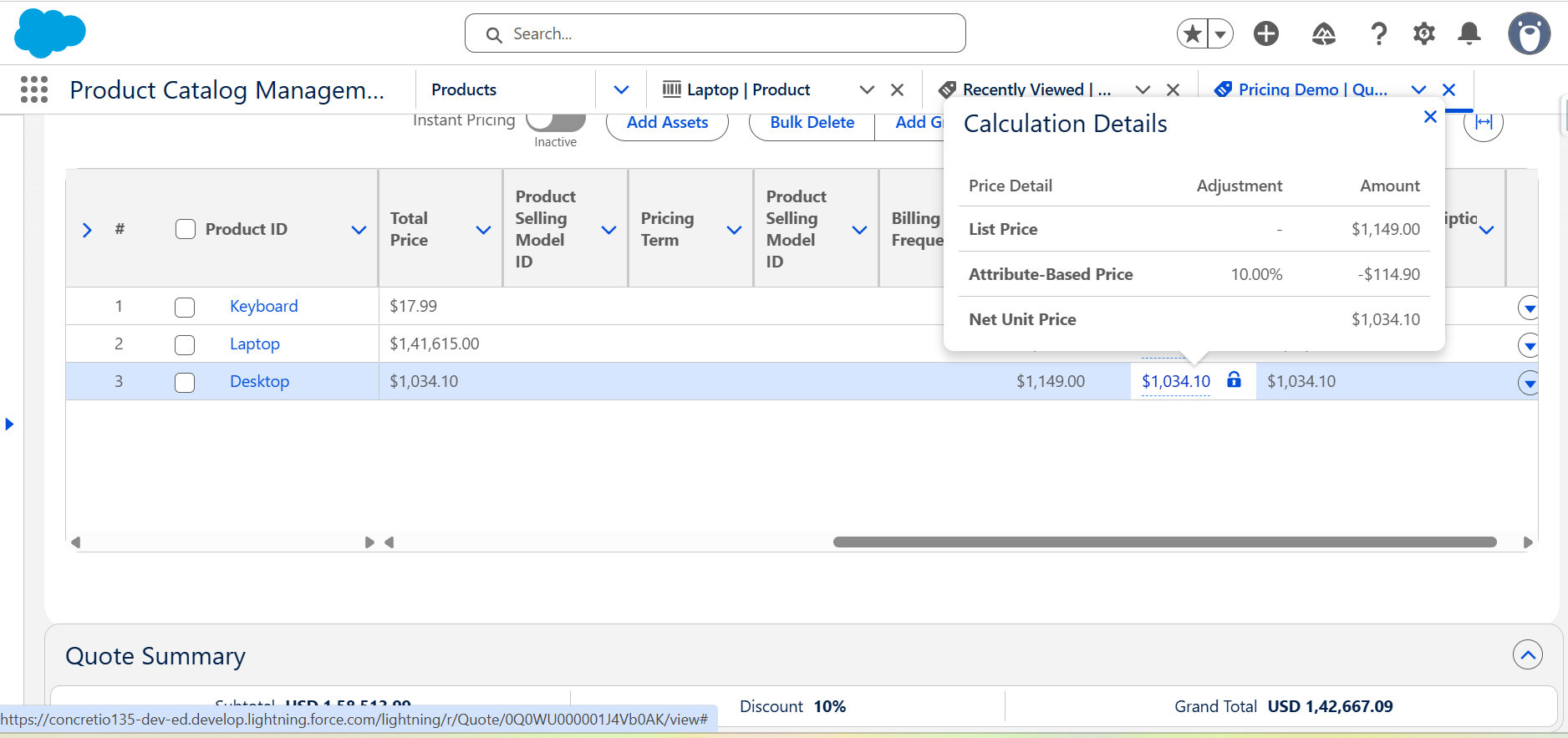
Hovering Net Unit Price in the Transaction Line Editor shows the price waterfall directly on the quote. That depends on the Pricing Setting element's Price Waterfall output variable being mapped (Unable to view the pricing waterfall when hovering on the Net Unit Price field).
When the mapping is missing, the tooltip shows nothing at all rather than partial data. That is a documented known issue, not a display quirk.
The fix: deactivate the active pricing procedure, open the initial Pricing Setting element, set its Price Waterfall output variable to price_water_fall, then reactivate the procedure (Unable to view the pricing waterfall when hovering on the Net Unit Price field).
Read the price logs in the Revenue Cloud Operations Console
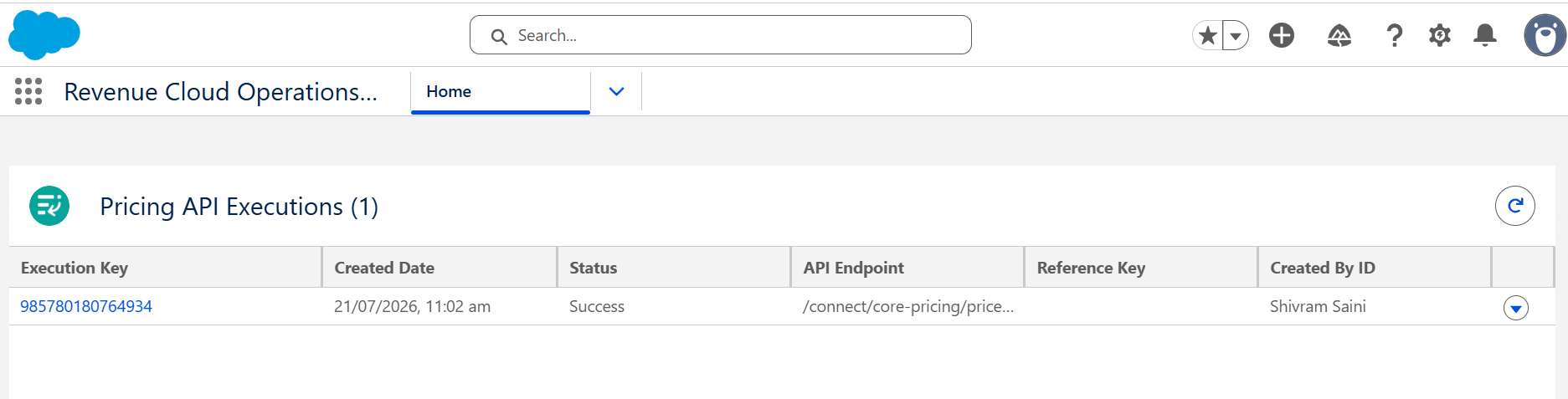
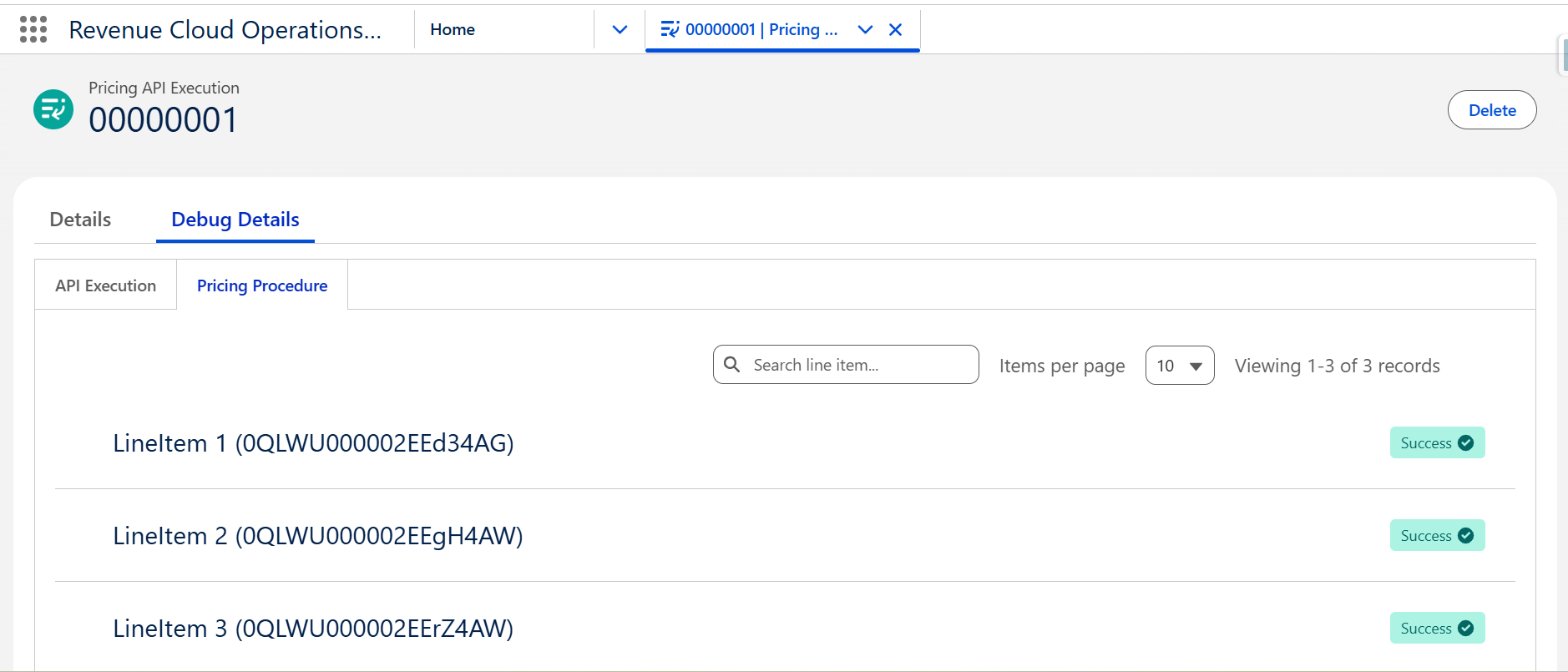
Turning on Price Logs Capture in Salesforce Pricing Setup and then opening the Pricing API Executions view shows, per line item, every input, every output, and the exact element sequence the procedure followed (Revenue Cloud Advanced / Agentforce Revenue Management Tips).
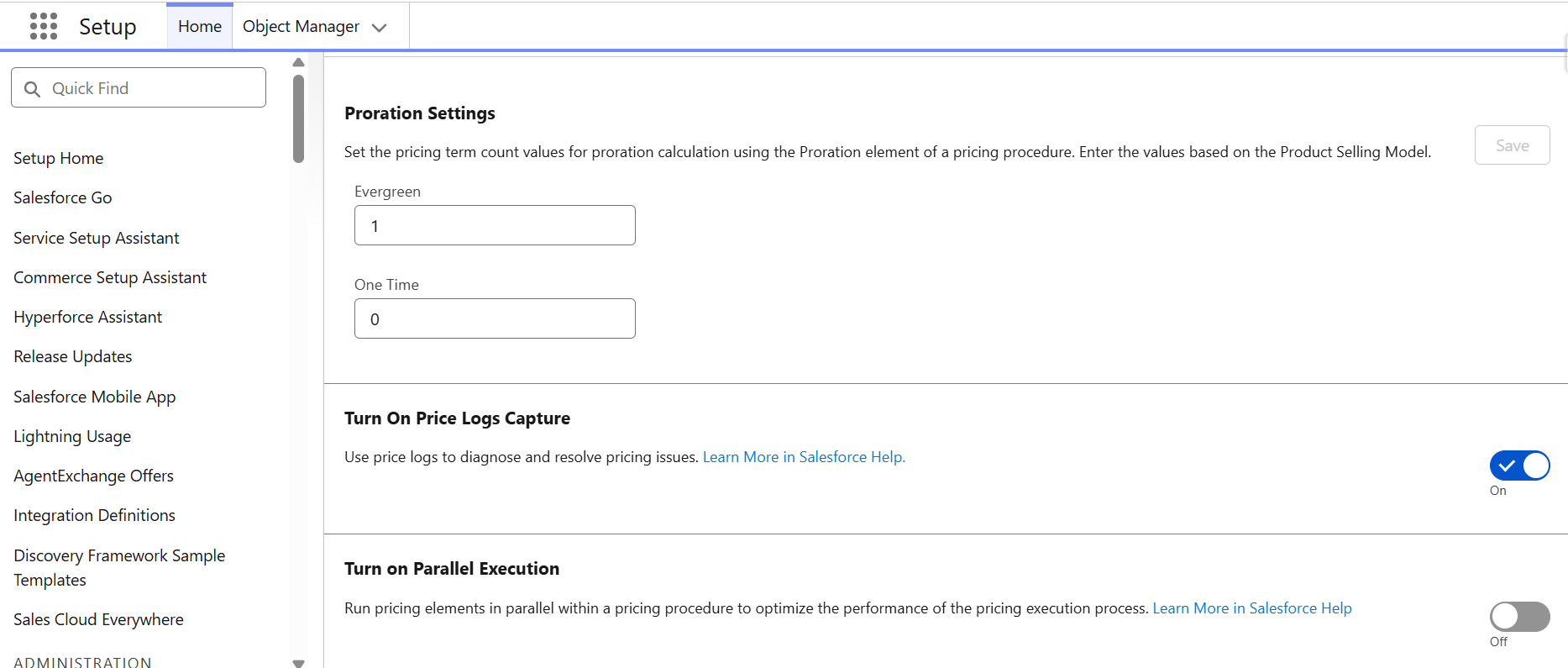
One source describes this console as the Revenue Cloud Operations Console, a Spring '26 rename of the former Pricing Operations Console (Salesforce Revenue Cloud Operations Console Explained, Spring '26 Update). If you are on an older org, look for the previous name.
The same source names four Advanced Logging categories worth knowing: Attribute-Based Price Logs, Derived Price Logs, Price Propagation Logs, and Pricing Promotion Logs.
Simulate the procedure against a real quote
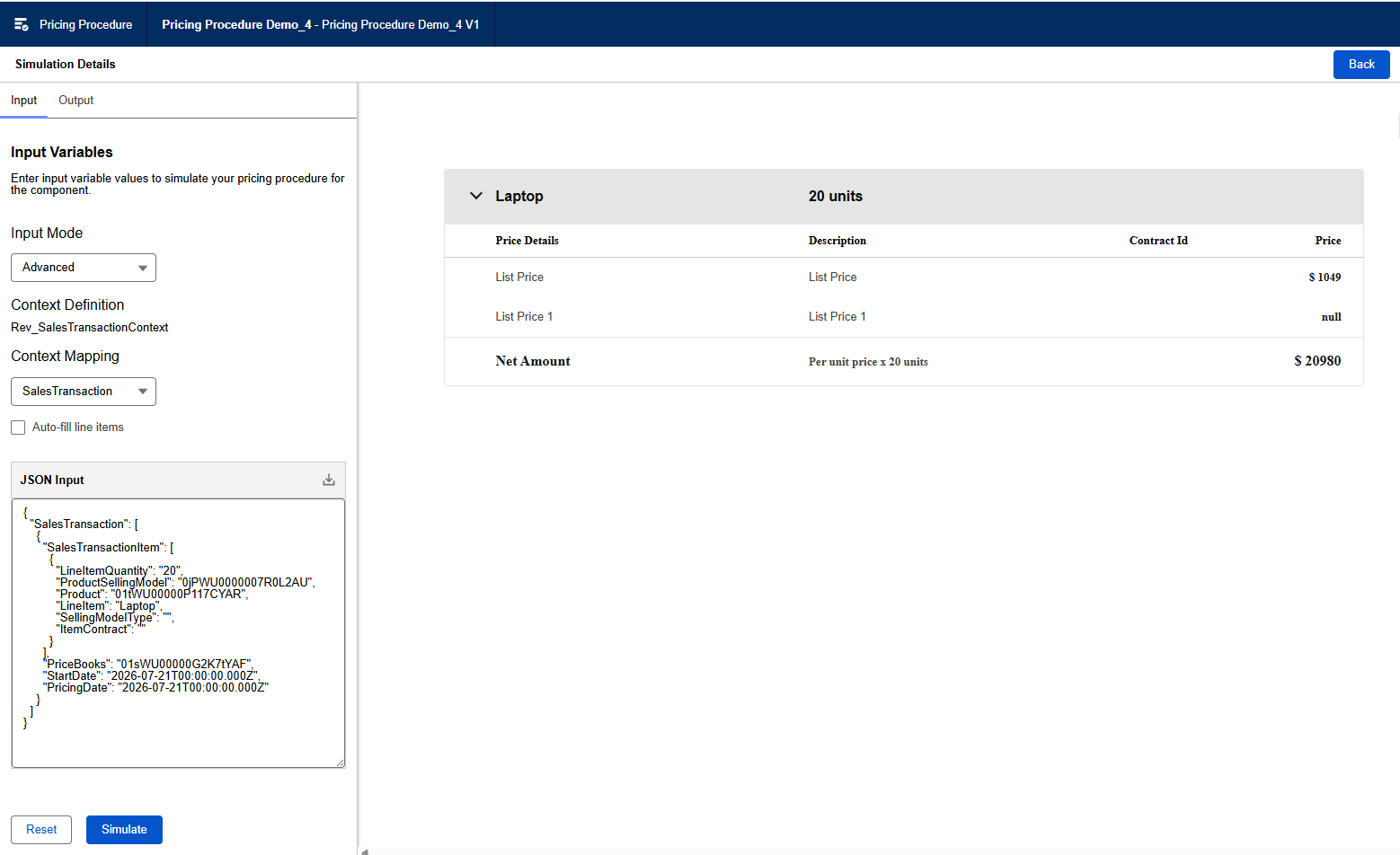
The Pricing Procedure Simulator runs inside the Pricing Procedure Builder; click Simulate in the top right corner (Create a Pricing Procedure with the List Price Element). It accepts input in Simplified form fields or Advanced JSON (Configure Product Pricing).
You can preload the simulation from a real quote Id instead of entering every field by hand; effective date is one value that still needs manual entry, in the exact expected format (Debug with Pricing Procedure Simulator). The run returns a full element-by-element JSON trace you can copy out for closer inspection.
Pull the waterfall through the Pricing Connect API
For headless pricing calls, the Pricing Connect API's runSalesforceHeadlessPricing action carries an isSkipWaterfall input that controls whether that specific call generates waterfall data at all (Run Salesforce Headless Pricing Action). Check that input first when a waterfall seems missing from an integration response.
For after-the-fact inspection, the separate Pricing Waterfall GET resource retrieves a persisted waterfall, but only if price waterfall persistence is on in Salesforce Pricing Setup (Pricing Waterfall GET).
The two are not interchangeable. The GET endpoint depends on persistence; the Connect API returns waterfall data inline regardless, gated instead by isSkipWaterfall.
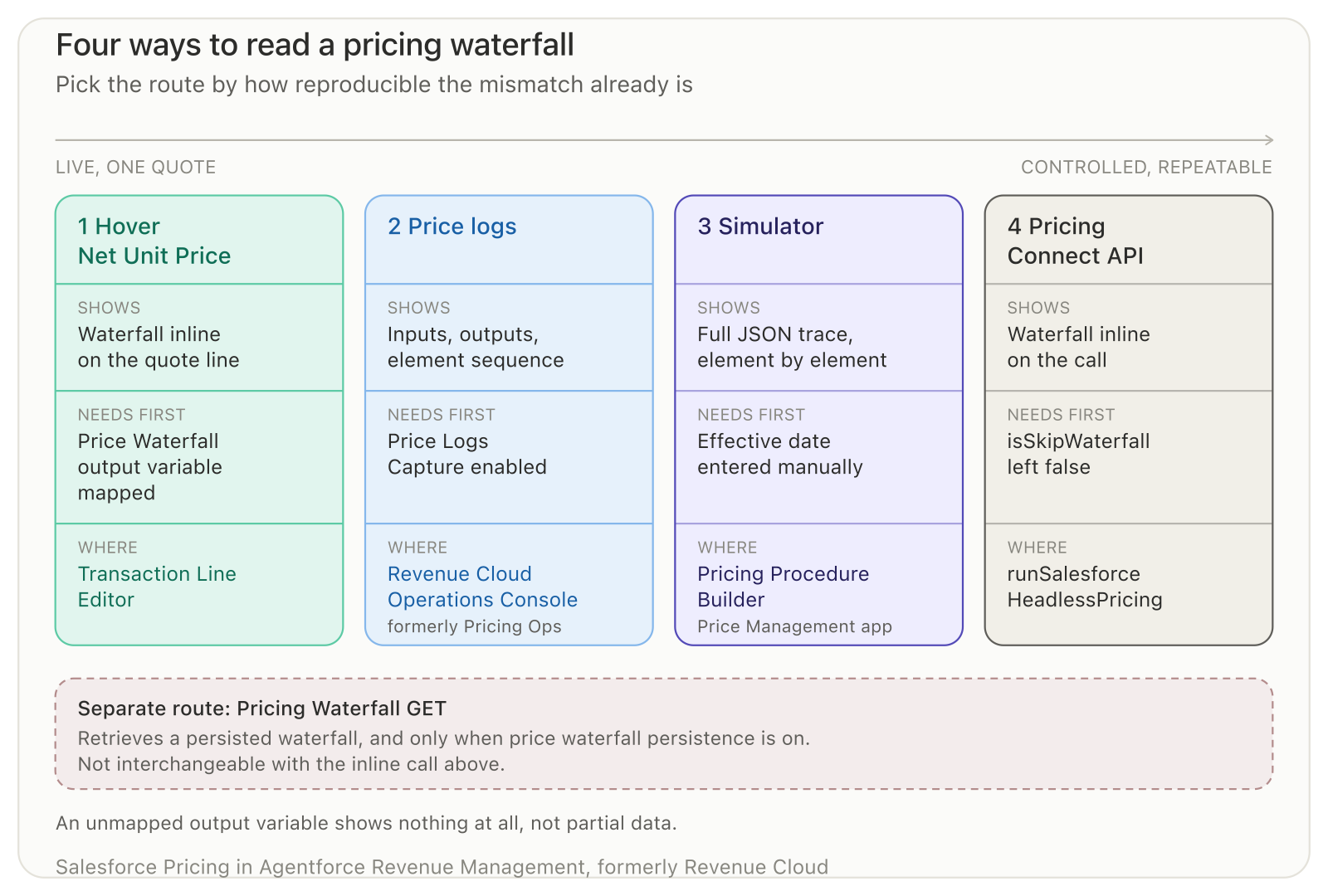
Each route trades speed for depth, and each has a prerequisite that silently produces an empty result when it is missing.
Every one of these routes reads the same chain. Elements execute in Rank order, and each element's output becomes the next element's input (Create a Pricing Procedure with the List Price Element).
That makes isolation mechanical rather than guesswork. Start at the wrong number and walk backward, Rank by Rank, to the element that produced it.
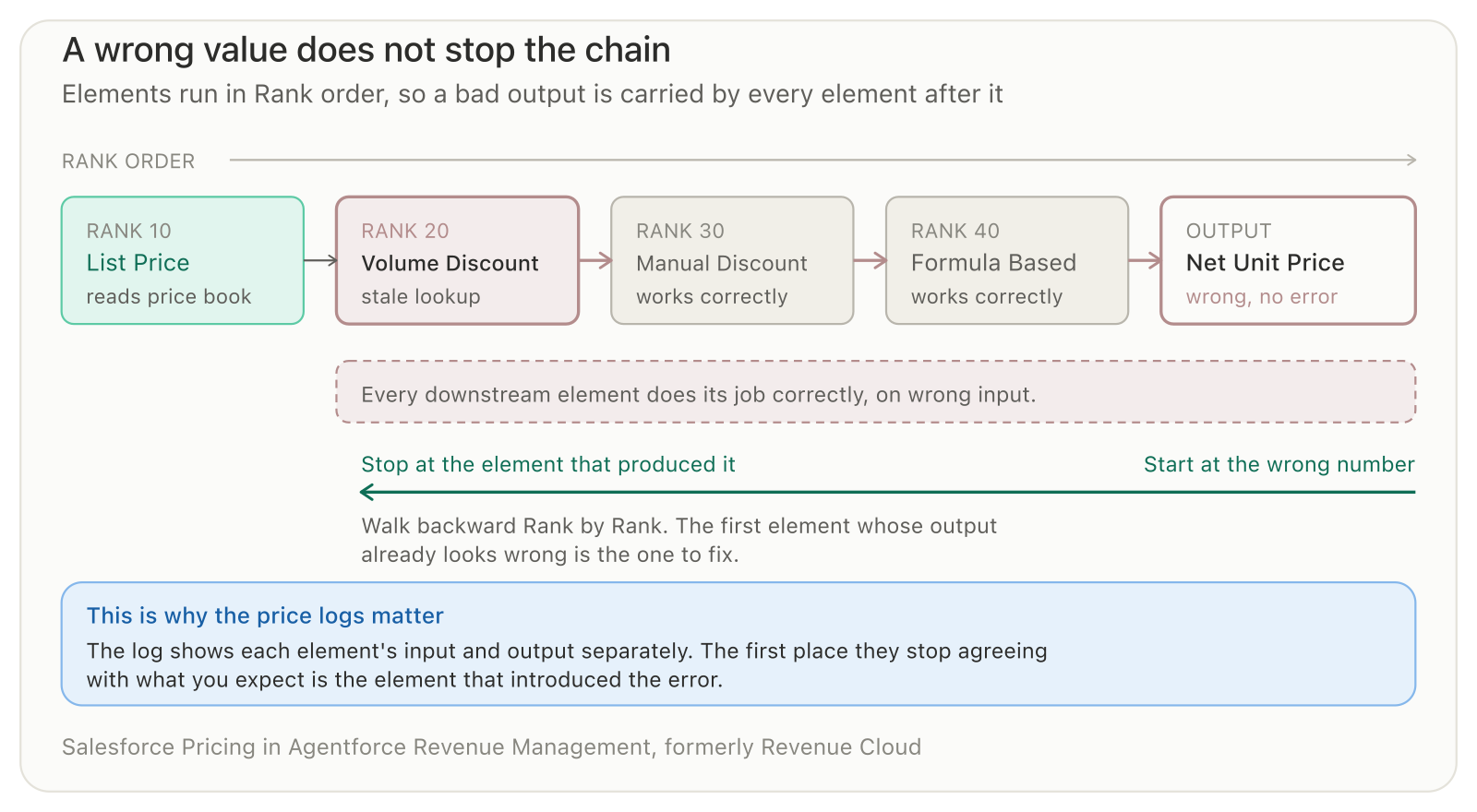
Downstream elements do their job correctly on wrong input, which is why the final number is wrong and nothing reports an error.
The five causes worth checking first
Five causes have documented mechanisms behind them: a decision table that was never refreshed, a pricing procedure with no element wired to the field a rep changed, contracted pricing that never got checked, procedure selection that drifted between two setup screens, and a stale-price warning hidden by one settings field.
The decision table was never refreshed
You add a new Price Adjustment Tier, activate a contract, or update a price book entry, and the quote keeps quoting the old number.
Decision tables are not live queries against your price book or contract records. They are synced snapshots, populated only when you run Sync Pricing Data org-wide or click Refresh on the specific table (Explore Salesforce Pricing). The pricing procedure reads the snapshot, not the source object.
Check Setup, Decision Tables, open the relevant table (Volume Discount Entries, Contract Pricing Entries, Price Book Entries), and read its Last Refreshed Date (Add Volume and Manual Discounts).
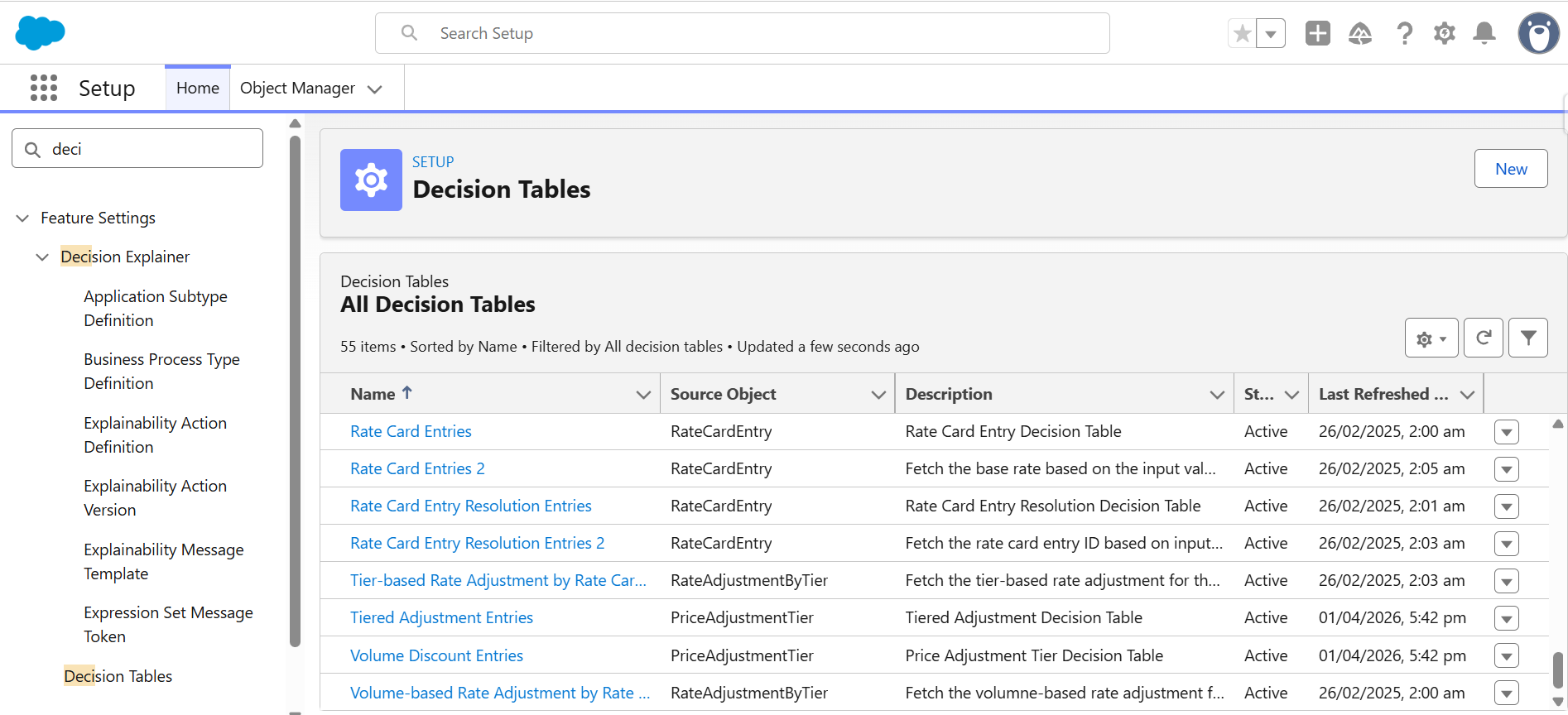
Refresh the table the change depends on, or run the org-wide Sync Pricing Data if you are unsure which one. If the Last Refreshed Date does not update, refresh the browser tab; that is a display lag, not a failed sync (Explore Salesforce Pricing).
Here is a constructed case that shows the mechanism, not a documented incident. A Standard Support Plan lists at $400 a unit. An admin builds a Price Adjustment Tier: 25 units or more gets 12% off, feeding the Volume Discount Entries table.
A rep quotes 30 units. Expected price is $400 x 30 x 0.88, or $10,560. Before the decision table is refreshed, the quote shows $400 x 30, or $12,000, a $1,440 gap with no error raised anywhere.
Refreshing Volume Discount Entries populates the new tier. The Net Unit Price hover then shows the 12% discount applied, and the total corrects to $10,560.
The procedure was never wired for the field you changed
A rep changes Sales Price or types a value into Discount directly on the quote line. The field saves. Net Unit Price does not move.
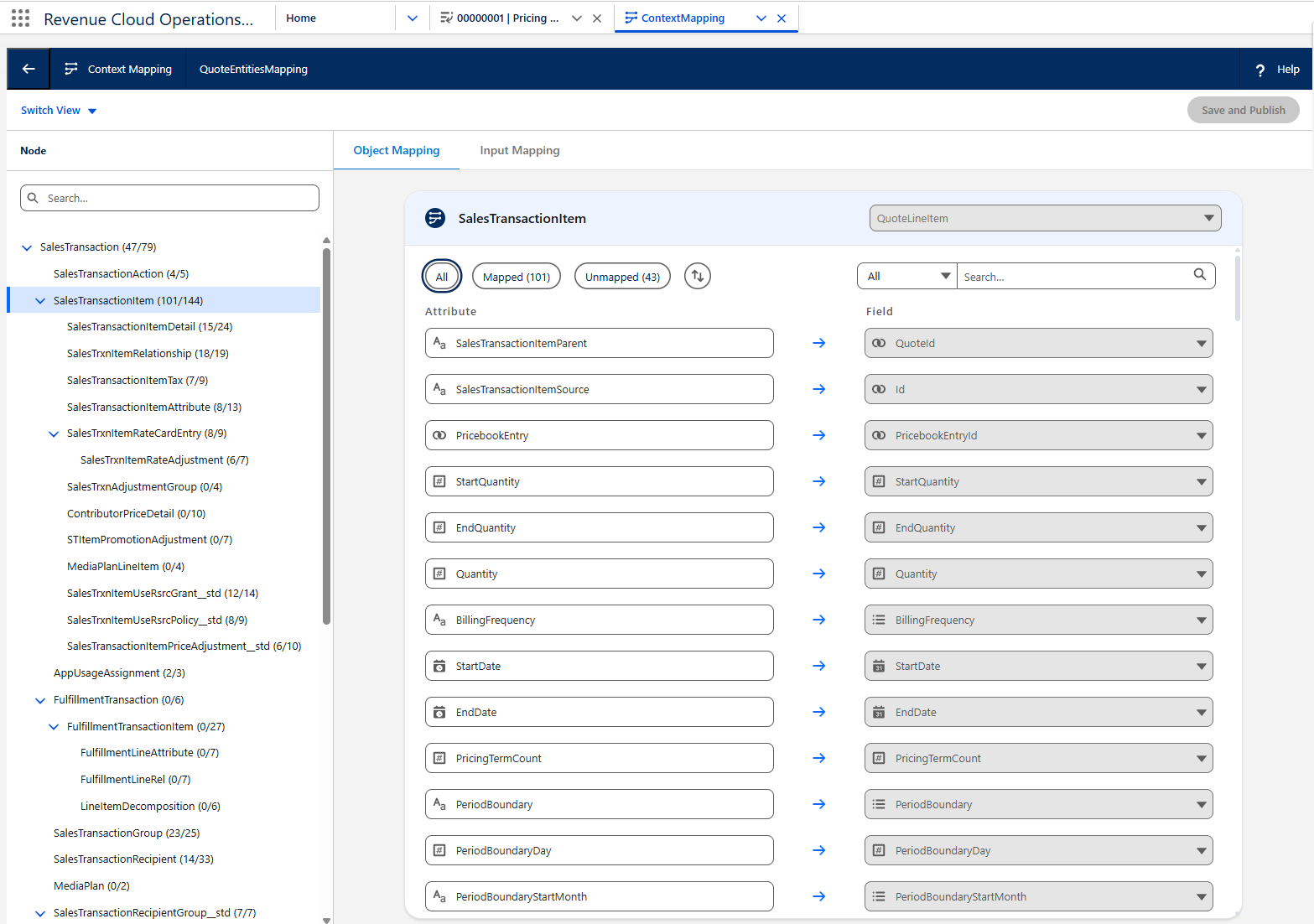
The field is visible and editable, but the pricing procedure never reads it. A minimal procedure that only wires List Price and Quantity reacts correctly to a quantity change and ignores everything else (Unpacking the Revenue Cloud Pricing Procedure, Part 1).
Open the procedure in Pricing Procedure Builder and trace the context definition to see which QuoteLineItem field each element reads.
In one practitioner's org that path runs Context Tags tab, then Map Data tab and the SObject mapping. Your mapping names may differ (Unpacking the Revenue Cloud Pricing Procedure, Part 1).
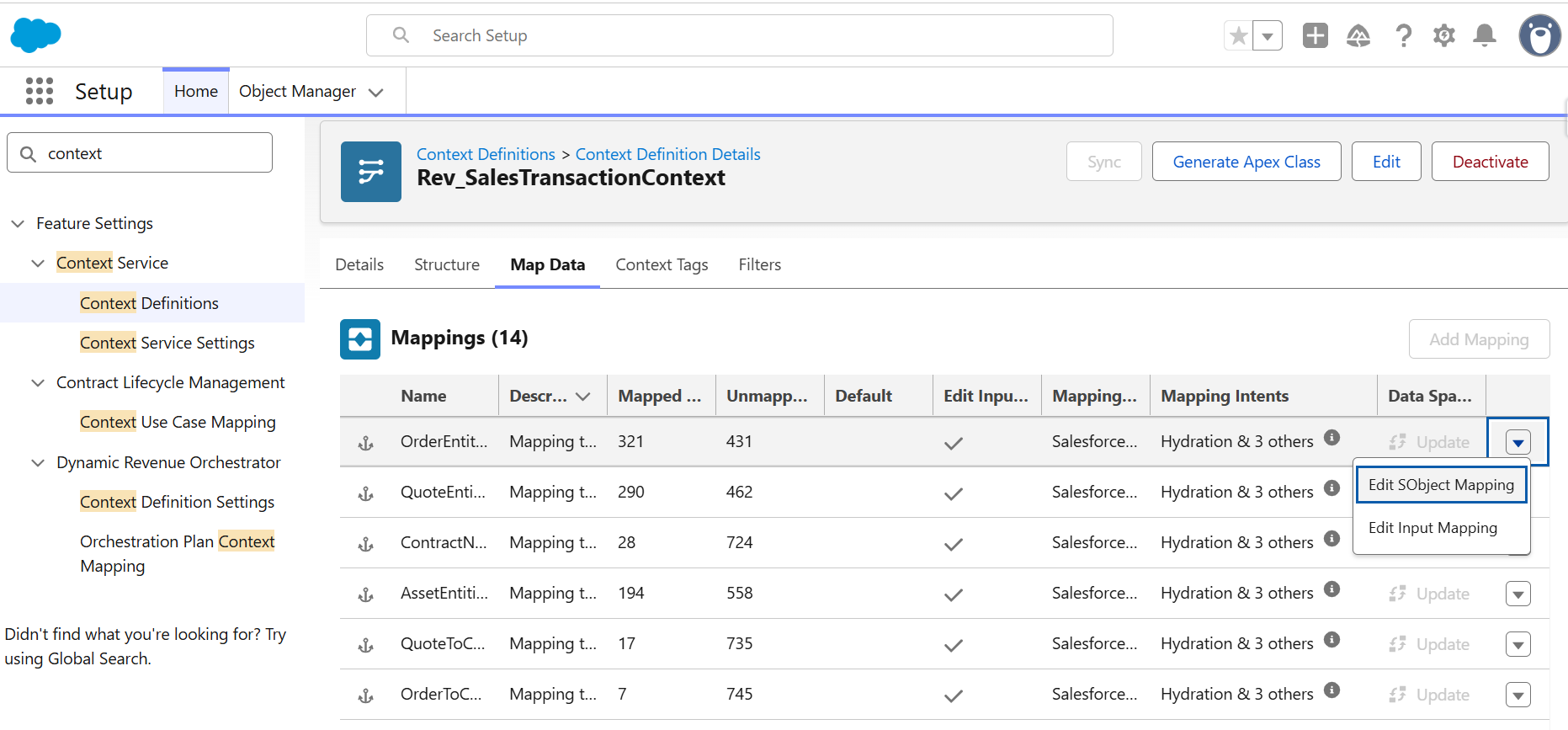
Add the missing chain: a List Group with a List Operation, then an Assignment element that maps Sales Price to QuoteLineItem UnitPrice and feeds it into Net Unit Price. One practitioner walkthrough documents this exact gap and fix (Unpacking the Revenue Cloud Pricing Procedure, Part 1).
Contracted pricing never got checked
A quote against a contracted account shows the standard price book price instead of the negotiated one, even though an active Contract Item Price exists for that product.
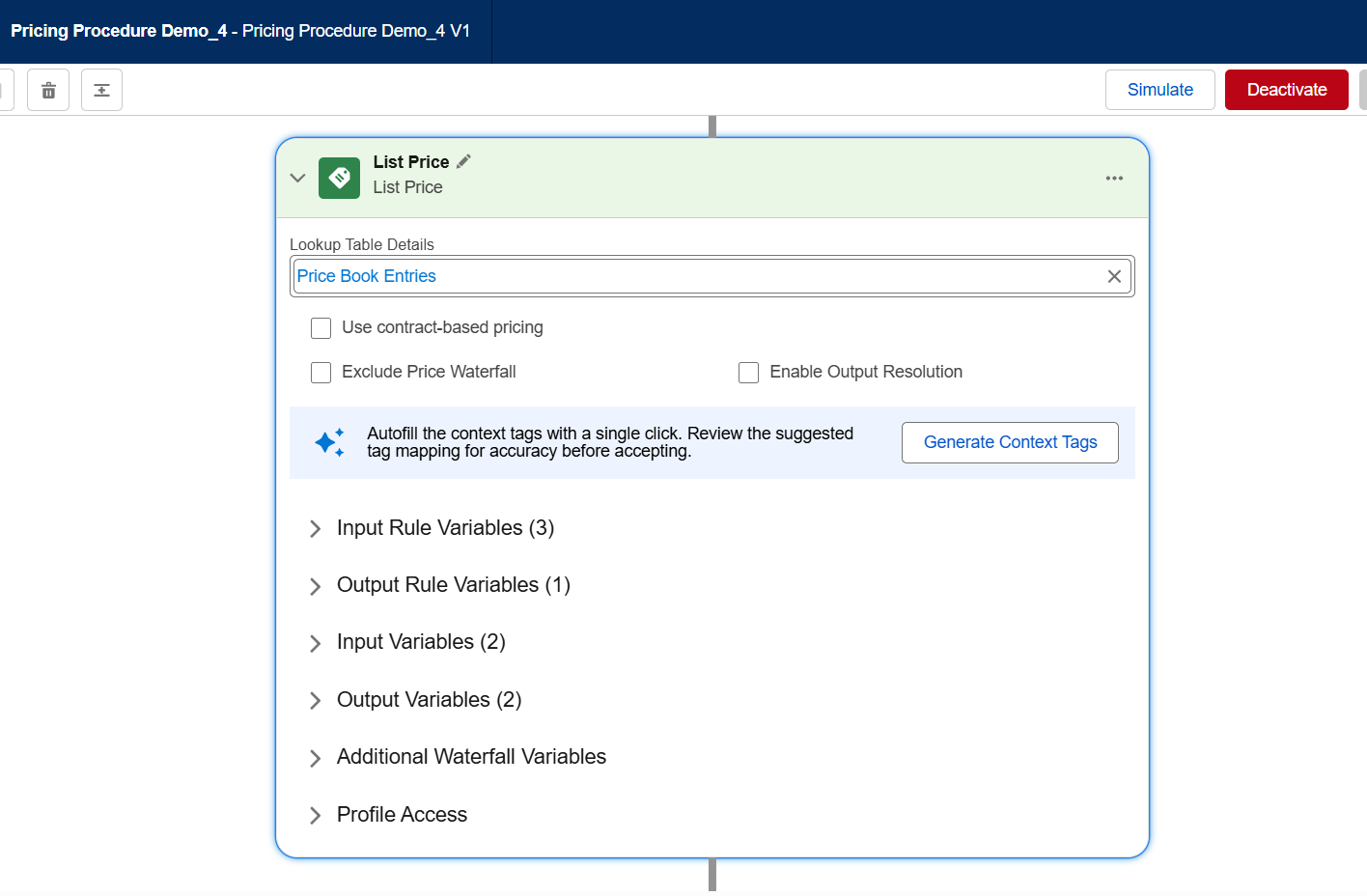
Contract pricing runs through dedicated List Price and Volume Discount elements, each carrying a Use contract-based pricing checkbox. Leave either unchecked, and that element resolves the standard, non-contracted price (Configure Contract-Based Pricing).
Hover Net Unit Price and check the waterfall for IsContracted, which the contract-aware element writes as an output mapping (Configure Contract-Based Pricing).
If it reads false where it should read true, check the checkbox first, then the Contract Pricing Entries and Contract Pricing Volume Tiers decision tables.
Check the box on both elements, and refresh both decision tables after every contract create or activate. If the checkbox is missed, pricing falls back to list price with no error raised (Configure Contract-Based Pricing).
Procedure selection drifted between setup locations
You update the pricing procedure in one setup screen, but a quote or order keeps resolving a different one, or an older version of it.
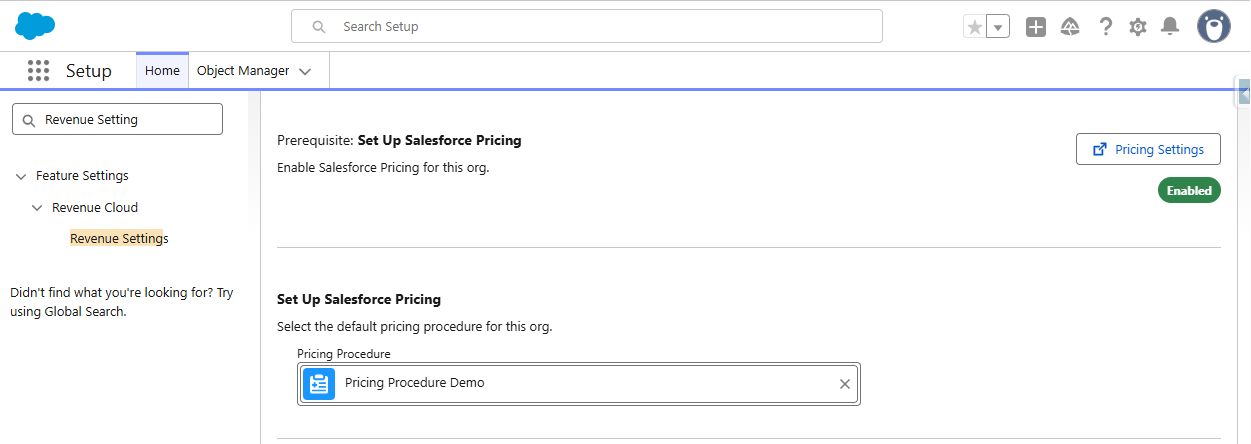
Salesforce lets you select a default pricing procedure in two separate places, Salesforce Pricing Setup and Revenue Settings, and one practitioner account reports the two selectors are not auto-linked (Two Switches, One Procedure).
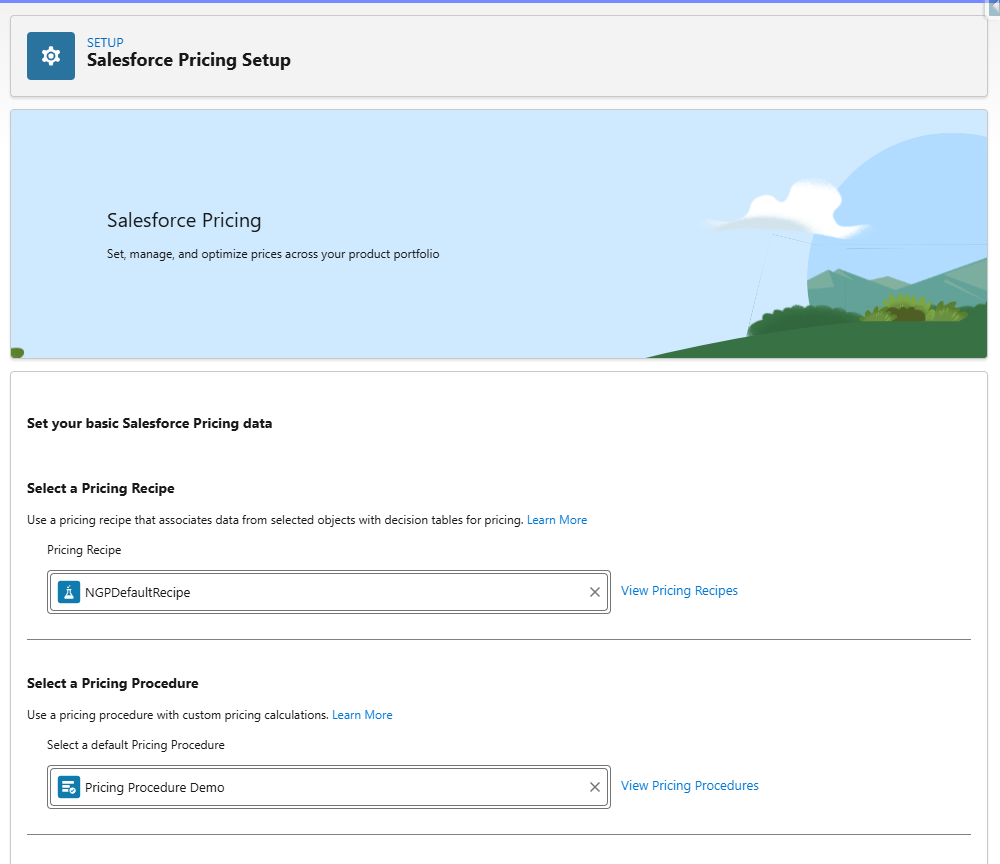
The official mechanism sits underneath that. skipOrgSttPricing skips the default and any sales-transaction-type procedure in favour of procedure plan routing, and it only takes effect once enableRevUnifiedSetup is already on (RevenueManagementSettings). Also check PricingProcedureResolution for an EffectiveFrom or EffectiveTo window that has already lapsed (PricingProcedureResolution).
Align both selector screens, confirm the enableRevUnifiedSetup and skipOrgSttPricing pairing matches what you expect, then verify in the Revenue Cloud Operations Console which procedure actually fired.
A setting is hiding the stale-price warning
A rep saves a quote or creates an order on prices that are stale, and no warning appears telling them to reprice first.
hidePriceRefreshNtfcn is a RevenueManagementSettings boolean, default false, that hides the notification Salesforce shows when quote or order prices have not been updated (RevenueManagementSettings). Someone in the org may have flipped it to cut down on noise.
Check the revenuemanagement.settings metadata for the org. This is not a page-one Setup toggle you would stumble across while browsing.
Set it back to false. Salesforce's own field description is blunt about the tradeoff: hiding the notification may affect saving quotes and creating orders, because you could be using outdated prices (RevenueManagementSettings).
Three more worth ruling out
Three further mechanisms produce the same symptom with thinner evidence behind each, so treat them as things to rule out rather than causes to expect.
The Pricing Connect API can assemble pricing context differently than the UI does. One documented case failed with DUPLICATE_VALUE_FOUND_IN_LOOKUP because attribute values never reached the line-level scalar fields the lookup needed. That same source is explicit that a pre-hook fix is not always necessary (Pre-Hooks for Pricing).
A quote-level discount can stop short of every line when a per-line minimum price floor blocks the distribution element from applying its full amount. One source documents this pattern, and its field names are author-labelled examples rather than real ones (Discount Distribution Service in Salesforce Revenue Cloud).
A PricingProcedureResolution record carries its own EffectiveFrom and EffectiveTo window. A quote priced outside that window can resolve a different procedure than the one visible in Setup (PricingProcedureResolution).
Why your Salesforce CPQ instincts produce wrong numbers here
Salesforce CPQ tracks price through a fixed seven-field ladder on SBQQ__ namespaced fields. Salesforce Pricing in Agentforce Revenue Management runs a configurable procedure of elements instead, writing to standard QuoteLineItem fields. The two calculate price through structurally different mechanisms.
| Dimension | Salesforce CPQ | Salesforce Pricing (Agentforce Revenue Management) |
|---|---|---|
| Price model | Fixed seven-field ladder: Original Price, List Price, Special Price, Regular Price, Customer Price, Partner Price, Net Price. | Configurable procedure of ordered elements, with roughly 50 in a default build. |
| Field ownership | SBQQ__ namespaced managed-package fields, such as SBQQ__ListPrice__c and SBQQ__SpecialPrice__c. |
Standard QuoteLineItem fields such as ListPrice, NetUnitPrice, and NetTotalPrice, accessed through context-tag mapping. |
| Where custom logic goes | Price rules targeting List Price or Special Price; the other four are prorated and may introduce rounding drift. | New elements added to the chain, including List Group, Assignment, Formula Based Pricing, and Volume Discount. |
| Visibility into the calculation | Seven named fields on the quote line that can be inspected directly. | A price waterfall log, accessible through hover, console, or API. |
CPQ's own guidance narrows where custom logic belongs: target List Price or Special Price with price rules and leave the other four alone, since they are prorated and a custom formula there risks rounding drift (Learn When to Use the Special Price Field).
Salesforce Pricing has no equivalent fixed ladder. Elements read and write context-tag variables that resolve to standard QuoteLineItem fields (Create a Pricing Procedure with the List Price Element), and one practitioner teardown counts close to 50 of them in a default build (Unpacking the Revenue Cloud Pricing Procedure, Part 1).
One capability does not carry across natively. CPQ's term-based subscription discounts have no out-of-the-box equivalent in Salesforce Pricing.
Reproducing the behaviour means building a custom object for the tiers, a decision table to look them up, a formula element for elapsed months, and a Price Adjustment Matrix wired into the procedure (How to Implement Term Discounts in Salesforce Revenue Cloud).
That structural gap is what catches teams moving between the two products off guard, not a defect in either engine.
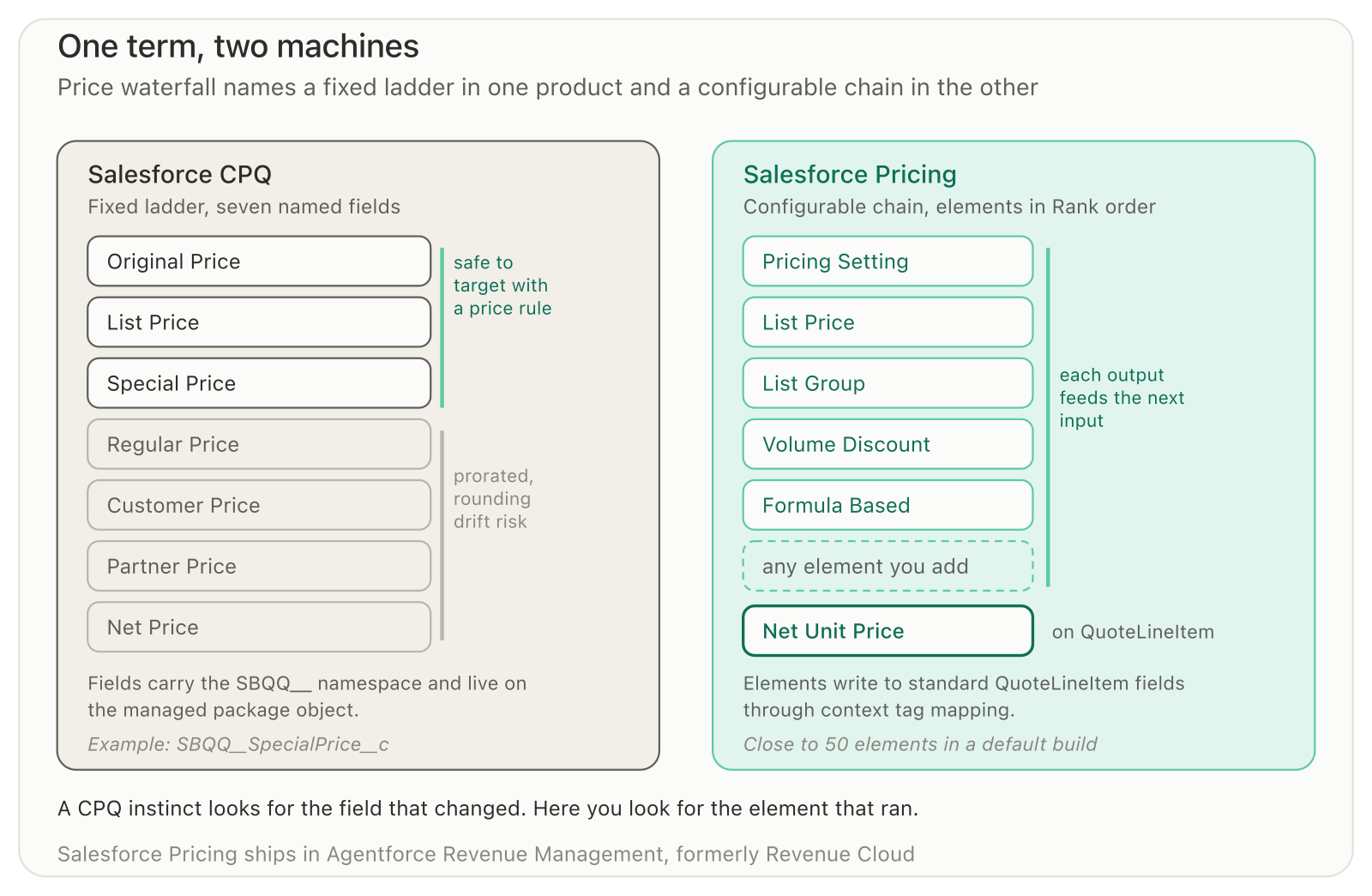
The same term names a fixed ladder of fields in one product and an ordered chain of elements in the other.
What it costs to leave this unfixed
A pricing error made at the quote stage is not recalculated downstream. It persists from Quote Line Item to Contract Line Item to Order Product to Invoice Line, so it surfaces as a billing dispute or a reporting gap, not at the point someone made the mistake.
Billing does not reinterpret pricing logic, it relies on stored values, so a mismatch caught at invoice time has to be traced back through the order and the contract to the quote where it started (Understanding Salesforce Pricing Architecture for 2026).
For a VP of Revenue Operations, the cost is not the wrong number on one quote. It is the erosion of trust in every figure finance pulls from Salesforce afterwards, and the hours spent tracing each dispute back to its source.
If your team is reconciling price mismatches after the fact instead of catching them at the quote, book an architecture consult and we will audit your pricing procedure and decision tables before it costs you a quarter-end close.
Sources
Official Salesforce documentation
Create a Pricing Procedure with the List Price Element, Salesforce Trailhead
Explore Salesforce Pricing, Salesforce Trailhead
Add Volume and Manual Discounts, Salesforce Trailhead
Configure Contract-Based Pricing, Salesforce Trailhead
Configure Product Pricing, Salesforce Trailhead
Learn When to Use the Special Price Field, Salesforce Trailhead
RevenueManagementSettings, Revenue Management Developer Guide
PricingProcedureResolution, Revenue Management Developer Guide
Run Salesforce Headless Pricing Action, Revenue Management Developer Guide
Pricing Waterfall GET, Revenue Management Developer Guide
Unable to view the pricing waterfall when hovering on the Net Unit Price field, Salesforce Help
Salesforce Revenue Cloud, Salesforce
Practitioner sources
Unpacking the Revenue Cloud Pricing Procedure, Part 1, ColinC
Two Switches, One Procedure, Rahul Singh
Salesforce Revenue Cloud Operations Console Explained, Spring '26 Update, SOLVD
How to Implement Term Discounts in Salesforce Revenue Cloud, Jean-Michel Tremblay
Discount Distribution Service in Salesforce Revenue Cloud, Jean-Michel Tremblay
Pre-Hooks for Pricing, Rohit Radhakrishnan
Revenue Cloud Advanced / Agentforce Revenue Management Tips, BhanuPrakash
Understanding Salesforce Pricing Architecture for 2026, Sushrut Mishra
Frequently Asked Questions
-
Check whether the decision table behind that price reflects your latest data. Decision tables are synced snapshots, not live queries, so a new price tier, contract price, or price book entry has no effect on quoting until you run Sync Pricing Data or refresh the specific table.
-
The Price Waterfall output variable may not be mapped in the pricing procedure's Pricing Setting element. Deactivate the procedure, set that output variable to price_water_fall, and reactivate. Separately, price waterfall persistence and the API-response toggle both live in Salesforce Pricing Setup and gate waterfall data elsewhere.
-
Yes. A new price adjustment tier, contract price, or price book entry has no effect on a quote until its decision table, Volume Discount Entries, Contract Pricing Entries, or Price Book Entries, is refreshed, either individually or through an org-wide Sync Pricing Data run.
-
In one documented case, an API create-and-price call failed with DUPLICATE_VALUE_FOUND_IN_LOOKUP because selected values sat only in child attribute rows while the pricing lookup needed line-level scalar fields the UI flow had already populated. The same source notes a pre-hook fix is not always the answer.
-
Salesforce CPQ's waterfall is a fixed seven-field ladder, Original Price through Net Price, on SBQQ__ namespaced fields. The Revenue Cloud price waterfall is a log produced by a configurable pricing procedure writing to standard QuoteLineItem fields. Structurally different mechanisms, not the same feature renamed.
Related Reading

Let’s Talk

Drop us a note, we’re happy to take the conversation forward 👇🏻