How to Automate Sensitive Data Masking Across Your Salesforce Org

Key Summary:
Manual masking is unscalable and risks data security gaps.
Contour automates Salesforce data masking through scanning, configuration, and deployment.
Contour ensures governance with centralized visibility for compliance and control.
Salesforce has become the operational backbone for thousands of organizations worldwide, storing everything from customer contact information and financial records to healthcare data and business details. As Salesforce orgs grow in complexity, the risk of sensitive data being exposed to unauthorized users increases. That’s where Salesforce data masking comes in.
However, the traditional approach to data masking in Salesforce is largely manual. Admins identify sensitive fields one at a time, tweak profiles, adjust page layouts, and hope nothing slips through the cracks. In large orgs with hundreds of objects, thousands of fields, and dozens of user personas, this approach is inefficient and unscalable.
Contour is a Salesforce-native application built specifically to solve this problem. It automates the entire sensitive data masking lifecycle. From discovery and configuration to deployment and rollback, giving administrators the control and visibility to maintain Salesforce data security at scale. So, let’s get into how to automate data masking across your Salesforce org using a simple native app.
The Challenge with Sensitive Data in Salesforce Orgs
Before diving into the solution, it helps to understand the scope of the problem. A typical enterprise Salesforce org might have dozens of custom objects, hundreds of standard and custom fields, multiple user profiles, and various permission sets layered on top. Sensitive data like PII, SSNs, credit card details, or personal health information can be scattered across many of these objects, sometimes without administrators even realising it.
That’s where the challenges sneak in. Different user personas need different levels of access: a sales team representative may need to view a customer's phone number but not their payment details, while a finance analyst may need the opposite. Managing this at the field level across pages creates room for errors.
Compliance requirements such as GDPR, HIPAA, and PCI-DSS further raise the stakes. A single misconfigured profile can mean a data breach, a regulatory fine, or worse. Therefore, automating the entire Salesforce data masking process and ensuring the safety of the Salesforce cloud platform has become a necessity.
Quick Guide to Automate Sensitive Data Masking In Salesforce CRM
Follow the steps to mask sensitive data in your production Salesforce org effectively and avoid data leaks.
Step 1: Scanning Your Org to Discover Sensitive Fields
The first step in the Salesforce data masking strategy is knowing what you are dealing with. Contour (Masker App) begins with a powerful scan that automatically identifies sensitive fields across your Salesforce org. Administrators can choose from three distinct scan types depending on their needs.
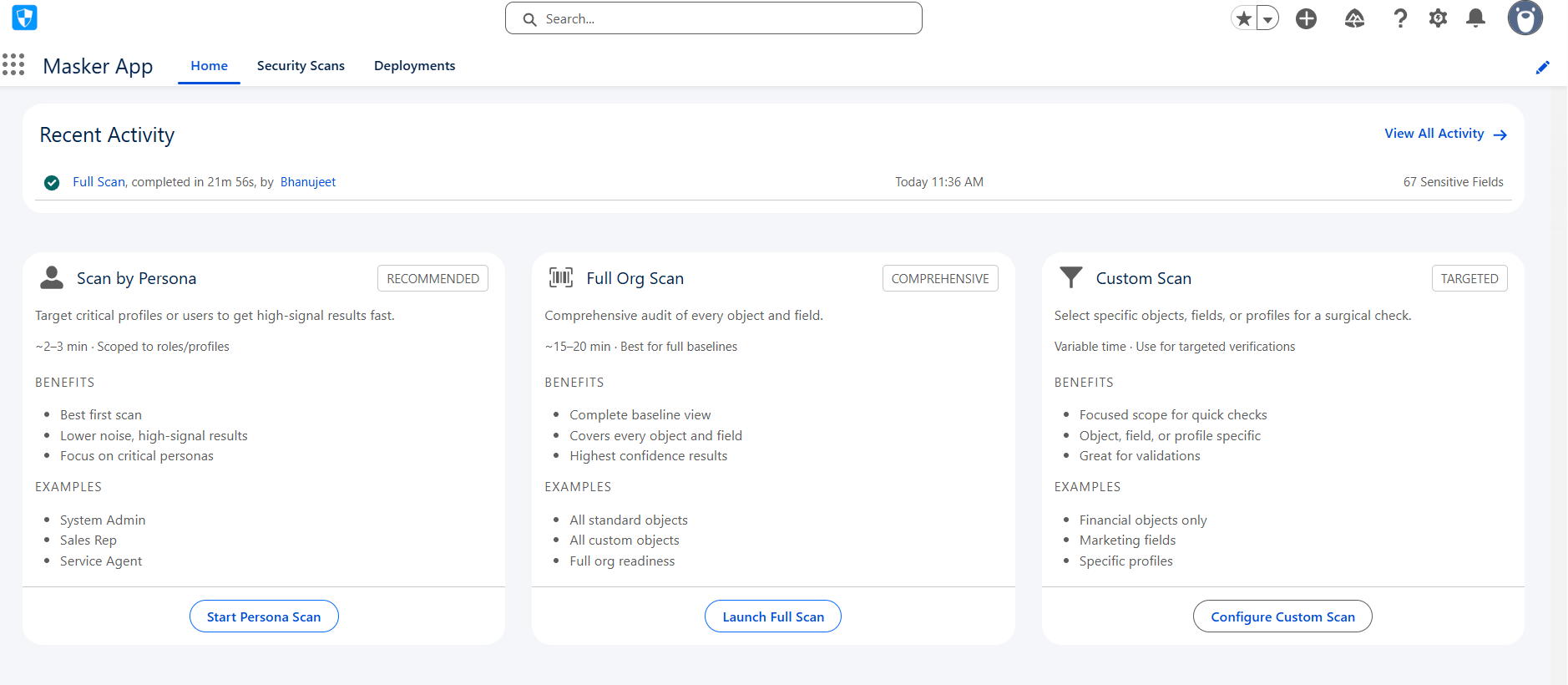
Full Org Scan
The Full Org Scan is the most comprehensive option. It goes across all supported objects in the org and automatically detects fields that contain sensitive data. This is ideal for organizations running their first masking exercise, or for periodic audits to catch newly created fields that may have been missed in previous scans. Rather than requiring admins to know which fields to look at upfront, the Full Org Scan does the heavy lifting automatically.
Custom Scan
For teams that already have a good sense of where their sensitive data lives, the Custom Scan offers a more targeted approach. Admins can select specific objects and fields to scan, keeping the process focused. This is particularly useful for ongoing maintenance. For example, when a new object is introduced or when a specific business unit needs a Salesforce security review.
Persona-Based Scan
The Persona-Based Scan is perhaps the most sophisticated of the three. Rather than scanning at the object or field level, it scans data based on user personas, profiles, or access patterns. This allows teams to identify exactly which sensitive fields are accessible to which types of users and then take targeted action. If a sales persona has access to fields they should not see, the persona-based scan allows you to know that immediately.
Once a scan is complete, Contour automatically identifies all sensitive fields within the scanned scope. It provides a consolidated history of every scan performed. Administrators have a complete audit trail from day one.
Step 2: Reviewing and Configuring Sensitive Fields
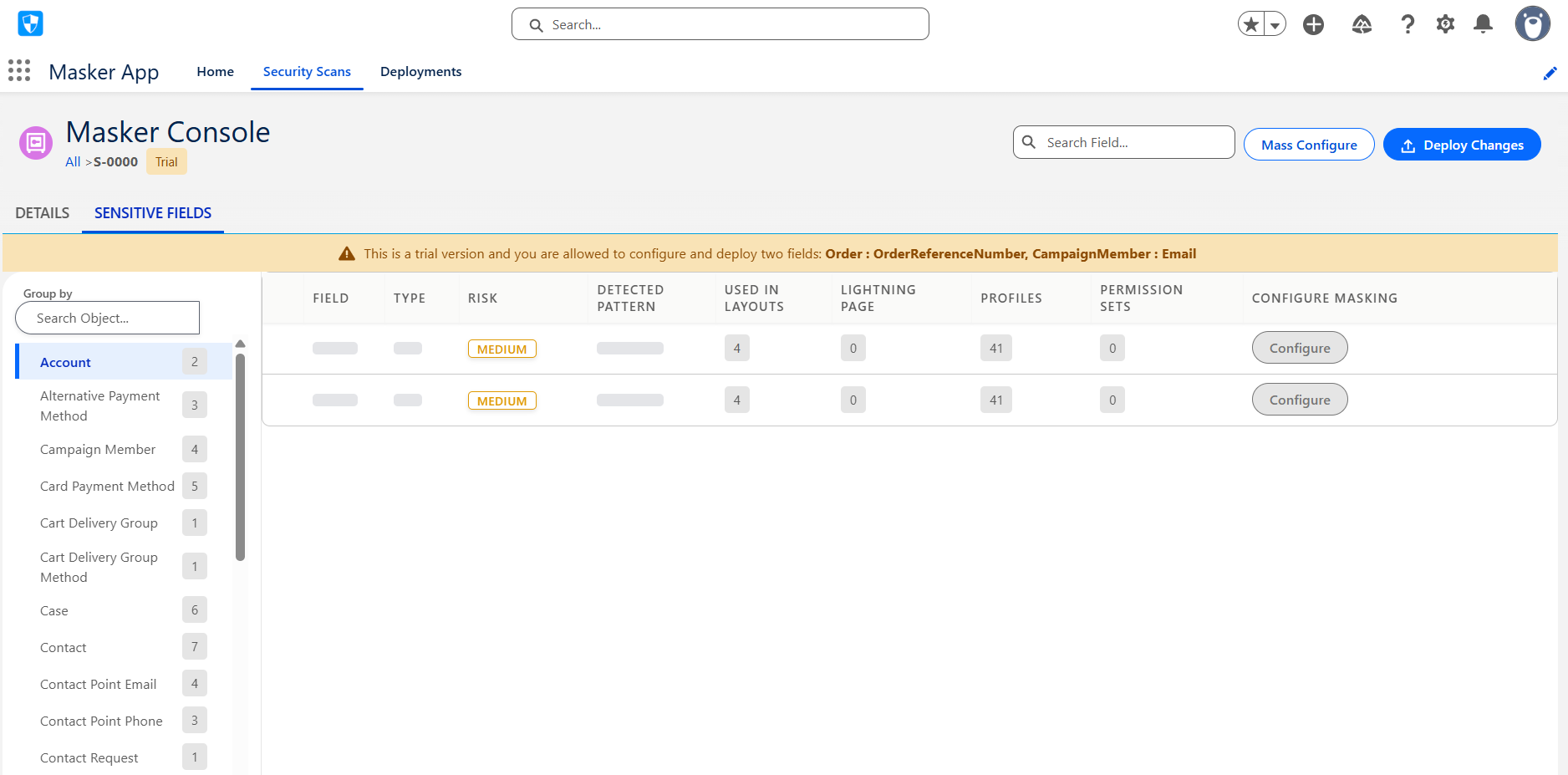
After a scan, all detected sensitive fields are surfaced in the Sensitive Fields tab. For each identified field, admins can define exactly how it should be masked and who should be able to see it.
Sensitive field configuration covers four key dimensions: Page layouts, Lightning pages, Profiles, and Permission Sets. This means that masking rules are not just applied at the field-definition level; they apply across the entire Salesforce UI layer, ensuring users see masked values wherever they encounter a field, not just in certain views.
Configuration can be done individually for granular control, or in bulk using the Mass Configuration feature.
Step 3: Deploying Masking Configurations
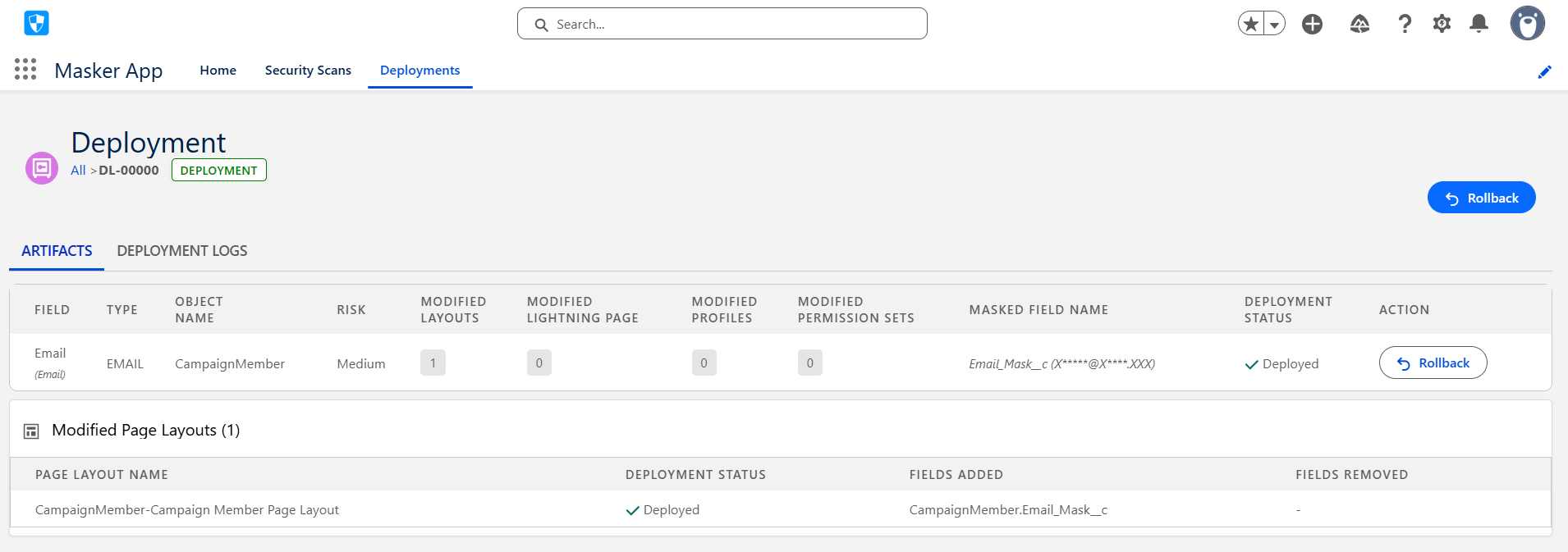
Once fields are configured, Contour (Masker app) handles the deployment. Deployment pushes all masking configurations to the live org.
Once deployment completes, a Deployment Record is automatically created, capturing everything that was changed. You get the complete visibility of the masked fields in the Deployments tab.
Step 4: Rolling Back When Needed
No deployment process is complete without a reliable rollback mechanism. Contour includes a full Rollback capability that allows admins to reverse any previously deployed data masking in Salesforce. Rollback reverts all changes applied and restores the field to its exact pre-deployment state.
Contour tracks the full lifecycle of each field through clear status transitions: Deployed fields show a Rollback button, while Rolled Back fields display a Deploy button, making it easy to re-deploy after adjustments. Every rollback generates its own rollback record, providing a complete and auditable history of all changes made to the org.
Visibility and Governance with the Dashboard and Activity Feed
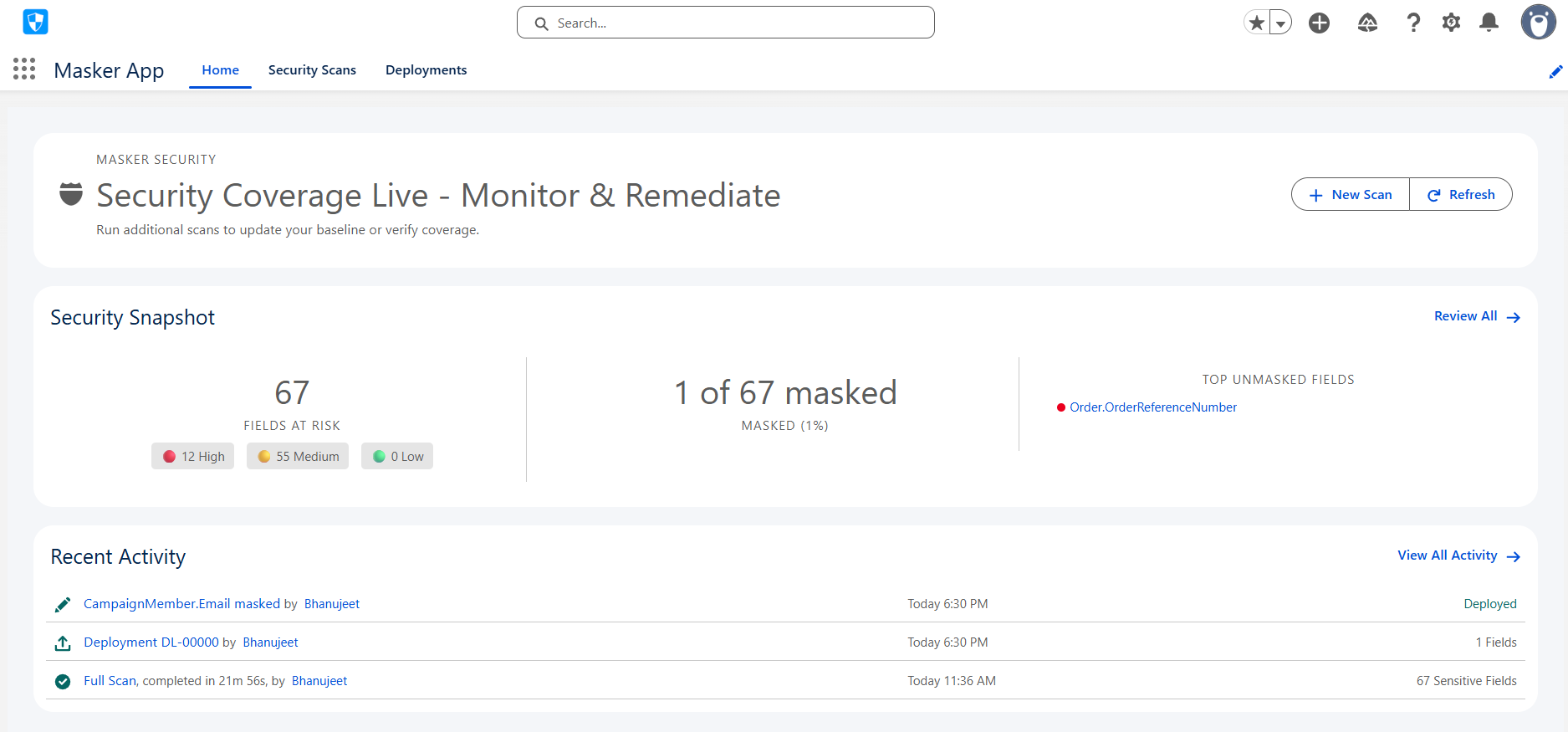
Automation is only valuable if it is visible. Contour addresses this with a centralized dashboard that gives Salesforce admins a complete view of their entire Salesforce data masking activity. The Recent Activity component surfaces a chronological log of all actions taken within the app: scans initiated, fields configured, deployments executed, and rollbacks performed.
This level of operational transparency is critical for governance. When a compliance audit asks "how is sensitive data protected in your Salesforce org?", Contour’s dashboard and activity history provide a clear answer. Teams can point to specific scan runs, show which fields were masked, and demonstrate which profiles were updated.
Why Data Masking Automation Matters in Salesforce Orgs
For small Salesforce organizations, manual data masking might be manageable. But for complex orgs, those with dozens of objects, multiple business units, and intricate permission hierarchies, manual processes simply cannot keep pace with the rate of change.
1. New fields get added regularly. New profiles are created for new teams. New personas emerge as the business evolves. Each change is a potential gap in data security.
2. Contour’s scanning engine can be run repeatedly, catching new sensitive fields as they are introduced.
3. Bulk configuration accelerates the process, and automated deployment ensures data masking in Salesforce is applied consistently.
4. Rollback ensures that mistakes can be corrected quickly without lasting impact.
The result is a data masking program that scales with the org. Not the one that requires an increase in manual effort every time the org grows.
In a Nutshell
Sensitive data protection in Salesforce is not a one-time task but an ongoing operational discipline. Contour by Concretio transforms this task from a manual, error-prone process into an automated, auditable, and scalable workflow.
Contour gives Salesforce-powered businesses the tools they need to stay ahead of data security risks, regardless of how complex their platform becomes.
If your team is managing sensitive data in Salesforce and relying on manual processes to keep it protected, Contour is built precisely for you. So, go ahead and speed up the data masking workflow with Contour today.
Further Reading
Salesforce - Security Best Practices
Migration - Migrating Einstein Bots to Agentforce
Multilingual Salesforce - Breaking Language Barriers in Salesforce
AI Compliance - Salesforce AI Governance: What Businesses Must Know
Related Reading



Let’s Talk

Drop us a note, we’re happy to take the conversation forward 👇🏻