Breaking Language Barriers in Salesforce Customer Support
As businesses expand globally, customers increasingly expect support in their native language regardless of where a company operates. Providing multilingual assistance helps organizations build trust, improve customer satisfaction, and deliver better customer experiences across regions.
However, managing conversations in multiple languages can create operational challenges for support teams, especially when companies rely on hiring language-specific agents. This approach can increase costs and complicate scaling customer support.
In this blog, we will explore the challenges of multilingual support and how businesses can deliver scalable customer service using modern solutions within Salesforce Service Cloud.
The Challenges of Native Hiring for Multilingual Customer Support
Many organizations believe the best way to support global customers is by hiring agents who speak different languages. While this approach may work initially, it becomes difficult to manage as businesses expand into multiple regions. Some of the major challenges include:
High Hiring Costs
Recruiting and training agents for every required language increases operational expenses and makes it difficult for organizations to scale efficiently.
Difficulty in Scaling Support
Expanding into new markets often requires hiring additional language-specific agents, which slows down the growth of support operations.
Uneven Workloads Across Teams
Language-specific teams often experience uneven workloads, where some agents remain idle while others handle high volumes of requests.
Operational Complexity
Managing multiple language queues and teams increases complexity within Salesforce support workflows.
Because of these challenges, many organizations are now exploring technology-driven approaches that simplify Salesforce multi-language support while improving efficiency. One such solution is ChatBridge, which we will explore in the next section.
ChatBridge: Language Translation Inside Salesforce
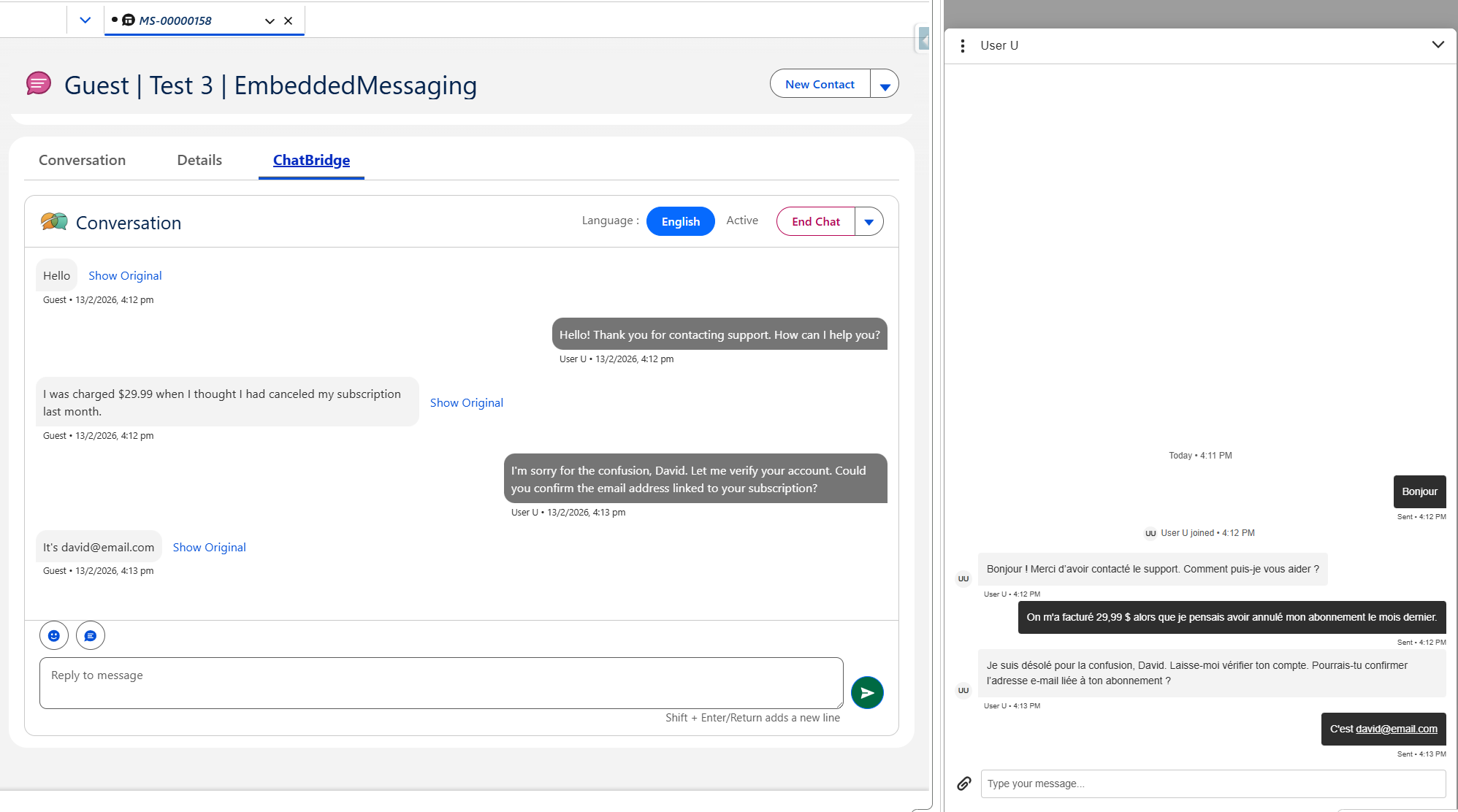
ChatBridge is a real-time multilingual chat translation solution designed to work within Salesforce Service Cloud. It allows customer support agents to communicate with customers in different languages directly inside the Salesforce interface.
When a customer starts a chat and sends a message in their own language, ChatBridge automatically translates the message into a language the agent can understand. The agent can then reply in their own language without needing to know the customer’s language. ChatBridge translates the agent’s response and delivers it back in the customer’s language, allowing the conversation to continue smoothly and naturally.
Because the translation happens within the Salesforce environment, agents do not need to switch between different tools or copy text into external translators. This enables support teams to handle multilingual conversations while continuing to follow their existing Salesforce support workflows.
Traditional Hiring vs Global Customer Support
Traditional hiring models require organizations to build separate language teams, which can increase hiring effort and operational complexity. Multilingual automation offers a more scalable approach by enabling support teams to manage global conversations within a single workflow. The table below compares traditional native hiring with multilingual automation to show how organizations can scale global customer support more efficiently.
| Factor | Traditional Native Hiring | ChatBridge |
|---|---|---|
| Team Structure | Separate language teams | One global support team |
| Hiring Effort | Language-specific recruitment | Minimal additional hiring |
| Agent Utilization | Often uneven | Balanced across regions |
| Workflow | Multiple language queues | Unified support workflow |
| Scalability | Slower expansion | Faster global coverage |
This approach allows organizations to save hiring costs while maintaining global support capabilities.
How ChatBridge Enhances Salesforce Service Cloud
With ChatBridge, businesses can transform their chat support into a smooth and efficient global communication channel. Instead of worrying about language barriers, support teams can focus on solving customer problems while ChatBridge handles the translation behind the scenes.
Single-Window Experience:
ChatBridge works directly inside the Salesforce chat interface. Agents don’t need to switch between different tools or tabs, which keeps conversations focused and workflows simple.
Faster Responses:
Messages are translated in seconds, allowing agents to reply quickly and keep conversations moving without delays.
Global Reach:
Support teams can interact with customers from different countries without needing separate language-specific agents. Whether a customer is from Germany, China, or another region, conversations can continue seamlessly.
Reduced Time and Operational Costs:
By eliminating manual translation and reducing the need for multilingual hiring, businesses can manage global chat support more efficiently while saving time and resources
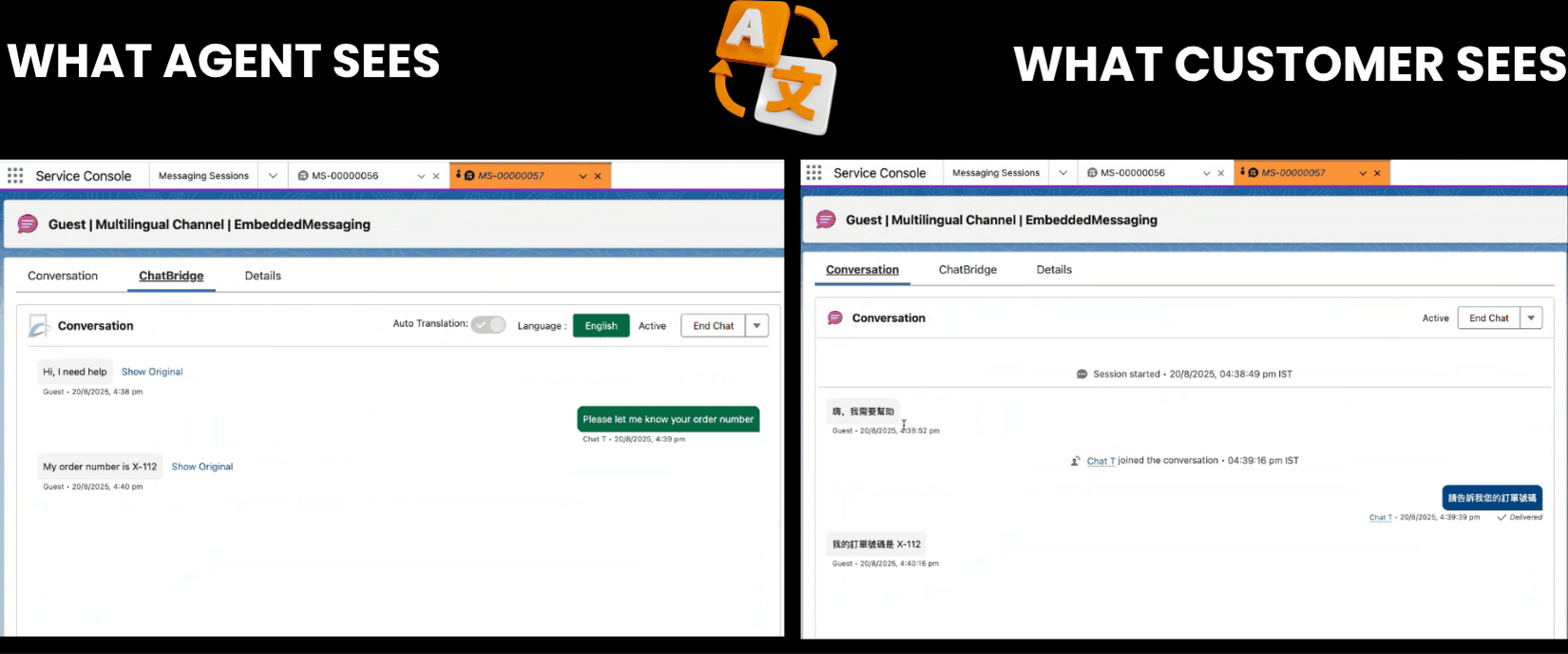
Example Scenario: Supporting Japanese Customers Without a Native Agent
Let’s look at a scenario that shows how organizations can manage interactions with Japanese customers without hiring separate language teams.
Problem:
Communication with Japanese customers can be challenging because the language can be complex to understand, especially for support teams that are not familiar with it. Differences in sentence structure and phrasing can make messages difficult to interpret. Even small translation or wording errors can sometimes lead to misunderstandings or unclear responses in customer interactions.
Solution:
To address these challenges, organizations can use translation tools such as ChatBridge to help agents communicate with customers across different languages. By enabling real-time translation within Salesforce, agents can respond in their own language while customers receive messages in their preferred language.
Conclusion
As businesses expand globally, delivering multilingual customer support becomes essential for maintaining strong customer relationships. While traditional hiring models increase complexity and cost, solutions like ChatBridge allow organizations to provide seamless multilingual communication directly within Salesforce Service Cloud.
By combining automation with existing Salesforce support workflows, businesses can scale customer service globally while improving efficiency and reducing hiring costs.
As global businesses continue to expand, multilingual automation will play a critical role in delivering scalable and efficient Salesforce customer support.
Transform Global Customer Support with ChatBridge
Transform the way your team delivers global customer support. With ChatBridge by Concret.io, enable multilingual communication in Salesforce without building language-specific teams.
Explore ChatBridge →Frequently Asked Questions
-
Automation helps support teams manage repetitive tasks, streamline communication, and handle customer interactions more efficiently, allowing agents to focus on solving complex customer issues.
-
Multilingual customer support helps businesses build stronger relationships with international customers, improve customer satisfaction, and provide more personalized service experiences.
-
Organizations should evaluate language coverage, integration with existing Salesforce features, ease of use for support agents, and the ability to scale support operations globally.
-
No. With multilingual translation tools integrated into Salesforce, agents can communicate with customers in different languages without being fluent in those languages.

Let’s Talk

Drop us a note, we’re happy to take the conversation forward 👇🏻