

Key Summary:
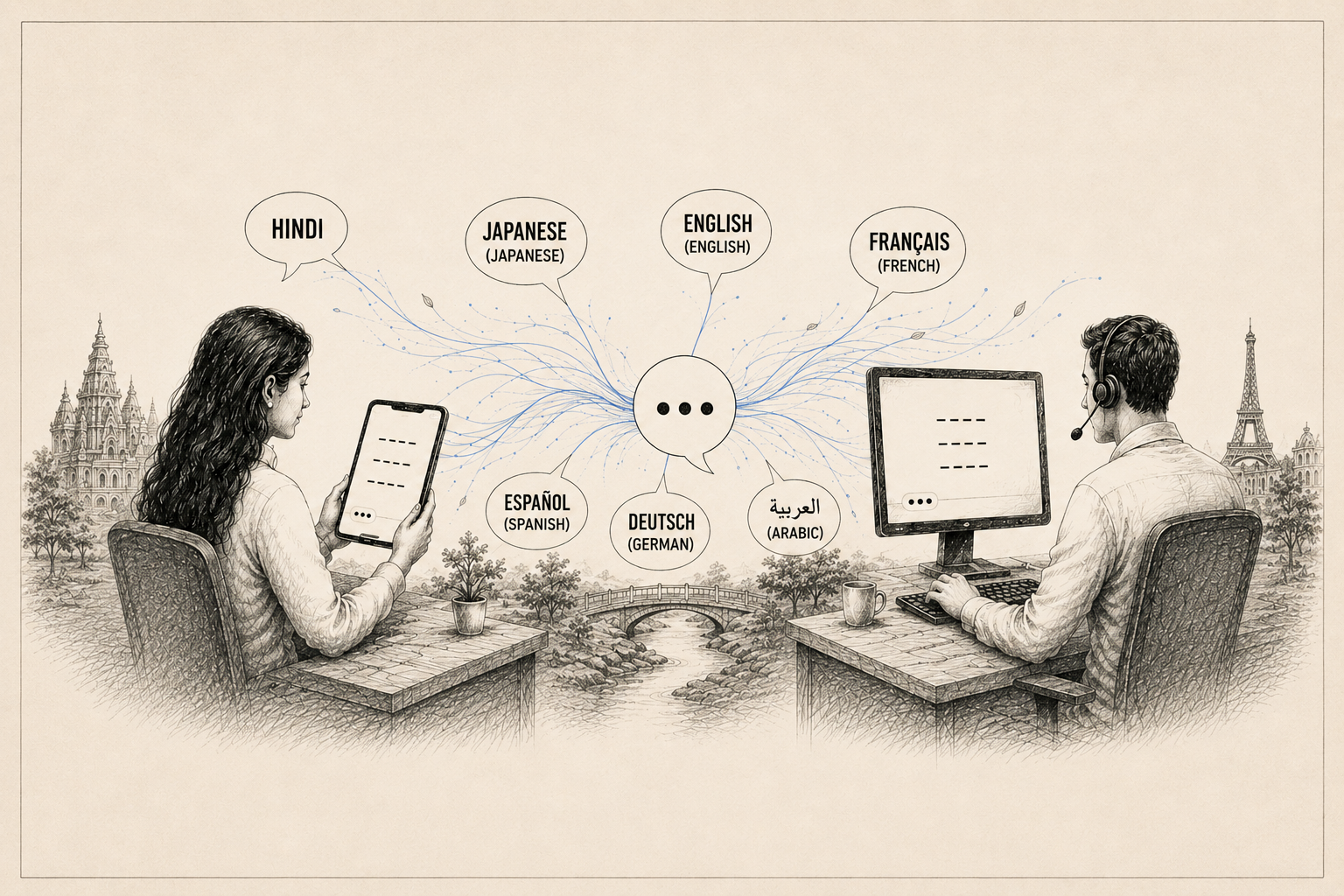
Language barriers hurt customer loyalty, and manual translation is slow and inefficient.
ChatBridge delivers real-time translation directly within Salesforce Service Console.
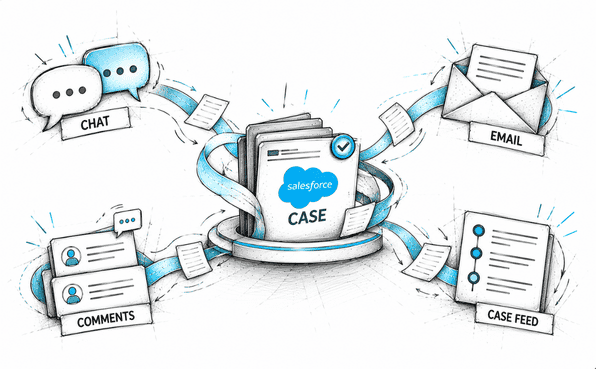
ChatBridge automates translation across chats, emails, and Chatter to boost agent efficiency.
Your customer writes in French. Your agent speaks English. The chat is already open. What do you do? This is a real scenario for thousands of support teams using Salesforce Service Cloud every day.
With customers across different countries and speaking different languages, the pressure on support agents is real. They are expected to deliver fast, accurate, and timely support in a language they may not even speak.
That’s exactly where Salesforce chat translation becomes a game-changer. In this article, I’ll walk you through how to enable multilingual chat support in Salesforce and how to actually chat with customers in their own language.
Why Multilingual Support Matters More Than Ever
Language barriers in customer support aren’t just an inconvenience but could also cost you customers. When a customer can’t get help in their preferred language, they feel ignored. They lose trust in your brand. And in most cases, they simply leave. Studies consistently show that customers are far more likely to buy and stay loyal when they receive support in their native language.
For businesses using Salesforce Service Cloud, the challenge is clear: how do you deliver multilingual customer support on Salesforce without hiring a team of translators or slowing down your response time?
The answer is Salesforce Service Cloud real-time translation, and the right app can help make it happen.
How Traditional Approach To Multi-Language Chat Support Fails
Many teams try to cover the language gap using copy-paste translation tools. An agent gets a message in Spanish, pastes it into Google Translate in a separate tab, reads the translation, types a reply in English, translates that too, and pastes it back into the chat. This process is slow, error-prone, and completely unsustainable at scale.
Others try to route chats by language, which means hiring multilingual agents or setting up complex routing rules. That works up to a point, but it’s expensive and hard to maintain as your customer base grows.
What you actually need is a Salesforce chat translation app that works natively inside the platform. Especially the one that translates in real time without interrupting the flow of the conversation.
Introducing ChatBridge: Real-Time Chat Translation for Salesforce
ChatBridge is a Salesforce-native app built specifically to solve the multilingual support problem. It brings real-time chat translation directly into Salesforce Service Cloud, so your agents never have to leave the console to communicate with customers in different languages.
Here is what makes ChatBridge stand out as a Salesforce chat translation app:
It works entirely within Salesforce. No separate windows, no copy-pasting.
It supports real-time translation in the live chat window.
It integrates with leading translation engines like Google Translate and Microsoft Translator.
It automatically detects the customer’s language so agents don’t have to guess.
It translates not just chats, but also emails, posts, comments, and the entire Chatter feed.
In short, ChatBridge makes it possible to chat in Salesforce in multiple languages as naturally as if you were both speaking the same tongue.
How To Chat in Customer’s Preferred Language on Salesforce
So what does this actually look like? How does real-time chat translation work in Salesforce? Here’s how ChatBridge makes it possible for your agents to hold a natural conversation in any customer’s preferred language directly inside Salesforce Service Cloud.
1. Install Chatbridge In Your Salesforce
The first thing you need to do is get the Chatbridge installation package installed in your Salesforce org. If you’ve installed apps from AppExchange before, it is completely familiar to get Chatbridge from AppExchange also. It uses the same managed package install flow you already know. Start with your sandbox environment so you can test it before going to production. The whole process takes just a few minutes.
2. Bring It Into Your Agent’s Workspace
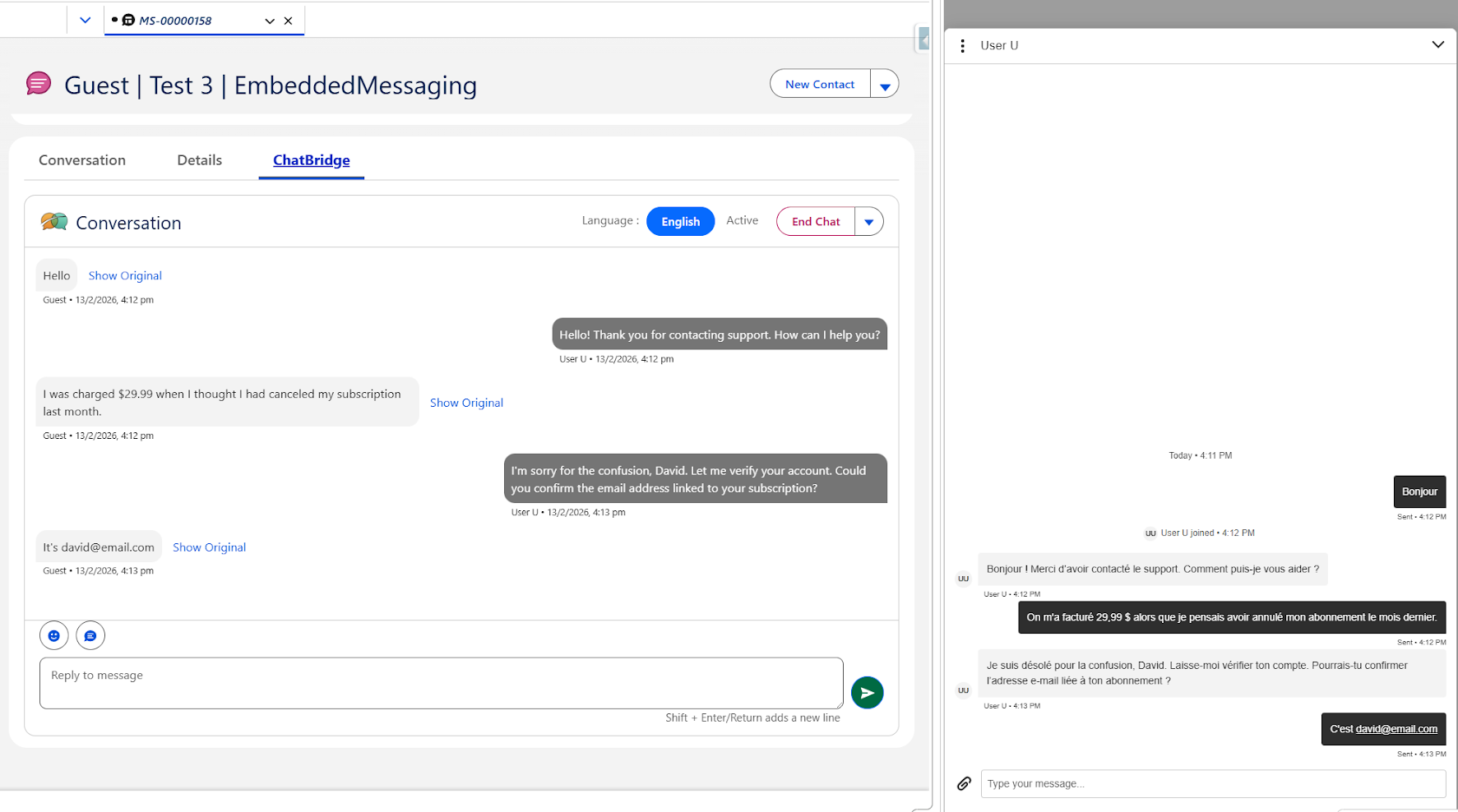
Once ChatBridge is installed, the next step is putting it where your agents actually work. You can add the ChatBridge Lightning components directly onto the record page of your Service Console.
From that point on, the translation capability is right there on the screen. The part of the chat workflow, not separate from it.
You can also add ChatBridge as a Chatter component inside Service Cloud. This takes things even further. Beyond translating live chats, the Chatter component lets agents translate posts, comments, and the full Chatter feed in real time - all in the language of their choice. If you want comprehensive multilingual Salesforce support across every channel, this is the setup to go with.
3. Pick the Translation Engine That Works for You
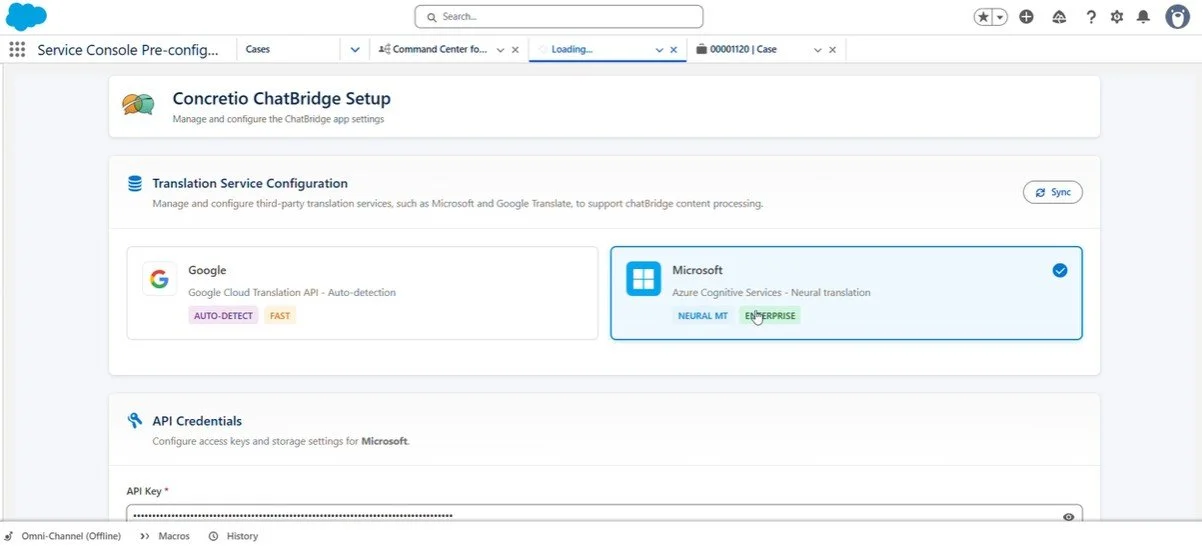
ChatBridge doesn’t lock you into a single translation provider. You can connect it to Google Translate, Microsoft Translator, or whichever translation API your team prefers. Not sure how to connect one? Your Salesforce admin or Salesforce service partner can take care of it. ChatBridge is built to make that process quick and straightforward.
4. Let Auto-Translation Handle the Language Gap Automatically
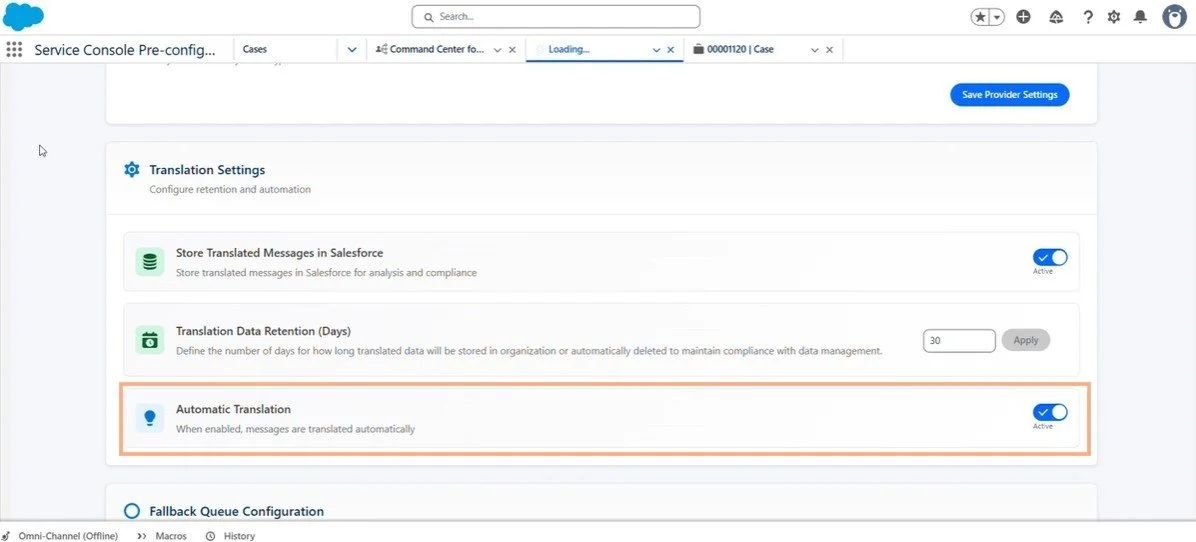
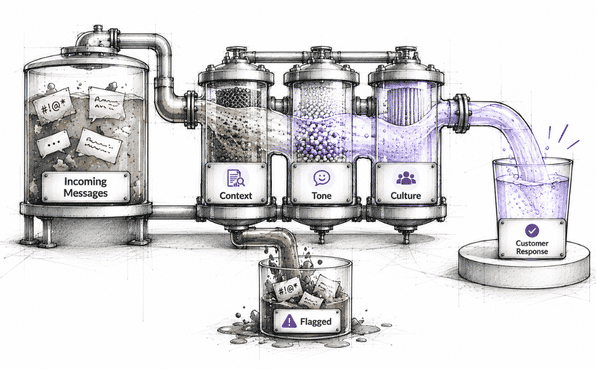
Here’s where your agents stop thinking about language altogether. ChatBridge includes an auto-translation feature that works in real time. When auto-translation is activated, every incoming message from the customer is automatically translated into the agent’s language and every reply goes back in the customer’s language. No delays. No manual steps.
ChatBridge also handles language detection on its own. The moment a customer sends a message, ChatBridge figures out what language they’re writing in. The conversation just flows as if both sides are speaking the same language. That’s an experience it creates.
Why Real-Time Translation Matters for Salesforce Service Cloud Teams
Here is the key thing to understand about Salesforce Service Cloud real-time translation. For global support teams, it’s a necessity for companies to stay competitive.
When you use an app like ChatBridge, you’re not just solving a translation problem. You’re making your agents more efficient. You’re reducing average handle time. You’re removing the bottleneck of language routing. And most importantly, you’re giving customers an experience that makes them feel valued, no matter where in the world they’re writing from.
This is what true multilingual customer support on Salesforce looks like. Not a workaround, not a patchwork of tabs and tools, but a clean, real-time solution built directly into the platform your team already uses.
Who Should Use ChatBridge?
ChatBridge is a great fit for any Salesforce Service Cloud team that:
Supports customers in more than one language or country.
Wants to reduce handle time without sacrificing quality.
Needs a scalable approach to multilingual support without expanding headcount.
Wants a Salesforce chat translation app that provides real-time support and is easy to manage.
Wants agents to stay focused in one place inside Salesforce, instead of jumping between tools.
Whether you’re a mid-sized SaaS company with customers in Europe and Asia, or a large enterprise running a global contact center, ChatBridge scales to fit your needs.
Final Thoughts
Language should never be a wall between your team and your customers. With the right setup, Salesforce chat in multiple languages is not only possible, it’s simple.
ChatBridge makes it easy to answer the question of how to translate Salesforce Chat by bringing real-time translation directly into the Service Console. From auto-detection to one-click translation of chats, emails, and Chatter posts, it covers different areas where your agents and customers connect.
If your support team is still copy-pasting between tabs or routing chats by language, it’s time to try a better way. Use ChatBridge and start delivering the kind of multilingual customer support Salesforce was always capable of.
Further Reading
ChatLingual vs ChatBridge: Salesforce Chat Translation Comparison
Salesforce Service Cloud - Know how Service Cloud works in Salesforce
Slack CRM - Know how it is a Game Changer for Sales Teams
Frequently Asked Questions
-
Yes. ChatBridge lets you connect your preferred translation API, including Google Translate and Microsoft Translator. You can set it up quickly, with no complex configuration required.
-
Absolutely. Beyond live chat, ChatBridge also translates Chatter posts, comments, and your entire feed in real time, making it a complete multilingual support solution across every Salesforce Service Cloud channel.
-
No. ChatBridge includes automatic language translation. The moment a customer sends a message, ChatBridge identifies the language on its own and translates it. Agents simply keep the auto-translation toggle on and focus on the conversation.
Related Reading

Let’s Talk

Drop us a note, we’re happy to take the conversation forward 👇🏻
