Key takeaways:
Marketing Cloud APIs can hit rate limits when request volume grows, which can slow down or break your integrations.
Middleware helps solve this by controlling how requests are sent, instead of hitting Marketing Cloud directly.
Following the right best practices and optimizing your API usage keeps things running smoothly even during traffic spikes.
Salesforce Marketing Cloud helps businesses run large-scale marketing campaigns. But when you connect other systems to it through APIs, you often run into a common problem: rate limits.
These limits control how many requests you can send in a given time frame. If you cross them, your integration slows down or fails. This becomes a bigger issue when the system experiences high traffic or deals with large amounts of data, and you need things to happen in real time.
The good news is, this problem can be managed. By using smart middleware and the right throttling strategies, you can control how requests are sent, avoid failures, and even reduce Marketing Cloud API usage rates.
In this post, we'll look at simple yet practical ways to handle Marketing Cloud API rate limits, so your integrations can work reliably in every situation.
Understand API Rate Limits in Salesforce Marketing Cloud
Salesforce actually enforces two different types of limits, and it helps to know the difference.
A hard limit is one you simply can't exceed; the API rejects the request outright and returns an error.
A soft limit is more forgiving; going over it can degrade performance rather than fail immediately, and in some cases you can purchase additional allocation if your usage grows past it.
Rate limiting in Salesforce Marketing Cloud usually happens at two different layers.
The authentication layer: This is where you request access tokens using OAuth 2.0. If an app requests too many tokens in a short time, then Marketing Cloud can start limiting how many token requests it accepts. Salesforce caps this at one token request every 20 minutes per client machine
The service layer: Even after you have a token, there might be chances where individual services can enforce their own limits on how many calls you can make. This is separate from token limits, and it's the one most developers think about first. For most synchronous API requests, that limit sits at 2,500 requests per minute, with a cap of 100 concurrent connections.
Knowing which type and layer is causing the problem is the first step to fixing it. A token-related issue needs a different fix than a service-level throttling issue.
Why API Rate Limits Become a Problem at Scale
An integration that makes a few API calls every hour may never encounter rate limiting. However, the situation changes when request volume increases.
For example, a customer visits a website, submits a form, places an order, and triggers several marketing events. If thousands of customers perform similar actions at the same time, the integration can suddenly see a large spike in API traffic.
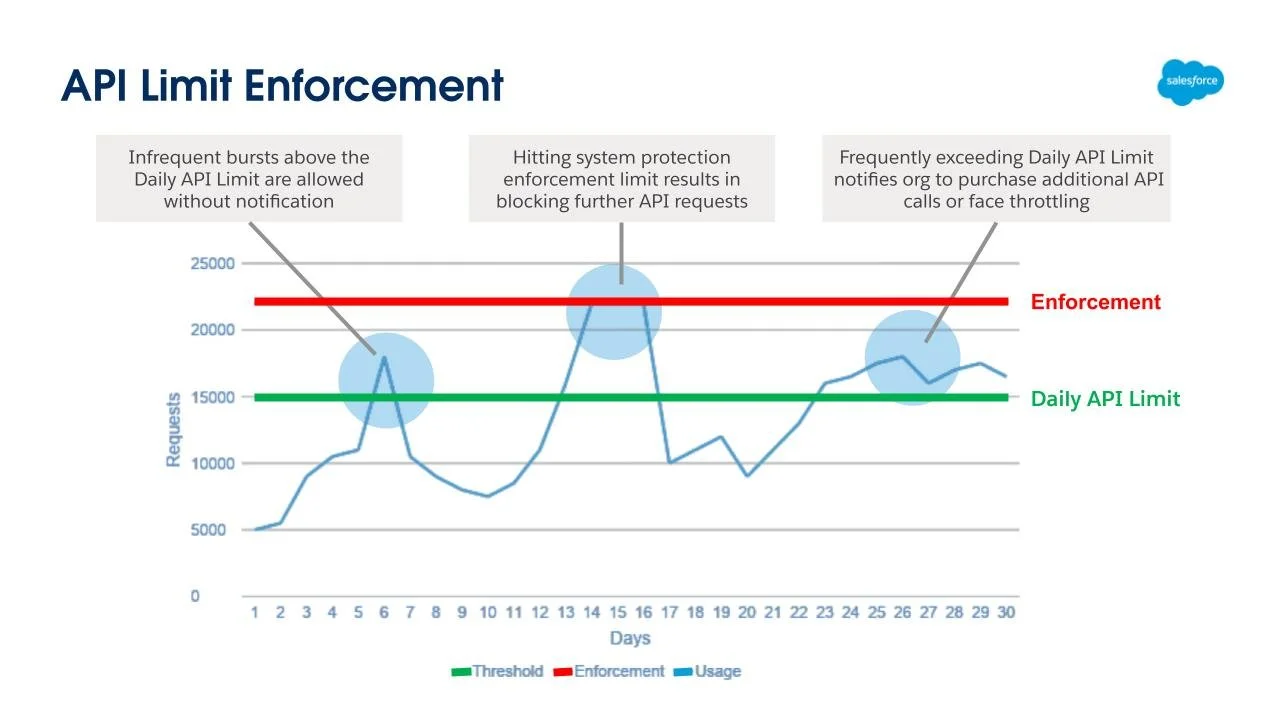
API-Limit-Enforcement | Source: Salesforce developer blogs
Without proper traffic management, that spike can cause:
HTTP 429 responses
Failed synchronization jobs
Delayed customer events
Increased processing time
Marketing Cloud can also temporarily throttle API traffic when API traffic starts to affect system performance negatively. Here’s how it does that
For REST APIs, Salesforce documents HTTP 429 responses for rate-limiting conditions.
SOAP API throttling can behave differently and may result in HTTP 500 responses.
How Middleware Helps Manage API Traffic
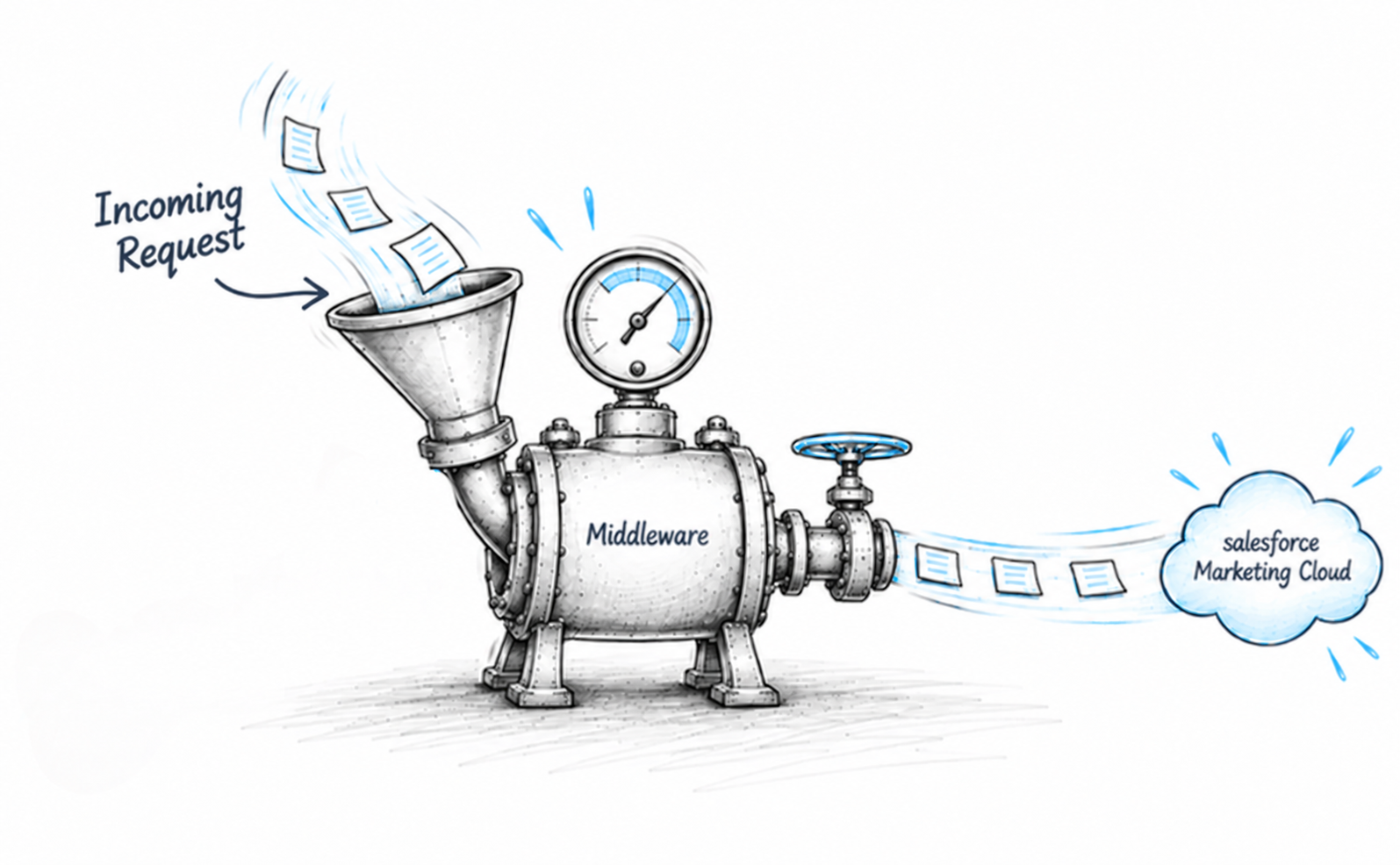
One way to manage API traffic is to place a middleware layer between your applications and Marketing Cloud.
Middleware sits between your applications and SFMC's APIs. Every request passes through it first. This gives you a single place to control traffic. Instead of allowing every application to communicate directly with SFMC, you can introduce a controlled integration layer:
Application → Marketing Cloud
Application → Middleware → Marketing Cloud
And that middleware becomes the traffic-management point for your integration.
Applications can submit requests to the middleware without needing to know exactly how quickly Marketing Cloud should receive those requests. The middleware can then decide when and how each request should be sent.
For example:
100 requests arrive → Middleware queue → Controlled processing → Marketing Cloud
Rather than sending all 100 requests immediately, the middleware can process them according to the configuration and Marketing Cloud API throttling rules.
This creates a separation between request generation and request processing. That separation is useful when traffic is unpredictable.
Key Middleware Patterns to Reduce API Load
Several middleware patterns can help reduce unnecessary API traffic and make a Salesforce Marketing Cloud integration more resilient.
1. Request Queuing
A queue allows incoming requests to wait until the system is ready to process them. Instead of immediately forwarding every request to Marketing Cloud, the middleware places requests into a queue and consumes them at a controlled rate.
2. Request Batching
Many Marketing Cloud operations support batch routes that let you send multiple records in a single call.
If your Marketing Cloud API operation supports batching, combine multiple records into a single request instead of making separate calls for every record.
Salesforce specifically recommends using batch routes where available to reduce API request volume. Synchronous batch requests are capped at 50 objects, while asynchronous batch requests can go up to 32,000 objects, which is a meaningful gap and worth designing around if you're processing large volumes.
3. Access Token Caching
Authentication requests are also considered as API traffic, so repeatedly requesting tokens can create unnecessary load.
If your system asks for the same data repeatedly, cache it instead of calling the API every time. This is especially useful for access tokens, which don't need to be requested more than once every 20 minutes per client machine. Marketing Cloud's OAuth response provides expires_in, which allows the integration to determine when the token should be refreshed.
4. Circuit Breaker
A circuit breaker prevents an integration from continuously calling an API that is already failing or being throttled.
When the middleware detects repeated failures or rate-limit responses, it temporarily stops sending requests to the affected service. After a defined period, it can allow a small number of requests through to determine whether the service has recovered.
This is preferable to continuously sending requests, receiving failures, and immediately retrying them.
Marketing Cloud API Throttling Strategies
Middleware patterns give you the structure. These strategies decide how requests actually flow through it, split into two goals: staying under the limit and recovering cleanly when you don't.
Controlling Your Request Rate
Fixed-Rate Throttling: Fixed-rate throttling processes requests at a predictable frequency. For example, the middleware could be configured to send requests at a predefined rate rather than sending the entire queue at once in bulk. This works better when traffic is constant and predictable, but doesn't works at times when the API is already under load.
Adaptive Throttling: Adjusts your outgoing request rate based on what the API is telling you; response codes, failures, latency. Instead of one fixed rate, the middleware slows down when the API signals it's under strain, and speeds back up when things are clear.
Recovering When You Get Rate-Limited
Even with good throttling, you'll occasionally hit a limit: a traffic spike, another integration sharing your Marketing Cloud API quota, or a temporary service slowdown. These two practices decide how well your integration recovers when that happens.
Exponential Backoff: When a request fails, retrying immediately usually makes things worse, five failed requests retried instantly become five more requests hitting an already-struggling API. Exponential backoff increases the wait between each retry: 2 seconds, then 4, then 8, then 16, up to a defined maximum.
Respect Retry-After: When Marketing Cloud returns an HTTP 429, it often includes a Retry-After header telling you exactly how long to wait. The correct move is to wait that long, then retry per your backoff policy.
Best Practices for Reducing API Rate Limits
Follow these best practices to reduce unnecessary API calls and minimize Marketing Cloud API quota usage.
Reuse access tokens
Don't request a new access token for every API call. Cache the token and use the expires_in value to determine when it needs to be refreshed.
Optimize API Requests
Don't make an API call when you don't need to. Cache data that doesn't change frequently, reuse previously retrieved information, and avoid repeatedly requesting the same resources. This reduces the number of requests your integration sends to Marketing Cloud.
Prefer bulk and asynchronous operations for large workloads
If you're processing large volumes of data, don't automatically use one synchronous API request per record. Check whether the relevant Marketing Cloud service provides a batch or asynchronous option. asynchronous batches support far more objects per request than synchronous ones (32,000 vs. 50), so the difference adds up fast at scale.
Use queues for bursty workloads
If traffic arrives in unpredictable bursts, queues can absorb those bursts and allow the middleware to process requests at a sustainable pace.
Deduplicate before you batch
Don't submit asynchronous batch requests full of duplicate entries. Salesforce warns this can degrade performance across your account, not just for that one request, so it's worth cleaning data at the source rather than relying on the API to sort it out.
Control concurrency
Limit how many requests your middleware sends simultaneously. Marketing Cloud caps concurrent connections at 100, so more parallel requests don't always mean better performance; past that point, you're just inviting throttling.
Monitor before problems become incidents
Always monitor and track API volume, error rates, queue depth, retries, and response times. Use available Marketing Cloud API usage information to identify high-volume services and optimization opportunities.
Test under realistic traffic
Test the integration with realistic data volumes and traffic spikes before production. The goal isn't simply to see whether the API works; it's to understand how the entire integration behaves when request volume increases.
For a deeper look at these practices, see our detailed guide on practices for stable API integrations in marketing platforms.
Conclusion
SFMC API limits are an important consideration when building integrations with Salesforce Marketing Cloud. Even an integration that works perfectly under normal traffic can behave very differently during a sudden spike.
A reliable approach to mitigate this issue is to build traffic management into the architecture itself. Therefore, middleware can provide the control layer needed to queue requests, batch operations, manage concurrency, cache access tokens, throttle traffic, and handle retries.
If you are also facing the same issue with your Marketing Cloud setup or integration, then it's time to optimize your architecture with the right middleware and throttling strategy. Our Salesforce API and integration experts can help you identify the gaps, optimize API usage, and build reliable integrations that can scale with your business.
Sources
Optimize API Calls and Data Structures
Best Practices to Prevent Rate-Limiting
API Limits and Monitoring Your API Usage
Reddit discussion on Salesforce API limits
API Request Limits and Allocations
Marketing Cloud Engagement API Guidelines and Limits
Frequently Asked Questions
-
A rate limit restricts how many API requests you can make within a specific period. Once you exceed it, requests may be rejected or throttled. A performance limit occurs when the system becomes slower or less responsive as workload increases, even without exceeding a defined request limit. Both can affect integration reliability.
-
If your integration hits a 429 error, don't retry immediately. Check for the Retry-After header in the response, it tells you exactly how many seconds to wait, then retry using exponential backoff (2s, 4s, 8s, 16s, and so on) rather than retrying at a fixed interval.
-
Description text goes here
-
No more than once every 20 minutes. Requesting a token for every API call doesn't improve performance and is a common cause of unnecessary rate-limiting. Cache the token and use the expires_in value to know when to refresh it.
-
Yes. Combining multiple records into a single batch call reduces total request volume significantly compared to one call per record, and Salesforce specifically recommends this wherever a batch route is available.
-
No, not every API behaves the same way. Different APIs and endpoints can enforce different limits, and how they respond when you hit one varies too, so what works for one type of request may not carry over cleanly to another.
Related Readings

Let’s Talk

Drop us a note, we’re happy to take the conversation forward 👇🏻