Salesforce Marketing Cloud Integration: The Architecture You Can't Undo
The Warning No One Gives You
Before you connect Marketing Cloud to your CRM, understand this: some decisions can't be reversed. Not "difficult to reverse." Not "expensive to undo." Genuinely permanent.
This isn't another setup tutorial. The internet has plenty of those. What's missing is a decision framework for the architectural choices that will shape your Salesforce investment for years. Enterprises have committed to integration patterns they can't escape, and most didn't realize the stakes until it was too late.
Of the five primary Salesforce Marketing Cloud Integration patterns, three are reversible. Two are not. Once those two are enabled, you're locked in. The only exit is a completely new Marketing Cloud account.
By the end of this guide, you'll have the framework to choose correctly the first time. Because in enterprise architecture, "we'll fix it later" is often a fantasy
The Five Integration Patterns (Quick Reference)
| Pattern | Reversibility | Best For | Cost | Complexity |
|---|---|---|---|---|
| 1. Single-Org MCC | ✅ Full | Single business unit | $ | Low |
| 2. Multi-Org Connector | ❌ Permanent | Stable enterprises only | $$$ | High |
| 3. Enterprise Org | ⚠️ Partial | Holding companies, franchises | $$ | Medium-High |
| 4. Multiple Instances | ✅ Full | M&A scenarios, compliance | $$$$ | Medium |
| 5. ETL/MDM | ✅ Full | Complex integration needs | $$+Dev | Variable |
What Is Single-Org Salesforce Marketing Cloud Integration?
Single-Org integration represents the standard Marketing Cloud Connect implementation. One Salesforce CRM org connects to one Marketing Cloud business unit. Simple, straightforward, and fully reversible.
How It Works
Marketing Cloud Connect creates synchronized data sources between your CRM and Marketing Cloud. Data flows from standard and custom objects into synchronized data extensions (identified by the _Salesforce_n suffix). Sync frequency runs as often as every 15 minutes for most objects.
The connection requires an API user in your Salesforce org. Whatever objects and fields that user can access become available in Marketing Cloud.
When Single-Org Makes Sense
Single business unit operations
One primary marketing team
No plans for significant M&A activity
Uncomplicated data segmentation needs
Budget-sensitive (native connector included in license)
Where Single-Org Falls Short
The limitation is in the name. One CRM org per Marketing Cloud instance. For enterprises with multiple divisions, acquired companies, or regional Salesforce orgs, this constraint becomes a strategic bottleneck.
One important constraint: you cannot delete individual object syncs. You can only pause them. The data extension remains permanently unless you disconnect the entire integration.
What Is a Multi-Org Connector?
Here's the thing: Multi-Org Connector solves a real problem. It connects multiple Salesforce orgs to a shared Marketing Cloud instance. But it comes with a permanent architectural commitment that most vendors downplay.
How It Works
Multi-Org enables business units within Marketing Cloud to each connect to separate Salesforce orgs. Data can be shared across organizational boundaries. Marketing operations unify across divisions.
The catch? It requires Marketing Cloud Enterprise 2.0, and you'll need to contact Salesforce Support to have it enabled. The configuration can't be self-provisioned. That friction is intentional.
What "Irreversible" Actually Means
Once Multi-Org is enabled, it cannot be undone. You're not just connecting systems. You're fusing them.
The only way to return to Single-Org is to provision a completely new Marketing Cloud account. Your data, automations, and configurations don't transfer cleanly. The architecture you choose today becomes permanent.
This isn't a technical limitation Salesforce plans to fix. It's an architectural reality of how Multi-Org Connector structures data relationships.
When to Accept Permanence
Multi-Org makes sense when organizational structure is genuinely stable:
Permanent divisional structure confirmed
M&A activity unlikely for 10+ years
Unified marketing operations required across orgs
Leadership has explicitly accepted the permanence in writing
When Multi-Org Is the Wrong Choice
Avoid Multi-Org if:
Potential divestitures are on the strategic horizon
Organizational restructuring is possible in your 5-year planning cycle
Flexibility ranks as a strategic priority
You can't get explicit stakeholder buy-in on permanence
Your company is in a growth or acquisition phase
What Is the Enterprise Org Pattern?
Enterprise Org represents a middle path: architectural complexity in exchange for operational flexibility. A parent Salesforce org acts as a data hub, with child orgs feeding into it.
How It Works
Multiple source orgs replicate records to a central enterprise org. That enterprise org connects to Marketing Cloud via standard MCC. Marketing Cloud sees unified data without requiring a Multi-Org Connector.
The enterprise org doesn't run business operations directly. It's a passthrough. Data normalizes there before reaching the Marketing Cloud.
When Enterprise Org Fits
Holding company structures with distinct subsidiaries
Franchise operations requiring central marketing visibility
Regulatory requirements mandating data visibility separation
Organizations wanting multi-org data access without permanence
What "Partial Reversibility" Means
Child orgs can be disconnected with effort. The enterprise org itself can be repurposed. Migration paths exist, but they're complex. The trade-off is latency: data hops twice (Child → Master → MC), making real-time triggers become "near real-time."
Should You Use Multiple Marketing Cloud Instances?
Sometimes the cleanest architecture is the most expensive one: separate Marketing Cloud instances for each Salesforce org. No data sharing infrastructure. Full independence.
How It Works
Each CRM org gets its own Marketing Cloud business unit (or account). They operate independently: separate branding, separate data, separate automations. Integration between them happens at the data layer if needed, not at the platform level.
When Multiple Instances Make Sense
Post-M&A: Acquired company keeps independence initially
Brand requirements demanding complete separation
Regulatory data separation (GDPR, healthcare, banking requiring hard data walls)
Organizations expecting significant structural change
M&A probability is high (this is your insurance policy)
Why This Pattern Offers Full Flexibility
Each instance remains fully independent. You can consolidate later if desired. You can divest without platform entanglement. Hard walls (not soft Business Unit filters) guarantee true data segregation. Determined admins cannot bypass via SQL, AMPScript, or SSJS.
The trade-off is higher licensing cost and potentially duplicated effort across instances. For organizations expecting organizational change, this pattern provides the insurance policy that Multi-Org can't.
When Does ETL/MDM Make Sense?
The fifth pattern steps outside native Salesforce connectors entirely. External ETL tools or MDM platforms handle data flow and normalization.
How It Works
Middleware (MuleSoft, Informatica, or custom ETL) sits between your source systems and Marketing Cloud. Data transformations happen in the integration layer. Custom logic governs what flows where and when.
2025 Update: The Informatica Acquisition
With Salesforce's $8 billion acquisition of Informatica in May 2025, ETL/MDM shifted from "third-party workaround" to first-class integration strategy. Native Informatica options are now available within the Salesforce ecosystem.
When ETL/MDM Fits
Complex data transformation requirements
Data sources outside Salesforce (ERP, Snowflake, data warehouse)
Non-standard sync logic (more frequent than 15 minutes, custom rules)
Organizations with existing middleware investments
Strong internal integration teams
You get complete control over data flow. Every integration decision remains reversible. But you're building and maintaining custom integration infrastructure.
Marketing Cloud Connect vs Data Cloud: Which Path?
The integration landscape is shifting. Data Cloud (rebranded to "Data 360" at Connections '25) represents a fundamentally different architecture, and for many enterprises, a better one.
Marketing Cloud Connect: Traditional but Constraining
MCC remains the native integration path. Real-time sync capabilities. Direct CRM-to-Marketing Cloud data flow. But with constraints that compound over time:
Cannot delete individual object syncs (must disconnect entire integration to reset)
API user permissions determine all visibility (if user loses permission, sync breaks silently)
Field length limitations (100-char caps in some scenarios; changes to Salesforce may not reflect in MC)
Single-direction sync for many standard objects
Business Unit data access is soft walls only (determined users can access via AMPScript/SSJS/SQL)
15-minute polling lag (not truly real-time)
Data Cloud: The Flexible Future
Here's my analysis: Data Cloud approaches integration differently. It's a Customer Data Platform (CDP) built on Hyperforce infrastructure, supporting 200+ pre-built connectors including zero-copy options for Snowflake, Databricks, and BigQuery.
Data Cloud isn't a System of Record. It's a System of Reference. If your only goal is getting data into Salesforce Core, Data Cloud is not the solution. But for unified customer profiles, cross-channel activation, and flexible data orchestration, it's increasingly the modern choice.
Data Cloud hit $900 million ARR in FY25 with 120% adoption growth.
Data Cloud One: The Game-Changer for Multi-Org
This is critical: Data Cloud One enables multi-org connectivity without Multi-Org Connector's irreversibility.
Multiple Salesforce orgs can feed into one Data Cloud instance. Unified customer view across orgs. Fully reversible (not a permanent architectural change). This is the modern alternative to Multi-Org Connector.
The Decision Matrix
| Your Priority | Recommended Path | Why |
|---|---|---|
| Real-time sync critical | MCC | Native, fast synchronization |
| CDP strategy central | Data Cloud | Modern architecture, flexibility |
| Multi-org without permanence | Data Cloud One | Reversible multi-org alternative |
| Maximum flexibility | Data Cloud + ETL | Avoid permanent connectors |
| Single org only | MCC (simple) | Low complexity path |
| Hard regulatory separation | Multiple Instances | Guarantees hard walls |
How Should You Choose Your Integration Pattern?
No competitor offers a true "when to use which" guide. Here's the framework most enterprises need.
What Matters Most in Your Decision
| Criterion | Weight | Evaluate |
|---|---|---|
| Organizational Structure | 30% | Single vs multi-division permanence |
| M&A Probability | 25% | Acquisition or divestiture likelihood |
| Data Strategy | 20% | CDP importance to roadmap |
| Budget Reality | 15% | Multi-org licensing feasibility |
| Technical Resources | 10% | Internal integration capabilities |
The Decision Tree
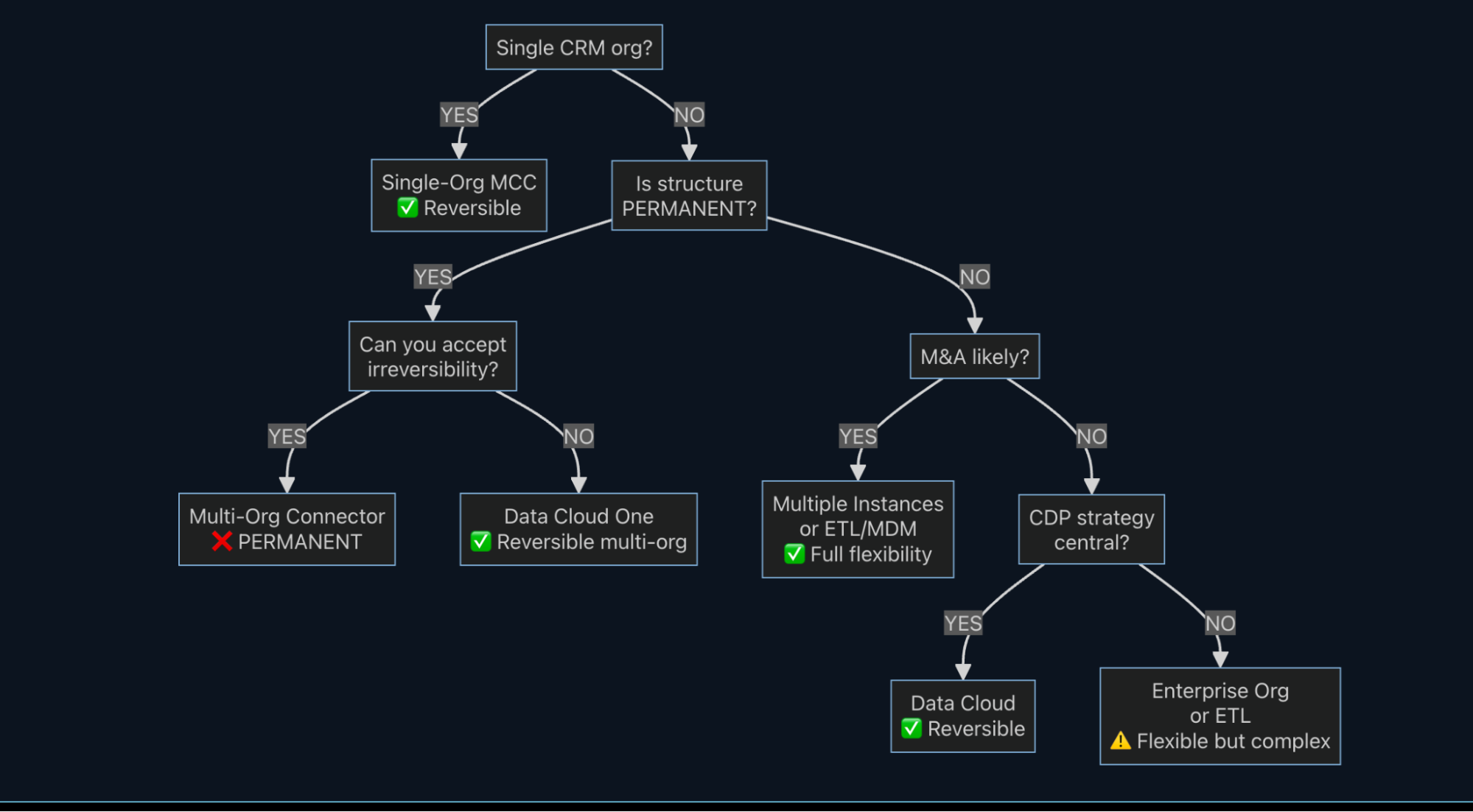
The Decision Path
For Single Business Units: → Single-Org MCC (Pattern 1). Don't overcomplicate what doesn't need complexity.
For Multi-Division Enterprises:
IF structure is genuinely PERMANENT → Multi-Org Connector (Pattern 2)
IF flexibility matters → Multiple Instances (Pattern 4) OR ETL/MDM (Pattern 5)
IF you want multi-org without permanence → Data Cloud One
For M&A Scenarios: → Multiple Instances (Pattern 4) or ETL/MDM (Pattern 5). Flexibility trumps integration efficiency when organizational change is likely. The licensing premium is insurance against integration entanglement.
For CDP-First Strategy: → Data Cloud as primary integration layer, MCC as optional enhancement for specific real-time use cases.
The Bottom Line
The Salesforce Marketing Cloud integration landscape offers five distinct patterns. Three are reversible. Two are not. Knowing which is which isn't optional knowledge. It's architectural due diligence.
Quick Reference:
✅ Reversible: Single-Org MCC, Multiple Instances, ETL/MDM
❌ Permanent: Multi-Org Connector
⚠️ Partial: Enterprise Org (passthrough)
2026 Recommendation:
For single orgs: Use Single-Org MCC
For multi-org: Use Data Cloud One (modern, reversible)
For M&A risk: Use Multiple Instances (insurance policy)
For complex data: Use ETL/MDM (now Salesforce-backed)
For CDP strategy: Use Data Cloud
Choose as if you can't change it. Because in some cases, you genuinely can't.
Your Turn: What integration pattern is your organization using? Have you experienced the constraints discussed here? I'd be interested to hear what's working and what's not.
Need help evaluating your Marketing Cloud integration architecture? Our Marketing Cloud consulting team can help you choose the right pattern for your organization.
Related Concret.io Resources
Explore these guides to deepen your Salesforce Marketing Cloud Integration expertise:
Salesforce Marketing Cloud Implementation Guide – Complete setup and best practices
Marketing Cloud Journey Builder Deep Dive – Master customer journey design
Salesforce Marketing Cloud Services – Professional consulting for your integration
Further Reading
Official Documentation:
Marketing Cloud Connect Setup Guide - Salesforce Trailhead
MCC Integration Patterns - Mateusz Dąbrowski
Data Cloud Architecture - Salesforce Developer Docs
Architecture Deep-Dives:
Implementing Marketing Cloud with Multiple Salesforce Orgs - Salesforce Architects
Data Cloud One Strategy - Salesforce Admins
Frequently Asked Questions
-
No. Once the Multi-Org Connector is enabled, it cannot be undone. The only path back to Single-Org is provisioning a completely new Marketing Cloud account. Data and configurations don't transfer cleanly. This is why Multi-Org requires explicit approval from Salesforce Support.
-
Cannot delete individual object syncs (must disconnect entire integration)
API user permissions determine all object/field visibility
Field length changes in Salesforce may not propagate to Marketing Cloud
Single-direction sync for many standard objects
Business Unit data access can't be fully siloed (AMPScript/SSJS/SQL access remains)
Every synced contact counts toward Contact Builder limits
15-minute polling lag (not sub-second real-time)
-
CDP strategy is central to your marketing roadmap
You need to unify data from multiple sources beyond Salesforce
Zero-copy connectors to existing data infrastructure are valuable
You want to avoid permanent integration commitments
Building unified customer profiles is a priority
Stick with MCC for simple, single-org CRM-to-email workflows where cost efficiency is the top priority.
-
Multiple Instances (Pattern 4) or ETL/MDM (Pattern 5). Both provide full reversibility. When organizational change is probable, flexibility is the priority. The licensing premium for multiple instances is insurance against integration entanglement. Never use Multi-Org Connector if M&A is possible.
Let’s Talk

Drop a note below to move forward with the conversation 👇🏻