Businesses choose Salesforce Marketing Cloud (SFMC) for its scalable, evolving, and wide range of features for an improved experience. It is a comprehensive AI-driven platform that unifies your customer data and automates personalized interactions across every channel. However, with Salesforce Marketing Cloud implementation, companies face several major challenges ranging from data hurdles to internal team limitations.
Data fragmentation, internal team limitations, and poor Artificial Intelligence (AI) execution are the leading reasons why businesses lose or fail to leverage their statistics effectively. When organizations fail to manage data pipelines, they suffer from data rot. It leads to missed opportunities, poor personalization, and incorrect strategic decisions. Gartner reports that poor data quality costs at least $12.9 million annually.
In this blog post, we will learn about the Marketing Cloud implementation through its step-by-step guide, cost, timeline, and checklist.
What Is Salesforce Marketing Cloud?
Salesforce Marketing Cloud Implementation is the end-to-end process to set up, configure, and launch the Salesforce Marketing Cloud (SFMC) platform. This cloud-based digital marketing platform is designed to streamline and automate marketing efforts across various channels, such as email, social media, mobile, and more.
It consists of two types of modules: 1) Studios and 2) Builders:
Studios: For managing content and specific marketing channels.
Builders: It manages data, organizes assets, maps automated customer experiences, and handles campaign automation.
Also Read: Salesforce Commerce & Marketing Cloud Integration
What Can Salesforce Marketing Cloud Be Used For?
Salesforce Marketing Cloud features and its powerful tools allow organizations for customer engagement, orchestrate journeys, and market.
Salesforce Marketing Cloud is the most crucial toolbox for new-age marketers. It lets users:
Design emails, landing pages, and eye-catching visuals.
Write targeted emails that resonate with the audience.
Personalize engagements through SMS and Push messages
Automate multi-channel campaigns.
Target online ads to find the right audience.
Personalize website interactions for every prospect.
Import, transform, and analyze customer data.
What Does Salesforce Marketing Cloud Implementation Include?
The end-to-end process of SFCM implementation is broken down for a clear and comprehensive understanding. It will help you know what it includes.
Requirements for the Business: It requires you to define business goals, Key Performance Indicators (KPIs), user roles, and compliance requirements like the General Data Protection Regulation (GDPR) and the Controlling the Assault of Non-Solicited Pornography and Marketing Act (CAN-SPAM).
Configuration: This includes setting up account structure, business units, user permissions, security settings, and sending domains Sender Authentication Package (SAP/IP warming).
Data Integration: Connecting Customer Relationship Management (CRM) platforms such as Salesforce Sales Cloud, external databases, and Application Programming Interfaces (APIs) for the purpose of mapping data extensions and subscriber attributes.
Automation: Journey Builder automates customer journeys while also using Automation Studio and Behavioral triggers.
Content: The Content Builder and AMPscript allow you to create dynamic templates, landing pages, and personalized assets.
Testing: Executing quality assurance checks, running A/B tests, and validating data triggers before going live.
Training: Within this, it conducts the user workshop, defines best practices, and helps create documentation for the marketing team.
Launch: Launch the first live campaign and monitor system performance, including deliverability rates.
Optimization: The system assists in analyzing post-launch metrics, refining data flows, as well as tuning to automate in order to improve Return on Investment (ROI).
Marketing Cloud Engagement vs. Marketing Cloud Next (2027)
Learn how Marketing Cloud Engagement vs. Marketing Cloud Next (MCN) differ from each other.
What Is Marketing Cloud Engagement?
Marketing Cloud Engagement (MCE) operates on its own infrastructure (the legal ExactTarget framework) independently. It uses a dedicated security and data model, and this further connects to Salesforce CRM via Marketing Cloud Connect.
MCE offers you the following options for an improved experience.
Journey Builder
Automation Studio
Data Extensions
Subscribers/Contact Model
Content Builder
CloudPages
What Is Marketing Cloud Next?
Salesforce Marketing Cloud Next (MCN) runs on the Salesforce Core Platform with zero synchronization lag as well as zero copy data access to Sales, Service, and Commerce Cloud.
Flow Builder: Salesforce's universal orchestration engine, Flow Builder, replaces isolated journey tools to enable event-driven, real-time automated workflows.
Data 360: Data 360, formerly known as Data Cloud, serves as the native data foundation and offers identity resolution and real-time data streaming.
SF Platform Architecture: Salesforce platform architecture unifies permissions, security, and governance by being built directly on core CRM infrastructure instead of external servers.
Unified customer data: Combines customer profiles into a single real-time view across the whole ecosystem using Data Model Objects (DMOs) and Unified Individuals.
AI/Agentforce capabilities: Incorporates autonomous and generative AI. Agentforce AI agents are integrated directly into workflows to forecast behavior, create assets, and initiate actions in real time.
Marketing Cloud Engagement vs. Marketing Cloud Next
Check out this comparison table for a quick overview and know both of them differ from each other.
| Area | Marketing Cloud Engagement | Marketing Cloud Next |
|---|---|---|
| Automation | Journey Builder / Automation Studio | Flow Builder |
| Data | Data Extensions / Contact Model | Data 360 / Salesforce data |
| Architecture | Marketing Cloud | Salesforce platform |
| Customer data | Subscriber/contact model | Unified data foundation |
| AI direction | Existing AI capabilities | Data 360 + Agentforce |
| Implementation | Marketing Cloud-centric | Cross-cloud/platform-centric |
Which Marketing Cloud Architecture Should You Implement?
If you are seeking to know which Marketing Cloud Architecture to implement. It entirely depends upon your organization’s data structure, regulatory environment, and technical maturity. There is no single architecture that fits every business model.
Here are significant decision factors that you must evaluate for the best setup for your business.
Data residency and compliance.
Business unit structure and autonomy.
Core data sources and CRM topography.
Technical maturity and resource capacity.
5. Architectural Paradigms
Check out the table below for a direct comparison to choose the right fit for your business.
| Decision Factor | Centralized (Single-Org / Multi-BU) | Distributed (Multi-Org) | Composable (Data Warehouse-Centric) |
|---|---|---|---|
| Data Control | Shared data model; centralized governance. | Complete isolation between business units. | Data remains in your central warehouse. |
| Implementation Speed | Faster initial setup; easy to scale templates. | Slow; requires independent builds for each org. | Moderate; depends on data warehouse readiness. |
| Maintenance Cost | Lower; shared resources and single license admin. | High; multiple licenses, admins, and sync processes. | Varied; lowers marketing tool costs but increases cloud warehouse costs. |
| Best Used For | Consistent global brands with shared customers. | Conglomerates with unrelated brands or strict geo-boundaries. | Tech-forward companies looking to eliminate data silos. |
What to Plan Before Salesforce Marketing Cloud Implementation
Before you directly jump on Salesforce Marketing Cloud sign-up, planning your goals, data, structure, and team is a must. It ensures a smooth setup and drives you toward the improved experience you need.
Define Objectives and Goals
Before you embark on your implementation journey, clearly define the objectives and goals of your Salesforce Marketing Cloud implementation. Ask yourself what you want to achieve.
Do you want to increase policy sales from existing customers?
Are you seeking to improve customer engagement metrics?
Do you intend to streamline marketing operations first?
1. Measure Key Performance Indicators (KPIs) such as email deliverability and inbox placement, conversion rate per channel, engagement by segment, unsubscribe & bounce rate, and the time it took for campaign deployment.
2. Outcomes of the target business, such as marketing-attributed revenue, repeat purchase, customer retention, cost per acquisition (CPA), and data unification.
3. Success criteria implementation, such as data integrity, phased rollout execution, security & governance validation, and user readiness.
Assess Current Marketing Processes and Systems
Look for gaps or inefficiencies in your marketing processes, systems, and data sources. Data silos, manual workflows, limited personalization features, and less capable AI can be some gaps you may have currently.
Here is a concise audit framework for your core system:
Salesforce CRM
Check for delayed data syncing, including both the sales and marketing teams.
Identify all duplicate, incomplete, and unsegmented lead records.
You also need to evaluate whether lead scoring and routing happen automatically or manually.
ERP and Data Warehouse
Identify whether the historical purchase history is locked away from marketers, any latency issues that prevent real-time audience building, and review the data formatting to make sure it is clean for Artificial Intelligence (AI) training.
Website and e-Governance
Audit the drop-off points within the user journey, gaps in behavioral tracking like cart abandonment triggers, and evaluate the speed and accuracy of product inventory on the frontend.
Mobile applications
Check if in-app behaviors match the web profile.
Evaluate the reliability of the push notification triggers based on the user action.
Assess compliance with the latest mobile privacy and opt-in framework.
Third-Party Marketing Platform
Check for fragmented data, spot redundant software subscriptions that offer overlapping features.
Check if there is any manual list upload workflow that is wasting your team’s time.
Select the Appropriate Salesforce Marketing Cloud Product/Edition
Choose the Salesforce Marketing Cloud edition that best aligns with your company's needs, budget, and goals. Consider factors such as the size of your customer base, desired features and functionalities, and integration requirements while identifying the perfect fit.
Marketing Cloud Engagement is best for high-volume B2C messaging via Journey Builder.
Marketing Cloud Next suits teams wanting a native, AI-first platform, and it is built directly on Data 360 (Data Cloud) with Agentforce and Flow.
Assign Your Implementation Team
Who will carry out your SFMC implementation? Do you plan to do it in-house, or will you need the expertise of a Salesforce Marketing Cloud Implementation Partner? If you have the resources, it's best to assign a few dedicated resources such as:
Executive Sponsor- An Executive such as a CMO or Marketing VP accountable for implementation.
Project Manager- For overseeing the Marketing Cloud platform strategy. Usually, a PM coordinates the entire process.
Administrator- An experienced digital marketer responsible for Marketing Cloud setup.
Solution Architect: Its role is for blueprint and system design. It helps map business goals to an overall technical architecture, design data schema, system integration, and multi-cloud strategy, which ensures scalability, governance, and long-term platform health.
Marketing Cloud Administrator: Its role is to setup platform and governance. It assists you with configuring business units, user permissions, and security settings such as SAP and SSL certificates. Further, it manages authentication packages to ensure high email deliverability. It also maintains the day-to-day health, package installations, and user management of SFMC.
Salesforce Administrator: the core CRM. It plays its role in CRM alignment and data flow. It configures the Salesforce Marketing Cloud Connect (MC Connect) plugin on the CRM side and further manages standard and custom objects, page layouts, and workflows in Sales or Service Cloud.
Developer: If you check its role, it assists with customization and personalization. The system writes AMPscript, SSJS also known as Server-Side JavaScript and SQL for advanced dynamic content.
The system helps you build custom presence centers, CloudPages, and API driven transactions triggers.
Develops responsive HTML/CSS email templates, including landing pages.
Data and Integration Specialist: Data pipelines and Extract, Transform, Load. The ETL helps build robust pipelines via Automation Studio and MuleSoft/APIs. You can get help in managing large-scale data synchronization, FTP file transfers, and relational data extensions, and optimizing SQL queries that ensure high-performance segmentation.
QA or UAT Stakeholders: Their role is for Quality Assurance (QA) and validation. Here, it tests journeys, trigger behaviors, and rendering across various devices as well as email clients.
The system validates that personalization strings, including dynamic blocks, display correct customer data. Further coordinates User Acceptance Testing (UAT), and this ensures that the system meets business sign-off criteria.
Marketing Stakeholders: Their role is for strategy and the content lifecycle. It defines the campaign goals, customer journey, KPIs, and segment criteria. It provides the creative assets, copy, and brand guidelines for deployment. The system uses Einstein analytics to optimize future marketing ROI.
Security and Compliance: Its role is for risk management and privacy compliance. This ensures compliance with legal frameworks such as GDPR, CCPA, and CAN-SPAM.
Audits data encryption policies such as field-level encryption and tokenized authentication. Moreover, it reviews data retention policies and opt-out consent management architectures.
Develop an Integration Strategy
If you plan to integrate Salesforce Marketing Cloud with other systems, be it Salesforce or a third-party ERP, plan the integration strategy, identifying the data flows and touchpoints between systems.
By combining customer identities, events, and CRM updates into a single source of truth in real time before activating them in SFMC Engagement, the Data Cloud (Real-Time Foundation) replaces nightly batches.
Salesforce CRM & Marketing Cloud Connect (MCC): Connects SFMC and CRM. For high-volume data updates, use scheduled batch syncs; for instantaneous Journey Builder entries, use real-time triggers. For sales visibility, sync tracking data back to CRM.
API Approach: Use SOAP APIs for complex administrative, bulk, or legacy operations and REST APIs for lightweight, real-time actions (transactional sends, journey entries).
Plan for Data Privacy and Compliance
Salesforce Marketing Cloud offers deeper insights into prospects/customers, which must be handled responsibly. At Concretio, we suggest teams stay updated on the latest requirements for GDPR, CCPA, and any other relevant regulations to ensure the Marketing Cloud practices remain compliant.
Healthcare (HIPAA/HITECH): Protect PHI, steer clear of unencrypted communications, make use of Salesforce Shield, and restrict data syncs to fields that are absolutely necessary.
Financial (GLBA/PCI DSS): Never keep unprocessed financial data. Make sure all API transfers are completely encrypted and rely on tokenization.
Education (FERPA): Use isolated Business Units and stringent Role-Based Access Controls (RBAC) to safeguard student records.
FedRAMP (Public Sector): Use specialized, compliant cloud environments, enforce stringent data residency, and log access.
Salesforce Marketing Cloud Implementation Architecture
SFMC implementation architecture is the structural blueprint for setting up data flows, multi-channel studios, and integrations. It further runs unified, event-driven customer journeys.
Salesforce Marketing Cloud Architecture Overview
Salesforce Marketing Cloud is an omnichannel digital marketing platform. It is built on a modular architecture that separates high-volume data handling, campaign execution, and CRM integration.
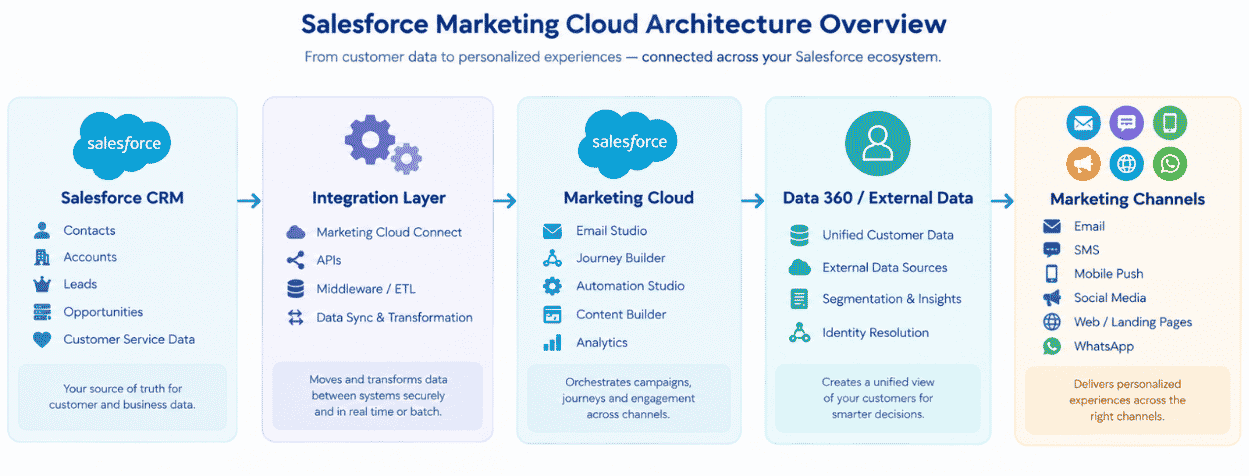
Salesforce Marketing Cloud Implementation Architecture
Define the System of Record
CRM Ownership: The core CRM is the master for foundational profiles (Leads, Contacts).
Marketing Data: SFMC owns all engagement metrics (opens, clicks, journeys).
Consent: The core CRM acts as the global master; SFMC handles immediate opt-outs.
Transactional: External systems (ERPs, E-commerce) own transaction data, ingested into SFMC for triggers.
Design the Customer Identity Strategy
Contact & Subscriber Key: Must be identical to maintain unified profiles.
CRM IDs: Use the 18-digit Salesforce ID as the master key.
Identity Matching: Map external system IDs to the master CRM ID.
Duplicate Prevention: Deduplicate upstream in the CRM or CDP before SFMC ingestion.
Design Data Flows Between Systems
Batch: Use Automation Studio for scheduled, high-volume data imports.
Real-Time: Use Journey Builder APIs for immediate, time-sensitive triggers.
APIs: Use REST for journeys/multi-channel and SOAP for legacy/tracking.
Native Integrations: Use Marketing Cloud Connect for bidirectional CRM syncing.
Data Synchronization: Use Synchronized Data Extensions to pull CRM data at set intervals.
Plan for Scalability and Governance
Business Units: Segment data, profiles, and access by region or brand.
Permissions: Enforce least-privilege access using specific user roles.
Naming Conventions: Apply strict, standardized asset formats; ex. Region > Dept > Campaign > Date.
Data Governance: Automate data deletion on transient Data Extensions to ensure compliance.
Documentation: Maintain centralized data dictionaries and architecture logs.
Salesforce Marketing Cloud Data Model and Data Architecture
Extensions of Data and Contact Information
Lists vs. Data Extensions: For enterprise scalability, choose Data Extensions (relational tables) over flat Lists.
Sendable Data Extensions: Use a sendable field that is mapped to the Contact Key to store target audiences.
Relational Data Extensions: Create a 360-degree view by connecting non-sendable tables to sendable data.
Unified Identifiers: Use the Contact Key to anchor data to a single master identity (such as the Salesforce CRM ID).
Strict primary keys should be defined in order to optimize query processing and uniquely identify records.
Customer Relations and Contact Builder
Contact Model: Consolidate all information into a single master contact record.
Identity: To avoid fragmented profiles and duplicate billing, unify identities across Email, SMS, and Push.
Attribute Groups: Make logical connections between the master Contact record and external Data Extensions.
Contact Relationships: To control Journey Builder routing and customization, specify 1:1 or 1:many connections
Governance and Data Quality
Duplicates & Missing Values: Use Automation Studio to automate deduplication and missing-field updates.
Data Freshness: To guarantee that segments rely on real-time data, schedule frequent syncs.
Naming Conventions: Make sure that folders and data extensions have consistent names.
Retention: To guarantee compliance and database speed, automate data purging on temporary tables.
Data Ownership: Establish stringent boundaries for business units and user permissions.
Marketing Cloud and Data 360
Unified Profiles: Create a single "golden" customer record by harmonizing all enterprise data.
Segmentation: Create real-time, highly targeted audience segments.
Activation & Personalization: To enable 1-to-1 omnichannel personalization, activate segments.
Making decisions: Use AI to identify the "next best action" for every profile.
Journey Builder: Include qualified segments in sophisticated omnichannel and predictive processes.
Marketing Cloud Connect Implementation Guide
Marketing Cloud Connect: What Is It?
The native program that connects SFMC to your CRM. Real-time data syncs are made possible by a smooth Salesforce Marketing Cloud integration, and journey triggers and cross-channel tracking are unified by a specific Salesforce Sales Cloud and Marketing Cloud integration.
Requirements: Dedicated Integration User licenses in both environments, System Administrator access, and compatible platform editions.
Set Up and Configure
Deploy: Whitelist SFMC IP ranges, update page layouts, and install the managed package in CRM.
Connect: Map cross-platform users, authenticate the API, and enter CRM credentials in SFMC.
User Configuration for Integration
For safe data flow, create a special "API Only" CRM user with the "Marketing Cloud Connected App" and "Marketing Cloud Connector Admin" permission sets.
Synchronization of Data
Sync: At a 15-minute polling interval, sync CRM Leads and Contacts using Contact Builder.
Identity: Use the SFMC Contact Key to map the 18-digit Salesforce CRM ID.
Testing
Verify that email tracking (opens/clicks) writes back to the CRM, that CRM data updates successfully initiate journeys, and that CRM records populate in SFMC.
Salesforce Marketing Cloud Implementation Step-by-Step
Now that you know the key prerequisites for Salesforce Marketing Cloud Implementation, it's time to understand how this implementation is carried out.
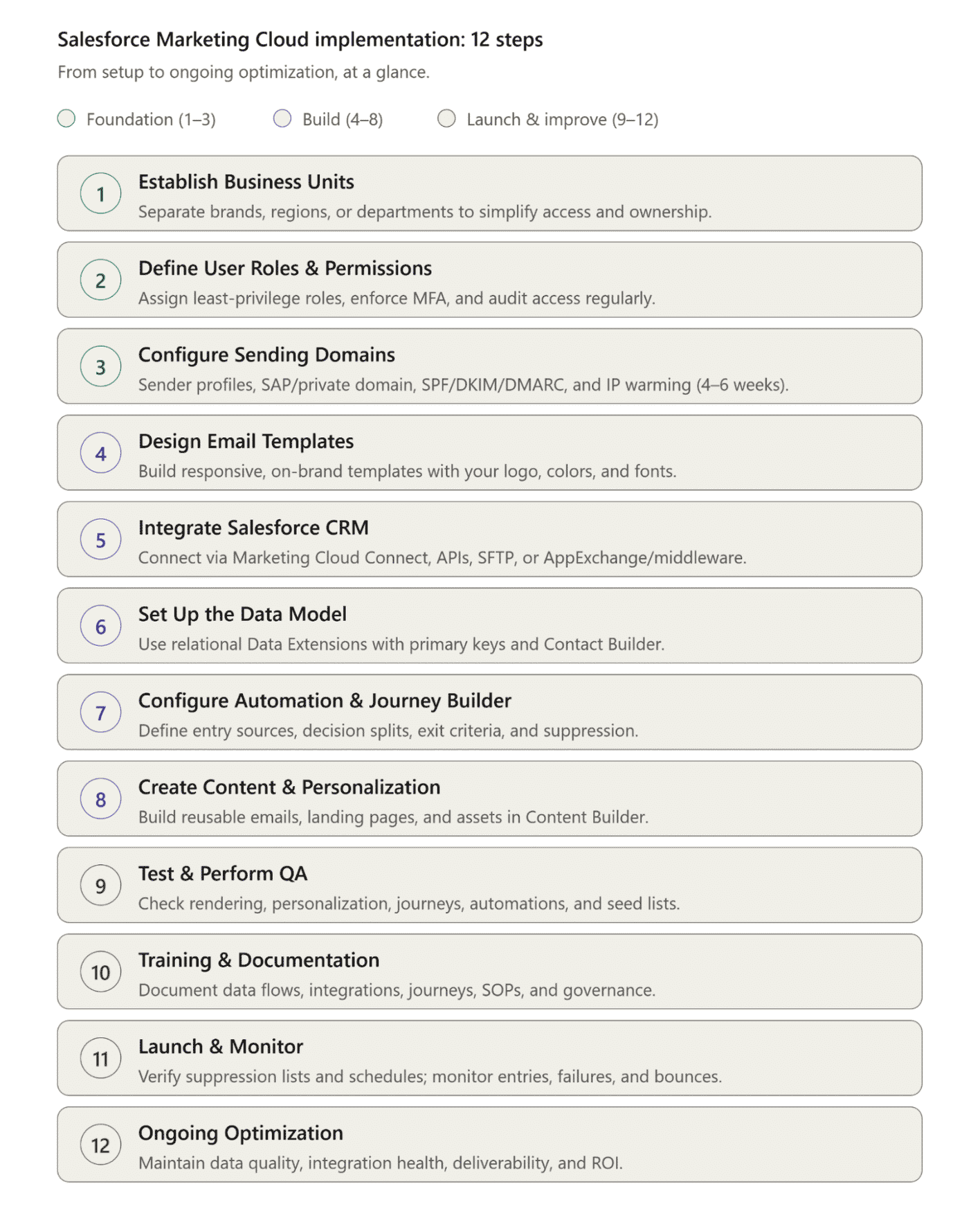
Salesforce Marketing Cloud implementation: 12 steps
Step 1: Establish Business Units
Marketing Cloud allows users to create business units, which are containers for managing marketing activities specific to different brands, regions, or departments within your organization. Doing this in the initial implementation stage will help simplify access control for your marketing team, ensuring clear ownership and accountability.
Note: Business units are unavailable in the following Salesforce tiers: Enterprise 1.0, Agency, and Core Tenants.
Step 2: Define User Roles and Permissions
There are several out-of-the-box roles in Salesforce Marketing Cloud: Administrator, Viewer, Channel Manager, Security Administrator, and Content Publisher/Editor. Define these roles in the beginning stages of SFMC implementation. This will help determine the level of access and actions each user can perform (e.g., creating email campaigns, managing data extensions, or accessing reports).
Plan for Scalability, Governance, and Security: Business Units & Isolation: To strictly limit a user's data visibility, divide data, profiles, and access by brand or region.
Assign the most restrictive roles required to stop unintentional data deletion or unauthorized sends in accordance with the principle of least privilege.
Authentication & Accountability: To ensure transparent audit trails, strictly forbid shared logins and implement Multi-Factor Authentication (MFA) worldwide.
Access Audits: Examine permissions on a regular basis and deactivate accounts for departing employees or agencies right away.
Naming Conventions: Use stringent, uniform asset formats (such as Region > Dept > Campaign >Date).
Data Governance: To guarantee system performance and compliance, automate data deletion on temporary Data Extensions.
Documentation: Keep architecture logs and centralized data dictionaries.
Step 3: Configure Email-Sending Domains
Before you send emails to prospects and customers, you want to establish how your emails will appear to recipients, and you must make sure they actually reach the inbox. For this, you need to configure your Email-sending domains, authenticate your sender identity, and build sender reputation.
Sender Profiles: This includes specifying the "From" name and email address that will be displayed in your marketing emails to ensure brand recognition.
Sender Authentication Package SAP & Private Domain: You can also set up a private domain or use Salesforce’s Sender Authentication Package for optimal deliverability. This practice provides you with an authenticated, brand domain that removes SF default tracking links and helps you preface the same with your own.
Authentication Protocols (SPF, DKIM, DMARC): Configuring all these essential protocols allows you to verify your sender identity. The private domain allows you to align these records so that your sending domain and return path match, as this is required to pass strict DMARC checks and keep your email out of spam folders.
IP Warming: If your domain setup has a new dedicated IP address, you must execute an IP warming campaign. It involves gradually increasing your email sending volume over the first four to six weeks. Warming establishes legitimacy with ISPs, builds a positive sender reputation, and helps prevent early email blocks.

Configuring Domains Before Sending Emails in Marketing Cloud Engagement (Source: Salesforce.com)
Note: Email-sending domains and SAP configurations are usually provided within 24 hours, but the IP warming process takes weeks to complete.
Step 4: Design Email Templates and Content
Once you have configured email-sending domains, you can create visually appealing and responsive email templates that align with your brand identity. Salesforce Marketing Cloud offers several templates that can be customized with your logo, colors, and fonts.
Step 5: Integrate Salesforce CRM
Integrating Salesforce Marketing Cloud with other Salesforce or third-party solutions is crucial for syncing customer data and gaining visibility across departments for better customer targeting. There are 4 different ways to integrate solutions or data in Salesforce Marketing Cloud.
The image below showcases the different ways you can integrate Salesforce Marketing Cloud with business solutions and data.

4 Ways to Bring Data into Salesforce Marketing Cloud (Source: MAInCognita)
Marketing Cloud Connect: The official native connector between SFMC and your primary Salesforce CRM (like Sales or Service Cloud) is called Marketing Cloud Connect. In order to initiate journeys based on real-time CRM updates, it automatically synchronizes CRM objects (Leads, Contacts, Accounts) directly into Marketing Cloud Data Extensions.
APIs (REST and SOAP): A developer-driven method for creating unique integrations with mobile apps or proprietary databases. While the SOAP API handles legacy systems and comprehensive tracking data, the REST API manages contemporary applications and real-time transactional messaging.
Data File Transfers (SFTP): Large, planned batch imports from external data warehouses, ERPs, or legacy systems work best with data file transfers (SFTP). Automation Studio retrieves, decrypts, and imports CSV files that are safely dropped into Marketing Cloud's SFTP.
AppExchange & Middleware (MuleSoft/Data Cloud): If you are looking for faster deployment without custom code, you can install ready-made integration apps from SF AppExchange or use middleware like MuleSoft to seamlessly connect popular third-party business solutions.
Step 6: Set Up the Data Model
Business data must be organized to carry out successful campaigns. In Salesforce Marketing, this requires setting up a data model, giving a structure to your data using objects, fields, and relationships.
You can choose any data model and determine the data fields needed, like name, email, and preferences, and establish relationships between different data extensions, offering a comprehensive view of your customers.
Note: There are 2 Data models to organize data in Salesforce Marketing Cloud, i.e., Lists and Data Extensions; Design Your Data Model.
The Modern Standard: Relational Optimization vs. Flat Lists
A successful deployment hinges entirely on your data structural choices. Many teams treat Marketing Cloud like a standard ESP, dumping flat subscriber lists into isolated groups. Instead, enterprise scalability requires leveraging relational Data Extensions (DEs) bound by strict primary keys.
Here are the structural rules for optimal system performance and data integrity:
Unified Identifiers: Connect every table to a master ID (such as an 18-digit Salesforce Contact ID) using unified identifiers.
Contact Builder: To create relational data, connect Data Extensions to the master Contact Record using the Contact Builder.
Primary Keys: To avoid corruption and expedite journey processing, set strict primary keys.
Data Retention: To maintain database performance and compliance, automate data purging on temporary Data Extensions.
Step 7: Configure Automation and Journey Builder
To move customers toward purchase, it's crucial to nurture them with personalized communication. Marketing Cloud’s powerful Journey Builder tools give users the power to create automated workflows using an intuitive drag-and-drop interface.
Entry Sources: Describe the contacts' entry points (e.g., Data Extension, API, or CRM sync).
Automate messaging in response to real-time actions (e.g., clicks, cart abandonment) using behavioral triggers.
Decision Logic: Utilize Decision Splits to direct clients along customized routes according to their information.
Exit Criteria: To avoid over-messaging, set rules to automatically remove contacts once they reach a goal.
Suppression: Use lists to weed out contacts who are opted out, inactive, or unqualified.
Step 8: Create Content and Personalization
Before you test out campaigns, you’ve to create content first.
Utilize the Content Builder tool to create and manage digital content for various marketing channels. Once you’ve designed email templates, landing pages, social media posts, and other marketing assets, those can be easily reused across your campaigns.
Step 9: Test and Perform Quality Assurance
Email Rendering: Use Inbox Preview to verify multi-device designs.
Personalization: Use "Preview and Test" to confirm AMPScript and dynamic content.
Journey Simulation: Use "Test Mode" to safely validate routing logic.
Automation Verification: Test SQL and data transfers by manually executing workflows.
Lists of seeds: To confirm the finished user experience, send live tests to internal teams.
Step 10: Training and Documentation
Data Flows: Document data entry, transfer, and exit routes (APIs, SFTPs, manual).
Integrations: Keep track of all CRM connectors, sync schedules, and third-party systems.
Journeys: Map current workflows, taking into account exit criteria, decision splits, and entry sources.
Troubleshooting: To fix common platform issues and unsuccessful sends, create SOPs.
Governance: Keep track of user permissions, naming conventions, retention policies, and business unit structures.
Step 11: Launch and Monitor
Checks Prior to Launch: Examine suppression lists, send schedules, and target data extensions.
Day-One Monitoring: To identify errors early, keep track of journey entries, automation failures, and hard bounces.
Analyze engagement trends, confirm deliverability, and modify IP warming volumes during the first week of monitoring.
Performance Metrics: Use built-in analytics to track opens, clicks, and conversions.
Step 12: Ongoing Optimization
Data Quality: Enforce data retention guidelines and remove duplicates.
Integration Health: To avoid sync failures, keep an eye on CRM connectors and APIs.
Deliverability: Monitor bounce rates and sender reputation to ensure inbox placement.
Journey Performance: Use engagement metrics and A/B testing to optimize workflows.
ROI: Compare pipeline generation and conversions to key business objectives.
Governance: Examine asset naming conventions, business units, and user permissions.
Salesforce Marketing Cloud Deliverability Setup
You must establish a strong sender reputation and ensure high inbox placement. Here are all the critical deliverability settings that you must configure before you jump on to launch your campaign.
Sending Domains: Use SAP or private domains for sender branding.
Authentication: To avoid spoofing, configure SPF, DKIM, and DMARC.
Sender Profiles: Specify "From" addresses and distinguish between transactional and commercial sends.
IP Warming: Increase send volumes for new IPs over a period of four to six weeks.
Suppression: Use preference centers and Auto-Suppression to control opt-outs.
Monitoring: Keep tabs on spam complaints and bounces to ensure list hygiene.
Pre-Launch Quality Assurance: Send to seed lists, test multi-device rendering, and confirm DNS.
Salesforce Marketing Cloud Testing and Quality Assurance
A rigorous QA process is critical as it ensures your campaign launches flawlessly, flows the data securely, and has a seamless customer experience.
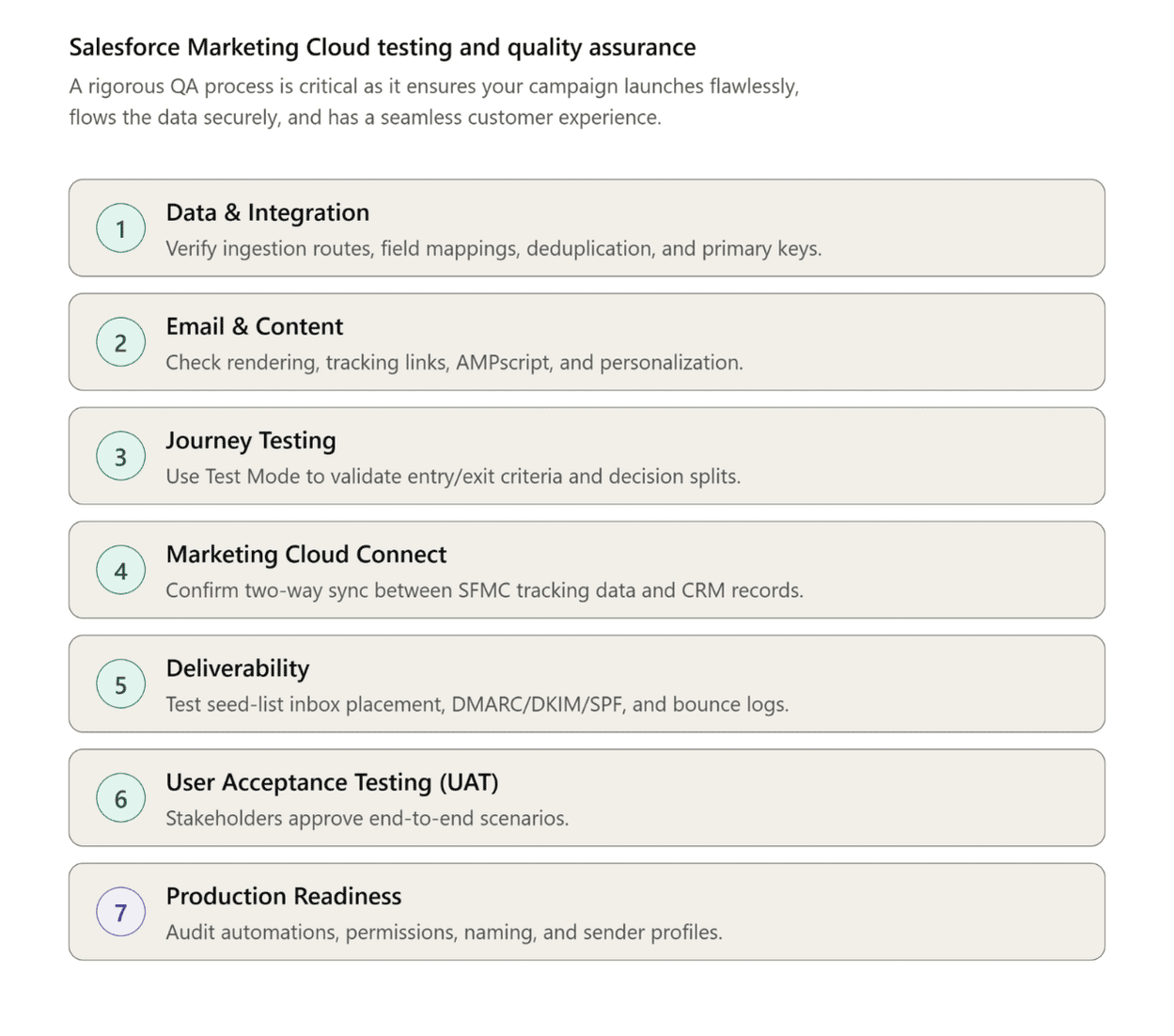
Salesforce Marketing Cloud testing and quality assurance
Data & Integration: Check all ingestion routes (CRM, API, SFTP). Verify field mappings, deduplication queries, and primary keys.
Email & Content: Use Inbox Preview for cross-device rendering and verify tracking links. Test AMPscript, dynamic content, and personalization strings thoroughly.
Journey Testing: Without using live sends, use "Test Mode" to verify entry/exit criteria, validate decision splits, and simulate routing.
Marketing Cloud Connect: Verify bidirectional sync to make sure SFMC tracking data writes back to CRM records and CRM updates trigger journeys.
Deliverability: Verify inbox placement by sending to internal seed lists. Verify DMARC, DKIM, and SPF authentication, and keep an eye on bounce logs.
User Acceptance Testing (UAT): From segmentation to email receipt, end-to-end scenarios require stakeholder approval.
Production Readiness: Before going live, audit active automations, permissions, naming conventions, and sender profiles.
Salesforce Marketing Cloud Implementation Timeline: How Long Does It Take?
If you are finding “how long does Salesforce Marketing Cloud implementation take?” It is a common question that organizations have when planning a deployment. A typical rollout takes eight to twelve weeks on average, but the precise time frame is largely dependent on your data architecture, channel needs, and level of technical maturity.
Typical Salesforce Marketing Cloud Implementation Timeline
| Project Complexity | Estimated Timeline | Typical Scope |
|---|---|---|
| Basic | 4–6 Weeks | Single Business Unit, flat data lists, basic email templates, and standard out-of-the-box configuration. |
| Standard | 8–12 Weeks | Relational Data Extensions, Marketing Cloud Connect (CRM sync), standard automated journeys, and basic integrations. |
| Complex | 12–16 Weeks | Multiple Business Units, omnichannel (Email, SMS, Push), custom API/SFTP data syncs, and advanced personalization (AMPscript). |
| Enterprise | 16–24+ Weeks | Global rollout, Data Cloud (Data 360) integration, complex predictive decisioning, custom development, and strict governance. |
What Affects the Implementation Timeline?
Data Complexity: Cleaning, moving, and mapping various enterprise data sources are examples of data complexity.
Integrations: Linking legacy SFTP servers, custom APIs, or external ERPs.
Setting up and testing the bidirectional data sync with Salesforce CRM using Marketing Cloud Connect.
Data 360: Integrating data to create cohesive profiles prior to activation.
Journeys: Your automated Journey Builder workflows' volume and logical complexity.
Channels: Adding SMS, Push Notifications, and WhatsApp in addition to email.
Business Units: Creating global or multi-brand structures with intricate user permissions.
Creating sophisticated AMPscript, Server-Side JavaScript (SSJS), or unique preference centers are examples of custom development.
The length of stakeholder review and approval cycles, or UAT (User Acceptance Testing).
Deliverability: DNS setup (SPF, DKIM, DMARC) and the required 4–6-week IP warming phase.
Salesforce Marketing Cloud Implementation Phases
A successful end-to-end deployment follows the following path; this helps prevent a sequential path.
Discovery -> Architecture -> Configuration -> Integration -> Build -> QA -> UAT -> Go-Live -> Hypercare
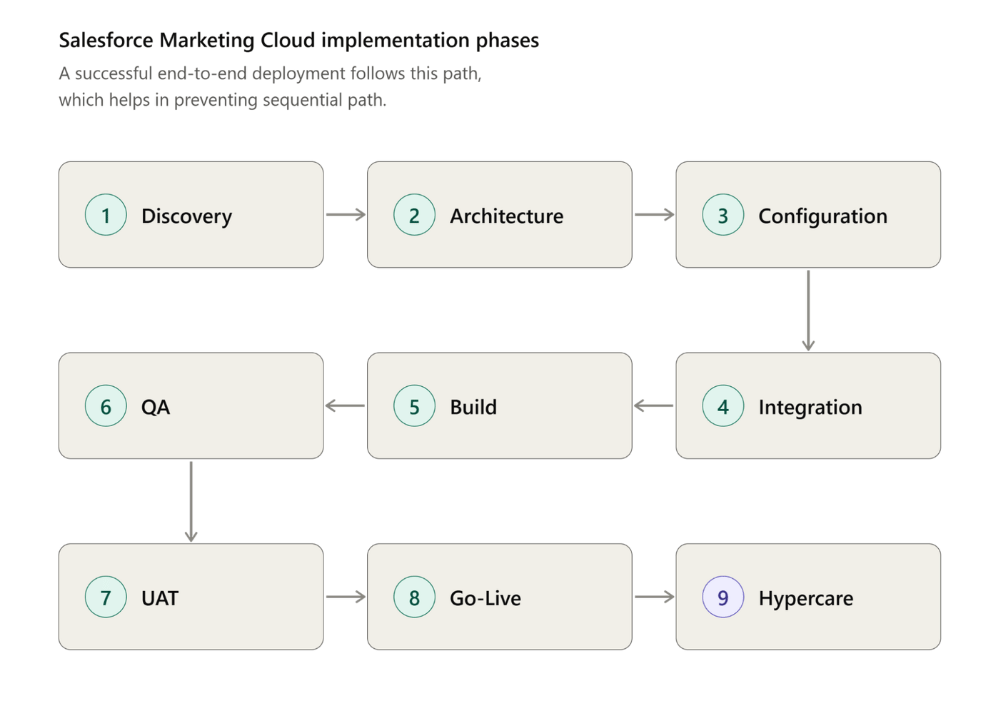
Salesforce Marketing Cloud Implementation Phases
Salesforce Marketing Cloud Implementation Cost: How Much Does It Cost?
If you too are seeking to know “how much does Salesforce Marketing Cloud implementation cost,” the accurate answer depends upon the professional services required to properly configure it, and you must distinguish between the software itself also.
Salesforce Marketing Cloud Implementation Cost Range
Here is an estimated SFMC implementation cost range, and it could be higher or lower based on the location, hiring an in-house team, and other factors.
A basic implementation could cost you around $15,000 to $30,000, which includes a single business unit standard CRM, basic email templates, and single-list-based data models.
Standard SFMC implementation could range from $30,000 to $75,000. This may include relational data architecture, comprehensive Marketing Cloud Connect setup, 3 to 5 automated journeys, and customized preference centers.
If the implementation is complex, the cost could range from $75,000 to 150,000. It may offer you multi-business units, omnichannel setup, email + SMS/push notifications, advanced AMPscript personalization, and custom API/SFT integrations.
Enterprise-level implementation could cost you $150,000+. This may provide you with global multi-brand rollouts, deep Data 360 (Data Cloud) integrations, predictive AI decisioning, and heavy customer development.
What Determines Implementation Cost?
Scope and Data: Your project’s breadth and its migration complexity.
Integrations: This includes connecting external systems such as ERPs, custom APIs, or e-commerce platforms.
Custom development: The requirement for custom AMPscript, server-side JavaScript (SSJS), or SQL queries.
Data 360: The effort it will require to ingest and harmonize data into unified profiles prior to activation.
Journeys: The sheer number as well as the logical complexity of automated Journey Builder workflows.
Channels: Expanding beyond email to configure SMS, push notifications, or WhatsApp.
Business Units: Architecting complex folder structures and permissions for multi-brand or regional teams.
Deliverability: Managing IP warming services and strict DNS configuration (SPF/DKIM/DMARC).
Training: Developing custom Salesforce Marketing Cloud documentation (PDF) and conducting specialized user training sessions.
Support: The duration and depth of post-go-live hypercare, including the managed services.
Salesforce Licensing vs. Implementation Cost
The SF license requires an annual subscription, which is paid directly to Salesforce. On the other hand, Salesforce Marketing Cloud Implementation services are just a one-time professional services fee that you pay to build and launch the platform.
How to Estimate Your Marketing Cloud Implementation Budget
Here is how you can build a practical budget estimate for better planning.
You can use the 1x to 1.5x rule for expert implementation services to cost 1 to 1.5 times your first-year software license.
Define an MVP, and you can start with a minimum viable product like email only, core CRM sync in order to defer advanced feature costs to later phases.
You can assess internal resources that reduce partner fees by handling non-technical tasks such as content creation, UAT, and basic training in-house.
Salesforce Marketing Cloud Implementation by Industry
This section will help you understand SFMC implementation by industry. You can take a quick look at each point for a comprehensive overview. This section introduces just uses with scannable points.
Salesforce Marketing Cloud Implementation for Healthcare
Salesforce Marketing Cloud features for the healthcare industry can help with the following practices:
Patient onboarding automation.
Provides you with omnichannel appointment reminders.
Helps prevent care outreach.
HIPAA compliances preferences management.
Salesforce Marketing Cloud Implementation for Financial Services
SFMC for financial service providers can help:
Drive account onboarding.
Product adoption.
Target cross-selling using behavioral triggers.
Help your company maintain SEC/FINRA compliance.
Salesforce Marketing Cloud Implementation for Insurance
If you are an insurance company and seeking an improved solution for your organization. SF for insurance companies helps you with:
Manage your policy onboarding.
Proactive renewal alerts.
Claim updates in real time.
Cross-sell complementary coverage.
BFSI Case Study
Check out how Concret assists one of its clients covered in this case study: a behavioral engagement engine using Salesforce Marketing Cloud.
Salesforce Marketing Cloud Implementation for Retail and E-commerce
Check how the services can help your retail and e-commerce business:
Triggers abandoned cart recovery.
Product recommendation with AI.
Auto replenishment.
Win-back campaigns.
Salesforce Marketing Cloud Implementation for Education
The education industry is huge, and it requires great efforts for digital marketing; if not, your competitors could brand the opportunity. However, improved SF services for marketing help you with:
Nurture prospective applicants.
Send automated enrollment deadlines.
Guide student onboarding.
Trigger academic support check-ins.
Salesforce Marketing Cloud Implementation for Travel and Hospitality
The Salesforce platform for marketing allows companies:
Automate digital booking confirmations.
Pre-arrival instructions.
Upgrade upselling.
Post-stay loyalty surveys.
Common Salesforce Marketing Cloud Implementation Challenges and Mistakes
Explore the common SFMC execution challenges and the mistakes one must consider. Here is a complete list.
Configuration before architecture.
Poor contact key design.
Ignoring the quality of your data.
Underestimating MC Connect.
Delayed deliverability setup.
Insufficient QA and UAT.
Overbuilding journeys.
Missing governance and documentation.
Ignoring scalability issues.
Testing Marketing Cloud Engagement and Marketing Cloud Next as the same architecture.
Salesforce Marketing Cloud Implementation Best Practices
The best practices for Salesforce Marketing Cloud implementation help you a lot. All the practices discussed in this section will assist you in making informed decisions.
Start With Business Outcomes
Design the Data Architecture Before Building Journeys
Establish a Consistent Customer Identity
Build Deliverability Into the Implementation
Use Reusable Content and Automation
Test Before Production
Implement in Phases
Document Integrations and Data Flows
Establish Governance
Monitor Post-Launch Performance
Plan for Future Data and AI Requirements
Real-World Salesforce Marketing Cloud Implementation: Concret.io Case Study
Here is just a brief overview, and you can read more in detail -> Salesforce Marketing Cloud implementation case study.
Challenge: Manual operations and bot-inflated metrics obscured true institutional investor intent.
Implementation: Leveraged SQL for bot filtering, Journey Builder for lifecycle automation, AMPscript for dynamic content, and integrated a custom engagement scoring model with Salesforce CRM.
Results: Eliminated manual overhead, achieved 100% data integrity, delivered personalized communications, and enabled real-time, high-intent lead routing to the sales team.
Salesforce Marketing Cloud Go-Live Checklist
Here is a section-wise checklist created for a better understanding; check each section for an improved experience.
Pre-Go-Live Checklist
Data: You should check data extensions, strict primary keys, and deduplication queries.
Integrations: Validate APIs, SFTP pipelines, and Marketing Cloud Connect authentication.
Permissions: Confirm the business unit structures and folders, including the role-based structures.
Deliverability: You can finalize the SAP, DNS records (SPF/DKIM/DMARC), as well as the IP warming schedule.
Content: Now test the AMPscript, dynamic logic, and cross-device rendering via Inbox Preview.
Journeys: Validate all the events, decision splits, as well as exit criteria.
QA and UAT: Complete end-to-end internal testing and secure formal stakeholder sign-off.
Checklist for Day One
Sends: Monitor the initial IP-warming deployments for successful inbox placement.
Integration & Synchronization: Confirm CRM data changes trigger journeys and 15-minute polling syncs execute properly.
Errors: Monitor Automation Studio and Journey Builder for failed SQL queries or API timeouts.
Deliverability: Audit initial bounce logs, spam complaints, and blocklists.
First 30 Days After Go-Live
Performance: Track core engagement metrics (opens, clicks, conversions) against baseline KPIs.
Data Quality: Continuously identify and resolve duplicate records or CRM mapping errors.
Journey Optimization: Refine wait steps, decision splits, and underperforming content paths.
Error Analysis: Investigate and resolve any recurring sync delays or automation failures.
Governance: Strictly enforce naming conventions, user permissions, and automated data-retention policies.
Salesforce Marketing Cloud Implementation Checklist
Check out this comprehensive checklist for Salesforce Marketing Cloud implementation.
Strategy: Map business KPIs and define the MVP scope.
Architecture: Enforce a unified Contact Key, e. CRM ID and relational data models.
Integration: Configure 15-minute Marketing Cloud Connect syncs and SFTPs.
Governance: Set up Business Units, user roles, and strict naming conventions.
Deliverability: Authenticate domains (SAP, DNS) and execute a 4-to-6-week IP warming.
Build: Automate SQL data hygiene, build AMPscript content, and map Journey logic.
Testing: Simulate routing, validate cross-device rendering, and secure UAT sign-off.
Go-Live: Deploy initial warming sends, verify live CRM syncs, and monitor system logs.
Post-Launch: Track core engagement KPIs, optimize journey paths, and audit data regularly.
Conclusion
Salesforce Marketing Cloud Implementation is beyond just configuring Email Studio and launching your first customer journey. It involves the strategic configuration of enterprise data extensions, business units, and cross-channel journeys that are tailored to your targeted business audience.
SFMC’s powerful and improved implementation drives your business with an AI-driven platform that centralizes data and automates personalized interactions across channels. But it requires companies to have clear goals and a unified customer identity strategy.
Are you in search of reliable Salesforce Marketing Cloud implementation services? Connect with one of our professionals right now.
References and Sources
Learn more about measuring customer data value in Gartner Data Quality Research.
For official training and documentation, visit Salesforce Trailhead: Design Your Data Model.
Frequently Asked Questions
-
SFMC implementation is an end-to-end process. It allows you to set up, configure, and deploy the SFMC platform to manage cross-channel customer journeys and marketing campaigns.
-
Implementing SFMC requires a structured, phased approach to align business goals with technical configurations. The execution process includes the following steps:
Planning and strategy
Account and technical setup
Data architecture
Content and campaign building
Testing and go-live
-
SFMC typically takes between 6 weeks and 6 months. It also depends on the organization’s size, data complexity, and integration requirements. Be clear whether you need just basic email/quick start setup or full enterprise implementation for the exact project time scope.
-
The cost of SFMC implementation generally ranges from $10,000 to $250,000+. It depends entirely on the complexity of your data structure, the number of business units, and necessary integrations. Note: This is a separate, one-time fee that you pay to a certified SF implementation partner, and the fee for the software license is separate.
-
MC Connect is a native SF integration tool. It links SFMC with CRM systems like Sales Cloud and Service Cloud. Salesforce Marketing Cloud Connect features include data syncing, trigger journeys, engagement tracking, and distributed marketing, while having a unified view with no custom code and better alignment.
-
MCC is a native bridge that links SFMC with Salesforce CRM, such as Sales Cloud and Service Cloud. It uses API integration and Connected App authentication. This further allows data and triggers to flow back and forth between both platforms without requiring custom pipelines.
-
To set up Marketing Cloud Connect, it specifically requires account setups, system user configurations, and platform settings across both SF CRM and Marketing Cloud Engagement.
-
Marketing Cloud runs on a separate, standalone infrastructure (legacy ExactTarget); on the other hand, Marketing Cloud Next is built natively on the core SF platform, which is powered by Data 360.
-
Yes, SFMC requires Data 360 (formerly Data Cloud). It connects to Snowflake, Databricks, Google BigQuery, and 100+ other sources without requiring data migration. Data 360’s Zero Copy architecture operates alongside external data infrastructure.
-
Before SFMC goes live, you must test data accuracy, email rendering, journey logic, automation workflows, and integration connections in order to prevent any errors and audience data contamination.
-
SFMC execution challenges often start with messy, siloed data and difficult system integration. The comprehensive list of common challenges includes real-time sync delays, lack of strategy, clear goals, low user adoption, training gaps, and technical expertise deficits.
Let's Talk

Drop us a note, we’re happy to take the conversation forward 👇🏻