Marketing Cloud Engagement vs. Marketing Cloud Next: A Complete Migration Strategy for Enterprise Architectures
Key takeaways:
Marketing Cloud Engagement vs. Marketing Cloud Next: Compare data models, architecture, and orchestration.
Marketing Cloud Next Migration Strategy: Connect MCE with Data 360 and adopt MCN gradually.
Enterprise Migration: Validate Business Units, AMPscript, integrations, and consent before cutover
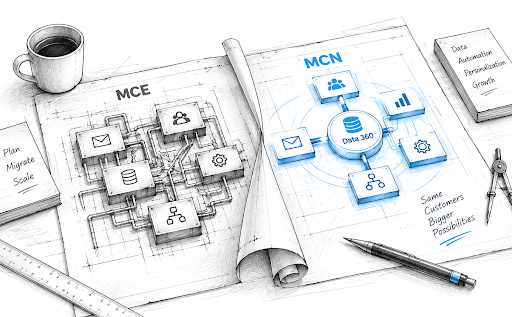
Salesforce introduced Marketing Cloud Next in 2025, but the real shift isn’t the name; it’s the platform underneath it. MCN brings marketing closer to Salesforce Core, with Data 360, Flow, and Agentforce working alongside CRM data and business processes.
For MCE customers, that changes the equation. Marketing Cloud Engagement vs. Marketing means reassessing Business Units, data, journey logic, integrations, and governance.
In this article, we’ll cover the key differences, architecture changes, and practical migration steps from MCE to MCN.
Marketing Cloud Engagement vs. Marketing Cloud Next: What’s Actually Different
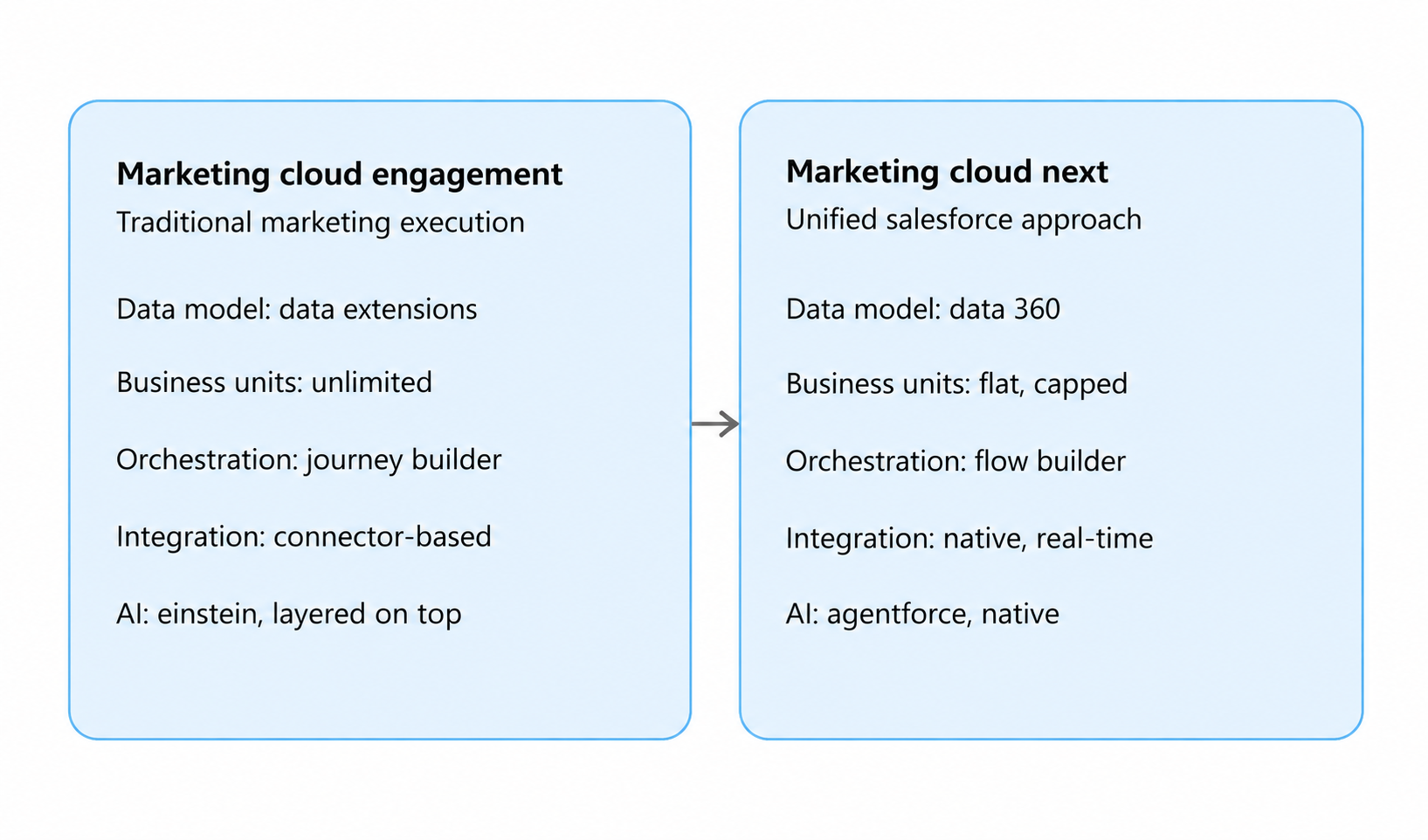
Marketing Cloud Engagement (MCE) and Marketing Cloud Next (MCN) both support campaigns, journeys, and customer engagement, but they differ in data models, Business Units, orchestration, integrations, and AI capabilities. MCE leans on marketing-specific structures, while MCN sits closer to Salesforce itself and Data 360.
MCE = Traditional marketing execution for campaigns and journeys.
MCN = A more unified Salesforce approach to marketing, data, automation, and AI.
These differences are exactly what shape the Marketing Cloud Next migration strategy.
1. Licensing and Pricing: What Does Marketing Cloud Next Actually Cost?
A Salesforce Marketing Cloud Next licensing and pricing comparison becomes more meaningful when you look at the current list prices rather than comparing product names alone.
Salesforce currently lists Marketing Cloud Next Growth at $1,500 per org/month and Marketing Cloud Next Advanced at $3,250 per org/month, both billed annually. Additional capabilities can add to the overall cost.
| Marketing Cloud Next component | Current listed price |
|---|---|
| Growth Edition | $1,500/org/month |
| Advanced Edition | $3,250/org/month |
| Additional Business Unit | $2,500/month |
| WhatsApp credits | From $2/1,000 credits |
| SMS | From $2/1,000 credits |
| Additional email sends | $2/1,000 credits |
| Flex Credits | $500/100K requests |
| Data 360 Profiles | From $240/1,000 profiles/year |
Salesforce also lists Enterprise Profiles at $420 per 1,000 profiles/year for Data 360. Data 360 can alternatively use consumption-based Flex Credits, currently priced at $500 per 100,000 credits.
2. Platform and Business Unit Model
The MCE vs. Marketing Cloud Next architectural differences become particularly clear when comparing Business Units, data boundaries, user access, and content management.
| Area | Marketing Cloud Engagement | Marketing Cloud Next |
|---|---|---|
| Business Unit structure | Parent-child hierarchy | No formal parent-child hierarchy |
| User context | User works within a specific Business Unit | Users can belong to multiple Business Units based on permissions |
| Data boundary | Primarily Business Unit-based | Business Unit + Data 360 data space |
| Data foundation | Marketing Cloud data structures | Data 360-centered model |
| Content model | Content spaces and sharing mechanisms | Multiple content workspaces with access-controlled CMS |
| Platform model | Dedicated marketing environment | More closely connected to Salesforce |
A Business Unit in MCE should not automatically be treated as a direct equivalent of one in MCN. The data, access, content, and governance model must be evaluated before mapping them.
3. AI and Personalization: Where Does Agentforce Fit?
Here's the real shift: AI stops being a feature you turn on and starts being a participant in the workflow.
In MCE, AI meant Einstein scoring things after the fact, subject lines, send-time optimization, bolted onto campaigns you'd already built. In Marketing Cloud Next, Salesforce Agentforce sits inside the workflow itself, reading unified customer context in real time and acting on it alongside sales and service.
Customer Data → Context → AI/Agent → Decision → Action
A cart gets abandoned, or a complaint gets filed, and instead of waiting for a batch job, an agent can see it and act immediately, on the same data layer marketing, sales, and service already share.
That power is exactly why it needs guardrails. Before letting an agent act on your behalf, enterprise teams need clear answers on:
Data access and permissions: what can it see, and should it?
Agent actions: what can it do, not just suggest?
Human approval points: where does a person sign off first?
Governance: who owns and controls the rules it runs on?
Auditability: can you trace why it did what it did?
Personalization logic: rules you understand, or a black box?
4. From Customer Signals to Real-Time Engagement
In MCE, channel engagement can depend on synchronized CRM data, Data Extensions, journey events, and automation workflows. Marketing Cloud Next shifts more of this decisioning toward connected customer data and real-time signals through Data 360.
MCE: CRM/Data Extensions → Journey Event → Decision → Channel
MCN: Data 360 → Customer Signal → Decisioning → Channel
For migration, enterprises should identify which journeys depend on batch data, scheduled automations, or external triggers and determine how those dependencies should work in the MCN environment.
How MCE and MCN Differ in Data and Architecture
Marketing Cloud Engagement operates on standalone, purpose-built infrastructure, with connectivity to Salesforce CRM data facilitated through Marketing Cloud Connect.
Marketing Cloud Next is architected natively on the Salesforce Platform, eliminating the need for a separate integration layer and enabling direct, real-time access to unified customer data across Sales, Service, and Commerce Cloud.
| Feature | Marketing Cloud Engagement (MCE) | Marketing Cloud Next (MCN) |
|---|---|---|
| Infrastructure | Standalone environment (ExactTarget-based legacy architecture) | Built natively on the Salesforce Core Platform |
| CRM Integration | Requires a connector (Marketing Cloud Connect), with periodic sync delays | Native, zero-copy access; operates within the same environment as Sales and Service Cloud |
| Data Foundation | Built around Data Extensions, Contact Builder, and custom schemas | Built around Data 360 (Data Cloud), Data Model Objects (DMOs), and Unified Individuals |
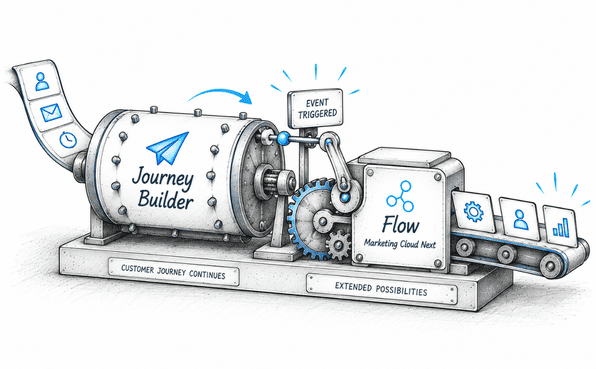
| Orchestration | Journey Builder and Automation Studio | Salesforce Flows, with event-driven, real-time logic |
| AI Capabilities | Einstein-powered prediction and optimization | Native Agentforce AI agents for autonomous campaign and lead management |
Marketing Cloud Next Migration Strategy: Moving from MCE to MCN
Marketing Cloud Next does not require enterprises to replace their existing MCE implementation. Salesforce supports a gradual adoption model, allowing teams to continue existing MCE operations while introducing MCN capabilities alongside them.
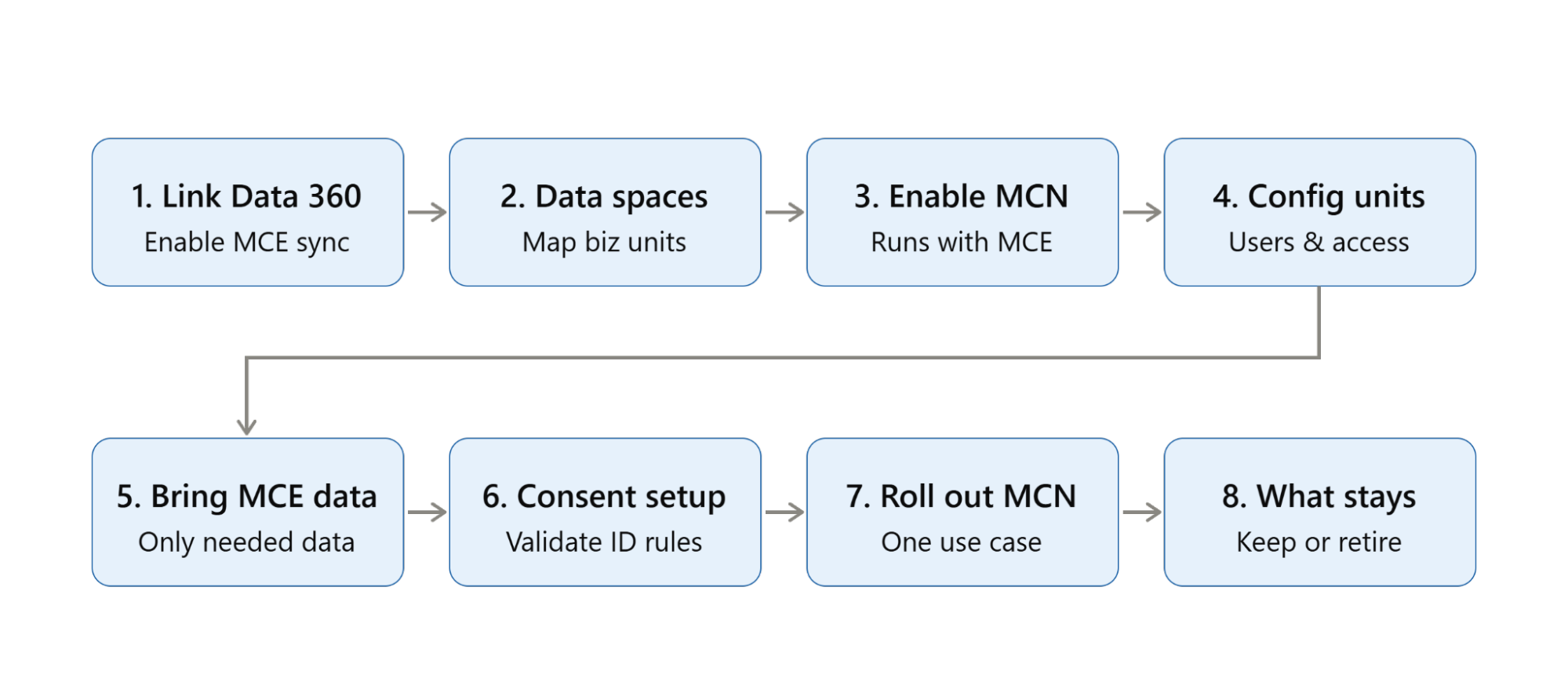
Step 1: Connect MCE to Data 360
Setup → Data Cloud Setup → Marketing Cloud Engagement → Configure Connection
Select your MCE environment, configure, and enable sync.
Marketing Cloud Engagement → Data 360 → Marketing Cloud Next
Step 2: Prepare Data Spaces
Setup → Data Cloud Setup → Feature Management → Data Spaces → New
Enter Name, Prefix, Description, and save.
MCN Business Unit ↔ Data 360 Data Space
Review existing MCE Business Units first — not all need a match.
Step 3: Enable Marketing Cloud Next
Setup → Marketing Cloud Next → Enable/Configure
Choose configuration, link the data space, verify access. Runs alongside MCE — not a replacement yet.
Step 4: Configure Business Units and Users
Marketing Cloud Next → Business Units → New Business Unit
Create the unit, link a data space, add users, assign permissions.
MCE Business Unit → Target MCN Business Unit → Data 360 Data Space
The two models don't map 1:1 — compare, don't auto-recreate.
Step 5: Bring In Existing MCE Data
Data 360 → Data Sources/Data Bundles → Select MCE Data
Map only the Data Extensions, contacts, and engagement data your specific MCN use cases need.
Step 6: Configure Consent and Identity
Data 360 → Identity Resolution → Configure Matching Rules
Set matching rules, then map consent and subscriptions.
Validate: identity, email/SMS consent, publication lists, preferences.
Skip this and records go inconsistent.
Step 7: Roll Out MCN Gradually
Start with one use case: Data 360 Segment → Flow → Decisioning → Channel → Measurement
Example: rebuild an MCE campaign's audience, build the Flow, test, activate.
Step 8: Decide What Stays in MCE
Not all-or-nothing review per asset: Keep → Extend → Redesign → Retire
MCE keeps what still fits; MCN takes over where connected data adds value.
A successful Marketing Cloud Next migration strategy isn’t about moving everything from MCE to MCN. It’s about identifying what works, what needs to change, and where MCN can deliver greater value.
How to Reduce Risk During an Enterprise Marketing Cloud Migration
MCE to MCN fits this pattern: a Cloud-to-Cloud (C2C) shift, not on-prem-to-cloud. Both platforms already run in the cloud. The risk isn't infrastructure. It's architecture: mismatched systems, legacy scripting with no equivalent, and schemas that don't map cleanly.
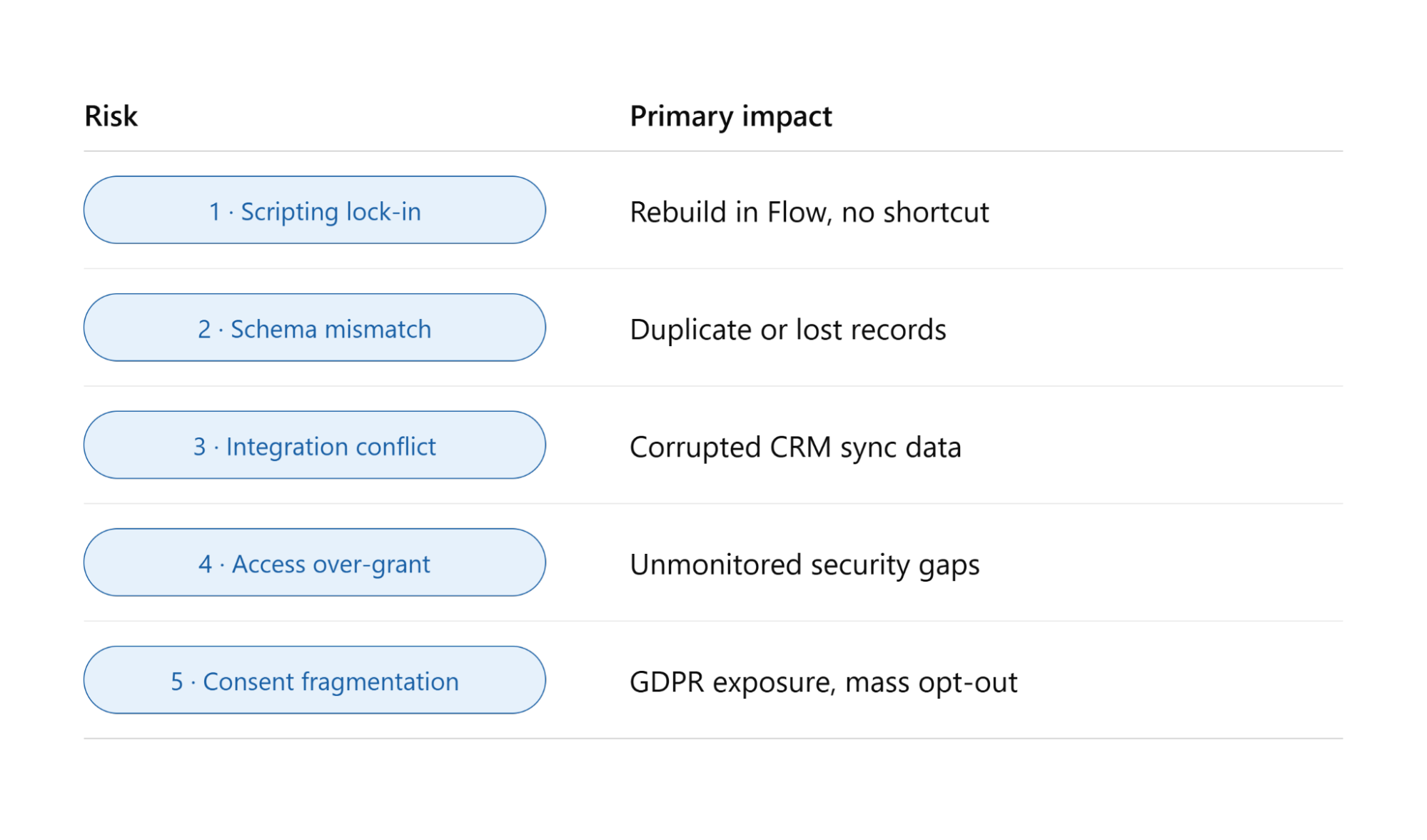
1. Proprietary Scripting Lock-In
The Risk:
MCE runs on AMPscript and Server-Side JavaScript for dynamic content, personalization, and behavioral triggers.
Marketing Cloud Next drops both entirely, running instead on Flow Builder, a visual, event-driven model.The AMPscript functions MCE teams depend on simply have no equivalent in MCN.
The Impact:
There's no lift-and-shift path here.
Every dynamic template, scoring script, and personalization block needs to be manually rebuilt in Flow, not ported, rebuilt from the ground up.
As of early 2026, Salesforce still hasn't released automated tooling for this conversion.
2. Core Data Schema Mismatch
The Risk:
MCE holds customer data in Data Extensions custom relational tables shaped over years of use.
Marketing Cloud Next is built on Data 360, structured around a fixed, unified identity model: Data Model Objects and Unified Individuals.
It's a different foundation entirely, not just a renamed version of the same thing.
The Impact:
Fitting a years-old, custom Data Extension structure into Data 360's rigid identity graph is far from simple.
Get the mapping wrong, and it won't fail loudly; it'll quietly fragment a customer into duplicate profiles, or overwrite records that were already there.
3. Native Integration Conflicts
The Risk:
Most MCE environments connect to Salesforce CRM via Marketing Cloud Connect.
MCN, by contrast, connects natively, with zero-copy access to that same CRM data.
Keeping both connections active against one CRM at once is a common transition-period setup; it opens the door to sync conflicts.
The Impact:
Two systems writing to the same customer record can corrupt pipeline data, cause sync delays, or send conflicting updates for the same customer from both platforms.
4. Over-Permissioning During Parallel Run
The Risk:
MCE and MCN typically run in parallel through the transition, a stretch some industry consultants expect could last until 2028 for full migrations.
To speed up data mapping between the two, teams under deadline pressure often hand out broad, temporary admin access.
The Impact:
Those access grants tend to outlive the migration itself, left active long after go-live, quietly creating unmonitored gaps in systems now holding your entire unified customer base.
5. Consent and Preference Fragmentation
The Risk:
MCE and Account Engagement typically store consent as basic boolean opt-in flags in custom tables.
MCN handles consent and identity through Data 360's Identity Resolution matching rules, a tighter, more centralized structure.
The two don't sync natively yet, and current guidance advises against sending from both platforms at once without a manual workaround in place.
The Impact:
Misalign the two consent models, and you're looking at real GDPR/CCPA exposure or, in a worst case, an accidental mass opt-out of your active subscriber list mid-cutover.
The Enterprise Migration Checklist: What to Validate Before Going Live
Data & Customer Profile Validation
Data Mapping: Confirm Data Extensions, CRM data, and other MCE sources map correctly to Data 360 objects.
Record & Attribute Validation: Compare record counts, attributes, and identifiers between MCE and Data 360.
Identity Resolution: Confirm records are matching correctly, with no duplicate profiles created.
Business Unit & Environment Readiness
Business Unit Mapping: Validate MCE Business Units against target MCN units and their data spaces.
User Access: Review users, permission sets, roles, and access before go-live.
Configuration Validation: Confirm required MCN features, workspaces, and connections are set up correctly.
Integrations & Automation
Integration Testing: Test CRM connections, APIs, data feeds, and sync processes.
Journey & Automation Validation: Check entry events, decision logic, and scheduled automations.
Flow & Data Dependencies: Confirm Flow and Data 360 workflows trigger the right actions.
Consent, Security & Governance
Consent Validation: Map MCE publication lists and consent to MCN's communication model.
Access & Permissions: Confirm users only see the data their role needs.
Governance Checks: Validate identity, consent, and integration controls before launch.
Business Validation & Cutover
UAT: Have business owners validate journeys, personalization, and reporting.
Parallel Testing: Run MCE and MCN side by side and compare results.
Cutover & Rollback: Define sequence, ownership, checkpoints, and a go/no-go decision.
From MCE to MCN: A Practical Transition and Setup Guide
What Changes After the Migration? Measuring the Impact on Your Marketing Architecture
The shift from Marketing Cloud Engagement (MCE) to Marketing Cloud Next (MCN) is less about replacing one marketing tool with another and more about changing the underlying data, orchestration, and platform architecture.
| Architecture Area | Before: Marketing Cloud Engagement | After: Marketing Cloud Next |
|---|---|---|
| Data Model | Data Extensions, synchronized data, and marketing-specific structures | Data 360 and connected customer data |
| Business Units | Parent-child Business Unit hierarchy | Business Units associated with Data 360 data spaces |
| Orchestration | Journey Builder and Automation Studio | Flow and connected Salesforce orchestration |
| Customer Context | Marketing and CRM data accessed through integrations | Broader customer context through Data 360 |
| Broader customer context through Data 360 | Marketing-specific automation and personalization | Data 360, Flow, and Agentforce capabilities |
| Integrations | Marketing Cloud-specific connectors and APIs | Greater alignment with Salesforce platform services |
Measuring the Architectural Shift
Enterprises can measure the transition across three areas:
1. Data & Customer Context
Data Access: Can teams access the customer data needed for segmentation and personalization?
Data Quality: Are identity, consent, and data relationships accurate across MCE, CRM, and Data 360?
2. Orchestration & Automation
Process Efficiency: Has the number of manual steps and separate automations decreased?
Journey Performance: Can journeys use connected data and Salesforce workflows more effectively?
3. Platform & Operations
Integration Complexity: Which legacy integrations can now be simplified or retired?
Governance: Does the new Business Unit and data-space structure provide clearer data access and control?
Conclusion
Marketing Cloud Engagement vs. Marketing Cloud Next isn’t just about choosing between two platforms; it’s about rethinking how your marketing ecosystem connects data, orchestration, automation, and AI.
A successful transition starts by evaluating your existing MCE setup and deciding what to keep, redesign, or extend in MCN. The goal isn’t simply to migrate; it’s to build a smarter, more connected marketing architecture.
With the right Salesforce Consultant or Marketing Cloud consultant, enterprises can turn this transition into an opportunity to simplify operations, unlock better data connectivity, and prepare marketing for what’s next.
Frequently Asked Questions
-
No. Salesforce hasn't announced a sunset date for MCE, and it remains fully supported. If your current setup is performing well, staying on MCE while exploring MCN in parallel is a reasonable path.
-
Not immediately. Coexistence is the recommended starting point; the safer approach is to run both side by side and validate MCN before considering a full replacement, rather than treating it as a forced swap.
-
It comes down to infrastructure. MCE runs on its own separate, ExactTarget-based infrastructure with batch data syncing. MCN is built natively on the Salesforce platform, with Data Cloud as its foundation instead of a synced layer.
-
Not really, as a self-contained tool. MCN depends entirely on a clean, well-governed Data Cloud setup underneath it, so the quality of your identity resolution and data governance directly shapes how well it performs.
-
Differently in structure. MCN uses a consumption-based pricing model, where costs scale with usage rather than a fixed license fee, making upfront budgeting less predictable than with MCE's flatter licensing model.
-
It supports both. MCN is positioned as an AI-powered platform built directly into Salesforce that serves B2B and B2C use cases, whereas MCE has traditionally leaned heavily toward B2C execution.
-
Yes, for now. MCE isn't going anywhere soon, so there's still a real need for people who know Journey Builder and AMPscript, though building familiarity with Data 360 and MCN's Flow-based model is increasingly worth doing alongside it.
-
Mostly data friction. Disconnected data, slow sync cycles between MCE and your CRM, or being unable to activate real-time customer signals in journeys are the clearest signs it's worth seriously evaluating Marketing Cloud Next.
Related Readings
Let’s Talk

Drop us a note, we’re happy to take the conversation forward 👇🏻