
Key takeaways:
Teams look for an Unbabel alternative or Language I/O alternative to compare and get the best solution for their Salesforce.
The right choice depends on your main need. Whether you need live chat translation, content translation, human-refined replies, or API-based builds.
ChatBridge suits live chat best, with native Service Cloud translation across 130+ languages that extends to case feed, emails, and Chatter.
If you run support on Salesforce and need to talk to customers in other languages, two names come up almost immediately: Unbabel and Language I/O. Both are established. Both integrate with Salesforce. And both are worth a look.
But they aren’t the right fit for every team. Some teams find the pricing hard to predict. Others want something built only for live chat inside the Service Console. Others just want a simpler setup. If that sounds like you, this guide walks through the best Unbabel alternative and Language I/O alternative options, what to look for, and how to choose.
What to Look for in a Salesforce Service Cloud Translation Tool
Before comparing names, decide what “good” translation solution looks like for your team. Here’s a simple checklist:
Native integration. It should live inside Service Cloud, not in a separate tab or browser extension.
Real-time speed. Live chat needs translation that keeps pace with the conversation.
Language coverage. Check less common languages, not just the top ten.
Coverage beyond chat. Your cases also include Case feed emails and Chatter comments.
Security. Look for AgentExchange listed apps and security status.
Clear pricing. You should be able to predict your cost as volume grows.
Low maintenance. Ideally, no developer needs to babysit it.
Keep this list handy. We’ll use it to compare every option below.
Unbabel and Language I/O at a Glance
Let’s start with a fair look at the two tools you’re comparing against.
Unbabel
Unbabel is built for customer service and combines machine translation with human reviews to keep quality consistently high. It has native connectors for Salesforce Service Cloud, Zendesk, Freshdesk, Intercom, and others, so agents can translate tickets, chats, and emails without leaving their workflow.
Strengths: polished, brand-sensitive output, plus human review when you need it.
Trade-offs: human review can add time to replies, and pricing is custom and volume-based.
Language I/O
Language I/O focuses on real-time translation for support teams. Its Salesforce integration covers chat, cases, knowledge articles, and social, across 150+ languages.
Strengths: broad language coverage and support for several channels in one platform.
Trade-offs: It serves many CRMs, so it isn’t purpose-built only for Salesforce.
Both are solid. Now let’s look at what else is out there.
Top Alternatives to Unbabel and Language I/O for Salesforce Service Cloud
ChatBridge
ChatBridge is a real-time chat translator for Salesforce built to live natively inside Service Cloud. It translates conversations as they happen, so agents and customers can chat in their own languages. With support for 130+ languages and a built-in fallback system, it keeps replies fast and reliable, even for less common languages.
What stands out:
Translates live chat in real time, with no copy-paste and no separate tab.
Covers 130+ languages to even support edge cases.
Installs from Salesforce AppExchange, with no custom integration project.
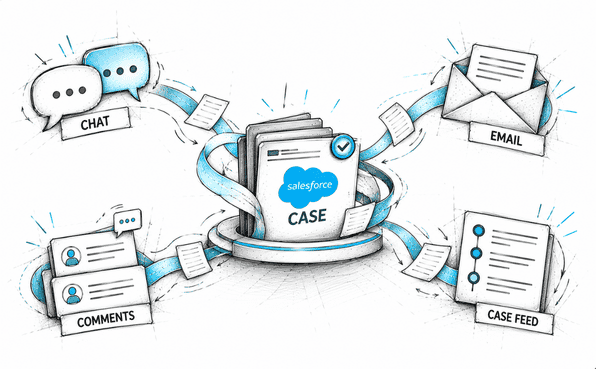
Extends to Case feed, knowledge articles, posts, emails, and Chatter comments, so the whole case stays consistent.
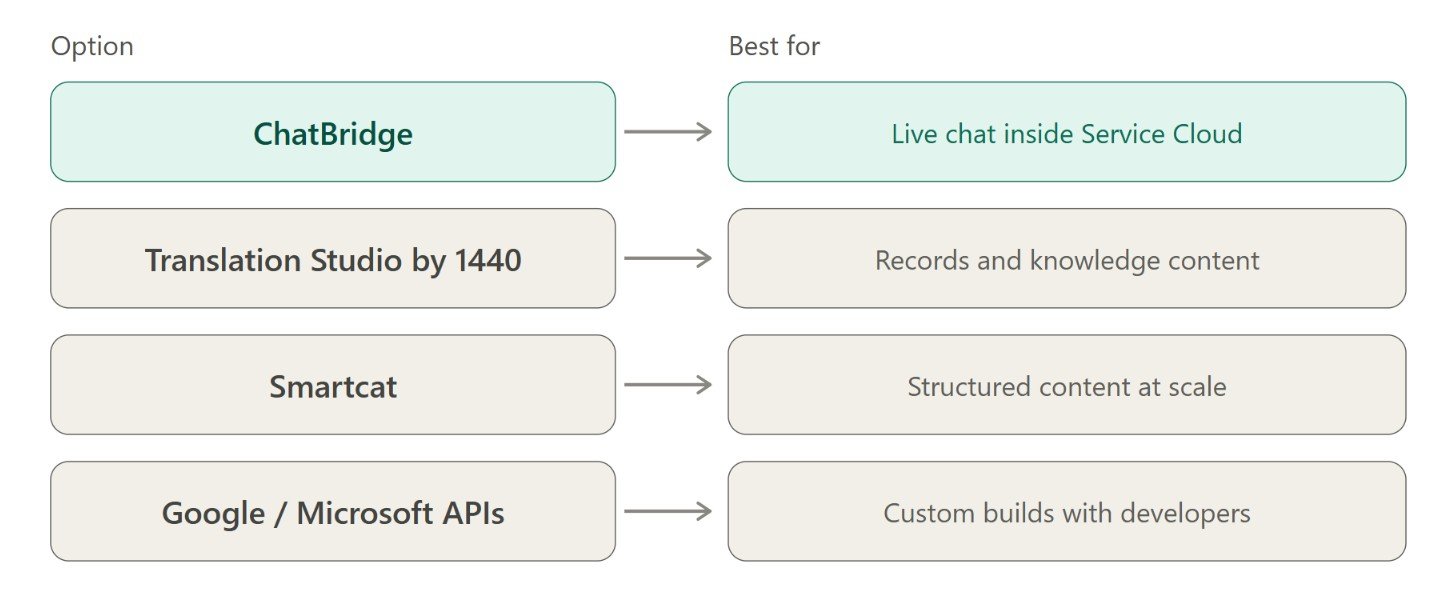
Best for: teams whose main need is fast, reliable Salesforce chat translation inside the Service Console.
Translation Studio by 1440
Translation Studio focuses on translating Salesforce records, messaging, emails, and knowledge articles, with tools for Agentforce use cases.
Best for: teams that need translation across many Salesforce objects, not just live chat.
Limitation: it’s broader in scope, so it’s less specialized for fast live-chat conversations.
Smartcat
Smartcat is a translation management platform. Teams send tickets and knowledge articles out for translation, review them, and sync the results back to Salesforce. It uses translation memory and glossaries to keep terms consistent.
Best for: structured content like knowledge articles and documentation at scale.
Limitation: it’s an asynchronous workflow, so it doesn’t suit a customer waiting in a live chat window.
Google Cloud Translation and Microsoft Translator
These general-purpose APIs are powerful and easy to find. They connect to Salesforce through third-party connectors or custom builds.
Best for: teams with developer capacity who want full control.
Limitation: someone has to build and maintain the integration, and they aren’t designed around support-specific tone and context.

Unbabel vs Language I/O vs Alternatives: Comparison Table
| ChatBridge | Unbabel | Language I/O | Translation Studio by 1440 | Smartcat | Google/Microsoft APIs | |
|---|---|---|---|---|---|---|
| Built for live Salesforce chat | Yes | Partly (multi-platform) | Partly (multi-platform) | Partly (broader scope) | No (content-focused) | No |
| Real-time speed | Instant, in-chat | Near real-time; human review adds time | Real-time | Fast | Not real-time | Instant, with setup |
| Lives inside Service Console | Yes | Yes | Yes | Yes | No (separate platform) | Not natively |
| Beyond chat (email, feed) | Yes | Email and tickets | Cases, articles, social | Records, emails, articles | Tickets, articles | Depends on build |
| Setup effort | Install and configure | Moderate | Moderate | Moderate | Moderate | Developer needed |
| Best suited for | Live chat support | Polished, human-refined replies | Multi-platform support teams | Records and knowledge content | Structured content | Custom builds |
Pricing and features change often, so confirm current details with each vendor before you decide. For ChatBridge-related enquiries, drop an email to chatbridge-sales@concret.io.
How to Choose the Right Alternative for Your Team
There’s no single winner. Match the tool to the problem you actually have:
Mostly live chat? Pick a native, real-time tool built for Service Cloud.
Mostly knowledge articles and documents? A content-focused platform fits better.
Need polished, brand-sensitive replies and can accept some delay? A human-in-the-loop option makes sense.
Have developers and want full control? An API-based build can work.
Want to start fast with minimal setup? Choose an AppExchange-installed app.
A quick decision checklist:
What channel causes the most delay today: chat, email, or both?
How many languages do you need, and how rare are they?
Who will maintain the tool after launch?
Can you predict your cost as ticket volume grows?
Does it need to work across Case Feed and Chatter too?
If your answers point to live chat and low maintenance, the next section is for you.
Why ChatBridge Is a Strong Unbabel Alternative
Plenty of tools can translate text. What sets ChatBridge apart is its focus. It was built for one job: helping Salesforce agents chat with customers in any language, live, without leaving the console.
Here’s what that means in practice:
Built for Service Cloud, not retrofitted. There’s no separate app, extension, or integration project.
Consistent speed across 130+ languages. Quality doesn’t drop off for less common languages.
Whole-case coverage. Translation extends across chat, cases, emails, posts, and comments. So no part of a case becomes a blind spot.
Built by a Salesforce PDO team. That means development follows Salesforce’s own program standards.
Simple AppExchange installation. Teams can get started without a long rollout.
Supports Google, Microsoft, and Bhashini language translator API for accurate results.
Cost-competitive compared to other tools, including Salesforce's native solutions.
For teams comparing Salesforce chat translation options, that mix of speed, simplicity, and native fit is often the deciding factor. It’s why many look at ChatBridge as a practical Unbabel and Language I/O alternative when live chat is the main need.
Final Thoughts
Unbabel and Language I/O are strong tools, and for some teams they’re exactly right. But if your priority is fast, simple, native Salesforce chat translation, it’s worth looking at alternatives built around that one job.
The best choice depends on what you need most: live chat, content translation, human-refined output, or full control through APIs. If live chat inside Service Cloud is your main challenge, ChatBridge gives you real-time translation across many languages and goes beyond chat to case feed, emails, and more. Ready to see ChatBridge in your own Salesforce? Get it now from AgentExchange.
Frequently Asked Questions
-
Only if you use Salesforce’s native translation. Third-party apps like ChatBridge work in any Service Cloud org without the Agentforce add-on, so teams can add real-time chat translation without a larger Agentforce commitment.
-
Yes, with ChatBridge. You connect your existing Google Cloud Translation or Microsoft Translator account, keep your enterprise agreement and data processing terms, and pay the engine provider directly with no markup.
-
ChatBridge supports Bhashini, the Government of India’s language platform, covering all 22 scheduled Indian languages, including low-resource languages like Kashmiri, Manipuri, and Sindhi. This suits Indian banks and insurers handling multilingual customer communication.
-
ChatBridge supports 130+ languages, depending on the engine you choose. Google, Microsoft, and Bhashini each cover different language sets, so you can pick the engine that performs best for your customers’ languages.
-
ChatBridge translates live chat in real time inside the Service Console. It also covers Case Feed, emails, and Chatter comments, so the whole case stays in one language for the agent.
-
ChatBridge is listed on Salesforce AppExchange (formerly AppExchange) and runs inside your Salesforce org. Because you use your own engine key, translation requests stay under your existing Google or Microsoft data processing terms.
Related Readings

Let's Talk

Drop us a note, we’re happy to take the conversation forward 👇🏻