

Key Takeaways:
Partner implementation: Data migration, architecture, automation workflows & custom integrations.
Cost: software subscriptions, mandatory HubSpot onboarding fees, partner execution, with project fees scaling based on data complexity & portal tier.
Timelines typically take 2-4 weeks for Starter, 6-12 weeks for Professional & 3-6 months for Enterprise.
Technology is evolving Artificial Intelligenct) (AI), and businesses are adapting it to generate revenue with improved marketing and sales practices.
Thanks to HubSpot (HS), businesses have a connected, improved, and affordable solution after Customer Relationship Management (CRM) to nurture customers systematically.
However, getting started with HubSpot Marketing Hub implementation is not just another integration. But to define the scope, primary goals, and who owns data migration, workflows, and training.
Careful consideration avoids strategic, technical, and organizational roadblocks and drives your business growth while aligning your organization’s goals.
In this HubSpot Marketing blog, we will discuss how to implement Marketing Hub for a business like yours step by step.
How We Implement HubSpot Marketing Hub for Your Business to Nurture Your Customers
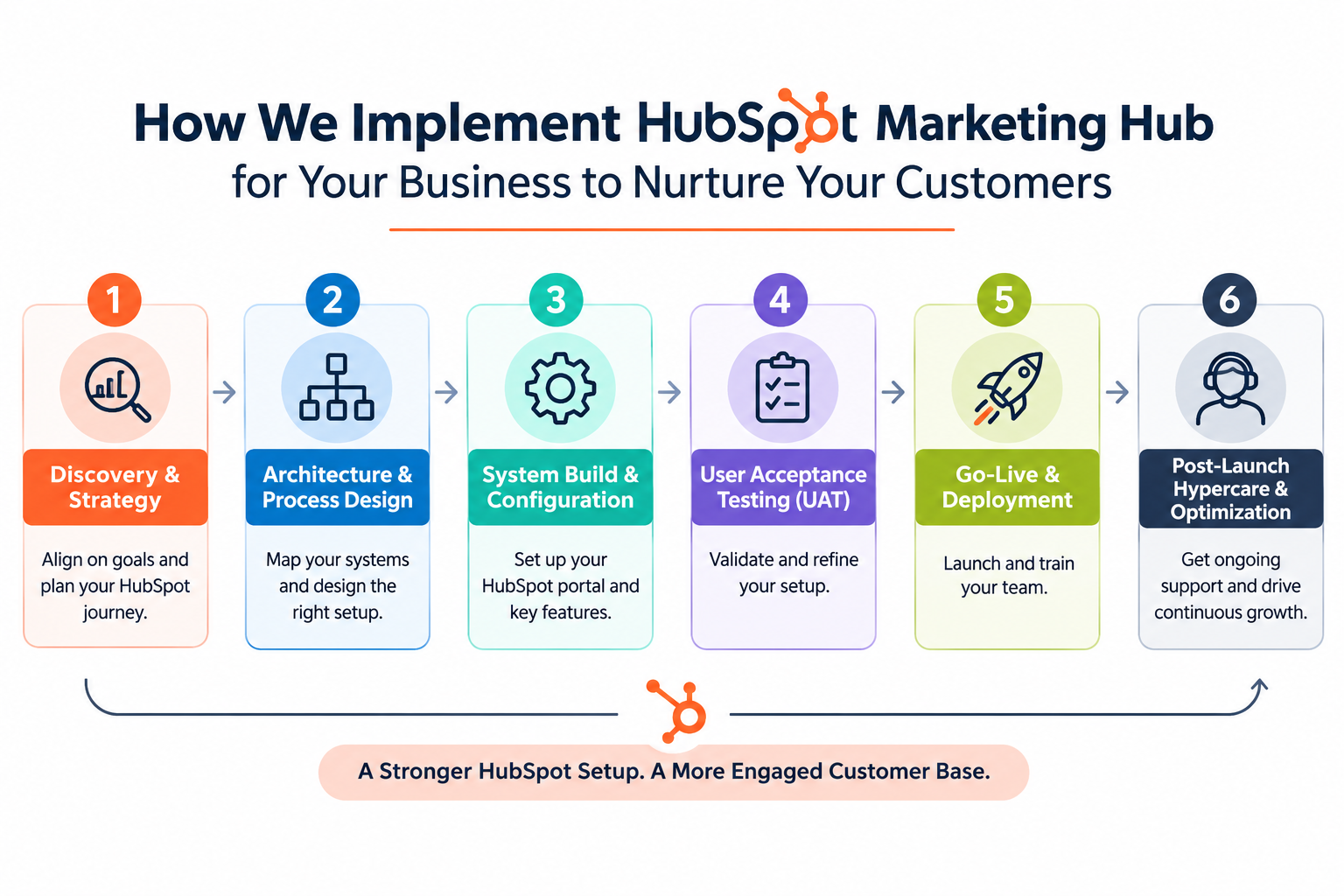
Phase 1: Discovery & Strategy
Following contract execution, we initiate detailed alignment sessions to map out your implementation roadmap. Our team reviews explicit project requirements, core deliverables, operational milestones, and deployment methodologies.
Phase 2: Architecture & Process Design
We analyze your business architecture to blueprint custom portal configurations, map data models, and establish structured enablement frameworks for core team members.
Phase 3: System Build & Configuration
Upon design sign-off, we construct and configure your database infrastructure to meet your specific operational needs. Key build elements include granular user permissions, subscription preference centers, lifecycle stage definitions, and initial campaign execution frameworks.
Phase 4: User Acceptance Testing (UAT)
Conduct thorough UAT scenario testing before full production deployment. This testing window ensures all custom logic, properties, and system configurations can be refined and validated.
Phase 5: Go-Live & Deployment
At production launch, we lead role-based training sessions for administrators and end-users, ensuring seamless system adoption across your entire organization.
Phase 6: Post-Launch Hypercare & Optimization
Our engagement extends well past your launch date through dedicated post-launch support. We evaluate operational benchmarks against your initial roadmap while actively monitoring emerging technical edge cases. Internally, our team conducts regular review sessions to further optimize, refine, and support your ongoing growth.

What HubSpot Marketing Hub Implementation Actually Includes (Onboarding vs Implementation)
HubSpot Marketing Hub onboarding vs. Implementation; they have the difference that costs you money.
Both terms are used interchangeably and are not the same product.
HubSpot Onboarding: -> Is HS’s mandatory, fee-based service on Professional and Enterprise tiers: Remote guidance from an onboarding specialist within 90 days of purchase. Your team still does the configuration, data import, and build.
HS Marketing Hub Implementation: It is the actual build: data architecture, migration, pipelines, workflows, integration, reporting, and training, done for you.
| HubSpot guided onboarding | Partner implementation | |
|---|---|---|
| Who builds the portal | Your team, with coaching | Certified consultants, with your approvals |
| Data migration | Your team prepares and imports | Audited, cleaned, mapped, and imported |
| Automation | Advice on what to build | Workflows built, tested, and documented |
| Training | Product walkthroughs | Role-based sessions in your own portal |
| After go-live | Program ends | Post-launch support window |
If your organization has a full-time ops owner with HubSpot experience, then the guided onboarding can be enough. In case you don’t have the fee, buy guidance while the build-the-experience part still sits on your team; that’s the trap.
-> For a deeper comparison, see our HubSpot Onboarding services.
Complete Marketing Hub Implementation Breakdown by Workstream
A complete Marketing Hub implementation rollout goes far beyond adding tracking scripts and dispatching emails. Regardless of which agency or partner handles your build, your deployment checklist should require the following core elements:
Discovery and Strategy: Complete process blueprinting, ideal customer persona definitions, targets, and documented functional requirements. If your implementation partner skips this initial step, hit pause immediately.
Data Architecture & Cleansing: Data auditing, deduplication, and thorough cleanup prior to migration, alongside custom property mapping and initial sandbox test imports.
Technical & Domain Setup: Deploying global tracking scripts, configuring email sending domains with SPF, DKIM, and DMARC protocols, establishing subscription types, and setting team permissions.
Lifecycle & Pipeline Design: Establishing precise lifecycle stage definitions, updating lead status properties, and configuring sales pipeline stages featuring strict entry/exit criteria.
Automation Workflows: Constructing lead capture forms, routing rules, automated nurture sequences, and lead scoring matrices executed only after underlying database health is secured.
Marketing Campaign Assets: Designing brand-aligned email templates, forms, conversion landing pages, and standardized UTM tracking parameters to preserve clear attribution integrity.
Reporting & Analytics: Building custom attribution reporting and executive dashboards mapped directly to your primary business metrics rather than relying on standard out-of-the-box templates.
Enablement & Support: Delivering role-specific user training, conducting real-world QA scenario testing, driving seamless go-live execution, and providing dedicated post-launch support.
What Differs by Tier: Starter, Professional, Enterprise
Starter Tiers: A lightweight setup covering essential form capture, basic automation rules, and a single operational pipeline spanning 2 to 4 weeks.
Professional Tiers: Provide advanced functionality including complex workflows, predictive lead scoring, custom dashboard analytics, and A/B testing capabilities. Projects frequently stall here when structural data architecture isn't fully established prior to constructing automated flows.
Enterprise Tiers: Incorporate custom object architectures, granular team permissions, multi-unit reporting, account-based marketing tools, and multi-touch attribution. These deployments typically span 3 to 6 months because establishing robust underlying data structures remains the core objective.
How Much HubSpot Marketing Hub Implementation Will Cost Your Business
HubSpot implementation charges for both Partner and HubSpot differ. In this section, we will understand the cost of HS implementation clearly, first with the three cost layers in the table and then what you should do. This way, you can make the right decision before finalizing.
| Layer | What it is | Typical number |
|---|---|---|
| Subscription | The software itself | Starts at $10/seat/mo; Professional from $890/mo (3 seats); Enterprise from $3,600/mo (5 seats) |
| HubSpot onboarding fee | Mandatory, one-time, Pro and Enterprise tiers | $3,000 (Professional) / $7,000 (Enterprise) |
| Partner implementation | The actual build | 5K–150K+ depending on scope |
Budget for all three before you sign anything. The first-year cost of Marketing Hub Enterprise is not $3,600 × 12. It's that, plus $7,000 for onboarding, plus the build.
What Could Be Partner Implementation Pricing Benchmark for an Organization Seeking Implementation
Here are some researched and analyzed pricing benchmarks of HubSpot implementation firms for an idea.
| Project type | Typical range | What drives it |
|---|---|---|
| Single-hub build, clean data | $5,000-$15,000 | Tier, number of workflows |
| Mid-market: 2-3 hubs, migration, integrations | 12,000–60,000 | Data quality, source systems, integrations |
| Enterprise: multi-hub, custom objects | 60,000–150,000+ | Data model complexity, multi-team rollout |
Note: The short answer to “What Does It Cost”:
The cost to hire HubSpot implementation consultant depends on 4 variables that move the number; they are as follows:
Which hub & Tier
How dirty the data is
Number of integrations
Process complexity
How Long Does Marketing Hub Implementation Take?
The exact time to implement HubSpot Marketing depends on whether you are with Starter, Professional, or Enterprise. For the estimation I mentioned a timeline below.
| Phase | Weeks | What happens |
|---|---|---|
| Discovery | 1–2 | Stakeholder interviews, process mapping, success metrics |
| Data audit & design | 2–3 | Cleanup, deduplication, property architecture, field mapping |
| Migration | 3–5 | Test import, full import, reconciliation |
| Build | 4–8 | Pipelines, workflows, forms, templates, integrations |
| Reporting | 6–9 | Dashboards tied to discovery metrics |
| Test & train | 8–10 | UAT with real scenarios, role-based training |
| Launch & hypercare | 10–12 | Go-live, issue triage, adoption checks |
Starter: 2-4 weeks
Professional: 6-12 weeks
Enterprise: 3-6 months.
What stretch time
Quality of the data
Number of source systems
Approval speed
Should You DIY, Use HubSpot's Onboarding, or Hire a Partner?
When DIY works
Handling deployment internally works well for Starter tiers with pristine records, straightforward operational rules, and a dedicated internal ops owner. At this foundational stage, HubSpot's own setup documentation provides sufficient guidance. Choosing DIY preserves your capital here, whereas engaging an implementation partner yields maximum return on Professional tiers or higher, where data architecture and automation logic demand deeper expertise.
When HubSpot's own onboarding is enough
HubSpot’s standard onboarding suits Professional or Enterprise organizations possessing a dedicated internal operations lead who requires strategic direction rather than execution hands. The program pairs your team with a specialist across a 60- to 90-day window, leaving all portal configuration on your shoulders.
When to Bring in an Implementation Partner
You're migrating from Pardot, Marketo, SFMC, or a legacy CRM
Your contact data lives in multiple systems and has never been deduplicated
You need integrations (ERP, billing, Salesforce, a data warehouse) beyond native connectors
Nobody internally will own the portal day-to-day
You need the portal live and documented by a fixed date
Your team needs training to actually adopt the system, not just log in
How to Evaluate HubSpot Implementation Firms
Most published listicles for the best HubSpot implementation agencies simply place their own author at the top. Rather than relying on self-serving rankings, conduct strict due diligence across these non-negotiable criteria:
Accreditations and Partner Tier: Prioritize verified badges in onboarding, data architecture migration, and custom integrations. Official HubSpot accreditations validate technical mastery across intricate, multi-hub enterprise builds.
Explicit Fixed-Fee Scope: Require fully documented deliverables, execution timelines, and costs locked firmly in writing prior to project kickoff.
Absolute Portal Ownership: Ensure your organization retains complete administrative credentials and direct billing, completely avoiding third-party agency dependencies.
Rigorous QA and Handoff Specs: Mandate clear scenario-based user acceptance testing along with comprehensive process documentation delivered during administrative handover.
Dedicated Post-Launch Support: Ensure a structured hypercare window following deployment to address emerging edge cases instead of immediate project sign-off.
Direct Industry References: Request contacts from similar business models, then actively call and interview them regarding performance.
Data-First Implementation Strategy: If an agency attempts to configure automation flows before auditing your database foundation, consider it an immediate red flag.
Common Marketing Hub Implementation Failures (and How They're Prevented)
The dirty-data import
The classic: export contacts from the old CRM, glance at the CSV, import. Three weeks later, the team discovers 200 duplicate records, phone numbers in three formats, and emails bouncing off typo domains.
The fix is unglamorous and non-negotiable: dedupe, standardize to E.164 phone format and ISO date formats, validate domains, and run a test import of a few hundred records before the real one.
Workflow conflicts nobody notices until attribution breaks
HubSpot logs that a workflow action completed; it does not warn you that another workflow just overwrote the same property. Teams end up with leads assigned to the wrong owner, lifecycle stages changed by competing automations, and attribution nobody trusts.
Prevention: a visual map of every workflow that touches each field, built before automation is activated.
Buying more Hubs to fix process problems
A disorganized pipeline or inconsistent data entry doesn't improve when you buy Service Hub; it amplifies the same chaos at a higher subscription cost. Audit the existing portal and its actual usage before adding anything.
The adoption cliff
You can fix the system, clean the data, and build clean processes; if the team keeps operating the way it did before, the same problems resurface within a quarter. Role-based training, documentation, and a hypercare window after launch are not add-ons; they're the difference between an implementation and a subscription.
No internal owner
Every successful engagement has one: a named admin on your side who makes decisions and enforces them after go-live. Data hygiene is not a one-time cleanup; it's an ongoing commitment with rules and ownership.
Why Teams Choose Concret.io
Official HubSpot Technology Partner, with 100+ HubSpot portals rebuilt
DiffSpot, our own admin toolkit, live on the HubSpot Marketplace, engineering depth, not just certifications
Salesforce + HubSpot fluency. As a Salesforce Select Partner and HubSpot partner, we run cross-stack migrations (Pardot, SFMC, Salesforce-to-HubSpot) in-house, with no subcontractors
Delivery models that pivot with you: Build & Deliver for the implementation, Operate & Maintain for ongoing support, or Build-Operate-Transfer if you want to own it with a trained internal team
Fixed-fee scopes — locked at proposal, with the scope and timeline written down
HubSpot Marketing Hub implementation requires the right orders for Hubs. You need expertise to ensure your organization is set up for success.
-> Start Smaller with a Portal Audit, Right Away.
Frequently Asked Questions
-
Starter: 2-4 weeks. Professional: 6-12 weeks. Enterprise: 3-6 months. Data quality and source-system count are the two biggest schedule variables.
-
Onboarding is HubSpot's coaching service guidance while your team builds. HubSpot Marketing Hub implementation is the build itself: data, pipelines, workflows, integrations, reporting, and training, done for you.
-
Yes, at the Starter tier with clean data and simple processes. At Professional and above, the data model, automation logic, and attribution setup are where Do It Yourself (DIY) builds fail; that's where a partner pays for itself.
-
Yes, Certified Solutions Partners can waive it when they deliver onboarding via the confirmation link at checkout. Confirm the waiver with the partner and your HubSpot rep before signing, and check that the charge is gone from your first invoice.
-
A partner matters most with migrations, dirty data, multiple integrations, or no internal portal owner. For clean Starter-tier builds, DIY with HubSpot's setup materials is reasonable.
-
Partner tier and accreditations, fixed-fee scope in writing, portal ownership, QA and documentation practices, post-launch support window, and industry references you actually call.
Related Readings
Let's Talk

Drop us a note, we’re happy to take the conversation forward 👇🏻

