Key Takeaways:
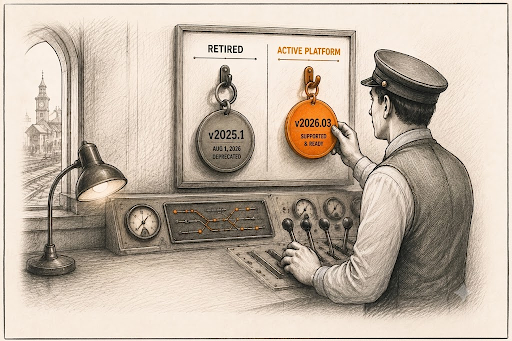
HubSpot Projects v2025.1 is deprecated after August 1, 2026.
Update
hsproject.jsonto v2025.2 or v2026.03 based on serverless function usage.Migrate early to prevent deployment issues and allow time for testing.
If you build on HubSpot's developer platform, mark your calendar. HubSpot Projects v2025.1 deprecation is now confirmed, with a sunset date of August 1, 2026. Once that date passes, building or deploying anything on this version simply won't work anymore.
Why is this happening? It's not a random product decision. AWS Lambda is retiring support for Node.js v20, and v2025.1 runs on exactly that runtime. HubSpot didn't really have a choice here.
But there's a silver lining. Instead of leaving developers hanging, HubSpot already shipped a replacement, Platform v2026.03, back in March 2026. So there's a real runway to plan this properly instead of scrambling in July.
Below, I'll walk through what's actually changing, whether this touches your setup at all, and what to do about it before the deadline hits.
The End of an Era: What HubSpot Projects v2025.1 Really Was
Before jumping into what's next, it's worth pausing on what v2025.1 actually gave developers.
When HubSpot released this version, it replaced the old, scattered way of building apps with something more structured: serverless functions, custom cards, and a project-based framework you could manage through the CLI. For a lot of teams, it quietly became the backbone of their custom HubSpot apps. Nothing flashy about it. It just worked, day after day, without much fuss.
A few things it handled well:
Custom integrations built around specific business needs
Serverless backend functions tied directly into HubSpot data
Full app projects deployed straight through the HubSpot CLI
So no, this chapter isn't closing because v2025.1 failed. It's closing because the Node.js runtime running on it is being pulled away by AWS. Sometimes that's just how software goes.
Why HubSpot Is Retiring Projects v2025.1 and What's Changing Behind the Scenes
Here's the real reason behind this August 2026 HubSpot deprecation: honestly, it has nothing to do with HubSpot chasing new features for the sake of it.
AWS Lambda, the service that actually runs serverless functions in the background, is dropping support for Node.js v20. HubSpot Projects v2025.1 happens to be built on that exact version. Once AWS pulls support, HubSpot can't keep it alive either. Simple as that.
So they had two options: let developers get stranded on outdated infrastructure, or build a proper replacement. They went with the second one.
That replacement is Platform v2026.03, which went generally available on March 30, 2026. It brings serverless functions back into the picture, this time on a newer runtime, and it also sets up a more predictable release cadence going forward:
| Detail | Information |
|---|---|
| New platform versions | Released every 6 months. |
| Support window | 18 months per version. |
| First version under this system | v2026.03. |
Honestly, this table alone should make future migrations less painful. Once developers know the rhythm, nobody has to be caught off guard again.
The Bigger Question: Will This Affect Your Team?
This is probably the part you clicked for, so let's not bury it.
You're affected if:
Your app's hsproject.json file lists the platform version as 2025.1
Your project depends on serverless functions built on v2025.1
Nobody on your team has touched this app in a while (be honest)
You're probably fine if:
Your app already runs on 2025.2 or later
You don't use HubSpot's developer platform or CLI-based projects at all
Your work is mostly on the CRM side, marketing, sales, or day-to-day task management inside HubSpot
That last point matters a lot. A lot of people hear "HubSpot Projects" and assume it's about their to-do lists or campaign boards. It isn't. This deprecation lives entirely on the developer side of the HubSpot ecosystem. If you're just using HubSpot for project management or task management as a business user, you can relax; this one's not for you.
August 1, 2026 Isn't Just a Date, It's Your Migration Deadline
It's tempting to glance at a deprecation notice and file it under "later." But August 1, 2026 is a hard stop, not a gentle nudge.
Once that date arrives:
Building new projects on v2025.1 stops working, full stop
You can't push updates to existing v2025.1 projects anymore
Apps still sitting on v2025.1 risk breaking outright as backend support disappears underneath them
This is exactly the kind of deadline that sneaks past busy teams. If your app has been running quietly in the background for months, untouched, unmonitored, this is the moment to actually go check on it.What Should You Do Before the Switch?
The good part is that HubSpot has actually made this HubSpot Projects v2025.1 migration pretty painless. No need to overthink it, just work through this in order.
Check your current version: Open hsproject.json and look at the platformVersion field. If it reads 2025.1, you've got work to do.
Decide where you're headed: There are really only two sensible destinations here: v2025.2, if your app never needed serverless functions in the first place, or v2026.03, if serverless backend logic is part of how your app actually runs.
Update your version number: After that, it's just a config change. Update the platform version in your JSON config to match wherever you're migrating to.
Test before you're forced to: Don't wait until the last week of July to see if anything breaks. Give yourself, and your team, room to fix things without panicking.
Keep Classic CRM Cards on your radar too: They will sunset on October 31, 2026. If your app still leans on those, you might as well knock out both migrations around the same time instead of doing this twice.
How to Migrate from HubSpot Projects v2025.1
Migrating from HubSpot Projects v2025.1 is straightforward, but the process depends on the version your project is currently running. HubSpot provides built-in CLI commands to simplify the migration and automatically update supported project components.
1. Check Your Current Platform Version
Open your project's hsproject.json file and look for the platformVersion field. If it's set to 2025.1, your project must be migrated before August 1, 2026 to continue receiving platform support.
2. Choose Your Migration Path
Your migration path depends on your current platform version and whether your project uses serverless functions.
Projects on v2025.1 should migrate to Platform v2026.03, which restores support for serverless functions on the latest developer platform.
Projects already on v2025.2 can upgrade to v2026.03 by updating the platformVersion field and uploading the project again.
3. Run the Migration
If your project is on v2025.1, navigate to your project directory and run:
hs project migrateThe HubSpot CLI will guide you through the migration and automatically update your project structure and supported components for Platform v2026.03.
4. Review and Test Your Project
After the migration is complete, verify that your application works as expected before deploying it. Pay particular attention to:
Serverless functions
API integrations
UI extensions
Environment variables and secrets
If your previous project stored environment variables in serverless.json, you'll need to recreate them as HubSpot Secrets because they aren't migrated automatically.
5. Deploy the Updated Project
Once you've completed testing, deploy the migrated project using the HubSpot CLI and monitor its behavior to ensure everything is working correctly in production.
Tip: If your application still uses Classic CRM Cards, consider planning that migration alongside this one. Classic CRM Cards are scheduled for retirement on October 31, 2026, so combining both upgrades can reduce future maintenance effort.
If Not Projects v2025.1, Then What? Exploring Your Best Options
So where do you actually land? Here's the short version.
| Option | Best For | Serverless Support |
|---|---|---|
| v2025.2 | Teams that never relied on serverless functions. | No |
| v2026.03 | Teams whose apps depend on backend serverless logic. | Yes |
If serverless functions were the only reason you'd stayed on v2025.1 this whole time, v2026.03 basically removes that excuse. Same modern project structure you're used to, minus the missing piece.
And realistically, for most developers this isn't some huge overhaul. It's closer to updating a version number, running your tests, and moving on with your day.
Conclusion
The retirement of HubSpot Projects v2025.1 is a reminder to review your developer projects before the August 1, 2026 deadline. Migrating early to a supported platform will help you avoid deployment issues and keep your applications running smoothly.
If you need guidance with the transition or are planning new HubSpot applications, experienced HubSpot consulting services and HubSpot implementation services can help ensure a seamless migration and long-term platform stability.
Frequently Asked Questions
-
The deprecation is driven by AWS Lambda ending support for Node.js v20, which HubSpot Projects v2025.1 relies on. HubSpot is replacing it with newer platform versions built on supported runtimes.
-
If your project uses serverless functions, migrate to Platform v2026.03. If it doesn't require serverless functionality, v2025.2 may be sufficient.
-
No. HubSpot provides migration tools through the HubSpot CLI, but developers need to initiate the migration, test their applications, and deploy the updated project before the deprecation deadline.
-
Open your project's hsproject.json file and check the platformVersion field. If it is set to 2025.1, your project should be migrated before the deprecation deadline.
-
After the deadline, you won't be able to build or deploy projects using v2025.1, and existing applications may encounter issues as platform support ends.
Related Reading
Let’s Talk

Drop us a note, we’re happy to take the conversation forward 👇🏻