Deploying Agentforce Marketing: Configuring Autonomous Campaigns with Clean CRM Data
key takeaways
Agentforce Marketing replaces rigid workflows with AI that plans, executes, and optimizes campaigns around business goals.
Clean, unified CRM data is essential because every decision the Campaign Agent makes depends on its quality.
Deploying Agentforce successfully requires more than setup; data preparation, permissions, and guardrails are equally critical.
For over a decade, "marketing automation" has meant one thing: building rigid workflows. You open Journey Builder, map out every possible path a customer might take, add decision diamonds for every branch, and hope nothing goes off-script.
Agentforce Marketing changes the underlying model. Instead of handing an agent a map, you hand it a destination. You define the goal, and a Campaign Agent plans, builds, launches, and continuously optimizes the campaign to get there. It's not automation following instructions. It's autonomy making decisions.
But here's what most walkthroughs skip: an autonomous agent is only as good as the data it's reasoning over. Feed it a clean, unified customer record, and it makes sharp, well-targeted decisions in real time.
This article walks through what autonomous marketing campaigns actually are in Agentforce, why CRM data hygiene is the real prerequisite to deployment, and how to configure a Campaign Agent step by step with the guardrails you need before you let it run unsupervised.
Note: Agentforce now sits inside a reshaped Salesforce marketing lineup: Marketing Cloud Next, Engagement, Account Engagement, Growth and Advanced editions.
This post is scoped to the deployment part; if you are someone who missed the recent updates Salesforce brings, then our posts on Marketing Cloud Next and its editions are your quickstart.
A Brief Introduction to Agentforce Marketing
Before we get into deployment, let's clear up what "Agentforce Marketing" actually means, since the name confuses a lot of people.
It's not a new AI feature added on top of Marketing Cloud, and it's not a separate product either. Agentforce Marketing is simply the new name for Salesforce's marketing suite, what Salesforce used to call Marketing Cloud. But it's not just a rename. Agents are now built into the platform itself, not added on top of it.
Inside this suite, Marketing Cloud Next is the actual product, the newer platform built on Data Cloud, Flow, and Agentforce. So think of it this way: Agentforce Marketing is the umbrella name, and Marketing Cloud is what you're actually setting up and working in, with Agentforce built in.
Want to know the difference between Salesforce Marketing solutions? Read our Marketing Cloud Engagement vs. Account Engagement guide.
One more thing before deployment: Agentforce pricing isn't just a flat fee; it offers various flexible pricing options. See our breakdown of the new Agentforce pricing models for the details.
What "Autonomous Campaigns" Actually Mean in Agentforce
Agentforce's Campaign Agent is not a chatbot with pre-written scripts, and it isn't just doing retrieval-augmented generation over your content library. It runs on the Atlas Reasoning Engine, which operates in a loop:
Plan: interpret the marketing goal and current customer state
Act: generate a campaign brief, segment an audience, draft content, or trigger a journey step
Evaluate: check engagement and performance signals against the goal
Refine: adjust targeting, timing, content, or spend and repeat
The critical shift from traditional automation is this: in Journey Builder, you define every branch. In Agentforce, you define the goal and guardrails, and the agent decides the branches dynamically, based on how each contact actually behaves.
To do that, the agent needs a single, trustworthy view of each customer. That's where Data Cloud comes in; it unifies CRM records, engagement history, and even unstructured data (PDFs, transcripts, web content) into one profile the agent can reason over. The agent doesn't see "a lead record" and "an email engagement log" as two separate things. It sees one customer, and it acts on the whole picture.
Why Clean CRM Data Is the Real Prerequisite
Before you configure a Campaign Agent, there's one prerequisite that matters more than anything else: clean, reliable CRM data. Without it, even the best deployment won't perform as expected.
An autonomous agent doesn't just execute your instructions; it makes judgment calls using your data as ground truth. That means data problems don't stay contained; they affect every decision the agent makes.
Let's look at a few common data problems that directly affect autonomous marketing campaigns:
Duplicate contacts fragment the customer view.
If the same person exists as three separate records in your data with different engagement histories, the agent can't reason this as the single person; it's reasoning about three partial pictures. You'll see the campaign under-personalize, or worse, contact the same person multiple times with inconsistent messaging.
Stale or missing consent data can quickly turn into a compliance issue.
An autonomous agent acts based on the consent information it's given. If that data is outdated or incorrect, it may contact customers who haven't given permission, creating compliance risks at scale.
Mismatched or inconsistent field values break segmentation logic.
If "lifecycle stage" is populated with five different naming conventions across systems (MQL, Marketing Qualified, mql, Stage 2, blank), the segmentation isn't wrong because of the AI; it's wrong because the input data is inconsistent.
An autonomous agent doesn't only fail when data is bad. It fails confidently, and at scale, before anyone notices. This is precisely why data preparation isn't a "nice to have" step before deployment. Configuring the agent is the easy part. Getting the CRM into a state where the agent's autonomy is trustworthy is the real work.
Pre-Deployment: Preparing Your CRM Data
Before you start configuring Agentforce Marketing, make sure your CRM data is clean and well-structured. Preparation for Salesforce CRM data cleaning often takes longer than the configuration itself, but the success of the deployment depends entirely on it.
1. Deduplication and identity resolution:
Run a deduplication pass across Leads, Contacts, and Person Accounts. Where you have overlapping records from multiple sources (CRM, marketing automation, support), use identity resolution rules in Data Cloud to merge them into a single unified profile rather than relying on CRM-native dedupe alone.
2. Standardize field values:
Audit and normalize the fields your segmentation and journeys depend on, such as lead source, lifecycle stage, industry, and consent/opt-in status. Choose one standard set of values and update existing records so the agent isn't working with years of inconsistent data.
3. Harmonize data into Data Cloud
Map your CRM objects into Data Cloud's unified profile model. This is what gives the Campaign Agent its "single customer view"; without doing this mapping correctly, the agent is still reasoning over fragmented data even if it looks unified in the UI.
4. Define data quality rules before activation:
Set validation rules and required fields for the data your agent will rely on, especially consent status and contact preferences. Make sure incomplete or invalid data is blocked before the agent can use it.
This phase can take longer than the actual agent configuration; plan for it accordingly rather than treating it as a checkbox before the "real" setup work. If you don't have the internal expertise, it's worth bringing in help rather than rushing it; this is one of the areas our data services covers.
Step-by-Step: Configuring the Campaign Agent
To simplify the setup, let's break the configuration into three phases: (1) enabling Agentforce, (2) authorizing the agent, and (3) prompting the Campaign Agent.
Phase 1: Enable Agentforce
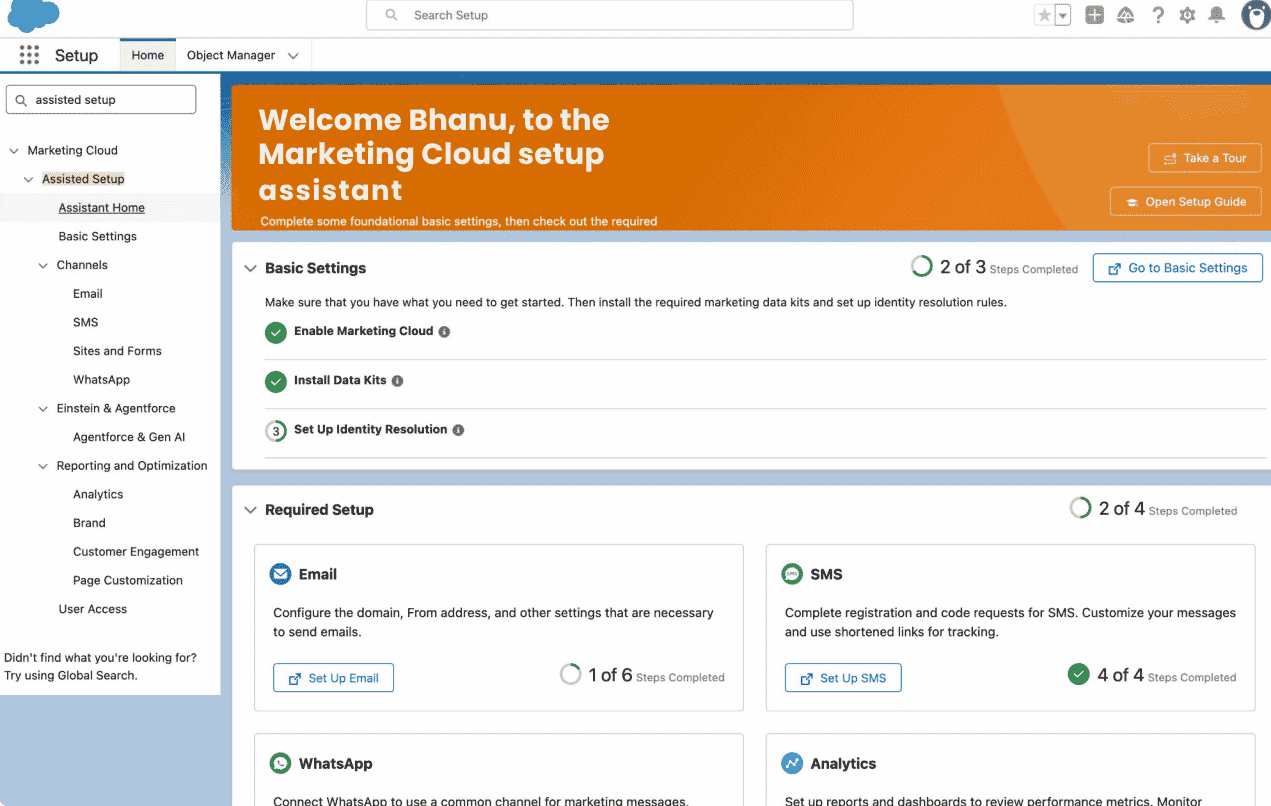
In Setup, select Marketing Cloud from the left rail, then open Marketing Cloud Assistant Home.
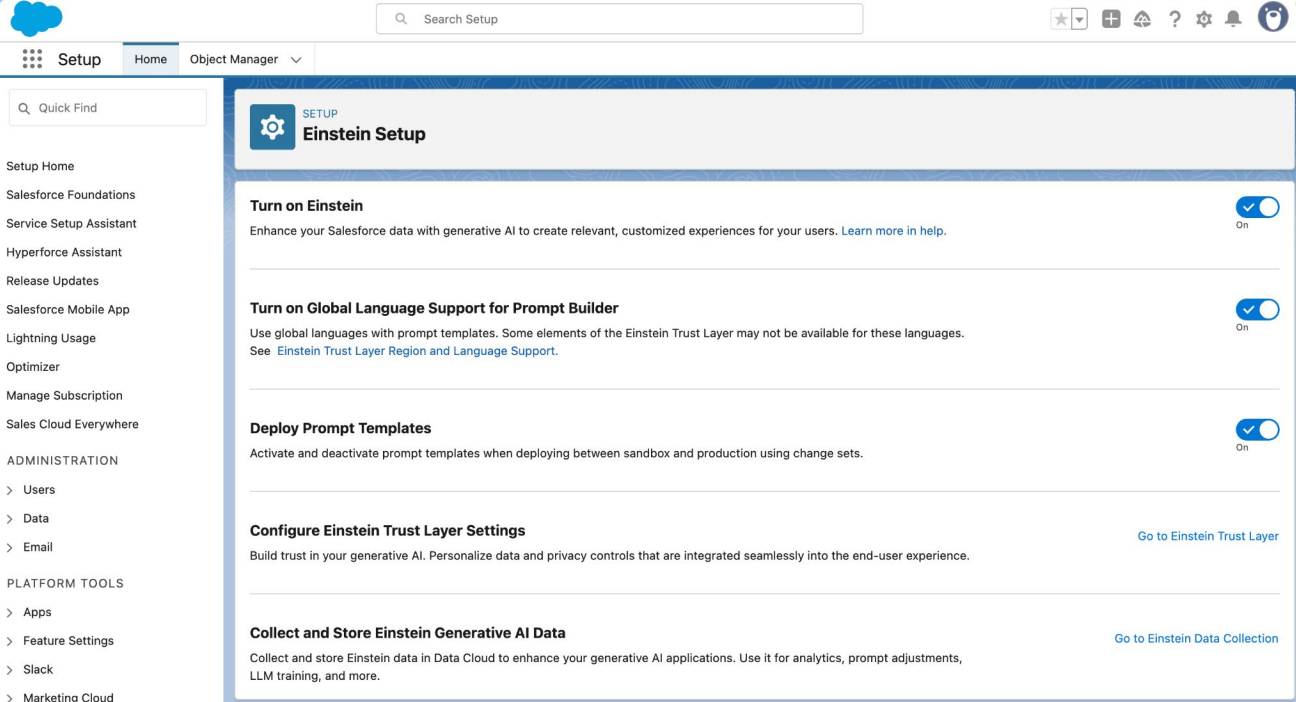
Scroll down and click into Einstein, then go to Einstein Setup.
Toggle on all three: Turn on Einstein, Turn on Global Language Support for Prompt Builder, and Display Prompt Templates.
Phase 2: Authorize the Agent
Search Agentforce Agents in Quick Find, toggle on Agentforce, and click + New Agent.
Choose Create from a template, then select Campaign Creation from the template menu.
Confirm the Marketing Campaigns topic is added, name your agent, add your company information (everything else comes pre-configured), pick your default language(s), and click Create, then Activate.
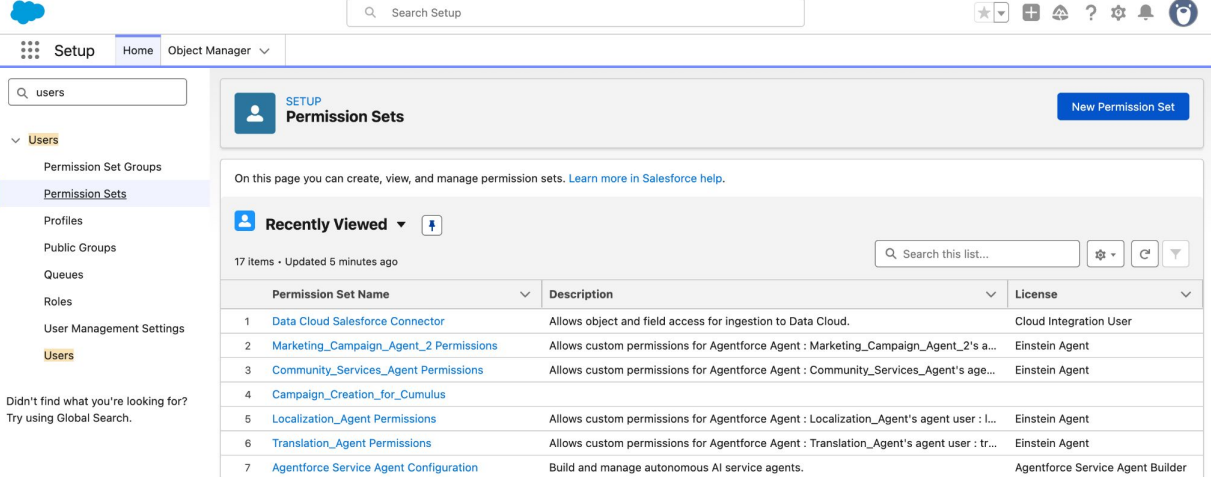
One more step before it's usable: permission sets. Go to Setup, search Users, and create a new permission set. Under that permission set, open Agent Access, add the agent you just activated, and save. Then assign that permission set to the relevant users under their Permission Set Assignments.
Phase 3: Prompt the Campaign
Once your data foundation is solid and Agentforce configured, setting up for the first campaign becomes comparatively fast, and a lot of it happens through plain language, not manual setup.
1. Describe your campaign in natural language:
This is the starting point. Instead of building a campaign piece by piece, you describe what you want in everyday language, and the Campaign Agent creates the brief, segment, and email from that one prompt.
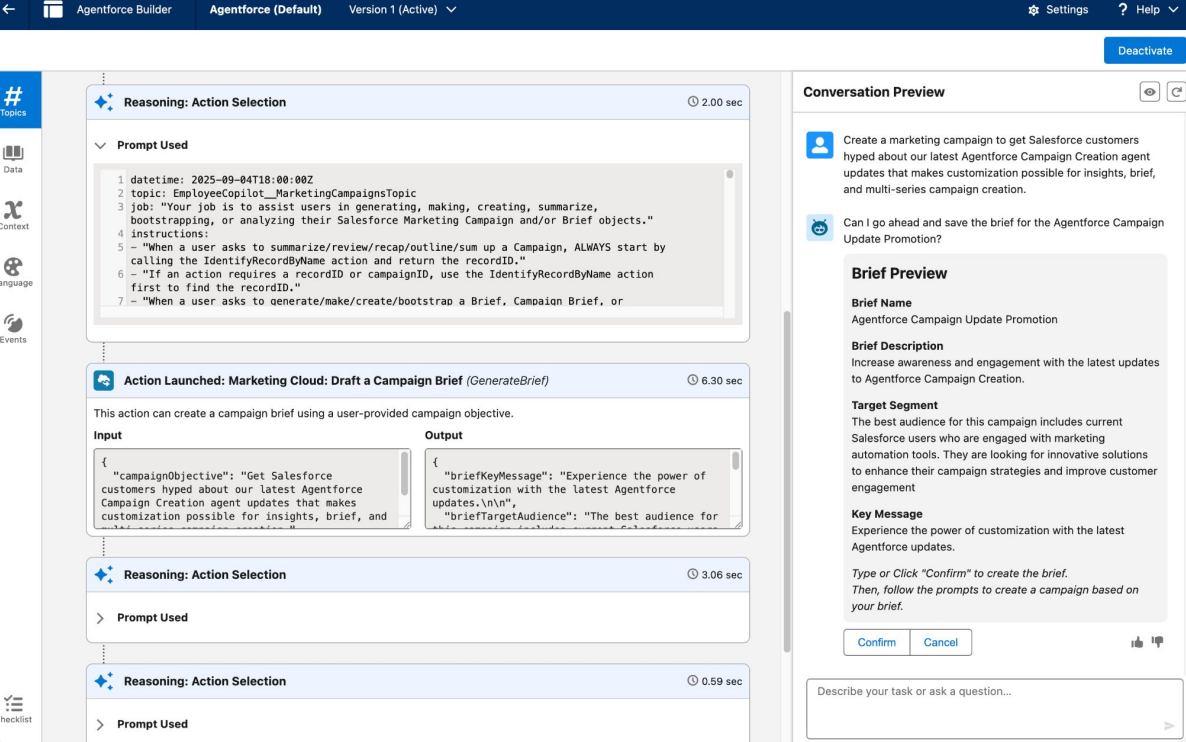
2. Customize your agent in Agent Builder:
Open Agent Builder in Setup to see and adjust what your agent actually does:
Topics show the tasks assigned to the agent, drafting email body copy, preheaders, and subject lines, optimizing SMS copy, or creating and summarizing campaigns and briefs.
Actions show what the agent is allowed to do, such as saving campaigns, summarizing campaigns, generating briefs, and more.
You can preview the agent right in the builder to test any changes before they go live.
3. Set brand guidelines in the CMS:
Give the agent your brand's default voice and tone you want it to write in. The agent uses this guidance every time it drafts or edits copy, and it applies across channels, so email and SMS stay consistent with each other instead of sounding like two different agents.
4. Set guardrails:
This is the step that determines how much you'll trust the deployment. Salesforce's Agentforce Marketing Goals Agent is built around this idea directly: marketers define the goal, budget, and autonomy limits, and the agent operates only within those boundaries. To set up guardrails, configure:
Approval checkpoints (e.g., agent-drafted content requires human sign-off before first send)
Budget or spend limits, if the agent is managing paid channels
Escalation rules for out-of-scope conversations (e.g., a pricing negotiation gets routed to a human rep)
Hard stops on sensitive actions: the agent should never touch consent records, offer discounts, or answer legal or pricing-exception questions without a human in the loop.
This whole configuration layer topics, actions, guardrails, permissions is where a lot of teams either under-scope the agent (and get little value) or over-scope it. If you'd rather have this set up by people who do it regularly, this is the kind of work ourAgentforce consulting and implementation services handle end-to-end.
Conclusion
Conclusion
Agentforce Marketing represents a genuine shift, from marketers building rigid workflows to marketers setting goals and letting the AI marketing agent handle execution. But the autonomy is only as trustworthy as the data underneath it. Before you configure a single Campaign Agent, the real work is getting your CRM to a state where you'd trust its data to drive decisions without a human checking every step.
Frequently Asked Questions
-
Yes. The autonomous Campaign Agent strictly runs on the Core-based Marketing Cloud Growth or Advanced editions. Additionally, your organization must have Salesforce Foundations enabled to provision and utilize Agentforce Flex Credits. It is not available on legacy Marketing Cloud Engagement or Account Engagement (Pardot) products in the same way
-
Journey Builder automation follows the exact branches you build. The Campaign Agent works from a goal you set and makes its own decisions about targeting, timing, and content within the guardrails you define; it's autonomous rather than rule-based.
-
Agentforce relies on CRM data as the basis for every decision it makes. Duplicate records, inconsistent field values, or outdated consent information can lead to poor targeting, inaccurate personalization, and even compliance issues. Clean, unified data helps the agent make reliable marketing decisions.
-
Only if you configure it that way. Approval checkpoints are a guardrail you set yourself, not a default behavior. Most teams start cautiously, requiring human sign-off on drafted content and initial sends, then gradually reduce that oversight as they build trust in the agent's decisions over time.
-
It learns continuously via a data feedback loop. The Atlas Reasoning Engine doesn’t just run single-shot tasks; it continuously evaluates campaign performance signals. By feeding interaction data back into the Salesforce Data Cloud, Atlas retrieves past success and failure metrics to ground future planning. This ensures every new campaign iteration starts from a smarter, data-optimized baseline rather than completely fresh
Related Readings
Let’s Talk

Drop us a note, we’re happy to take the conversation forward 👇🏻