
Key Takeaways:
Data 360 and CRM connectors serve as the foundation for real-time customer data unification and identity resolution.
Omnichannel configurations require proper authentication (DKIM, SPF, RMM) and strict consent management compliance.
Implementation timelines range from 4 to 12 months depending on data complexity, integrations, and migration needs.
Configure Content & Privacy Tools:
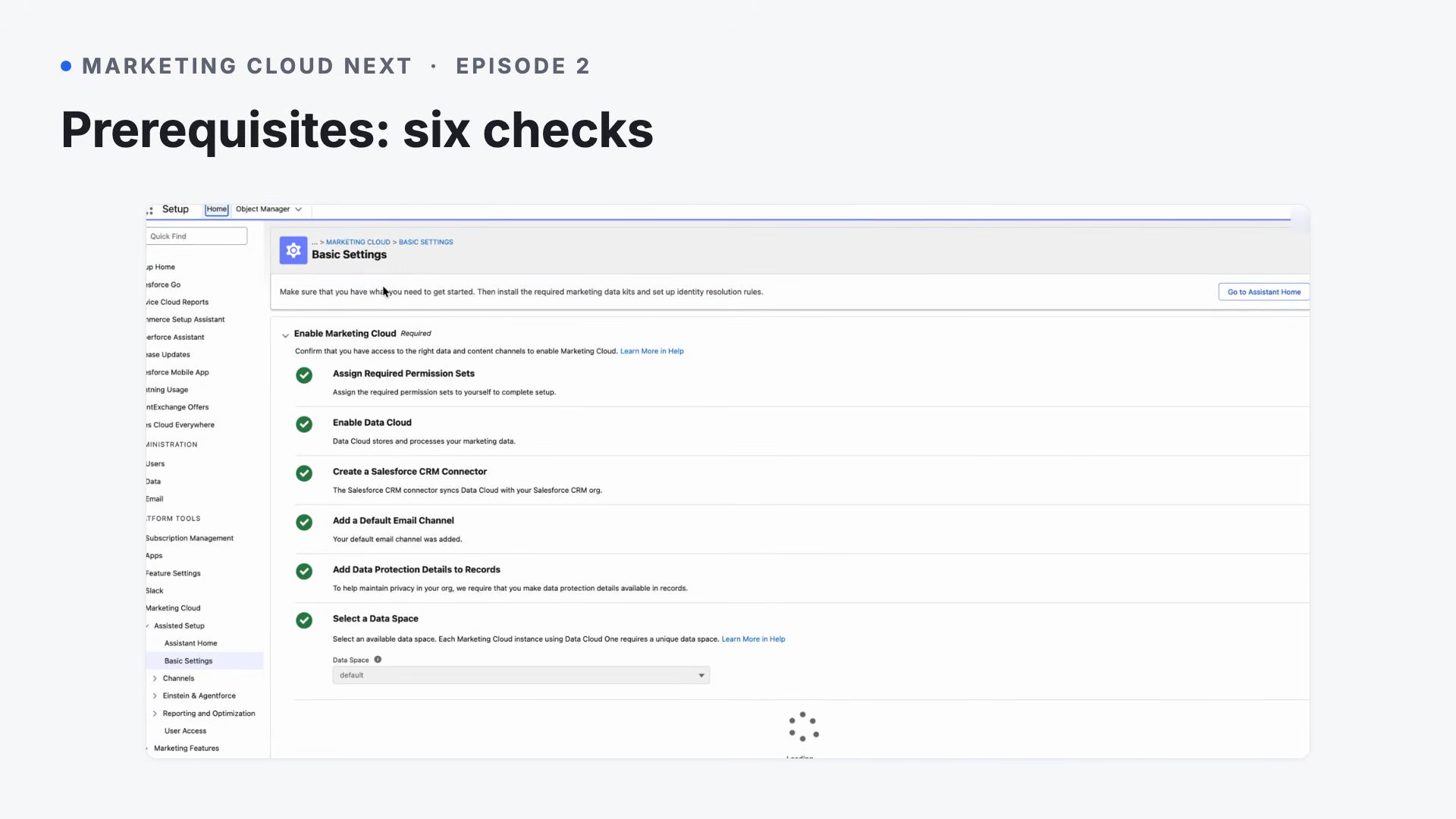
Default Email Channel: Submit a request to Salesforce Support to activate the standard Salesforce CMS email delivery channel.
Data Protection: Navigate to Setup, search Data Protection and Privacy, and enable data privacy visibility across records.
4. Select a Data Space: In Basic Settings, assign your target operational data space (such as the default space) from the selection menu.
3. Data Integration & Unification
A. Deploy Required Data Kits
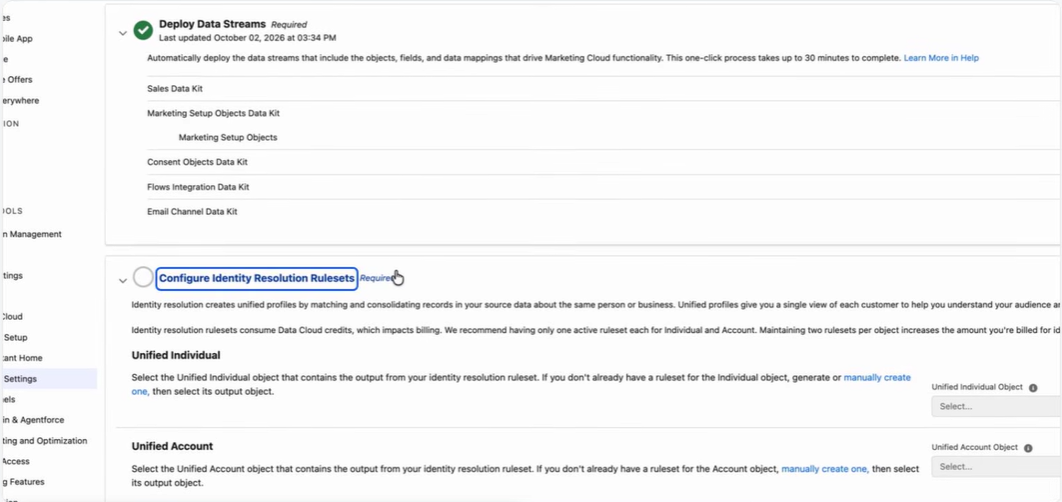
Open Setup, head to Basic Settings, and access Deploy Marketing Data Kits:
Choose Deploy or Update to install primary packages (Marketing Objects, Consent Data, Flow Integrations, and Channel Events).
Under Deploy the Sales Data Kit, click Deploy or Update to sync CRM Accounts, Contacts, Leads, and Opportunities into Data 360.
B. Configure Identity Resolution Rulesets
Identity mapping unifies incoming cross-channel records into single, consolidated Individual and Account profiles:
Go to Setup, open Basic Settings, and click Identity Resolution Rulesets.
Locate Unified Individual and select Generate Ruleset.
Open Identity Resolutions, open your generated rules, and edit Match Rules to include custom conditions:
Lead-to-Contact Rule: Set matching criteria to Exact match using lead-to-contact identification.
Web Tracking Attribution Rule: Set matching criteria to Exact match using device-to-known mapping.
4. Select Publish to apply and execute your reconciliation logic.
4. User Access & Experience Cloud Provisioning
Assign Permission Sets: Navigate to Setup, open Permission Sets, and grant Marketing Cloud Admin or Manager privileges to users directly or using Manage Assignments.
Enable Privacy Preference Manager: Go to Setup, open Profiles, modify Standard User, and under Tab Settings, switch Privacy Preference Manager to Default On.
Configure CMS Workspace Contributors: Access Marketing App, open Content, select your active workspace, click Contributors, and grant team roles (Content Admin, Manager, or Author).
Set Up Landing Page Site Contributors: Open Setup, go to All Sites, open Workspaces beside Marketing Landing Pages, navigate to Administration -> Contributors, and grant Viewer access.
Set Up Identity-Licensed Users (SSO): Duplicate the Identity User profile, set core marketing tabs to Default On, construct user profiles, and assign Marketing Cloud Manager access.
5. Channel Configuration & Compliance
A. Email Channel Setup
DKIM & Domain Authentication: Generate DKIM records with network admins, then use Setup -> Authenticated Domains to validate domain ownership.
From Addresses: Navigate to Setup -> Authenticated From Addresses, click Add From Addresses, and verify sender identities and email addresses.
Reply Mail Management (RMM): Inside Authenticated Domains, choose See Details, open Reply Mail Management, and define automated deletion or reply forwarding rules.
Physical Address Compliance: Open Setup -> Company Information and enter your complete physical location details for legal footer compliance.
B. SMS & WhatsApp Setup
SMS Messaging: Acquire short codes or long codes by submitting Brand, Campaign, and Code applications via Setup.
WhatsApp Business Account: Go to Setup -> Your Numbers, deploy required consent packages, and integrate your official WhatsApp account.
C. Mobile App Messaging
Open Setup -> Unified Messaging -> Mobile App -> Your Applications, then choose Add Application.
iOS Configuration: Provide your APNs credentials (.p8 or .p12 files) alongside Key ID, Team ID, and Bundle ID settings.
Android Configuration: Provide your Firebase Developer credentials (FCM).
Testing: Navigate to the Test tab inside your app configuration and trigger sample push notifications to verify setup.
D. Consent Management
Communication Subscriptions: Open Consent -> Preference Pages and Subscriptions, click New Subscription, and associate desired delivery channels.
Custom Preference Pages: Head to Setup -> Preference Page Customization and switch on Custom Preference Pages.
Historical Consent Import: Format CSV data with Contact Point and Consent Date values, then upload via the Consent Imports tool.
6. Web Activity Tracking
Option A: Tracking with a Consent Banner (Recommended)
Build and launch a privacy banner within Salesforce CMS.
Go to Setup -> Landing Page Tracking, click Select Banner, and assign your published CMS banner.
Open Setup -> All Sites, open Builder for Marketing Landing Pages, navigate to Settings -> Integrations, enable Data Cloud and Web Tracking Consent options, and publish changes.
Option B: External Website Tracking
Go to Setup -> Website Connectors and initialize a new tracking connector.
Open Setup -> Webpage Embed Codes, choose your connector, assign the CMS banner, and link a campaign.
Add the generated tracking code script directly into your external website header.
7. Analytics & Performance Intelligence
Install Managed Analytics Packages: Go to Setup -> Reporting and Optimization -> Analytics, then deploy Marketing Engagement Analytics and supplementary report packages.
Share Analytics Folders: Inside Marketing App, go to Analytics -> Browse -> Folders, and share reporting assets org-wide with Viewer access.
Enable Marketing Performance Intelligence (Tableau Next):
Open Setup and search Marketing Performance Intelligence.
Confirm data dependencies and launch installation.
Grant reporting permissions to users requiring analytics access.
8. Scoring Models & AI Features
A. Customer & Account Scoring Models
Navigate to Setup -> Customer Engagement and click Enable Scoring.
Go to Scoring Models, click New, and choose target records (People or Accounts).
Balance the overall scoring weights between Engagement and Fit rulesets.
Establish custom rules based on recipient actions and point modifications.
Publish rules and define re-calculation intervals (1 to 24 hours).
B. Agentforce & Predictive AI Integration
Agentforce Assistants: Open Setup -> Einstein & Agentforce to activate campaign and content creation, agents.
Einstein Send Time Optimization (STO): Go to Setup -> Einstein Send Time Optimization and click Enable to automate dispatch timing.
Einstein Metrics Guard: Go to Setup -> Messaging -> Email Feature Settings and enable bot filtering to keep reporting clean.
Source: Marketing Cloud Next documentation PDF https://resources.docs.salesforce.com/rel1/doc/en-us/static/pdf/mktg_implementation_guide.pdf
Marketing Cloud Next Implementation Architecture
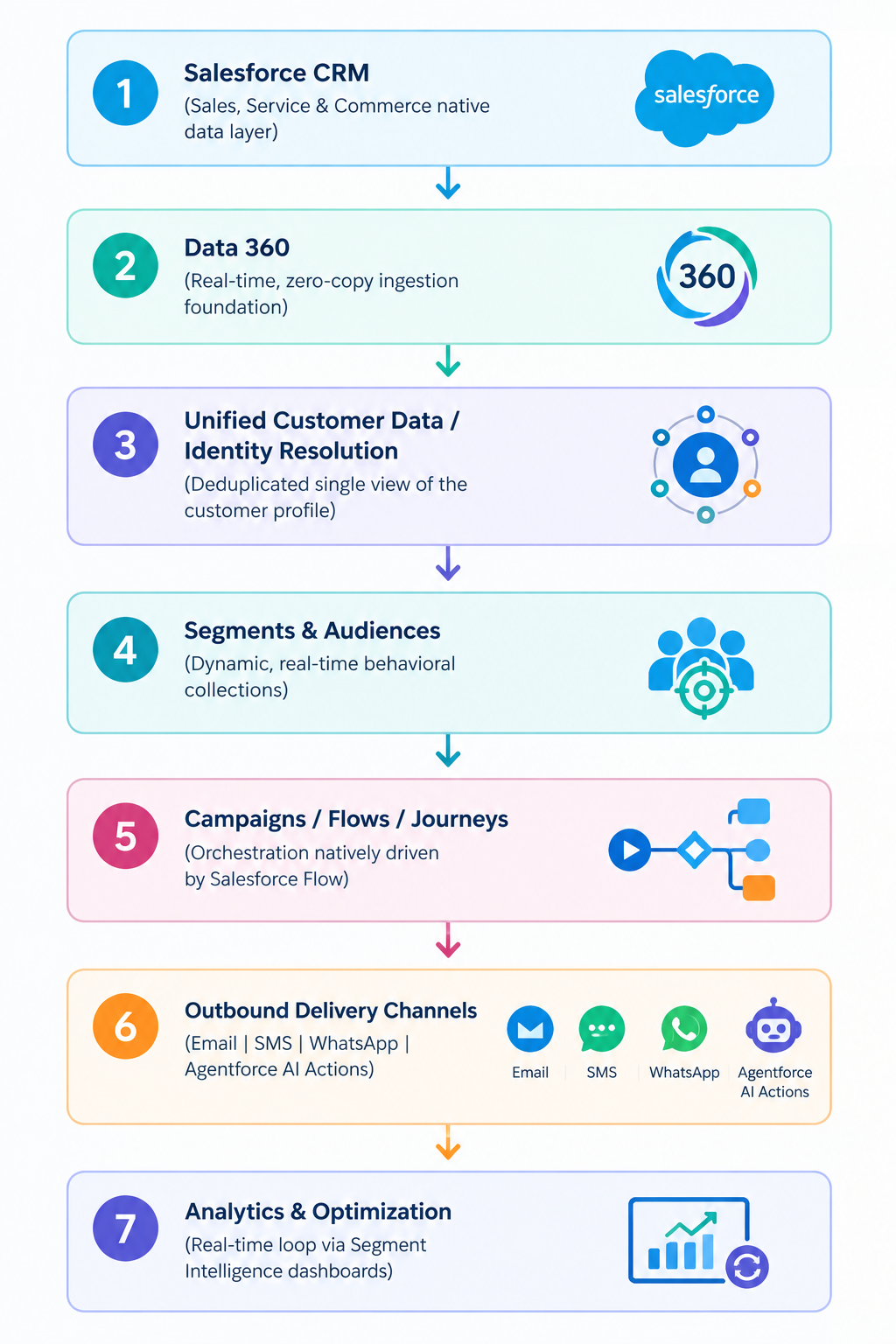
The core architecture of Salesforce Marketing Cloud Next (MCN) represents a paradigm shift from the previous legacy batch-synced data setups.
The reason to shift from the legacy batch is that it is built natively on the core SF platform. It utilizes a unified, real-time data architecture fueled by Data 360 and executed natively through Salesforce Flow and the autonomous Agentforce AI.
Here, you need to understand that MCN does not shuffle data across distinct external infrastructure platforms. The data remains secure inside the unified customer profile to instantly fire off target segments down active channel journeys.
Also read: Salesforce Marketing Cloud Implementation (2027)
How Long Does Marketing Cloud Next Implementation Take?
The standard MC Next implementation typically takes 4 to 6 months, depending on your business project scope, while full enterprise deployments or complex migrations can range from 6 to 12+ months.
Here are some key factors that you should know and that dictate the timeline for your Marketing Cloud Next setup:
Data complexity: This is where it handles dirty source data, data translation, and unified profiles via Data 360.
Integrations: Connecting the CRM core systems, external databases, or third-party apps.
Number of channels: This includes setting up single-channel such as email vs. multi-channel or omnichannel journeys like SMS, push, web, AI agents.
Existing Salesforce architecture: Leveraging the pre-existing core org foundations versus building new multi-cloud or multi-brand structures.
Migration requirements: Rebuilding legacy journeys, handlers, and templates, and performing deliverability re-warming, which alone takes 4 to 8 weeks.
Number of use cases: The volume of automated journeys, segmentation rules, and personalization logic required.
Governance requirements: The multi-business unit permissions, security models, data privacy, and consent compliance.
Marketing Cloud Next Implementation Cost
Selecting an experienced Marketing Cloud Next setup partner serves as a critical variable in controlling project expenditures. Because service costs vary based on system complexity, geographic resource rates, and integration scope, your choice of consultant directly shapes the total financial investment.
Here is a breakdown of software licensing costs and partner considerations.
Implementation Partner Impact on Cost
When estimating total setup budgets, overall expenditures depend on your selected consulting agency, team geography, data readiness, and organizational scope. Ultimately, engagement outcome links back to partner capability; their proficiency determines data architectural efficiency, legacy system migration speed, and initial go-live timelines.
Licensing Structure
Software access utilizes an org-based subscription model rather than seat licenses, allowing organizations to add internal team members without raising recurring platform fees:
Growth Edition: $1,500 USD per org per month billed annually, and it covers essential automation features, subscriber scoring, and primary campaign tools.
Advanced Edition: $3,250 USD per org monthly, and this one is also billed annually, built for organizations needing sophisticated AI features, predictive scoring models, and broader multi-channel capabilities.
https://www.salesforce.com/marketing/pricing
Common Marketing Cloud Next Implementation Mistakes
In this section, we will discuss SFMC Next/Data Cloud-driven environments. The most critical mistakes you should consider are listed below.
Starting campaigns before fixing the data foundation
Poor identity-resolution strategy
Ignoring consent architecture
Overcomplicating Business Units/Data Spaces
Trying to migrate everything without auditing it
Launching without proper testing
What Should Be Your MCN Pre-Implementation Planning, KPI Teams & Scope
MCN Implementation (pre) requires an outcome-driven foundation that is focused on four pillars.
1. Planning & Strategy
Outcome-First Strategy: Concentrate on resolving three to four major operational friction points, including onboarding churn and disconnected systems.
Native Platform Design: Align customer data models directly within Data 360 while architecting journey pathways inside Flow Builder.
Phased Deployment: Launch a minimum viable product use case initially, expand cross-channel reach next, and subsequently scale artificial intelligence features.
2. KPI Framework
Engagement Performance: Track onboarding completion percentage growth alongside initial conversion velocity.
Operational Efficiency: Reduce hands-on campaign build duration and accelerate deployment timelines.
Data Integrity: Monitor sync refresh rates, audience segmentation errors, and profile resolution metrics.
Commercial Revenue: Measure marketing-influenced pipeline volume across standard 30, 60, and 90-day intervals.
3. Team Framework
Executive Sponsor: Drives overarching revenue objectives, controls funding, and maintains organizational alignment.
MCN System Lead: Directs workflow automation architecture, campaign strategies, and message templates.
CRM System Administrator: Manages foundational database quality, user security roles, and system rules.
Data Steward: Supervises identity mapping rulesets and data stream ingestion across Data 360.
Creative Director: Designs reusable content components and omnichannel messaging assets.
4. Implementation Phasing
Discovery Phase: Review current infrastructure challenges, evaluate data cleanliness, and confirm proper software licensing.
Data Setup Phase: Establish primary subscriber keys, map attributes within Data 360, and implement consent boundaries.
Build & Quality Assurance Phase: Construct primary automated customer journeys, authenticate sending domains, and execute trial distributions.
Go-Live Phase: Roll out campaigns across audience groups iteratively, track daily metrics, and refine ongoing operations.
Salesforce Marketing Cloud Next Implementation Checklist
Phase 1: Preparation & Strategic Alignment
Use Cases: Outline target business metrics, key performance indicators, and planned journey structures.
Licensing: Confirm platform edition entitlements, Data 360 consumption credits, and overall storage capacities.
Roles: Designate core administrators and assign user permissions directly within Salesforce Setup.
Phase 2: Data Architecture & Connectivity
Data 360: Initialize Data Cloud capabilities directly inside your core Salesforce instance.
CRM Connection: Establish native connector paths into Sales and Service Cloud environments.
Data Spaces: Partition operational visibility and brand datasets across distinct organizational boundaries.
Data Kits: Map standard CRM objects into target Data Model Objects (DMOs) using deployed packages.
Phase 3: Identity Resolution & Governance
Identity Resolution: Configure matching rulesets to construct single, unified individual profiles.
Permissions: Grant specific functional access levels for roles such as Data Steward or Marketing Manager.
Deliverability: Validate dispatching domains by configuring essential SAP, SPF, DKIM, and SSL credentials.
Compliance: Establish strict consent ingestion flows aligned with user preference choices and opt-out statuses.
Phase 4: Campaign Execution & Activation
Segmentation: Create dynamic target audiences by leveraging consolidated cross-channel profile attributes.
Campaigns: Construct multi-channel customer flows driven natively by Data 360 event triggers.
QA: Perform complete end-to-end trial dispatches using test groups to confirm rendering and personalization.
Go-Live: Deploy live journey pathways and activate real-time communication schedules.
Phase 5: Performance Optimization & Oversight
Optimization: Track ongoing engagement metrics, system processing usage, and overall operational efficiency.
Frequently Asked Questions
-
Salesforce Marketing Cloud Next implementation (also known as Agentforce Marketing implementation) involves more than just enabling marketing features. Businesses must prepare their Salesforce environment, connect customer data, configure marketing capabilities, and ensure everything works together.
The core architecture of Salesforce Marketing Cloud Next represents a paradigm shift from previous legacy batch-synced data setups, operating natively on the core platform. It utilizes a unified, real-time data architecture, fueled by Data 360 and executed through Salesforce Flow and autonomous Agentforce AI, to keep data secure inside unified profile records and instantly trigger active channel journeys.
-
Deploying Salesforce Marketing Cloud Next requires executing a structured, sequential procedure:
Prerequisites & Required User Access: Grant administrative functions, including System Administrator, Data Cloud Architect, and Marketing Cloud Admin roles, inside Setup.
Basic Setup & Core Infrastructure: Initialize Data 360, establish the Salesforce CRM connector, provision privacy tools, and assign your operational data space.
Data Integration & Unification: Deploy marketing and sales data packages, then publish identity resolution rulesets to unify incoming profile records.
User Access & Experience Cloud Provisioning: Distribute permission sets, enable Privacy Preference Manager visibility, and assign workspace and landing page site contributors.
Channel Configuration & Compliance: Authenticate domain credentials (DKIM, RMM), establish SMS/WhatsApp endpoints, configure mobile push notifications, and build preference subscriptions.
Web Activity Tracking: Capture online user actions by embedding privacy consent banners or attaching external website tracking scripts.
Analytics & Performance Intelligence: Deploy managed reporting assets, grant folder access privileges, and activate Marketing Performance Intelligence powered by Tableau Next.
Scoring Models & AI Features: Configure subscriber and account grading rules, then enable Agentforce assistants, Einstein STO, and Metrics Guard filtering.
-
SF Marketing Cloud Next prerequisites depend on whether you need technical setup/environment requirements or exam/certification qualifications.
Technical and system prerequisites
Required user permissions.
Data Cloud/Data 360 enabled.
Salesforce CRM connector.
Default email channel.
Data space selected
Core data kits.
Certification and Candidate prerequisites
Prerequisites credentials.
Recommended experience.
Suggested background knowledge.
-
Yes, MC Next requires Data 360 (formerly Salesforce Data Cloud) as its core data foundation.
-
MCN and Marketing Cloud Engagement (MCE) differ primarily in their underlying architecture, data foundation, and AI integration.
-
It is up to you whether you want to migrate or not. SF is not currently forcing existing MCE users to migrate, instead offering a coverage strategy including SKUs like Marketing Cloud Plus while building MCN as its modern platform. As of now, Salesforce continues to sell and support MCE, and there is no mandatory end-of-life or deprecation deadline forcing a sudden move.
-
Standard deployment timelines for Marketing Cloud Next generally span four to six months based on project scope, whereas complex migration initiatives or enterprise-wide rollouts may require six to twelve-plus months.
-
Marketing Cloud Next pricing for implementation differs based on your project scope, time, complexity, and the Marketing Cloud Next company you choose. However, the cost typically ranges from $10,000 to over $180,000 for SFMC Next consulting, configuration, and onboarding.
Conclusion
Now, it is clear to you how Salesforce Marketing Cloud Next implementation is completed with its comprehensive Marketing Cloud Next Implementation guide. It is not just enabling marketing features, but it is more than you think.
Marketing Cloud Next/Agentforce Marketing implementation requires Salesforce developers or businesses like yours to prepare the SF environment, connect customer data, configure marketing capabilities, and ensure everything works together.
Ready to Implement Salesforce Marketing Cloud Next?
Navigating a Salesforce Marketing Cloud Next implementation requires deep technical expertise, proper data architecture planning, and seamless cross-channel integration.
Whether you need assistance with Data 360 setup, identity resolution rulesets, channel configurations, or migrating from Marketing Cloud Engagement, our certified Salesforce experts are here to help you accelerate your implementation and maximize ROI. Contact Our Salesforce Implementation Experts Right Now!
Related Readings
Let's Talk

Drop us a note, we’re happy to take the conversation forward 👇🏻