
Key Takeaways:
Traditional contact centers rely on IVR menus and scripted bots, but Agentforce brings natural conversations and AI-powered support into the picture.
With access to customer data, AI agents can understand requests, resolve routine issues, take action, and involve human reps when needed.
By bringing voice, chat, messaging, and CRM data together, Agentforce Contact Center gives businesses a more connected way to manage customer service.
Picture the last time you called customer support. You probably waited in a queue, pressed a dozen buttons, and then explained your problem twice. For decades, that's been the deal: businesses pay a lot to staff phone lines, and customers pay with their patience.
In this AI era, holding on to the same traditional way of working no longer makes sense. Salesforce is changing the game with Agentforce Contact Center.
So what exactly is it? How does it work? And is it really better than a human rep handling calls and queries? Whether you’re a business looking to transform your customer service operation or someone just discovering Agentforce, this blog will walk you through everything you need to know. Let’s dive in.
What Is Agentforce Contact Center?
Agentforce Contact Center is Salesforce's own contact center platform built into Service Cloud. It brings phone calls, chat, messaging, customer data, and AI agents into one system, so AI agents and human reps can work on the same customer, in the same place. Salesforce launched it at Enterprise Connect in March 2026 as a native contact center as a service (CCaaS) offering.
In simple terms, it brings four things together in one system:
Voice: phone calls handled natively on the Salesforce platform
Digital channels: chat and messaging
CRM data: each customer's history, cases, and records
AI agents: Agentforce AI agents that answer and take action, plus AI help for human reps
What makes it different
Until now, businesses that wanted phone support in Salesforce usually connected a separate telephony provider. That meant extra setup, extra cost, and customer data sitting in two places. With Agentforce Contact Center, voice is built into the platform itself, so there is no separate system to integrate, and the AI can use the customer's data during the call.
How is it different from IVR?
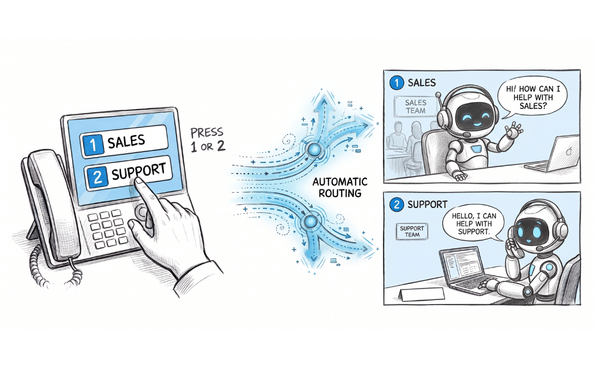
IVR menus and scripted bots follow fixed paths, so they get stuck the moment a customer says something unexpected. Agentforce AI agents understand natural language, handle interruptions, and answer from real customer data instead of canned lines.
One naming note: it is sold as an add-on to Service Cloud, and Salesforce's product pages call it "Contact Centre." It is the same product.
The Difference Between Agentforce Voice And Agentforce Contact Center
You will also come across the name Agentforce Voice, and the two are easy to mix up. Agentforce Voice is the AI phone agent: it answers calls, understands what the caller wants, takes action in Salesforce, and hands over to a human when needed. Agentforce Contact Center is the bigger platform around it, which also covers chat and messaging, case management, supervisor tools, and workforce and quality management. And Service Cloud is the core product, with the contact center sold as an add-on to it.
The two are not tied together. Agentforce Voice can run on top of a third-party contact center platform such as Amazon Connect, Five9, NICE, Genesys, or Vonage. Agentforce Contact Center is the option where Salesforce provides the whole thing, so voice becomes one part of a single system. In short, voice is a capability, and the contact center is the home it can live in.
Where Salesforce Is Taking Voice Next: The Cresta Acquisition
AI voice agents are also where Salesforce is spending big. On November 2, 2026, it announced an agreement to acquire Cresta, a company whose AI voice agents handle complex calls from start to finish and whose platform coaches human reps in real time. Marriott, Comcast, and Alaska Airlines are among its customers.
The aim of this acquisition is to bring Cresta's understanding of every conversation into Service Cloud, so each call can be tied to its outcome: resolution, retention, or revenue.
Note: The deal is signed, not finished. It is expected to close in early 2027, subject to regulatory approval, so Cresta is not part of Agentforce Contact Center yet.
How Agentforce Handles Customer Conversations
When you call an Agentforce voice agent, a lot happens in just a few seconds. Here is the journey of a single customer request:
Listen. Speech is converted to text, with models trained to cope with accents, fast talkers, and noisy lines.
Work out the intent. The agent figures out what the caller actually wants, even if they phrase it in an unexpected way.
Check the facts. Before answering, it looks up the customer's record, your policies, and your knowledge articles, so the reply comes from your own data rather than a guess.
Do something about it. If the request needs action, such as rescheduling a booking or opening a case, the agent does it in your systems.
Reply like a person. An LLM writes the response, and text-to-speech reads it out quickly enough that the call does not feel laggy.
Know when to stop. If the issue is too complex or the customer wants a human, the agent escalates.
Behind all of this sits an orchestration layer that coordinates actions across systems and decides when a conversation should be handed to a human.
Transfers Conversations to Human Reps
This is the part customers will notice most. When an AI agent escalates to a human rep, the full customer context goes with it. The rep sees the history and what has already been discussed, and picks up exactly where the AI left off. The customer never has to start from the beginning.
The Same Agent Across Every Channel
On the building side, Salesforce lets teams define an agent once, with a single set of instructions and trusted CRM data, and deploy it across voice, chat, and messaging. You break the work into subagents (the "jobs to be done," like rescheduling an appointment), give each one instructions, and assign actions the agent can perform. That keeps service consistent whether a customer phones in or sends a message.
Key Features and Capabilities of Agentforce Contact Center
Agentforce Contact Center is an all-in-one platform with a long list of features and capabilities. The easiest way to understand them is to follow a customer from the first contact to the follow-up, and then look at how the team behind the scenes runs.
Reaching you: channels and routing
One workspace, many channels. With AI voice agent Implementation, reps can handle phone calls, WhatsApp voice, messaging (SMS, Facebook Messenger, WhatsApp, Apple Messages, and LINE), web and in-app chat, email, and web forms from the same interface. Because channels and CRM data are connected, customers who switch channels keep their context.
Native voice. Salesforce provides the telephony itself, with call recording, transcription, and real-time supervisor controls. You can build IVR into flows, and the setup includes callbacks, voicemail, warm transfers, and routing returning callers to the rep they last spoke with.
Your choice of telephony. A business can use Salesforce's native voice or connect a telephony partner through AppExchange, and it can also run alongside an existing contact center, so a full replacement is not required on day one.
Handling the request: AI agents
Self-service AI agents. They work around the clock, use the customer's full history, and handle routine requests across channels. An agent is set up once and deployed on all of them.
Proactive service. Customers need proactive support, and Agentforce AI agents can act before the customer asks, and automated outbound calls can be started from a flow.
Sentiment and triggers. Sentiment is generated automatically from call conversations, and actions can be triggered by what is said on the call.
Handing over: support for human reps
Intelligent handoffs. When an AI agent escalates, routing uses the customer's full history, so the rep picks up exactly where the AI stopped.
AI helps during the work. Reps get a step-by-step action plan for each case, and AI-generated summaries of calls cut down the wrap-up work.
Real-time translation. Messaging and email conversations can be translated as they happen.
Running the operation: supervisors, staffing, and quality
Supervisor tools. Agentforce offers a lot of supervisor tools such as: a live view of human and AI performance, the ability to listen in on a call or step in with barge-in, and prebuilt reports and dashboards.
Workforce management: It includes workload forecasting based on historical data, capacity planning, live dashboards to track whether reps are following their schedules, shift scheduling, and time-off management for both AI and human agents.
Quality management. Interactions are scored automatically, with scorecards that show AI confidence levels. According to Salesforce, this covers 100% of conversations, and it flags coaching opportunities.
Agentforce vs. IVR and Traditional Chatbots: What Actually Changes?
The fair comparison for Agentforce is not a human rep. It is the automation companies already use to answer the phone: IVR menus and scripted chatbots. Agentforce does not replace your people. It replaces the part of the experience that frustrates customers the most: the menus and scripts standing between them and the help they need.
Here is what changes:
Understanding. IVR makes callers pick from menu options, and scripted bots match keywords. But Agentforce works very differently; it understands natural language, so a caller can simply say what they need.
Going off script. Old systems break when a customer says something unexpected, interrupts, or changes topic. Agentforce is designed to handle interruptions and follow the conversation.
Customer data. A menu or a standalone bot often knows nothing about the caller. Agentforce works inside Salesforce, so it can use the customer's history, cases, and records.
Taking action. Old bots were mostly limited to routing calls or answering FAQs. Agentforce is built to do more than that; it takes actions such as updating records, rescheduling bookings, and creating support cases.
Handoff: For years, a call transfer has meant customers have to start over. With Agentforce, the conversation context and suggested next steps are passed to the human rep, making the experience more personalized.
One agent, every channel. Build an agent once and deploy it across voice, chat, and messaging; that is the flexibility Salesforce offers. But with traditional approaches, businesses have to maintain a separate IVR flow and chatbot for each.
Where humans still fit
Agentforce is built to work with human reps, not to replace them. Complex problems that need judgment, emotional or sensitive situations, and high-stakes conversations still belong to people, and Salesforce itself acknowledges that AI voice agents can lack the emotional intelligence of human reps.
Where AI agents still fall short
No technology is perfect, and AI systems have their own limitations. Before implementing AI voice agents in your contact center, it's important to understand the challenges they can bring.
Wrong answers can sound confident. A fixed phone menu never makes things up, but an AI agent can. That is why grounding the AI in your own data, narrow topics, and clear escalation rules matters so much.
Voice is unforgiving. Noisy lines and heavy accents can still affect transcription, and long chains of actions can cause noticeable pauses. Reading back dates and numbers for confirmation helps.
Coverage is not universal: Voice support is available in fewer languages and regions than chat, so check what is supported for your market before planning around it. For chat, a multi-language chat translator like ChatBridge helps your reps serve customers across many languages while you wait for wider voice coverage.
Setup takes work. It needs clean data, a good knowledge base, and testing with real calls, not just typed messages.
This is where a Salesforce Agentforce consultant adds value, helping with testing, grounding the AI in your data, and setting clear escalation rules.
The verdict: Agentforce is not a replacement for your people. It is a replacement for the rigid menus and scripted bots that sit in front of them. The best results come when AI handles the routine work, and people handle everything that needs a human.

The Benefits of Agentforce Contact Center
Introducing AI into a contact center is not just about automating calls. It is about making customer service faster, reducing repetitive work for human reps, and giving businesses better control over their support operations.
Here are some of the key benefits of Agentforce Contact Center:
Faster answers: Nobody enjoys working through three levels of menus just to ask about a delivery date. With Agentforce AI agents, the customer says what they need, the agent looks up the order, and plenty of these requests get settled in minutes. There are fewer transfers too, because the customer isn't passed from one department to the next.
Less repetitive work for reps: Order status checks, record updates, and opening cases fill a big part of a rep's day, and an AI agent can take a good share of that. Reps get pulled in when a call needs real judgment or empathy, which is usually the more interesting part of the job.
Lower running costs, with a catch: With a traditional contact center, a business spends money on staffing, training, phone infrastructure, and daily upkeep. But with AI agents handling the routine contacts, you can take on more volume without growing the team at the same pace. Still, you need to spend on licensing, setup, and usage fees based on the number of conversations handled, all of which changes the math, so run the numbers for your own case.
Conversations that remember: One of the biggest benefits of using Agentforce for a contact center is that it records and transcribes the conversation. Because the agent works on Salesforce data, it can also see earlier interactions, account details, and open cases, so a customer doesn't have to explain their whole story a second time just because they called back.
Consistent quality on every channel: Customers don't stick to one channel. Some call, some chat, and some send a message. Agentforce runs voice, chat, and messaging on one platform, so the same agent and the same customer context sit behind all of them.
Better Visibility Into Performance: Managing a contact center requires more than monitoring the number of calls received or resolved. With Agentforce, supervisors can see conversation data, sentiment, and live performance in one place. That makes it easier to spot problems that keep coming up, work out who needs coaching, and decide where to put human judgment.
How to Get Started with Agentforce Contact Center
Agentforce Contact Center isn't something you switch on and forget. A little planning up front is often the difference between a rollout that works and one that frustrates you and your customers. Here's where to start:
Pick a few simple use cases first: It's tempting to automate everything at once, but it works better to begin with the requests that come up most often and have clear answers, such as order status, appointment booking, and knowledge lookups. These are easy to get right, and if the agent slips up, the damage is small. Once they run smoothly, you can take on more complex requests with more confidence.
Sort out your data and knowledge base: An AI agent can only work with what it's given. If your CRM records are messy or your help articles are out of date, the agent will pass on those mistakes, just faster than a person would. A little time spent cleaning up customer records and refreshing the knowledge base before launch makes the answers far more accurate.
Decide how you'll measure success: Before you launch, pick a few numbers to keep an eye on, such as containment rate (the share of conversations the AI resolves without a human), average handle time, bookings completed, and customer satisfaction. Note where you stand today as well, so you have a clear before and after to compare.
Keep improving after launch: Going live isn't the finish line. Read call transcripts regularly, see where the agent gets things wrong, and fix them. Listen for trouble with accents, background noise, and inaccurate answers in particular, since voice is less forgiving than chat and small errors are easier to notice.
Plan the transition: Agentforce Voice can work alongside your existing systems, so you can add it without replacing everything. But if you plan to move fully off your current system and onto the Agentforce contact center platform, an experienced Salesforce Agentforce consultant can map out a phased migration so your support doesn't get disrupted.
Conclusion
For years, getting help over the phone has meant a trade-off: wait for a person, or fight with a menu or a bot that never quite understood you. Agentforce Contact Center is Salesforce's attempt to remove that trade-off by putting voice, digital channels, CRM data, and AI agents on one platform.
If you're thinking about bringing Agentforce Contact Center into your business, our AI voice agent development services can help. We can walk you through which use cases to start with, how to get your data ready, and what a rollout would look like for you.
Frequently Asked Question
-
Agentforce Voice supports English, and Salesforce’s Summer ‘26 release added French, Italian, German, Spanish, Portuguese, and Japanese. Salesforce keeps adding languages, but support can vary by region and accent, so check Salesforce’s current documentation or ask your account team before you plan around a specific language.
-
Test the agent in a sandbox using simulated customer conversations before connecting it to real customers. Start with common questions, ambiguous requests, interruptions, background noise, incorrect inputs, and situations requiring human handoff. Use Agentforce Testing Center to run multiple scenarios and evaluate response accuracy, action execution, and consistency. For voice, also check speech pacing, response delays, and interruption handling.
-
On data, Agentforce's AI requests pass through a Trust Layer. This includes zero data retention agreements with outside AI model providers, so they don't keep customer data or use it for training, along with toxicity checks and an audit trail of AI activity. Agents also work within the access rules you set in Salesforce.
-
To use Agentforce Contact Center, you generally need a Service Cloud edition (Core, Advanced, or Max) along with the Contact Center add-on. Service Cloud provides the foundation, while the add-on enables the contact center capabilities. Exact licensing requirements may vary depending on your business needs and existing Salesforce setup, so confirm them with Salesforce before purchasing.
Related Readings

Let's Talk

Drop us a note, we’re happy to take the conversation forward 👇🏻