Connect Salesforce Data Cloud to Snowflake, BigQuery, and Databricks with Zero Copy
Updated on Oct 15, 2026
A team asks to connect Salesforce Data Cloud to the warehouse you already use. The pitch is reassuring: zero copy, your data never moves, no migration.
The basic idea is true. But behind that phrase are different architectures, and the approach you use depends on the warehouse, the supported integration pattern, and how the connection is configured.
This article is about zero-copy architecture as a data pattern, not the operating-system trick with the same name. Here, zero copy means one thing: use the data where it already sits, without making a copy. Salesforce Data Cloud(Data 360) supports zero-copy patterns in both directions: it can access data that remains in an external warehouse and share Data 360 data with external platforms.
Most explanations stop at that definition. We’ll look at the three zero-copy mechanisms, where Snowflake, BigQuery, and Databricks fit, how to set up and connect each warehouse, what it costs, what governance really means, and how to choose and manage the right setup.
How Snowflake, BigQuery, and Databricks Fit Into the Data Cloud Architecture
In a modern Data 360 architecture, Snowflake, Google BigQuery, and Databricks can serve as the external data engines behind Salesforce's customer data layer, each offering a different approach to storing, processing, and analyzing data.
Although all three can support large-scale enterprise data workloads, they start from different architectural models: Snowflake as a cloud data warehouse built for scalable analytics and data sharing, BigQuery as a serverless analytics warehouse tightly integrated with Google Cloud, and Databricks as a lakehouse platform designed for data engineering, analytics, and AI workloads.
For Data 360, that distinction matters. The warehouse or lakehouse remains the environment where the underlying data is managed, while Data 360 can work with the relevant data for unification, insights, and activation.
The Snowflake integration therefore isn't simply about moving data from one system to another; it is about how two different layers of the data architecture work together.
Snowflake → Data 360 → Customer 360 → Salesforce
BigQuery → Data 360 → Customer Insights → Salesforce
Databricks → Data 360 → Unified Customer Data → Salesforce
The architecture behind each flow is different, which is why the connection method, supported capabilities, and zero-copy behavior can also differ.
Zero copy architecture is three mechanisms, not one
Start with the main term. Federation means the data stays in the system that owns it, and another platform queries it there. No export, no nightly sync, no second copy. The opposite is ingestion: copy the data in first, then use it.
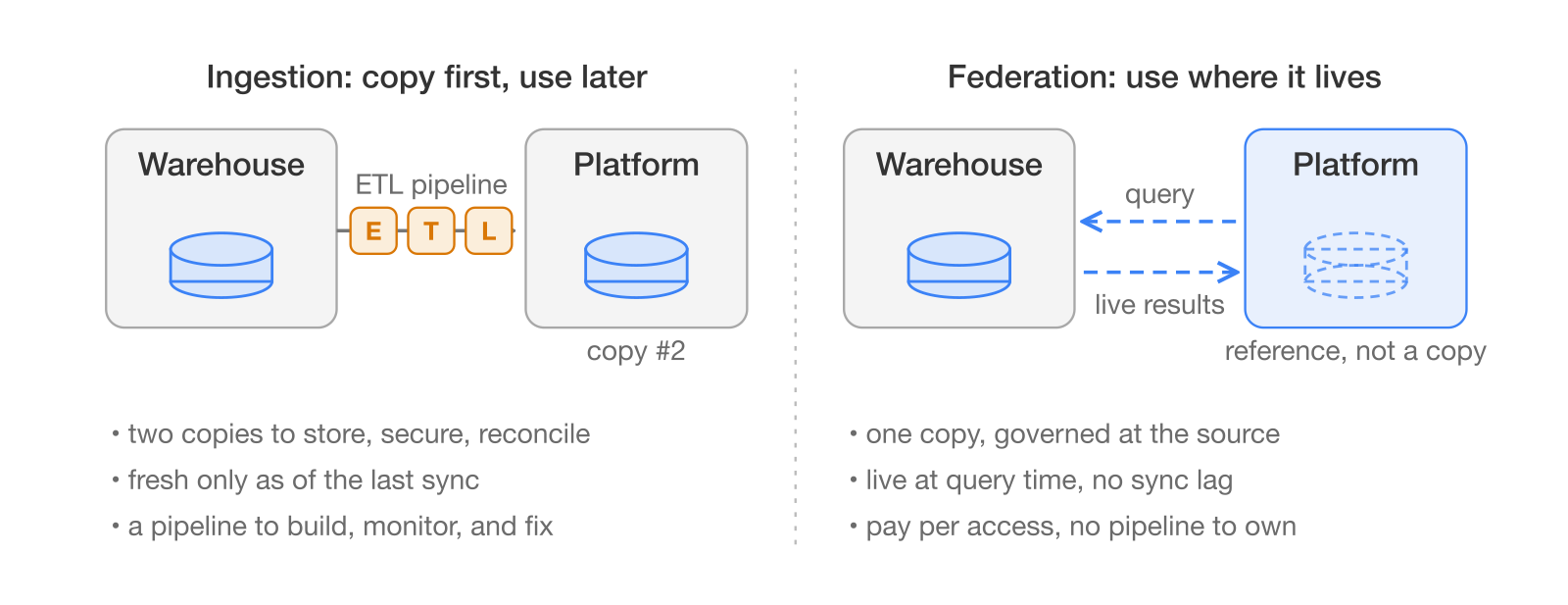
The trade in one picture: ingestion makes a second copy to get fast access; federation keeps one copy and pays per query.
Zero copy works in both directions. To keep them straight, remember your seat in this story: you own the warehouse. When Data 360 reads your warehouse, that is federation. When your warehouse reads Data 360, that is sharing (Salesforce Trailhead).
Federation itself comes in two forms, query federation and file federation. The difference between them decides most of the cost and most of the risk.
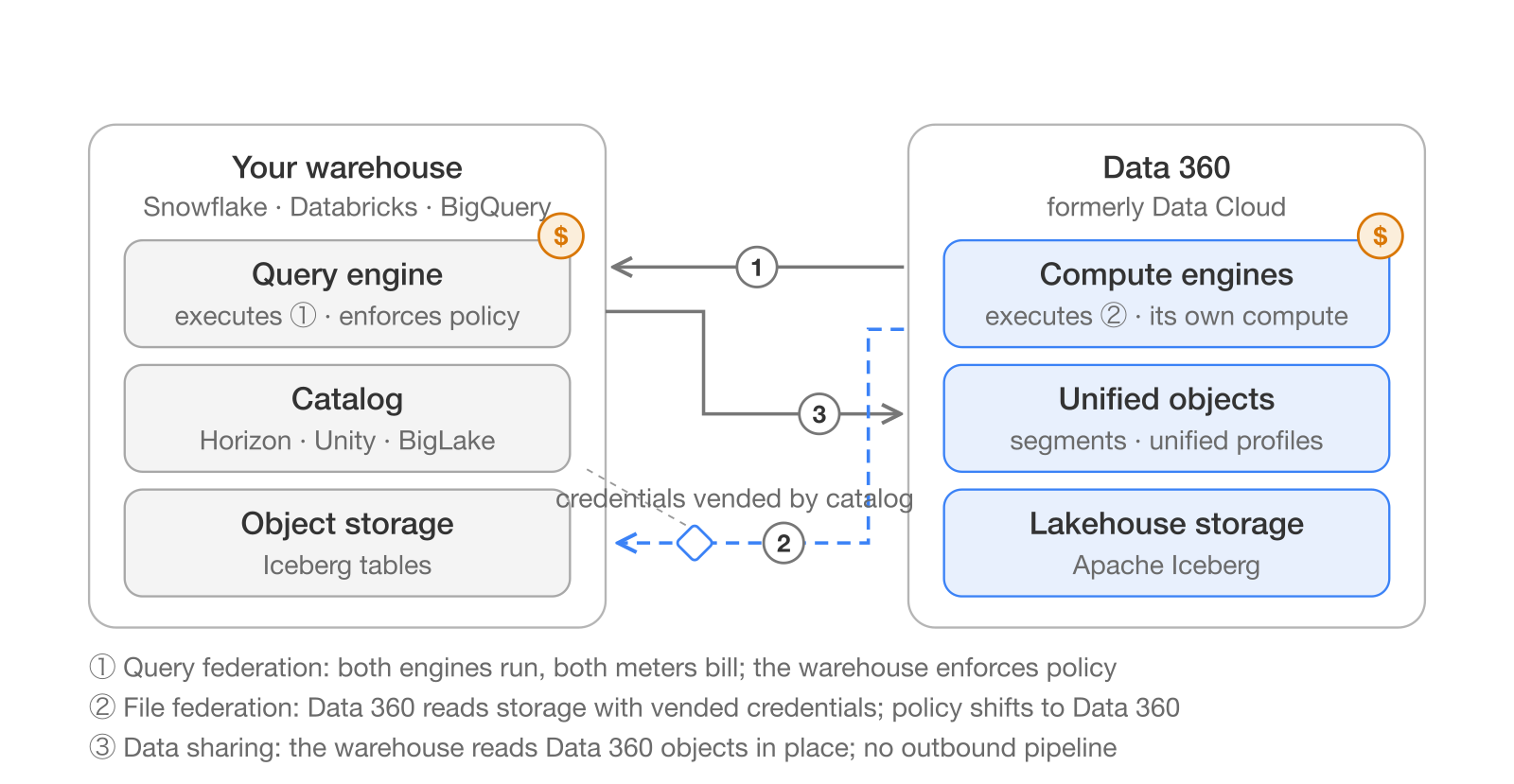
The general architecture: three paths through the same two stacks. Which paths your warehouse offers, and what each costs, is the rest of this article.
1. Query federation: the other engine does the work
Data 360 sends a query to the external system's own engine, which runs it against storage and returns records. Salesforce's own docs teach it with a library: you hand your request to the clerk, and only the clerk enters the book room (Salesforce Trailhead).
Since the warehouse's engine does the work, you may pay compute fees on the warehouse side too. Every external system supports this mode. Databricks states it directly: the query "is run both in Databricks and using remote compute" (Databricks). Two engines run. Two meters tick.
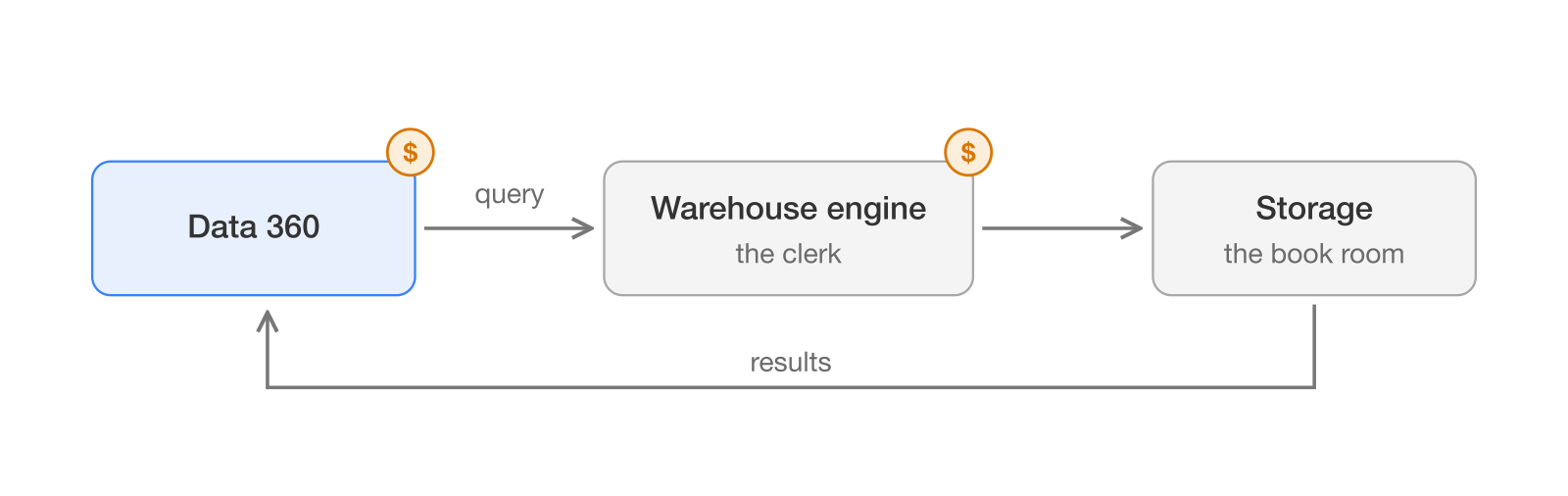
You ask the clerk; the clerk enters the book room. Both of you are on the clock.
2. File federation: read the shelves yourself
Here Data 360 skips the clerk and walks into the book room. It reads the storage layer directly with its own compute engines, so there is no warehouse compute fee, per the same Salesforce module.
This mode works best for large datasets stored in open table formats like Apache Iceberg, and Salesforce recommends it wherever available. The catch: not every system supports it.
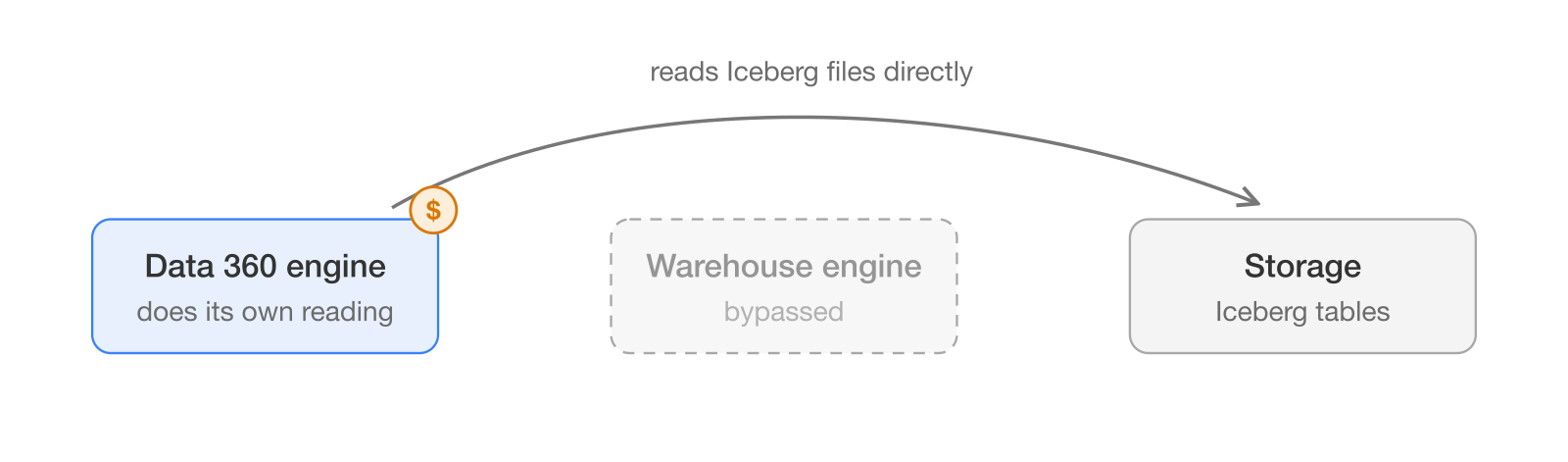
You skip the clerk and read the shelves yourself. One meter runs.
3. Data sharing: the same idea, reversed
Sharing runs the other way. Data 360 exposes its unified objects, and the external platform queries them in place, with no outbound pipeline to build or maintain, per Salesforce's data sharing module.
Three setups, one label. Here is the difference in one view:
| Mechanism | Direction | Whose engine runs it | Who gets billed | Who enforces governance |
|---|---|---|---|---|
| Query federation | Data in | The warehouse's engine | Both: Salesforce credits plus warehouse compute | The warehouse (it executes the query) |
| File federation | Data in | Data 360's engine, reading storage directly | Salesforce credits; Snowflake may add a small catalog API fee | Shifts toward Data 360 |
| Data sharing | Data out | The warehouse's engine, reading Data 360 objects | Data share credits (800 per 1M rows) | Data 360 exposes governed objects |
The last two columns are the rest of this article. Who gets billed is the cost section. Who enforces governance is the section after it.
Salesforce engineering describes the change simply: query federation uses two compute engines, file federation uses one, reading shared storage in the Iceberg format (Salesforce Engineering). Keep that one-engine versus two-engines picture in mind. It drives the cost section below.
How to Connect Salesforce Data Cloud to Snowflake
The Salesforce Data Cloud Snowflake integration starts with authentication. Salesforce supports Salesforce IDP authentication, which uses Salesforce as the identity provider instead of relying on long-lived credentials.
Step 1: Create the Snowflake Connection
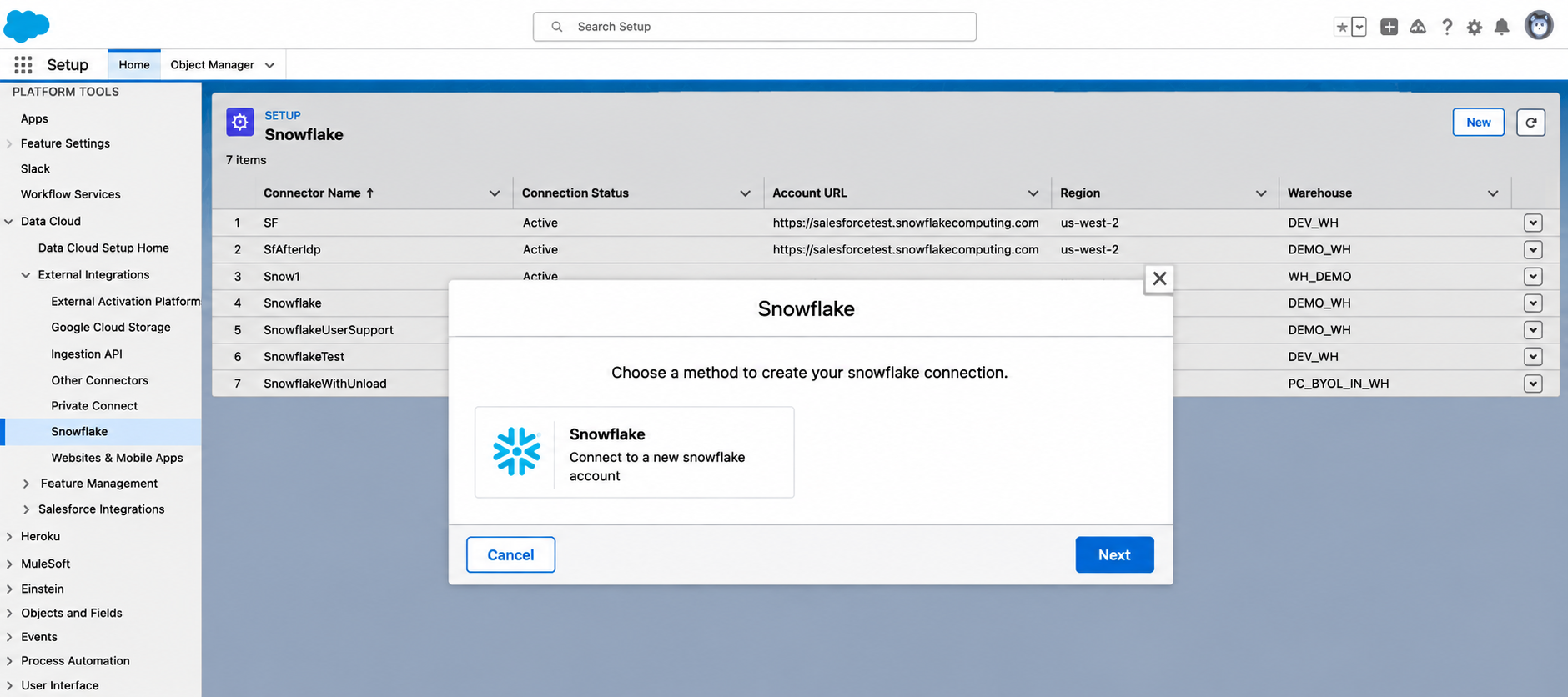
In Data 360, go to Data Cloud Setup → External Integrations → Snowflake → New.
Select Snowflake, then enter the connection name and API name.
Turn on Use Salesforce IDP Auth.
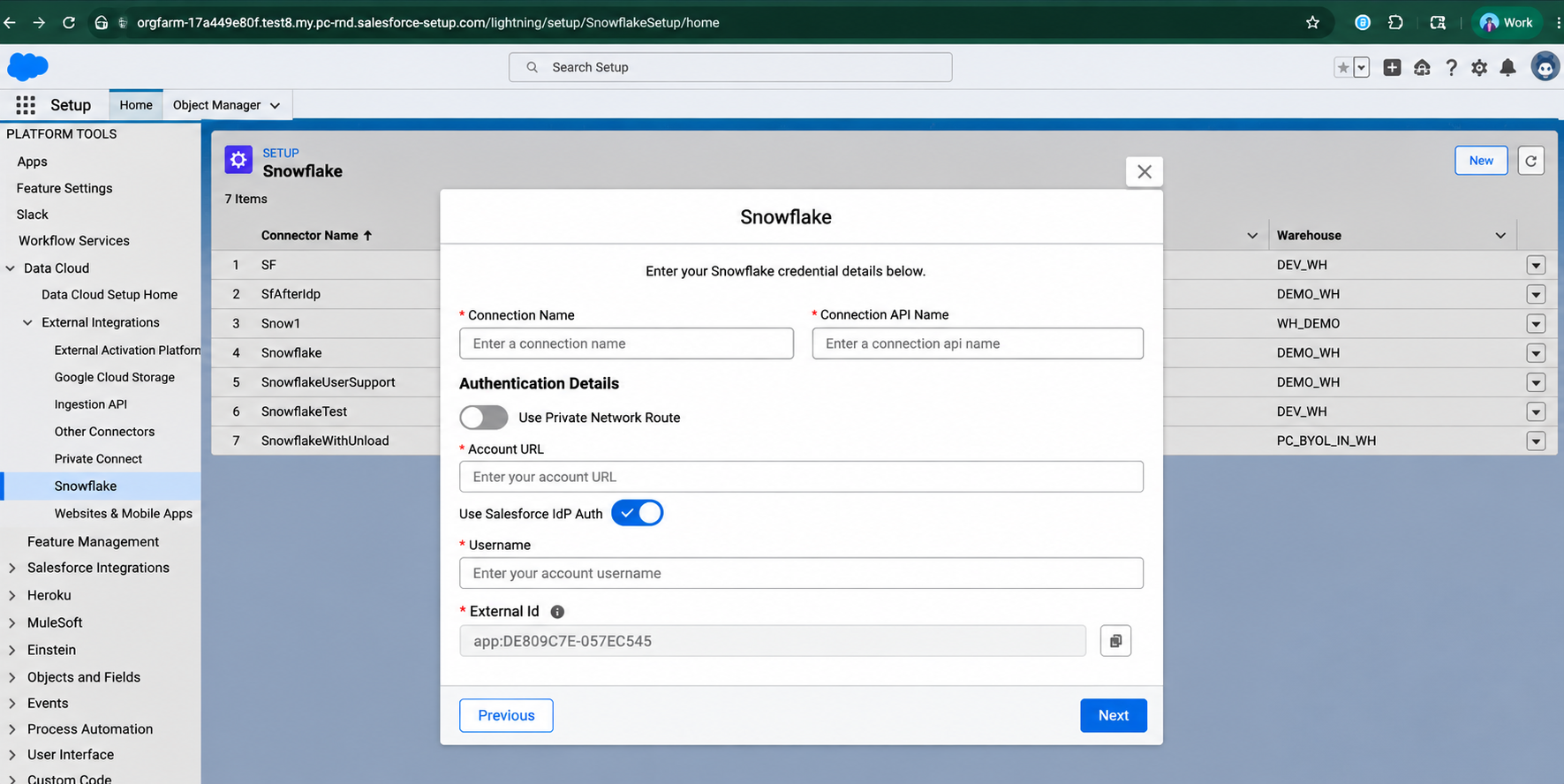
Data 360 generates a unique External ID and shows a Username field. No Snowflake password or private key is required in this flow. The External ID acts as the connection ID. You will use it when configuring the Snowflake OIDC user.
The Username identifies the Snowflake user linked to the Data 360 org.
Step 2: Create the Snowflake OIDC User
Now configure the Snowflake side.
Create a dedicated WORKLOAD_IDENTITY (OIDC) service user for Data 360.
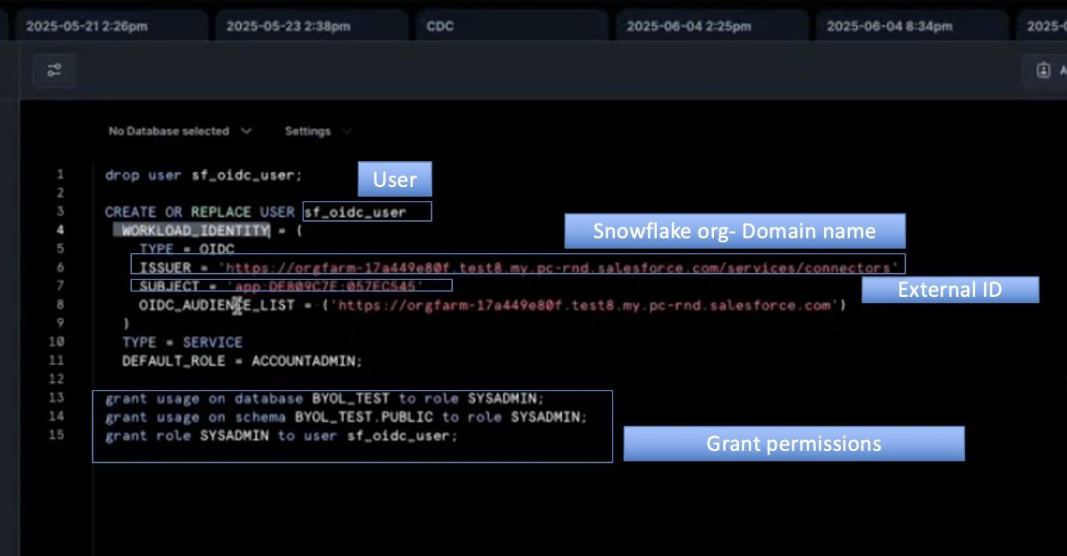
Use the External ID from Step 1 as the OIDC subject.
Then configure the following:
Issuer: Your Salesforce My Domain URL followed by /services/connectors
Subject: The Data 360 External ID
OIDC Audience: Your Salesforce My Domain URL
This establishes the trust relationship between Data 360 and Snowflake.
Step 3: Grant the Required Snowflake Access
Create a dedicated Snowflake role for the Data 360 user.

Grant access to the required:
Warehouse
Database
Schema
Tables or other required objects
Attach the role to the OIDC service user.
Keep the permissions limited to the data Data 360 needs.
Step 4: Complete the Data 360 Connection
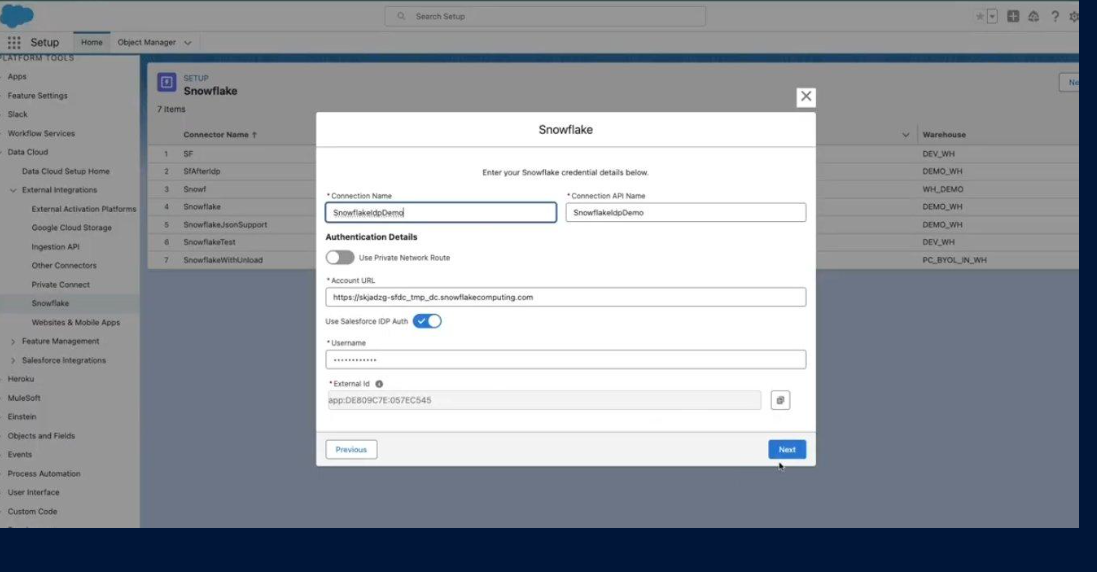
Return to the Snowflake connection and enter the Snowflake Username and Account URL.
Click Next, select the required warehouse, and click Save.
The connection is now ready for supported Data 360 data streams and integration methods.
Step 5: Choose How Data 360 Will Use Snowflake Data
The connection alone doesn’t define how data is used. Snowflake supports:
Data ingestion
Query Federation
File Federation
Data Share
Ingestion copies data into Data 360; the other three are zero-copy options. Your next steps depend on the method selected.
Step 6: Configure the Selected Data Path
For a data stream, select the Snowflake connection, database, objects, data category, primary key, fields, and Data Space. Then deploy.
For federation, follow the setup for the selected method. Query Federation and File Federation have different requirements, with File Federation requiring Snowflake Open Catalog and Apache Iceberg tables.
Step 7: Map and Use the Snowflake Data
Map the available data to the Data 360 data model for downstream use. It can support identity resolution, unified profiles, calculated insights, segmentation, and activation.
For ingested streams, map the resulting Data Lake Object (DLO) to the Data 360 semantic data model.
How to Connect Salesforce Data Cloud to Google BigQuery
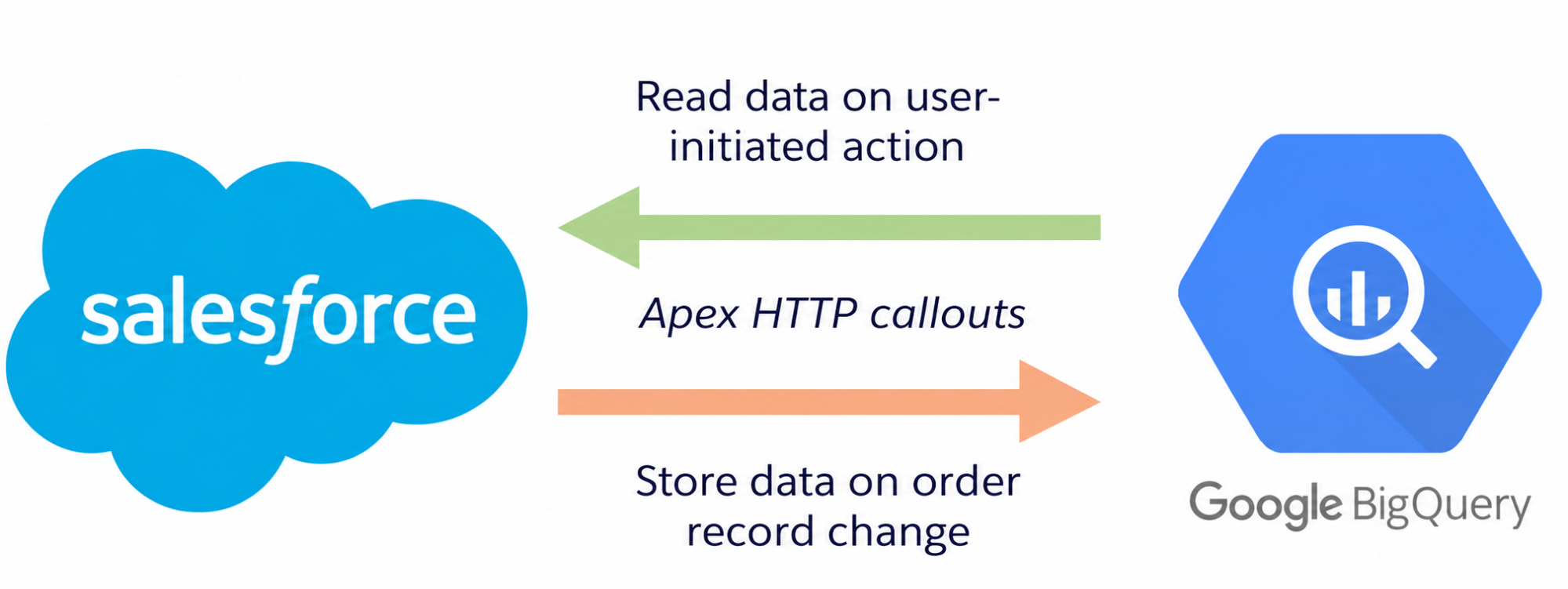
The BigQuery integration uses a different connection model from Snowflake. Instead of walking through the setup as a long sequence, think of the integration as four configuration layers.
1. Create the Connection
In Data Cloud, go to Data Cloud Setup → Configuration → More Connectors → New. Under Source, select Google BigQuery and click Next. Enter the Connection Name and Connection API Name.
2. Configure Authentication and Google Cloud Access
Choose Private Key Pair or Identity Provider-based authentication.
For IDP authentication, configure Workload Identity Federation in Google Cloud. Use your Salesforce My Domain URL + /services/connectors as the issuer and your My Domain URL as the allowed audience.
Create the required Google Cloud service account and grant the permissions needed for BigQuery access.
3. Complete and Test the Connection
For IDP authentication, download the generated Google Cloud configuration and paste it into the OIDC Client Config field in Data 360. Enter the Project ID and Service Account Email, then click Test Connection → Save.
4. Create and Configure the Data Stream
Go to Data Streams → New.
Under Other Sources, select the Google BigQuery connection and click Next. Select the required BigQuery objects.
For each object, define the Data Lake Object label, API name, category, primary key, and fields. Then select the Data Space and configure acceleration if required. Click Deploy.
5. Map the Data
After deployment, the data stream creates a Data Lake Object (DLO).
Map the DLO to the Customer 360 Data Model to use the BigQuery data across Data 360, including segments, calculated insights, and other use cases.
Learn more: Set Up a Google BigQuery Data Federation Connection
How to Connect Salesforce Data Cloud to Databricks
There are two integration directions between Salesforce Data 360 and Databricks. The first lets Databricks query Data 360 data without copying it. The second lets Data 360 access data that remains in Databricks through Data Federation.
Method 1: Query Data 360 from Databricks
This method uses Databricks Lakehouse Federation to query Salesforce Data 360 without moving the data.
1. Create a Salesforce Connected App
In Data 360, go to Setup → Platform Tools → Apps → App Manager → New Connected App.
Enable OAuth and add these scopes:
cdp_api
api
cdp_query_api
refresh_token
offline_access
Save the Consumer Key and Consumer Secret.
2. Create the Databricks Connection
In your Databricks workspace, go to Catalog → Add → Create a connection.
Select Salesforce Data 360 as the connection type. Enter the Salesforce Client ID and Client Secret, then click Sign in with Salesforce.
After authentication, click Create connection.
3. Create the Foreign Catalog
In the connection wizard, enter a name for the Foreign Catalog and specify the Salesforce Data Space. Click Create catalog.
The catalog mirrors the Data 360 database so Databricks can query the data through Unity Catalog.
Method 2: Query Databricks Data from Data 360
This method uses Data 360 Data Federation to access data that remains in Databricks. Salesforce documents this connection for AWS- and Azure-hosted Databricks.
1. Create the Databricks Connection
In Data 360, go to Data Cloud Setup → Configuration → Connectors → New.
Under Source, select Databricks and click Next.
Enter the Connection Name and Connection API Name.
2. Configure Authentication
Choose one of the three supported methods:
Username & Password
Client ID & Client Secret
Identity Provider Based
For Client ID and Client Secret authentication, Salesforce specifies that the Databricks service principal must be an Azure Databricks-managed service principal.
3. Enter the Databricks Details
Enter the Connection URL using the SQL warehouse server hostname and port. Then enter the SQL warehouse HTTP Path.
Click Test Connection to verify the configuration, then click Save.
The connection can then be used for supported Data 360 federation workflows. Salesforce currently lists Query Federation, File Federation, and Data Share as zero-copy Databricks methods, alongside batch ingestion.
What zero copy costs, on both invoices
Zero copy is sold on one number: federation is cheaper than moving data. That is true on one invoice. If you own the budget, you need to see both invoices.
The official Salesforce Data Cloud rate card (August 2025) sets the multipliers per million rows, Production Batch: data federation or sharing accessed, 70 credits; data share out, 800 credits; batch ingestion through an external data pipeline, 2,000 credits (Salesforce Rate Card). Under the Flex Credits model, credits cost $500 per 100,000, or $0.005 each (Data 360 Pricing). The 70-versus-2,000 gap, roughly 28 to 1, is the number the pitch rests on.
Now the part that number hides. Those 70 credits meter the Salesforce side only. Under query federation, the external engine executes on its own compute and bills you separately, because both engines run (Databricks).
So the real comparison is not 70 versus 2,000. It is 70 credits plus your Snowflake or Databricks compute, against 2,000 credits with no external compute. File federation removes the second invoice by reading storage with Data 360's own engine (Salesforce Trailhead).
One footnote on Snowflake: even the storage-layer path can leave a small line on that invoice. When the read goes through Horizon's Iceberg REST Catalog API, Snowflake bills 0.5 Cloud Services credits per million calls, with billing scheduled to start in the second half of 2026 (Snowflake).
| Operation (per 1M rows, Production Batch) | Credits | At $0.005 per credit | External warehouse compute? |
|---|---|---|---|
| Data federation or sharing, rows accessed | 70 | $0.35 | Yes under query federation, billed separately; none under file federation |
| Data share, rows shared out | 800 | $4.00 | The reading warehouse pays its own compute |
| Batch ingestion, external data pipeline | 2,000 | $10.00 | None |
Salesforce's own pricing example shows the scale. For a Snowflake-based enterprise, the first-year list price totals $129,845, and the single line "Data Federation or Sharing Rows Accessed" runs to 114 billion rows accessed, 7,984,375 credits, $39,922 (Salesforce). Federation is the second-largest cost line in the vendor's own example, not a rounding error.
The break-even point depends on how often you query. No one publishes a single break-even number, so work it out per workload. Federation's per-row rate is low but charged on every access.
An independent analysis states it directly: federation is "cheaper at small volumes" and "wildly more expensive when an autonomous agent queries 50 million rows in a loop" (Revanth). Analysts query selectively; agents query relentlessly. A federation setup tuned for dashboards will surprise you the first time an AI workflow hits it. One more thing to watch: "acceleration." Ambrosetti points out it is caching, meaning a copy, and that copy has a storage cost the comparison tables leave out (Luke Ambrosetti).
"Your data never leaves" is true and incomplete
The data does stay in your warehouse. That part is true. What the pitch skips is a different question: who enforces your access rules. The answer changes with the mechanism.
Salesforce engineering says it plainly: "Query Federation naturally relies on the remote warehouse's governance controls because that platform executes the query. File Federation shifts more responsibility toward Data 360 because compute operates closer to storage" (Salesforce Engineering). Under query federation, your warehouse enforces the rules. Under file federation, Data 360 does.
A working architect puts it more sharply. When file federation reads files directly, it bypasses the source platform's compute engine, and with it the governance layer that engine enforces. Ambrosetti's conclusion: it "requires you to duplicate and maintain a second governance model entirely within Data Cloud" (Luke Ambrosetti).
Your Snowflake Horizon or Databricks Unity Catalog policies do not follow the data when something reads around the engine that applies them. For a CIO in a regulated industry, that is the sentence that matters. It is the opposite of the "better governance" the category is sold on.
It is not all bad news, but be precise about it. Snowflake can enforce masking policies, tag-based masking, and row access policies on Iceberg tables queried from Apache Spark, as long as the read goes through the governed Horizon Catalog path, generally available since January 27, 2026 (Snowflake).
The rules hold when the read goes through the governed catalog path; Spark is the documented case so far. They do not hold when an engine reads raw files outside that path. Know which path you are on before you promise anything to a compliance officer.
The credential model is the reassuring part. File federation never takes permanent access to your storage. Access "flows through the catalog layer, which provides temporary credentials for specific requests and limited periods of time" (Salesforce Engineering). Access is granted per request, for a limited time, never permanently. In my assessment, that credential design is the strongest security argument for the pattern, stronger than "the data never leaves," because it answers what an auditor asks.
Best Practices for Connecting Data Cloud to External Warehouses
A successful Salesforce Data Cloud integration starts before the connection is created. From deciding which data should move to managing identities and access, a few architectural choices can make a big difference. Here’s what to consider:
1. Where should the data live?
Decide whether to ingest data into Data Cloud or access it through federation.
2. How much data actually needs to move?
Avoid unnecessary data duplication and consider performance and cost.
3. Can Salesforce understand the data?
Align schemas, identifiers, and data models before bringing warehouse data into customer profiles.
4. How will customer identities be matched?
Make sure records from different systems can be linked to the right customer.
5. Who can access the data?
Apply the right security, PII, and compliance controls across both platforms.
6. What happens when something breaks?
Set up monitoring so you can quickly spot connection, data, or synchronization issues.
The one line to take away
Zero copy tells you where the data lives. It does not tell you where the compute runs, who pays for it, or who enforces your policies, and those three answers change with the mechanism and the warehouse. Before you sign off, ask which mechanism, on which platform, at what query frequency.
For teams weighing a zero-copy connection against a migration, our team can map the mechanism, cost, and governance tradeoffs to your specific warehouse. Book an architecture consult.
Thanks
Harting Harris for help with proof reading and auditing the quality of this post.
Sources
Salesforce Trailhead, Get Started with Zero Copy Data Federation
Salesforce Trailhead, Get Started with Zero Copy Data Sharing
Salesforce Engineering, Scaling Zero Copy from 1 Trillion to 120 Trillion Rows with File Federation
Salesforce, Data Cloud Platform Services Rate Card (August 2025)
Salesforce, Data 360 Zero Copy pricing use case
Salesforce, Data 360 Pricing
Salesforce Developers, Google BigQuery Connector, Data 360 Integration Guide
Databricks, Connect to external databases and catalogs
Databricks, What is query federation?
Snowflake, External query engine support for Iceberg tables with Horizon Catalog (GA)
Snowflake, Enforce data protection policies when querying Iceberg tables from Apache Spark
Snowflake, Access Apache Iceberg tables with an external engine through Snowflake Horizon Catalog
Google Cloud, Work with Salesforce Data Cloud data in BigQuery
SiliconANGLE, Salesforce introduces Data 360 as part of its new platform
Luke Ambrosetti, Salesforce Zero-Copy Recommendations: The Good, The Bad, and The Ugly
Revanth, Zero-copy data architecture is not the death of ETL. It's ETL with the receipts hidden
Common questions
-
A pattern for using data where it already lives, without duplicating it. Instead of an ETL pipeline that extracts and loads a copy, the consuming system reads the source through metadata references or a live query (Salesforce Trailhead).
-
Through one of three mechanisms: query federation, where the source engine runs the query; file federation, where the consuming platform reads the source's Iceberg storage directly; and data sharing, where the source exposes governed objects for an external system to query in place (Salesforce Trailhead).
-
Query federation runs on the external engine and can bill you for external compute; every platform supports it. File federation runs on the consuming platform's own compute against the storage layer, avoids external compute fees, and is not supported everywhere (Salesforce Trailhead).
-
Yes, but not identically. Databricks supports query and catalog federation plus sharing; Snowflake exposes tables to external engines via Horizon Catalog; BigQuery supports query federation and data share only, with no file federation and no Government Cloud availability (Databricks, Salesforce).
-
At low query volumes, yes: 70 credits per million rows federated against 2,000 for batch ingestion. At high, repeated query volumes, federation can cost more once you count the external compute it triggers on every access (Salesforce Rate Card, Revanth).
-
Under query federation, you pay both: Salesforce credits plus your external warehouse's compute, because both engines run. File federation removes the external compute bill by reading storage with Data 360's own engine (Databricks).


Let’s Talk

Drop us a note, we’re happy to take the conversation forward👇🏻