Can Salesforce Revenue Cloud Integrate with Other CRM Systems?
Key takeaways:
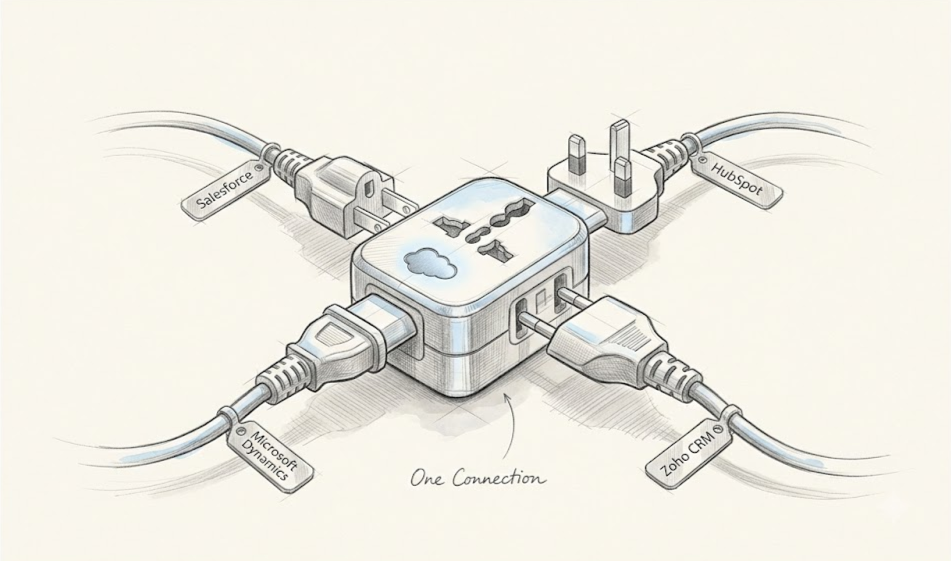
Salesforce Revenue Cloud can integrate with non-Salesforce CRMs like HubSpot, Microsoft Dynamics 365, and Zoho using APIs, MuleSoft, iPaaS tools, or custom integrations.
The right integration approach depends on your data volume, business requirements, budget, and need for real-time synchronization.
Real-time sync is possible through tools like Platform Events and Change Data Capture (CDC), but it may add complexity and cost.
If you've found your way here, chances are your company runs on more than one CRM. Maybe you inherited a second system through an acquisition, or perhaps your sales team operates in HubSpot while finance prefers Salesforce. Whatever the reason, you've probably asked yourself one question: Can Salesforce Revenue Cloud actually integrate with these other platforms?
The short answer is yes. Revenue Cloud, Salesforce's suite for quoting, billing, and revenue lifecycle management, is built to extend beyond the Salesforce ecosystem. But "yes, it's possible" and "yes, it's simple" are two very different things. The real answer depends on which systems you're connecting, how much data needs to move, and how real-time that data needs to be.
In this blog, we'll break down how Revenue Cloud integrates with other CRMs, what tools make it possible, and what to watch out for along the way.
This post will be helpful whether you're just starting your Revenue Cloud implementation or already running it alongside other systems.
What Is Salesforce Revenue Cloud, Briefly
Revenue Cloud brings together Configure-Price-Quote (CPQ), billing, and revenue lifecycle management into a single platform. It's designed to manage the entire revenue process from the first quote to recurring billing to renewals natively within Salesforce. Because it's deeply embedded in the Salesforce data model, it works perfectly out of the box if your whole tech stack is Salesforce. The real challenges show up when other systems enter the picture.
Native and Out-of-the-Box Integration Capabilities
Revenue Cloud data isn't restricted to Salesforce alone. Salesforce provides several tools that support connections to outside systems:
APIs (REST, SOAP, Bulk, GraphQL): These let external systems read from and write to Revenue Cloud objects programmatically, whether you need a single record update or a bulk data sync.
Platform Events and Change Data Capture (CDC): These enable near real-time syncing, so changes in Revenue Cloud Salesforce (like a new quote or updated invoice) can trigger updates in another CRM almost instantly.
AppExchange Connectors: Salesforce's marketplace includes pre-built connectors for popular platforms, which can significantly cut down custom development time.
Integration Approaches for Non-Salesforce CRMs
Once you've chosen Revenue Cloud Salesforce and want to integrate it into your CRM system, whether HubSpot, Microsoft Dynamics, or Zoho, your team can pick between several integration strategies:
MuleSoft Anypoint Platform: Being developed by Salesforce itself, this tool is considered to be the most supported platform and is meant for large-scale integration needs when high data volumes and advanced control over interactions are required.
Third-Party Middleware (iPaaS Tools): There are numerous iPaaS solutions, such as Workato, Boomi, and Zapier, that are less heavy in nature than MuleSoft and offer fast and convenient integration processes. They might be used in mid-size companies and simple scenarios.
Custom API Integrations: For unique or highly specific requirements, some teams build direct point-to-point integrations using Salesforce's native APIs. This offers maximum flexibility but requires more engineering resources to build and maintain.
This approach is best handled through dedicated expert Salesforce Revenue Cloud Services rather than in-house alone.
ETL and Batch Sync Tools: When real-time sync isn't necessary, ETL (Extract, Transform, Load) tools can move data between systems on a schedule; this is particularly useful for reporting or reconciliation use cases where a few hours' delay is acceptable.
Common Systems Revenue Cloud Is Integrated With
Even though Revenue Cloud is designed to work perfectly with Salesforce products, there are many companies that integrate Revenue Cloud with third-party CRMs and business applications to synchronize customer contacts, product catalog, quotes, contracts, invoices, or orders.
Some of the most common systems Revenue Cloud is integrated with include:
HubSpot: It is very common for companies to use HubSpot for marketing automation and lead management, along with Salesforce Revenue Cloud for quoting, subscriptions, and billing. The integration between these two ensures that customer contacts, opportunities, and customer lifecycle information stay consistent for both sales and marketing departments.
Microsoft Dynamics 365: In cases when organizations have Microsoft Dynamics 365 alongside the Revenue Cloud, integration of the two synchronizes customer, opportunity, and order information. Such an integration is commonly required after an acquisition or merger of enterprises.
Zoho CRM: Small and medium-sized enterprises might have Zoho CRM for sales management and use Salesforce Revenue Cloud for advanced pricing or subscription management. Integration here eliminates duplicate data entry and keeps customer information consistent across both platforms.
ERP Systems: Salesforce Revenue Cloud is frequently integrated with ERP platforms such as SAP, Oracle ERP, or NetSuite. These integrations allow approved quotes and orders to flow into finance and operations for invoicing, inventory management, procurement, and revenue recognition.
Key Challenges to Watch For While Integrating Revenue Cloud
It is clear that Integration is achievable, but it's rarely plug-and-play. Before rolling out any integration, it is important to understand where things typically go wrong so you can plan around them before rather than react to them later. Common friction points include:
Data model mismatches: Revenue Cloud's objects and fields (quotes, subscriptions, revenue schedules) don't always map correctly onto every CRM's data structure. A field that means one thing in Revenue Cloud may not have a direct equivalent elsewhere, so field mapping takes real planning and often some compromise on both sides
Real-time vs. batch tradeoffs: Real-time sync keeps systems constantly aligned but adds technical complexity and cost, whereas batch sync is simpler and cheaper to maintain but introduces data lag, which can be a problem if teams are making decisions based on outdated information.
Licensing and cost: Middleware platforms come with their own pricing structures, and enterprise-grade tools like MuleSoft can add meaningful cost to a project, especially at scale. It's worth budgeting for these tools early rather than treating them as an afterthought.
Data integrity: Keeping two systems consistent over time, especially around pricing, discounts, and billing, requires ongoing monitoring, not just a one-time setup. Small mismatches can compound quickly if left unchecked, leading to billing errors or reporting inconsistencies down the line.
Best Practices for a Smooth Revenue Cloud Integration
A few principles can make the difference between a clean integration and a constant headache:
1. Establish a single source of truth.
Define from the start which system is responsible for which data (Revenue Cloud is in charge of billing information; the other CRM is in charge of lead/contact data) to avoid conflicting updates. Otherwise, different departments will have two systems that will argue about which one of them has the right version of the record.
2. Favor middleware over pure point-to-point connections as complexity grows
Point-to-point integrations may seem faster to set up initially, but they become difficult to manage once you're connecting three or more systems. Middleware centralizes the logic, scales better, and is easier to maintain and troubleshoot long-term.
3. Build in error handling and monitoring from day one
Integrations will occasionally fail, a record won't sync, an API call will time out, a field mapping will break after a system update. Having alerts and logging in place from the start means these issues get caught and fixed quickly, rather than discovered weeks later when data is already out of sync.
4. Test with real-world data volumes before going live.
A small sample of test records can hide problems that only surface at scale, such as API rate limits, timeout issues, or performance slowdowns. Running a pilot with production-level data helps catch these problems before they affect live customers.
Getting this right on your own can be tricky; that is why working with an experienced Salesforce Revenue Cloud integration partner can make a huge difference by helping you avoid common pitfalls and get your integration live faster.
Conclusion
Revenue Cloud isn't restricted to Salesforce products. It can work well with other CRMs and ERPs if the right combination of APIs and middleware is used along with proper planning, thus allowing your company to maintain all the familiar tools while also centralizing your revenues.
The important thing is not whether it's possible to integrate but rather which approach to choose based on data volumes, budget, and the need for real-time capabilities. If you're evaluating this for your own organization, it's worth starting with a data audit and guidance from a Salesforce Consulting partner to map out the approach that best fits your systems.
Frequently Asked Questions
-
Not entirely out of the box, but it can integrate with other CRMs through APIs, MuleSoft and external iPaaS, though out of the box integration is for Salesforce, so you'll typically still need middleware or custom development to complete the integration with CRMs apart from Salesforce.
-
Connecting HubSpot or Dynamics 365 with Revenue Cloud isn’t hard, but the choice entirely depends on your scale and budget. MuleSoft is the preferred IPaaS for large enterprises with complex, high-volume data needs. For anything simpler or basics use cases, iPaaS tools like Workato, Boomi, or Zapier are usually faster and cheaper to set up.
-
Yes. It can be done using the help of platform events and Change Data Capture (CDC), which enable near real-time integration, which means that any changes made in Revenue Cloud can be synchronized with any other CRM instantly.
-
For basic connections using AppExchange connectors or lightweight iPaaS systems, admins can often handle setup with minimal coding. More complex integrations, however, will require you to hire a Salesforce developer or an integration partner, especially with requirements involving MuleSoft or custom API work.
Related Reading
Let’s Talk

Drop us a note, we’re happy to take the conversation forward 👇🏻