Why Only Salesforce Native Security Isn't Enough for Sensitive Data Protection
Key Summary:
Salesforce native security offers strong basic protection and access control.
It lacks dynamic masking and sensitive data discovery for PII/PHI protection.
Additional security tools are needed to ensure full compliance and reduce risk.
Salesforce is one of the most trusted CRM platforms in the world. Millions of businesses rely on it to store customer data, manage sales pipelines, and run critical operations. And yes, Salesforce takes security seriously. But here's the uncomfortable truth: “native Salesforce security features alone aren't enough to protect your sensitive data”.
If your organization handles PII, PHI, or financial records inside Salesforce, relying only on built-in features could leave you exposed in ways you haven't even considered yet. Let's get into exactly why.
What Salesforce Native Security Actually Covers
Before pointing out the gaps, it's worth acknowledging what Salesforce does well. The Salesforce native security is what it is.
Salesforce offers a solid set of native security controls.
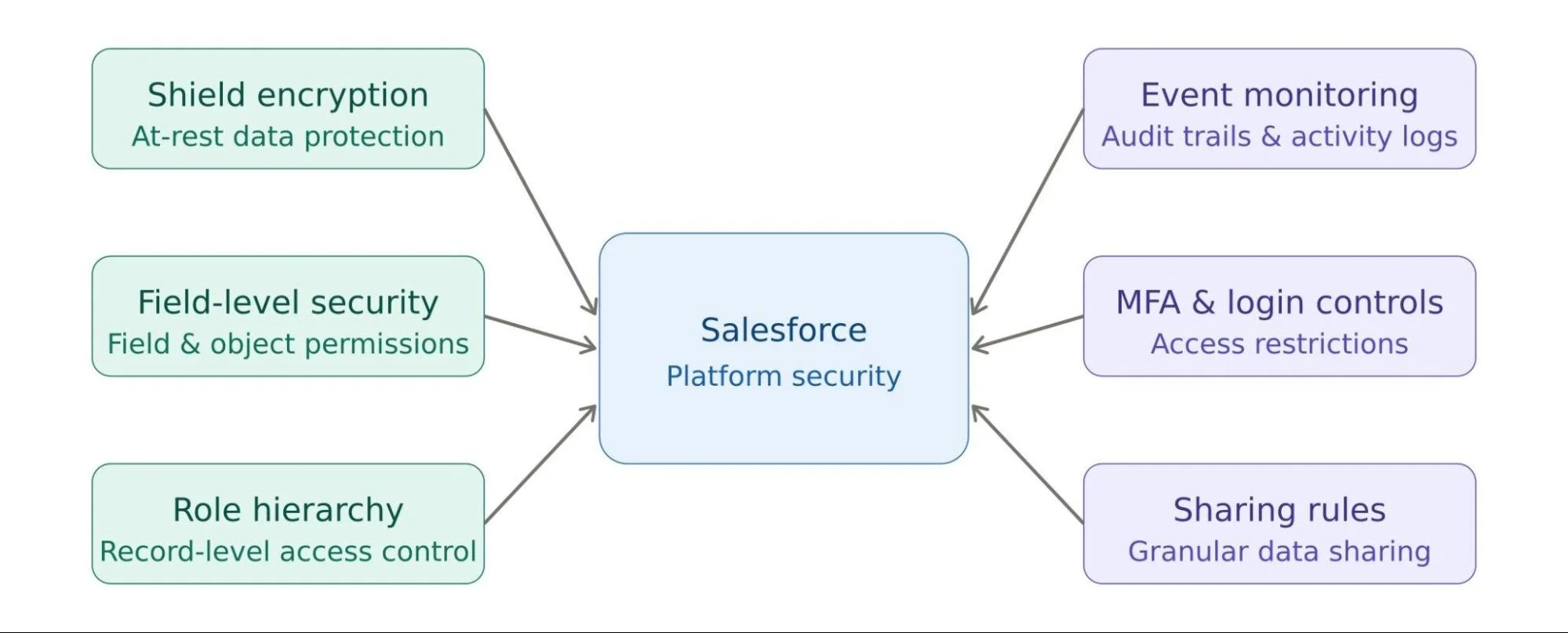
Shield Platform Encryption enables data-at-rest encryption. It covers fields, files, and attachments. Field-Level Security (FLS) and object permissions allow admins to control who can see or edit specific fields.
The Role Hierarchy and Sharing Rules system gives you granular control over record-level access.
On top of that, Event Monitoring and audit trails let you track user activity. Activities like logins, report exports, or data access. And features like Multi-Factor Authentication (MFA), login hours, and IP restrictions add another layer of access control.
These are real, valuable capabilities. Salesforce invests heavily in platform security, and it shows. But the catch here is that these tools protect the platform. The sensitive data would remain out of the equation. Protecting your data inside that platform is a different challenge entirely.
The Critical Gaps in Salesforce Native Security For Sensitive Data
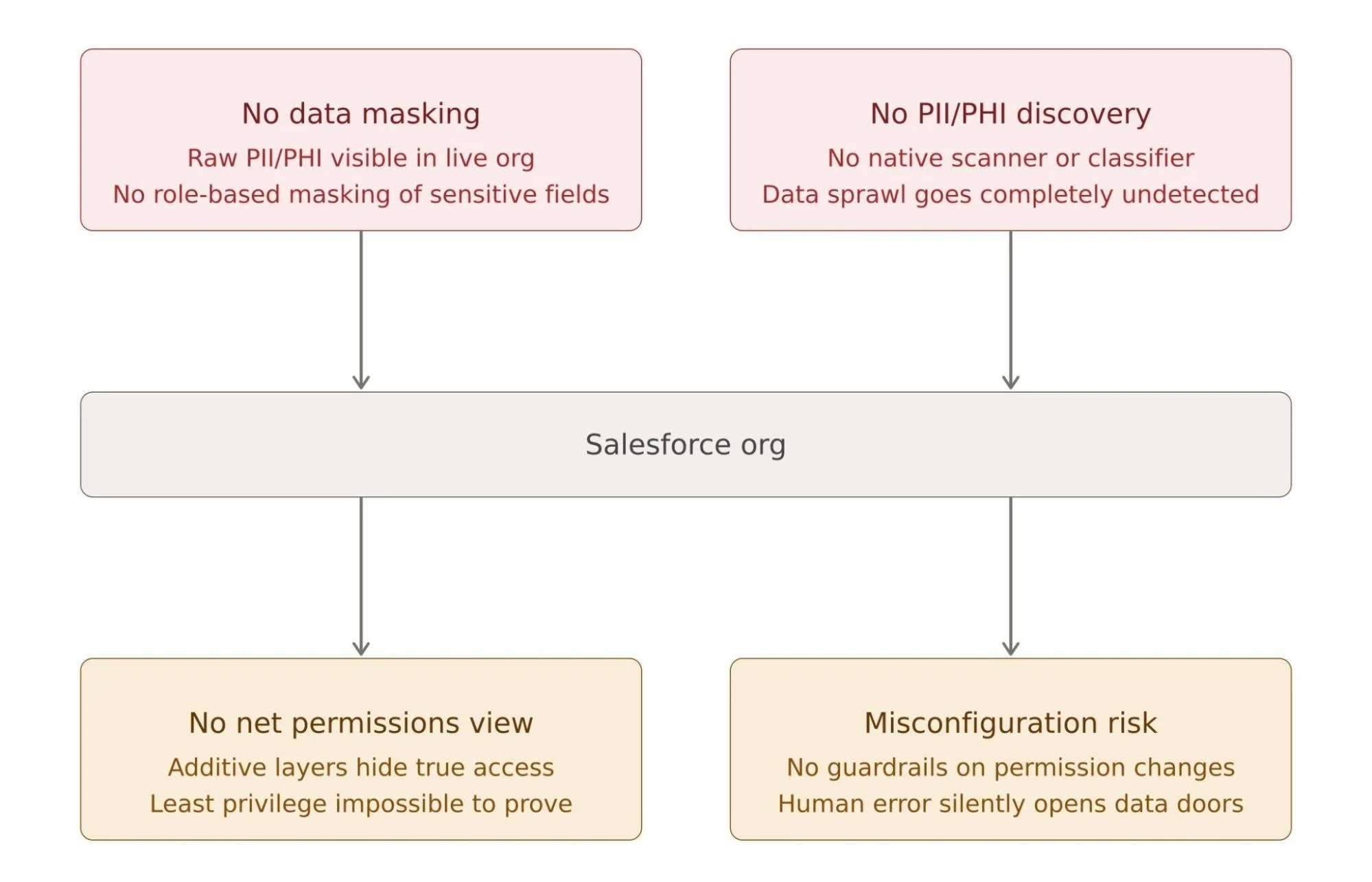
There are a few areas where Salesforce's native features fall short when it comes to securing sensitive data. Understanding these gaps gives you an edge in enhancing CRM security.
1. No Native Data Masking in the Live Org
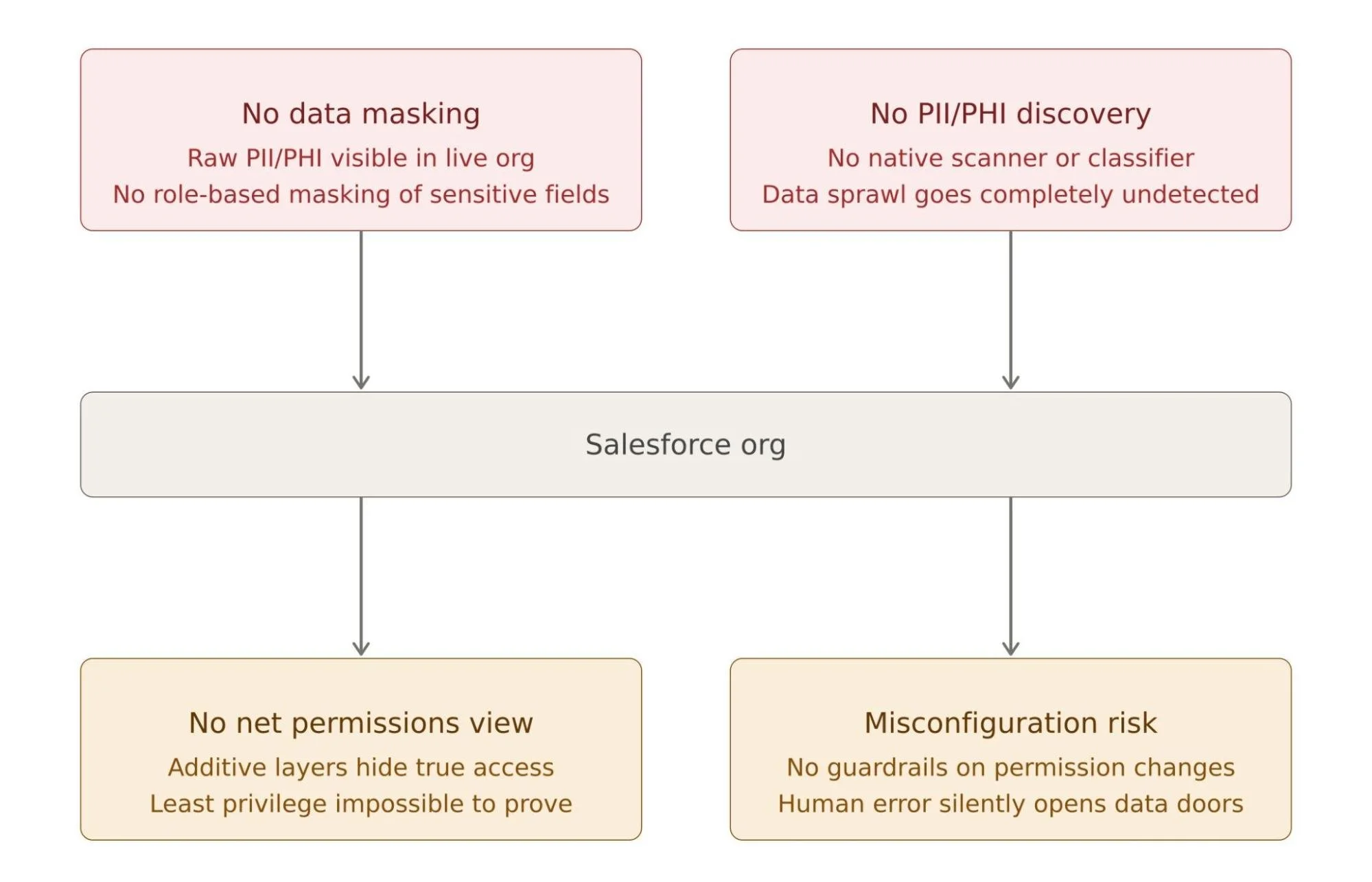
This is one of the most overlooked gaps in Salesforce data security. Shield Platform Encryption encrypts data at rest. That means if someone physically accesses the database, they won't see plain text. Great. But what about when an authorized user opens a record inside your live Salesforce org? They see everything. Full Social Security Numbers. Complete credit card digits. Unmasked patient health information.
There is no native dynamic data masking in Salesforce. No way to show a support agent hidden/starred values (for eg, ****-****-1234) instead of the full number. No way to hide PHI from a contractor who only needs partial access. Either a user has field access and sees the raw data, or they don't.
This creates a serious problem for any organization managing sensitive records. Over-privileged users, temporary contractors, and customer support teams routinely see far more than they need to. And Salesforce's native toolset gives you no middle ground. So, you need to go beyond Salesforce Shield. That’s where data masking in Salesforce works as the solution. Without it, your sensitive data is always one curious employee or one compromised account away from full exposure.
Ready to close this critical security gap? Contour by Concretio is the new purpose-built solution that provides dynamic data masking in your live Salesforce org without altering underlying data.
2. No Automated PII/PHI Discovery or Classification
Here's a question many Salesforce admins can't answer with confidence: Where exactly does all your sensitive data live?
Salesforce is a flexible platform. Over time, data sprawls.
PII (Personally Identifiable Information) ends up in custom fields built years ago.
PHI (Protected Health Information) gets entered into free-text notes.
Attachments contain sensitive documents.
Legacy integrations dump unstructured data into places nobody audits anymore.
That’s where sensitive data security in Salesforce becomes crucial.
Salesforce has no native tool to automatically scan, detect, and classify sensitive data across your org. There's no built-in PII scanner. No automated data classification engine. This is a significant compliance risk. GDPR requires you to know where personal data lives. HIPAA demands that you can account for every piece of protected health information.
If you can't find your sensitive data, you can't protect it. And you certainly can't prove compliance during an audit. The longer a Salesforce org runs without sensitive data discovery, the more sensitive data accumulates in unknown corners. And once a breach happens, figuring out what was exposed becomes an expensive, time-consuming nightmare.
3. Inability to View "Net Effective Permissions" to Sensitive Data
Salesforce permissions are layered and additive. A user's actual access comes from multiple sources: their Profile, one or more Permission Sets, Permission Set Groups, Sharing Rules, and sometimes manual sharing.
Each layer stacks on top of the previous one. Permissions can't easily be taken away through one setting if another grants them elsewhere. And here's the real problem: there is no native Salesforce tool that shows you what a user can actually access in a single, consolidated view.
This concept is called "net effective permissions." And without visibility into it, Salesforce admins are essentially flying blind.
Want to know what this means in practice? An admin grants a permission set for a project. The project ends, but the permission set remains. Another admin adds access for a temporary integration. Someone inherits elevated permissions from a role change that nobody reviewed. Over time, users accumulate access that was never intended to be permanent.
During a Salesforce audit, proving least privilege access is nearly impossible. You can't demonstrate that users only have the access they need if you can't see what access they actually have. Net effective permissions visibility isn't a nice-to-have. For any regulated organization, it's a compliance requirement that Salesforce native tools simply don't meet.
4. User Misconfiguration Risk
You could feel that the permission models are quite intricate on Salesforce. When permission structures are intricate, human error becomes inevitable. An admin assigns a permission set without realizing that it also grants access to a sensitive custom object. A sharing rule gets created too broadly.
Salesforce doesn't provide automated guardrails or real-time alerts when sensitive field access is inadvertently exposed through a configuration change. There's no native mechanism that flags: "This permission set change just gave 200 users access to a field containing PHI."
Misconfiguration is consistently one of the leading causes of data exposure in cloud environments. Salesforce is no exception. The more complex your org, the higher the risk that a well-intentioned configuration change quietly opens a door to sensitive data.
Real-World Scenarios Where Native Security Falls Short
It helps to see these gaps in action. Here are three scenarios that play out in real Salesforce environments:
Scenario 1: A sales rep runs a standard report and exports it to Excel. The report pulls full SSNs stored in a custom field. There's no masking, no export alert. The file sits in their Downloads folder indefinitely.
Scenario 2: A compliance audit requires your team to ensure which users can access PII/PHI fields. You spend three days manually cross-referencing profiles, permission sets, and sharing rules, and still can't produce a clean, confident answer.
Scenario 3: A customer service rep enters a patient's diagnosis into a free-text Notes field during a call. That field isn't encrypted. It isn't flagged as sensitive. It never shows up in any data classification report because none exists.
They're all the result of normal business operations running inside a platform that lacks the right controls for sensitive data protection.
What a Complete Salesforce Data Security Strategy Looks Like
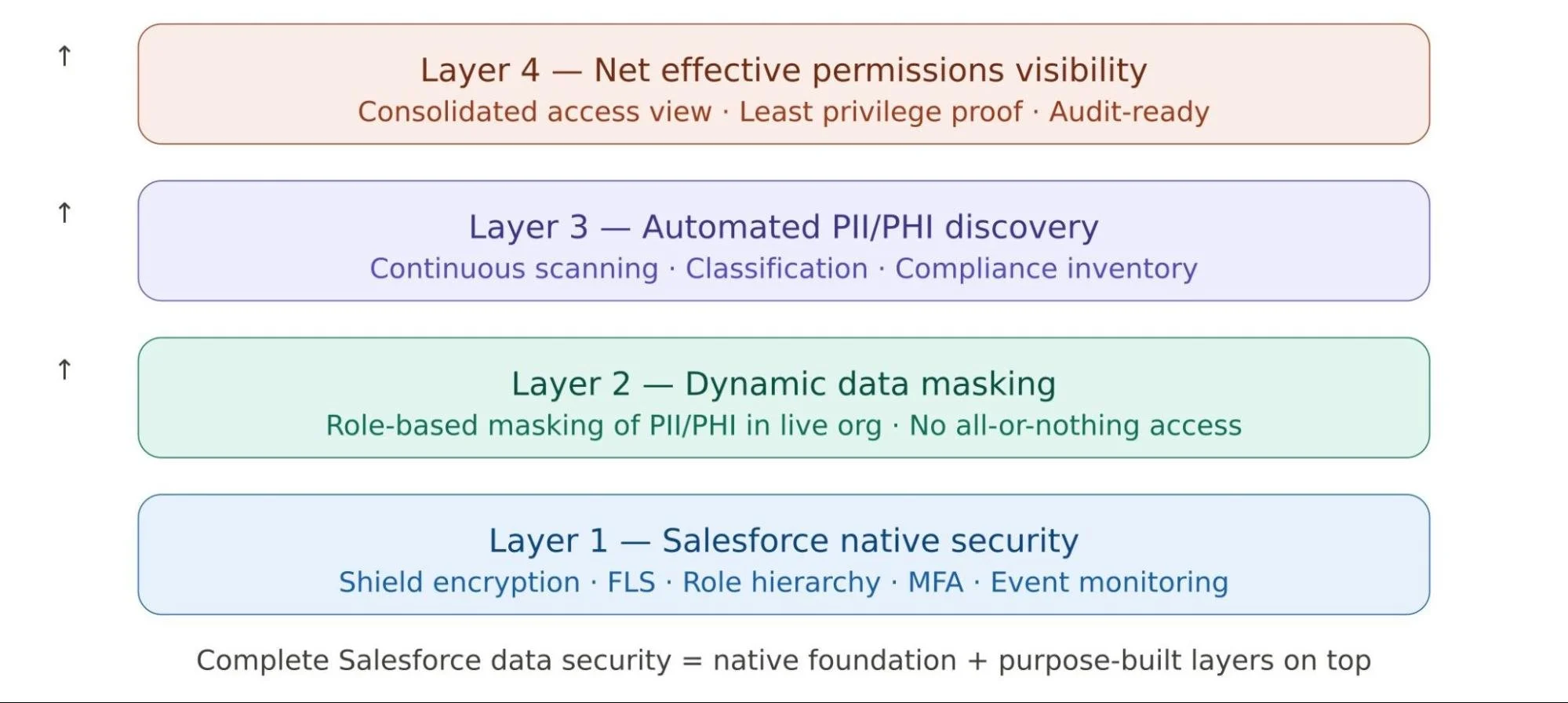
Closing Salesforce security gaps requires layering purpose-built security solutions on top of Salesforce's native capabilities. Here's what that looks like in practice:
1. Dynamic Data Masking in Salesforce replaces raw sensitive values with masked equivalents in the live org. Without changing the underlying data. Support agents see ****1234. Executives see full numbers only if their role requires it. Access is role-based, not all-or-nothing.
2. Dedicated Sensitive Data Discovery helps scan your Salesforce org to find and classify PII, PHI, and other sensitive data. Custom fields, notes, attachments, and legacy objects all get inventoried. You always know what you have and where it is.
3. Net Effective Permissions Visibility gives admins and compliance teams a clear, consolidated view of what every user can actually access. No more manual cross-referencing. No more audit surprises.
4. Real-Time Misconfiguration Alerts notify your security team the moment a permission change exposes sensitive data before it becomes a breach or a compliance violation.
Conclusion
Salesforce's native security features are genuinely strong. Shield Platform Encryption, Data Masking & Seeding, Field Level Security, Event Monitoring, these are not trivial tools. They're a solid foundation.
But Sensitive data protection in Salesforce requires going beyond what's built in. It requires knowing where your PII and PHI live, who can really access it, what it looks like to an authorized user, and whether your configurations are quietly creating risk.
The organizations that get this right don't just rely on Salesforce to protect their data. They take ownership of it. They use the right strategy, the right tools, and a clear-eyed view of where the gaps are. If you haven't audited your Salesforce org for these vulnerabilities yet, now is the right time to start. Discover Salesforce Masker, the all-in-one solution for quick PII/PHI scan, dynamic data masking, and permissions visibility in Salesforce.
Further Reading:
Shield Platform Encryption:Salesforce Shield Platform Encryption documentation
Salesforce Shared Responsibility Model:Salesforce Trust & Compliance documentation
GDPR requirements:GDPR official regulation text (GDPR.eu)
Salesforce Security Basics: Salesforce native features for security
Data Masking and Seeding: Secure Your Sandbox Data with Salesforce Data Mask
Frequently Asked Questions
-
DescriptionSalesforce has no native tool to scan and classify PII or PHI across your org. The manual approach involves reviewing field metadata, custom object definitions, notes, attachments, and report data, which is time-consuming and incomplete. The data scanning and discovery tools help specifically to automate this process by scanning your entire org and flagging sensitive data wherever it lives. text goes here
-
Encryption protects data at rest. It scrambles the stored value so it cannot be read if someone gains unauthorized access to the database. Data masking controls what an authorized user sees on screen in real time. Salesforce provides encryption natively through Shield, but has no native data masking. This means an authorized user with field access always sees the full, unmasked value.
-
At a minimum, a comprehensive Salesforce security audit should be conducted once/twice a year. However, for organizations handling PHI, financial data, or large volumes of PII, a quarterly review of permissions, sharing rules, and data classification is a better practice. Any significant org change should also trigger a targeted audit of the affected configurations.
-
Salesforce Shield adds encryption, event monitoring, and field audit trail capabilities. But it does not provide dynamic data masking, quick PII/PHI scan, or a consolidated view of net effective permissions. Shield is a significant upgrade over base Salesforce security, but it still leaves critical gaps that require dedicated app solutions to fill.
Explore Related Blogs
Let’s Talk

Drop us a note, we’re happy to take the conversation forward 👇🏻