Salesforce Web Console: What It Is, Why It Exists, & Who It's Actually For?
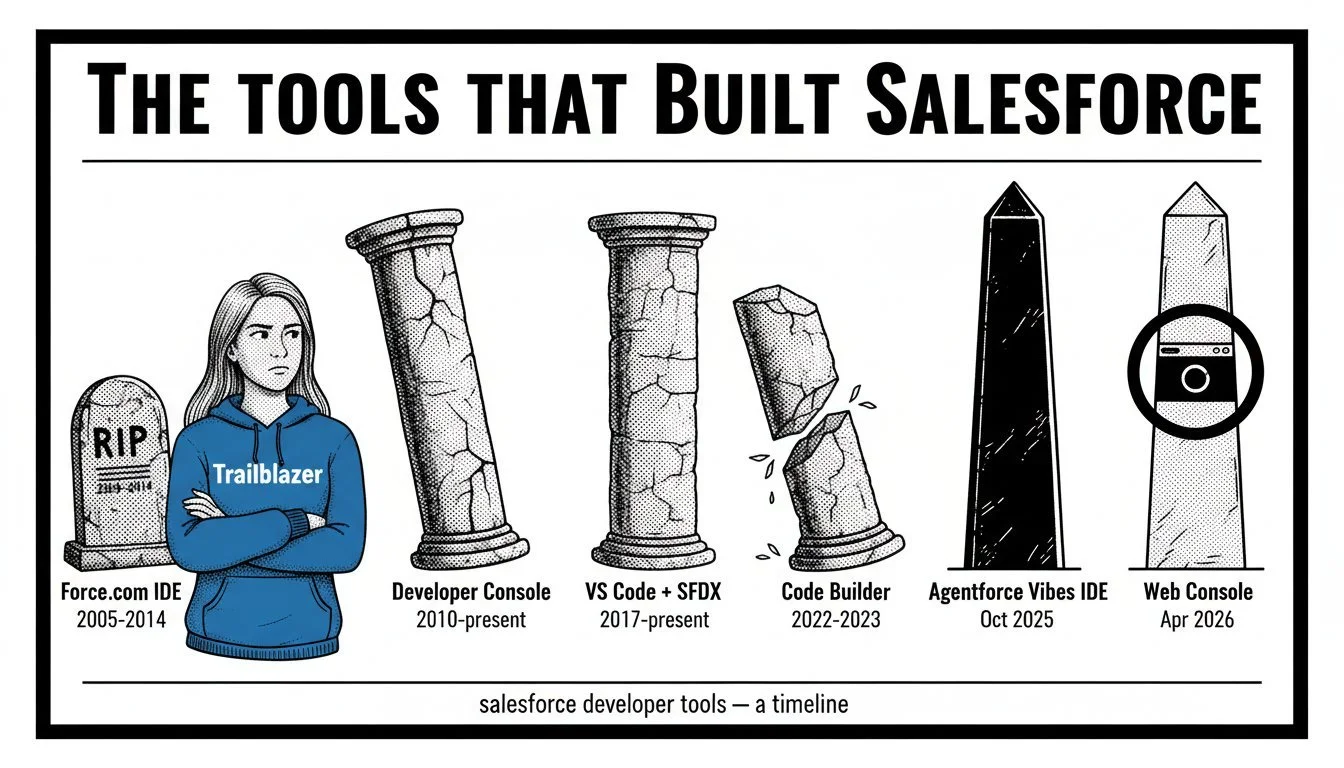
Most coverage of Salesforce Web Console beta tells you what it is and how to enable it.
That part is straightforward: browser-based IDE, VS Code for Web, open beta April 14, 2026, Summer '26.
Any LLM can answer that in one prompt.
What none of it explains is - Why Salesforce built it?.
The answer is in the governance and coverage data for Agentforce Vibes IDE, and it changes how you should think about this tool.
The Short Version
If you are in rush these 3 points are the crux of the whole post below.
Agentforce Vibes has a coverage gap. Professional Edition, Government Cloud, EU Operating Zone, FedRAMP High, and China Cloud are all excluded. Those orgs still need a modern IDE. Web Console works in all of them.
Developer Console has no path forward. It launched in 2011 on a pre-Lightning JavaScript stack, has no LWC support, and carries the "legacy" label. Web Console replaces it with VS Code for Web, a platform Salesforce can iterate on.
VS Code for Web gives Salesforce an extensible in-org foundation. Zero install, session-authenticated, familiar to the 75.9% of developers who already use VS Code. New capabilities ship as extensions, not new tools to install.
Web Console is not a build tool. No version control, no CI/CD, no deployment pipeline. It is an investigation and debugging tool that fills the gaps Agentforce Vibes cannot reach.
Official Salesforce Pitch - What Is Salesforce Web Console?
Salesforce's official positioning: a browser-based IDE on VS Code for Web that bridges "the gap between legacy Developer Console, and resource-intensive Agentforce Vibes IDE."
What they said:
"Developers should not have to leave Salesforce to build Salesforce apps" (Raj Sensharma, Dir. PM)
Replaces Developer Console and the officially unsupported Workbench.
Context-aware launch: click a failed Apex job, Web Console opens with that code loaded
Beta supported orgs: Developer, Professional, Enterprise, Unlimited, Performance, plus Government Cloud and China Cloud editions. Ships disabled by default.
What's between the lines:
“Agentforce Vibes, the “resource-intensive” tool in that quote, does not reach every Salesforce org/customer. Web Console does. The edition and region data tells you why this tool was built.”
Where Agentforce Vibes Can't Reach?
The Agentforce Vibes setup page lists the AI extension as "Inoperable" in Professional edition and "Not available" in EU Operating Zone and Government Cloud.
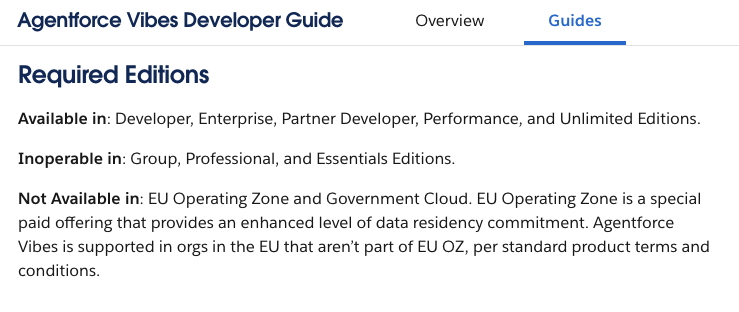
Web Console vs AgentForce Vibes - Salesforce Edition Support
Web Console's supported orgs page lists five US Standard editions for the beta:
| Edition | Web Console (Beta) | Agentforce Vibes (AI features) |
|---|---|---|
| Developer | Yes | Yes |
| Enterprise | Yes | Yes (1,000 hrs/mo) |
| Unlimited | Yes | Yes (2,500 hrs/mo) |
| Performance | Yes | Yes |
| Professional | Yes | Inoperable |
Unused Vibes compute hours expire monthly. No rollover. Note: Performance edition is listed on the Vibes extension setup page but absent from the Vibes IDE supported editions page. Salesforce's own docs disagree here.
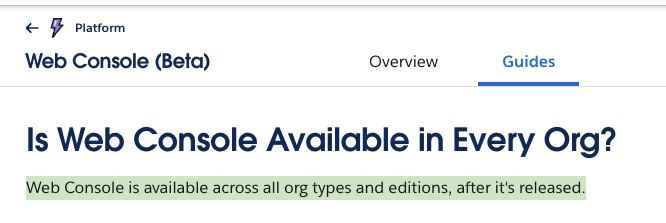
☝️ SF's FAQ claims Web Console will be "available across all org types and editions.", this is misleading.
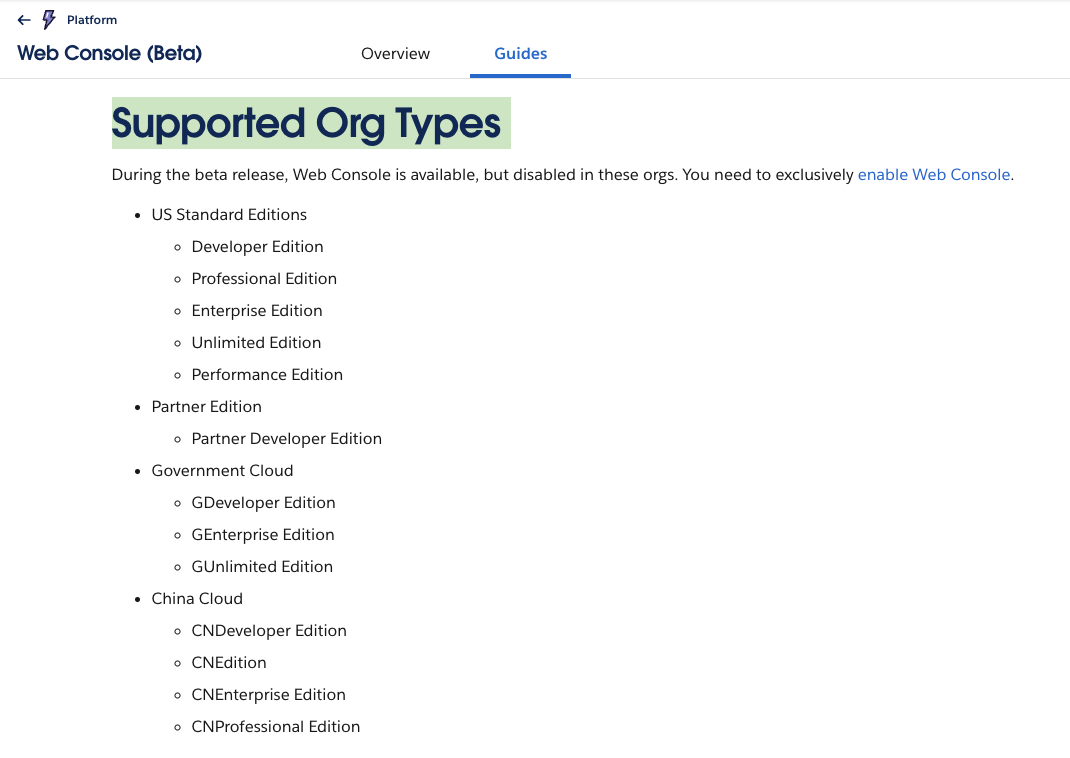
☝️ The Web Console supported orgs page lists only the five editions above for the beta
Apex development is available only in Developer, Enterprise, Unlimited, and Performance editions (Professional can execute Apex from installed managed packages but cannot create or edit it natively). On Professional edition, Web Console's value is limited to SOQL queries and metadata browsing.
Web Console vs AgentForce Vibes - Region & Compliance Exclusions
| Constraint | Web Console | Agentforce Vibes IDE |
|---|---|---|
| EU Operating Zone | Available | NOT available |
| Government Cloud | Available | NOT available |
| China Cloud | Available | NOT confirmed |
| FedRAMP High | Inherits org certification | NOT covered |
Key Points:
Web Console has no regional restrictions, no license cost, and no compute backend.
For Government Cloud orgs and EU Operating Zone orgs, Web Console is the only modern browser-based IDE option.
That is not a small segment: it includes all US federal, state, and local government Salesforce customers plus the highest-compliance EU accounts.
The Salesforce IDEs Historic Release Timeline
Salesforce has shipped six developer environments in two decades. Each one replaced something, added something, and left gaps the next one had to fill.
| Tool | Era | Architecture | Status |
|---|---|---|---|
| Force.com IDE (Eclipse) | ~2007-2014 | Local IDE plugin | Retired |
| Developer Console | ~2011-present | Browser (in-org) | Active, labeled "legacy" |
| Salesforce Extensions for VS Code | Sept 2017-present | Local IDE + CLI | Active |
| Code Builder | 2020-2025 | Cloud VM (browser VS Code) | Renamed to Agentforce Vibes IDE |
| Agentforce Vibes Extension | Oct 2025 | Cline fork (VS Code extension) | Active, paid orgs only |
| Web Console | Apr 2026 | VS Code for Web (browser) | Beta, 5 editions + Gov/China Cloud |
The architectural distinctions matter. Code Builder was a cloud VM with a dedicated compute container per developer.
Agentforce Vibes is the third generation of Salesforce's AI coding tools, rebuilt on a Cline fork with multi-model AI including GPT-5. Web Console is a browser sandbox with no compute backend.
These are three different architectures, not three versions of the same tool.
Beyond Compliance, Why Agentforce Vibes Will Never Be Inside Web Console?
VS Code for Web runs in a browser WebWorker sandbox. That means no Node.js runtime, no child_process spawning, no filesystem access, no server-side model calls.
Agentforce Vibes is a Cline fork. It requires Node.js, spawns child processes, and makes LLM API calls to a compute backend. This is an architectural impossibility, not a roadmap item.
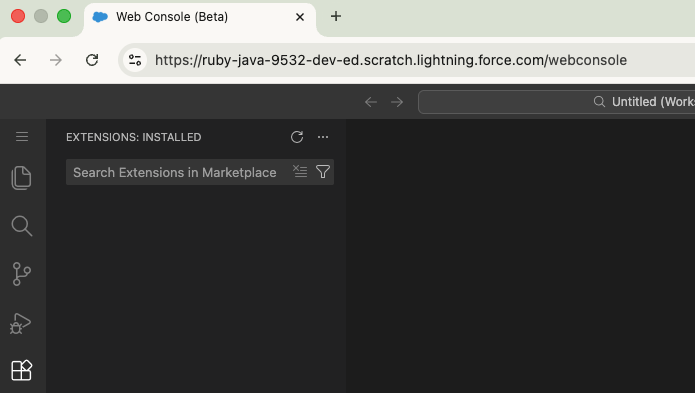
☝️ VS Code for Web does support web-compatible Marketplace extensions, but Salesforce's Web Console blocks Marketplace installs entirely; only pre-packaged extensions are available.
The official FAQ classifies Web Console as "Manual coding" with no AI capabilities listed.
The tiering is intentional: zero-cost, in-org utility (Web Console) on one side; paid, AI-capable workspace (Vibes) on the other.
What Web Console Actually Does: Feature Audit
What's in the Beta
The core capabilities confirmed in the open beta:
Debug Log Viewer with structured hierarchy and file-based trace configuration. Logs auto-refresh every 30 seconds. Stack trace entries click through to the source line. This replaces Developer Console's raw log output but not its 7-panel Log Inspector.
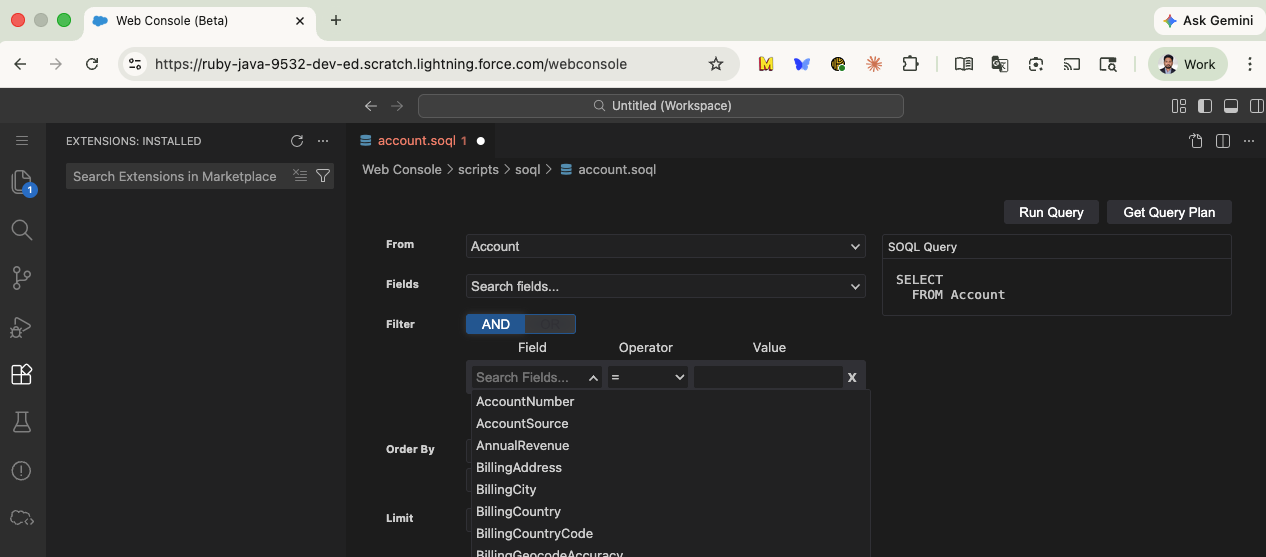
> SOQL Query Builder with a visual form interface plus raw text editor. Export as CSV or JSON. Read-only: queries return data but cannot modify records.
Query Plan Inspector as a dedicated tab, no longer buried inside the query editor.
Anonymous Apex execution without leaving the browser.
Inline Apex editing with quick fixes (sandbox and non-production orgs only).
Visualforce page browsing and editing.
LWC support for viewing, editing, and creating Lightning Web Components (JavaScript, HTML, CSS). Developer Console never supported LWC at all.
Org Browser for metadata navigation with field-type details.
Production Code Editings Guardrails
The Salesforce platform already prevents Apex class and trigger editing directly in production across all editions that support Apex; all changes must be deployed via change sets or the Metadata API. Developer Console enforces this by showing Apex as viewable but non-editable.
Web Console adds a UX layer on top of the same platform restriction: edit functionality is removed from the production interface, not just disabled. The official documentation states Apex is "read only" in production orgs. As Sensharma put it: "A modern experience should make developers faster, but not by weakening platform guardrails."
Both tools allow Anonymous Apex execution in production. The difference is in how clearly the UI communicates the boundary.
The sandbox behavior is unchanged. Saving a file deploys it to the connected org immediately. Same direct-edit model as Developer Console.
What's Missing from the Web Console Beta?
Test Runner: Running test via Command Pallet are giving errors.
Checkpoint Debugger: not in beta. Developer Console's Log Inspector (Stack Tree, Execution Stack, Execution Log, Source, Variables, Execution Overview) has no equivalent.
Terminal: the panel exists in the UI but accepts no input. No CLI commands, no scratch org creation.
Extension installation: Marketplace installs are blocked. Pre-packaged extensions only.
Git integration: the panel is visible (inherited from VS Code for Web), but the official FAQ confirms no repository workflow.
CI/CD hooks: no pipeline integration. Edits bypass deployment workflows entirely.
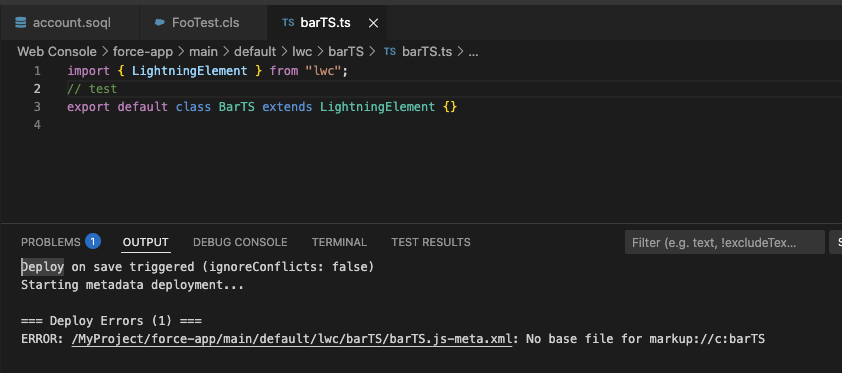
☝️ LWC deployment stability: community testing has surfaced deployment failures when saving components. Beta instability, not a design limitation. I tried saving Typescript components, it resulted in errors as indicated in screenshot.
Decision Matrix: Pick Your Poison by Use Case
I said poison not IDE, as I am not using none, Claude(Codex/etc) can do it all, specially with ease to add agent-skills and agents now, and with ability to connect various MCP servers. I think it’s true, we might not need to login to Salesforce for doing a lot of stuff. LLM Chat is new UX.
Still - Here is a 3-Way Comparison
| Capability | Developer Console | Web Console (Beta) | Agentforce Vibes |
|---|---|---|---|
| Architecture | Browser, in-org | Browser, in-org (VS Code for Web) | Cline fork, VS Code extension |
| Setup required | None | Admin toggle | VS Code + Salesforce CLI + JDK |
| Available in | Editions with Apex | 5 editions (beta) | Enterprise, Unlimited, Developer, Performance |
| AI assistance | None | None | Full (Vibe Codey, multi-model) |
| LWC support | No | Yes (view/edit/create) | Yes (full editing) |
| Context-aware launch | No | Yes (from Setup pages) | N/A |
| Production guardrail | Platform-enforced (edits disabled) | Platform-enforced + edit UI removed | Sandbox only |
| Version control | None | None (direct org edits) | Full Git integration |
| Test runner | Yes | Not in beta | Yes |
| Checkpoint debugger | Yes (interactive) | Not in beta | Replay Debugger (with checkpoints) |
Which Tool for Which Job
Quick investigation in production: Web Console. Read-only, no setup, context-aware launch from Apex Jobs or Setup pages. Open the class, add a trace, inspect the log, all in one browser tab.
Debug log analysis and SOQL queries: Web Console. Structured log viewer, Query Plan tab, CSV/JSON export. Replaces both Developer Console and the officially unsupported Workbench.
Test runner or checkpoint debugger today: Developer Console. These capabilities are not in the Web Console beta. Once Web Console reaches GA with these features, this use case disappears.
Full build cycle with CI/CD: VS Code + Salesforce Extensions. Source control, deployment pipelines, code review workflows. Web Console has none of these.
AI-assisted enterprise development: Agentforce Vibes IDE, if your edition and region qualify. I covered the architectural evolution of Vibes in a separate analysis.
Government Cloud or EU Operating Zone: Web Console is your only modern browser-based IDE option.
Enterprise Considerations
Web Console raises the same telemetry and data residency questions as any browser-based IDE. Regulated industries should evaluate before enabling org-wide.
The real gap for enterprise teams sits outside the editor. Web Console has no version control, no CI/CD hooks, and no deployment pipeline. Teams with governed deployment workflows should treat Web Console as a debugging tool, not a development tool.
FAQs
What is Salesforce Web Console?
A browser-based IDE built on VS Code for Web, embedded in Salesforce. It supports SOQL queries, Anonymous Apex, debug log analysis, Apex editing, and LWC viewing. Launched in open beta on April 14, 2026. The supported orgs page lists Developer, Professional, Enterprise, Unlimited, and Performance editions, plus Government Cloud and China Cloud.
How do I enable Web Console?
Open Setup. In Quick Find, search "Web Console" or "Development." Select "Web Console (Beta)" and toggle it to Active.
Only admins with appropriate permissions can enable or disable it. Admins can also set it as the default IDE for the org.
Is Web Console replacing Developer Console?
Salesforce positions it as the modern successor. Developer Console remains active but carries the "legacy" label in official documentation. No deprecation date has been announced.
The beta is missing test runner and checkpoint debugger, so Developer Console stays necessary during the beta period.
What is the difference between Web Console and Code Builder?
Code Builder launched in 2020 as a cloud VM with a dedicated compute container per developer. Salesforce renamed the cloud IDE to Agentforce Vibes IDE in October 2025. The same month, Salesforce separately launched the Agentforce Vibes extension, a Cline fork AI coding agent.
Web Console is architecturally distinct: client-side VS Code for Web with no compute backend, no paid edition, targeting in-context investigation tasks.
Can I use Web Console in production?
Yes, but Apex is read-only. You can inspect classes, run SOQL queries, execute Anonymous Apex, and review debug logs.
Editing requires a sandbox or non-production org. Developer Console has the same platform restriction, but Web Console goes further by hiding edit links entirely in production rather than just greying them out.
For a deeper look at how Salesforce's developer tooling strategy evolved, read my analysis of how Agentforce Vibes went through three architectural generations in two years.
Further Reading
Official Documentation:
Introducing Web Console (Beta): Code Where You Build on Salesforce - Salesforce Developer Blog
Web Console Documentation - Salesforce Developer Docs
Web Console Feedback Repository - GitHub
Deep-Dives:
How Salesforce Built Agentforce Vibes: 3 Architectural Generations in 2 Years - Abhinav Gupta, Medium
Why Salesforce Being 2 Years Late to Vibe Coding Might Be Good - Abhinav Gupta, Medium