How Do You Migrate an Existing Aura Site to LWR to Support Agentforce?
Key Summary:
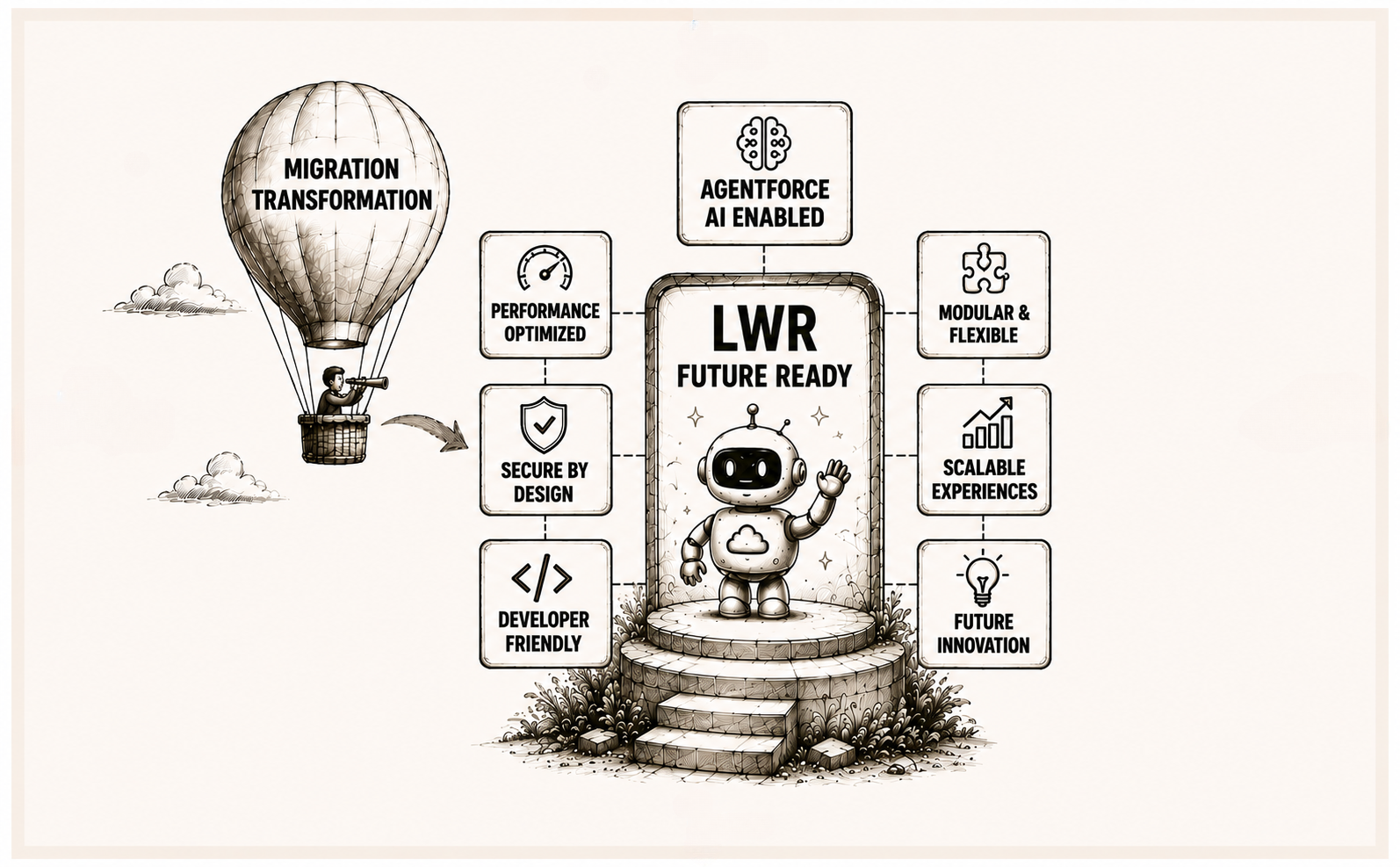
Migrating from Aura to LWR is essential because Agentforce is built for the LWR platform for full functionality.
LWR offers significant upgrades over Aura.
A best practice is to avoid a 1:1 component migration and instead redesign with LWR patterns.
If your organization has been running an Experience Cloud site on the Aura framework, you've likely started to notice a growing gap: the Salesforce Agentforce AI is being built exclusively for the Lightning Web Runtime (LWR) platform. That's not a coincidence. It's a strategic signal from Salesforce that Aura's era as the primary experience framework is drawing to a close.
This guide walks you through everything you need to understand and execute an Aura to LWR migration, from why it matters for Agentforce compatibility to the technical steps, the common pitfalls, and a practical LWR migration checklist to keep you on track.
Why Agentforce Requires LWR Migration: Understanding the Dependency
Before diving into the how, it's worth understanding the why. Many teams postpone a Salesforce LWR migration because their existing Aura site "still works." But working and being AI-ready are two very different things.
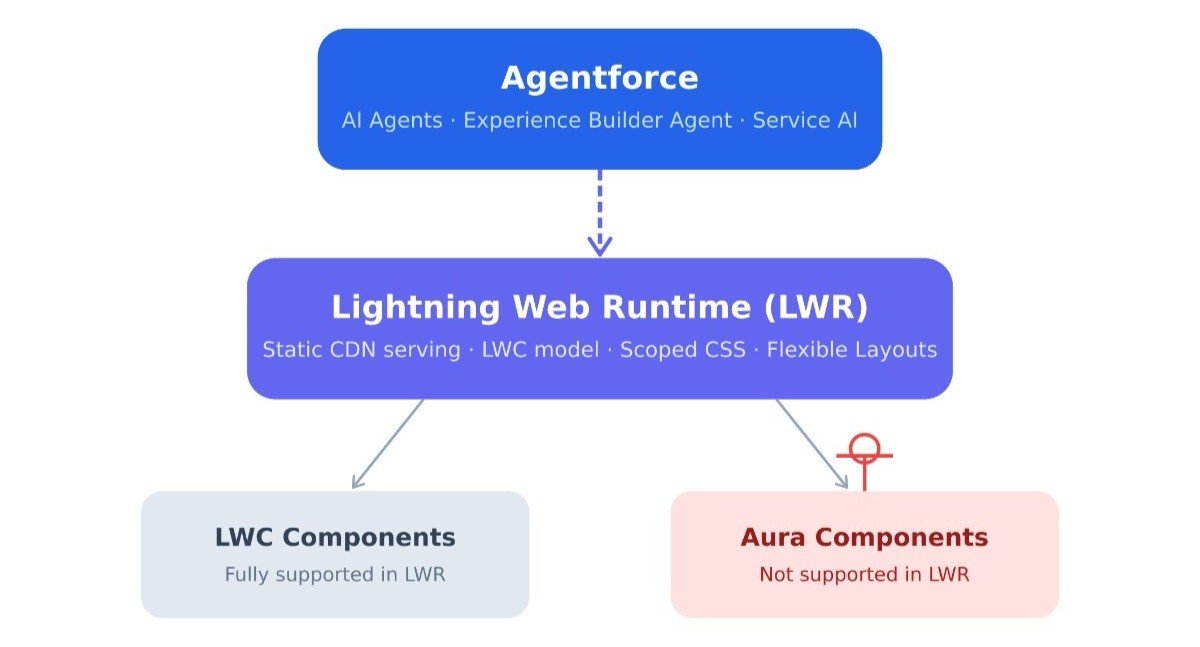
Agentforce LWR support is not simply a feature preference; it reflects a fundamental architectural reality. Salesforce has built Agentforce's deepest integrations directly into the LWR stack. As of Summer '25, the Experience Builder Agent is available exclusively for enhanced LWR sites. To enable it, you navigate to Setup → Digital Experiences → Settings and turn on the Agentforce (Beta) toggle, but that option only surfaces for LWR-based sites.
More broadly, the Agentforce Service Agent, which powers AI-assisted customer interactions, relies on the embedded messaging infrastructure that is natively compatible with LWR's component model. While it's technically possible to embed a messaging web deployment on an Aura site, the richer, more seamless AI-native experience is a capability that Salesforce is building and maintaining only within the LWR ecosystem.
Clearly, migrating the Aura components to LWR is essential if you want better support from Agentforce. If your roadmap includes any Salesforce Agentforce Implementation, LWR is the foundation it must be built on.
Migrate Experience Cloud Aura Site: Pre-Migration Assessment
The single biggest mistake teams make when they migrate an Aura site to LWR is jumping straight into code. A thorough discovery phase is what separates a smooth migration from one that stops in production.
1. Inventory Your Aura Components
Start in Setup. In the Quick Find box, enter Lightning Components and open that page. You'll see both Aura components and Lightning Web Components listed. Create a complete inventory of every Aura component in use across your site and note down:
Which pages does each component appear on
Whether any Aura components are nested within other Aura components
Whether those components handle data operations (Apex calls, wire adapters, etc.)
Whether equivalent LWC versions already exist in the standard Salesforce component library
This audit is the foundation of your migration plan. Aura components are not supported in LWR. Every single one must be replaced with an LWC equivalent before your site can run on the new runtime.
2. Identify Out-of-the-Box Components That Need Rebuilding
Standard Aura-based Experience Builder templates ship with out-of-the-box components that don't carry over automatically to LWR. As part of your assessment, catalog which of these out-of-the-box components your site relies on. Verify whether LWR equivalents exist in the standard component library, or whether they need to be rebuilt.
3. Assess Your CSS Strategy
In Aura, a site-wide CSS editor allows global styling across all pages. LWR eliminates this. In LWR, Lightning Web Components use scoped CSS by default, which prevents cross-component style bleeding but also means your global Aura CSS will not carry over. All site-level CSS must be migrated to the sfdc_cms__styles folder within the DigitalExperienceBundle metadata bundle, accessed via SFDX.
4. Review Page Layouts
Aura Experience Builder templates use fixed column templates for page layout. LWR introduces Flexible Layouts, which allow you to create custom column widths, stack and reorder sections, and build much more adaptive page structures. This is a significant UX improvement, but it means your page layouts will need to be redesigned, not just copied.
How to Migrate Aura Site to LWR: The Step-by-Step Process
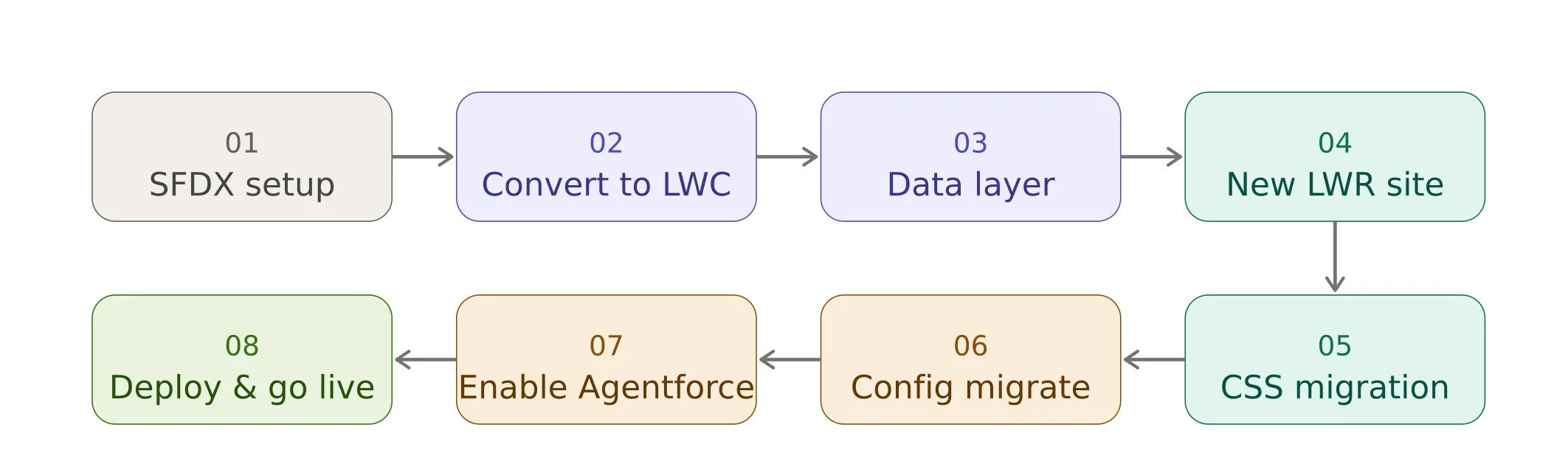
With a thorough assessment in hand, here is the proven technical process for migrating from Aura components to LWC for LWR.
Step 1: Set Up a Separate SFDX Project
Never migrate directly into your existing Aura project. Create a new SFDX project and copy your Aura component files into it. This preserves your existing Aura site throughout the migration and gives your team a clean workspace for refactoring. Your production Aura site stays live while the LWR version is built in parallel.
Step 2: Convert Aura Templates to LWR
This is the most labor-intensive phase. For each Aura component, you have two paths:
Direct conversion: Most Aura components can be rewritten as LWC equivalents. The Salesforce Developer documentation provides a Base Components mapping guide that maps common Aura base components to their LWC counterparts. Many of these mappings are straightforward. For instance, <lightning:button> in Aura becomes <lightning-button> in LWC.
Architectural redesign: Complex Aura components often shouldn't be migrated 1:1. Instead, consolidate and redesign. In Aura, complex workflows often use logic across multiple components connected by event chains. In LWR, the better pattern is a single LWC with modular JavaScript services handling state, calculations, and rendering separately. This not only makes the migration cleaner but also results in components that perform significantly better in LWR's reactive property system.
Salesforce has also released Aura to LWC Migration Tools (Beta) within the Developer Experience MCP toolset. The orchestrated migration workflow uses orchestrate_aura_migration to analyze an Aura component, draft a product requirements document, and generate LWC creation instructions in one pass. For controlled migration, you can run create_aura_blueprint_draft, enhance_aura_blueprint_draft, and transition_prd_to_lwc sequentially.
Step 3: Refactor the Data Layer
Aura and LWC access Salesforce data differently. Aura components often use force:recordData or direct Apex method calls scattered across a component tree. LWC uses wire adapters, which provide a more efficient and reactive way to get data. As you refactor, consolidate data operations to the outermost (container) components. This makes the lower-level child components more portable and reusable, and it means you only need to update data access in one place if schemas or API endpoints change later.
Step 4: Recreate the Site in LWR and Apply Flexible Layouts
Create a new Experience Cloud site using the Build Your Own (LWR) or Microsite (LWR) template. This becomes the target environment for your migrated components. Reconstruct your page layouts using Flexible Layouts, taking advantage of the new column and section controls that LWR provides. This is also a good opportunity to revisit and improve your site's information architecture.
Step 5: Migrate CSS and Branding
Move your site's global CSS into the sfdc_cms__styles folder within the DigitalExperienceBundle metadata structure. Since LWC uses scoped CSS in LWR, review each component's styles to ensure they're properly encapsulated. Also, take advantage of LWR's CSS custom properties for branding.
Step 6: Migrate Store Configuration (for Commerce Sites)
If you're migrating a B2B Commerce site, Salesforce provides a streamlined path: create a change set from your Aura store and apply it to the new LWR store. Update navigation references, especially the Cart page changed from a record page in Aura to a named page in LWR, so any components using lightning/navigation to navigate to or link to the cart need to be updated accordingly.
Step 7: Enable Agentforce on the Enhanced LWR Site
Once your LWR site is live, you can unlock Agentforce capabilities. In Setup → Digital Experiences → Settings, enable Agentforce (Beta) in Experience Builder. Then go to Setup → Agentforce Agents and use the Experience Builder Agent template to create and activate your agent. If you want the full enhanced LWR site capabilities (including the DigitalExperienceBundle and DigitalExperienceConfig metadata types), upgrade your LWR site via Settings → Updates → Upgrade in Experience Builder.
Step 8: Deploy and Test
Deploy your components from Salesforce CLI and place them in your new LWR site using Experience Builder. Before go-live, test thoroughly across:
Multiple browsers and devices (LWR's responsive capabilities require device testing).
Authenticated and unauthenticated user flows.
All Agentforce agent interactions.
Performance benchmarking (compare Core Web Vitals against your Aura baseline).
Common Pitfalls and Best Practices for LWR Migration
For Aura to LWC migration, don’t fall for the common mistakes. So, it’s best to follow some of the best practices when doing Lightning Web Runtime migration.
Don't Attempt a 1:1 Migration
The most common failure mode in migrating from Aura components to LWC is treating it as a translation exercise. LWR favors different architectural patterns, particularly around state management.
Aura's shared, global state model doesn't map cleanly to LWR. Complex Aura component trees that rely on application events for inter-component communication tend to become slow and brittle if ported directly. The better approach is to redesign with LWR patterns in mind from the start: centralize state, use reactive properties, and let LWC's modular service pattern replace event chains.
Consolidate Data Operations Early
One of the best investments you can make before migration is moving all data operations to the outermost components in your component trees. This makes migrating child components far easier. It also makes your post-migration code far more maintainable.
Plan for the CSS Refactor
Teams consistently underestimate the CSS work involved. The loss of the site-wide CSS editor in LWR is significant if your site relies on global style overrides. Budget time specifically for auditing, migrating, and testing all styling.
Preserve Your Aura Site Throughout
Never tear down your Aura site while the LWR version is being built. Work in parallel. Your users depend on the Aura site staying live, and your team needs a reference point for parity testing. Only cut over once the LWR site has passed full UAT (User Acceptance Testing).
Learn more: A Practical Guide to Implementing Agentforce in SFMC
Aura Runtime vs LWR: What Actually Changes
To appreciate what Aura to LWR migration involves, it’s also good to know how different these two runtimes actually are. Here's a quick table of the key differences between Aura and LWR:
| Dimension | Aura | LWR |
|---|---|---|
| Component model | Aura components (.cmp) | Lightning Web Components (LWC) |
| Page rendering | Dynamic (server-side metadata fetch) | Static (compiled, CDN-served) |
| CSS scope | Global, site-wide CSS editor | Scoped CSS via Shadow DOM per component |
| Page layouts | Fixed column templates | Flexible Layouts (custom columns, reordering) |
| Agentforce support | Limited / not natively supported | Full support, including Experience Builder Agent |
| URL structure | Adds /s to authenticated URLs | Clean URLs without /s |
| Accessibility | Standard | Enhanced (F6 navigation, improved screen reader) |
| Performance | Moderate | Up to 60% faster load times |
Why Consider a Salesforce Implementation Partner For Migration?
The Aura to LWR migration involves component audits, architectural redesign, data layer refactoring, CSS migration, layout rebuilding, and Agentforce configuration, all while keeping your production Aura site running for real users. For most organizations, this is a multi-week or multi-month project, depending on site complexity.
Working with a qualified Salesforce implementation partner can significantly reduce the risk and timeline. An experienced Salesforce developer who has done multiple LWR migrations will know where the hidden complexity lives. That experience is hard to replicate from documentation alone.
Conclusion
Migrating your Experience Cloud site from Aura to LWR is the foundational step that makes Salesforce Agentforce AI implementation a real option for your organization. The LWR migration to support Agentforce requires a step-by-step process. So, the outcome is a site that is faster, more accessible, more design-flexible, and fully AI-ready.
The Lightning Web Runtime migration is not optional for teams serious about Agentforce but a prerequisite. And the organizations that complete it now will be positioned to deploy AI-powered customer experiences while their competitors are still planning their migrations.
Further Reading:
How to Automate Sensitive Data Masking Across Your Salesforce Org
How to integrate Salesforce Sales Cloud with Marketing Cloud
Salesforce Headless 360 Explained: Agentic Everything, API-First CRM
Why Only Salesforce Native Security Isn't Enough for Sensitive Data Protection
Frequently Asked Questions
-
Not fully. Basic Agentforce Service Agent embedding via Messaging for Web is technically possible on Aura sites, but the deeper AI-native features like the Experience Builder Agent for AI-generated content are exclusive to enhanced LWR sites. If Agentforce is on your roadmap, Aura will increasingly hold you back.
-
For the full Agentforce experience, yes. Salesforce is building all new Agentforce integrations on LWR. The Experience Builder Agent only appears in Setup for LWR sites, and the richest contextual, conversational agent capabilities are being developed exclusively within the LWR stack.
-
Yes, meaningfully so. LWR sites load up to 60% faster, offer better accessibility (F6 navigation, improved screen readers), cleaner URLs, more flexible page layouts, stronger CSS encapsulation, and are the only framework receiving new Salesforce investment, including all Agentforce features. Aura still works, but it's in maintenance mode.
-
It depends heavily on site complexity. A simple site with few custom components can take 4-8 weeks. A customized site with dozens of bespoke Aura components, complex event chains, global CSS, and Commerce integrations can run 3-6 months. The bulk of the time is component conversion and testing, not the LWR site setup itself.
-
The most common breakage points are: all Aura components (none are supported in LWR and must be rewritten as LWC), global site-wide CSS (replaced by scoped Shadow DOM styling per component), page layouts (Aura's fixed templates don't map to LWR's Flexible Layouts), Aura application events (replaced by DOM Events or Lightning Message Service), and any component relying on the site-wide CSS editor, which doesn't exist in LWR.
Related Reading


Let’s Talk

Drop us a note, we’re happy to take the conversation forward 👇🏻