A Practical Guide to Implementing Agentforce in SFMC
Artificial Intelligence is transforming how businesses operate by improving efficiency, reducing manual work, and enabling smarter systems. Agentforce was introduced to support this shift by allowing organizations to build and manage AI agents that assist with tasks, decision-making, and customer interactions.
In this guide, we’ll briefly explore what Agentforce is, the technologies behind it, and how it can be implemented in Salesforce Marketing Cloud (SFMC) to enable AI-powered marketing automation.
What is Agentforce, and What Technologies Power It?
Agentforce is Salesforce’s AI-powered platform that enables businesses to build intelligent agents that automate tasks, support workflows, and interact with customers. These agents can assist across functions such as marketing, sales, and customer service.
Powered by advanced AI and integrated with platforms like Salesforce Marketing Cloud and Data Cloud, Agentforce helps businesses analyze data, automate processes, and deliver more personalized customer experiences.
Agentforce relies on several advanced AI and data technologies to process requests, automate workflows, and deliver intelligent responses
The table below highlights the key technologies that power Agentforce:
| Technology | Description |
|---|---|
| Large Language Models (LLMs) | These models allow Agentforce agents to understand natural language, interpret user queries, and generate human-like responses. |
| Natural Language Processing (NLP) | NLP enables the system to understand customer intent, analyze text inputs, and deliver more accurate responses. |
| Salesforce Data Cloud | Salesforce Data Cloud unifies customer data from multiple systems, giving AI agents a complete and real-time view of customer information. |
| Machine Learning | Machine learning allows Agentforce to continuously improve by learning from previous interactions and data patterns. |
| Reasoning and Decision Engines | These systems help AI agents analyze requests, retrieve relevant information, and determine the best action to take. |
| Automation and Workflow Integration | Agentforce connects with Salesforce automation tools to trigger workflows, update records, and execute tasks automatically. |
| Data Retrieval and Search Technologies | Technologies such as semantic search and vector databases help AI agents quickly access relevant information and provide context-aware responses. |
While these technologies form the foundation of Agentforce, their real value becomes clear when applied within Salesforce Marketing Cloud to execute marketing tasks intelligently and at scale.
What Agentforce Actually Does in Salesforce Marketing Cloud
In Salesforce Marketing Cloud, Agentforce enables marketers to move beyond manual execution by automating key marketing tasks and workflows. Instead of only providing insights, it helps execute actions across campaigns using AI.
In real-world usage, Agentforce supports:
Content Creation: Generates emails, subject lines, and landing pages based on campaign briefs and brand guidelines, reducing the need for manual drafting.
Audience Targeting: Allows marketers to define customer segments using simple language, removing dependency on complex queries or technical teams.
Campaign Execution: Automates the setup of marketing journeys, ensuring consistent communication across channels like email and messaging.
Personalized Engagement: Uses customer behavior and data to deliver relevant, targeted messages to different audience groups.
Continuous Optimization: Embeds A/B testing and performance tracking into campaigns, enabling ongoing improvements without additional manual effort.
By handling these tasks, Agentforce helps marketers save time, improve campaign performance, and focus more on strategy rather than execution
As we have understood what Agentforce can do in a marketing context, the next step is to look at how to practically implement it within Salesforce Marketing Cloud.
Step-by-Step Guide to Implementing Agentforce in SFMC
Step 1: Define the Agent Use Case
The first step in implementing Agentforce is identifying a clear business use case for the AI agent. Attempting to automate multiple workflows at once can increase complexity and reduce reliability.
Common initial use cases include:
Service Agent: Handles tier-1 support tasks such as order tracking, password resets, and frequently asked questions.
SDR Agent: Qualifies inbound leads and schedules meetings for sales representatives.
Sales Coach Agent: Provides real-time guidance and objection-handling support for sales teams.
Commerce Agent: Recommends products and assists customers during the purchasing process.
When selecting a use case, prioritize processes that have structured workflows, clean data, and measurable KPIs. This helps ensure the AI agent delivers consistent and measurable outcomes.
Step 2: Perform a Data Readiness Assessment
Agentforce relies on contextual data to generate accurate responses. Before implementation, ensure that the required data environment is properly prepared.
Key considerations include:
Unified customer profiles in Salesforce Data Cloud
Clean CRM records with minimal duplicates and complete information
Updated knowledge articles and documentation
Clearly defined business workflows
Ensuring data readiness improves the reliability and performance of the AI agent.
Step 3: Enable Einstein AI
Click the Setup icon and select Setup.
In the Quick Find search box, type Einstein Setup and open it.
Ensure the Turn on Einstein toggle is switched on.
Refresh the browser to reload the Setup page.
Step 4: Enable Agentforce
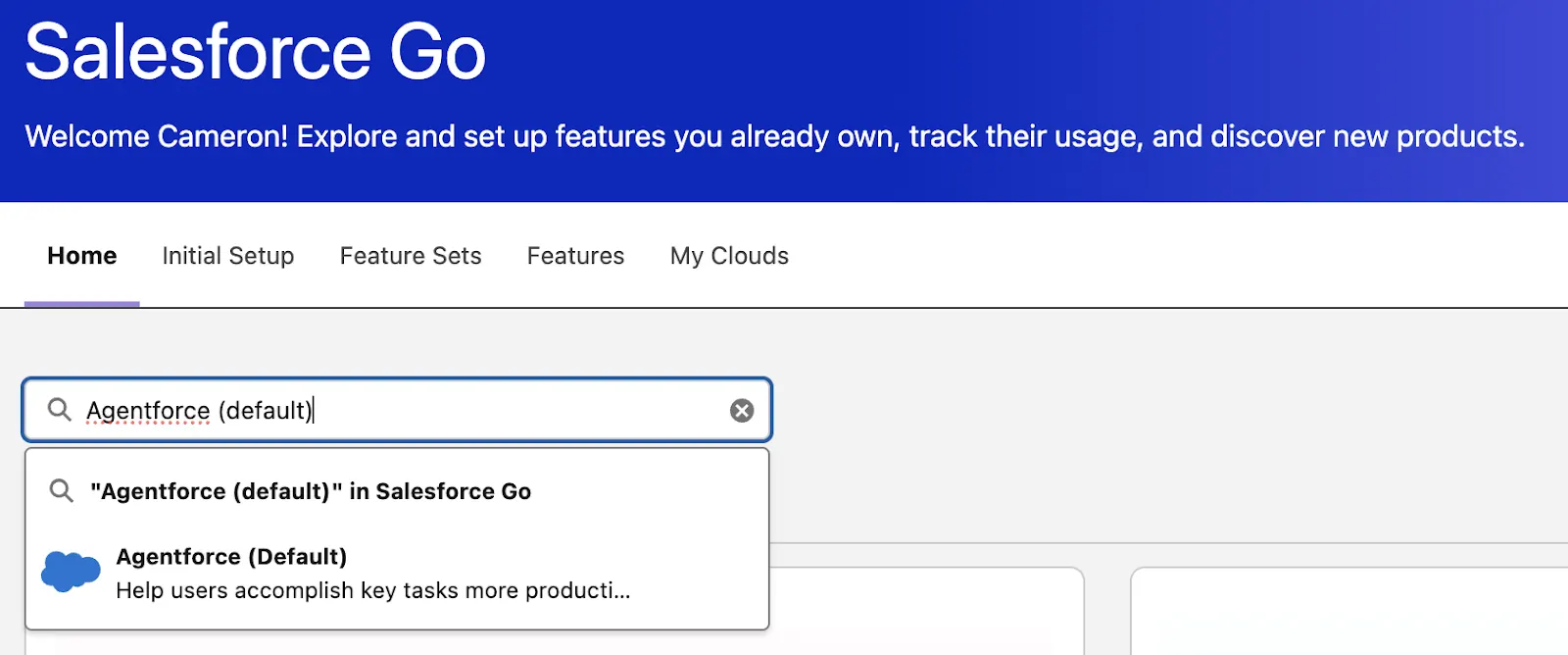
In the Quick Find search box, search for Salesforce Go.
In the Search features field, type Agentforce (Default) and select it.
Click Get Started.
Click Turn On and then select Confirm to enable Agentforce.
Step 5: Access Agentforce Studio
After enabling Agentforce, the next step is to access Agentforce Studio, which is the workspace used to create and manage AI agents.
Navigate to Setup and open Agentforce Builder / Studio
Create a new agent or open an existing one
This interface allows you to define agent behavior, topics, and actions
This step ensures you are working in the correct environment before configuring the agent.
Step 6: Manage User Access and Permissions
Before configuring or using Agentforce, it is important to assign proper access to users.
Grant required permissions and roles to users
Ensure access to Agentforce features and related data
Control access based on user roles to maintain security
Proper user access configuration ensures that only authorized users can create, manage, and interact with
Step 7: Configure Topics and Instructions
Open the created agent in Agentforce Builder.
Click New Topic to define the tasks the agent can handle.
Provide a topic name and classification description.
Define the scope of the topic and add instructions describing how the agent should respond to requests.

Click Next and Finish to save the topic configuration.
Step 8: Add Agent Actions
Actions allow the agent to interact with Salesforce data and perform automated tasks.
Open the Actions tab within the topic configuration.
Click New Action.
Select the Reference Action Type, such as:
Flow
Prompt Template
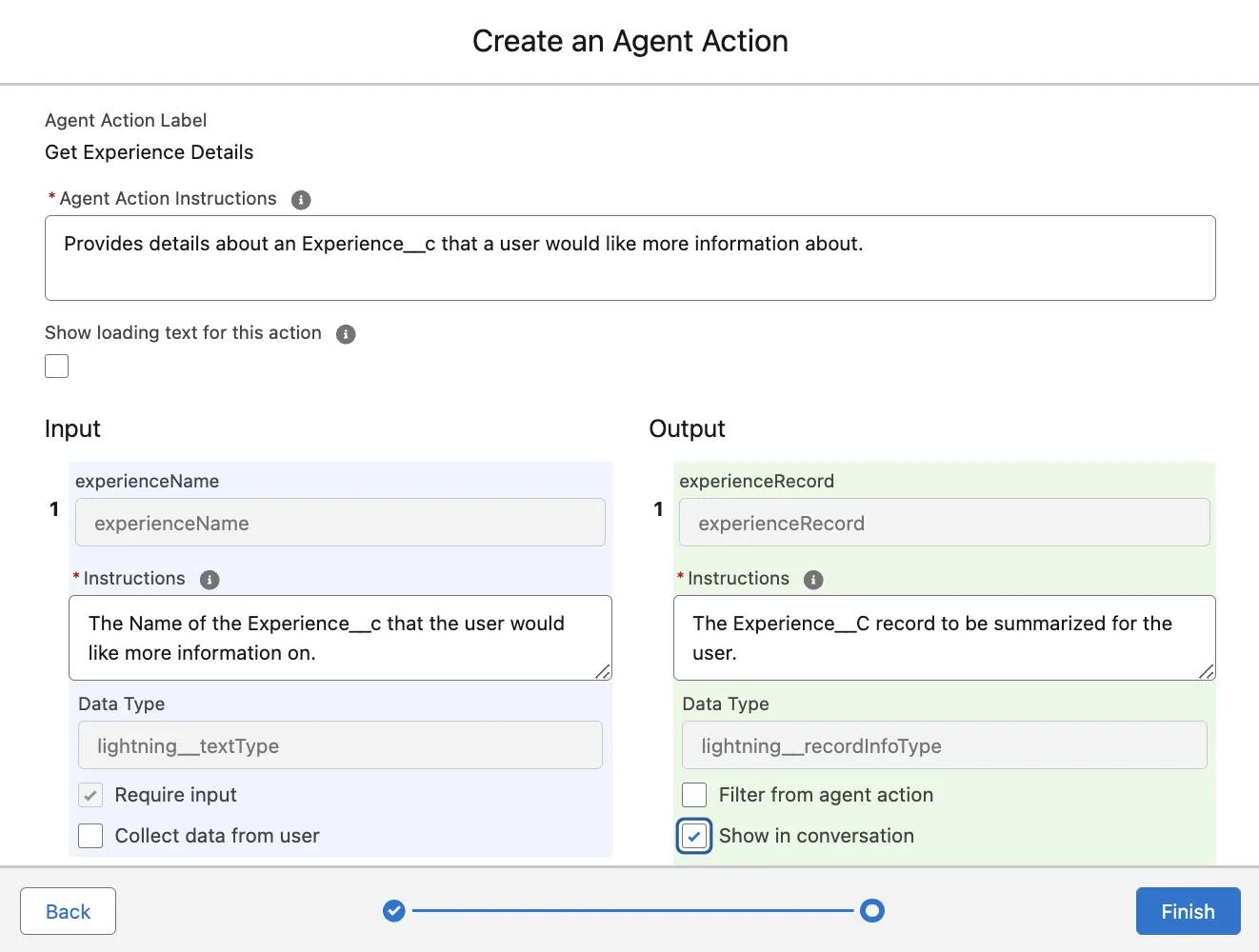
Select the required action and configure the input and output fields.
Save the action and attach it to the topic.
Step 9: Connect Data Sources
To generate contextual responses, the agent must be connected to relevant data sources.
Common data sources include:
Salesforce Data Cloud for unified customer profiles
CRM objects such as Accounts, Contacts, Cases, and Opportunities
Salesforce Knowledge articles for information retrieval
External systems integrated through APIs or middleware
Business documents and operational data
Step 10: Activate the Agent
In Agentforce Builder, click Activate in the upper-right corner.
Confirm activation to make the agent available for use.
Step 11: Test the Agent
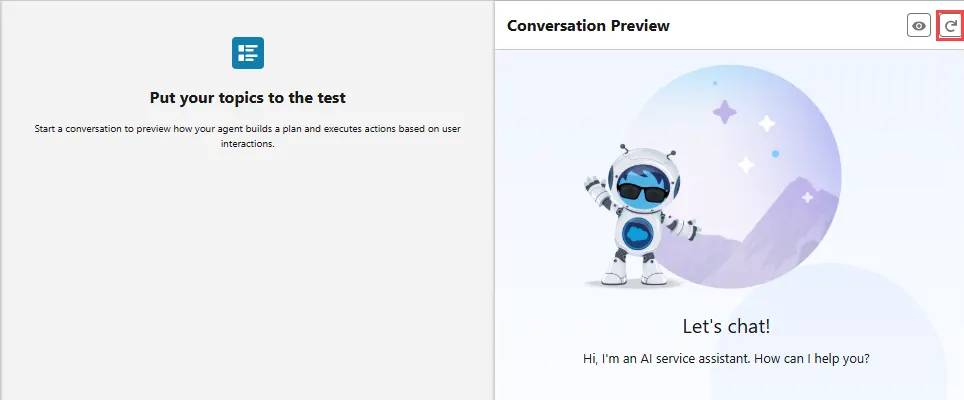
Before deploying the agent to production, testing should be performed in a sandbox environment.
Testing activities include:
Unit testing for individual topics
Integration testing for workflows and automation
Edge-case testing for unexpected user inputs
User acceptance testing (UAT)
This ensures that the agent responds correctly and executes actions as expected.
Step 12: Deploy the Agent
After testing is complete, the agent can be deployed to production. A phased rollout approach is recommended to minimize risk.
Deployment may include:
Deploying the agent to selected users first
Monitoring system behavior
Expanding availability gradually
Step 13: Monitor Agent Performance
After deployment, administrators should continuously monitor agent performance using Salesforce analytics.
Important metrics include:
Case deflection rate
Average resolution time
Escalation rate to human agents
Customer satisfaction scores
Monitoring these metrics helps ensure the agent continues to deliver value and maintain service quality.
While the implementation process may seem straightforward, there are several common pitfalls that organizations should avoid to ensure successful adoption.
Common Implementation Mistakes to Avoid
Ambiguous Agent Instructions :
Unclear prompts or poorly defined instructions can lead to incorrect intent classification and unreliable agent responses. Always use precise and structured instructions to guide agent behavior.Overloading a Single Agent with Multiple Use Cases
Designing one agent to handle multiple workflows increases complexity and reduces performance. It is recommended to start with a single, well-defined use case and expand functionality incrementally.
Poor Data Quality and Lack of Data Preparation
AI agents rely on accurate CRM and knowledge data. Duplicate records, incomplete customer profiles, or outdated knowledge articles can negatively impact response accuracy.
Insufficient Testing Before Production Deployment
Deploying agents without thorough validation can lead to workflow failures. Use sandbox testing, reasoning logs, and scenario simulations to verify agent behavior before going live.
Undefined Human Escalation Logic
Agents cannot resolve every interaction. Clearly define escalation rules and handoff conditions so complex queries can be transferred to human agents when required.
Conclusion:
Agentforce is redefining how businesses implement AI-driven automation in Salesforce Marketing Cloud. By combining technologies such as Large Language Models (LLMs), Salesforce Data Cloud, and intelligent workflow automation, organizations can build AI agents that streamline operations, automate marketing tasks, and deliver highly personalized customer engagement at scale.
With the right use case, clean data, and proper configuration, Agentforce enables businesses to drive smarter marketing automation, faster customer interactions, and more data-driven decision-making.
Get in touch with our salesforce consultant, if you’re interested in elevating your marketing strategy with AI-powered solutions like Agentforce and Salesforce Marketing Cloud.
Frequently Asked Questions
-
The implementation timeline depends on factors such as data readiness, integration complexity, and business requirements. In most cases, organizations can begin seeing initial results within a few weeks after proper setup and testing.
-
Yes, Agentforce can integrate with various Salesforce products and third-party systems through APIs and automation tools, allowing businesses to connect their existing marketing and data platforms.
-
Agentforce enables AI-driven personalization by analyzing customer behavior and automatically triggering relevant campaigns, messages, and interactions across different channels.
-
Yes, Agentforce can support multi-channel engagement strategies by working alongside Salesforce Marketing Cloud to deliver personalized experiences through email, mobile, web, and other digital channels.
Related Reading

Let’s Talk

Drop us a note, we’re happy to take the conversation forward 👇🏻