

How to Package Agentforce Actions in a Salesforce Managed Package
Key takeaways:
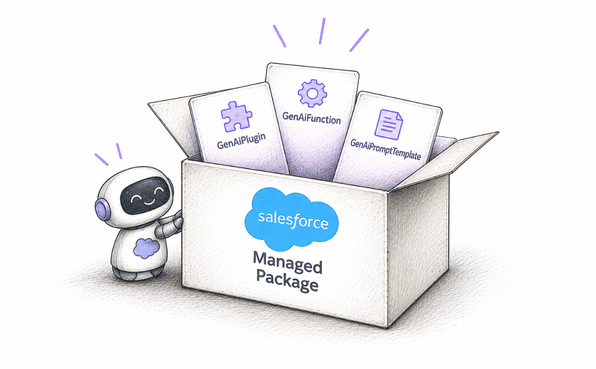
Agent actions must exist in the Agentforce Asset Library before they can be packaged, GenAiFunction, GenAiPlugin, and GenAiPromptTemplate are the core metadata types involved.
2GP managed packages are the preferred format for Agentforce actions packaging, especially for teams targeting an AgentExchange listing.
Successful Agentforce deployment depends on testing actual agent behavior post-install, not just confirming the metadata deployed cleanly.
If you're building on Salesforce and your roadmap now includes AI agents, you've probably hit the same wall a lot of ISVs are hitting right now: Agentforce actions packaging isn't quite like packaging a regular Lightning component or a chunk of Apex.
There's a specific way Salesforce wants you to structure things, a specific set of metadata types involved, and unexpected flaws that can cost you a security review rejection if you skip them.
This article walks through exactly how to package Agentforce Actions in a Salesforce managed package, from building the actions themselves to getting them ready for AgentExchange.
What Agentforce Actions Packaging Actually Involves
Before you touch a scratch org, it helps to know what you're actually bundling. When people talk about Agentforce actions packaging, they usually mean wrapping up the Agentforce-specific metadata (the actions, topics, and prompt templates that make an agent do something useful) into a distributable, version-controlled container. That container is a Salesforce managed package.
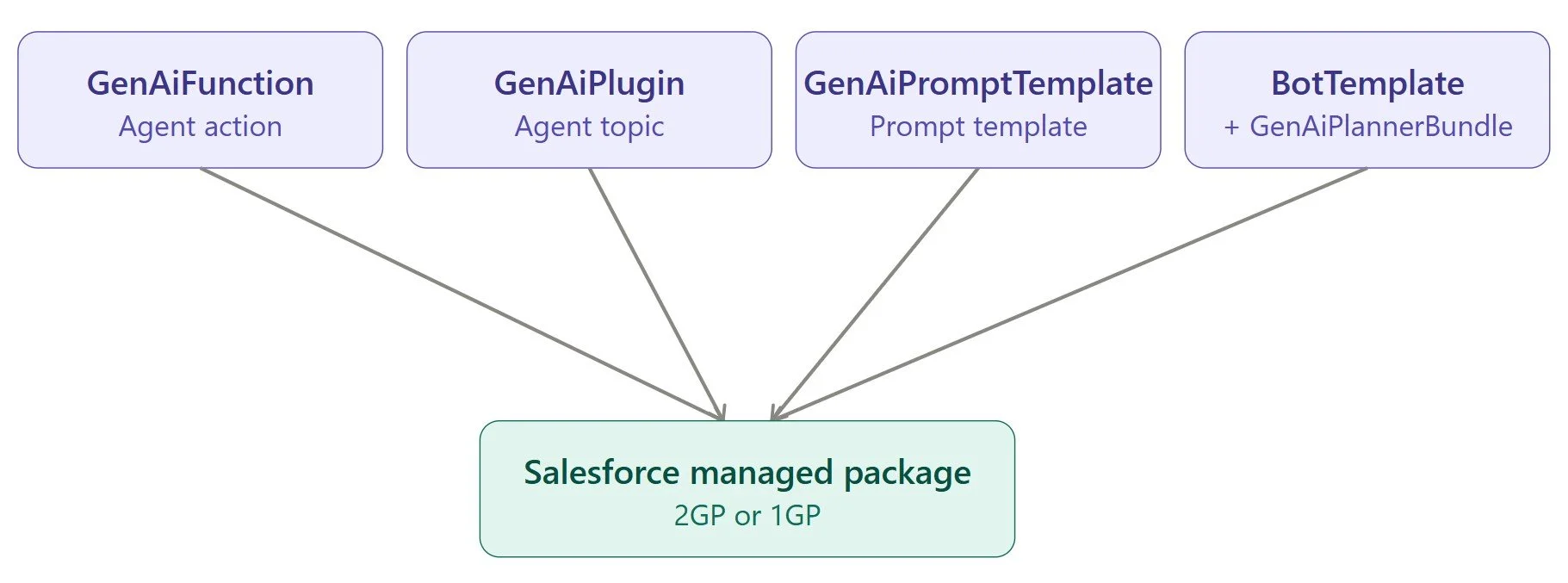
Salesforce made this officially supported territory a while back. The key metadata types you'll be working with are:
GenAiFunction: this is the actual Agent Action.
GenAiPlugin: this is the Agent Topic that groups related actions together.
GenAiPromptTemplate: prompt templates used by your actions or agent.
BotTemplate and GenAiPlannerBundle: used if you're packaging a full Agent Template, not just individual actions.
All of these are packageable in both second-generation managed packages (2GP) and first-generation managed packages (1GP), which matters when you're deciding how to structure your Agentforce development pipeline.
Why Package Agentforce Actions Instead of Building Them Org by Org
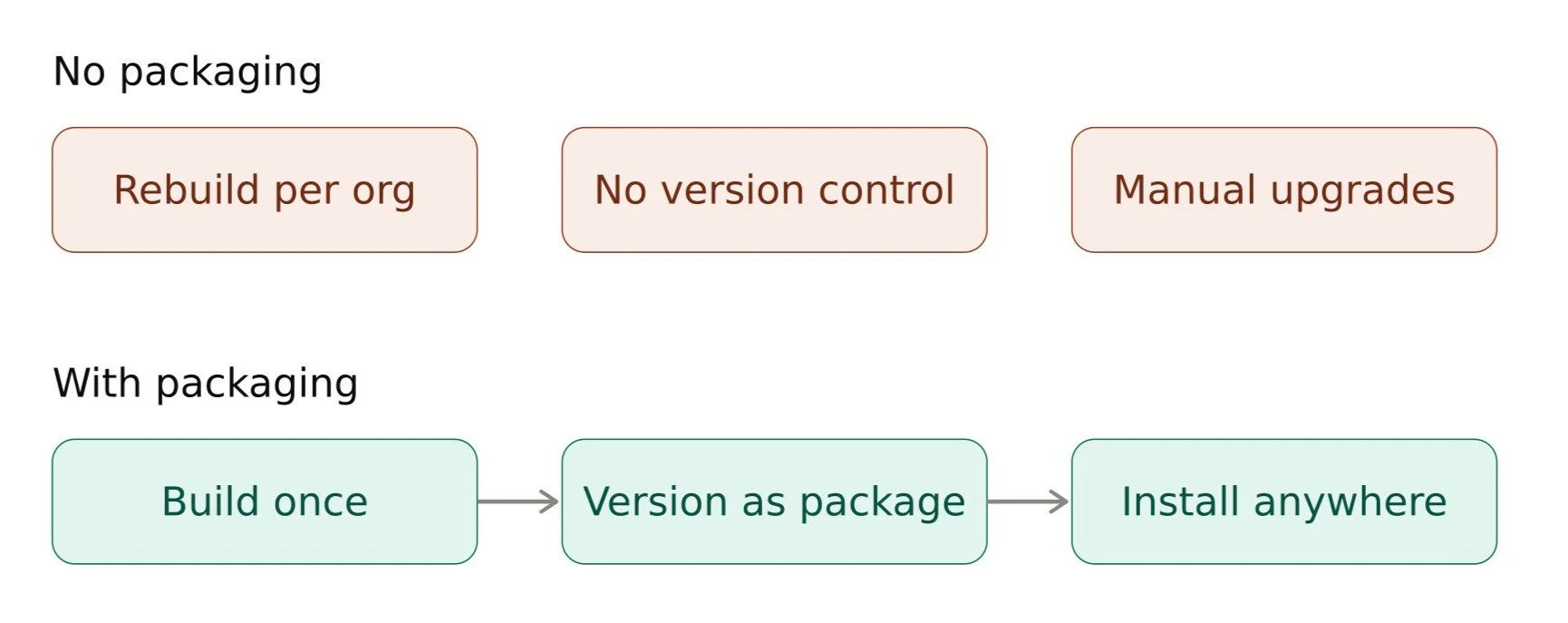
If you're doing Agentforce development for a single internal org, you don't need any of this. Build the action, add it to your agent, done. Packaging only matters once you're distributing to other orgs, whether that's multiple business units, customers, or a public listing.
A Salesforce managed package gives you version control, controlled upgrades, and IP protection you don't get from manually recreating actions in every target org. For anyone doing Salesforce ISV development, this isn't optional. It's the only realistic way to ship Agentforce functionality at scale without a support nightmare every time you push an update.
It’s also the reason a lot of teams bring in Agentforce consultants or experts early because getting the packaging structure right saves you from re-architecturing a package after customers have already installed it.
Building Agentforce Custom Actions Before You Package Anything
Here’s where people often get confused. You can't package an action that doesn't exist as a proper asset yet. Any agent action or topic you want to package has to live in the Agentforce Asset Library first. That means:
Create your Agentforce custom actions using the standard tools: Flow, Apex invocable methods, or MuleSoft/external service actions and register them as custom agent actions.
Create the corresponding custom topic that groups the action(s) logically.
Confirm both show up in the Asset Library in Agent Builder before you go anywhere near your packaging org.
If an action isn't in the library, it's invisible to the packaging tooling, and you'll waste time troubleshooting a "missing component" error that's really just a sequencing problem.
Choosing the Right Salesforce Managed Package Type for Agentforce Actions
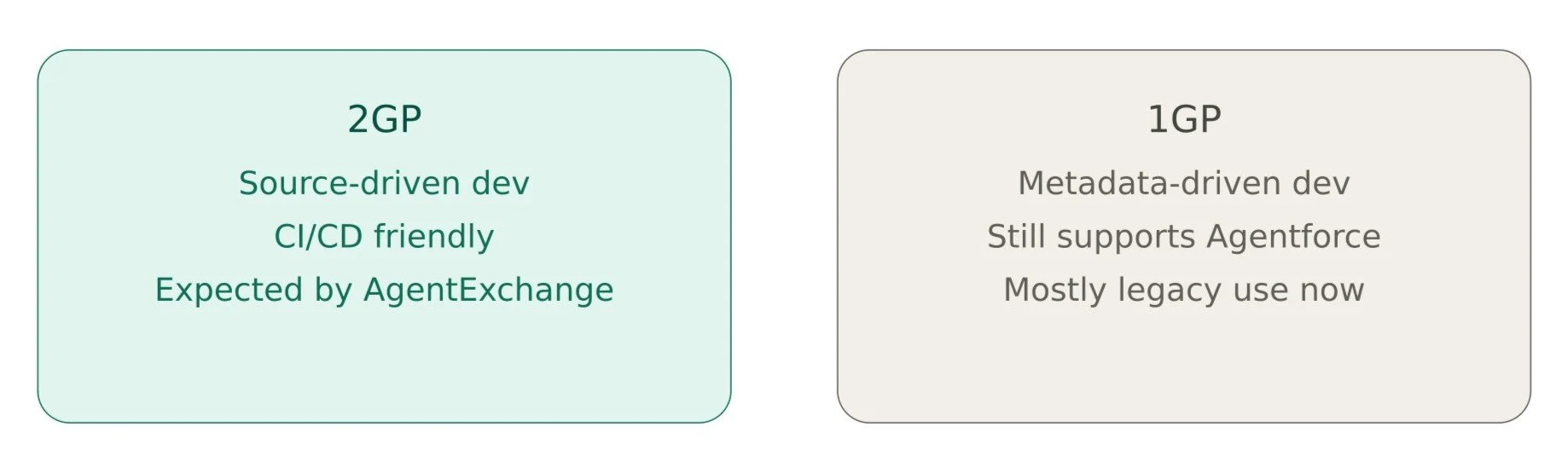
You've got two paths: first-generation (1GP) and second-generation (2GP) managed packages. Both support the Agentforce metadata types listed above, but 2GP is where Salesforce is putting its weight, and it's what's expected for most modern Salesforce ISV development including AgentExchange listings which explicitly favor 2GP packaging in their technical requirements.
2GP gives you source-driven development, easier CI/CD integration, and better version control through Salesforce CLI. If you're starting fresh, build your Agentforce actions packaging pipeline around 2GP unless you have a specific legacy reason to stick with 1GP.
Setting Up a Scratch Org for Agentforce Development
This step is often missed, and skipping it can cause significant delays in your deployment. Not every scratch org has Agentforce enabled by default. Before you can package Agentforce Actions, you need a Dev Hub and scratch org configuration that specifically grants access to Agentforce features. Practically, this means:
Requesting or confirming Agentforce access on your Dev Hub.
Creating your scratch org definition file with the right features and settings enabled so Agentforce metadata types are visible.
Verifying you can actually see Agent Builder and the Asset Library inside the scratch org before building anything.
Skip this and you'll build your actions in a source org that can't even generate the package version, a frustrating way to burn a day.
Step-by-Step: How to Package Agentforce Actions in Salesforce Managed Package
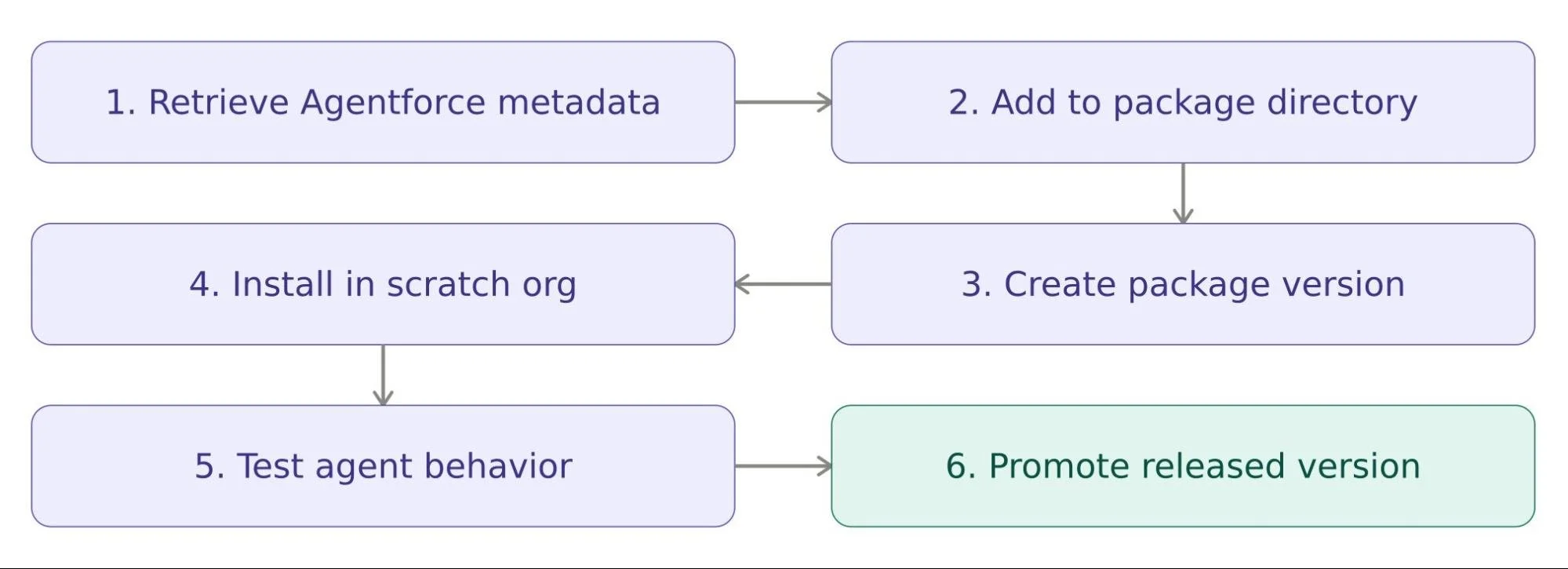
Once your actions and topics exist in the Asset Library and your scratch org is properly provisioned, the actual packaging flow looks like this:
Retrieve the Agentforce metadata from your source org (the GenAiFunction, GenAiPlugin, and any GenAiPromptTemplate components tied to your actions) into your local project using Salesforce CLI.
Add the components to your package directory in your sfdx-project.json, alongside any supporting Apex, Flow, or custom object metadata the actions depend on.
Create a package version using the standard 2GP package version creation command. This validates that all your Agentforce metadata is packageable and properly referenced.
Install the package version in a fresh scratch org or sandbox to confirm the actions and topics actually appear correctly in Agent Builder after installation, not just that the metadata deployed cleanly.
Test the agent behavior end to end. Metadata deploying successfully doesn't guarantee the action performs correctly inside a live agent conversation, so run it through real test scenarios.
Promote the package version once you're confident it's stable, and set it as the released version for broader distribution.
This is the core process for any Agentforce deployment involving custom actions, whether you're shipping to one customer org or preparing for a public marketplace listing.
Packaging Agent Topics, Prompt Templates, and Agent Templates Alongside Actions
Packaging a single action in isolation is rarely the standard approach. Most real-world Agentforce development involves a topic (GenAiPlugin) that references multiple actions, plus one or more prompt templates (GenAiPromptTemplate) that shape how the agent reasons about when to use them.
A few practical notes here:
Prompt templates have their own packaging considerations, particularly around how grounding and data references resolve after installation in a different org. Worth checking Salesforce's documentation on prompt template packaging before you finalize your package.
If you're distributing a complete, ready-to-use agent rather than just standalone actions, you'll also package a BotTemplate and GenAiPlannerBundle. This is the difference between shipping "actions a customer can add to their own agent" versus "a full agent template they can deploy in one click."
Keep your dependencies clean. A topic that references an action outside your package, or a prompt template pointing at org-specific data, will break the moment someone installs your package in an org that doesn't have that context.
Preparing Agentforce Actions for AgentExchange
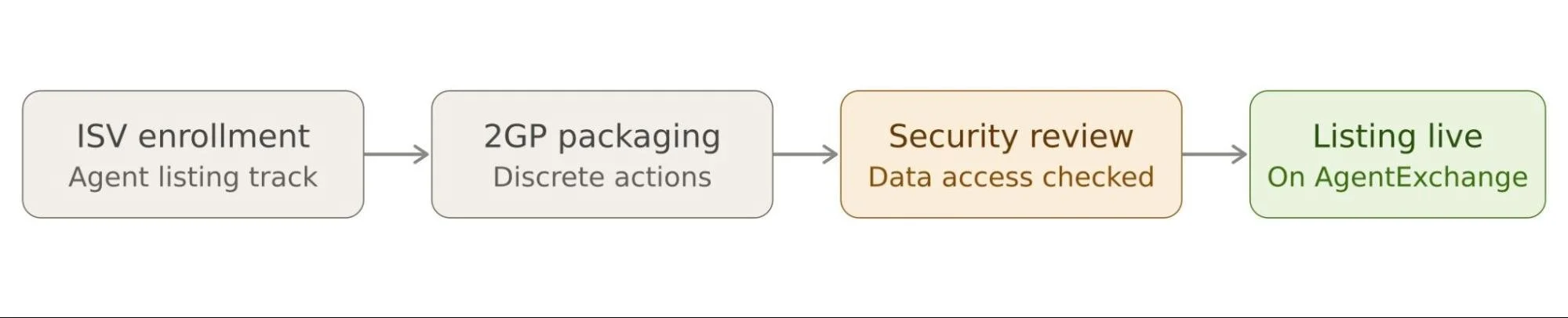
If the end goal is a public listing, packaging correctly is just step one. Salesforce's marketplace known as AgentExchange has specific expectations when it comes to Agentforce actions for AgentExchange listings:
2GP managed packaging is the expected format for the technical submission.
Security review is mandatory, same as it's always been for AppExchange listings, and it now includes scrutiny of how your actions handle data access and permissions. Learn more about the true opportunity cost of an AgentExchange security review failure.
Partner enrollment matters. You'll need to be signed up under Salesforce's ISV partner program, and specifically the track that covers agent-based listings, before you can submit.
Actions should be built as discrete, well-scoped, composable units. AgentExchange favors solutions that expose functionality as clean actions an agent can invoke on its own, rather than features buried inside a UI-driven app.
A lot of teams doing this for the first time rely on certified AgentExchange development experts specifically for the security review prep because it's the stage where packaging mistakes (over-broad permissions, hardcoded org references, missing test coverage) tend to surface and cause rejections.
Common Pitfalls in Agentforce Deployment
A few mistakes you can avoid when deploying your Agentforce actions:
1. Building the action before confirming Asset Library visibility, which means starting over once you realize it can't be packaged as-is.
2. Mixing 1GP and 2GP components in a single dependency chain, which creates upgrade headaches down the line.
3. Ignoring permission set packaging. Agentforce actions often need specific permissions to function post-install. Bundle the permission sets with the package rather than assuming admins will configure access manually.
4. Not testing in a genuinely separate org. Actions can appear to work in your development org because they may rely on org-specific configuration, permissions, or dependencies that aren't present in a fresh org. Always validate it in a genuinely separate org before deployment.
Wrapping Up
Packaging Agentforce Actions isn't fundamentally different from other Salesforce managed package work. It's still metadata, dependency management, and version control. But the Agentforce-specific pieces (Asset Library requirements, scratch org provisioning, and the newer AgentExchange review standards) add a layer most Salesforce ISV development teams haven't dealt with before.
Get your actions properly registered before you package, pick 2GP unless you have a reason not to, and test the actual agent behavior post-install, not just the metadata deployment. Do that, and you'll avoid most of the friction that trips up first-time Agentforce deployment projects.
Further Reading:
Maximizing ROI with Agentforce: A Guide for Business Leaders
How Salesforce Agentforce Improves Sales and Customer Service
Salesforce Agentforce Implementation Roadmap: Steps, Timeline, and Cost Factors
How to Ground Agentforce with RAG in Data 360 (2026 Decision Guide)
How to Ground Agentforce Service Agents Using Your Experience Cloud Knowledge Base
Frequently Asked Questions
-
No. You can package and install Agentforce Actions in your own orgs without partner status. Partner enrollment is only required if you plan to list your package publicly on AgentExchange.
-
Yes, 1GP still supports the core Agentforce metadata types. However, 2GP is the format Salesforce favors for new development and the one expected for AgentExchange submissions.
-
It's almost always because the action hasn't been added to the Agentforce Asset Library yet. Actions and topics must exist there before the packaging tooling can see them.
-
No. Your Dev Hub needs explicit Agentforce access, and your scratch org definition file must enable the right features before Agent Builder and the Asset Library become visible.
-
Packaging individual actions and topics lets customers add functionality to their own existing agents. Packaging a full agent ships a complete, ready-to-deploy agent instead.
Related Readings
Let’s Talk

Drop us a note, we’re happy to take the conversation forward 👇🏻
