Salesforce Data 360 Implementation Guide: Fuel Business Growth
Updated on: October 13

Key takeaways:
Learn the key steps to implement Salesforce Data 360 and build a unified data foundation.
Understand how data models, identity resolution, segments, insights, and activations work together.
See how Data 360 improves customer insights, AI outcomes, personalization, and operational efficiency.
Data has become a valuable asset in today's business landscape, and collecting and managing it are crucial for achieving growth and success. However, gathering data from various sources and managing it in a single source can be a challenging task.
This is where the Salesforce Data 360 (previously called Data Cloud) comes into play. It is a powerful tool that enables businesses to centralize their customer data from different sources into one place. By eliminating data silos, it creates a single platform to access and leverage all enterprise data seamlessly.
In this blog, we will explore the Salesforce Data Cloud, provide a detailed Salesforce Data Cloud Implementation Guide, and highlight the numerous benefits it offers to businesses.
What is Salesforce Data Cloud?
Salesforce Data 360, previously known as Salesforce Data Cloud and Genie, is a dynamic data platform that consolidates and integrates data from different sources into one place, providing a unified view for teams. It enables seamless data management, powers AI tools and CRM with real-time data for insights and personalized customer experiences; its capabilities help drive more informed decision-making and operational efficiency across organizations.
Data 360 sits at the center of all customer 360 platforms, letting it easily integrate with Salesforce's platforms such as Agentforce, Sales Cloud, Service Cloud, Marketing Cloud, and Commerce Cloud. This integration further enhances the ability to create a 360-degree view of every customer, allowing companies to harness the full potential of their data to improve customer experiences and drive business growth.
Additionally, it also provides access to a vast repository of third-party data (data that lives outside of Salesforce), including B2B and B2C data, which can be integrated with a company's data to create a comprehensive view of the customer.
Step-by-Step Salesforce Data Cloud Implementation Guide
Implementing Salesforce Data Cloud can transform your data management, improve AI responses and ROI, and unlock rich analytics capabilities.
When implemented correctly, it can help businesses get more value from their existing data. Here’s how you can approach the implementation process.
Step 1: Set Up Your Data Cloud Org
To implement Data Cloud (Data 360) for your business, you need to set up a Data Cloud instance in your Salesforce org.
a. Create the Data Cloud Instance
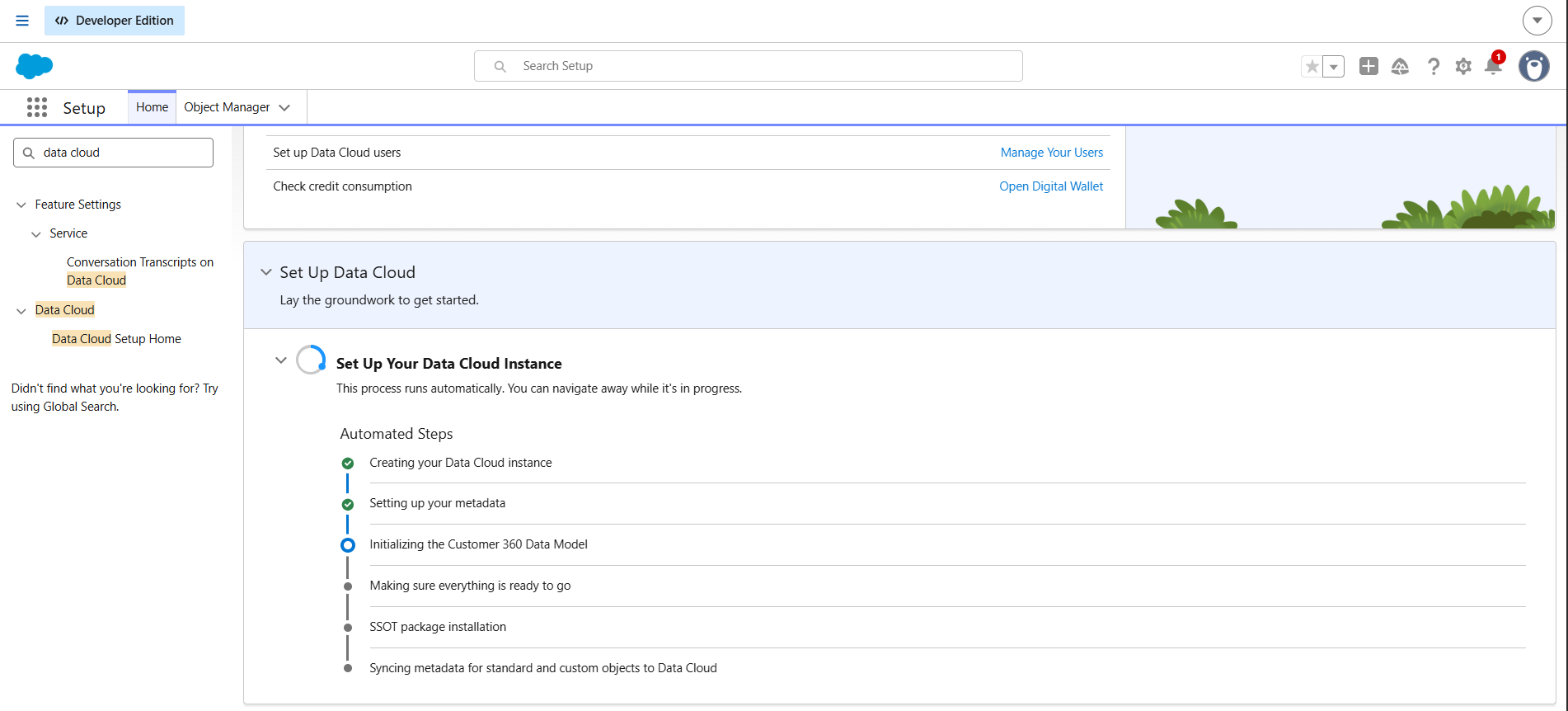
In Setup, use Quick Find to search for Data Cloud.
Open Data Cloud Setup Home.
Click the button Get Started to set up Data Cloud.
Salesforce then creates your instance and sets up the metadata behind it. This takes some time, so you may need to wait before moving on.
b. Assign User Permissions
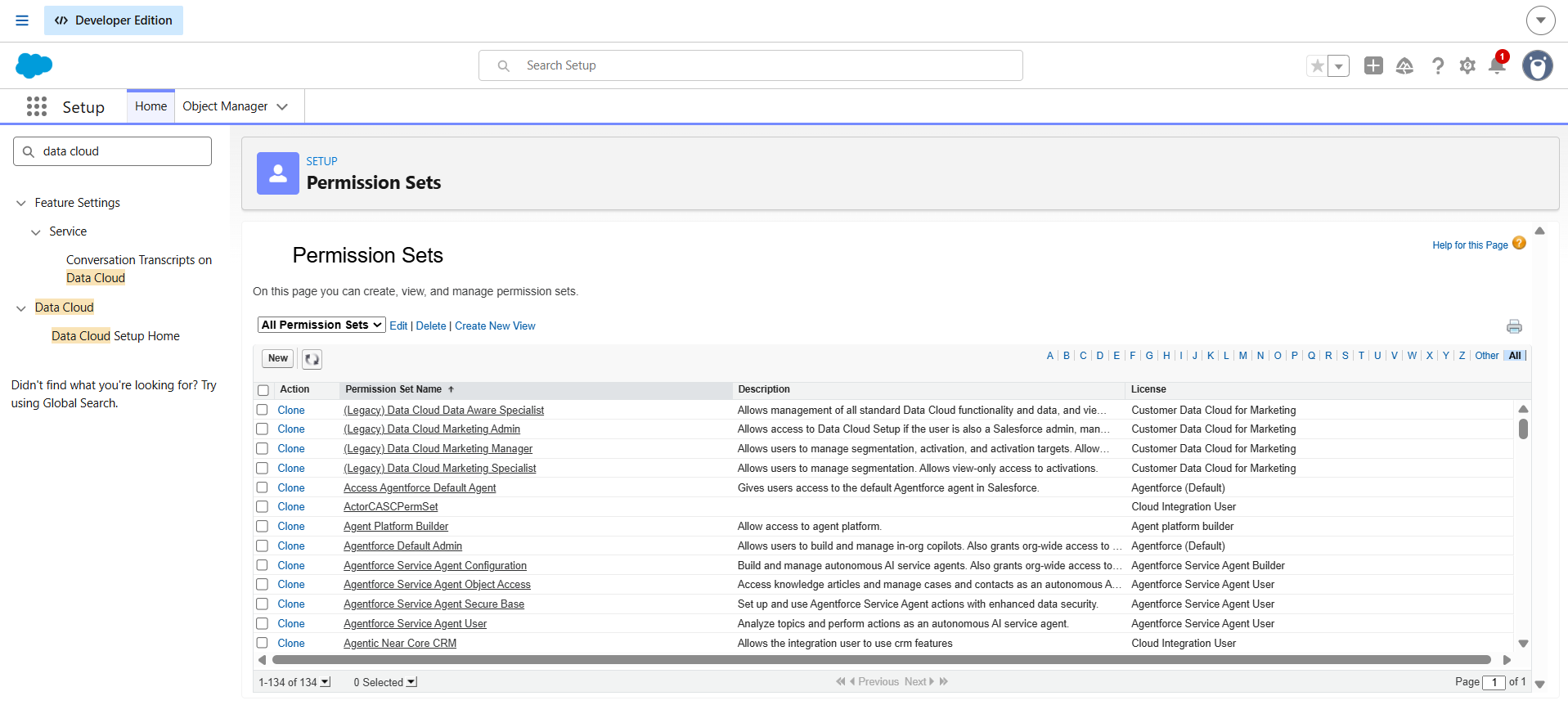
Once the instance is created, assign permission sets to the people who will work in Data Cloud. Without them, users can't see or configure anything in the platform.
c. Connect Another Salesforce Org (Optional)
If your data lives in more than one Salesforce org, connect the additional orgs as data sources. There are two connection types:
Standard connection: Brings data from the other org into Data Cloud.
Companion connection: Does the same, and also shares Data Cloud data back to the connected Salesforce org.
d. Connect Your Data Sources
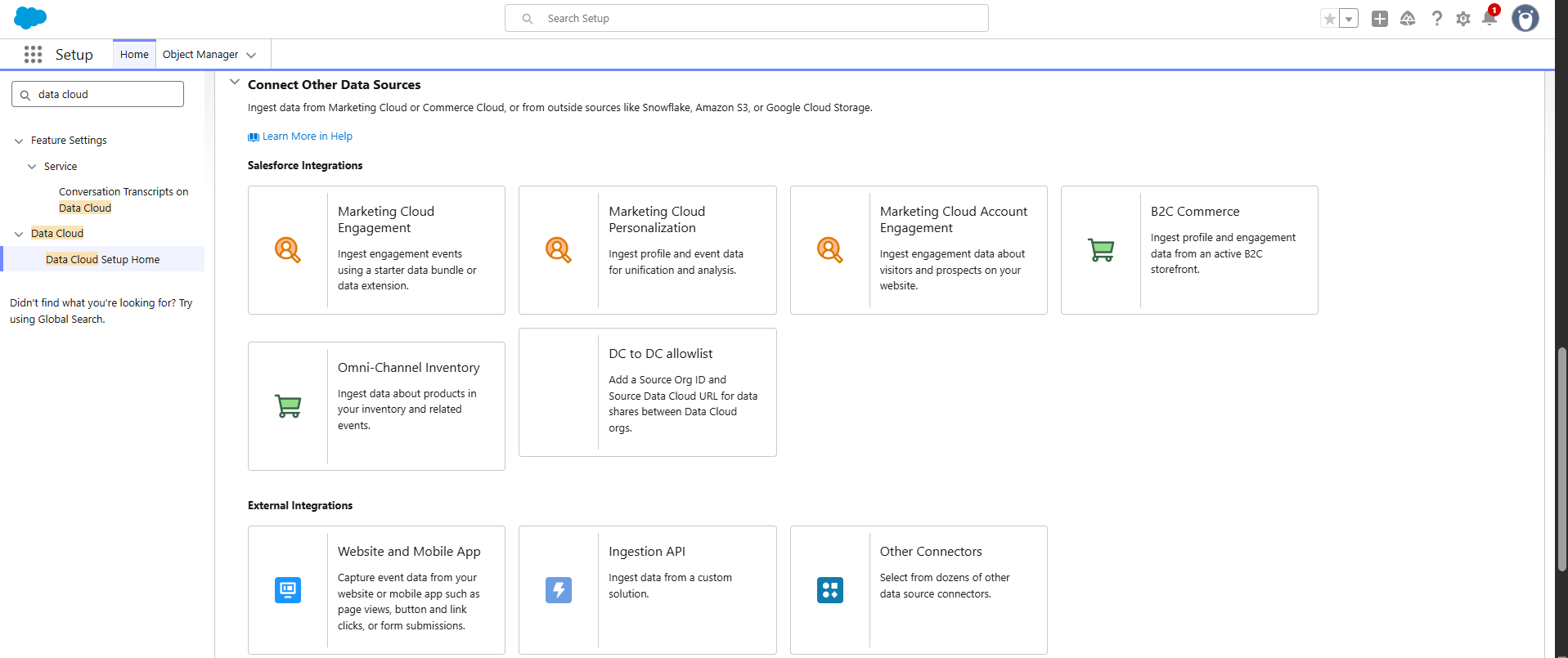
This is the main step of the setup. Connect Data Cloud to the systems that hold your customer data:
Salesforce products: Marketing Cloud, Commerce Cloud, and other Salesforce clouds
External platforms: Snowflake, Amazon S3, Google Cloud Storage, and others
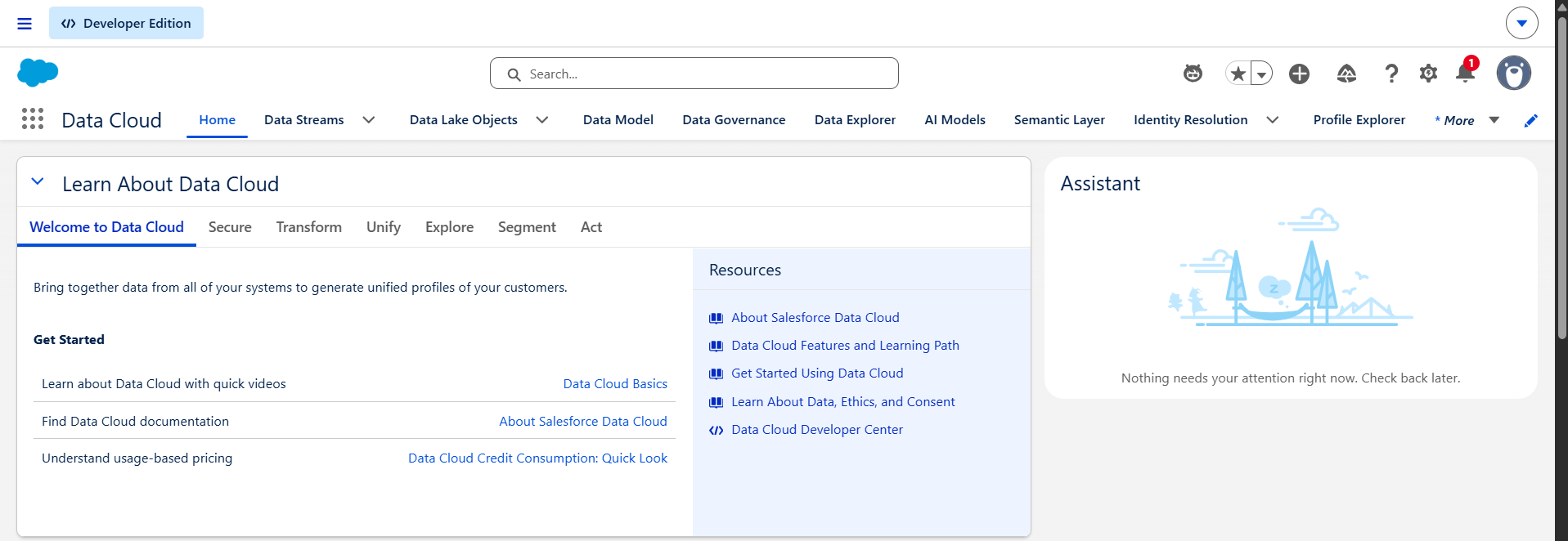
Tip: As soon as the instance is created, you can open Data Cloud from the App Launcher. But if you plan to configure permissions and connect data sources first, do it right after instance creation, before anyone builds on top of it.
Step 2: Define Your Use Cases and Plan the Architecture
With the instance running, decide what you want Data Cloud to do. A unified marketing audience, a service view of the customer, and an Agentforce grounding project all need different data and different models.
List your priority use cases and the business outcome for each.
Identify the source systems, data owners, and the customer identifiers (email, phone, loyalty ID) you can match on.
Decide whether you need multiple data spaces for brands, regions, or business units, or a Data Cloud One setup that shares one instance across several CRM orgs.
Estimate consumption. Data Cloud pricing is usage-based, so ingesting everything "just in case" gets expensive.
Tip: Start with one or two high-value use cases, then expand. Teams that try to onboard every source at once usually stall at identity resolution.
Step 3: Set Up Governance and Security
It's far easier to build governance now than to do it after data is flowing.
Data spaces: Create them to separate data by brand, region, or department, and tie each to the right permission sets.
Tags and classifications: Label sensitive fields (such as PII) so policies can act on them. Tags can propagate to downstream objects.
Policies: Set role-based access, object- and field-level security, and dynamic data masking.
Encryption and consent: Enable Platform Encryption for sensitive data, and plan how consent and data subject rights requests will be honored at segmentation and activation time.
Step 4: Create Data Streams
Each connected source delivers its data through a data stream, which feeds a Data Source Object and then a Data Lake Object.
Salesforce sources: Use the CRM connector for Sales, Service, Commerce, Loyalty, and Financial Services data. Starter data bundles come with pre-built mappings, which makes this the fastest route.
Marketing sources: Create streams from Marketing Cloud Engagement, Account Engagement, and Personalization.
External sources: Use Amazon S3, Google Cloud Storage, Azure, SFTP, the Ingestion API, or the web and mobile app connector.
Zero copy federation: For Snowflake, Databricks, BigQuery, or Redshift, query the data where it lives instead of copying it.
For every stream, set the category (Profile, Engagement, or Other), the primary key, and a refresh mode that matches how often the source changes.
Tip: Use incremental or scheduled refreshes where you can. Full refreshes of large objects are the biggest source of avoidable consumption.
Step 6: Map Data to the Customer 360 Data Model
Mapping connects your raw Data Lake Objects to the standardized Data Model Objects. The Customer 360 data model has subject areas such as Party (Individual, Account, Contact Points), Sales Order, Engagement, Case, Loyalty, and Product.
Map to standard DMOs wherever possible. Segmentation, identity resolution, and Agentforce features expect them.
Use auto-mapping as a starting point, then review every field by hand.
Create custom DMOs only when no standard object fits.
Define DMO relationships, since segments and data graphs depend on them.
Step 7: Unify Profiles with Identity Resolution
This step creates the single customer view. An identity resolution ruleset has two parts:
Match rules decide which records belong to the same person or account, using exact and fuzzy matching on fields like email, phone, and name plus address. You can also group individuals into households.
Reconciliation rules decide which value wins when sources disagree, such as most recent, most frequent, or a preferred source.
After each run, review the consolidation rates and the data quality insights. Expect to run this step more than once.
Step 8: Create Calculated Insights and Data Graphs
With unified profiles in place, add the metrics and structures your use cases need.
Calculated Insights define metrics like lifetime value, purchase frequency, or engagement scores on top of your DMOs. They can run in batch or streaming mode.
Data Graphs pre-assemble related data (purchases, browsing, cases) into a single denormalized object, so real-time personalization and AI prompts can read customer context quickly.
Step 9: Build Segments
Turn your unified data into audiences. You can build standard, real-time, waterfall, or nested segments using attributes, insights, and engagement filters, or describe the audience in plain language and let the Marketing Agent draft it. Set a publish schedule that matches how fresh each activation needs to be.
Step 10: Activate Your Data
Now it's time for activation, because data only creates value when you use it.
Activation targets: Send segments to Marketing Cloud Engagement, Personalization, B2C Commerce, file storage platforms, advertising platforms, or other external systems.
Related attributes and filters: Add the fields the receiving system needs, such as name, email, or loyalty tier, and apply contact-point or consent filters.
Data actions: Trigger platform events, webhooks, or flows when something happens in the data.
Enrichments: Push insights back into CRM as related lists or copied fields, so sales and service teams see them inside the tools they already use.
Step 11: Test, Validate, and Optimize
Build and test in a Data Cloud sandbox before touching production.
Package your configuration with data kits so it can be deployed consistently across orgs.
Validate with cross-functional users. Check that profile counts, segment sizes, and activation outputs match what the business expects.
Monitor data stream refresh history, identity resolution results, and credit consumption, then tune as usage grows.
Salesforce Data 360 Data Models and Architecture
Unlike other Salesforce clouds built on a shared core platform with a relational database, Salesforce Data 360 leverages a unique architecture and technology stack. This section explains the unique data models and associated concepts that empower its functionality.
Data Source: Data Cloud gathers data by utilizing available information from various Data Sources such as Commerce Cloud, Sales Cloud, Service Cloud, and other Salesforce clouds. Additionally, it collects data from external sources like Amazon S3, Google Cloud Storage, etc.
Data Stream: Data Streams operate by extracting specific entities from diverse data sources, including various Salesforce Clouds and external platforms. These Data streams establish connections to data repositories such as 'Emails' in the Marketing Cloud or 'Contact information' in the Sales Cloud. When integrating a Data Source with Data Cloud, the configuration of Data Streams is essential to access these specific entities.
Data Source Object (DSO): The DSO functions as temporary storage for staging data, preserving it in its original raw file format from the Data Stream. When data ingested from an external system, it immediately holds that data in its raw format.
Data Lake Object (DLO): A Data Lake Object serves as a significant stage in the data flow, providing a primary workspace for data inspection and preparation. It is a physical storage table in Salesforce Data Cloud that holds compressed, historical data ingested from external sources. It cleanses and structures raw information before it is mapped to a standardized Data Model Object for AI and automation.
Data Model Object (DMO): The DMO serves as the final standardized layer in the data flow, offering a virtual view of your data . Unlike DSOs and DLOs that handle physical data storage, a DMO acts as a universal blueprint that merges different sources into one format. It creates the clean, single source of truth needed for real-time identity resolution and AI automation.
Data Space: Serves as a logical partition within a Data 360 instance, providing a secure virtual container to isolate data, metadata, and processes. Data space segregates DLOs, DMOs, and downstream operations by brand, region, or department. Controlled via permission sets, it ensures that teams only view and interact with the specific segment of data relevant to their operational boundaries.
Unified Profile: It brings together records from different sources that belong to the same person or account. The original data stays unchanged. The profile simply links those records, so you can see everything about a customer in one place.
Calculated Insight Object (CIO): Calculated Insights let you define aggregated metrics, such as lifetime value or total purchases, on top of DMOs. The results are written to the lakehouse and stored as CIOs, which can be used for segmentation, analysis, and activation. They can run in batch or streaming mode.
Data Graph: A Data Graph is a denormalized, JSON-format view built from multiple lakehouse tables and their relationships. A Profile data graph, for example, combines a person's purchases, browsing history, and cases into one object. It gives real-time personalization and AI prompts fast access to customer context.
Benefits of Salesforce Data 360
Salesforce Data 360 offers numerous advantages that can significantly enhance a company's operations. Below are some key benefits:
Unified Customer View: One of the most significant benefits of Data cloud is its ability to create a unified 360-degree view of customer data from all sources. This holistic view enables organizations to gain a better understanding of their customers, including their preferences, behaviors, and interactions with the company. This, in turn, can be used to personalize customer engagement, improve service, and drive sales.
Enriched Customer Profiles: Organizations can leverage enriched customer profiles and behavioral data to segment their audience more effectively. This helps in targeting marketing efforts more precisely and delivering more relevant content to customers. The Data Cloud also allows tracking of customer behavior across multiple channels, including social media, email, and mobile, providing a more comprehensive picture of customer activities.
Real-Time Data Processing: It stores all data using a lakehouse architecture, which organizes unstructured data from across the enterprise and makes it easier to access. This enables real-time data processing, allowing for faster, more informed decisions. Real-time data processing also facilitates quick responses to changes in customer behavior and market trends.
Integration with Other Products: Data Cloud is fully integrated with Salesforce products like Agentforce, Sales Cloud, and Marketing Cloud, as well as external platforms such as Snowflake, Databricks, and Google BigQuery using a Zero-Copy architecture. This native integration connects legacy databases, storage hubs like Amazon S3, and web apps to provide real-time customer context for AI.
Salesforce Data Cloud Integration with Other Products
Data Cloud can be fully integrated with other products, including Salesforce’ own Commerce Cloud, Sales Cloud, Service Cloud, Marketing Cloud, and other external products like Microsoft Azure and Amazon S3. Here is how the integration can help:
1. Commerce Cloud:
Personalized Shopping Experiences: Integrating it with Commerce Cloud enables businesses to offer personalized shopping experiences based on customer data and behavior. This can increase customer satisfaction and conversion rates.
Enhanced Inventory Management: With real-time data analytics, organizations can optimize inventory levels, reduce stockouts, and improve supply chain efficiency.
2. Sales Cloud:
Comprehensive Customer Insights: The integration provides sales teams with a 360-degree view of customers, including their purchase history, preferences, and interactions across all channels. This leads to more informed and effective sales strategies.
Improved Sales Forecasting: By utilizing predictive analytics, sales teams can enhance forecasting accuracy, enabling them to make data-driven decisions and set realistic targets.
3. Marketing Cloud:
Unified Customer Profiles: Create unified customer profiles by aggregating data from various touchpoints. This enables more precise segmentation and personalized marketing efforts.
Real-Time Campaign Optimization: With real-time insights, the marketing team can analyze campaign performance and optimize strategies to maximize ROI.
4. Service Cloud:
Efficient Case Management: Integrate Data Cloud to streamline case management processes, ensuring that support agents have access to all relevant customer data for quick and effective resolution.
Personalized Service Interactions: Provide support agents with detailed customer profiles, enabling them to offer personalized service and build stronger customer relationships.
How Long Does a Salesforce Data Cloud Implementation Take?
The time required to implement Data Cloud depends on your business requirements, data complexity, and the expertise of your implementation team. If your internal team lacks deep data-modeling experience, engaging specialized Salesforce Data Cloud implementation services during the scoping phase can speed up delivery and help prevent significant architecture debt.
A standard enterprise deployment typically follows this 12-week operational framework:
Weeks 1–3 (Discovery & Governance Setup): The initial weeks are spent provisioning licenses, configuring administrative permission sets such as Data Cloud Admin and Marketing Admin, and defining security boundaries.
Weeks 4–6 (Ingestion & Connection): After the initial setup, connect your Salesforce CRM orgs, establish data streams, and set up cloud storage buckets.
Weeks 7–9 (Data Mapping & Identity Resolution): During this phase, incoming data lake schemas are mapped to the Individual DMO, while exact and fuzzy rulesets are configured to bring data together into unified profiles.
Weeks 10–12 (Calculated Insights & Activations): The final phase focuses on defining analytical metrics, building targeted segments, testing real-time data actions, and validating the setup with cross-functional users.
Conclusion
Salesforce Data Cloud offers a robust solution for centralizing and integrating customer data from diverse sources. Follow our Data Cloud implementation steps to create a successful unified data solution that enhances operational efficiency, personalizes interactions, and drives informed decision-making. To further amplify this, consider integrating with other platforms.
While Data Cloud has great capabilities to transform the way you interact with and use data, its best use requires a well-structured approach. Our experts at Concretio can help you by providing excellent Salesforce implementation services coupled with smooth deployment and post-launch support.
Related Reading


FAQs
-
Salesforce Data Cloud implementation refers to the process of setting up and configuring a data cloud platform within your organization. This platform acts as a central hub for unifying, managing, and analyzing data from various sources. It involves steps like creating a data cloud organization, connecting to data sources, transforming and harmonizing data, building segments, and potentially activating insights across different systems.
-
There are several compelling reasons to consider a data cloud implementation:
Unified Customer View: Data clouds break down data silos, providing a 360-degree view of your customers by integrating information from various touchpoints. This empowers data-driven decision making and personalized experiences.
Enhanced Analytics: Data clouds offer robust data management capabilities, allowing for easier data cleansing, transformation, and analysis. This fosters deeper insights and improved decision-making across departments.
Scalability and Agility: Data clouds are inherently scalable, enabling you to handle growing data volumes without infrastructure limitations. They also provide flexibility to integrate new data sources as your business needs evolve.
-
Security is paramount when dealing with sensitive data. Here are key considerations for a data cloud implementation:
Data Access Controls: Granular access controls ensure only authorized personnel can view or modify data based on their roles and permissions.
Data Encryption: Data should be encrypted both at rest and in transit to safeguard it from unauthorized access.
Compliance: The data cloud platform should comply with relevant data privacy regulations like GDPR or CCPA, depending on your location and data types.
-
Implementing a data cloud involves several challenges, including data migration, integration complexities, and potential downtime. Migrating data is intricate and time-consuming, requiring careful planning to prevent data loss and ensure integrity. Integrating cloud services with existing systems poses technical difficulties and requires compatibility solutions. Organizations may experience downtime during migration, affecting operations. Other challenges include managing cloud costs, ensuring data security, and adhering to regulatory compliance.
-
Measuring the success of a data cloud implementation involves assessing key performance indicators (KPIs) like system uptime for reliability, enhanced data accessibility, improved user experience, and cost savings by comparing current cloud expenses to previous infrastructure costs. Additional KPIs include data processing efficiency, user satisfaction, and scalability to meet business needs. Regular monitoring of these metrics ensures alignment with organizational goals and expected benefits.
Let’s Talk!

Drop a note with your queries to move forward with the conversation 👇🏻