How to Integrate Marketing Cloud Personalization with Agentforce to Launch Autonomous End-to-End Campaigns
Key Summary:
Instant Intent Capture: Marketing Cloud Personalization 2026 detects live digital body language with millisecond latency.
Autonomous Decisioning: Agentforce autonomous campaigns.
Unified Data Fabric: Marketing Cloud Personalization Data Cloud integration enables real-time AI action.
Traditional marketing campaigns are hitting a wall. If a customer browses your website today, waiting two days to send them a manual follow-up email means you have already lost their interest. Customers want personalization immediately, and they get frustrated when brands send them generic, delayed offers.
According to the Salesforce Agentforce for Marketing, over 70% of buyers expect brands to understand their specific needs right away, but most feel that corporate personalization efforts miss the mark.
To fix this, marketing teams are moving away from old, manually built email tracks. Instead, they are launching autonomous campaigns. By linking Salesforce Marketing Cloud with Agentforce marketing orchestration, you build a system that reads a customer’s live behavior and launches targeted campaigns automatically, without any manual work.
This guide skips the high-level fluff and gives you the exact blueprint needed to hand the operational heavy lifting over to autonomous agents safely, predictably, and at scale.
What Is Marketing Cloud Personalization 2026?
Marketing Cloud Personalization is a real-time interaction management (RITIM) engine that tracks, analyzes, and responds to customer behaviour as it happens. Operating at millisecond latency, the platform captures digital body language across websites, mobile apps, and portal touchpoints for both known and anonymous visitors.
Core Capabilities
Immediate Context Capture: Tracks real-time signals including active page dwell time, live search queries, real-time click paths, and location data.
Dynamic Profile Appending: Instantly updates users’ intent score and brand affinity profile during an active session, rather than relying on historical batch data.
On-the-Fly Optimization: Immediately swaps out website banners, product recommendations, or application assets based on the user’s current digital interaction.
How Salesforce Personalization Works
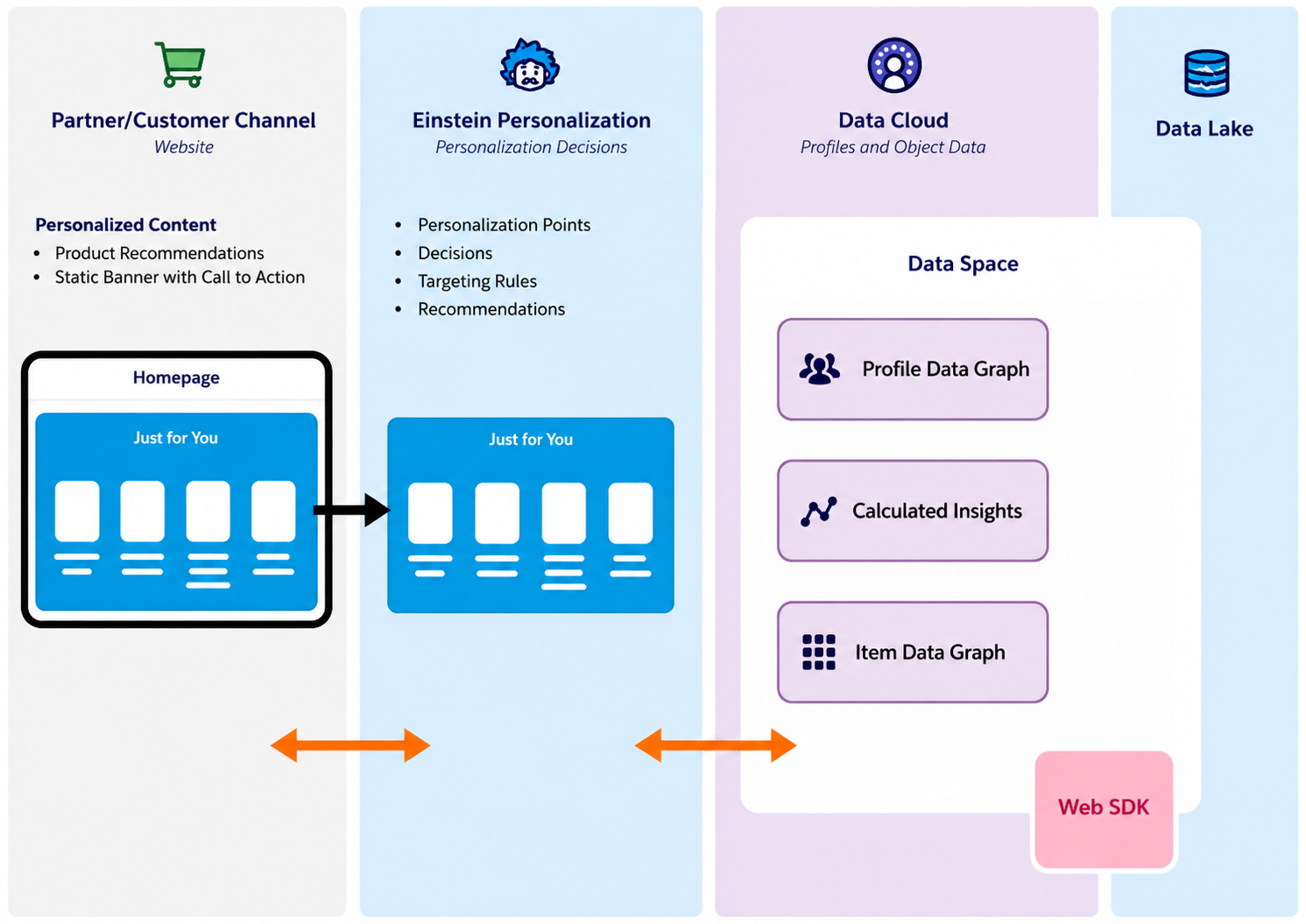
Salesforce Personalization uses Data 360 to isolate, organize, and prepare data for use as personalized content. Data 360 data spaces provide logical partitions to organize the data for profile unification, calculated insights, and marketing. A data space contains data graphs that use data model objects (DMOs) to build precalculated views of your data.
Personalization uses these data graphs to obtain and deliver personalized content to users or site visitors. Personalization uses its own DMOs to determine which individuals are eligible for personalization and which personalized content to provide.
Personalization is delivered in the following ways.
A Customer 360 Personalization application that centralizes connected and personalized experiences across clouds.
Personalization as a Service that uses Data 360 to provide real-time personalization functionality to Salesforce customers across channels.
Ultimately, Salesforce Personalization acts as an intelligent router that turns raw data into live interactions. By utilizing organized data spaces and data graphs, the platform instantly decides who gets which offer, allowing brands to deliver consistent, real-time personalized experiences across every digital touchpoint.
Integrating Agentforce with Marketing Cloud Personalisation for Autonomous Campaign Execution
Step 1: Ensure the Required Prerequisites Are in Place
Before starting, ensure you have:
| Requirement | What You Need |
|---|---|
| Edition | Marketing Cloud Growth/Agentforce Edition or Marketing Cloud Next |
| Agentforce | Enabled Setup → Agentforce & 1 Gen 1 AI; Permissions Assigned |
| Data Cloud | Activated with Data Graph Configured |
| Personalization | Salesforce Personalization module enabled |
| Foundation Data | Personalization Point, Decision, Personalizer, and Log DMOs deployed |
| Journey Builder | Enabled for multi-channel flows |
| Content Builder | Accessible for email and landing page creation |
| Calculated Insights | Configured for daily metrics |
| Attribution Model | Enabled to track revenue events |
| Flex Prompt Templates | Access granted; LLM model selected |
| Data 360 Credits | Available for prompt execution |
Step 2: Access Agentforce in Marketing Cloud
Log into Marketing Cloud (Growth/Advanced Edition)
Click the Agentforce logo on any tab to open the Agentforce panel
In Advanced Edition, open Campaign Designer (Beta) from the home page
Why: Agentforce is your AI assistant that creates campaigns from briefs.
Step 3: Create a Campaign Brief
What to do:
1. Select "Create a Campaign From a Brief" in the Agentforce panel
2. Type your campaign objective:
Target Audience: Customers with $200+ purchases in past 30 days
Objective: Guide to landing page with 20% discount
Channels: Email + Web personalisation
Goal: Maximise revenue
3. AI generates draft brief with campaign name, message, audience, goals
4. Review and manually update content
Why: The brief is your input to Agentforce. Being specific = better campaigns.
Step 4: Generate Campaign and Content
What to do:
Agentforce drafts campaign + components based on brief
AI creates:
Email subject line, preheader, paragraph copy
Landing page
SMS message
Use sparkle button in Content Builder to draft/revise text
Why: Automates hours of manual content creation. AI understands brand voice.
Step 5: Configure Campaign Flow and Channels
What to do:
AI recommends campaign flow with multiple channels
Modify message text or use AI to refine flow
Set up multichannel journeys (email, SMS, social, WhatsApp)
Configure scheduling and audience segments
Default: one-day wait between sends (adjustable)
Why: Campaign Flow connects all channels so the right message reaches the right person at the right time.
Step 6: Enable Marketing Cloud Personalisation for Real-Time Personalisation
What to do:
Set up Salesforce Personalization for Marketing Cloud Next
Deploy Foundation Data:
Personalization Point
Decision
Personalizer
Log DMOs
Configure Calculated Insights for daily metrics
Enable Attribution Model (Browse, Add to Cart, Purchase)
Install Personalization Pipeline Intelligence Dashboard
Why: This delivers 1:1 real-time personalisation across web, email, mobile based on behavior and intent.
Step 7: Activate Segment-Triggered Autonomous Flow
What to do:
Start with a segment of Unified Individuals from Data Cloud
Set up a Segment-Triggered Flow that refreshes before each execution
Schedule: Daily, weekly, or hourly with automatic refresh
Enable no manual intervention mode
Why: Creates autonomous loop flow triggers automatically without manual work.
Step 8: Add AI-Powered Personalisation with Flex Prompt Templates
What to do:
Flow calls Agentforce Flex Prompt Template as an action element
Pass recipient data as input to generate unique content
Use up to 5 data sources per prompt
Choose model (Google Gemini, ChatGPT, or Claude)
Content generated at send time based on recipient's data
Why: True 1:1 personalisation. Content didn't exist until the moment it was sent.
Example: Birthday email with unique anecdote about what happened on their exact birth date, not just "Happy Birthday, {{FirstName}}".
Step 9: Store and Deliver AI-Generated Content
What to do:
AI-generated content stored in an Apex class as a data source
Email references it as a simple merge field
No custom development needed
Content exists only at send time
One template delivers thousands of unique emails
Why: Each recipient gets a unique message based on their data, at scale.
Step 10: Monitor and Optimize
What to do:
Agent provides campaign summary (opens, CTR, delivery stats)
Agentforce analyzes performance and identifies trends
Receive AI suggestions for optimizations
Monitor via Personalization Pipeline Intelligence Dashboard
Track attribution metrics
Why: AI continuously learns from engagement and suggests improvements. Campaigns self-optimize 24/7.
Step 11: Enable Continuous Autonomous Optimization
What to do:
Agentforce automates marketing tasks
Uses unified customer data for intelligent marketing
Identifies high-potential audience segments
Makes real-time decisions based on behavior, preferences, and intent
AI infers customer intent and makes instant personalisation decisions
Why: This is the autonomous engine. Works 24/7 to optimize campaigns without manual intervention.
Example Use Case: Autonomous Product Recommendation Campaign
Customer Interaction Captured in Real Time
A customer browses products, views categories, or interacts with marketing content.
Marketing Cloud Personalization captures these behaviors instantly.
Unified Customer Profile Created
Customer data from multiple touchpoints is consolidated into a single profile.
This provides a complete view of preferences, interests, and past purchases.
Agentforce Analyzes Customer Intent
AI agents evaluate the customer's behavior and engagement patterns.
Potential product interests and purchase intent are identified automatically.
Personalized Product Recommendations Generated
Based on the analysis, the system selects the most relevant products for the customer.
Recommendations are tailored to individual preferences and current interests.
Recommendations Delivered Across Channels
Personalized suggestions can appear on websites, emails, mobile apps, and other customer touchpoints.
Customers receive a consistent experience regardless of the channel they use.
Continuous Optimization Through AI
Agentforce monitors customer responses to recommendations.
The system learns from clicks, purchases, and engagement metrics to improve future recommendations.
Improved Customer Engagement and Conversions
Customers receive more relevant offers and experiences.
Businesses can increase engagement, conversion rates, and customer satisfaction through automated personalization.
Common Challenges and How to Overcome Them
| Challenge | Solution |
|---|---|
| Fragmented Customer Data | Unify data with Data Cloud to create a single customer profile. |
| Limited Real-Time Personalization | Use Agentforce to respond to customer behavior instantly. |
| Manual Campaign Management | Automate campaign tasks and optimization with AI agents. |
| Inconsistent Cross-Channel Experiences | Deliver consistent messaging across all customer touchpoints. |
| Difficulty Scaling Personalization | Leverage AI to personalize experiences for large audiences. |
| Slow Campaign Optimization | Use real-time insights to continuously improve campaign performance. |
Conclusion:
Moving to autonomous campaigns means shifting from slow, reactive workflows to intelligent, live systems. Linking Marketing Cloud Personalization 2026 with Agentforce marketing orchestration eliminates manually built tracks, allowing your brand to respond to customer behavior instantly through a unified Data Cloud Agentforce marketing automation setup. Building this secure Salesforce Marketing Cloud ecosystem requires deep technical expertise in data graphs and trust guardrails.
Partnering with a certified Salesforce consultant ensures your system is configured correctly from day one. Contact our professional Salesforce implementation service team today to schedule an architecture review and launch your autonomous marketing strategy.
Frequently Asked Questions
-
Instead of using rigid "if/then" rule maps, the AI evaluates live customer behavior against current business data to autonomously pick and send the best message.
-
The Marketing Cloud Personalization 2026 Web SDK tracks them using temporary anonymous IDs. The second they log in or fill out a form, Identity Resolution instantly merges their past browsing history into their permanent Salesforce Marketing Cloud profile.
-
Yes. When a behavioral change occurs, Data Cloud runs a calculated insight and triggers a Real-Time Data Action. This action instantly alerts the Agentforce marketing orchestration layer to launch an autonomous recovery message.
-
You lock down the agent inside the Agentforce Builder using strict plain-text instructions. These trust boundaries define exactly what offers, maximum discount percentages, and approved communication channels the agent is allowed to use.
Related Reading
Let’s Talk

Drop us a note, we’re happy to take the conversation forward 👇🏻