
Key Takeaways:
HS CPQ: Natively built into CRM, Revenue Hub streamlines standard quoting workflows. SF CPQ (succeeded by Revenue Cloud) delivers deep platform customization for complex enterprise revenue governance.
HS excels: standardized, seat-based, flat/tiered pricing models. SF Revenue Cloud handles multi-variable, attribute-based configurations, consumption pricing, intricate approval chains.
Evaluation must extend beyond base seat licensing; implementation, integration, data migration, ongoing technical maintenance significantly impact long-term ROI of both solutions.
What could eat up your business revenue? -> Your sales team’s wrong sales practices? Maybe; yes!
Poor traditional sales practices lead to huge errors in quoting, are slow sales cycles, inconsistent pricing, bad sales productivity = lost revenue. Your business is losing revenue, and you may not be aware.
Are you figuring out where the revenue leakage is?
Either you are choosing the wrong platform that is causing you manual work, inconsistent pricing, or may be having integration problems across sales and finance.
You want to make an informed decision and be familiar with the tools to choose between HubSpot CPQ vs Salesforce CPQ, right? Both tools approach the requirements differently.
HubSpot (HS) provides native Configure, Price, Quote (CPQ) capabilities within its CRM based on the revenue platform. On the other hand, Salesforce (SF) CPQ offers businesses established enterprise quoting functionality.
In this guide, we will compare HubSpot CPQ and Salesforce CPQ across features, pricing, integrations, scalability, and implementation requirements to assist businesses like yours in determining which solution fits best.
What Are HubSpot CPQ and Salesforce CPQ?
The Configure, Price, Quote (CPQ) software allows your sales team to automate the process of selecting products, calculating prices, applying discounts, and generating accurate sales quotes.
The software solution of CPQ enables your team to align with policies for pricing and reduce manual configuration and approval work.
Since both CRM tools (HubSpot and Salesforce) offer CPQ capabilities, their approach differs in architecture, functionality, and integration with broader operations.
What Is HubSpot CPQ?
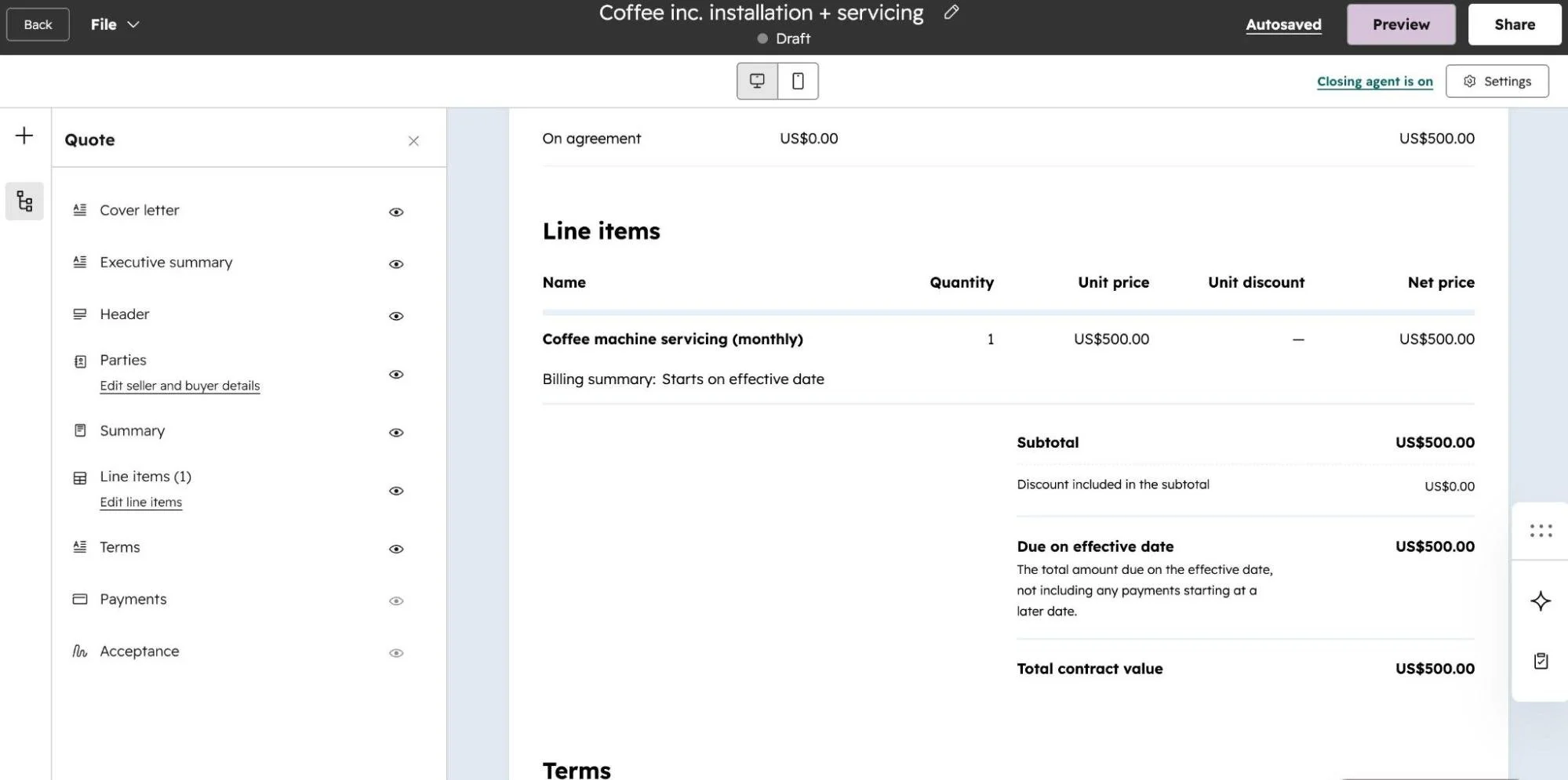
HS CPQ is a built-in quoting toolset within its Customer Relationship Management (CRM). It is associated with Revenue Hub (formerly Commerce Hub). This assists your sales teams in configuring products and services, applying pricing rules, and generating, approving, and sending quotes for acceptance and payment.
Key capabilities include:
Product library: Store products and services with standardized descriptions, pricing, and line-item information.
Pricing models: Support flat-rate, stair-step, and tiered pricing, along with price books.
Quote generation: Create branded quotes using a quote editor and AI-generated content.
Approval workflows: Route quotes through standard or advanced approval processes.
Quote rules: Apply product configuration, pricing, quantity, and discount controls.
E-signatures: Allow buyers to review and sign quotes electronically.
Billing and payments: Connect accepted quotes with payment and subscription workflows.
-> Need Help with HubSpot Revenue Hub?
Consult Your Business Requirements with One of Our Representatives, Right Away for a 1:1 Discussion.
What Is Salesforce CPQ?
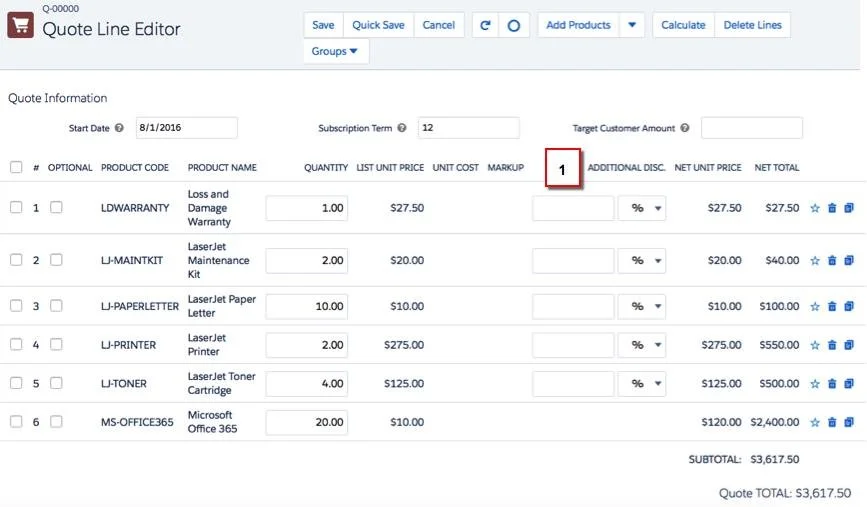
SF CPQ is a native extension of Salesforce CRM. It automates product configuration, dynamic pricing, and quote generation for sales teams.
Its major capabilities include:
Product configuration: Configure products, bundles, and related options using product rules.
Pricing automation: Apply price rules, discount schedules, and pricing conditions.
Quote management: Build and manage quotes through the Quote Line Editor.
Approval management: Route quotes through approval processes based on discount thresholds and business policies.
Contract management: Support contract creation, renewals, and amendments.
Subscription management: Manage recurring products and subscription-related quoting processes.
Salesforce CPQ vs. Revenue Cloud: What's Changed?
Salesforce Revenue Cloud serves as the strategic path forward for organizations exploring modern revenue management capabilities within the SF ecosystem.
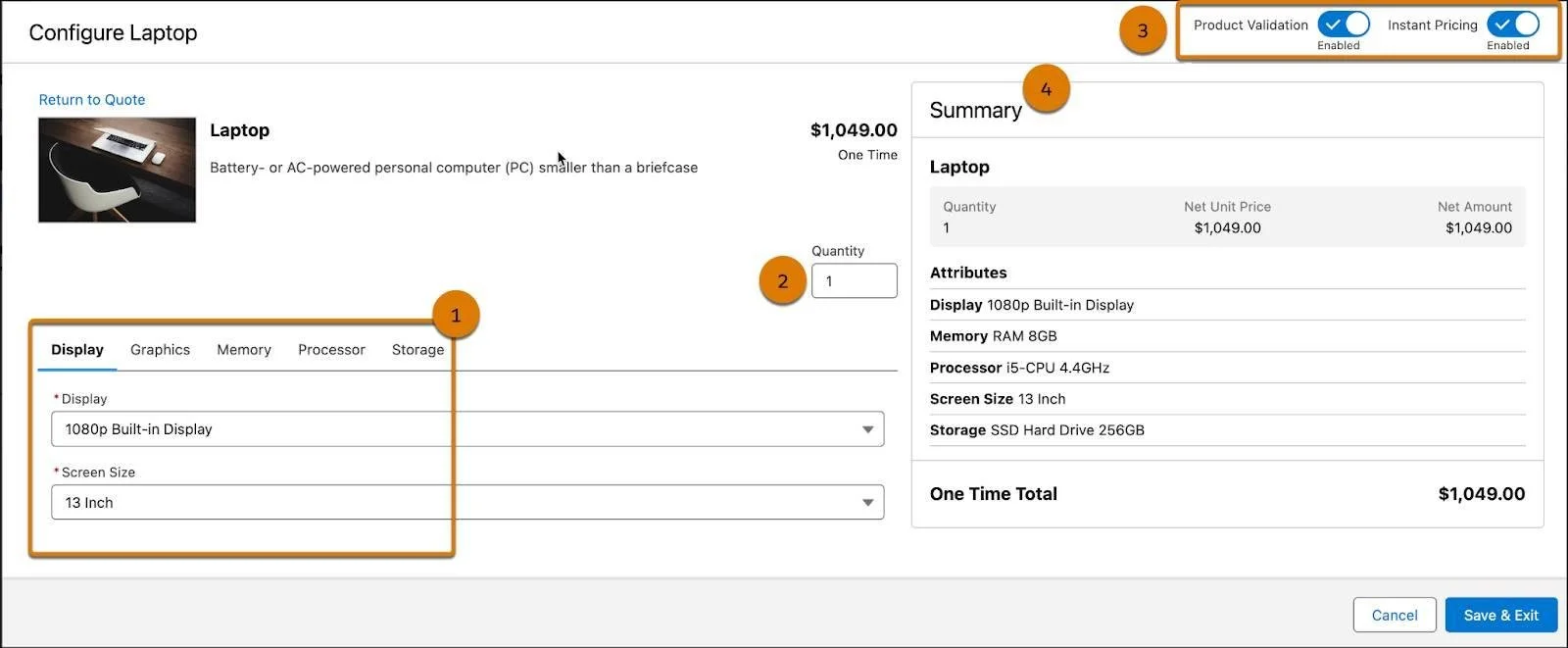
While Revenue Cloud incorporates core quoting features, it represents far more than an updated iteration of the legacy managed package. Instead, it relies on a fundamentally distinct underlying architecture, data framework, and configuration model.
| Area | Salesforce CPQ | Salesforce Revenue Cloud |
|---|---|---|
| Architecture | Managed package | Native Salesforce platform architecture |
| Product configuration | SKU and bundle-based rules | Attribute-based configuration |
| Pricing | Price rules and discount schedules | Advanced pricing procedures |
| Quoting | Quote Line Editor | Transaction-based quoting |
| Revenue models | Traditional and subscription-oriented quoting | One-time, subscription, and consumption-based models |
| Order management | Requires associated capabilities and integrations | Expanded native order management |
| API architecture | Managed-package-dependent integrations | API-first architecture |
Salesforce positioned Revenue Cloud as an all-inclusive revenue ecosystem, moving far beyond standard proposal generation to embrace item catalogs, automated pricing, agreement lifecycles, order processing, asset tracking, and customer invoicing.
Transitioning to Revenue Cloud from legacy SF CPQ demands a complete platform rebuild rather than a routine version update, primarily driven by underlying architectural and data structure differences.
What this means for buyers: Organizations must assess HubSpot Revenue Hub against the distinct demands of both current Salesforce CPQ instances and prospective Revenue Cloud deployments. Each scenario presents unique strategic implications and cannot be approached as identical platform transitions.
Salesforce CPQ Demo
Watch the full video here:
HubSpot CPQ vs Salesforce CPQ: Feature-by-Feature Comparison
HubSpot CPQ (part of HubSpot Revenue Hub) fits teams wanting fast setup, native CRM alignment, and straightforward quoting, while Salesforce CPQ / Revenue Cloud (with legacy Salesforce CPQ end-of-sale since March 2025 and succeeded by Revenue Cloud / Revenue Cloud Advanced) fits complex enterprise catalogs, multi-variable pricing, and heavy governance.
Product Catalog and Configuration
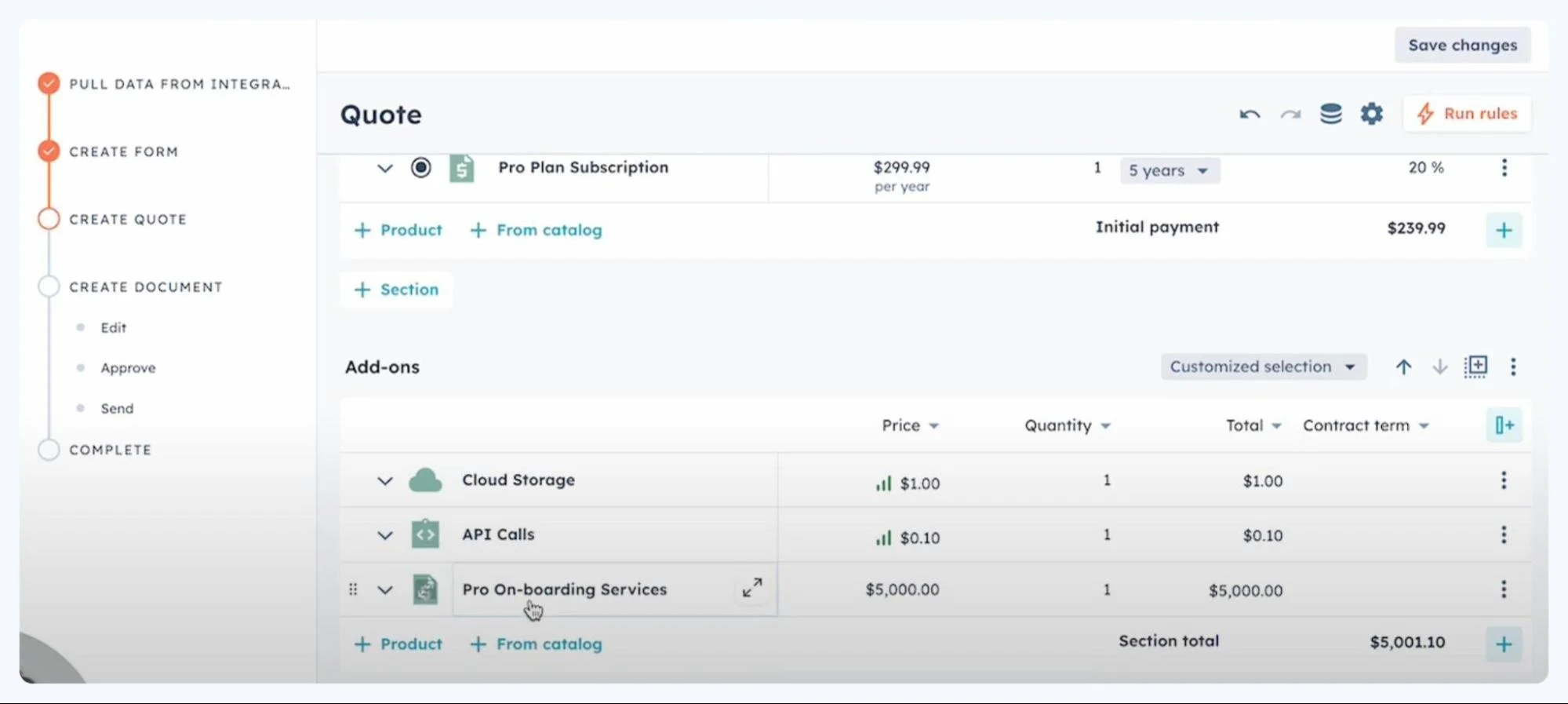
HubSpot CPQ: Uses a product library and single-page quote editor with basic compatibility/pricing checks via Quote Rules (Enterprise). Best suited for standardized or seat-based offerings; complex bundles and multi-constraint rules often rely on third-party tools.
Salesforce CPQ/Revenue Cloud: Built for complex product catalogs, guided selling, product dependencies, and multi-constraint configurations across large enterprise deals.
Pricing Models and Discount Management
| Pricing requirement | HubSpot CPQ | Salesforce CPQ |
|---|---|---|
| Flat-rate pricing | Yes | Yes |
| Tiered pricing | Yes | Yes |
| Stair-step pricing | Yes | Configurable |
| Regional price books | Yes | Yes |
| Discount controls | Quote rules and approvals | Advanced pricing and discount rules |
| Complex conditional pricing | More limited native rule framework | More extensive rule-based capabilities |
Flat-rate & tiered pricing: Supported on both platforms.
Stair-step, formula & multi-variable pricing: More extensive on Salesforce Revenue Cloud (including usage/consumption, ramp deals, and custom pricing logic), whereas HubSpot is strongest on fixed, seat-based, and tiered models.
Regional price books & discounts: Both support Price Books and discount controls; Salesforce provides deeper rule-based discounting and conditional pricing logic.
Quote Generation, Approvals, Contracts, Billing & AI
Quote generation & approvals: HubSpot offers quote templates, AI-assisted quote generation, and approval workflows (up to 10 approvers on Professional; multi-step approval chains and Quote Rules on Enterprise). Salesforce supports deep multi-step approval chains and complex quote rules.
Contracts, e-signatures & billing: HubSpot includes native e-signature, contract records, subscription billing, invoices, and payments (via HubSpot Payments or Stripe). Users on Reddit generally agree that HubSpot's native CPQ and recurring revenue tools are limited for SaaS companies with high contract volumes (2,000+) or frequent upgrades/downgrades. Salesforce Revenue Cloud spans quoting, orders, contracts, consumption/billing, and renewals at enterprise scale.
Reporting & AI: HubSpot leverages Breeze AI and unified CRM reporting for quick deployment and full-funnel visibility, while Salesforce pairs Einstein/Agentforce AI and analytics/Tableau with deep enterprise customization.
HubSpot Revenue Hub vs. Salesforce CPQ: Pricing and Total Cost of Ownership
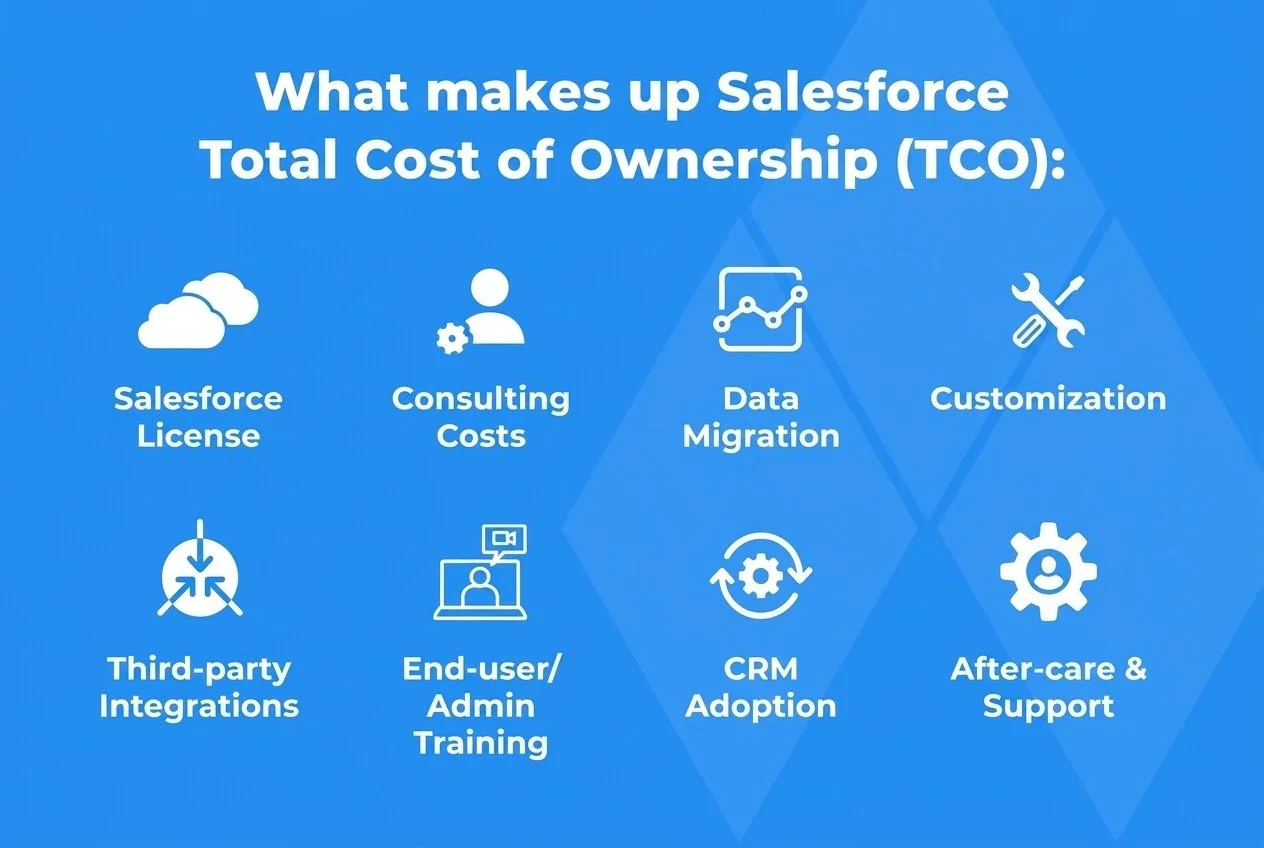
Software licensing is only one component of CPQ cost. Your company has to consider other costs including:
Implementation
Configuration
Integration
User training
Maintenance
Resources required to manage pricing and quoting workflows
HubSpot Revenue Hub Pricing and Licensing
| Plan | Monthly price per seat | CPQ availability |
|---|---|---|
| Free | $0 | No full CPQ functionality |
| Professional | $85/month (annual billing) | Yes |
| Enterprise | $140/month (annual billing) | Yes |
https://www.hubspot.com/pricing/revenue?selectedPackage=professional&utm
Salesforce CPQ and Revenue Cloud Licensing Considerations
Note: SF CPQ is no longer available for new customers to buy its services, but Revenue Cloud is.
| Salesforce product | Published starting price |
|---|---|
| Revenue Cloud Growth | $150/user/month |
| Revenue Cloud Advanced | $200/user/month |
| Salesforce CPQ | Existing customer contract pricing |
https://www.salesforce.com/sales/revenue-lifecycle-management/revenue-optimization-pricing/
Revenue Cloud pricing is published on an annual billing basis. If you see the Growth Edition it includes quoting, configuration, order capture, and subscriptions.
The “Advanced” edition adds capabilities such as contracts, orders, consumption, invoicing, AI, and analytics.
Note: The Revenue Cloud billing is a separate product with quote-based pricing.
Implementation, Integration, and Maintenance Costs
The total cost of ownership (TCO) extends beyond subscription fees. A platform with lower licensing costs may require you to do substantial configuration, customization, and integration work in order to meet business requirements.
Consider these cost components when evaluating both solutions.
| Cost component | What it includes |
|---|---|
| Software licensing | User seats, subscriptions, add-ons, and feature access |
| Implementation | Platform configuration, product catalog setup, and workflow development |
| Data migration | Transferring product, pricing, customer, and contract information |
| Integration | Connecting CRM, ERP, billing, accounting, and other business applications |
| Customization | Developing additional business rules, automation, and workflows |
| Training | Preparing sales, finance, and operations teams |
| Maintenance | Managing integrations, configuration changes, updates, and troubleshooting |
Which Platform Offers Better Long-Term Value?
Decide based on total implementation and operating costs, not just the subscription price alone.
HS: Value for businesses that want to consolidate CRM and quoting workflows without maintaining a highly customized CPQ environment.
SF: It may offer long-term value that needs advanced product configuration, complex pricing, subscription management, and broader quote-to-cash capabilities.

Can HubSpot Revenue Hub Handle Enterprise CPQ Requirements?
HS Revenue Hub provides native CPQ capabilities, but that does not automatically make it suitable for every enterprise quoting environment.
The key question is whether its configuration, pricing, approval, and integration capabilities can support the organization's actual revenue processes without excessive customization or external applications.
Consider the following before choosing HubSpot as a Salesforce CPQ replacement.
Managing Complex Product Configurations and Bundles
Businesses selling configurable products often need rules that determine which products can be combined, which options are mandatory, and which selections are incompatible.
For example, a technology company selling enterprise software might offer:
A mandatory base platform subscription
Optional security and analytics modules
Additional user licenses
Implementation and onboarding services
Premium support packages
HubSpot's quote rules can enforce product selection requirements and prevent invalid configurations. However, organizations with deeply nested bundles, extensive dependencies, and sophisticated configuration logic should validate whether the native rule framework covers their requirements.
Salesforce CPQ provides established product selection, validation, filtering, and alert rules for more involved configuration scenarios.
Business implication: HubSpot is a reasonable option for standardized offerings. Businesses with highly configurable product portfolios should conduct a technical proof of concept before committing to a migration.
Supporting Multiple Pricing Models and Contract Amendments
Pricing complexity increases when businesses sell products through different commercial models.
Consider an organization offering:
Fixed-price products
Tiered subscription packages
Usage-based services
Volume discounts
Multi-year agreements
Contract amendments and renewals
HubSpot supports flat-rate, stair-step, and tiered pricing, along with price books. These capabilities cover several common commercial models.
However, businesses that need sophisticated consumption pricing, complex subscription amendments, and dynamic pricing calculations should evaluate Salesforce Revenue Cloud or a dedicated revenue management solution.
It is also important to distinguish recurring payment functionality from full subscription lifecycle management. Supporting recurring charges does not automatically mean a platform can manage every subscription change, amendment, and renewal scenario.
Handling Multi-Level Approvals and Discount Governance
Large organizations often operate with different approval requirements depending on deal value, discount percentage, customer segment, and contract duration.
For example:
A sales manager approves discounts within an established threshold.
A sales director reviews larger discounts.
Finance approves nonstandard payment terms.
Legal reviews agreements containing exceptional commercial clauses.
HubSpot supports standard and advanced quote approvals, with advanced workflows available in Enterprise. Its quote rules can also enforce conditions related to pricing, discounts, quantities, and product configurations.
Salesforce CPQ provides more established flexibility for organizations with extensive approval hierarchies and complex quote governance.
Business implication: HubSpot can manage structured approval processes, but enterprises should test their complete approval matrix before replacing an existing Salesforce CPQ implementation.
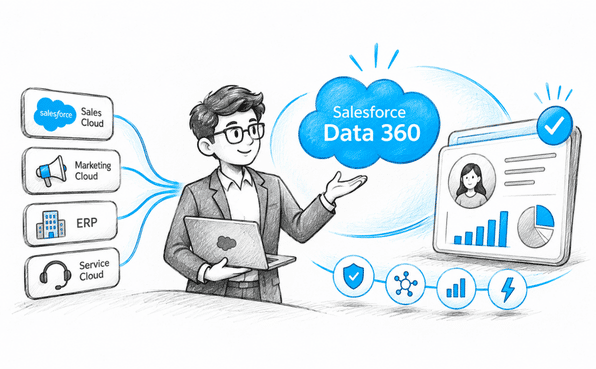
Integrating ERP, Billing, and Financial Systems
CPQ does not operate independently in a mature enterprise environment. It exchanges information with systems responsible for inventory, finance, accounting, billing, and order fulfillment.
A typical architecture might look like this:
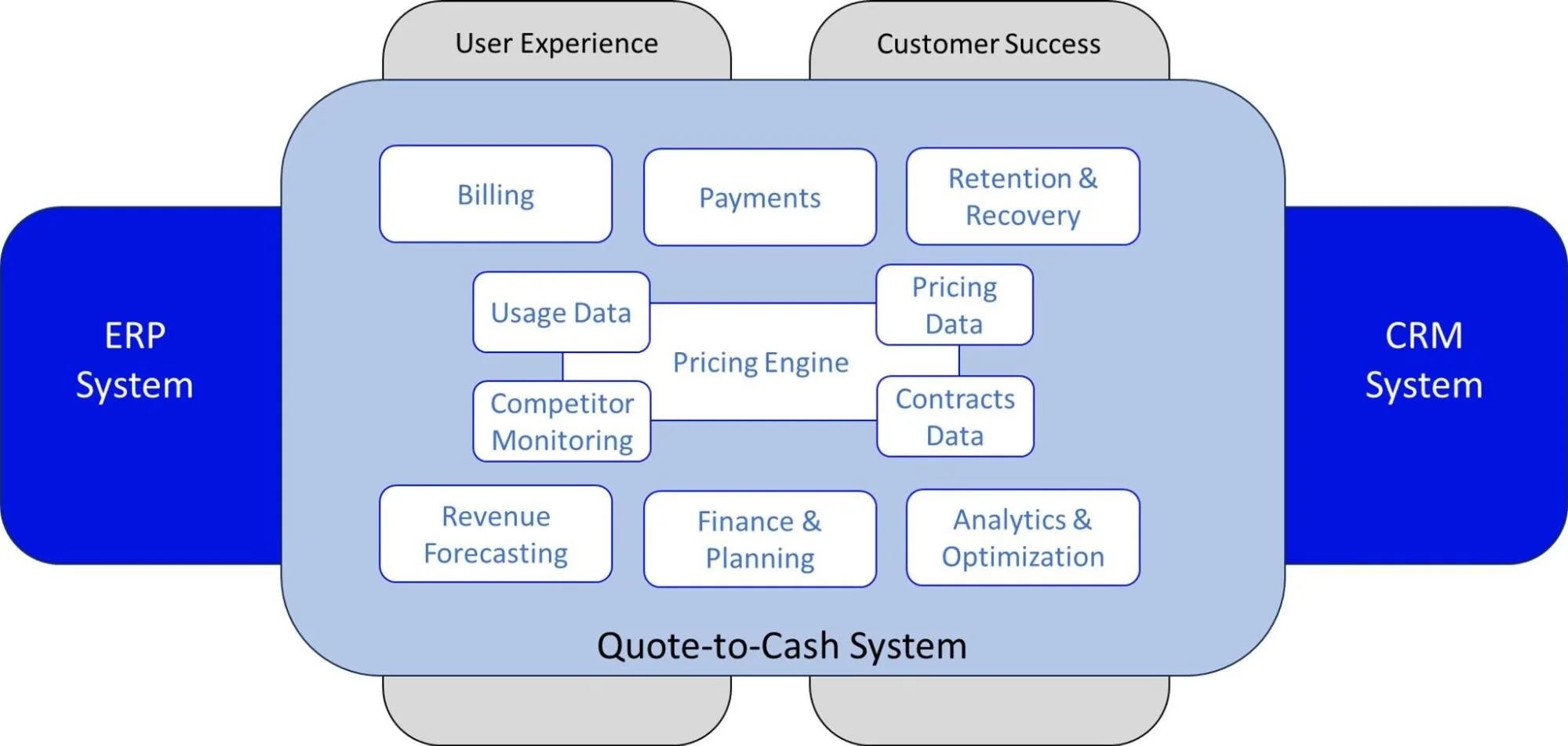
Typical data flow:
CRM stores customer, account, and opportunity information.
CPQ retrieves product and pricing information.
The quoting engine calculates prices and applies commercial rules.
Approved quotes move into contract and order workflows.
ERP and billing systems process fulfillment, invoicing, and payments.
Financial information is synchronized with reporting systems.
HubSpot provides integrations and APIs that businesses can use to connect external applications. Salesforce Revenue Cloud offers an API-first architecture for exposing revenue processes across different channels.
The right integration architecture depends on where product, pricing, customer, and financial data are maintained.
Business implication: Before replacing Salesforce CPQ, identify every downstream process that depends on its data. Replacing the quoting application without redesigning these connections can create operational problems after go-live.
HubSpot CPQ vs Salesforce CPQ: Integration and Scalability
HubSpot CPQ (Part of HubSpot Revenue Hub) favors speed, native simplicity, and low overhead for growing teams. On the other hand, Salesforce CPQ is evolving into Salesforce Revenue Cloud/Agentforce Revenue Management. It offers deep configuration, complex lifecycle rules, and enterprise-scale extensibility.
CRM and Sales Process Integration
HubSpot CPQ: Built natively into HubSpot CRM so reps configure quotes, e-signatures, and payments directly from deal records without separate logins or managed packages. Supports fast setup and standard quote workflows/approvals out of the box.
Salesforce CPQ or Revenue Cloud: Embedded inside Salesforce Sales Cloud with deep bundle, guided selling, compatibility rules, and contract amendments/renewals. It requires heavier admin configuration and ongoing maintenance than HS.
ERP and Accounting System Connectivity
HubSpot CPQ: Acts as a front-end quoting/deal engine while ERPs such as NetSuite, QuickBooks Online, Microsoft Dynamics 365, and SAP remain the system of record for invoicing, tax, inventory, and revenue recognition. This uses native data sync for simpler flows (like contacts, companies, and basic accounting sync) and iPaaS, reverse ELT, or custom connectors for multi-object order/invoice sync. See HubSpot CPQ Integration for architecture patterns.
Revenu Cloud: Connects to ERPs and accounting platforms via native connectors, AppExchange apps, middleware, or custom APIs to synchronize accounts, products, price books, orders, and invoices. Suited for complex billing, ASC 606 revenue recognition, or multi-system order orchestration spanning CRM and ERP.
API Capabilities and Data Synchronization
HubSpot CPQ: Leverages HubSpot’s REST APIs, webhooks, and data sync tools (one-way or two-way), with scheduled or event-driven (e.g., closed won) updates. The best practice is assigning a single system of record per field and using middleware/iPaaS when syncing complex line items, orders, or multiple systems.
SF CPQ: offers dedicated programmatic APIs like Quote, Configuration, Contract, and Approval APIs on CPQ, plus headless/Revenue Cloud APIs alongside Salesforce REST, SOAP, Bulk, and Pub/Sub APIs.
Scalability for Growing Revenue Operations
HubSpot Configure, Price, Quote: Scales quickly for SMB and mid-market RevOps teams prioritizing fast deployment, ease of adoption, and unified marketing-to-billing workflows without heavy technical overhead. May hit limits when facing intricate product bundles, custom pricing rules, or heavy ERP orchestration.
SF Revenue Cloud: Scales for complex enterprise revenue models including usage/consumption billing, multi currency/multi-language catalogs, and intricate approval chains, provided you have dedicated admins/developer capacity and budget.
How to Migrate from Salesforce CPQ to HubSpot Revenue Hub
Migration is more than transferring product and customer records. It requires you to evaluate:
Existing quoting architecture
Revalidating business rules
Ensuring connected systems continue to operate correctly
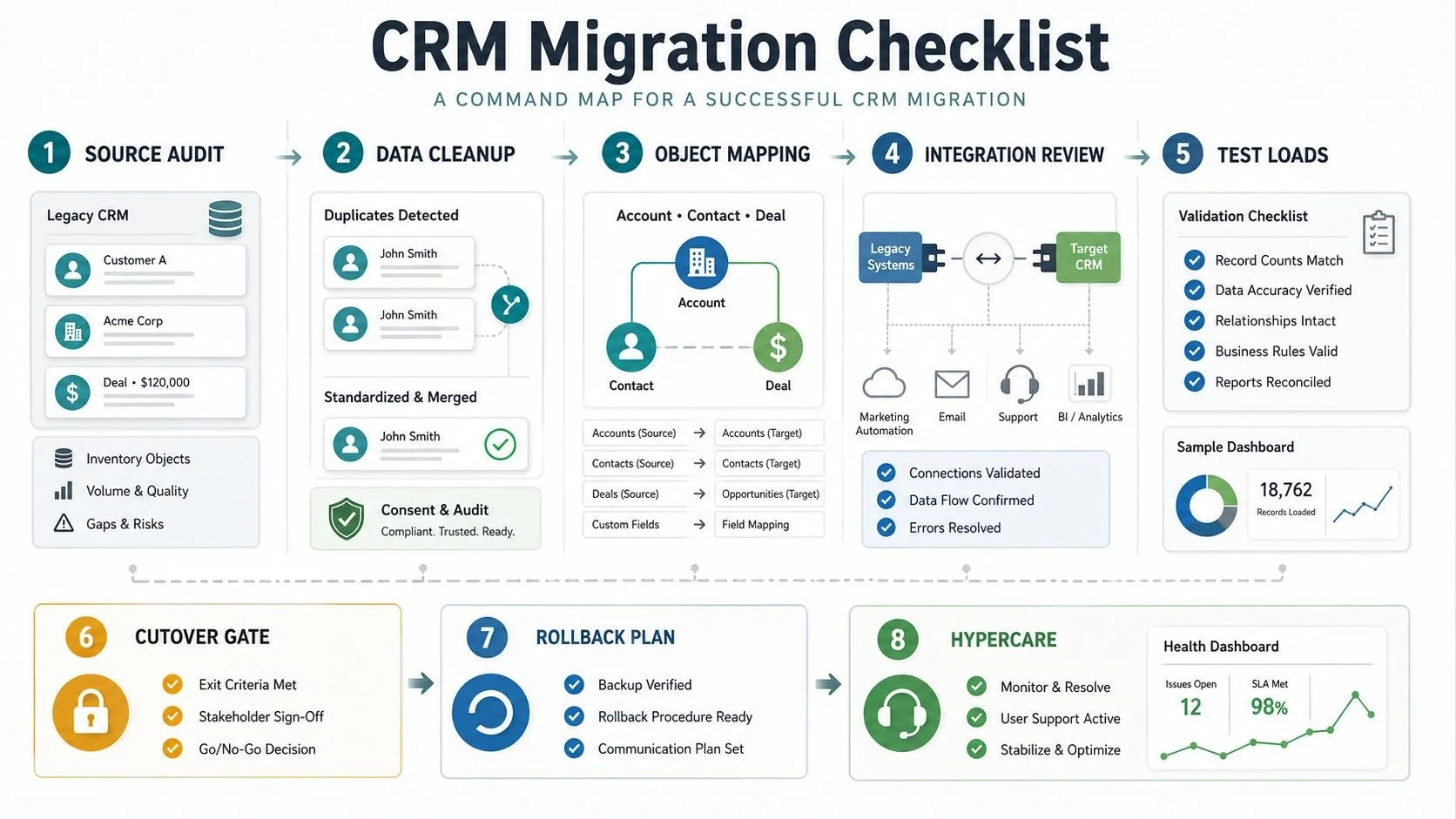
Step 1: Audit Existing Salesforce CPQ Configuration
Document how the existing Configure, Price, Quote environment supports the sales process.
Step 2: Map Product Catalogs, Pricing Rules, and Contract Data
Now map the information that needs to move into HubSpot.
Step 3: Rebuild Quote Workflows and Approval Processes
Create the quoting process using HubSpot’s product library, quote editor, approval workflow, and quote rules.
Step 4: Integrate Billing, ERP, and Other Revenue Systems
After configuring the quoting environment, connect HubSpot with the systems that depend on quote and contract information.
Step 5: Test, Validate, and Deploy the New CPQ Environment
Before you go live, validate the new environment against representative sales and finance scenarios.
Test:
Product configuration accuracy
Price and discount calculations
Quote generation
Approval routing
Contract acceptance
Billing synchronization
Data migration accuracy
User permissions
HubSpot CPQ vs Salesforce CPQ: Which Should Your Business Choose?
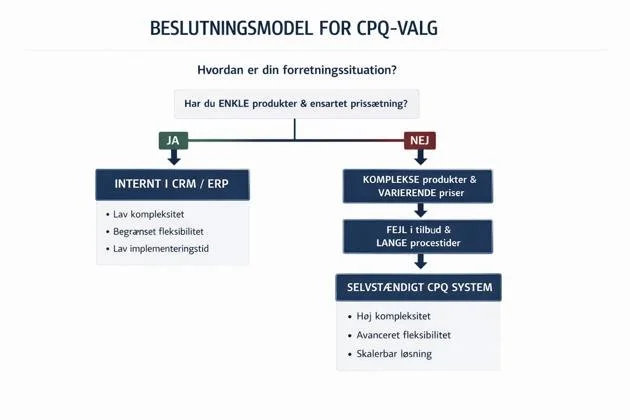
The right choice for a CPQ platform depends on the complexity of your venue operations, existing CRM investment, pricing requirements, and future technology strategy.
The HubSpot Revenue Hub can be a practical choice for businesses who are seeking to have integrated CRM and quoting capabilities. However, organizations with sophisticated product configuration, pricing dependencies, and enterprise revenue workflows may need Salesforce Revenue Cloud or a dedicated CPQ platform.
Also Read: Exploring the Benefits of Using Salesforce CPQ for Businesses
When to Consider a Dedicated CPQ Solution
Neither HubSpot nor Salesforce should be a brand automatically be the answer for every organization.
A dedicated CPQ solution may be worth evaluating when the business requires specialized product configuration, industry-specific pricing, complex manufacturing rules, or capabilities that do not fit either platform’s native functionality.
The decision should account for integration requirements, implementation complexity, and the long-term cost of maintaining another application.
CPQ Platform Selection Matrix
| Business requirement | Recommended platform to evaluate |
|---|---|
| Standardized quoting and CRM workflows | HubSpot Revenue Hub |
| Existing customized Salesforce CPQ environment | Retain or optimize Salesforce CPQ |
| Advanced product configuration | Salesforce Revenue Cloud |
| Complex subscription and consumption models | Salesforce Revenue Cloud |
| Straightforward subscription quoting | HubSpot Revenue Hub |
| Highly specialized industry requirements | Dedicated CPQ solution |
These are starting recommendations, not universal rules. Validate the actual product capabilities and licensing against your business requirements.
Frequently Asked Questions
-
No, Salesforce CPQ is end of sale, not end of life. This means SF no longer sells it to new customers but provides support; it continues to be used and can be renewed; this is for existing customers only.
-
The choice for the best CPQ depends on your organization's CRM/ERP stack, product complexity, and sales model. There is no good or bad Configure, Price, and Quote (CPQ) for a particular business.
-
No, but in some cases HS wins over many small and mid-size businesses and competes further upmarket. But Salesforce still dominates large enterprises.
-
Yes, its native CPQ solution is built into Revenue Hub, which requires a Revenue Hub Professional or Enterprise subscription.
-
Yes, it helps businesses with tiered, step-and-ramp pricing and price books and supports advanced approval workflows. It has limits when pricing depends on multiple variable rules, add-on product configuration, or multi-region hierarchies.
-
The Revenue Hub price starts at $85 per seat/month billed annually or $95 per seat/month paid monthly with an annual commitment for Revenue Hub Professional, and $140 per seat/month for Enterprise edition, while basic billing and quoting tools have a $0/month free tier.
-
Yes, businesses can integrate with existing ERP and billing systems using native integration, third-party connectors, middleware/iPaaS tools, or custom APIs.
Conclusion
Choosing between HubSpot CPQ vs Salesforce CPQ comes down to aligning your software stack with operational complexity rather than simply matching features. While HubSpot Revenue Hub delivers immediate value through rapid setup, intuitive workflows, and tight CRM integration for streamlined sales models, Salesforce Revenue Cloud provides the deep architectural customization required for intricate product dependencies and enterprise-scale revenue governance.
Evaluating your long-term revenue processes, internal technical capacity, and total cost of ownership will ensure you select the platform best positioned to accelerate your business growth.
Connect with one of our certified experts and consult your business requirements for free, right now!
Related Readings
Let's Talk

Drop us a note, we’re happy to take the conversation forward 👇🏻