Modern Experience Cloud Implementation Blueprint
Key Takeaways:
Understand what Salesforce Experience Cloud is and how its architecture is evolving.
Explore the key phases involved in planning and implementing an Experience Cloud site.
Learn how to approach licensing, security, templates, and runtime selection before development begins.
Customers today don't want to hunt through FAQ pages or wait in a support queue; they want an answer the moment they ask for one. Salesforce Experience Cloud has always been the platform for building that kind of self-service, partner, and community experience, but it's changed a lot in the past few years.
This blueprint walks through what an Experience Cloud implementation actually involves today: the runtime you should build on, the licensing decisions that quietly make or break your budget, how Agentforce now fits into self-service, and the launch and governance steps that keep a site healthy long after go-live.
What's Different About Experience Cloud in 2026
Three shifts matter most for anyone planning a new build or a rebuild:
Lightning Web Runtime (LWR) is now the primary architectural framework for new Experience Cloud builds, delivering a faster, highly SEO-friendly foundation.
Agentforce is woven directly into the self-service experience, not bolted on as a separate chatbot. Rather than shipping as a standalone portal template, Agentforce Service Agents integrate natively inside standard Experience Builder layouts, transforming traditional help centers into autonomous, action-oriented digital spaces.
AI-driven discovery (GEO) is a first-class concern. Experience Builder now includes a toggle for Generative Engine Optimization, so your help center content can be read and cited correctly by tools like ChatGPT and Gemini, not just ranked by Google.
None of this makes the fundamentals (objectives, licensing, security, content strategy) obsolete. It changes the decisions you make within each of them.
Key Phases of Salesforce Experience Cloud Implementation
Phase 1: Foundation and Planning
Define Your Objectives
Before anything else, get specific about why you're building the site. "Improve customer support" is a starting point, not an objective. Is the goal case deflection through self-service and AI-assisted answers? A partner portal for deal registration and co-selling? An employee help center? Each answer points toward a different template, license mix, and success metric.
Engage Stakeholders Early
Bring in the people who will actually use the site: support agents, partner managers, community members, and document what they need from day one: content types, integration points, user roles, and how much self-service versus human escalation they expect. This step hasn't changed, but one thing has: it's worth asking stakeholders directly whether they want an AI agent handling first-touch conversations, because that decision affects your license and architecture choices from the start.
Choose the Right Runtime: LWR vs. Aura
This is the single biggest architectural decision you'll make before implementing Experience Cloud, and it's worth getting right up front.
LWR (Lightning Web Runtime) is Salesforce's strategic direction. It renders faster, indexes better for search and AI discovery, and is where new capabilities land first.
Aura still works and is still supported; Salesforce has not announced a retirement date as of mid-2026, but it's the legacy runtime now.
Visualforce remains relevant only for narrow, legacy-specific requirements. Don't choose it for a new build unless you have a hard dependency that requires it.
Recommendation for new sites: default to LWR unless you have a specific, well-understood reason not to. For existing Aura sites, plan a phased migration rather than a rebuild. Salesforce's own tooling (including Agentforce Vibes and the Salesforce DX MCP Server) can now help migrate individual components, though it won't migrate an entire site for you.
One practical constraint to plan around: LWR sites support up to 500 routes (unique URLs), and Salesforce recommends staying under 250 for performance, favoring dynamic content over one page per item.
Choose Your Template
Templates defines what the site looks like and how content is organized:
Salesforce provides several Experience Cloud templates, each designed around a different type of external experience. The right choice depends on your audience, use case, and how much customization you need.
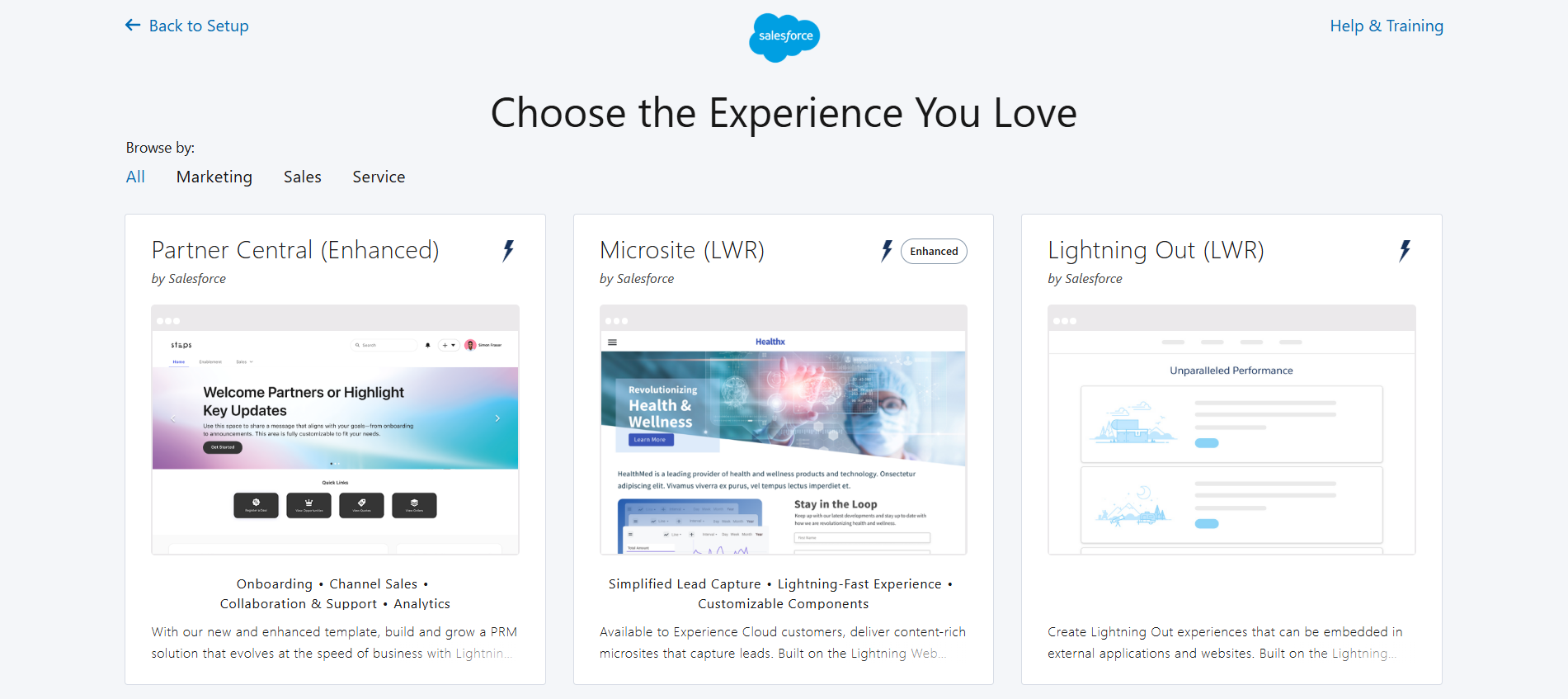
| Template | Description |
|---|---|
| Partner Central (Enhanced) | A modern partner portal for managing leads, opportunities, deal registrations, onboarding, and collaboration with your sales team. |
| Microsite (LWR) | A lightweight, content-focused LWR site built for fast, responsive microsites, landing pages, or simple lead-capture experiences. |
| Lightning Out (LWR) | Lets you embed Salesforce-powered functionality directly into external websites or applications outside a traditional Experience Cloud site. |
| Build Your Own (LWR) | A flexible starting point for a fully custom site on LWR, letting you design pages, navigation, branding, and functionality around your specific requirements. |
| Help Center | Built for customer self-service, with knowledge articles, guided search, and case creation to deflect support tickets. |
| Customer Account Portal | Gives customers a place to view records, manage their account, get support, and connect with external systems. |
| Customer Service | A broader self-service community template combining support, collaboration, and access to relevant Salesforce content and records. |
| Build Your Own (Aura) | A customizable Aura-based starting point, useful when your requirements depend on Aura components unavailable in LWR. |
| Partner Central | The original partner portal template, with preconfigured onboarding, lead and opportunity management, and channel sales tools. |
| Aloha | A simple app-launcher experience giving users single-sign-on access to Salesforce and connected third-party applications in one place. |
| Tabs + Visualforce | A legacy template built around Salesforce tabs and Visualforce pages, relevant mainly for existing Visualforce dependencies. |
Note: Not every template is intended for a new implementation. For most new Experience Cloud projects, LWR-based templates are the starting point to evaluate, while Aura and legacy templates may still make sense when an existing implementation depends on Aura components, Visualforce, or older functionality.
Phase 2: Licensing, Get This Right Before You Build Anything
Licensing mistakes are the most common (and expensive) implementation error. Experience Cloud licenses fall into several families: Customer Community, Customer Community Plus, Partner Community, External Apps, Channel Account, and External Identity (an identity-only license, upgradeable later).
Each of these, except External Identity, comes as either a member-based or login-based license:
Member-based licenses: A named seat, billed whether or not the person logs in. Best for users who log in frequently.
Login-based licenses: Drawn from a shared monthly pool, consumed per session. Better for occasional or seasonal users, but can get expensive fast if usage spikes.
External Apps: A separate SKU aimed at custom digital experiences for external stakeholders, with more platform capacity (custom objects, storage, APIs) than the base community SKUs.
For a full breakdown of what these licenses actually cost, see our Salesforce Experience Cloud pricing guide.
Phase 3: Security and Access
Security planning still needs to happen early, right after you've settled on your site's purpose, runtime, and template, and before you get deep into the build.
Core areas to define:
Authentication: Self-registration, Single Sign-On (SSO), or both, and for which audiences.
Data visibility and sharing rules: What each user type can see, down to the record level.
Encryption and data security: Especially relevant if the site touches regulated data.
Certificate and protocol hygiene: This is a live issue in 2026: Triple DES was retired as of Summer '26, and Salesforce has moved to faster, less-announced certificate rotation cycles. Implement the Certificate Metadata API and assign the Expired Certificate Notification permission so your team isn't caught off guard by an expiring certificate.
File security: With upload limits now up to 10 GB per file on both Aura and LWR sites, and generally available malware scanning for uploaded files, make sure scanning is actually turned on, not just available.
Phase 4: Building the Site
With a solid plan in place, it’s time to bring your digital experience to life. Here’s how you can do it:
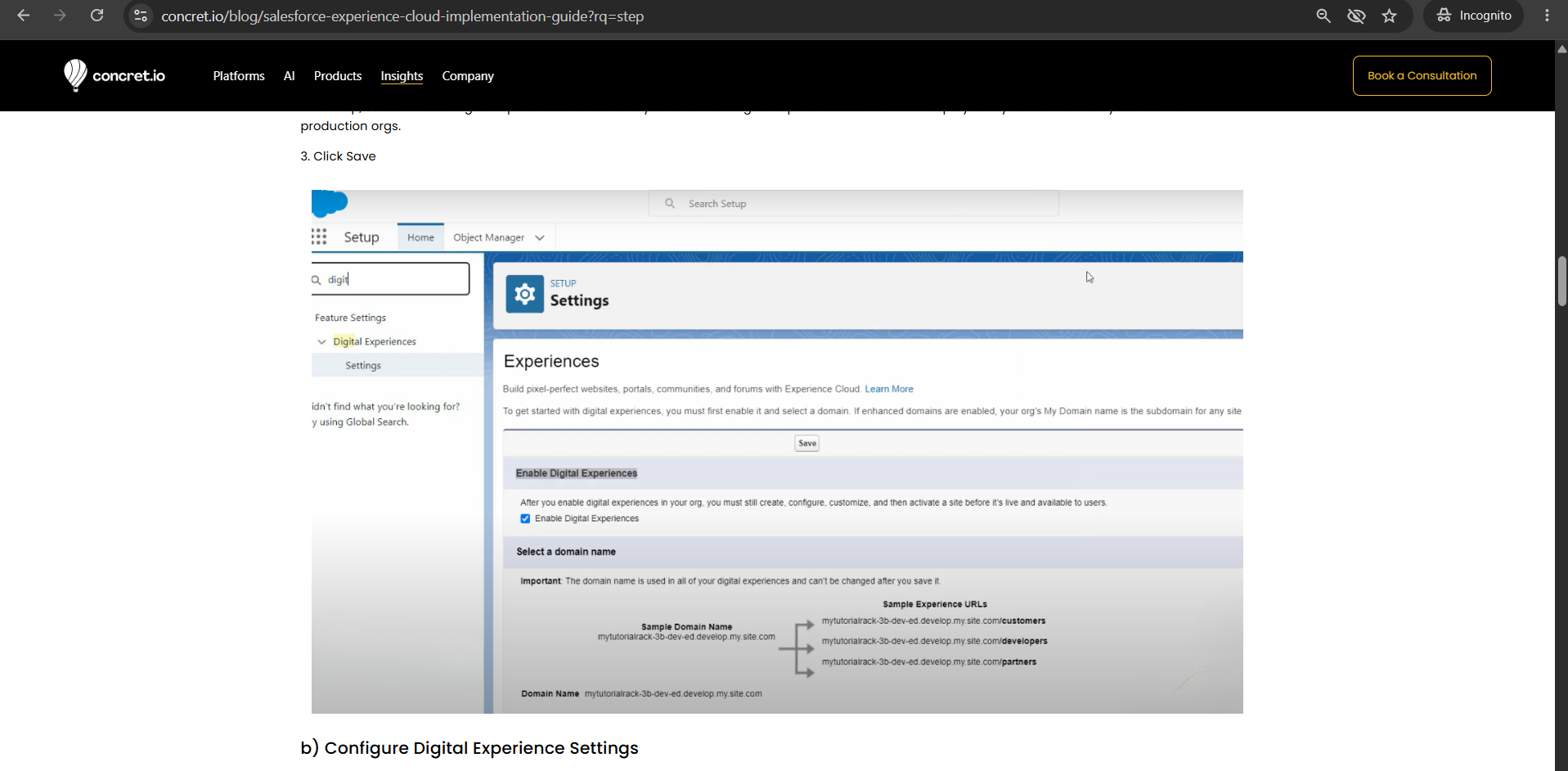
a) Enable Digital Experiences
Start by enabling digital experiences in your Salesforce setup. This is a one-time, org-level step that unlocks every Experience Cloud site type, help center, partner portal, or customer community.
And how to do it?
1. From Setup, enter Digital Experiences in the Quick Find box, then select Digital Experiences > Settings.
2. Next up, select ‘Enable Digital Experiences’ to activate your site. Your digital experiences domain will display as MyDomainName.my.site.com for production orgs.
3. Click Save
b) Configure Digital Experience Settings
After you’ve enabled digital experiences, it's now time to fine-tune the global settings for your Experience Cloud sites. By thoughtfully configuring required settings, you’ll create a more seamless and enjoyable experience for everyone who interacts with your portals.
Here are some digital experience settings you can configure for your site:
Experience management settings
Roles and user settings
Moderation rule settings
Salesforce mobile settings for experiences
New User Email Settings
Account relationship settings
c) Configure a Custom Domain
To maintain brand consistency, set up a custom domain for your Experience Cloud site. A branded URL like community.yourcompany.com looks more professional, is easier for users to recognize, and simplifies domain management even if Salesforce-hosted URLs change over time.
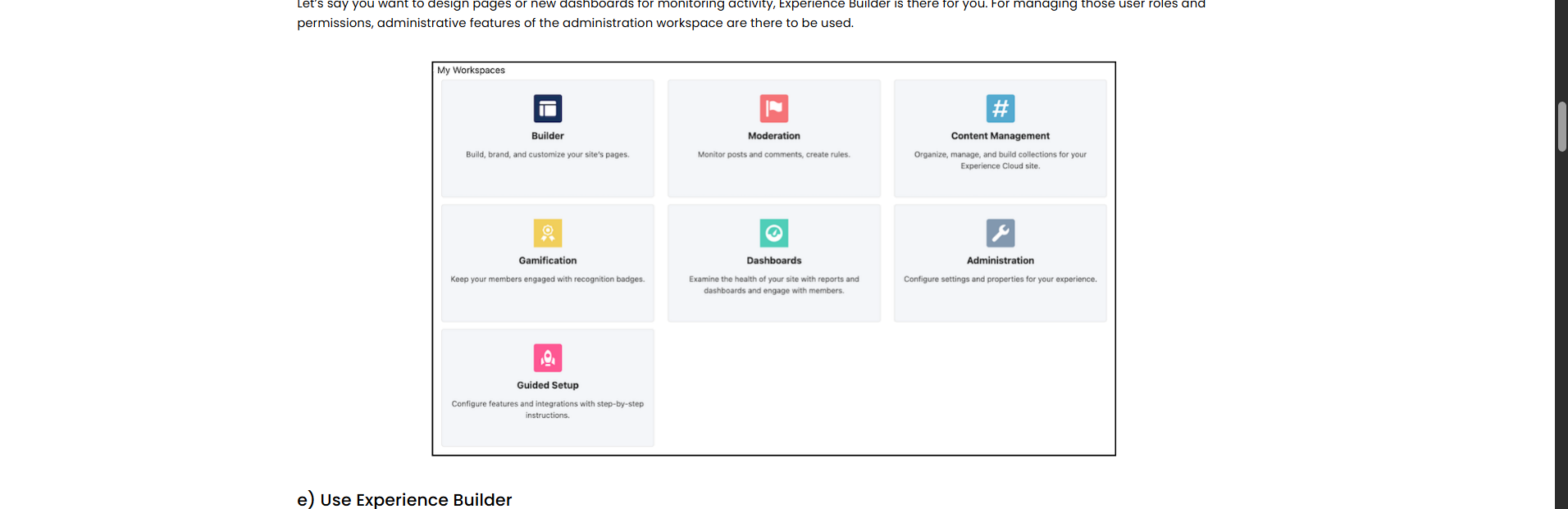
d) Find Your Way Around Experience Workspaces
Experience Workspaces is the central hub for managing and customizing your site, from initial setup and branding through ongoing optimization. Page and dashboard design happens in Experience Builder; user roles, permissions, and moderation live in the Administration workspace.
e) Use Experience Builder
Experience Builder is where you build and design pages, dashboards, and the site overall, starting from a template such as Customer Account Portal, Partner Central, Customer Service, Help Center, Microsite, or Build Your Own (LWR or Aura).
For interactivity, Salesforce's current toolkit is Agentforce, not a generic chatbot. Depending on your needs, you can add an Agentforce Service Agent to the site, enable search or data-category-based conversations, add Highlight-to-Ask so users get instant context on selected text, or set up Context-Aware Quick Chat.
f) Configure Essential Features
Your site’s usability plays a crucial role in its success. Here are a few features you should configure to enhance your site’s user experience:
Navigation Menus: Create clear and logical menus to make it easy for users to find what they need.
Page Layouts: Organize content effectively by designing layouts that prioritize usability and readability.
Search Functionality: Optimize search tools to help users quickly locate articles, products, or resources.
Salesforce Integrations: Add features like the Knowledge Base for robust self-service options or Chatter to foster collaboration within your community. These features make your site not only functional but also highly engaging.
Phase 5: Testing, Launch, and Optimization
To bulletproof your Salesforce Experience Cloud implementation, validate every role and scenario, run a pilot with real (ideally external) test users, and promote from sandbox to production using Change Sets or the Metadata API to keep environments in sync.
What's worth adding to your today launch checklist:
Test the AI agent's boundaries explicitly: what it should answer, what it should escalate, and what happens when it's wrong. Treat this like a governed feature, not a "set and forget" widget.
Verify GEO settings and content structure before launch if AI discoverability matters to your business; this is now something you configure, not something that happens automatically.
Confirm certificate and file-scanning settings are active, given the tighter security posture described above.
Should You DIY Experience Cloud Implementation, or Bring in a Partner?
DIY works for smaller, well-scoped sites where your team already has Salesforce skills. It's cheaper upfront but carries real risk: missed best practices, longer timelines, and ongoing maintenance overhead once the site is live.
Having an expert Salesforce Experience Cloud partner makes sense once you're dealing with complex integrations, an Agentforce-driven self-service strategy, or a partner/customer portal with real compliance requirements. When evaluating a partner, the technical bar has moved; beyond LWC and integration experience, ask specifically about:
Their experience building or configuring Agentforce agents inside Experience Cloud, not just Service Cloud
Familiarity with LWR-first architecture (not just legacy Aura expertise)
Their approach to licensing modeling, so you don't overbuy member seats or underbuy login pools
Not sure how to find expert partners? We've put together a complete Salesforce Experience Cloud consultant hiring checklist to help.
Conclusion
A successful Experience Cloud implementation starts with the right decisions that include defining your goals, audience, licensing, architecture, and security before you build, then treat Agentforce and ongoing optimization as part of the experience rather than afterthoughts.
With the right foundation and continuous governance, Experience Cloud can become a scalable digital experience that keeps delivering value long after launch.
Frequently Asked Questions
-
LWR, for new builds. It's Salesforce's primary framework going forward, renders faster, and gets new capabilities first. Aura still works and has no announced retirement date, but it's the legacy option now, mainly relevant if you're maintaining or extending an existing Aura site.
-
Member-based licenses are named seats billed whether or not the person logs in, best for frequent users. Login-based licenses draw from a shared monthly pool and suit occasional or seasonal users, but can get expensive if usage spikes unexpectedly.
-
No, but it's increasingly central to self-service. Agentforce Service Agents integrate natively into Experience Builder layouts, letting sites answer questions and take action, not just display articles. Most new help center or portal builds should evaluate where an agent fits rather than defaulting to static FAQ pages alone.
-
It depends heavily on template choice, integration complexity, and whether you're building an Agentforce-driven experience. A straightforward Help Center on a packaged template moves faster than a custom Partner Central build with deep CRM integrations and agent workflows.
-
If you are working on smaller requirements and well-scoped sites where your team already has Salesforce skills, then DIY might be a good option. A partner makes more sense for complex integrations, Agentforce-driven strategies, or compliance-heavy portals, especially since the skill bar now includes LWR and Agentforce experience, not just legacy Aura knowledge.
Related Readings

Let’s Talk

Drop us a note, we’re happy to take the conversation forward 👇🏻