Journey Builder vs. AI Marketing Automation: 7 Differences That Matter in 2026
Key takeaways:
Journey Builder vs. AI Marketing Automation: Compare rule-based journeys with AI-assisted marketing.
Salesforce Marketing Cloud: Explore how Data 360 supports personalization and optimization.
Marketing Automation in 2026: Choose an approach that fits your business goals and Salesforce setup.
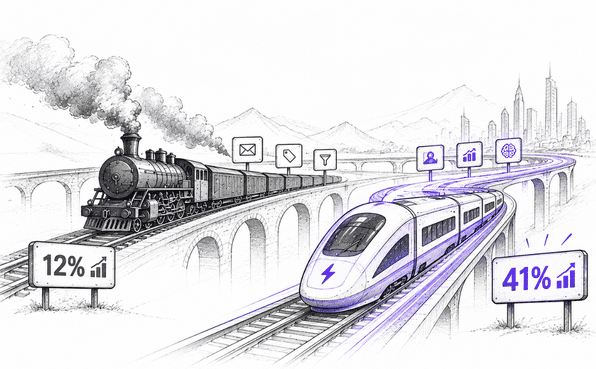
Two marketing teams sent the same win-back campaign this week. One got a 12% response rate. The other got 41%. Same offer, same audience, same email copy.
The only difference? What was making the decisions behind the scenes.
That's the uncomfortable truth at the heart of Journey Builder vs. AI Marketing Automation in 2026: the tool you call "automation" might just be following orders, while your competitor's is actually thinking. One runs on pre-set rules. The other adjusts in real time based on what customers actually do.
Here are the 7 differences that decide which side of that gap you're on.
Quick Definitions
| Journey Builder | Salesforce Journey Builder is a customer journey orchestration tool in Salesforce Marketing Cloud Engagement. It helps marketers create, automate, and manage customer journeys across multiple channels based on predefined events, rules, and customer interactions. |
| AI Marketing Automation | AI marketing automation is the use of artificial intelligence, machine learning, and predictive analytics to run, optimize, and personalize marketing campaigns autonomously with minimal human input. |
1. Journey Builder Pricing vs. AI Marketing Automation Costs
The cost of marketing automation depends on the platform, messaging volume, data requirements, and AI capabilities an organization needs.
Journey Builder Pricing
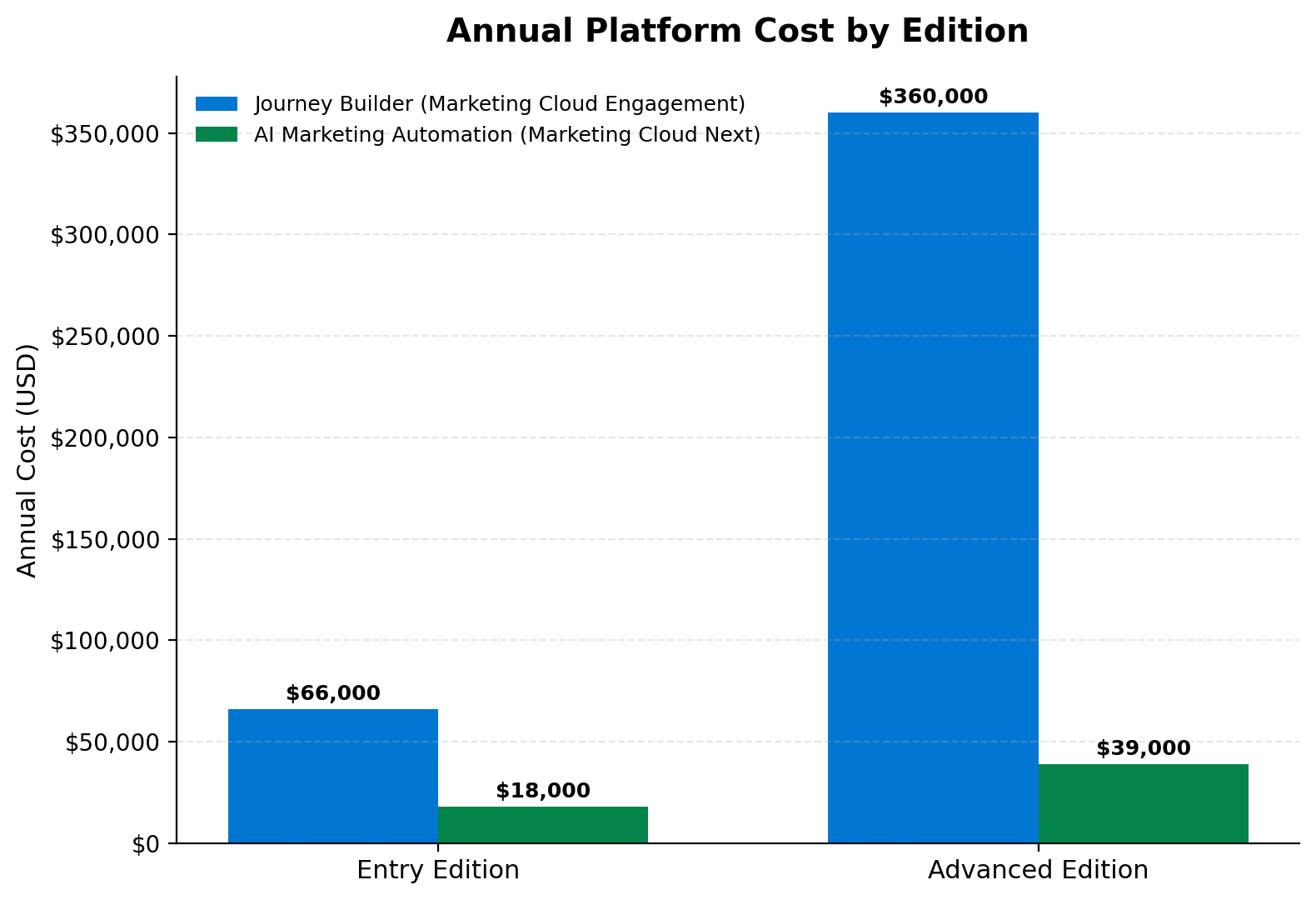
Journey Builder is included in Marketing Cloud Engagement+, Corporate+, and Enterprise+. Salesforce lists these editions at $5,500 and $30,000 per org/month, respectively. Pro+ costs $2,000 per org/month, but Journey Builder is not included in that edition. Marketing Cloud Engagement pricing
For example, the annual Corporate+ subscription is:
$5,500 × 12 = $66,000/year
Source: Journey Builder pricing
AI Marketing Automation Costs
Salesforce lists Marketing Cloud Next Growth at $1,500 per org/month and Advanced at $3,250 per org/month, billed annually. Marketing Cloud Next pricing
For Growth:
$1,500 × 12 = $18,000/year
Source: Marketing Cloud Next Pricing
Additional usage may also affect the cost. Salesforce lists Flex Credits for Agentforce interactions at $500 per 100,000 requests. Marketing Cloud add-ons and credits
For 200,000 requests:
(200,000 ÷ 100,000) × $500 = $1,000
This is a usage calculation, not a complete estimate of an organization's AI marketing bill.
Quick Cost Comparison
| Cost component | Journey Builder | AI Marketing Automation |
|---|---|---|
| Platform | Marketing Cloud Engagement+ | Marketing Cloud Next |
| Pricing model | Edition-based subscription | Edition-based subscription |
| Data | Depends on data requirements | Data 360 consumption may apply |
| AI usage | Depends on included capabilities | AI and agent usage may add costs |
| Messaging | Edition limits and additional usage | Included credits and add-ons |
| Implementation | Journey and data configuration | Data, AI, and integration configuration |
Calculate the Total Cost of Ownership
The subscription price is only one part of the investment. A more complete calculation is:
The subscription price is only one part of the investment. A more complete calculation is:
TCO = Platform + Data Migration + Integration + Implementation/Consulting + Ongoing Support
Using Marketing Cloud Next Growth's published platform cost as the anchor, here's what a realistic annual range looks like based on published implementation benchmarks:
| Expense | Estimated Annual Range |
|---|---|
| Platform (Growth Edition) | $18,000 |
| Data Migration | $5,000 – $60,000 (one-time) |
| Integration (simple to complex) | $2,000 – $40,000+ |
| Implementation/Consulting | $20,000 – $100,000+ |
| Ongoing Support & Maintenance | ~30% of license cost/year |
Implementation spend is often 2 to 3 times the annual license fee, and consulting or development alone can represent 40–60% of total project cost, depending on complexity and the partner you hire.
An $18,000/year platform license can realistically turn into 50,000–150,000+ in year-one total cost once migration, integration, and implementation are factored in.
2. Marketing Automation Architecture: Journey Builder vs. AI-Driven Systems
Marketing Cloud Engagement and Marketing Cloud Next use different approaches to marketing orchestration. Journey Builder organizes customer interactions through configured journey activities and decision logic.
Marketing Cloud Next is built on the Salesforce platform, using Data 360, Flow, and Agentforce to support connected data, automation, and AI-driven marketing.
Core Architectural Differences
| Feature | Journey Builder | Marketing Cloud Next |
|---|---|---|
| Platform foundation | Marketing Cloud Engagement | Salesforce platform |
| Journey orchestration | Canvas-based journeys with configured activities and paths | Flow-based automation and journeys |
| Decision logic | Decision Splits, Engagement Splits, and supported Einstein split activities | Flow logic, Data 360 insights, and Agentforce capabilities |
| Data architecture | Uses contact data, journey data, and configured data sources | Uses Data 360 to unify and prepare customer data for marketing |
| Event handling | Supports configured entry sources and event-based journey entry | Supports Data 360 streaming events and triggered automation |
| AI capabilities | Includes supported Einstein features, such as engagement scoring and frequency-based splits | Includes Agentforce Marketing capabilities and AI agents |
| Cross-team coordination | Can integrate with Salesforce data and activities through supported connections | Built on the Salesforce platform to support workflows across teams and clouds |
How Journey Builder Processes Customer Interactions
Journey Builder uses a visual canvas where marketers define how contacts enter, move through, and exit a journey.
Its architecture includes:
Entry sources: Determine how contacts enter a journey.
Decision Splits: Evaluate configured criteria and route contacts through different paths.
Engagement Splits: Use email engagement, such as opens, clicks, or bounces, to determine a contact’s path.
Einstein split activities: Supported features can use engagement scoring or frequency to guide contacts through journey paths.
Journey activities: Execute configured actions, including communications and supported integrations.
These components give marketers control over journey logic and customer interactions. Salesforce Journey Builder activities
How Marketing Cloud Next Uses Data and AI
Marketing Cloud Next combines Salesforce platform automation with Data 360 and Agentforce capabilities.
Data 360: Unifies customer information and supports segmentation and data-driven marketing.
Flow: Powers automation and customer journeys on the Salesforce platform.
Agentforce: Provides AI agents that can support marketing tasks and customer interactions.
Cross-cloud foundation: Enables marketing workflows to connect with Salesforce capabilities across teams, including Sales, Service, and Commerce.
Salesforce describes this architecture as a way to bring data, workflows, and AI capabilities together within the platform. Salesforce Marketing Cloud Next overview: Salesforce Data 360 architecture
What the Difference Means
The key distinction is how each architecture organizes marketing work:
Journey Builder: Marketers configure journey paths, conditions, and activities that determine how contacts progress.
Marketing Cloud Next: Flow, Data 360, and Agentforce provide a platform-based architecture for connected data, automation, and AI-supported marketing activities.
This is not necessarily an either-or decision. Salesforce states that Engagement+ customers can retain existing Marketing Cloud Engagement assets while accessing Marketing Cloud Next capabilities.
3. Customer Data and Decision-Making: Rules, Signals, and AI
Customer data helps marketers decide what action to take next. Journey Builder follows marketer-defined rules, while Marketing Cloud Next adds Data 360 and AI-assisted capabilities to support more context-aware decisions.
From Journey Rules to AI-Assisted Decisions
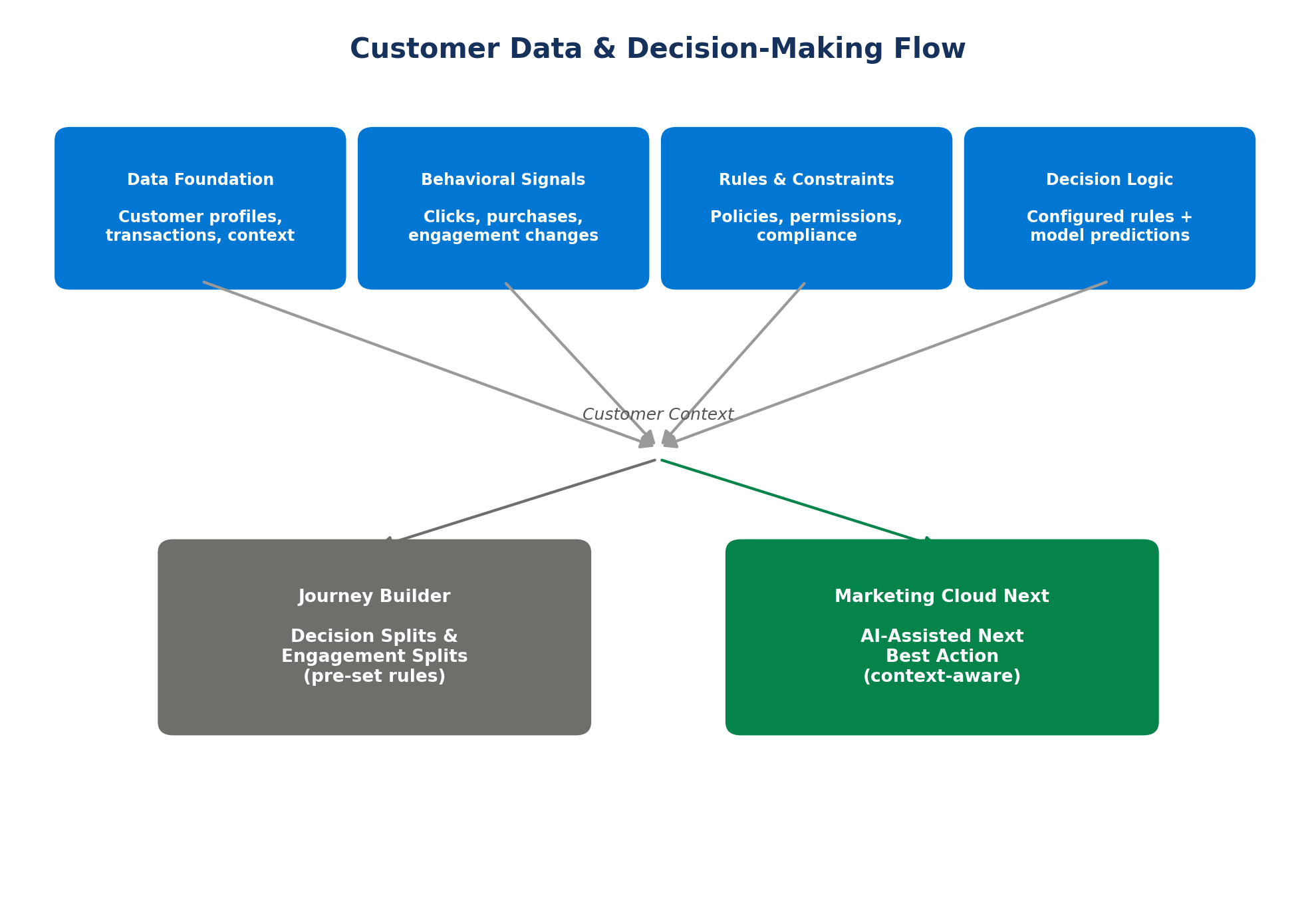
Journey Builder uses activities like Decision Splits and Engagement Splits to route contacts down different paths based on the conditions you've configured.
Marketing Cloud Next goes a step further. It combines customer profiles, behavioral signals, business rules, and AI-assisted insights to help teams pick the next best action, not just the pre-set one.
Key components include:
Data foundation: Customer profiles, transactions, and available context.
Behavioral signals: Clicks, purchases, and changes in engagement.
Rules and constraints: Business policies, permissions, and compliance requirements.
Decision logic: Configured rules and model predictions that can recommend or trigger actions.
Together, these capabilities can help marketers respond faster and personalize interactions using relevant customer context. That said, the level of automation you actually get still depends on how the tools and workflows are configured.
At a Glance
| Journey Builder | Marketing Cloud Next |
|---|---|
| Uses marketer-defined journey rules | Adds Data 360 and AI-assisted capabilities |
| Routes contacts through configured paths | Uses available customer data and signals to support decisions |
| Supports decision and engagement splits | Supports AI-assisted audience creation and marketing workflows |
Journey Builder follows configured journey logic. Marketing Cloud Next adds data and AI-assisted tools to support more context-aware marketing decisions.
4. Real-Time Data and Integrations: Journey Builder vs. AI Marketing Automation
The way marketing automation uses customer data determines how quickly and intelligently it can respond to customer actions.
Journey Builder
Uses data extensions, entry events, and decision splits to manage customer journeys.
Evaluates customer attributes and engagement data to direct contacts through predefined paths.
Supports event-based entry through APIs and Automation Studio.
AI Marketing Automation
Marketing Cloud Next uses Data 360 to unify customer data and support real-time event-triggered automation through Flow.
The Journey Decisioning Agent can dynamically assign subscribers to suitable journeys using customer behavior, profile details, and context.
AI-generated content can personalize messages for individual subscribers.
Journey Builder follows configured journey logic, while AI-powered automation can add dynamic journey selection and contextual personalization.
How Implementation and Migration Work in Journey Builder and Marketing Cloud Automation
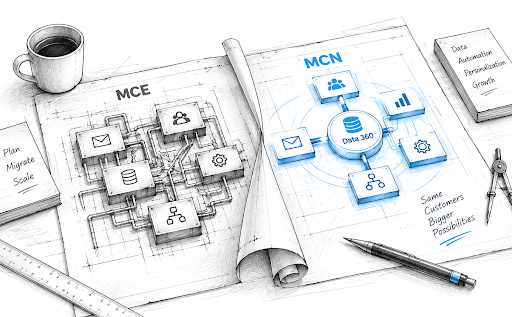
Implementation and migration for Marketing Cloud Next (MCN) function as a parallel convergence and architectural re-engineering project rather than a traditional rip-and-replace migration.
| Area | Journey Builder | Marketing Cloud Next |
|---|---|---|
| Setup | Prepare entry sources, data, and content. | Enable Marketing Cloud Next and configure Data 360. |
| Configuration | Build journey paths and decision rules. | Configure business units, permissions, and identity resolution. |
| Testing | Validate journey settings before activation. | Test in a sandbox before deploying to production. |
| Maintenance | Review journey performance and data timing. | Maintain data streams, integrations, and platform settings. |
| Migration | Existing journeys stay within Marketing Cloud Engagement. | Adopt Next gradually alongside existing Engagement assets. |
Journey Builder is about building and maintaining journeys. Marketing Cloud Next involves broader setup across Salesforce and Data 360, but it can be adopted incrementally, not as a forced full migration.
6. How Journey Builder and Marketing Automation Handle Personalization, Optimization, and Scalability
Both platforms support personalized marketing, but they differ in how marketers use customer data, test campaigns, and expand their efforts.
Journey Builder
Personalizes messages using personalization strings and Dynamic Content Blocks, which display different content based on subscriber attributes like location or preferences.
Optimizes campaigns through A/B/n testing and Journey Metrics, giving marketers visibility into which channels, messages, and timing perform best.
Scales through a drag-and-drop logic engine that connects messaging, content, and triggers into a single workflow across the customer lifecycle.
AI Marketing Automation
Uses Marketing Intelligence to turn unified performance data into AI-driven dashboards, supporting continuous optimization across channels.
The Journey Decisioning Agent can dynamically assign subscribers to the most suitable journey based on behavior, profile, and context rather than a single fixed path.
Data 360 unifies customer data across the organization, allowing personalization and optimization to scale without manual data prep for every journey.
Journey Builder personalizes and optimizes within the journey itself. Marketing Cloud Next extends that further with unified data and AI-driven decisioning, so personalization and optimization can scale across the broader business, not just a single journey.
7. How Security, Governance, and Human Control Differ in 2026
Security isn’t just about protecting customer data. It also means controlling who can access marketing tools and how automated decisions are used.
Journey Builder: Access is managed through user roles and permissions. Marketers configure journey paths and rules, while admins control who can manage them.
AI Marketing Automation: Marketing Cloud Next uses Salesforce permission sets to manage access to marketing features. Salesforce’s Einstein Trust Layer provides safeguards for data used by supported AI capabilities.
Human Control: AI can assist with marketing tasks, but teams remain responsible for reviewing outputs, setting permissions, and deciding how automation is used.
Journey Builder focuses on access to journeys and their activities, while AI marketing automation also requires governance of AI-enabled features and workflows.
Conclusion
Journey Builder and AI marketing automation take different approaches to customer engagement. One relies on marketer-built journeys and rules; the other adds connected customer data and AI-assisted capabilities. The difference matters when you’re deciding how to personalize campaigns, optimize performance, and manage marketing at scale.
A Marketing Cloud Consultant or Salesforce Consultant can help you assess your current setup and understand what changing your approach would involve.
The bottom line: Don’t just ask which platform can do more. Ask which one can do what your marketing actually needs in 2026.
Frequently Asked Questions
-
Journey Builder is part of Marketing Cloud Engagement and focuses on orchestrating customer journeys. Marketing Cloud Next connects marketing with Salesforce data and applications, with capabilities such as Data 360 and Agentforce.
-
Salesforce AI capabilities can assist with tasks such as content creation, audience segmentation, recommendations, and decision support. The features available depend on the product, edition, and configuration.
-
Review your marketing goals, customer data quality, integrations, licensing, team skills, and governance requirements. Also check which AI features are available in your Salesforce edition before planning implementation.
-
AI-assisted marketing can help teams analyze customer signals, generate recommendations, and personalize experiences. Traditional automation remains useful for repeatable processes where marketers want direct control over defined rules and paths.
-
Costs can depend on the Salesforce edition, user and platform licenses, Data 360 usage, messaging, and consumption-based AI features. Businesses should review the current pricing and entitlements for their specific configuration.
Related Readings
Let’s Talk

Drop us a note, we’re happy to take the conversation forward 👇🏻