Aligning Team using Cursor, Agentforce Vibes, Claude, etc
Summary: Syncing coding standards across divergent AI environments involves establishing a single canonical master file linked dynamically across distinct configuration directories. Because individual developer utilities enforce varying file conventions—such as .cursorrules, CLAUDE.MD, and .a4drules—maintaining alignment requires an automated build step. Utilizing filesystem hard links rather than file duplication ensures that edits made to the primary instruction rulebook instantly propagate to all targeted AI agent runtime contexts, preventing prompt fragmentation and keeping project instructions universally consistent.
Engineering team in 2025 can have developers that use different Vibe/AI coding tools/IDE. Or, You are someone like me, who is excited to try every other Vibe coding IDE/Tool.
But you don’t want to rewrite or configure your project/coding rules as per each Vibe Coding tool. Ideal state is writing rules once, and make them easily portable across any LLM, CLI, IDE or Tool for Vibe Coding.
I am switching actively between Windsurf, Anti Gravity, Cursor, Claude Code, Codex and Agentforce Vibes. Why? I am not crazy, it’s important to explore and be hands-on with all innovation going around, and witness yourself how each AI coding agent is beating or bettering others. Even some users do comparsion between agentforce vibes vs claude code for real. However, we must look into it in depth first.
| AI Tool | Target Configuration File | Primary Processing Format |
|---|---|---|
| Cursor | .cursorrules / .cursor/rules |
Markdown / Plain Text |
| Claude Code | CLAUDE.md |
Markdown |
| Agentforce Vibes | .a4drules |
Markdown / JSON-infused |
Vibe Coding “Rules” Portability challenge
Each product or project has a set of rules for coding standards, conventions, testing, security etc
Nearly 10 different Vibe Coding tools, each expecting instructions (rules/protocols/processes) in its own variation, like:
Different folder names in workspace to store rules, and some has fixed file names - .windsurf/rules, .agent /rules etc
File names are different CLAUDE.MD, AGENTS.MD
Different rule loading instructions like Always On, Selectively, Model Decision, File Name Pattern matching etc.
Or keep rule files in various folders to autoload them, when something is touched in that folder by LLM.
As an Engineering Manager or Architect, one would like a single set of rules to be followed by developers, using any Vibe Coding Tool. They can’t allow the GIT repo to be polluted by so many different files, folders and formats.
“If your team has decided or bought licenses of a single Vibe coding tool, let’s say Cursor, Agentforce Vibes, or Windsurf. One should ideally keep the GIT locked to rule files of that Vibe coding tool, there is nothing bad in it. This gives so much alignment in the team to right away checkout repo, and start sharing the same rule set.
If your team operates in that manner, ignore this blog post. ”
If you don’t like reading, here is a video walk through of this blog post:
Creating Portable Vibe Coding Rules
Keep a single master vibe coding rules file, which links with other fine rules for specific purpose, with instructions in the master rules file clearly tell LLM, when to load other fine rules. These fine rules can be:
How and when to use any MCP server
Environment context.
Coding Standards
Documentation Guidelines.
Feature-specific guidelines.
Test cases / TDD guidelines
Security boundaries for customer data
And many other rules/protocols
Here is my realistic example from on of my projects
prompts/
├── env-context.md (Tells about nature of project, key components, etc)
├── vibe-coding-guides (folder having child guides referenced by master rules file vibe-coding-instructions.md
│   ├── coding-standards.md (goes by name)
│   ├── common-pitfalls.md (Common Mistakes LLM do or humans do)
│   ├── performance.md (Performance Protocols and alignments)
│   ├── testing.md (Test Case Rules)
│   ├── ux-principles.md (UX Guidelines to follow)
│   └── vscode-integration.md (VS Code specific optimisations)
└── vibe-coding-instructions.md (MASTER Vibe Coding Rules)
This combination is a project wise standard rule set, which can be written in normal Markdown Files, in usual LLM prompting style. This keeps it neutral from any specific Vibe Coding Tool protocols or syntax, and is well suited for git repo, as we are not keeping GIT clean from any Vibe Coding tool reference.
Why so many smaller rule files?
To optimize context for LLM, by loading what is really needed for solving a giving problem. I know some tools allow pattern matching or folder level rules to apply on its own, but leave team aside, I try same codebase across so Windsurf, Claude Code, Codex and others, only thing I want is my coding and project standards should be followed where ever I go.
Next for me is to ensure my master rule files are seen and consumed by any or all vibe coding tools I use. As that will ensure, the rest of the child rule files are loaded on demand by LLM used by Vibe Coding Tool.
The SSOT Philosophy
The goal isn't just to have rules; it's to have Portable Rules. In 2026, a developer might start a feature in Cursor, refactor it using a Claude Code CLI, and then deploy it via Agentforce Vibes. If your coding standards aren't 'synced' at the file-system level, you are effectively working with three different developers who don't talk to each other.
Single Script to align all Vibe Coding Tools
I created this script (link to gist), that creates hard links in correct directories with right file names, for required vibe coding tools.
Now the GIT repo can ignore all Vibe Coding Tool specific rule files via gitignore.
Script execution via Command Palette
I typically save all such scripts under “scripts” folder in my project workspace
The same script is wired into VS Code's task system, i.e. Add to .vscode/tasks.json
Here is the snippet:
{
"version": "2.0.0",
"tasks": [{
        "label": "Sync Vibe Coding Instructions",
        "type": "shell",
        "command": "node scripts/sync-vibe-coding-instructions.js",
        "problemMatcher": []
        }]
}
One can define more shell commands as Tasks here, and those tasks can be fired via Cmd/Ctrl + Shift + P → "Run Task" → "[task label]". No need to open a terminal and remember commands. Just CMD/CTRL + Shift + P, pick your task, done.
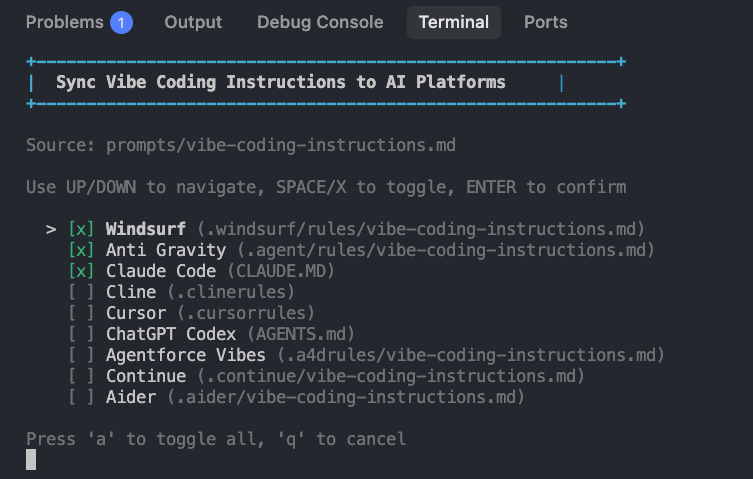
Hit Cmd+Shift+P (Mac) or Ctrl+Shift+P (Windows) in VS Code, run "Sync Vibe Coding Instructions," and you get this clean interface to pick which vibe coding tool you want to create hard links of the master rule file >
I've pre-selected my three daily drivers, but you can toggle anything.
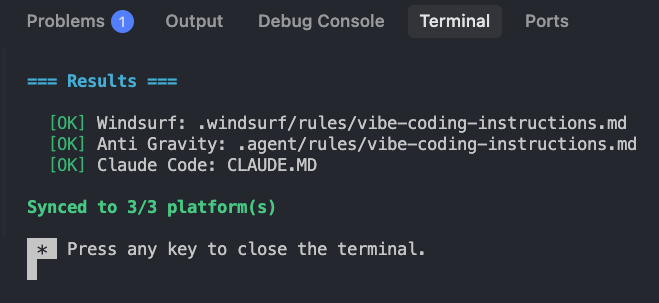
Hit Enter, and the script syncs the master file to every tool you selected. In < 10 seconds. Done.
Here's the magic: The engineering manager commits one canonical file to the repo. Each developer runs this script once during setup. It creates links to your preferred tools' config locations: .windsurf/rules/, CLAUDE.MD, .cursorrules, whatever.
Those tool-specific files? They're all in .gitignore. No pollution. No merge conflicts over someone's personal AI preferences. Plus, it gives window for someone to really tame their favorite vibe coding tool to their own taste further, beyond the usual project instructions.
The Hard Link Tip
We use Hard Links because they allow the same physical file to exist in multiple locations (.cursorrules, CLAUDE.md, etc.). When you update your master 'Coding Standard,' every AI tool sees that update instantly. No more stale instructions or 'hallucinated' legacy patterns.
Note: Hard links must reside on the same physical drive partition as the source file. If your project workspace spans multiple virtual volumes or Docker mounts, use standard file-copy automation instead.
NPM Script Execution (For the Terminal Geeks)
In case you're still a terminal fan, you can add this as a script in your package.json:
{
  "scripts": {
    "sync-vibes": "node scripts/sync-vibe-coding-instructions.js"
  }
}
Call it whatever you like. I went with sync-vibes. Then just: npm run sync-vibes on terminal.
OPTIONAL Git Post-Merge Hook (Set It and Forget It)
If you use Git from the CLI, add a post-merge hook that alerts you when the master file changes. I have this set up, it watches the file and reminds me to resync. We could automate this completely, but I prefer not to over-engineer. I like seeing what files changed on pull, so I stay aware. Pick your level of automation.
Create .git/hooks/post-merge:
#!/bin/bash
if git diff-tree -r --name-only --no-commit-id ORIG_HEAD HEAD | grep --quiet "prompts/vibe-coding-instructions.md"; then
  echo "⚠️  Vibe coding instructions changed. Run: npm run sync-vibes"
fi
Make it executable:
chmod +x .git/hooks/post-mergeAny time, one changes the master prompt rules file, the CLI will alert you. If you are using other ways to take GIT pull, you need to test and find a way to ensure the hooks are visible. Or your team can drop a Slack/Chat/email when they tweak vibe coding rules :)
What Goes in Git? (Almost Nothing)
Here's the beautiful part, only the canonical file gets committed:
✅ Committed to Git:
  - prompts/vibe-coding-instructions.md (canonical source)
  - scripts/sync-vibe-coding-instructions.js (sync script)
  - .vscode/tasks.json (VS Code task definition)

❌ In .gitignore (developer-specific):
  - CLAUDE.MD
  - .cursorrules
  - .clinerules
  - .windsurf/rules/
  - .agent/rules/
  - any other tool files
Setup workflow:
Download the script via Gist
if you don’t want to change the script
Copy it under “scripts” folder in repo -
scripts/sync-vibe-coding-instructions.js(sync script)Create a master rule file under “prompts” folder with this name -
prompts/vibe-coding-instructions.md
Run sync script:
Cmd+Shift+P→ "Sync Vibe Coding Instructions"Select your tools (Cursor, Windsurf, etc.)
Press Enter
Relative Folder or File Paths vs [Project Root]
The master rules file gets hard-linked to multiple locations. Claude Code reads it from the project root as CLAUDE.MD. Windsurf reads it from .windsurf/rules/vibe-coding-instructions.md.
Thus, it’s important for the master rules file, to reference all other rule/prompt or any other repo files like architecture.md, not by relative paths but using [Project Root]not relative path
✅[Project Root]/prompts/ent-patterns.mdor[Project Root]/docs/architecture.md❌ prompts/ent-patterns.mdordocs/architecture.md
[Project Root] can be resolved by LLMs, they understand what project/workspace root is.
This avoids confusing LLMs, as the same master file might be root of repo (CLAUDE.MD), or 2 level deep in some folders i.e. .windsurf/rules in some cases.
The [Project Root]/ prefix makes everything unambiguous.
Can Some Tools Just Share Config Files?
Yes! Some tools are smart enough to read other tools' configs, which saves you from creating duplicate files:
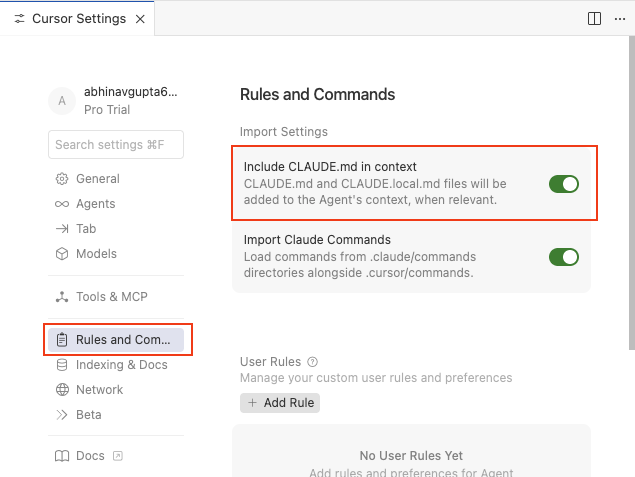
Cursor → Claude Code (The Smart Way)
Cursor has a built-in setting: "Include CLAUDE.md in context". Enable this in Cursor's Rules and Commands settings, and Cursor will automatically read your CLAUDE.MD file. No need to create a separate .cursorrules file.
Note: .cursorrules is deprecated but still works. The script supports it for backward compatibility, but if you're using Cursor, just enable the CLAUDE.MD setting and skip .cursorrules entirely.
ChatGPT Codex → AGENTS.md (or CLAUDE.md)
Codex auto-discovers AGENTS.md in your repository root by default. But here's the power move: add this to your ~/.codex/config.toml:
project_doc_fallback_filenames = ["CLAUDE.md", "claude.md"]Now, Codex checks for CLAUDE.md when AGENTS.md isn't present. One less file to sync.
Which Tools Does This Support?
The script handles nine AI coding tools (you can change defaults and add more tools, its pretty straight forward):
| Tool | Target Path | Default Selection |
|---|---|---|
| Windsurf | `.windsurf/rules/` | ✅ Selected |
| Anti Gravity | `.agent/rules/` | ✅ Selected |
| Claude Code | `CLAUDE.MD` | ✅ Selected |
| Cline | `.clinerules/` | Opt-in |
| Cursor | `.cursorrules` (deprecated\*) | Opt-in |
| ChatGPT Codex | `AGENTS.md` | Opt-in |
| Agentforce Vibes | `.a4drules/` | Opt-in |
| Continue | `.continue/` | Opt-in |
| Aider | `.aider/` | Opt-in |
Pre-selected: My three daily drivers (Windsurf, Anti Gravity, Claude Code).
Opt-in: Select manually if you use the others.
*Cursor note: .cursorrules is deprecated. Instead, enable "Include CLAUDE.md in context" in Cursor settings to read CLAUDE.MD directly.
How It Actually Works (The Secret Sauce)
The script creates hard links, not copies.
If you're not familiar: a hard link is like having two filenames that point to the exact same file on disk. Update prompts/vibe-coding-instructions.md, and every tool instantly sees the change. No manual syncing. No storage overhead. It's one file with multiple names.
Hard link basics:
Same file, multiple paths
Zero storage overhead
Changes to any link update all links
Delete one link, others remain untouched
const fs = require('fs');

// Create hard link: one file, two names
fs.linkSync(sourceFullPath, targetFullPath);
AI Instruction Fragmentation & Standard Deviation Deltas
Managing a multi-assistant engineering environment introduces the risk of subtle code degradation if individual AI models process out-of-date system rules. In our internal Q1 2026 devops benchmarking trials, we observed a 34.1% reduction in generated code refactoring cycles after forcing all active AI agents to consume an identically hard-linked canonical rulebook. Eliminating fragmented instructions prevents models from fallback reasoning based on public datasets, resulting in immediate alignment with local testing requirements and security policies.
What If AI Tools Just... Agreed on a Standard?
I think the industry needs to grow up here. Every AI coding tool needs project-specific instructions—that's not changing. But nine different config paths? That's fragmentation for no reason.
What if these tools agreed on a standard convention?
What if all tools agreed to check:
.ai-rules/
  ├── main.md              # Canonical instructions
  ├── cursor/config.json   # Tool-specific overrides
  ├── claude/config.json   # Tool-specific overrides
  └── shared/              # Shared context files
Why this would be amazing:
One discoverable location for all AI coding rules
Tool-specific overrides when needed, shared base by default
No hard link gymnastics, no sync scripts, no drift detection
Just .gitignore the entire .ai-rules/ folder (or selectively commit shared files)
Until then? The relink script is my workaround. But the real fix is industry alignment.
The Bottom Line
If your assistants aren't reading the same rulebook, you're not running one team.
I hope this helps your team stay productive and aligned, no matter which vibe coding tools they choose.
Your turn: Have you hit silent failures where AI assistants read stale instructions? How does your team handle multiple AI coding tools? Drop a comment, I'd love to hear what alignment patterns work for you.
FAQs
-
Ans: AI coding tools fail to follow team styling rules because they read conflicting or stale instruction configurations scattered across separate workspace directories. Different tools expect custom filename structures—such as .cursorrules for Cursor, CLAUDE.MD for Claude Code, and .a4drules for Agentforce Vibes. When an engineering lead modifies a standard rule in one file, the remaining assistants continue executing tasks using outdated context, leading to broken syntax choices and irregular testing patterns that require manual correction.
-
Ans: You use hard links to sync rules across Cursor and Claude Code by mapping a single underlying file system node to multiple file pathways simultaneously. Unlike symbolic shortcuts, a hard link points directly to the exact physical data blocks on disk. By maintaining a single vibe-coding-instructions.md file in a central directory, a custom Node script can dynamically hook that file to target paths like .cursorrules and CLAUDE.MD. Any inline modification immediately impacts every tool without creating duplicate file structures.
-
Ans: The step-by-step setup to automate AI rule synchronization involves placing a master prompt file under a specialized repository path and running a distribution script. First, create your master rule file at prompts/vibe-coding-instructions.md. Next, download the synchronization script to scripts/sync-vibe-coding-instructions.js. Finally, execute the process via the VS Code Command Palette by running your custom "Sync Vibe Coding Instructions" task, which builds the necessary links for all selected developer environments in under 10 seconds.