ChatLingual vs ChatBridge: Salesforce Chat Translation Comparison
As businesses grow beyond borders, customer conversations no longer happen in just one language. A customer might start a chat in Portuguese, Spanish, or Japanese, while your support team operates entirely in English. What should be a quick, helpful interaction suddenly becomes a challenge.
Not because your agents lack skill, but because language gets in the way.
Earlier, multilingual support meant hiring language-specific agents or relying on manual translation tools that slowed everything down. Today, real-time chat translation has changed that. Conversations can now flow naturally, without copy-pasting or delays.
Tools like ChatLingual and ChatBridge enhance Salesforce chat support by enabling agents to communicate seamlessly while customers receive responses in their preferred language. In this blog, we compare ChatLingual vs ChatBridge to help you choose the right Salesforce chat translator.
What Is ChatLingual?
ChatLingual is a translation solution that simplifies communication between support teams and customers across different languages. It offers multiple products to support multilingual conversations, including apps for Salesforce, Genesys, and LivePerson.
The platform translates customer queries into a language agents understand and converts agent responses back into the customer’s preferred language, allowing conversations to flow naturally within Salesforce.
Beyond live chats, ChatLingual also enables agents to access internal knowledge bases in their chosen language, helping them respond more accurately and efficiently.
With support for up to 100 languages, it works seamlessly within existing Salesforce workflows. This allows global support teams to manage multilingual conversations from a single environment and scale customer support without adding complexity to daily operations.
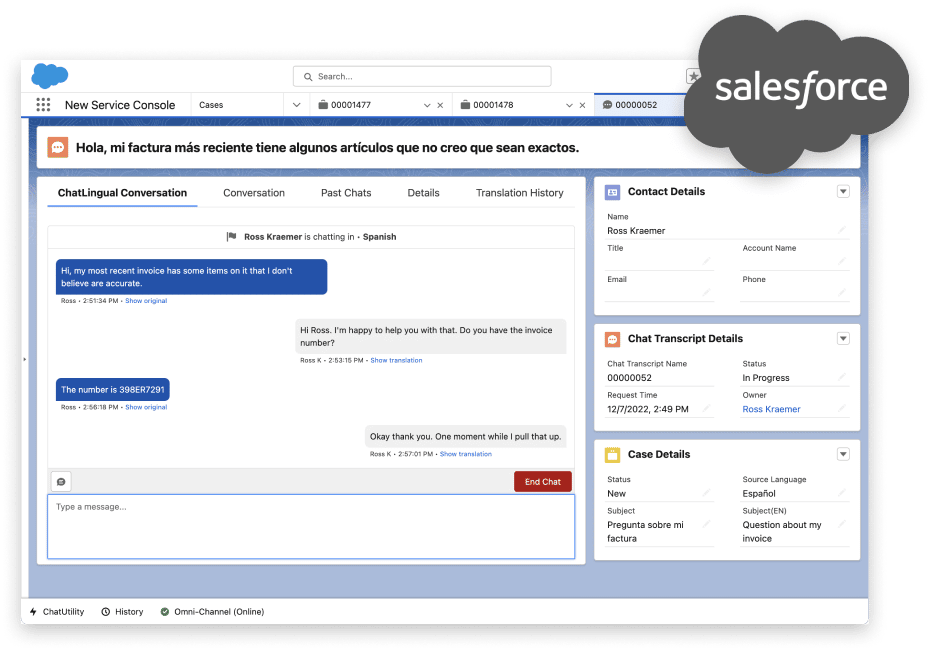
ChatLingual tool
Key Features of ChatLingual
Enterprise-Grade Security
Built with rigorous data protection protocols, ChatLingual is GDPR compliant and ISO 27001 certified, meeting enterprise security and privacy standards.
100+ Language Support
The platform supports over 100 major languages, including Chinese, Portuguese, Spanish, Japanese, and more, enabling global customer communication.
Easy Deployment and Onboarding
Designed for quick setup with minimal IT involvement, helping teams get started without long implementation cycles.
Multilingual Knowledge Base Access
Allows agents to access internal knowledge articles in their chosen language, helping them respond more accurately and confidently.
What is ChatBridge?
ChatBridge is an advanced Salesforce chat translation tool that bridges the language gap between support teams and customers. It automatically detects customer messages and translates them into a language agents can understand, while converting agent replies into the customer’s language, ensuring every conversation feels fully localized.
Unlike ChatLingual and other tools, ChatBridge is built for speed and simplicity, working directly within live chat workflows so agents don’t need to copy, paste, or switch between tools.
With broader coverage of over 200 languages, it’s ideal for teams managing high volumes of live customer chats and looking for a reliable ChatLingual alternative. Translation happens seamlessly in the background, delivering a smoother, more human support experience.
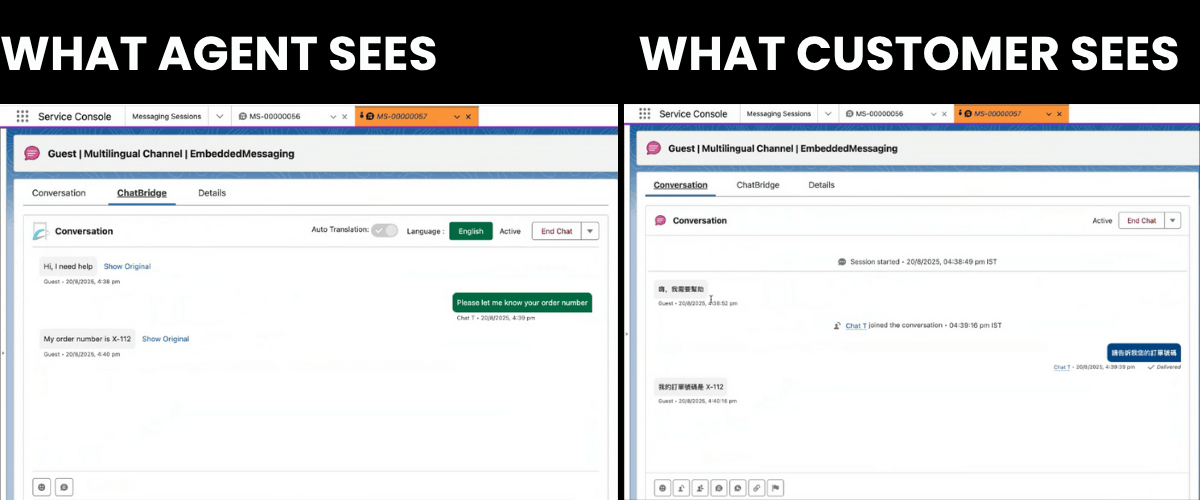
ChatBridge: Salesforce Chat Translator
Key Features of Chatbridge
Custom Translation Preferences:
The tool enables agents to select between automatic and on-demand translation, giving them full control over how and when chat messages are translated during live conversations. When enabled, it can set up real-time chat translations automatically.
200+ Language Support:
Designed to handle over 200 major global languages, ChatBridge enables support teams to assist customers worldwide and maintain consistent conversations across regions, making it a top choice for Salesforce chat translation.
Seamless Interface Integration:
All translations happen directly within the support team’s existing interface. Agents can manage Salesforce multilingual chats in the same service console they already use, with no extra tools or workflow changes.
Custom Chat Duration:
To help customers resume chats seamlessly and minimize repeated translation efforts, ChatBridge lets support teams set chat window durations, ensuring conversations can resume seamlessly.
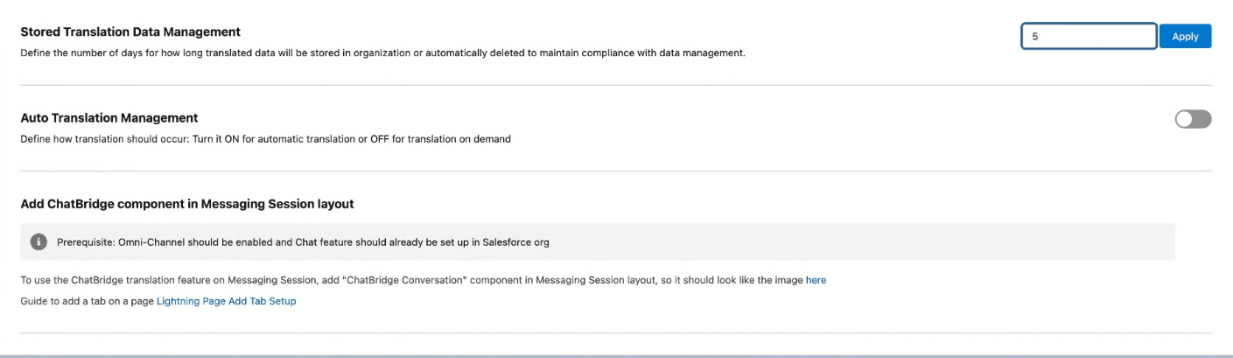
ChatBridge Features
Interested in ChatBridge? Join the AppExchange waitlist or book a consultation to learn more.
Comparison: ChatLingual vs. ChatBridge
When evaluating chat translation tools for Salesforce chat support teams, it’s important to understand how each solution handles its core responsibility: multilingual translation. Below is a comparison of ChatLingual and ChatBridge based on language coverage, core capabilities, and overall value.
Language Coverage
ChatLingual: Supports up to 100 languages, offering solid coverage for most global markets.
ChatBridge: Enables communication in 200+ major languages, offering broader coverage and making it a stronger alternative to ChatLingual for global support.
Core Capabilities
ChatLingual: Provides automatic translation within Salesforce, with robust integrations tailored for enterprise support workflows.
ChatBridge: Offers greater flexibility with advanced features such as automatic or on-demand translation, configurable chat duration, and the ability to manage conversations entirely within the same workflow.
Pricing & Value
ChatLingual: Pricing is typically enterprise-focused and aligned with broader platform capabilities and integrations. Exact pricing is available upon request.
ChatBridge: Offers a single, straightforward plan at $125 per month, regardless of team size, making it a cost-effective option for scalable multilingual chat support.
In addition to the product license, translation is powered by external APIs, with usage-based charges applied separately based on actual translation volume.
For teams exploring other Salesforce chat translation options, we’ve also compared ChatBridge with Vanizum in a separate detailed guide.
Final verdict
Both ChatLingual and ChatBridge are effective Salesforce chat translation tools that manage multilingual conversations without requiring manual translation.
ChatLingual offers robust enterprise integrations, making it a reliable choice for organizations with established workflows. However, it lags in language coverage and advanced features, which are crucial for scalable Salesforce multilingual chat support.
ChatBridge, on the other hand, emerges as a stronger ChatLingual alternative, providing broader language support, advanced translation controls, and a transparent, cost-effective pricing model.
For teams looking to scale global customer interactions efficiently, ChatBridge offers a clear advantage and stands out as the preferred choice.
FAQs
-
Real-time chat translation automatically converts messages as they are sent and received, allowing agents and customers to communicate naturally across different languages.
-
ChatBridge will soon be available on the Salesforce AppExchange, making it easy for organizations to install and integrate directly with their Salesforce instance.
-
Yes. ChatBridge offers a 7-day free trial, allowing teams to explore its translation features and experience seamless multilingual chat support before committing.
-
Yes. ChatBridge lets support teams set custom chat durations, so depending on the number of days configured, customers can return and seamlessly continue their conversations from where they left off.
-
Teams should evaluate language coverage, advanced translation features, ease of setup and use, and overall affordability. A solution like ChatBridge brings all these elements together, making it well-suited for scalable and efficient multilingual customer support.
-
When implemented correctly, chat translation tools improve productivity by removing language barriers. Automated, real-time translations help agents respond faster, reduce misunderstandings, and focus on resolving issues instead of managing language differences.
Let’s Talk

Drop us a note, we’re happy to take the conversation forward 👇🏻