How to Master Workato Recipes: Best Design Practices
Automation is the key to working faster and more accurately. Platforms like Workato make automation accessible. But true success isn't just about connecting apps. There has to be a strategy in place for perfect execution. To get real value, you need to build intentional workflows that actually move the needle for your business. This is where mastering Workato recipes becomes essential.
A recipe in Workato is essentially a workflow. A workflow that connects different apps and performs tasks automatically. So, never design a recipe poorly.
Modern enterprises now leverage 100+ SaaS apps. Without a design standard, unstructured automation turns into confusion. For example, a single API change in a core CRM like Salesforce can trigger a domino effect, breaking dozens of downstream workflows. It could create more problems than solve them.
Thanks to the best practices we have for you. These best practices of Workato recipe design will take things to another level. So, get ready and dive in.
12 Best Practices To Design Workato Recipes
Good design is the secret to automation that doesn't break. Here are the best practices to keep your Workato recipes running smoothly.
1. Start with Process Clarity, Not the Tool
Getting straight into building a recipe is one of the common mistakes you could make. Before you even open Workato, take a step back and understand the process.
Have a clear understanding of the process, not just the tool. You'd better ask yourself simple questions. How will the automations help? What problem am I trying to solve? What triggers the process? What should happen step by step? Are there exceptions or edge cases?
It lays the foundation, the blueprint you need in the first place. With the clear process, your recipe becomes easier to design. The chances of making errors are significantly reduced. Most importantly, you avoid the unnecessary complexity. If your process is unclear, your automation will also be unclear. Consequently, an unclear lead to broken workflows.
2. Choose the Right Trigger Type
Choose the right trigger type because every Workato recipe starts with the trigger. The trigger means telling the system when to run the workflow. That's why it is important to choose the right trigger. With the right trigger in place, you get the performance, cost, and efficiency gains.
There are different types of triggers, and each has its use case. Here is the list of them.
Real-time triggers:
These triggers run instantly when an event happens. It can be used especially when speed is important. Also, when you need immediate action (like a lead assignment).
Polled triggers:
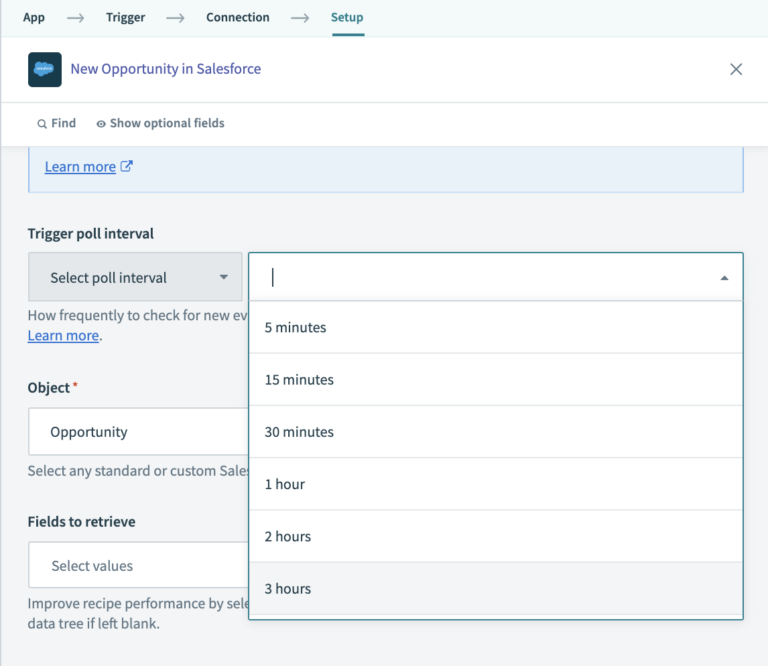
These triggers check for new data at intervals. When to use these triggers? You can use them when real-time is not required. When you want to reduce the API usage.
Batch triggers:
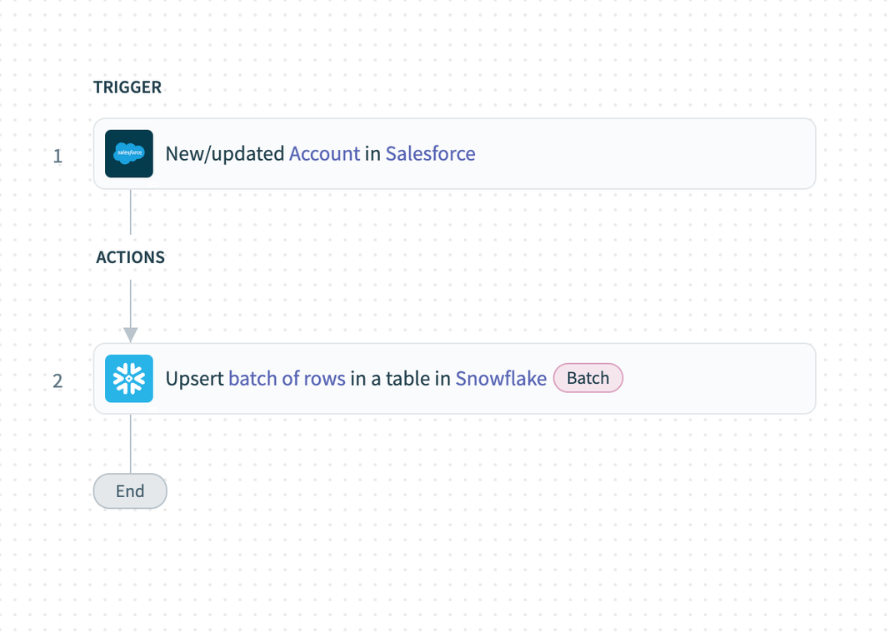
These triggers are designed to process multiple records together. They can be used when you are handling large volumes of data. The efficiency is what matters here more than speed.
Scheduled Triggers:
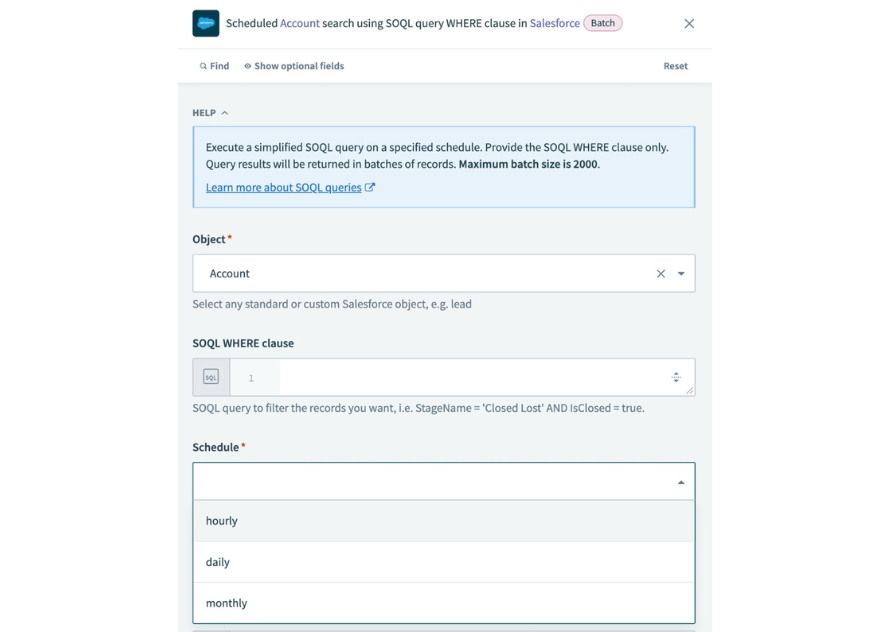
The triggers that run at specific times are called scheduled triggers. Use the triggers when tasks are needed to run daily, weekly, or monthly. You are generating reports or syncing data. The key here is the balance.
If you choose real-time for everything, you may overload your system. If you rely too much on scheduled ones, you may slow down your business processes.
3. Filter Data Early to Avoid Noise
Not every data change needs automation. One of the best practices is to filter data as early as possible. This prevents unnecessary recipe runs and improves performance. There are two main ways to do this:
a) Filter at the source (using queries).
b) Filter inside the recipe (using conditions).
For example, instead of triggering a recipe for every record, you can only trigger when a specific field changes. Only process records that meet certain criteria. Think of it as cleaning your input before processing it. This helps you:
Reduce the API calls.
Improve the execution speed.
Focus only on meaningful data.
4. Design Recipes for Idempotency (Avoid Duplicate Data)
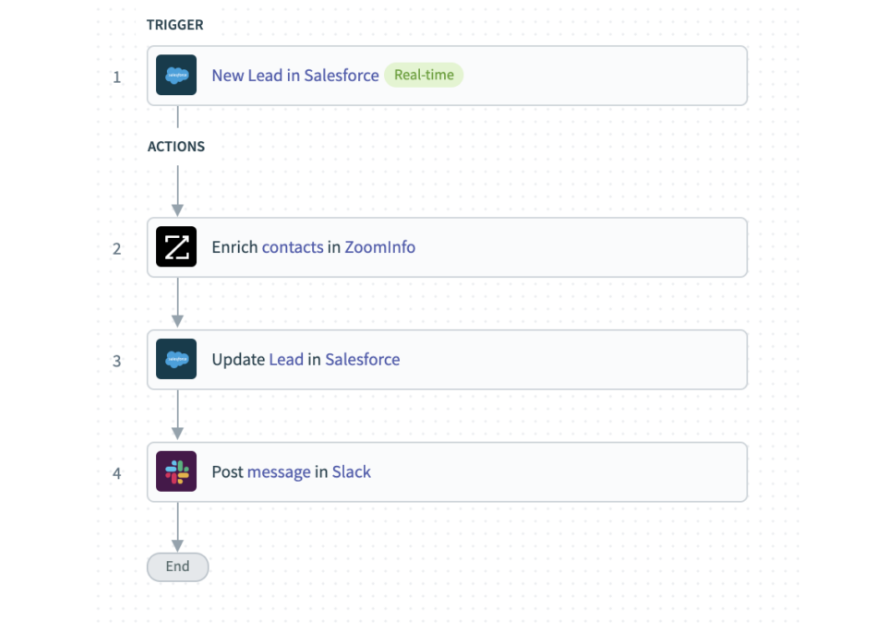
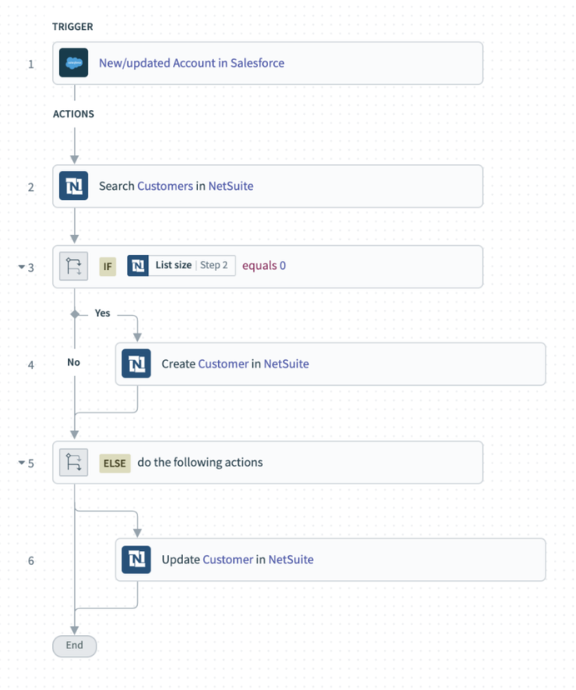
Duplicate data is often a common problem in automation. You could end up creating duplicates if your recipe runs multiple times for the same record. So you should know how to design a Workato recipe so that you don't create duplicates. For instance, you are updating a record of the Salesforce account and using the trigger "new or updated", but with the action "create a new customer". The result would be the creation of a new customer if you run the recipe as is.
You surely don't want this because the customer record already exists. As a result, it can damage your CRM, reporting, and overall data quality. This is where idempotency comes in. Idempotency is about rerunning a recipe on the same trigger event without creating duplicate records. But exactly how do you achieve this? Instead of using the "Create " action for a record, you can use the "Upsert" action.
Upsert is a database action that helps you update a record if it already exists and creates a new record if it doesn't exist. Let's understand how it works:
Search for a record.
If found → update it.
If not found → create it.
This ensures your data stays clean and consistent.
5. Prevent Infinite Loops
Infinite loops are one of the most dangerous issues in automation. Preventing them is a best practice for you to maintain stable Workato recipes. There are some reasons why that happens. First, a recipe triggers itself. Second, when two recipes keep triggering each other.
If not managed, this feedback loop can rapidly exhaust your API limits, slow system resources, and result in duplicate or corrupted data. You should stop these loops. That's where the Workato best practices come in place. Prevent infinite loops by using the smart trigger conditions. These conditions distinguish between manual and automated changes.
For instance, you can add a simple condition like “Only run if the record was not updated by the integration user.” This small step can save you from major issues. You also ensure the recipe ignores its own actions. Moreover, another effective way is to use dedicated integration users.
6. Build Modular and Reusable Recipes
As your automation grows, managing everything in one large recipe becomes difficult. Instead, you should think in terms of modular design. Break your logic into smaller, reusable components. Workato allows you to do this using callable recipes.
Think of callable recipes like functions. You write the logic once, and you reuse it multiple times. This approach gives you several benefits. The development becomes faster. The maintenance gets easier. Also, the logic across the workflows is consistent. For example, instead of writing error-handling logic in every recipe, you can create a reusable error handler and call it whenever needed.
7. Handle Errors Like a Pro
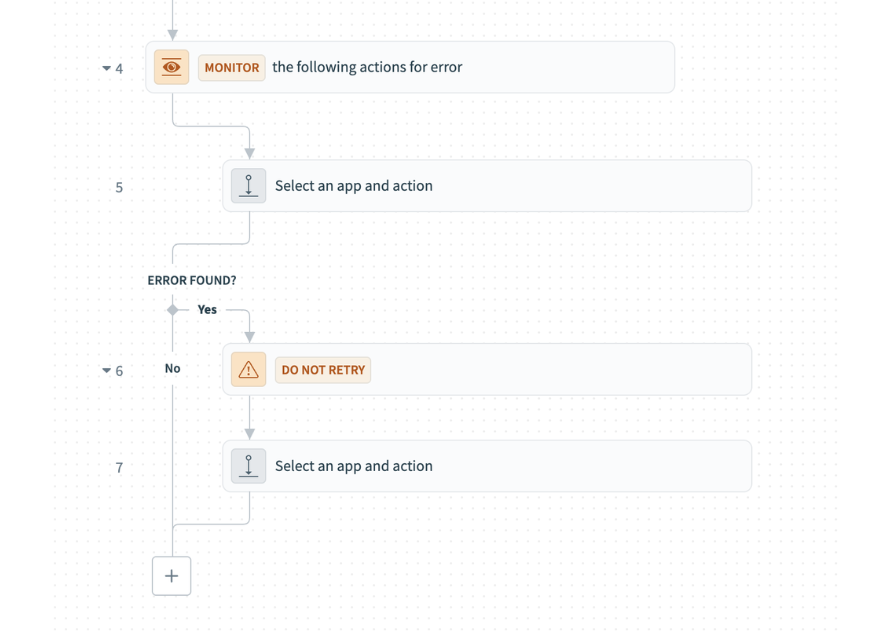
No automation is perfect. Errors will happen. The difference between a good and a bad recipe is how it handles failures. Without proper error handling:
Your process may break silently.
You may lose important data.
Troubleshooting becomes difficult.
When you replace a person with an automation, you need a plan for exceptions. Workato’s monitoring blocks are built for this. They watch your workflow for errors when they occur. The block tells the system exactly what to do next, like sending a notification or retrying the task. If you have many recipes that need to handle errors the same way, you should use a callable recipe. This keeps your error-handling logic organized instead of being spread across every individual workflow.
8. Optimize for Performance and Scalability
As your business grows, your automation will handle more data. If your recipes are not designed for scale, they will slow down or fail. To optimize performance:
Avoid unnecessary steps.
Use batch processing where possible.
Reduce API calls.
Use efficient data structures.
Also, think long-term. A recipe that works for 100 records may fail at 10,000 records. Design with scale in mind from the beginning.
9. Maintain Clear Logic and Readability
Recipes aren't just for machines; humans need to read them too. Clear logic makes your work much easier to debug. It helps new team members understand the flow quickly. Plus, you can make future changes without fear of breaking things.
To improve readability, start with clear naming conventions. Add brief descriptions to your steps to explain their purpose. Always organize your actions in a logical sequence. Finally, avoid unnecessary complexity whenever possible. A clean recipe is easy to maintain and stays free of errors.
10. Test Thoroughly Before Deployment
Test everything before you go live. Testing is not just essential but one of the best practices when working with Workato recipes. You can't just deploy without testing. Test different scenarios and edge cases. Know what could fail. Don't just follow the happy path when testing.
Always ask yourself what happens if data is missing or if an API fails. Consider how the recipe handles duplicate records as well. When you deeply test, you ensure the automation works in the real world. Thorough preparation results in a reliable, stable workflow.
11. Monitor and Improve Continuously
Think of your live recipe like a garden. You can’t just plant the seeds and walk away; you have to water the plants and pull the weeds. So, regularly monitor your recipes by looking at success rates and performance stats. Tracking data is the key here. You can use the data to improve your recipes over time. Here are some key considerations:
If a step fails frequently, optimize it.
If a process is slow, redesign it.
Continuous improvement is key to long-term success.
12. Align Recipes with Business Goals
Automation is about the business outcomes. At the end of the day, what you get out of designing the Workato recipes is what matters. So, another best design practice of Workato recipe is alignment. Aligning recipes with your business objectives. Every recipe should serve a purpose.
Before you put in the work, ask yourself if it actually saves time. Does this improve the customer experience? Does it have an impact on accuracy? If you don't get the right answer for any of these, it might not be worth building. Rather than just how many automated tasks you can create, focus on the actual results you’re achieving.
Final Thoughts
Mastering Workato recipes is not about automating everything and anything. Using the right approach and best practices is the key. Go through all the design tips mentioned above. Understand your process, choose the right triggers, and design your workflows accordingly. That’s when your automation becomes more reliable.
Don’t build your workflow in one go. Gradually enhance it step by step. Focus on creating clean, simple, and reusable recipes. The results you will get will be clearly visible. You would save time while keeping your automation easier to manage as your business grows.
In the end, the goal is simple. Your Workato recipes should make work faster, smoother, and error-free. You’ll get to know you’re on the right track if the automation helps your team and improves the processes.
References:
Workato Documentation - Workato on Designing Workflow Recipes
Frequently Asked Questions
-
You can avoid duplicates by using “upsert” actions or by searching for existing records before creating new ones. This ensures that your recipe updates existing data instead of creating multiple copies of the same record.
-
Callable recipes are reusable workflows that can be triggered by other recipes. They help you avoid repeating the same logic multiple times and make your automation easier to manage, update, and scale.
-
You can handle errors by using monitoring tools, adding fallback steps, and setting up alerts. This helps you identify issues quickly and ensures your automation continues to run smoothly even when something goes wrong.
-
To improve performance, reduce unnecessary steps, filter data early, and use batch processing where possible. Efficient recipe design helps save API calls, speeds up execution, and ensures your automation scales as your business grows.

Drop us a note, we’re happy to take the conversation forward 👇🏻