Step-by-Step Guide for Salesforce Experience Cloud Implementation
Imagine this: Customers visit your website and instantly access a self-service portal to get answers, log cases, track progress, or connect with your community. This is the power of Experience Cloud, a platform that empowers businesses to engage customers, collaborate with partners, and streamline workflows, creating delightful digital experiences that deliver results.
But let’s face it. Like every other tool, Salesforce Experience Cloud implementation can be tricky and will require a well-thought-out plan. This guide walks you through the journey of implementing Salesforce Experience Cloud—from planning to post-launch optimization.
Moreover, we’ll explore both company-supported and DIY options so that you can make the right choice for your business.
Common Preparation Steps You’d Follow Before Implementation
Before getting started with Salesforce Experience Cloud implementation, here’s what you must do:
Define Your Objectives
Do you wish to enhance customer support with self-service options and case tracking? Or aim to create a knowledge base that will streamline employee workflows?
Engage with Stakeholders
Involve stakeholders, be they employees, partners, or community members, and document the features and functionalities they think are crucial to improving the end-user experience. This may include aspects such as design preferences, content requirements, integration needs, and user management considerations.
Get the Right Licenses
Your site’s users—customers, partners, or employees—will require Customer Community, Partner Community, or External Apps licenses based on their roles and access levels.
To ensure licenses don’t go unutilized, check in with your Salesforce account executive to understand the difference between the licenses, and which ones best suits your requirements.

📖To understand licenses and pricing better, consider checking out our detailed blog on Experience Cloud pricing
DIY Experience Cloud Implementation
Before you start with Salesforce Experience Cloud implementation, you must plan a few things.
Choose the Right Framework and Template
The framework you choose will determine your site’s capabilities such as operational nature, performance, and scalability. Here are a few options you can choose:
Aura: Great for low-code, customizable experiences.
LWR (Lightning Web Runtime): High-performance and ideal for complex sites.
Visualforce: Best for legacy or specific Visualforce-powered requirements.
While a framework tells you how a website will function, a template tells you what the site looks like and how it organizes content and features to serve a specific purpose.
“A template is a prebuilt layout designed for specific use cases, helping you quickly structure your site’s design and content.”
Here are a few template options as examples (and when to choose them):
Customer Service Template: Ideal for support-focused sites with knowledge bases and case management.
Partner Central Template: Built to facilitate partner collaboration and deal management.

Plan for Security
Security shouldn’t be an afterthought—it should be a key part of your Salesforce Experience Cloud implementation strategy. But when to plan for it?
After you consider your site’s vision and purpose and you’re familiar with frameworks and templates, consider planning your site’s structure, layout, and design.
Consider defining user roles, permissions, and data visibility settings early. Decide if you’ll offer self-registration or require users to log in through Single Sign-On (SSO).
While planning for security focus on these key areas:
Data security and Encryption
Access
Authentication
Cookies
Content Strategy and Mobile Readiness
From FAQs, and guides to blog posts, you’ll be hosting tons of content on different subjects so it benefits your customers, partners, and employees. And for that, you’ll need a CMS.
Moreover, don’t forget mobile users—ensure your site is responsive or consider using Salesforce’s Mobile Publisher for a dedicated app experience.
DIY: Technical Setup and Configuring Your Org for Experience Cloud Sites
With a solid plan in place, it’s time to bring your digital experience to life. Here’s how you can do it:
a) Enable Digital Experiences
Start by enabling digital experiences in your Salesforce setup. This will help you start creating any Experience Cloud site, whether it’s a help center, partner portal, or customer community.
And how to do it?
1. From Setup, enter Digital Experiences in the Quick Find box, then select Digital Experiences > Settings.
2. Next up, select ‘Enable Digital Experiences’ to activate your site. Your digital experiences domain will display as MyDomainName.my.site.com for production orgs.
3. Click Save

b) Configure Digital Experience Settings
After you’ve enabled digital experiences, it's now time to fine-tune the global settings for your Experience Cloud sites. By thoughtfully configuring required settings, you’ll create a more seamless and enjoyable experience for everyone who interacts with your portals.
Here are some digital experience settings you can configure for your site:
Experience management settings
Roles and user settings
Moderation rule settings
Salesforce mobile settings for experiences
New User Email Settings
Account relationship settings
c) Configure a Custom Domain for Your Experience Cloud Site
To maintain brand consistency, consider setting up a custom domain for your Experience Cloud site.
For instance, a branded URL like this “https://community.yourcompany.com” will create a professional look and make it easier for users to identify your site. This will also simplify your domain management, ensuring seamless functionality even if Salesforce-hosted URLs change over time.
d) Find Your Way Around Experience Workspaces
Experience Workspaces are the central hub for managing and customizing your Experience Cloud sites. Right from site setup and its branding to ongoing site optimization, workspaces are where most of the magic happens.
Let’s say you want to design pages or new dashboards for monitoring activity, Experience Builder is there for you. For managing those user roles and permissions, administrative features of the administration workspace are there to be used.

e) Use Experience Builder
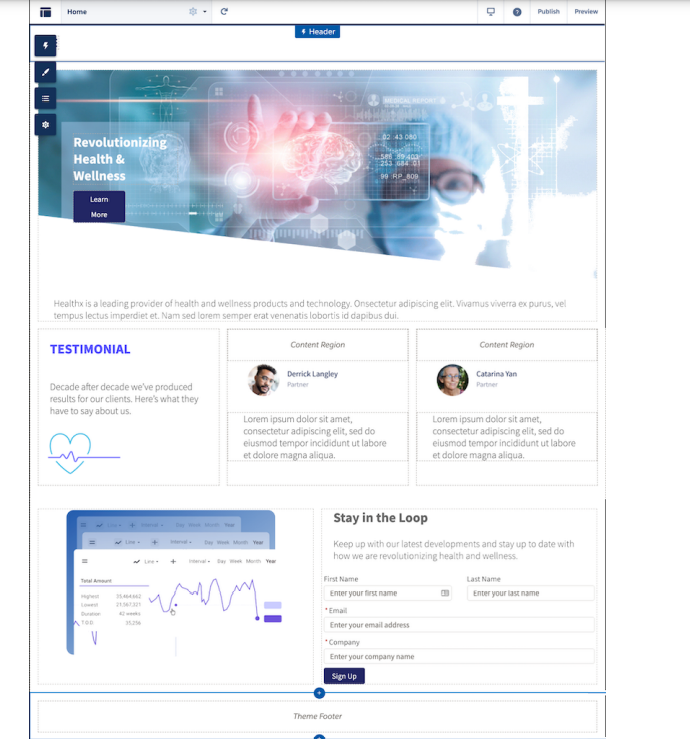
The Experience Builder is where you build and design pages, dashboards, and sites in general. Use it to choose from templates like Customer Service or Partner Central, depending on your use case.
Or if you want to enhance interactivity, consider adding dynamic components like chatbots for instant assistance, forms for data collection, or dashboards to visualize key metrics.
Experience Builder also allows you to design personalized user journeys for different audience segments. Let’s say, you want to show exclusive partner resources to logged-in users while offering public knowledge articles for guests, you can do it easily with Experience Builder.
f) Configure Essential Features
Your site’s usability plays a crucial role in its success. Here are a few features you should configure to enhance your site’s user experience:
Navigation Menus: Create clear and logical menus to make it easy for users to find what they need.
Page Layouts: Organize content effectively by designing layouts that prioritize usability and readability.
Search Functionality: Optimize search tools to help users quickly locate articles, products, or resources.
Salesforce Integrations: Add features like the Knowledge Base for robust self-service options or Chatter to foster collaboration within your community. These features make your site not only functional but also highly engaging.
DIY Launch and Optimization
Test and Deploy Your Experience Cloud Site
After your site is built, verify every functionality across various roles and scenarios to ensure seamless performance. Moreover, share the site with a group of test users and refine based on their input. And if there’s someone from outside your organization, that would be the best.
Lastly, as you move your site from sandbox to live deployment, go with tools such as Metadata API or Change Sets. Both these tools simplify the process of transferring configurations, customizations, and components, reducing the risk of errors and ensuring your live site mirrors the tested environment seamlessly.
Optimize and maintain your site

Don’t let your masterpiece go unnoticed. Announce the launch via email campaigns, social media, or internal communication channels. A short, engaging video showcasing key features can generate excitement.
Post-launch, track site usage and satisfaction with Salesforce dashboards or tools like Google Analytics. For example, if your goal is case deflection, monitor the decrease in customer service requests. Regularly update content to keep the experience fresh.

Implementing Experience Cloud with the help of a Salesforce Partner
While Experience Cloud can be implemented through the DIY route, you’ll likely need the help of an Experience Cloud Implementation Company, somewhere down the line. This is especially true if you’ve complex business requirements and need assistance to create, configure, customize, or optimize your Experience Cloud site.
However, hiring a reliable Experience Cloud partner requires careful consideration and planning. Follow these steps to find the perfect fit and champion the implementation phase.
1. Research and Shortlist Partners
The AppExchange directory is a valuable resource for finding Salesforce partners and exploring their profiles, ratings, certifications, success stories, and case studies. Based on the research, you can prioritize partners with expertise in your industry (Healthcare, Finance, Retail, whichever you are in) and have sufficient certified people onboard.
2. Evaluate Technical Competence
Salesforce Experience Cloud implementation can involve technical complexities. A reliable partner must demonstrate expertise in critical technical areas to deliver a robust and secure solution.
Check if your partner:
Has built custom Lightning Web Components (LWCs) for your industry.
Has experience building integrations for seamless data flow between Salesforce and external systems
Can handle security and compliance, including role-based access, data privacy (e.g., GDPR), and authentication (e.g., SSO, MFA).
Can build custom LWCs, modify themes or templates, and create automation rules for your needs.
For instance, at Concretio, we are one of the earliest companies to implement custom Lightning components on AppExchange.
3. Get Insights on Implementation Methodology
A transparent, step-by-step process is crucial to stay informed and confident throughout the implementation phase. This approach ensures your implementation stays on track and delivers value.
Ask your partner to explain their methodology, including:
How do they approach requirement gathering to understand your business needs?
Whether they offer prototypes or wireframes before development to align expectations.
How they manage testing and quality assurance to deliver a bug-free, performance-optimized platform.
4. Discuss Scope of Implementation
Begin by discussing your business needs, goals, and specific use cases. Whether you’re looking to implement a customer portal, partner community, or employee intranet, ask for their insights on the feasibility of your requirements. Do they find your vision realistic, or do they anticipate challenges? Their response will reveal their ability to assess and tackle complexities.
5. Enquire About Implementation Support and Scalability
Experience Cloud is not a one-time setup. Your Salesforce partner should be prepared to support and optimize the platform as your needs evolve.
Clarify the following:
Do they provide ongoing support for troubleshooting, updates, and enhancements?
Can they train your team to manage the platform effectively?
How scalable is the solution to accommodate growth or new features in the future?
6. Budget and Implementation Timeline
Ask your prospective partner for a detailed breakdown of costs, including implementation, customizations, integrations, licensing, and post-implementation support. Their transparency will help you identify any hidden costs and ensure their pricing structure fits your budget.
Similarly, explore their proposed timeline for delivering the project. How long will it take to complete the discovery phase, configure the platform, and go live? Do they have a track record of delivering on time?
Once you have all things figured out, you can get started with your selected implementation partner.

DIY vs. Partner Implementation: Making a Choice

Should you go solo and do it in-house or with the help of freelancers or hire a Salesforce partner who has a proven track record in implementing Experience Cloud projects? Let’s explore both options and what they bring to the table, one by one:
A. DIY Implementation
For smaller projects, DIY implementation can be a cost-effective solution, especially if your team has in-house Salesforce expertise. It gives you full control over the process and allows for a tailored approach based on your specific needs.
While the DIY approach may save upfront costs, it demands substantial time and resources, which can strain smaller teams. Moreover, lack of experience can lead to errors, missed opportunities to leverage best practices, or overlooking advanced features that could enhance your system.
Additionally, after the implementation phase, ongoing maintenance is required to ensure the system remains optimized and secure. Hiring a dedicated in-house Salesforce professional for these tasks can result in significant long-term costs, especially for businesses whose core focus isn’t technology or Salesforce.
To address this, you can opt for a Salesforce Managed Service Provider (MSP) post-implementation. MSPs can handle maintenance, updates, and optimizations without the need to hire full-time Salesforce resources, providing a cost-effective and scalable solution for non-tech-focused businesses. This ensures the platform stays aligned with evolving business needs while keeping overhead costs in check.
B. Partner-Supported Implementation
When the requirements are more complex, or your team lacks deep Salesforce expertise, availing of Salesforce Experience Cloud services can make all the difference. They bring specialized knowledge, streamline the setup process, and deliver scalable solutions tailored to your business needs—all while helping you avoid common pitfalls.
That said, this approach does come with considerations. Partner-supported implementations can be more expensive upfront compared to a DIY strategy, however, in the long run can give a good ROI.
Choosing the Right Fit
The choice between DIY and partner-supported implementation depends on your project scope, budget, and available resources. For smaller, straightforward setups, DIY might work. However, for complex or large-scale projects—or for businesses that want to focus on their core business—hiring a Salesforce partner is a must.
Conclusion
Salesforce Experience Cloud implementation is a transformative step for any business looking to enhance customer and partner experiences. With its powerful capabilities—like self-service portals, partner collaboration, and streamlined workflows—it has the potential to redefine how businesses interact with their stakeholders.
However, the success of implementing Experience Cloud also lies in choosing the right approach. While a DIY strategy may suit smaller projects with in-house expertise, complex implementations often require the expertise and guidance of an experienced partner.
No matter the path you choose, a strategic and well-executed implementation ensures that your Experience Cloud solution not only meets immediate business needs but also scales to drive long-term success.
References
Let’s Talk!

Drop a note below to move forward with the conversation 👇🏻